
Jimdo sitenize anlık bildirim eklemenin bir yolunu mu arıyorsunuz?
Bu gerçekten harika bir karar.
Anlık bildirimler, çok az çabayla ve otomatik olarak çok fazla trafik, etkileşim ve satış oluşturmanıza yardımcı olabilir. Ve bir Jimdo sitesine anlık bildirim eklemek gerçekten çok kolay. Bu yüzden, bu gerçekten hızlı bir kazanç.
Bu makalede, daha önce hiç yapmamış olsanız bile anlık bildirimleri Jimdo'ya nasıl ekleyeceğinizi göstereceğiz.
Bu makale için, Jimdo web sitenizde anlık bildirimleri ayarlamak üzere PushEngage'i kullanacağız. PushEngage, dünyanın 1 numaralı anlık bildirim yazılımıdır. Bu nedenle, kampanyalarınız emin ellerde olacaktır.
Ancak PushEngage kullanmıyor olsanız bile, bu işlem diğer satıcılar için oldukça benzer olmalıdır.
Hadi başlayalım.
Jimdo'ya Anlık Bildirim Nasıl Kurulur
Jimdo'ya anlık bildirim yüklemek süper kolaydır. Sadece bu adımları izleyin ve bu makalenin sonunda, sitenizden bunun gibi anlık bildirimler gönderebileceksiniz:
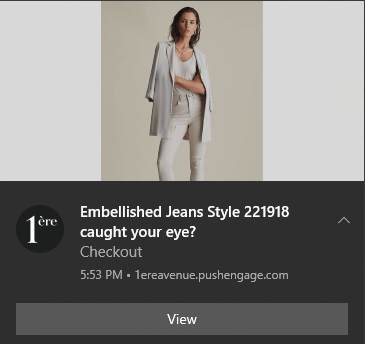
Ve anında bildirimlerin gücünden yararlanmak için büyük bir işletme yürütmek zorunda değilsiniz. Çok az trafiğe sahip küçük bir işletme sitesi yürütüyor olsanız bile aynı şeyi çok etkili bir şekilde yapabilirsiniz.
Hadi başlayalım.
Adım #1: PushEngage Hesabınızı Kurun
PushEngage ana sayfasına gidin ve Başlayın düğmesine tıklayın:

PushEngage'ı denemek için ücretsiz planı seçebilir veya işletmenizi büyütme konusunda ciddiyseniz ücretli bir planı tercih edebilirsiniz. Ücretli planlar daha fazla kampanya seçeneği ve daha büyük abone listeleri oluşturma olanağı ile birlikte gelir.
Bir hesap için kaydolduktan sonra, PushEngage kontrol paneline gidin ve Ayarlar » Site Ayarları » Kurulum Ayarları'na gidin:
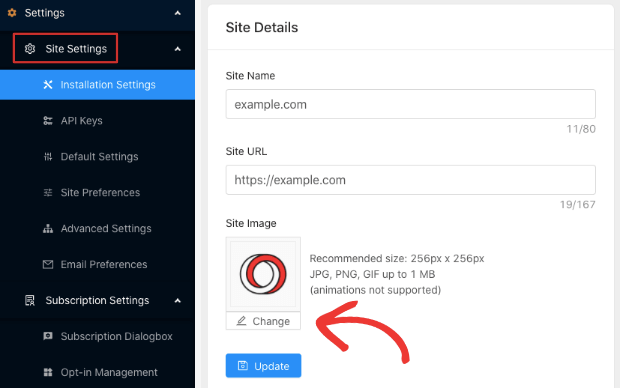
Burada site ayrıntılarınızı ve markanızı yapılandırırsınız. Anlık bildirimleriniz için bir logo ve site URL'si ayarlayın. Anlık bildirimlerinizi doğru bir şekilde test edebilmek için bunu şimdi yapmalısınız.
Adım #2: PushEngage'dan Kurulum Kodunu Alın
Ardından, PushEngage kontrol paneline gitmeniz ve kurulum kodunu almanız gerekecek. Ayarlar » Site Ayarları » Kurulum Ayarları'na gidin:
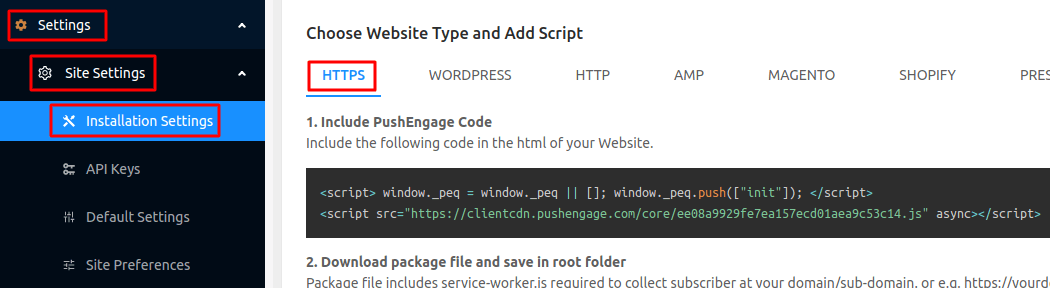
Sitenizde bir SSL sertifikası yüklü olup olmadığına bağlı olarak, kurulum kodunuzu almak için HTTP sekmesine veya HTTPS sekmesine gidin.
Bu kodu kopyalayın. Daha sonra ihtiyacınız olacak.
Adım #3: Kurulum Kodunu Jimdo Sitenize Yerleştirin
Jimdo Creator'ınıza giriş yapın ve Menü:'ye tıklayın:

Ardından, Ayarlar'a gidin:
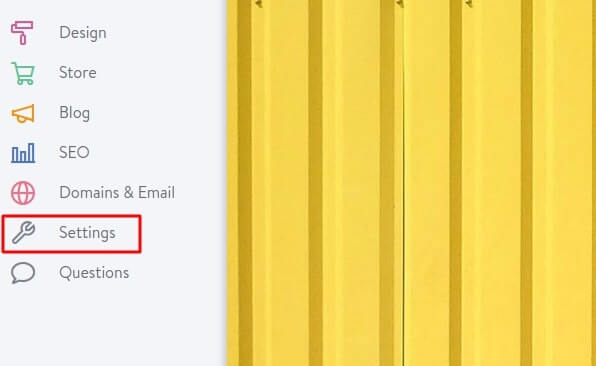
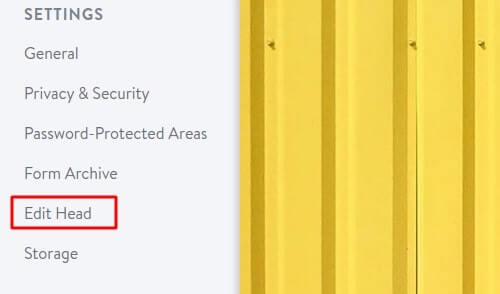
Ve Kafa Düzenle'ye tıklayın:
Kod düzenleyicide, PushEngage kurulum kodunuzu yapıştırın:
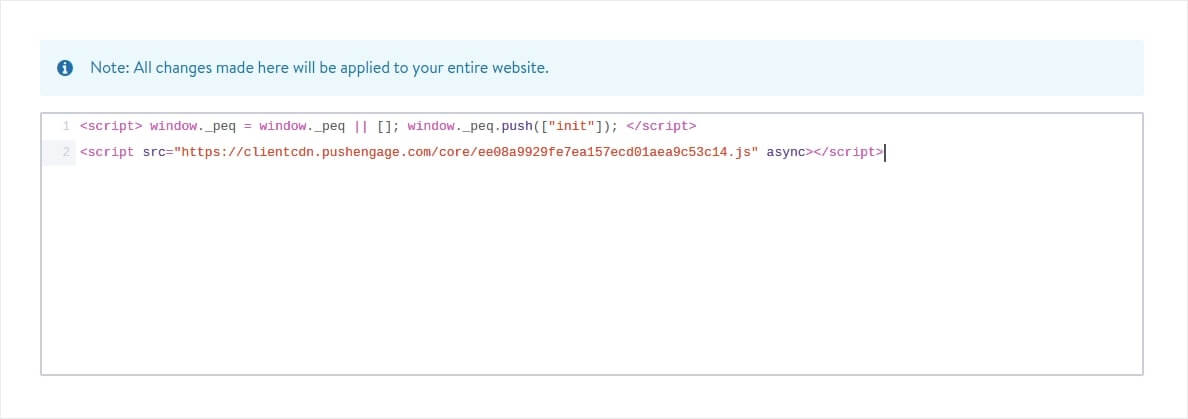
İşiniz bittiğinde, Kaydet'e basın.
Adım #4: PushEngage Onayını Yapılandırma
Son olarak, PushEngage kontrol panelinizde Ayarlar » Abonelik Ayarları » Abonelik İletişim Kutusu » Düzenle'ye gidin:
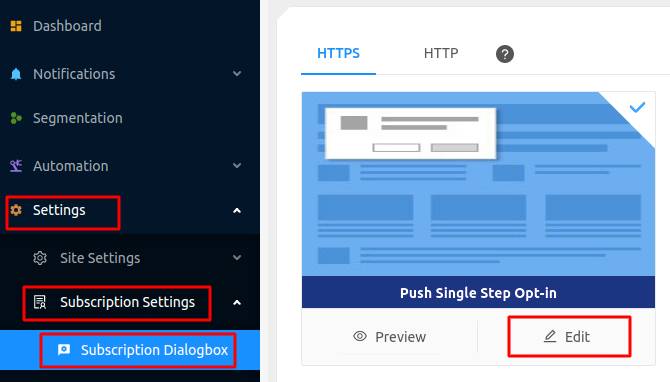
Buradan anlık bildirim kabul isteğinizi özelleştirebilirsiniz. Bu konuda yardıma ihtiyacınız varsa, özel bir anlık bildirim kabul isteği oluşturma hakkındaki bu makaleye göz atmalısınız.
Biraz ilhama ihtiyacınız varsa, yüksek dönüşüm sağlayan anlık bildirim kabul istekleri hakkındaki bu makaleye göz atabilirsiniz.
Adım #5: Hoş Geldin Bildirimi Oluşturma
İsteğe bağlıyı ayarlamayı bitirdiğinizde siteniz abone toplayabilir.
Ancak anlık bildirimlerinizin düzgün çalışıp çalışmadığını nasıl anlarsınız?
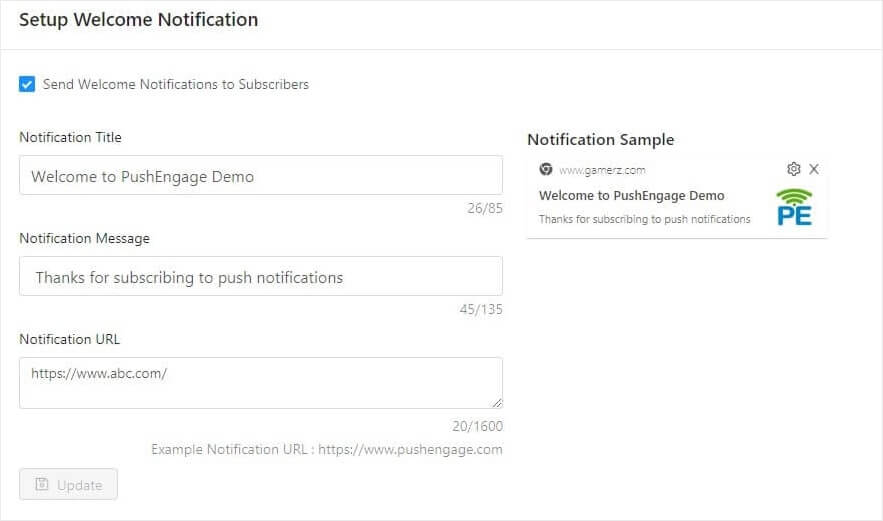
Kurulumunuzun sorunsuz ilerlediğini test etmek için bir hoş geldin anlık bildirimi oluşturmanızı öneririz. Hoş geldin bildirimi, yeni bir aboneye aboneliğini onaylamak ve onları hoş karşılamak için gönderdiğiniz bir anlık bildiridir.
Ayarlar » Site Ayarları » Kurulum Ayarları bölümüne gidin ve hoş geldin mesajınızı yapılandırın:
Son olarak, sitenize geri dönün ve her şeyin sorunsuz çalışıp çalışmadığını test etmek için kendi anlık bildirimlerinizi seçin.
Ve hepsi bu kadar!
Jimdo sitenizde anlık bildirimleri başarıyla ayarladınız. PushEngage kontrol panelinize geri dönüp anlık bildirim kampanyalarınızı oluşturmaya başlama zamanı.
Sonuç
Bu kadar, millet!
Anlık bildirimlere yeni başlıyorsanız, yayına geçmeden önce kapsamlı bir anlık bildirim testi sürecini izlemelisiniz. Ziyaretçileriniz bunları görmeden ve bozuk bir kullanıcı deneyimi hakkında şikayet etmeye başlamadan önce yaygın sorunları gidermenize yardımcı olacaktır.
Ve henüz yapmadıysanız, devam edin ve PushEngage'ı deneyin. PushEngage, dünyada 1 numaralı anlık bildirim hizmetidir. Bu nedenle, işinizi büyütme konusunda ciddiyseniz, PushEngage'a yatırım yapmalısınız.


