Google, izin istemeyle ilgili kullanıcı deneyimini iyileştirmeye yönelik olan ve Chrome 80 kullanıcıları için Daha Sessiz Kullanıcı Arayüzünü tanıtıyor. Artık web sitesini ziyaret eden her kullanıcı, anlık bildirim aboneliği için kayıt olma veya izin istemi almayacak ve bu, kullanıcının tercihlerine (eskisi gibi, ancak ek bir seçenekle), geçmiş kullanıcı eylemlerine ve web sitesinin anlık bildirimlere kayıt olma ve bunların teslim edilmesiyle ilgili performansına bağlı olacaktır. Bu, 4 Şubat 2020'de çıkması beklenen Chrome 80 güncellemesinin yayınlanmasıyla işlevsel hale gelecektir.
Ne olacak?
Chrome, kullanıcı davranışınıza veya sitenin performansına göre web anlık bildirimleri için abonelik isteğini engelleyecektir. Bu, Chrome 80+ sürümünde tanıtılan Daha Sessiz Kullanıcı Arayüzü tarafından yapılacaktır.
Nasıl çalışacağına dair üç yol aşağıdadır –
- Anlık bildirim isteklerini sık sık engelleyen kullanıcılar – Chrome 80, bildirim aboneliği isteğini varsayılan olarak engelleyecektir. Kullanıcının, isteği tekrar görebilmek için bunu manuel olarak etkinleştirmesi veya engeli kaldırması gerekecektir.
- Düşük kayıt olma oranına sahip web siteleri – Chrome 80, tüm anlık bildirim isteklerini varsayılan olarak engelleyecektir. Bu, ziyaretçilerin web sitenizin yerel tarayıcı kayıt olma isteminde Sık Sık Engelle'ye tıkladığı durumlarda meydana gelecektir. Tarayıcı daha fazla veri topladıkça, kötü amaçlı yazılım ve spam/promosyonlar için anlık bildirimleri kullanan web sitelerini engelleyecektir.
- Ayarlarda Ek Seçenekler: Tüm kullanıcılar, ayarlarının bir parçası olarak Daha Sessiz Kullanıcı Arayüzünü kullanarak tüm anlık bildirim isteklerini engelleme seçeneğine sahiptir.
Chrome Daha Sessiz Kullanıcı Arayüzü Genel Bakış –
Ziyaretçiler, masaüstü için Daha Sessiz Bildirimler etkinleştirildiğinde yerel kayıt olma istemi almak yerine URL çubuğunda bir gösterge ve hem mobil hem de masaüstü için "Bildirim engellendi" mesajını görecektir.
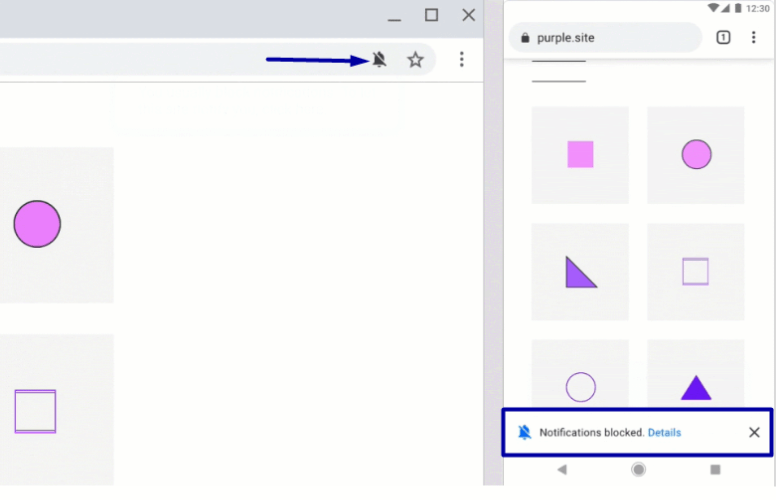
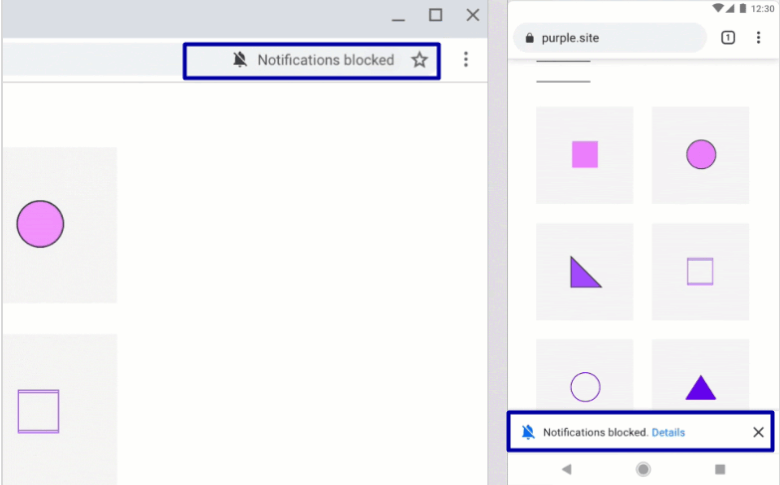
Chromium ekibi ayrıca, yeni güncellemenin uygulamasının çoğunu içeren Chrome'un "Canary" sürümünü de yayınladı. Bu ayarları, "Daha Sessiz bildirim izni istemi"nin ön sürüm Beta sürümünde yapılandırabilirsiniz.
Aynı bağlantıyı ziyaret ederek kontrol edebilirsiniz – chrome://flags/
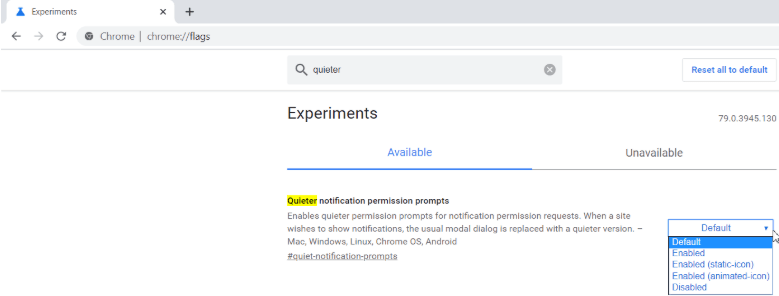
Nihai sürüm yayınlandığında birkaç değişiklik olabilir.
Chrome 80 değişiklikleri için PushEngage Önerisi ve Güncellemeleri
PushEngage, web anlık bildirim kanalınızı en uygun şekilde kullanmaya devam edebilmeniz için Chrome 80+ tarayıcısının yeni güncellemesi için bazı kılavuzlar ve ürünümüzde bazı değişiklikler hazırladı.
Tarayıcı güncellemesine şu şekilde hazırlandık –
1. Kullanıcı değer elde ederken kullanıcı eyleminde kayıt olmayı tetikleyin – Google'ın kayıt olma/izin verme kullanıcı deneyimi en iyi uygulamalarında önerdiği gibi, sitenizden değer elde ederken kullanıcıya istemde bulunmak en iyisidir. Örnek: Sitenizde bir uçuş arama veya son dakika haberleri aboneliği.
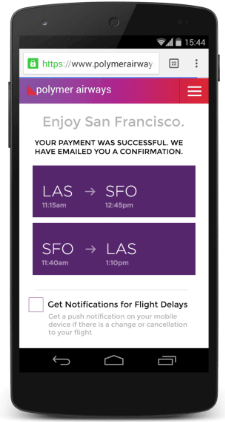
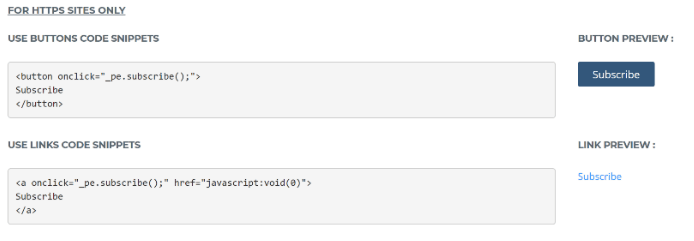
Bu tür özel istemler için, herhangi bir kullanıcı eylemi üzerine bir istemi tetiklemek üzere kullanılabilecek Düğme ve Bağlantı Öğesi mevcuttur ve bunu sitenize özel olarak entegre edebilirsiniz. Bu tür kod entegrasyonu için kılavuz kontrol panelimizde yer almaktadır veya canlı sohbet veya e-posta yoluyla destek ekibimizle iletişime geçebilirsiniz.
2. Abonelik İçin Tek Adımlı veya Yerel İzin Kullanımı – Tek adımlı izin, daha yüksek bir push abonelik oranı avantajına sahiptir, ancak müşterilerin izin ver düğmesine tıkladıklarında tam olarak anlamamalarına neden olabilir.
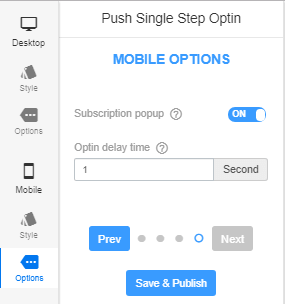
a) İzin öncesi gecikme: Bu nedenle, iznin gösterilmesinde yeterli gecikme eklemenizi öneririz ve isterseniz, rıza amacına ilişkin mesajlaşmayı gösterin, bunu bir kaplama öğesinde kullanın. İzni tetiklemek için saniye cinsinden gecikme veya % kaydırma seçeneğimiz mevcuttur. Ayrıca, mobil cihazlarda gecikmenizi masaüstünden biraz farklı bir değere göre yapılandırabilirsiniz.
b) İzin Verme Oranını Gelişmiş Analitiklerimizle İzleyin: Ayrıca, sitenizin izin verme oranı düşüşleri nedeniyle cezalandırılmasını önlemek için, izin verme oranı için bir izleme sistemi oluşturuyoruz. Bildiğiniz gibi, kullanıcı eylemlerinden kullanıcı iznine/seçenek istemlerine izin verme analizi sağlayan az sayıda sağlayıcıdan biriyiz.
Bu, PushEngage kontrol panelinizdeki İzin Analizi bölümündedir. İzleme kullanıma sunulana kadar abonelik oranınızı düzenli olarak izin analizlerinde kontrol edebilirsiniz. Örneğin, izin verme oranı %5'in altına düşerse bir izleme uyarısı ayarlarsanız, bunu günlük olarak izler ve oranın altındaysa size bir uyarı göndeririz. O zaman düzeltici önlemler almaya karar verebilirsiniz, isterseniz başka bir izin stiline geçiş yapabilirsiniz. Bunun dışında, abonelik oranı verilerini kendiniz de karşılaştırabilir ve Tek Adımlı İzin kullanmaya devam etmek isteyip istemediğinize karar verebilirsiniz.

3. Zil veya Çok Adımlı İzin Kullanımı– Zil seçeneği gibi diğer izin türlerini geliştirmek için çalışıyoruz, böylece bir abonenin tüm yaşam döngüsünü yönetmek için kullanabilir ve ziyaretçilerinizin bildirimlere kolayca abone olabileceği şekilde öne çıkmasını sağlayabilirsiniz.
İzin kaplamasında, kullanıcıların daha sessiz bir kullanıcı arayüzüne sahip olmaları durumunda, bildirimleri etkinleştirmek için nereye tıklayacaklarını gösterecek ek bir mesaj ekleyebilirsiniz, eğer engellenmişse.
4. Bildirim Alma Widget'ı/Düğmesi – Kullanıcı bildirimleri engellemişse veya tarayıcı tarafından varsayılan olarak engellenmişse, bildirim alma widget'ını göstereceğiz ve bildirimlere abone olmak için adımlar ayrıntılı olarak belirtilecektir.
Bu şekilde, web sitenizin web push izinleri/izin verme ile ilgili deneyimini yönetmenize yardımcı oluruz ve abonelik oranlarınızın sağlıklı kalmasını sağlarız.
En iyi uygulamaları görüşmek isterseniz veya Chrome'un yeni güncellemesiyle ilgili herhangi bir sorunuz olursa, doğrudan Hesap Yöneticinizle iletişime geçebilir veya [email protected] adresine e-posta gönderebilirsiniz.