Merhaba, Engagelings.
Heyecan verici haber: Abonelik Yönetimi Widget'ı adında yeni bir özellik yayınlıyoruz.
Neden mi? Sizden dolayı!
Doğru duydunuz, kullanıcı deneyimini (diğer adıyla: sizin deneyiminizi) çok daha iyi hale getiriyoruz. Artık abonelerinize yönetmeleri için basit bir yol sunabilirsiniz:
- Sizden bildirim alıp almak istemedikleri
- İlgilendikleri bildirim türleri
Abonelik Yönetimi Widget'ını PushEngage'de göstermeyi de çok kolaylaştırdık. Bu harika yeni özellikten çok gurur duyuyoruz ve onu seveceğinizi düşünüyoruz. Ve bu büyük bir güncelleme, bu yüzden ANLATILACAK ÇOK DAHA FAZLASI var.
Hadi başlayalım.
Neden Bir Abonelik Yönetimi Widget'ı Kullanmalısınız
İtme bildirimi yazılımlarının en büyük sorunlarından biri, abonelerinizden belirli türde bildirimler göndermek için izin almak sizin için çok zor olmasıdır. Sonuç olarak, çok fazla itme bildirimi gönderme veya ilgisiz mesajlar gönderme riski vardır.
Aynı sorun e-posta pazarlamasında da mevcut. Ancak en azından, e-posta pazarlama yazılımı ile aboneleri belirli bir e-posta listesi segmentine eklemek için özel bağlantılar oluşturabilirsiniz. İtme bildirimleri için bu özellik mevcut değil.
Şey... değildi. Şimdiye kadar.
Başka kimsenin ele almaya bile çalışmadığı devasa bir sorunun çözümünü inşa ettik!
Abonelik Yönetimi Widget'ı, itme bildirimi abonelik listenizi demokratikleştirir. Ziyaretçileriniz artık ne tür bildirimler almak istediklerini seçebilirler. Aboneleriniz, ne istediklerini dinlediğiniz için size bayılacaklar ve hedeflenmiş ve son derece alakalı itme bildirimleri göndererek ÇOK DAHA FAZLA para kazanabilirsiniz.
Ve itme bildirimlerinden aboneliği iptal etmeye çalışan mutsuz abonelerden gelen destek taleplerinizi azaltabilirsiniz.
Abonelik Yönetimi Widget'ı ile Kolayca Başlayın
Başlamak için PushEngage kontrol panelinize gidin ve Tasarım » Widget'lar bölümüne gidin ve Abonelik Yönetimi Widget'ını etkinleştirin:

Widget'ınızı özelleştirmek için Widget'ı Düzenle düğmesine tıklayın. Görünüm ve Tasarım altında widget'ınızın görünümünü markanızın tasarım diline uyacak şekilde özelleştirerek başlayın:
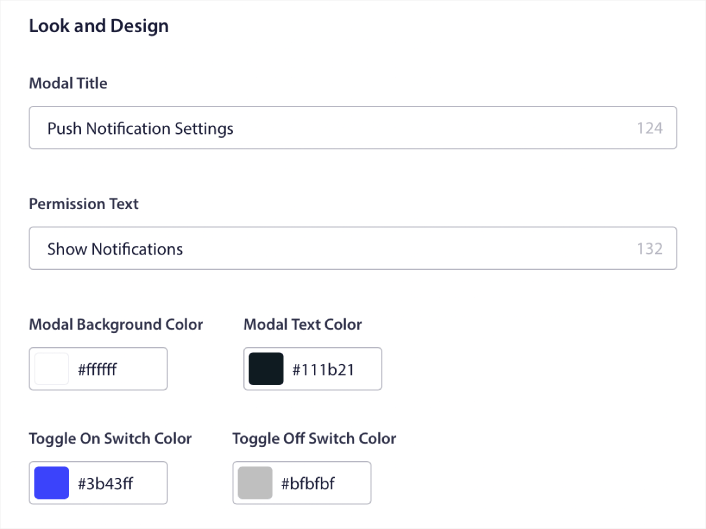
Ziyaretçileriniz varsayılan açılır pencere açılır pencerenize abone olmasa bile, kalıcı olan tamamen özel bir açılır pencere modalı oluşturabilirsiniz. Açılır pencere tetikleyici düğmesinin boyutlandırması size uymuyorsa, bunu da Tetikleyici Düğme altında özelleştirebilirsiniz:
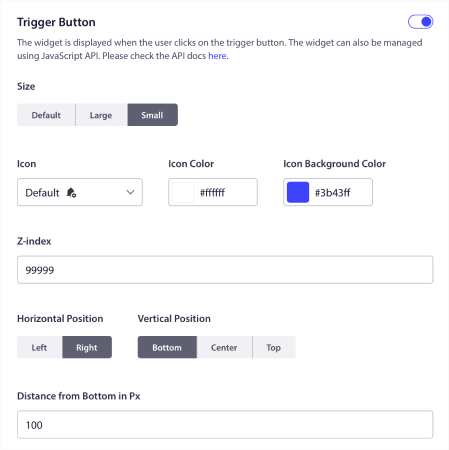
Abonelik Yönetimi Widget'ının Nerede Gösterileceğini Seçin
Ve en havalı yanı, widget'ı Tetikleyici Düğme Görüntüleme Kuralları altında göstermek için belirli sayfalar da seçebilmenizdir:

Varsayılan olarak, düğme tüm sayfalarda gösterilecektir. Ancak belirli sayfaları hedefleyerek widget'ın belirli sürümlerini göstermek için özel hedefleme kuralları oluşturabilirsiniz:
Konumlar:
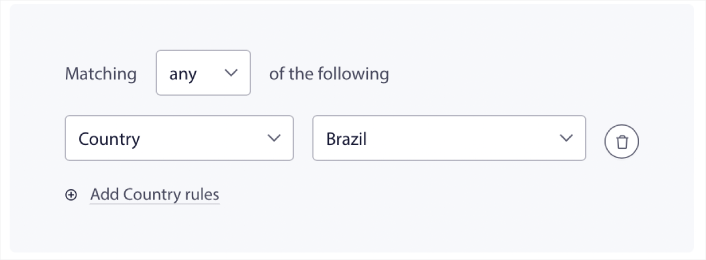
Cihazlar:
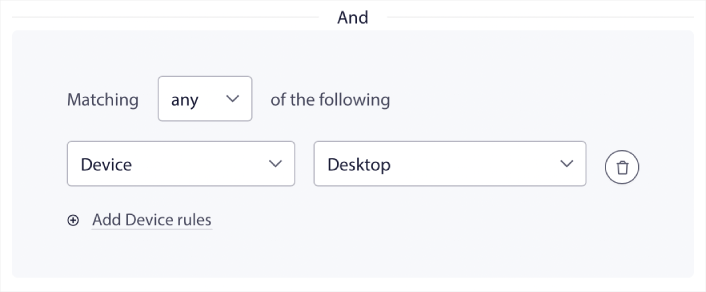
Ve sitenizdeki URL'ler:
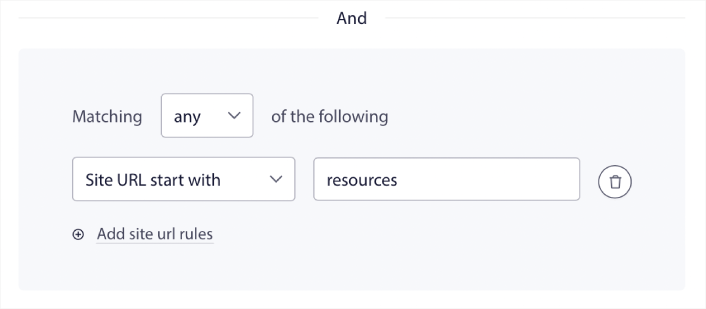
Kolay Abonelikten Çıkma Seçenekleri
Ayrıca, Abonelikten Çıkma Seçeneği altında abonelerinize itme bildirimlerinizden çıkmanın kolay bir yolunu sunabilirsiniz:
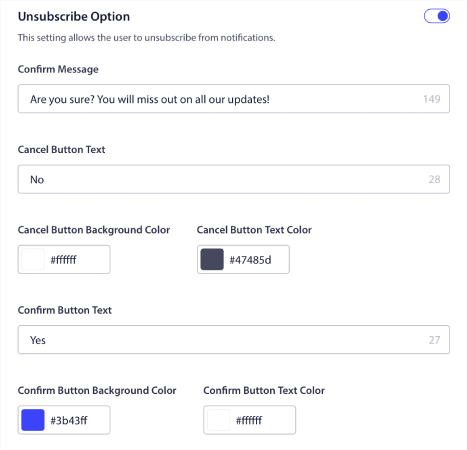
Yine, marka yönergelerinize uyacak şekilde tasarımın görünümünü ve hissini, mesajlaşma ile birlikte tamamen özelleştirebilirsiniz. İtme bildirimlerinizden aboneliğini iptal eden herhangi bir ziyaretçi, abonelik yönetimi widget'ını kullanarak yeniden abone olabilir.
Abonelerin Kişiselleştirilmiş İtme Bildirimi Tercihlerini Ayarlamasına İzin Verin
İşleri bir sonraki seviyeye taşımak için, abonelerinizin Segment Tercihleri altında ne tür bildirimler almak istediklerini seçmelerine de izin verebilirsiniz:
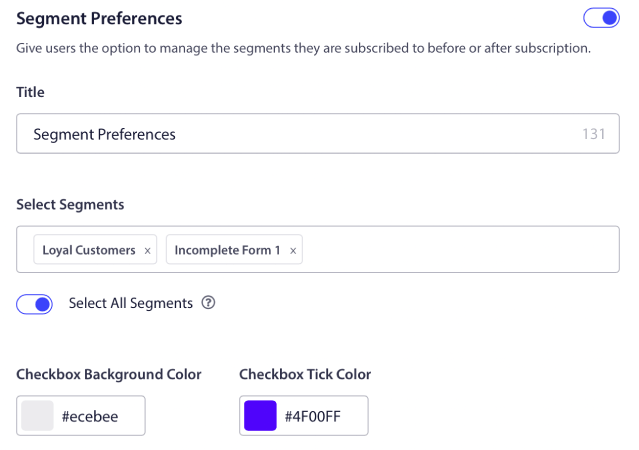
Tümünü Seç seçeneğini etkinleştirirseniz, aboneleriniz varsayılan olarak seçilen tüm segmentlere otomatik olarak eklenecektir:
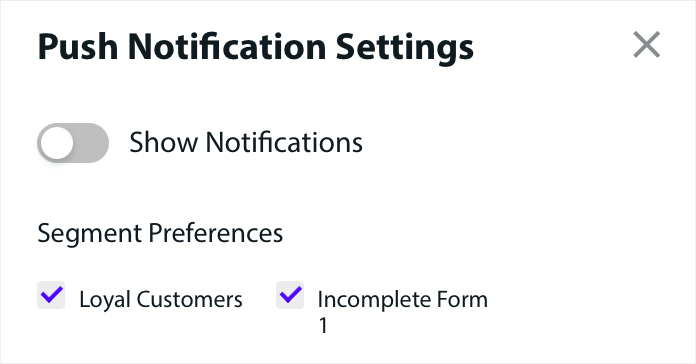
Bu, haber siteleri ve blog siteleri için inanılmaz derecede güçlü bir özelliktir.
Kişiselleştirilmiş İtme Bildirimleri Göndermek İçin İzin İsteyin
Sitenizde bir e-ticaret anlık bildirimleri çalıştırıyorsanız, bunların çoğu tetiklenmiş anlık bildirimler olacaktır. Buna şunlar dahildir:
- Göz Atma Terk Etme Anlık Bildirimleri
- Sepet Terk Etme Anlık Bildirimleri
- Fiyat Düşüşü Uyarıları
- Stokta Yok Uyarısı
Ve hatta özel tetiklenmiş anlık bildirim kampanyaları.
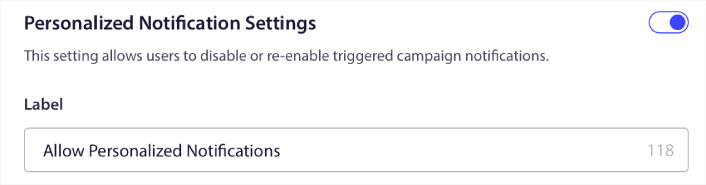
Yeni Abonelik Yönetimi Widget'ımızla, abonelerinizin kişiselleştirilmiş bildirimleri görüp görmek istemediklerini artık seçmelerine izin verebilirsiniz:

Yalnızca Kişiselleştirilmiş Bildirim Ayarları altındaki seçeneği etkinleştirin:
Başka Ne Var?
Bir işletme büyütmenin zorlu bir iş olduğunu biliyoruz. PushEngage olarak ürünümüzü ve deneyiminizi geliştirmek için her zaman çalışıyoruz. Bu yeni özelliği, PushEngage aboneliğinizden daha fazla değer elde etmenize yardımcı olmak için yayınladık.
Bu duyuruyu okuduğunuz için çok teşekkür ederiz.
Herhangi bir sorunuz olursa, Müşteri Başarı ekibimiz size yardımcı olmak için burada. Canlı Sohbet'ten bir konuşma başlatın veya iletişim sayfamıza göz atın.
Ve PushEngage kullandığınız için teşekkür ederiz. Ücretsiz sürümü veya Kurumsal sürümü kullanıyor olsanız da, bizim için eşitsiniz. Abonelik yönetimi widget'ı, başarınıza yardımcı olmak için tasarlanmıştır ve size en iyisini dileriz.
Düşüncelerinizi aşağıdaki yorumlarda bize bildirin ve henüz yapmadıysanız, bugün PushEngage ile başlayın!


