Merhaba, Engagelings.
Heyecan verici haberler: PushEngage'e RSS anlık bildirimlerine BÜYÜK bir yükseltme ekledik.
Bir süre önce RSS otomatik anlık bildirim kampanyaları başlattık ve bu çok popüler oldu. Ancak, RSS bildirimleriyle yapabilecekleriniz sınırlıydı. Bu nedenle, RSS akışı kampanyalarımıza daha güçlü özellikler ekledik.
İşte öne çıkanların hızlı bir özeti:
- Birden fazla RSS akışı oluşturun
- RSS anlık bildirimlerinizi istediğiniz zaman başlatın/durdurun/silin
- RSS akışlarınız için büyük bir resim ekleyin
- RSS akışı anlık bildirimleriniz için büyük resmi dinamik olarak seçin
- Anlık bildirim simgesini RSS akışından dinamik olarak ayarlayın veya marka simgenizi yükleyin
- Belirlediğiniz aralıklarda RSS akışını tarayarak en son içeriğinizi otomatik olarak tanıtın
- Daha iyi kişiselleştirme için hedeflemek istediğiniz kitle grubunu seçin
- Bildirim sonlandırma kuralları ekleyin
- Özel UTM Parametreleri ayarlayın
- Her RSS akışı kampanyası için ayrıntılı kampanya analizleri alın
Kullanımını da süper kolay hale getirdik. Bu yükseltme için çok çalışıldı ve beğeneceğinizi düşünüyoruz. Ayrıca büyük bir güncelleme, bu yüzden anlatılacak ÇOK şey var.
Hadi başlayalım.
Neden RSS Anlık Bildirimleri Göndermelisiniz?
Sürekli içerik oluşturmak ve bir blog yönetmek zor iştir. Ancak ciddi bir iş yürütüyorsanız, yalnızca içerik oluşturmanın yeterli olmadığını bilirsiniz. İçeriğinizi tanıtmanız da gerekir.
Ve anlık bildirimler, maliyet açısından etkili bir şekilde abone kazanmak için harika bir yoldur. Anlık bildirimleri bu kadar iyi bir pazarlama aracı yapan şey, tamamen otomatikleştirilebilmeleridir.
İşte burada RSS anlık bildirimleri devreye giriyor.
RSS anlık bildirimlerini doğru şekilde ayarlarsanız, sitenizde bir içerik yayınladığınız her seferinde aboneleriniz otomatik olarak içeriğinize yönlendiren bir anlık bildirim alırlar.
Ancak yanılmayın. RSS anlık bildirimleri, diğer otomatik anlık bildirim kampanyalarına göre hala daha az kişiseldir. Bu nedenle, büyümenizi en üst düzeye çıkarmak için farklı kampanyaların bir karışımını kullanmanızı öneririz. Örneğin, bir e-ticaret sitesi çalıştırıyorsanız e-ticaret anlık bildirimlerini etkinleştirmeniz gerekir.
Birden Fazla RSS Akışı Bildirimi Oluşturun
PushEngage'i sitenize kurduktan sonra, PushEngage kontrol panelinize gidin ve Kampanya » RSS Otomatik İtme bölümüne gidin ve Yeni Kampanya Oluştur'a tıklayın:
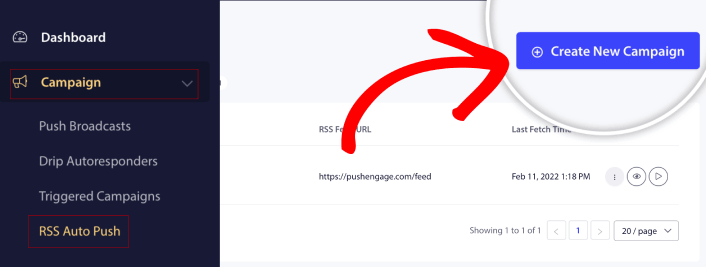
Bu yeni yükseltmeyle, farklı segmentler ve Kitle Grupları için birden fazla RSS akışı bildirimi oluşturabilir ve gönderebilirsiniz. Sitenizin yalnızca bir RSS akışı yoktur. Sitenizdeki her içerik kategorisi için RSS akışları oluşturabilirsiniz.
Ve bunu yapmak çok az zaman alıyor. Ancak birden fazla akış oluşturmak, daha kişiselleştirilmiş RSS anlık bildirimleri göndermenize olanak tanır.
Diyelim ki sırasıyla yalnızca süper arabalar, motosikletler ve kamyonlarla ilgilenen üç kitle grubunuz var. Her kategori için farklı RSS akışı URL'leri kolayca oluşturabilir ve abonelerinize gerçekten ilgilendikleri içerikler hakkında anlık bildirimler gönderebilirsiniz.
Sonuç? Basit bir RSS otomatik anlık bildirim kampanyasıyla bile site etkileşiminizde bir artış göreceksiniz!
RSS Kampanyanızı İstediğiniz Zaman Başlatın, Durdurun ve Silin
RSS kampanyalarındaki, hatta e-posta RSS kampanyalarındaki en büyük sorun zamanlamaydı. Ne kadar gönderi gönderdiğinizi kontrol etmek çok zordur. Ve kampanyalarınızı durdurmak daha da zordu.
Şimdiye kadar!
PushEngage ile herhangi bir RSS akışı kampanyasını istediğiniz zaman kolayca başlatabilir, durdurabilir veya silebilirsiniz. Birden fazla kampanya çalıştırıyorsanız bu süper kullanışlı bir özelliktir.
Diyelim ki bir Kara Cuma anlık bildirim kampanyası yürütüyorsunuz. Aboneleriniz yalnızca promosyon tekliflerinize odaklanmalı. Ancak aynı zamanda, tatil sezonu bitene kadar yeni içerik yayınlamayı durduramazsınız. RSS akışı kampanyalarınızı duraklatmak için harika bir zaman.
Artık birden fazla RSS kampanyası çalıştırabildiğiniz için, promosyonunuzla hedeflemediğiniz abonelere düzenli içerik göndermeye devam edebilirsiniz.
Kolay Resim Özelleştirme Seçenekleri
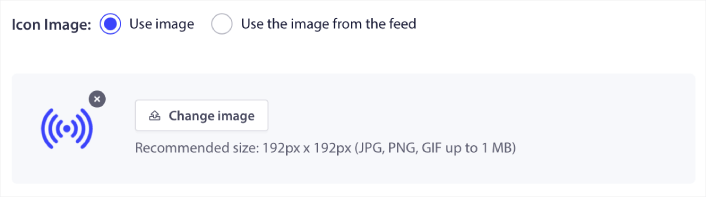
Hem bildirim simgesini hem de bildirimin büyük resmini doğrudan RSS beslemenizden özelleştirebilirsiniz. Bildirim simgesi için simgeyi manuel olarak yükleyebilirsiniz:
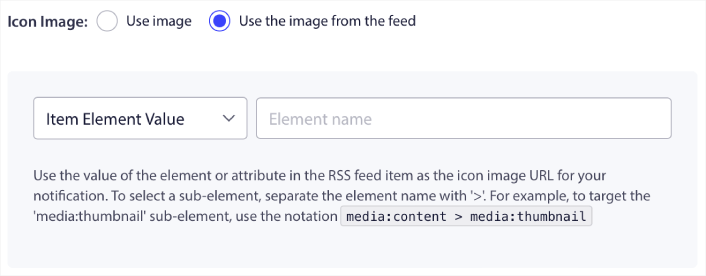
Veya, bildirim simgesini RSS beslemenizden dinamik olarak almak için PushEngage'in bir desen kurmasını sağlayabilirsiniz:
Benzer şekilde, PushEngage'in gönderileriniz için büyük resmi otomatik olarak bulmasına izin verebilirsiniz:

Veya, RSS beslemenizden alarak istediğiniz büyük resim türünü özelleştirebilirsiniz:
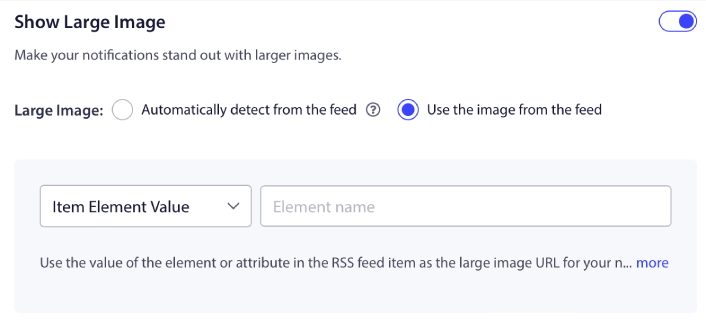
DİKKAT: Gelişmiş resim alma seçeneklerini yalnızca bir RSS beslemesindeki XML'i okuyabiliyorsanız kullanın. XML ile rahat değilseniz, PushEngage'in bildirim büyük resminize karar vermesine izin vermeli ve bildirim simgesini manuel olarak yüklemelisiniz.
RSS Bildirim Sıklığını Ayarlayın
Ayrıca her RSS kampanyası için Kampanya Sıklığını ayarlayabilirsiniz:
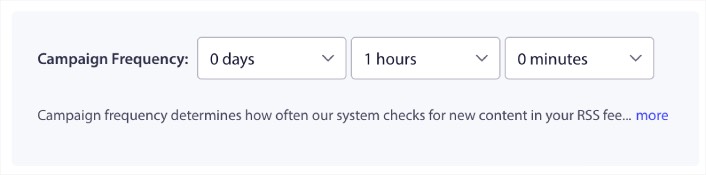
Kampanya Sıklığı, RSS besleme kampanyasının blogunuzdaki yeni içeriği ne sıklıkla arayarak otomatik bir anlık bildirim göndereceğidir. Minimum değer 15 dakika ve maksimum değer 7 gündür.
Haber ajansı değilseniz, her 2 günde bir tanıtılacak içerik aramanızı öneririz. Haber ajansları için bunu 15 dakikada bir tutmalısınız. PushEngage'ın yalnızca RSS besleme kampanyasını kurup yayınladıktan sonra yeni içerik arayacağını unutmayın.
Anlık Bildirim Süresini Ayarla
Anlık bildirim süresi, bildirimin abonenizin bildirim tepsisinde otomatik olarak silinmeden ne kadar süreyle kaldığıdır.
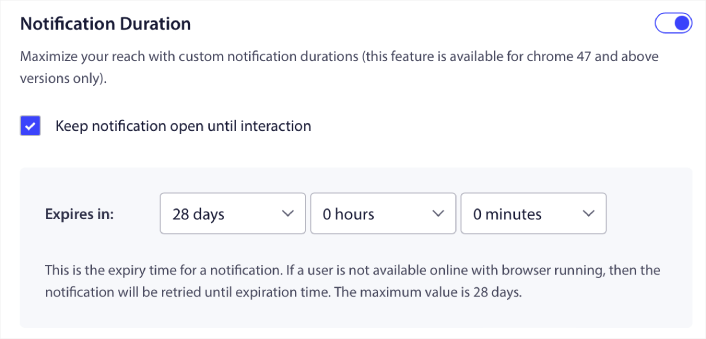
Abonelerinizi okunmamış bir sürü bildirimle bunaltmak istemiyorsanız, anlık bildirimlerin birkaç gün içinde sona ermesine izin vermek muhtemelen en iyisidir.
Yayın bildirimlerinin veya diğer otomatik anlık bildirimlerin aksine, RSS anlık bildirimlerini saat dilimine veya belirli bir gönderme zamanına göre gerçekten zamanlayamazsınız. Bu nedenle, bildirim süresi dolmadan bile, aboneleriniz etkileşimde bulunana kadar bildirimi açık tutma seçeneğiniz her zaman vardır.
Bildirimlerinizi İzlemek İçin UTM Parametreleri Ayarlayın
Ayrıca anlık bildirimleri izlemek için UTM parametreleri ayarlayabilirsiniz:
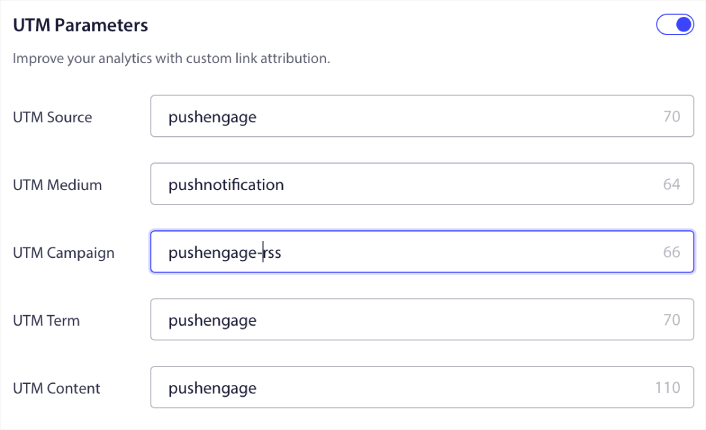
Bu şekilde, bu anlık bildirimlerden gelen trafiği Google Analytics'te kolayca atfedebilirsiniz. Elbette, PushEngage kontrol panelinizden tüm kampanyanız için ayrıntılı analizler de alabilirsiniz.
Belirli Bir Kitle Grubunu Hedefleyin
RSS anlık bildirimlerindeki en büyük yükseltme, hedeflenmiş bildirimler göndermek için bir Kitle Grubu seçme seçeneğinizdir. RSS besleme kampanyasını tüm abonelerinize gönderebilir veya RSS beslemenizden bile kişiselleştirilmiş anlık bildirimler göndermek için Kitle Grupları oluşturabilirsiniz.
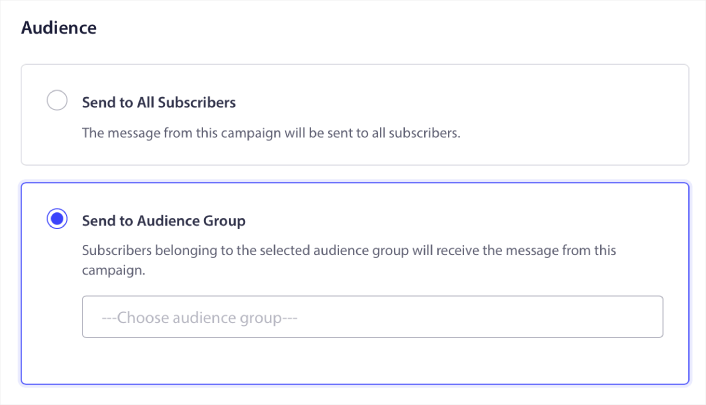
Artık, bunları bir kez ayarlayarak otomatik anlık bildirimler gönderebilirsiniz. Ancak, belirli kitlelere ne tür içerik tanıtmak istediğinizi seçebildiğiniz için bu daha da iyidir.
Başka Ne Var?
Bir işletme büyütmenin zorlu bir iş olduğunu biliyoruz. PushEngage olarak ürünümüzü ve deneyiminizi geliştirmek için her zaman çalışıyoruz. Bu yeni özelliği, PushEngage aboneliğinizden daha fazla değer elde etmenize yardımcı olmak için yayınladık.
Bu duyuruyu okuduğunuz için çok teşekkür ederiz.
Herhangi bir sorunuz olursa, Müşteri Başarı ekibimiz size yardımcı olmak için burada. Canlı Sohbet'ten bir konuşma başlatın veya iletişim sayfamıza göz atın.
Ve PushEngage kullandığınız için teşekkür ederiz. Ücretsiz sürümü veya Kurumsal sürümü kullanıyor olsanız da, bizim için eşitsiniz. Yeni RSS otomatik anlık bildirim özellikleri, başarınıza yardımcı olmak için tasarlanmıştır ve size en iyisini dileriz.
Düşüncelerinizi aşağıdaki yorumlarda bize bildirin ve henüz yapmadıysanız, bugün PushEngage ile başlayın!


