Merhaba, Engagelings.
Heyecan verici haberler: Shopify uygulamamızın fiyatlandırmasını güncelledik ve bazı heyecan verici yeni özellikler ekledik. Ve e-ticaret işinizi inanılmaz uygun fiyatlarla büyütmek her zamankinden daha kolay!
Kulağa heyecan verici geliyor, değil mi? Burada anlatılacak çok şey var. Öyleyse, dalalım.
PushEngage için Yeni Shopify Fiyatlandırması Nedir?
Artık iki fiyatlandırma planımız var: Ücretsiz plan ve Büyüme planı.
Ücretsiz plan, ayda 100 ABD dolarından az kâr elde eden yeni e-ticaret işletmeleri için mükemmeldir. Ayrıca PushEngage kontrol paneli deneyimini test etmek için de uygundur.
Öte yandan, Büyüme planı ayda yalnızca 4 ABD dolarından başlayan fiyatlarla 5.000 aboneye kadar çıkıyor ve hesabınızı 100.000 aboneye kadar yükseltebilirsiniz. 100.000 abonenin üzerindeki her şey için Kurumsal hesap için bizimle görüşebilirsiniz.
Ancak burada anlatılacak çok daha fazlası var. Birincisi, tıklama ve anlık bildirim gönderme sayısına göre değil, abonelik listenize göre ücret alıyoruz. Ve bu büyük bir fark çünkü PushEngage ile şunları elde edersiniz:
- Tahmin Edilebilir Maliyetler: Aboneliğe dayalı bir fiyatlandırma modeliyle, abonelik listenizin boyutuna göre tam olarak ne kadar ödeyeceğinizi bilirsiniz. Bu, maliyetlerin öngörülemeyecek şekilde dalgalanabileceği gösterim tabanlı bir modele kıyasla bütçeleme ve maliyet tahminini çok daha kolay hale getirir.
- Kaliteye Nicelikten Önce Odaklanma: Gösterim başına ödeme yaptığınızda, daha fazla değer elde etmek için ilgisiz veya aktif olmayan kullanıcılara bile mümkün olduğunca çok bildirim gönderme teşviki vardır. Aboneliğe dayalı fiyatlandırmayla odak, kullanıcıları bildirimlerle doyurmak yerine yüksek kaliteli, etkileşimli bir abonelik tabanı oluşturmaya kayar.
- Hedeflerle Daha İyi Uyum: Anlık bildirimlerin temel amacı, abonelik tabanınıza etkili bir şekilde ulaşmak ve onları etkileşimde tutmaktır. Abone başına ödeme yapmak, maliyetleri gösterimler gibi belirsiz bir metriğe dayandırmak yerine, fiyatlandırma modelini doğrudan bu hedefle uyumlu hale getirir.
- Aşırı Ücretlendirmeden Kaçının: Gösterim tabanlı fiyatlandırmayla, kullanıcılar tarafından aslında hiç görülmeyen veya etkileşimde bulunulmayan bildirimler için ödeme yapabilir ve bu da boşa harcanan harcamalara yol açabilir. Aboneliğe dayalı fiyatlandırma, yalnızca aktif, onay veren kitleniz için ödeme yapmanızı sağlar.
- Şeffaflık ve Kontrol: Maliyetlerinizin yalnızca abone sayınıza dayandığını bilmek, maliyetlerin birçok dış faktörden etkilenebilen bir metrik (gösterimler) tarafından belirlenmesine kıyasla, anlık bildirim harcamalarınız üzerinde daha fazla şeffaflık ve kontrol sahibi olmanızı sağlar.
Bunun yanı sıra, daha az ödeme yapmak ve gönderme hacminizi en üst düzeye çıkarmak için aktif olmayan aboneleri kaldırmak üzere abone listenizi temizleyebilirsiniz (bunun hakkında daha sonra daha fazla bilgi).
Shopify Anlık Bildirim Kampanyaları Nasıl Oluşturulur
PushEngage Shopify uygulamasını yüklemeyi bitirdikten sonra, Shopify arama çubuğunda onu arayın:

PushEngage kontrol paneline gitmek için PushEngage Anlık Bildirimleri'ne tıklayın.

Burada istediğiniz e-ticaret anlık bildirim kampanyasını oluşturabilirsiniz.
Yüksek Dönüşüm Sağlayan Shopify Kampanyaları Nasıl Gönderilir
E-ticaret kampanyaları, Shopify entegrasyonunun gerçekten parladığı yerdir. Çok basit ve kolaydır. PushEngage kontrol panelinize gidin ve Kampanyalar » Tetiklenen Kampanyalar'a gidin:
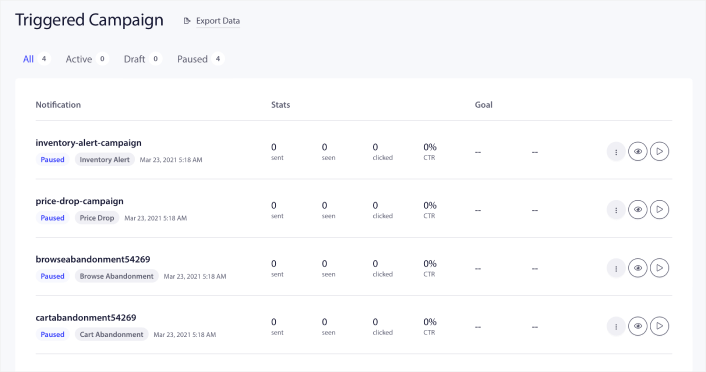
Hesabınızın varsayılan olarak 4 önceden oluşturulmuş tetiklenen kampanya ile geldiğini göreceksiniz:
- Fiyat düşüşü uyarısı
- Stok uyarısı
- Göz atma terk kampanyası
- Sepet terk kampanyası
Tek yapmanız gereken her kampanyayı düzenlemek, İçerik bölümünü doldurmak ve onları etkinleştirmektir. Önceden oluşturulmuş kampanya şablonlarınız zaten oldukça yüksek dönüşüm sağlayan metinlerle birlikte gelir. Ancak tüm müşterilerimizden içeriği pazarlama stratejilerine uyacak şekilde düzenlemelerini istiyoruz.
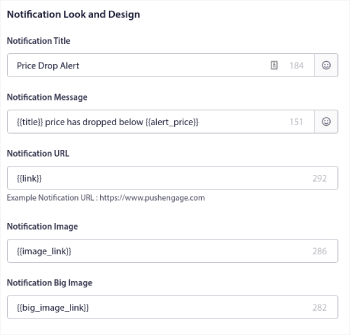
Sıradaki anlık bildirimlerden herhangi birine tıkladığınızda, bildirimi istediğiniz dereceye kadar özelleştirebilirsiniz:
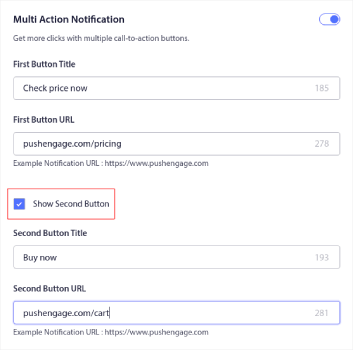
Daha sorunsuz bir dönüşüm için birden fazla düğme ekleyebilirsiniz:
Ve Bildirim Süresi altında özel bir bildirim süresi ayarlayabilirsiniz:
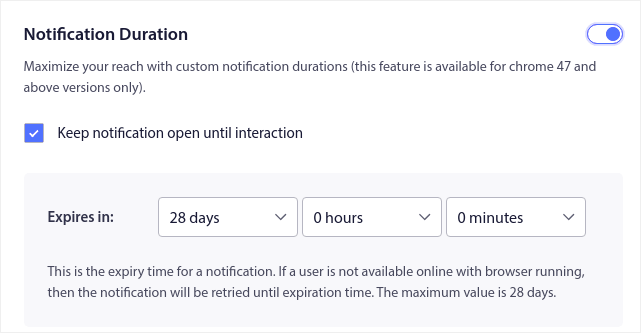
İçerik sekmesiyle işiniz bittiğinde, Tetikleyici Ayarları düğmesine tıklayın ve anlık bildirimlerinizin ne zaman gönderileceğini yapılandırın.
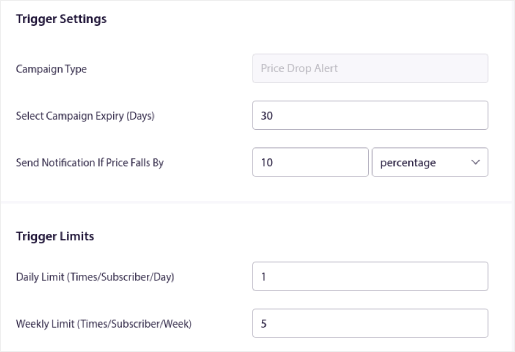
Bu işlem, tüm e-ticaret kampanyaları için aynıdır. Tek yapmanız gereken kampanyayı özelleştirmek ve etkinleştirmektir. API anahtarı yok, manuel kod entegrasyonu yok ve 10 dakika veya daha kısa sürede başlamak için hiçbir engel yok!
NOT: Sepet terk kampanyanız için, kampanyanızdan elde edilen dönüşümleri ve geliri raporlayacak önceden oluşturulmuş bir gelir izleyiciniz de bulunur. Bu özelliği etkinleştirmek için hiçbir şey yapmanız gerekmez. Sadece sepet terk kampanyasını çalıştırın.
Toplu Bildirimler Nasıl Gönderilir
Bazen, belirli süreli teklifleri ve promosyonları duyurmak için bir anlık bildirim yayını göndermek isteyebilirsiniz. Kampanyalar » Yayın'a gidin ve Yeni Anlık Bildirim Yayını Oluştur'a tıklayın:

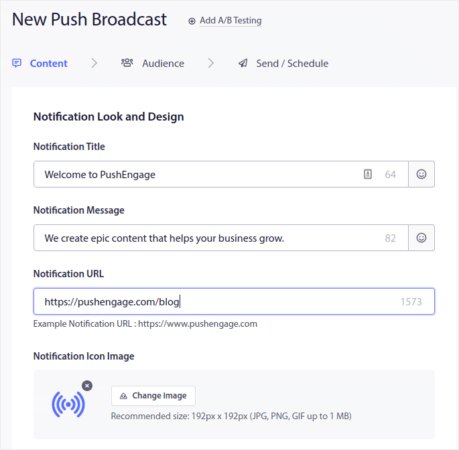
Ardından, göndermek için yeni bir anlık bildirim oluşturun. İçeriği İçerik sekmesi altında özelleştirin:
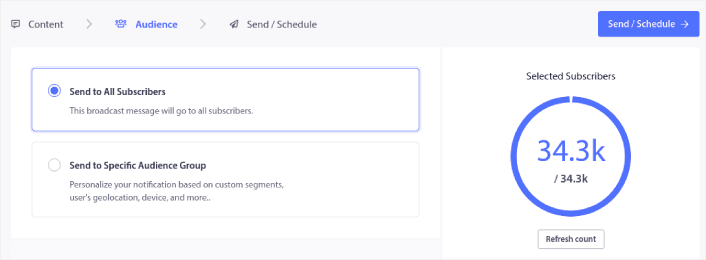
Ardından, Hedef Kitle altında hedef kitlenizi seçin:
Ve son olarak, Gönder/Zamanla altında, bildirimi tekrarlayan bir anlık bildirim olarak zamanlayabilirsiniz:

Özel günler, tarihler ve saatler dahil olmak üzere anlık bildirimleriniz için istediğiniz herhangi bir zamanlamayı kolayca oluşturabilirsiniz.
RSS Otomatik Anlık Bildirim Kampanyaları Nasıl Kurulur
Sürekli içerik oluşturmak ve bir blog yönetmek zor iştir. Ancak ciddi bir iş yürütüyorsanız, sadece içerik oluşturmanın yeterli olmadığını bilirsiniz. İçeriğinizi tanıtmanız da gerekir. Peki e-ticaret iş gelirini içeriği otomatik olarak tanıtarak nasıl ölçeklendirebilirsiniz?
Ve anlık bildirimler, aboneleri uygun maliyetli bir şekilde kazanmak için harika bir yoldur. Anlık bildirimleri bir pazarlama aracı olarak bu kadar iyi yapan şey, tamamen otomatikleştirilebilmeleridir. İşte burada RSS anlık bildirimleri devreye giriyor.
PushEngage kontrol panelinize gidin ve Kampanya » RSS Otomatik İtme bölümüne gidin:
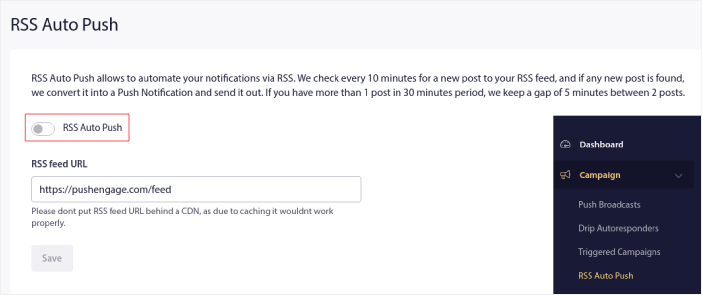
RSS Otomatik İtme'yi etkinleştirmek için geçiş düğmesine tıklayın ve RSS besleme URL'nizi yapıştırın. İşlem tamamlandıktan sonra, RSS beslemenizin kabul edildiğini doğrulamak için RSS'yi Doğrula'ya tıklayın. İşiniz bittiğinde, Kaydet'e basın.
Artık yeni bir gönderi yayınladığınızda, anında iletme bildirimi aboneleriniz yeni içeriğiniz hakkında otomatik olarak bir anında iletme bildirimi alacak.
Shopify'da Abonelik Maliyetlerinizi Nasıl Azaltırsınız
Pasif abonelerinizi silerek PushEngage plan maliyetlerinizi Shopify'da azaltabilirsiniz. Abone başına ödeme yaptığınız için, gereksiz yere maliyetlerinizi artırmamak adına istenmeyen aboneleri kaldırma seçeneğini de sunmak istedik.
Aynı seçenekleri almak için PushEngage kontrol paneline gidin ve Kitle » Aboneler bölümüne gidin. Bildirimlerinizi belirli sayıda gün boyunca almayan, görüntülemeyen veya tıklamayan aboneleri kaldırabilirsiniz.
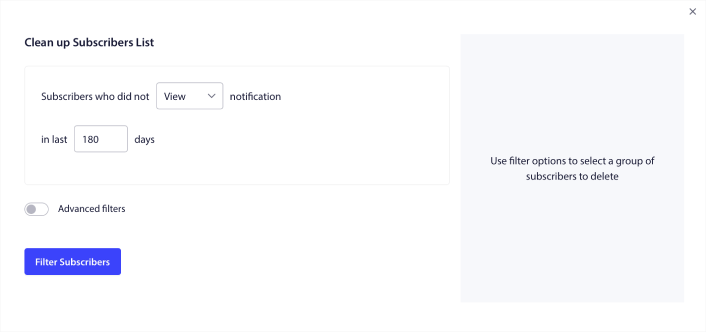
Bildirimlerinizi 240 gün boyunca görüntülemeyen aboneleri silmenizi öneririz. Daha spesifik kaldırmalar için gelişmiş filtreleri de kullanabilirsiniz.
Gelişmiş filtreler şunları içerir:
- Öznitelikler: Platform veya diğer tanımlayıcı veriler gibi belirli özniteliklere sahip aboneleri silin.
- Segmentler: Tüm bir segmenti veya bir dizi segmenti silin
- Tarayıcı: Belirli bir tarayıcıdan gelen aboneleri silin.
- Cihaz: Masaüstü veya mobil cihazlardan etkileşim kuran aboneleri silin.
- Ülke: Belirli bir ülkedeki aboneleri silin.
- Eyalet: Belirli bir eyaletteki aboneleri silin.
- Şehir: Belirli bir şehirdeki aboneleri silin.
- Abonelik tarihi: Belirli bir tarihten önce veya sonra abone olanları hedefleyin. Etkileşimde bulunmayan yeni aboneleri yeniden hedeflemek için harikadır.
- Son gönderim: Bildirimi en son belirli bir süre önce alan aboneleri hedefleyin.
- Son görüntüleme: Bildirimi en son belirli bir süre önce görüntüleyen aboneleri hedefleyin.
- Son tıklama: Bildirime en son belirli bir süre önce tıklayan aboneleri hedefleyin.
- Toplam gönderim sayısı: Toplam ömür boyu alınan bildirim sayısı belirli bir sayıdan az veya eşit olan aboneleri hedefleyin. Artık push bildirimlerinizi almayan aboneleri hedeflemek için harikadır.
- Toplam görüntüleme sayısı: Toplam ömür boyu görüntülenen bildirim sayısı belirli bir sayıdan az veya eşit olan aboneleri hedefleyin. Bildirimlerinizi alan ancak hiç kontrol etmeyen aboneleri hedeflemek içindir.
- Toplam tıklama sayısı: Toplam ömür boyu tıklanan bildirim sayısı belirli bir sayıdan az veya eşit olan aboneleri hedefleyin. Bildirimlerinize hiç tıklamayan aboneleri filtreleyin.
- Abonelik karma değeri: Belirli bir aboneyi listenizden kaldırmak içindir. Bir listeden e-posta silmeye benzer.
Bu filtreler tek başlarına çok anlamlı gelmeyebilir. Ancak, belirli hedef kitle üyelerini seçmek için birden çok filtreyi birleştirebilirsiniz. Örneğin, bir yıldan uzun süredir abone olan ancak bildirimlerinize hiç tıklamamış aboneleri kaldırmak istediğinizi varsayalım. Abonelik tarihi filtresini Toplam tıklama sayısı filtresiyle birleştirebilirsiniz.
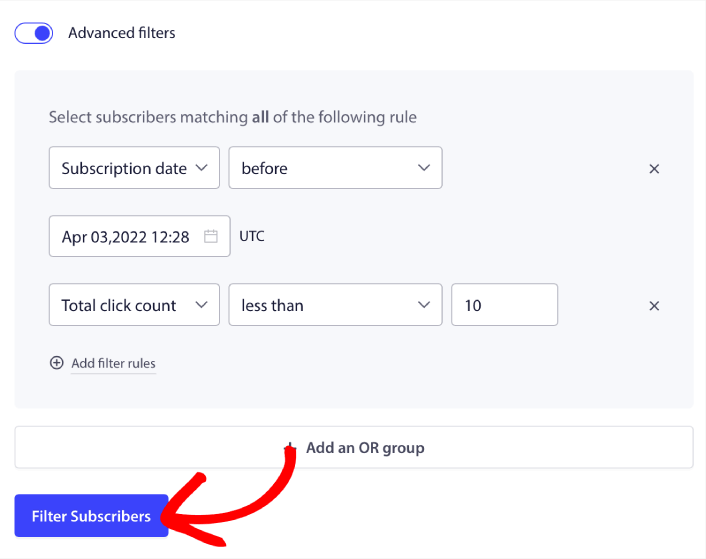
Birden çok türde etkileşimi olmayan kullanıcıları filtrelemek istiyorsanız, + VEYA grubu ekle düğmesine tıklayabilir ve birden çok kullanıcı türünü hedefleyebilirsiniz.
Shopify'da Abonelik Yönetimi Widget'ı Nasıl Oluşturulur
Abonelik yönetimi widget'ı, abonelerinizin ve web trafiğinizin ne tür bildirimler almak istediklerini seçmelerine olanak tanıyan PushEngage'ın benzersiz bir özelliğidir.
PushEngage kontrol paneline gidin ve Tasarım » Widget'lar bölümüne gidin ve Abonelik Yönetimi Widget'ı'nı etkinleştirin:

Widget'ınızı özelleştirmek için Widget'ı Düzenle düğmesine tıklayın. Markanızın tasarım dilini eşleştirmek için widget'ınızın görünümünü ve hissini özelleştirmeye Görünüm ve Tasarım altından başlayın:
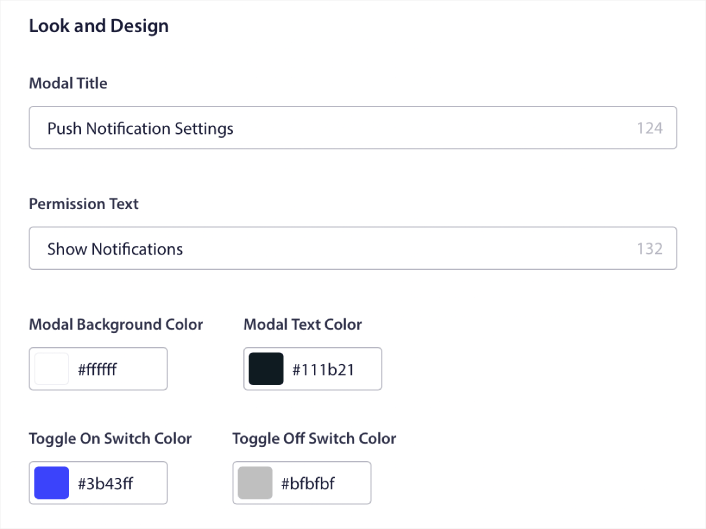
Varsayılan açılır pencere widget'ımızdan ziyaretçileriniz abone olmasa bile kalan tamamen özel bir açılır pencere widget'ı oluşturabilirsiniz. Açılır pencere tetikleyici düğmesinin boyutlandırması size uymuyorsa, bunu da Tetikleyici Düğmesi altından özelleştirebilirsiniz:
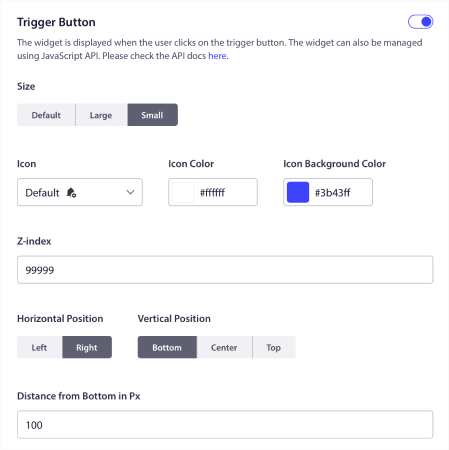
Ve en havalı yanı, widget'ı görüntülemek için belirli sayfaları Tetikleyici Düğme Görüntüleme Kuralları altından seçebilmenizdir:

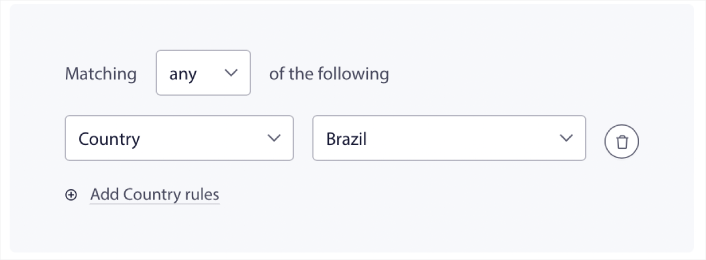
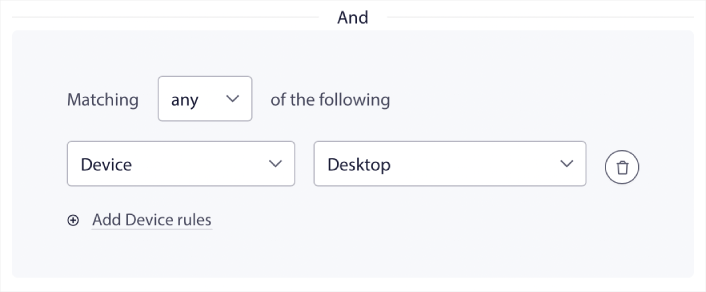
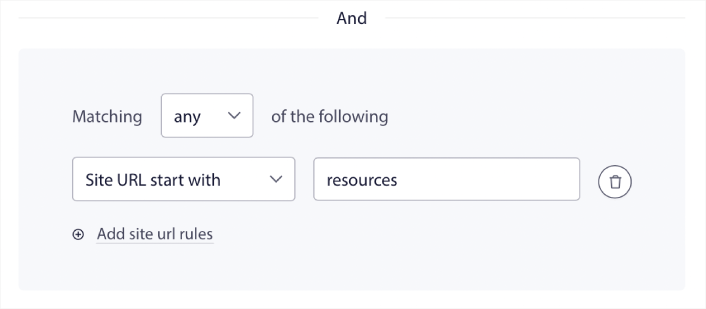
Varsayılan olarak, düğme tüm sayfalarda gösterilecektir. Ancak belirli sayfaları hedefleyerek widget'ın belirli sürümlerini göstermek için özel hedefleme kuralları oluşturabilirsiniz:
Konumlar:
Cihazlar:
Ve sitenizdeki URL'ler:
İşleri bir sonraki seviyeye taşımak için, abonelerinizin Segment Tercihleri altından hangi tür bildirimleri almak istediklerini seçmelerine de izin verebilirsiniz:
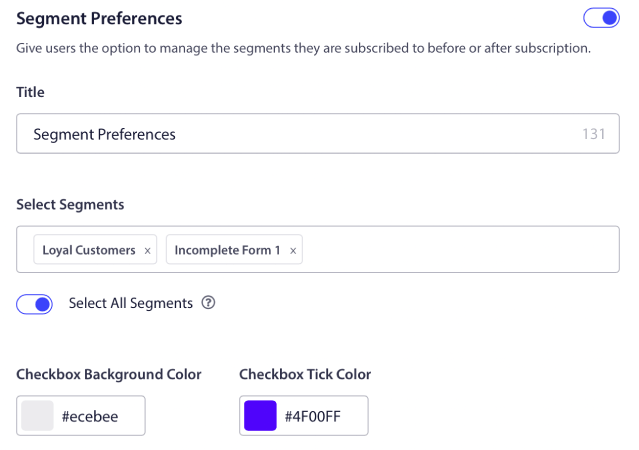
Eğer Tüm Segmentleri Seç seçeneğini etkinleştirirseniz, aboneleriniz varsayılan olarak otomatik olarak seçilen tüm segmentlere eklenir:
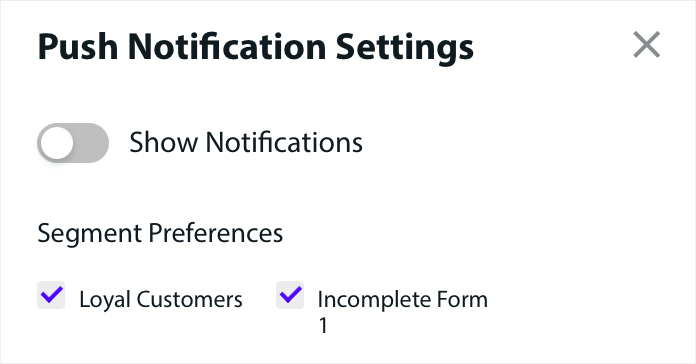
Bu, bir yeniden hedefleme listesi oluşturmak için harika bir yoldur.
Sitenizde herhangi bir e-ticaret anlık bildirimleri çalıştırıyorsanız, bunların çoğu tetiklenmiş anlık bildirimler olacaktır. Buna şunlar dahildir:
- Göz Atma Terk Etme Anlık Bildirimleri
- Sepet Terk Etme Anlık Bildirimleri
- Fiyat Düşüşü Uyarıları
- Stokta Yok Uyarısı
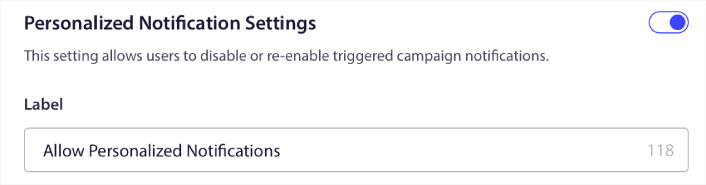
Ve hatta özel tetiklenmiş anlık bildirim kampanyaları. Abonelik Yönetimi Widget'ımızla, artık abonelerinizin kişiselleştirilmiş bildirimleri görüp görmek istemediklerini seçmelerine izin verebilirsiniz:

Sadece Kişiselleştirilmiş Bildirim Ayarları altındaki seçeneği etkinleştirin:
Uygulama Anlık Bildirimleriyle İşinizi Nasıl Büyütürsünüz
Eğer mağazanız için bir Android veya iOS uygulaması, hatta bir web uygulaması çalıştırıyorsanız, mobil uygulama anlık bildirimleri ve web uygulaması anlık bildirimleri kullanarak satışlarınızı daha da hızlı artırabilirsiniz.
NOT: PushEngage'ın güçlü SDK'larını kullanarak Android ve iOS uygulamalarınıza mobil anlık bildirimler ekleyebilirsiniz. Kampanyalarınızı göndermek ve yönetmek için bir arayüz oluşturmanıza ve yönetmenize gerek yoktur. Ve tüm bunları aynı kontrol panelinden yapabilirsiniz.
Mobil uygulama anlık bildirimleri, bir uygulamadan doğrudan bir kullanıcının mobil cihazına gönderilen, uygulama aktif olarak kullanılmasa bile güncellemeler, hatırlatıcılar veya kişiselleştirilmiş içerikler sağlayan mesajlardır. Kullanıcının parmak uçlarına zamanında ve ilgili bilgileri ileterek kullanıcı etkileşimini artırırlar.
Elbette, bu yalnızca bir uygulamanız varsa veya gelecekte işletmeniz için bir mobil uygulama yayınlama sürecindeyseniz sizin için faydalıdır. İşletmenizi büyütmek için bir uygulama yayınlama konusunda kararsız kaldıysanız, bu sizin için doğru zaman olabilir. Uygulamaların karşılaştığı en büyük zorluklardan biri müşteri etkileşimidir. Ve PushEngage artık bu acıyı tamamen ortadan kaldırmanıza yardımcı olabilir.
Daha derin, daha sık etkileşim için uygulama anlık bildirimleri tercih edilir. Ara sıra güncellemeler veya uyarılar için web anlık bildirimleri etkilidir. Bu amaçla, uygulama bildirim kampanyaları daha iyi zengin medya ve etkileşimli içerik sunar. Uygulama anlık bildirimleri, web anlık bildirimlerinin çoğu zaman kullanamayacağı verilere dayanır.
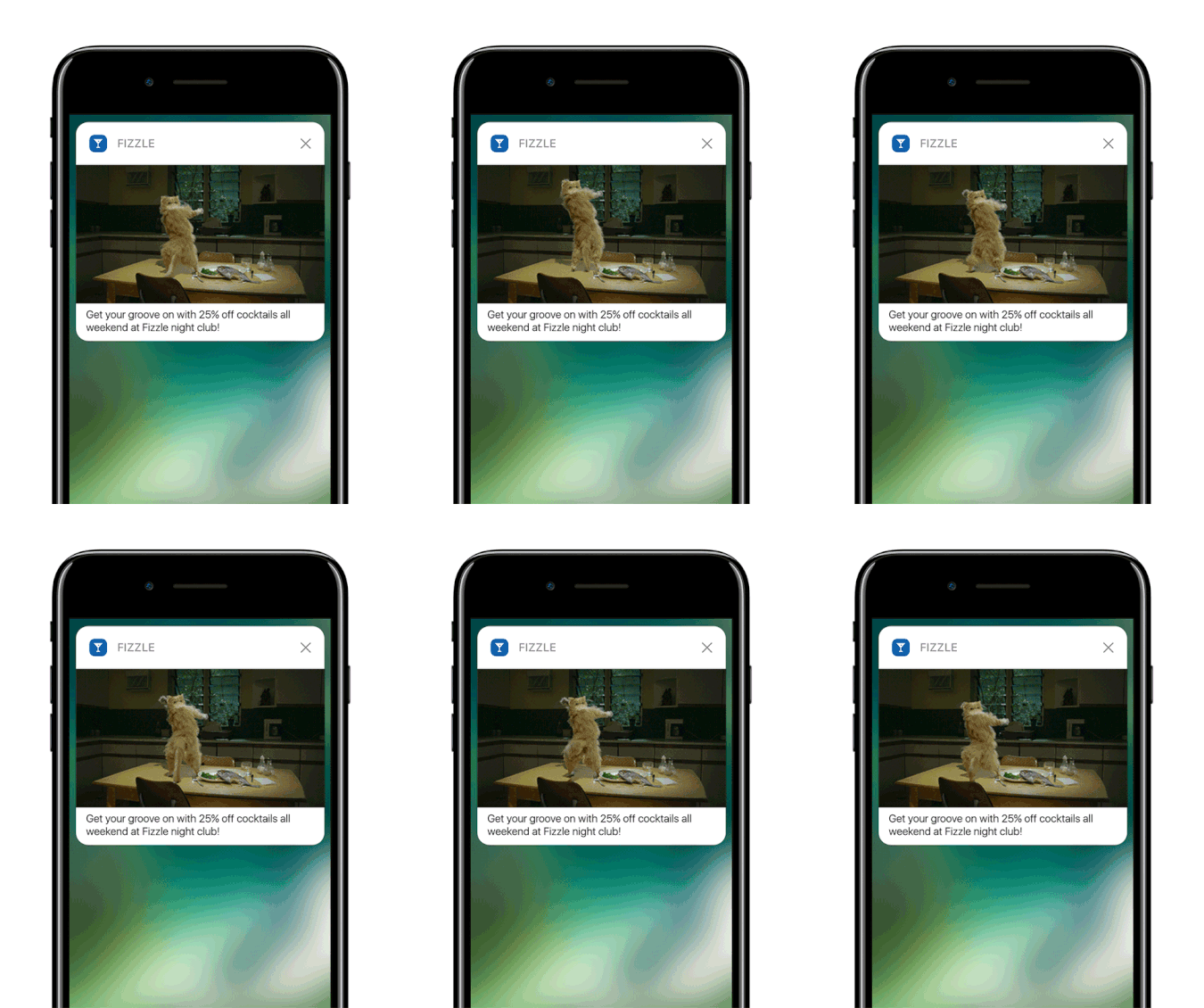
Dürüst olmak gerekirse: Kişiselleştirilmiş web anlık bildirimleri oluşturabilirsiniz. Ancak uygulama anlık bildirimleri kişiselleştirmede ÇOK daha derine inebilir.
Mobil uygulama anlık bildirimleri, sadece bir iletişim aracı olmanın ötesine geçer; kullanıcı deneyimini geliştirmenin, etkileşimi artırmanın ve kullanıcılarla kişiselleştirilmiş bir bağlantı kurmanın güçlü bir mekanizmasıdır.
Bir uygulamanın kullanıcılarını elde tutma ve etkileşimini sağlama etkinliğine önemli ölçüde katkıda bulunabilecek bir etkileşim ve kişiselleştirme düzeyi sağlarlar.
- Gelişmiş Kullanıcı Etkileşimi:
- Bağlamsal Alaka Düzeyi: Uygulama anlık bildirimleri inanılmaz derecede bağlama duyarlı olabilir. Zamanında ve ilgili bildirimler göndermek için konum, davranış ve tercihler gibi kullanıcı verilerini kullanırlar. Örneğin, bir fitness uygulaması, siz genellikle koşuya çıktığınızda motive edici bir mesaj gönderebilir.
- Davranışsal Tetikleme: Bildirimler, belirli kullanıcı eylemleri veya eylemsizlikleri tarafından tetiklenebilir. Bu, bir kullanıcının sepetinde bıraktığı bir satın alma işlemini tamamlama gibi istenen davranışları teşvik etmek için onları oldukça etkili hale getirir.
- Zengin Kullanıcı Deneyimi:
- Multimedya Entegrasyonu: Temel metin mesajlarının aksine, uygulama bildirimleri resimler, ses ve hatta video içerebilir. Bu zengin medya entegrasyonu, onları daha ilgi çekici ve keyifli hale getirir.
- Etkileşimli Öğeler: Bazı bildirimler, kullanıcıların doğrudan kilit ekranından veya bildirim alanından etkileşimde bulunmalarına olanak tanır. Bu, bir mesaja yanıt verme, bir gönderiyi beğenme veya hatta müzik çalmayı kontrol etme gibi eylemleri içerebilir.
- Kişiselleştirilmiş İletişim:
- Kişiye Özel İçerik: Veri analitiği kullanarak, uygulamalar oldukça kişiselleştirilmiş bildirimler gönderebilir. Bu, adınızı kullanmak kadar basit veya göz atma geçmişinize göre ürün önermek kadar karmaşık olabilir.
- Segmentasyon ve Hedefleme: Uygulamalar, kullanıcılarını çeşitli kriterlere göre segmentlere ayırabilir ve hedeflenmiş bildirimler gönderebilir. Bu, kullanıcıların ilgi alanlarına ve ihtiyaçlarına uygun bildirimler almasını sağlar.
- Müşteri Elde Tutma ve Sadakati:
- Düzenli Etkileşim: Kullanıcıları bilgilendirilmiş ve etkileşimde tutarak, uygulama bildirimleri müşteri elde tutmayı önemli ölçüde iyileştirebilir.
- Sadakat Ödülleri: Bildirimler, kullanıcıları sadakat programları, özel teklifler ve ödüller hakkında bilgilendirmek için etkili bir yoldur, böylece müşteri sadakatini artırır.
- Analitik İçgörüler:
- Kullanıcı Yanıt Verileri: Uygulamalar, kullanıcıların bildirimlerle nasıl etkileşimde bulunduğunu izleyerek kullanıcı tercihleri ve davranışları hakkında değerli bilgiler sağlayabilir.
- A/B Testi: Bu veriler, en iyi neyin işe yaradığını görmek için farklı bildirim stratejilerini A/B test etmek için kullanılabilir, bu da daha etkili iletişime yol açar.
- Operasyonel Verimlilik:
- Otomatik İletişim: Bildirimler, belirli kriterlere göre otomatikleştirilebilir, manuel müdahale ihtiyacını azaltır ve zamanında iletişim sağlar.
Kullanıcı verilerinden ve davranışlarından yararlanarak, uygulama anlık bildirimleri işletmelerin müşterileriyle etkileşim kurma biçimini dönüştürebilir, iletişimi daha alakalı, zamanında ve etkili hale getirebilir. Bu etkileşim ve kişiselleştirme derinliği, uygulama anlık bildirimlerini diğerlerinden ayıran ve herhangi bir mobil uygulamanın dijital iletişim stratejisinde değerli bir varlık haline getiren şeydir.
Ve daha ayrıntılı bir kılavuza ihtiyacınız varsa, iOS uygulama anında iletme bildirimlerini ayarlama ve Android uygulama anında iletme bildirimlerini ayarlama konularındaki belgelerimize göz atmalısınız.
Başka Ne Var?
Bir işletme büyütmenin zorlu bir iş olduğunu biliyoruz. PushEngage olarak ürünümüzü ve deneyiminizi geliştirmek için her zaman çalışıyoruz. Bu yeni özelliği, PushEngage aboneliğinizden daha fazla değer elde etmenize yardımcı olmak için yayınladık.
Bu duyuruyu okuduğunuz için çok teşekkür ederiz.
Herhangi bir sorunuz olursa, Müşteri Başarı ekibimiz size yardımcı olmak için burada. Canlı Sohbet'ten bir konuşma başlatın veya iletişim sayfamıza göz atın.
Ve PushEngage kullandığınız için teşekkür ederiz. İster ücretsiz sürümü ister Kurumsal sürümü kullanıyor olun, bizim için eşitsiniz. Yeni kod parçacıkları başarınıza yardımcı olmak için tasarlanmıştır ve size en iyisini dileriz.
Hayatınızı kolaylaştırmak için daha da epik entegrasyonlar geliştiriyoruz. Bu nedenle, düşüncelerinizi aşağıdaki yorumlarda bize bildirin. Gelecekte görmek istediğiniz belirli entegrasyonları talep edebilirsiniz.
Ve henüz yapmadıysanız, bugün PushEngage ile başlayın!


