Anlık bildirimin en iyi şekilde yararlanmak için, düzgün bir anlık bildirim stratejisi oluşturmanız gerekir. Bunu desteklemek için, hangi bildirimin daha iyi çalıştığını bilmek ve buna göre bildirimler oluşturmak için artık AB testini kullanabilirsiniz.
Bildirim AB Testi Nedir?
PushEngage olarak, ürünü özellik açısından zengin hale getirmek için sürekli çalışıyoruz. İşletmeniz için anlık bildirim etkinliğini iyileştirmenin önemini anlıyoruz ve bu nedenle AB testi özelliğimizi güncelledik.
NOT: A/B testi yalnızca Premium ve Enterprise planları için PushEngage'da mevcuttur. Zaten PushEngage kullanıyorsanız ve bildirimlerinizi A/B testi yapmak istiyorsanız, lütfen önce hesabınızı yükseltmeyi düşünün.
Bu, şunlara dayalı olarak AB testi yapabileceğiniz anlamına gelir:
- Bildirim içeriği
- Açılış sayfası URL'si
- Büyük Resim & Bildirim Resmi
- Çoklu Eylem Düğmesi
- Etkileşim Türleri
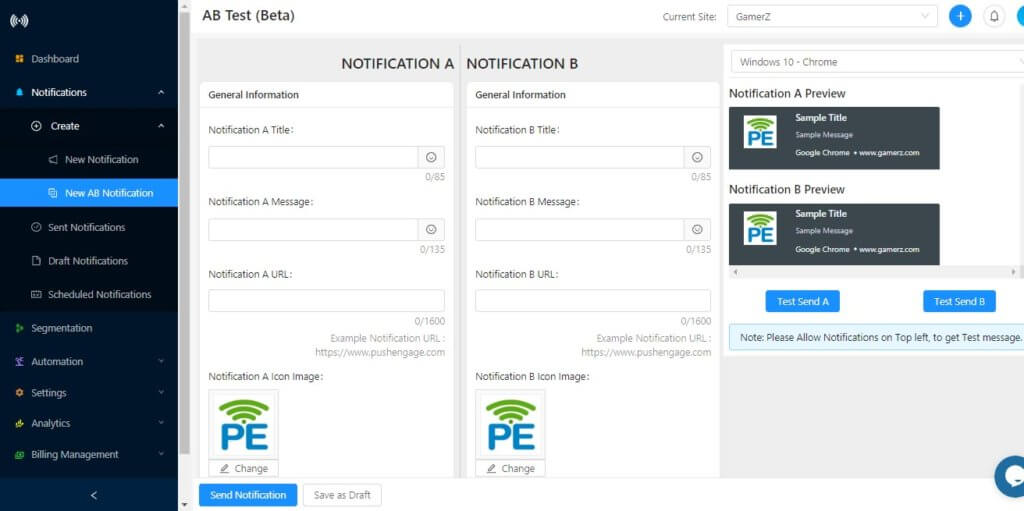
Ayrıca her bildirim için farklı UTM parametreleri de belirleyebilirsiniz. Bu şekilde, Google Analytics gibi kendi analiz aracınızı kullanarak performansı izleyebilirsiniz.
Anlık Bildirim AB Testi Nasıl Çalışır?
AB bildirimini kullanmak çok basit ve anlaşılırdır. AB testi özelliği Yeni Bildirim bölümünde mevcuttur. AB testi bildiriminde, abone sayısı sistem tarafından eşit olarak bölünür. Gönder'e tıkladığınızda, abonelerinizin yarısı Bildirim A'yı, diğer yarısı ise Bildirim B'yi alacaktır.
Birkaç saat sonra, hangi bildirimin iyi performans gösterdiğini görmek için analitikleri kontrol edin. Sonuçlara dayanarak, bir dahaki sefere bildirimi gönderdiğinizde, daha iyi sonuçlar almak için kazanan bildirimlerin formatını izleyin (bu konuda daha sonra daha fazla bilgi).
Geleneksel A/B testi bu şekilde çalışır. Ancak Nisan 2021 güncellememizden sonra PushEngage artık ek bir seçenek olarak Akıllı A/B testi sunuyor. Adından da anlaşılacağı gibi, Akıllı A/B testi, anlık bildirimlerinizi daha etkili kullanmanıza yardımcı olacaktır.
Nasıl çalıştığına hızlıca bir göz atalım.
Akıllı A/B testi, aynı testi toplam kitlenizin küçük bir yüzdesinde yürütür. Yüzdeyi ihtiyaçlarınıza göre ayarlayabilirsiniz, ancak varsayılan ayar, AB testini kitlenizin %10'una gönderir ve ardından daha iyi performans gösteren bildirimi otomatik olarak kitlenizin kalan %90'ına gönderir.
Burada manuel bir müdahale yok. PushEngage tüm bunları sizin için yapacak ve sizin tek yapmanız gereken kontrol panelinden kurmak.
NOT: Tüm bir damla dizisini A/B testi yapamazsınız. Bu nedenle, lütfen kitlenizin tercihlerini daha iyi anlamak için A/B testini kullanın veya yalnızca yayınlar için kullanın.
Bildirimin Temel İçeriği
Kullanıcıların göreceği tüm ayrıntıları içerecektir.
- Bildirimin Başlığı
- Web Anlık Bildirim Mesajı
- Bildirim Simgesi
- Büyük Resim
- Açılış sayfası URL'si
Bildirim Ayarları
AB Testi Bildiriminde, bildirim etkileşim türünü test edebilirsiniz:
- 20 saniye açık tut
- Etkileşim olana kadar bildirimi açık tut
PushEngage ile A/B Testi –
- Giriş Yap
PushEngage Kontrol Panelinize giriş yapın ve Bildirimler > Oluştur > Yeni AB Bildirimi'ne gidin.
- Detayları Ekle
Ardından Bildirim A için bildirim başlığını, mesajını, URL'sini ve resmini ekleyin. Bu işlem tamamlandıktan sonra bildirim B için farklı bir bildirim başlığı, mesajı, URL'si ve resmi seçebilirsiniz. Farklı bir resim eklemeyi deneyebilir veya başka bir bildirim resmi Büyük Resimli Bildirim olabilir veya birden fazla CTA ve farklı metinlerle.
- Gönderim
Bu işlem tamamlandıktan sonra Gönder'e tıklayın ve bildirim abonelerinize gönderilecektir.
- Analitik
Bir süre sonra Bildirimler> Gönderilen Bildirim'e giderek iki bildirimden hangisinin daha yüksek görüntülenme ve tıklama sayısına sahip olduğunu kontrol edebilirsiniz.
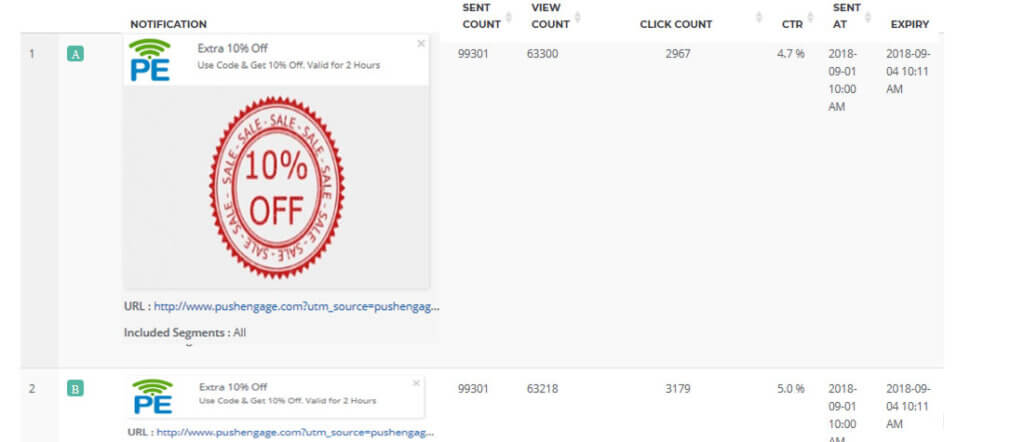
A/B Testi İçin En İyi Uygulamalar –
- Kullanıcılarınızı demografilerine, satın alma modellerine veya site eylemlerine göre segmentlere ayırın. Ardından A/B testi bildirimi gönderebilirsiniz. Bu, daha iyi sonuçlar elde etmenize yardımcı olacaktır.
- Her kampanya öncesinde kullanarak A/B Testini aşırı kullanmayın.
- Çok sayıda varyantla bir test çalıştırmayı planlayın, büyük bir kitleyi hedeflediğinizden emin olun. Bu size daha iyi sonuçlar verecektir.