PushEngage позволяет отправлять таргетированные кампании выбранной базе подписчиков, а не всем. Вы можете быстро добиться этого, используя сегментацию. Сегментация веб-пуш-уведомлений — это мощный способ отправлять таргетированные уведомления конкретным подписчикам на основе их интересов, поведения или других критериев. Вы можете повысить вовлеченность, сократить отток и увеличить количество конверсий, сегментируя свою аудиторию.
В этой статье мы поможем вам понять все типы сегментации.
Сегментация доступна в нашем бизнес-плане и выше. Вы можете ознакомиться с нашими ценами здесь и начать использовать бизнес-план, чтобы воспользоваться преимуществами этой функции.
Типы сегментации
Вы можете использовать демографические, поведенческие и контекстуальные данные для создания эффективных сегментов. Некоторые примеры критериев сегментации могут включать: демографические данные, поведение и контекст.
1. Автоматическая сегментация на основе URL
2. Сегментация по категориям
3. Варианты сегментации по умолчанию — устройство и браузер.
4. Сегментация на основе геолокации
5. Пользовательская сегментация с использованием Javascript API
Как использовать сегментацию
Применяя таргетированный подход к вашим веб-пуш-уведомлениям, вы можете повысить уровень вовлеченности, сократить количество отписок и, в конечном итоге, увеличить количество конверсий для вашего бизнеса.
Автоматические сегменты
Автоматический сегмент позволяет создавать правило сегмента на основе шаблонов URL. Это самый простой способ создавать сегменты через панель управления без дополнительного кода. Вы можете перейти в список установленных плагинов на вашей панели управления WordPress и выбрать PushEngage » Аудитория.
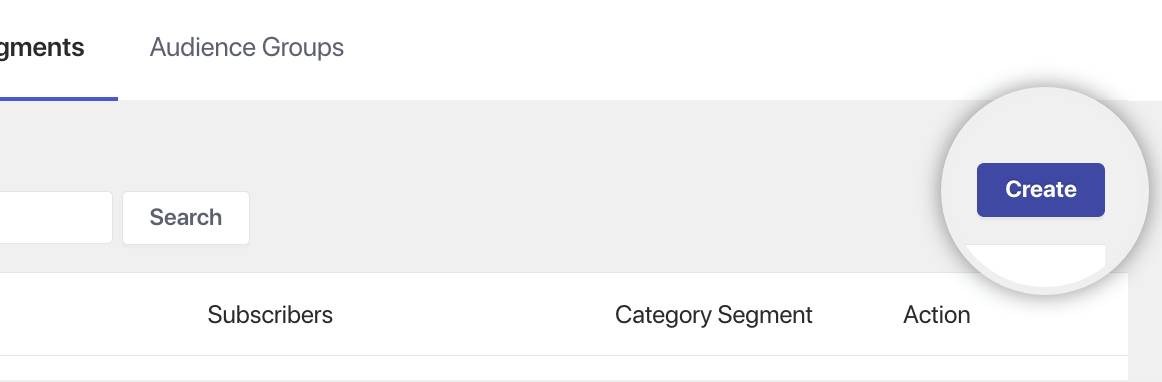
Затем вы можете перейти на вкладку Сегменты и нажать кнопку Создать.
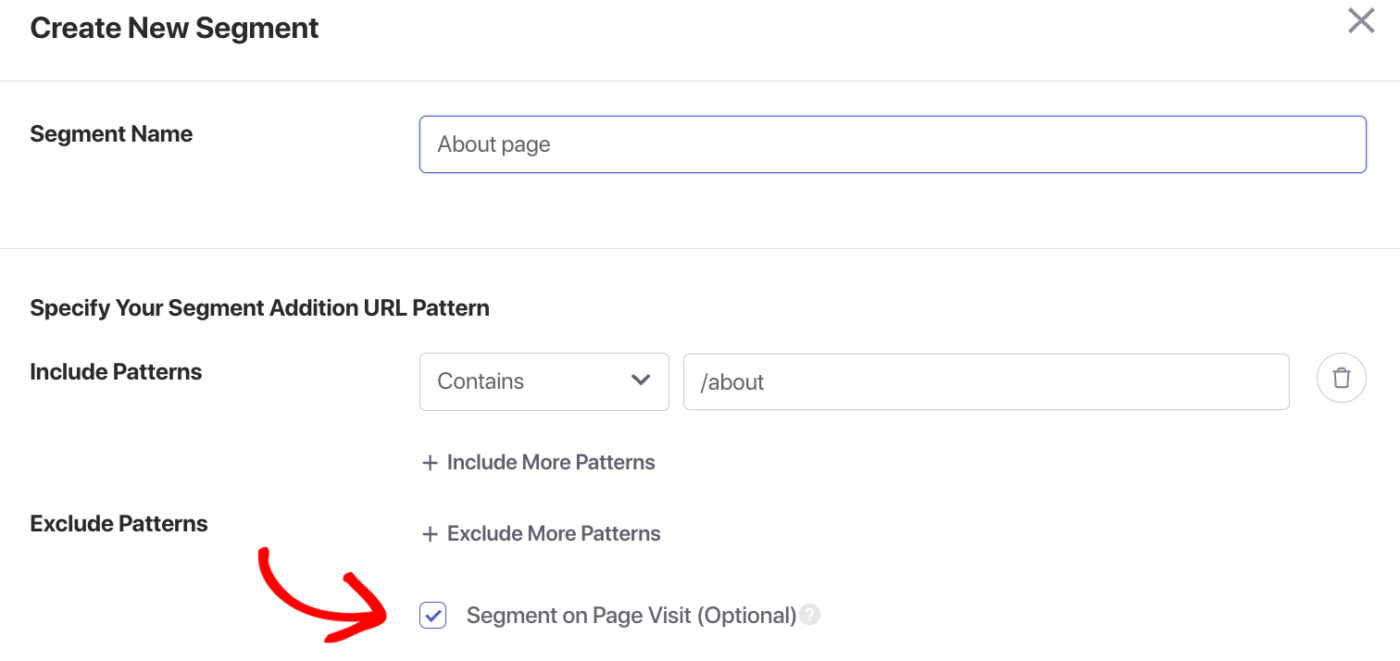
Затем вы можете добавить название сегмента — «О блоге» и добавить правило шаблона URL, содержащее условие.
Убедитесь, что переключатель «Посещение страницы» включен, чтобы не только новые подписчики, но и старые подписчики, которые могли только что войти на главную страницу, были добавлены в сегмент при следующем посещении.
Сегментация по категориям
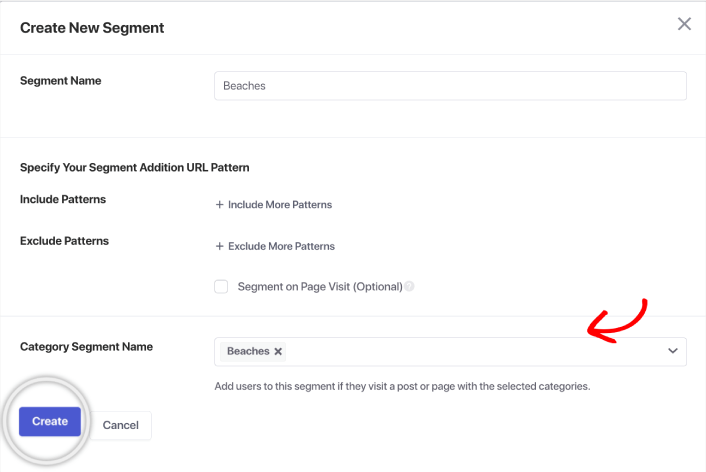
Сегментация по категориям в WordPress может сопоставлять существующие категории с сегментами. Таким образом, вы можете таргетировать любых подписчиков, посещающих определенные категории. Вы можете перейти к созданию сегмента. Затем выберите любую существующую категорию с названием сегмента и нажмите Создать.
Сегменты по умолчанию
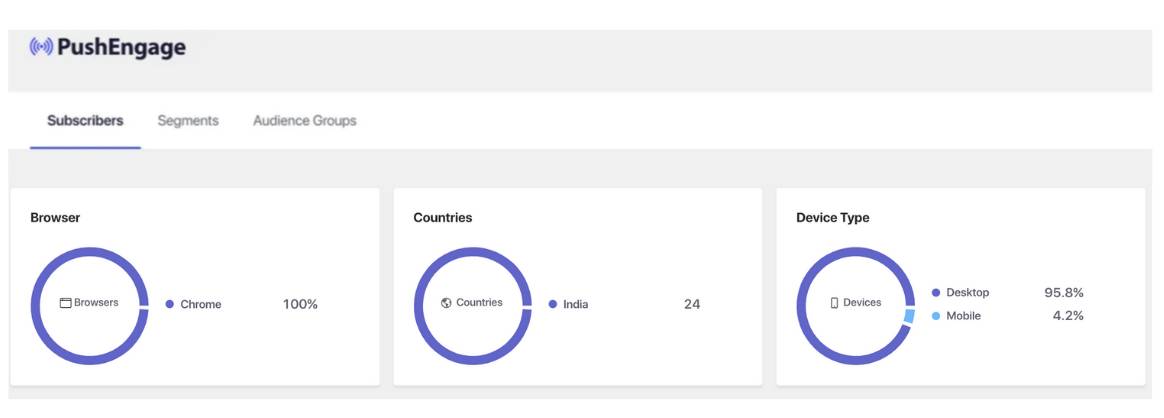
Сегментация по умолчанию содержит демографические сегменты и сегменты устройств/браузеров. Эти данные собираются, когда человек нажимает «Разрешить» и становится вашим подписчиком. Здесь вы можете проверить доступные сегменты на вкладке Аудитория » Подписчики.
Пользовательские сегменты
В пользовательском сегменте вы можете использовать любое событие веб-сайта для захвата в качестве сегмента с помощью Javascript API. У вас есть возможность даже удалять сегменты или добавлять их динамически.
Отправка пуш-кампаний сегментированной аудитории
Создавая кампании веб-пуш-уведомлений, обязательно адаптируйте свои сообщения к уникальным потребностям и интересам каждого сегмента. Например, вы можете отправлять персонализированные рекомендации по продуктам клиентам, которые недавно совершили покупку, или срочные предложения подписчикам, которые ранее проявляли интерес к определенной категории.
Вы можете отправлять кампании веб-пуш-уведомлений тремя способами через панель управления WordPress:
1. Ручная рассылка пуш-уведомлений
2. Отправка через кампании автопуш-уведомлений
3. Отправка сегментированных кампаний через автоответчики Drip
Вот руководство, которое поможет вам отправлять веб-пуш-рассылки и автоответчики Drip по сегментам, а также поможет вам разработать кампанию с учетом лучших практик.
Если у вас возникнут какие-либо проблемы, пожалуйста, не стесняйтесь связаться с нами , нажав здесь. Наша служба поддержки сможет вам помочь.