
Looking for a quick guide to track SEO keyword rankings in WordPress?
Tracking your SEO rankings is one of the most important parts of any SEO campaign. If you can’t track your rankings, you can’t improve your traffic and conversions.
And WordPress has a ton of SEO plugins. But which one allows you to track SEO keywords? Do you need to buy a premium SEO tool like SEMrush or Ahrefs? Do you need a developer to integrate rank tracking into your WordPress site?
The short answer is: No!
You can simply install a WordPress plugin to track SEO keyword rankings. And in this article, we’re going to show you how.
始めましょう。
Why Should You Track SEO Keyword Rankings?
Let’s talk about why it’s a good idea to keep track of your website’s keyword rankings for SEO.
Think of it like keeping an eye on your garden to see how well your plants are growing. Just like you want your plants to flourish, you want your website to show up well when people search for stuff on the internet.
PushEngageは世界No.1のプッシュ通知プラグインです。無料で入手!
Here’s why tracking your SEO keyword rankings is like tending to your online garden:
- See What’s Blooming: By tracking your keyword rankings, you can see how your website is doing in search results. Are your keywords (the words people use to search) helping your site appear on the first page of results? It’s like checking to see if your flowers are blooming nicely.
- Measure Your Green Thumb: You can tell if your SEO efforts are working. If your keyword rankings are going up, it means you’re doing a good job. It’s like getting a thumbs-up for taking care of your garden well.
- Spot the Weeds: If your rankings drop, it’s a sign that something might be wrong. Maybe a new competitor popped up, or your content needs a little makeover. Just like spotting weeds early in your garden and getting rid of them.
- Stay Ahead of the Game: You can keep an eye on what your competitors are doing. If they’re using certain keywords that work well, you might want to consider using them too. It’s like learning from your gardening neighbors about which plants thrive best in your area.
- Tweak and Prune: When you see which keywords are doing great and which ones need a bit of help, you can make changes. It’s like adjusting how much water or sunlight your plants get to make them happier.
- Harvest the Fruits: High rankings mean more people see your site. When more folks visit, you might get more clicks and visitors. It’s like having a lot of people stop by to admire your garden.
- Plant New Seeds: If you notice some keywords are getting popular, you can create more content around them. It’s like planting new seeds in your garden to add more beauty.
- Celebrate Growth: Watching your rankings rise is exciting! It’s like watching your garden grow and flourish. You can pat yourself on the back for a job well done.
So, tracking SEO keyword rankings is like taking care of your website’s garden. You nurture it, watch it grow, and make sure it looks beautiful to everyone passing by (or searching online).
How to Track SEO Keyword Rankings
Now that we understand why we should track SEO keyword rankings, let’s check out how you can do it for your WordPress site.
Step #1: Install an SEO Rank Tracker WordPress Plugin
Before you can track SEO keyword rankings for your WordPress site, you need to pick the right WordPress SEO plugin. We recommend using All In One SEO.

All in One SEO(AIOSEO)は、WordPressコミュニティで最も高く評価されているSEOプラグインの1つです。元のバージョンは、多くの新機能とアドオンを追加するために完全に作り直されました。したがって、過去にAIOSEOを使用したことがある場合は、もう一度プラグインを確認する必要があります。
AIOSEOには、最新のSEOベストプラクティスを実装するのに十分強力なSEO機能があるだけでなく、特定のSEOの問題をすぐに解決するための高度なSEO設定も利用できます。これには以下が含まれます:
- ローカルオーディエンスを持つ中小企業向けのローカルSEOモジュール
- オンラインストア向けのWooCommerce SEO
- WordPressエディター内のSEOオプティマイザー
- 検索エンジンでの即時インデックス作成のためのスマートサイトマップ
- リッチスニペットでコンテンツをランク付けするためのスキーマプラグイン
And of course, you also get a built-in SEO rank tracker to stay on top of your SEO rankings.
要するに:All in One SEOを使用すると、専門家を雇うことなく、WordPress SEOを適切に設定できます。All in One SEOの300万以上の顧客(私たち自身も含む)が信じられるなら、AIOSEOはあらゆるSEO要件に対応する素晴らしい検索エンジン最適化ソフトウェアです。
専門家を雇うことなくSEOの処理を支援してくれるため、ブロガーや中小企業のオーナーに最適です。All in One SEOレビューで私たちの言葉を信じるか、AIOSEOが検索結果でビジネスをトレンドさせるのに役立つ影響について読むことができます。
注意:Google Search ConsoleはAll in One SEOでのみ統合できます。より詳細なウェブサイト分析が必要な場合は、MonsterInsightsプラグインをインストールしてWordPressサイトにGoogleアナリティクスをインストールすることを検討してください。
Step #2: Get an Overview of Keyword Rankings
Head over to the Search Statistics section in the WordPress plugin to see an overview of your keyword rankings:
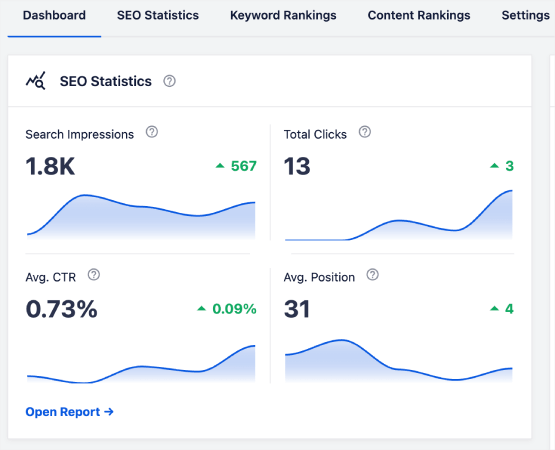
メインダッシュボードには、トップキーワードとトップ勝者/敗者キーワードの概要を示すキーワードランキングセクションもあります。
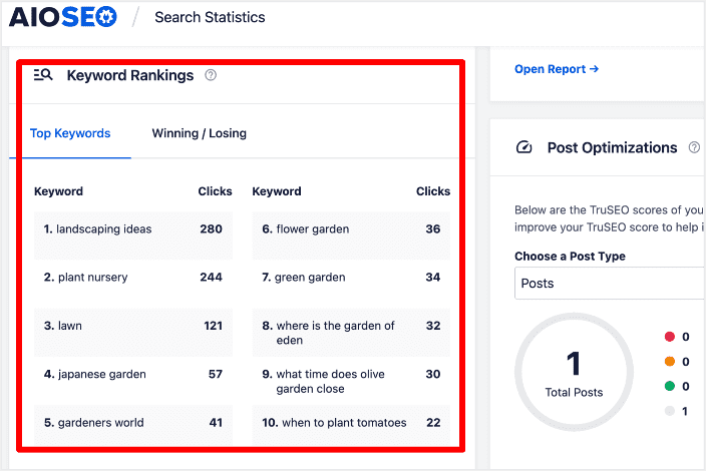
ランキングが低下しているキーワードを特定することは、パズルのピースがどこに欠けているかを見つけるようなものです。これにより、それらのページの状況を把握し、それらの順位を取り戻すための戦略を計画することができます。
And guess what? When you do that, you’ll see more people visiting your site, which means more money in your pocket. It’s like solving a puzzle to make your website even better!
On the other hand, the Top Winning keywords can give you insight into the SEO tactics that are producing results so you can replicate them.
Step #3: Dive Deep into the Keyword Rankings Report
キーワードパフォーマンスの全体像を把握したら、次のステップはキーワードランキングレポートを開くことです。ここでは、コンテンツのランキングの詳細な統計を確認することもできます。
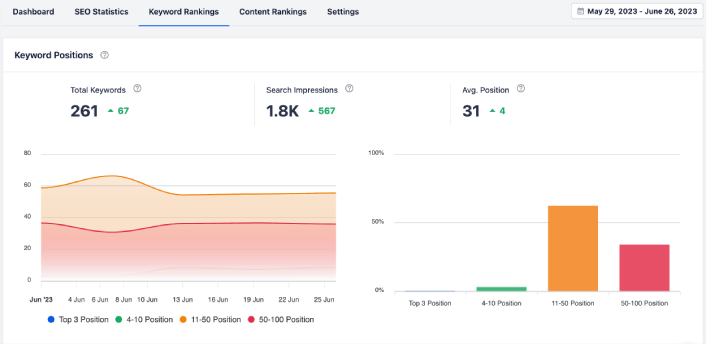
さらに下にスクロールすると、検索ランキングを獲得または失っている正確な投稿を確認することさえできます。さらに、クリック数で最適なキーワードをフィルタリングし、ランキングを即座に確認できます。
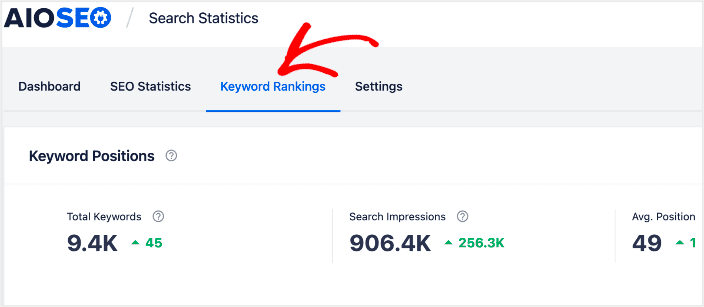
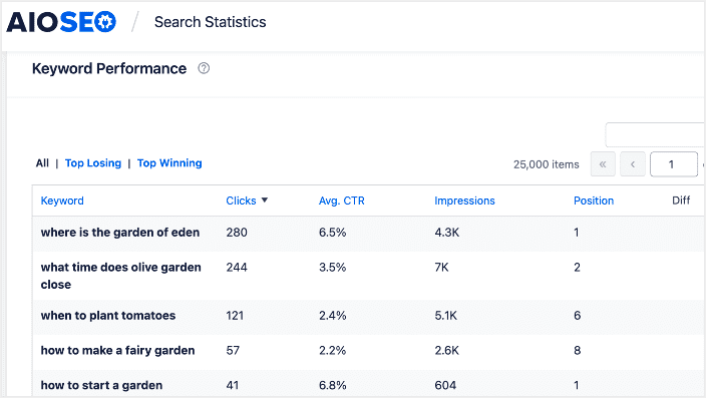
ここでは、すべてのキーワードとそのSERPでのパフォーマンスの詳細なレポートを取得できます。キーワードパフォーマンスセクションまでスクロールすると、個々のキーワードがどのようにパフォーマンスを発揮しているかを詳しく見ることができます。
ここでは、使用しているすべての単語とその検索結果でのパフォーマンスに関する完全なレポートを取得できます。キーワードパフォーマンス部分までスクロールすると、各単語が単独でどのようにパフォーマンスを発揮しているかを詳しく調べることができます。
トップ勝者タブをクリックすると、ランキングが向上しているキーワードが表示されます。
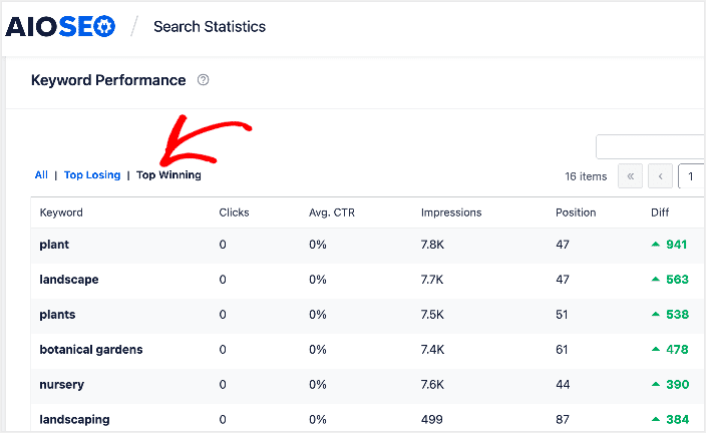
These show that you’ve optimized well for the target keywords and that your SEO strategy is working.
Step #4: Check Your Top Losing Keywords
トップ勝者キーワードを確認するだけでなく、トップ敗者キーワードを追跡することもできます。これを行うには、キーワードパフォーマンスレポートのトップ敗者タブをクリックします。
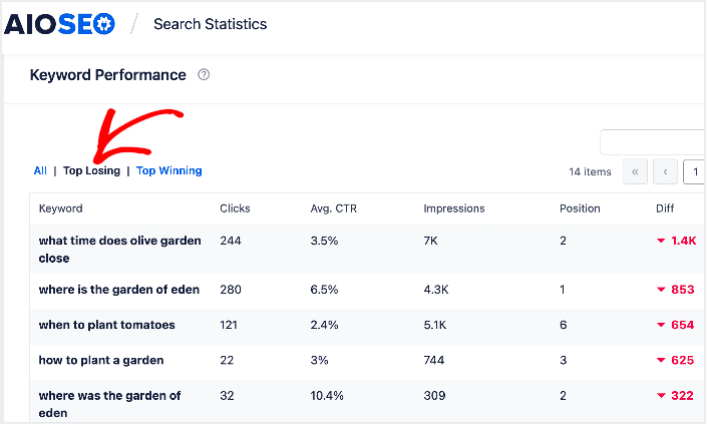
このセクションでは、ランキングが低下しているキーワードを示します。これは、最適化する必要のあるキーワードとコンテンツを示すため、非常に重要な情報です。キーワードのランキングが低下している場合は、すぐにコンテンツを更新する必要があります。
What to do After You Track SEO Keyword Rankings
Tracking your SEO rankings is only one part of the puzzle. Our top recommendation is to use All in One SEO to optimize your website content. The right tools can help you with getting repeat traffic, engagement, and sales. For that, we recommend using push campaigns.
プッシュ通知は、ビジネスを成長させるための強力なマーケティングツールになり得ます。まだ確信が持てませんか?これらの素晴らしいリソースをご覧ください。
- 顧客エンゲージメントを高めるための7つのスマートな戦略
- プッシュ通知は効果的ですか?7つの統計情報+3つの専門家のアドバイス
- Web通知WordPressプラグインをサイトに追加する方法
- 放棄されたカートのプッシュ通知を設定する方法(簡単なチュートリアル)
プッシュ通知キャンペーンを作成するためにPushEngageの使用をお勧めします。PushEngageは世界No.1のプッシュ通知ソフトウェアです。まだお済みでない場合は、 今すぐPushEngageを使い始めましょう!


