
Looking for a resource on how to sell show tickets online with WordPress?
Selling tickets online can be hard. Online marketplaces lack customizability and they usually charge a ton of fees as commissions. Offline resellers at event venues are pretty much the same. So, using WordPress to sell show tickets online is a smart choice for your business.
WordPress offers user-friendly plugins and themes such as Easy Digital Downloads and it’s super easy to set up a professional ticketing system with zero technical knowledge. But how do you get started?
In this article, we’re going to show you step by step how to sell show tickets online with WordPress. The best part? You can complete the setup in 10 minutes or less!
さあ、始めましょう。
How to Sell Show Tickets Online Without Coding
The last thing you need to think about right before a major event is how to sell show tickets online. Of course, if you’re just getting started as an artist, then you HAVE to think about all that. And if you’re an agent looking to promote your artists, then selling tickets online makes a lot of sense.
You get full control over your promotion list. On top of that, you can also control the pricing based on demand. You can also save a lot by paying only a small transaction fees to process online payments.
PushEngageは世界No.1のプッシュ通知プラグインです。無料で入手!
If you follow along with this tutorial step by step, you’ll be able to sell show tickets online using a simple WordPress site.
Just follow along.
Step #1: Selecting the Right Events Plugin to Sell Show Tickets Online
Before we start selling event tickets on WordPress, you’ll need a WordPress site. If you don’t have one, you should check out our guide on how to create a WordPress site. WordPress gives you all the control you need to create beautiful pages to promote your event as well as the technical specs you need to sell tickets online.
What’s even better is that you don’t need any coding experience to use WordPress. You can install plugins to do most of the heavy lifting for you and start selling tickets in a matter of a few hours.
To sell event tickets on WordPress, we recommend using Sugar Calendar.
Sugar Calendar is a simple, easy to use events calendar plugin for WordPress. The best part about Sugar Calendar is how many different features it has. You can use Sugar Calendar for:
- イベント管理
- イベントチケット販売
- 繰り返しイベント
- 複数日イベント
- ウェビナー
- 一般公開上映会
- パーティー
- 展示会
- オープンマイクナイト
- デモンストレーション
- 製品発表会
And more! The beauty of the plugin is that you can use it directly from the WordPress dashboard using the WordPress editor. Check out our Sugar Calendar review for a detailed breakdown of its features. When you’re done, let’s get started with selling tickets.
Step #2: Setting Up Sugar Calendar
Sugar Calendar プラグインをインストールして有効化する必要があります。方法がわからない場合は、WordPress プラグインのインストール方法に関するこの記事を確認してください。
We recommend getting either a Professional or Ultimate license:
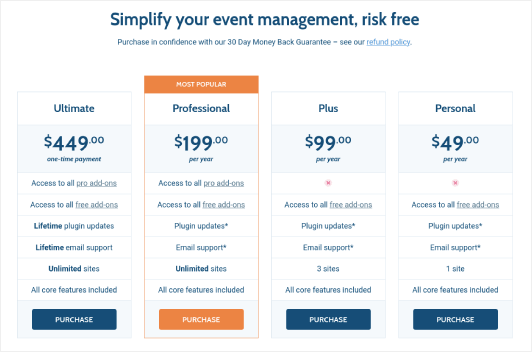
With a Professional or Ultimate license, you can get access to their Event Ticketing add-on that will make it easy to sell show tickets online with WordPress.
次に、Sugar Calendar ダッシュボードに移動し、**ライセンス**にアクセスします。
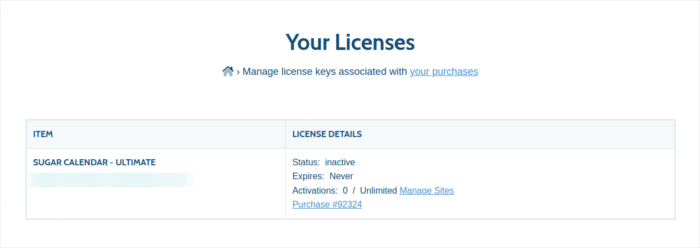
ライセンスキーをコピーします。完了したら、WordPress ダッシュボードに移動し、**カレンダー » 設定 » ライセンス**にアクセスします。
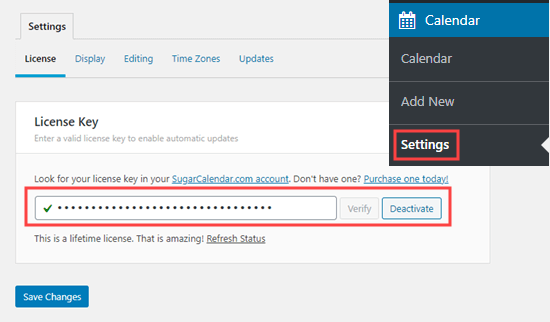
ライセンスキーを貼り付けます。完了したら、**変更を保存**をクリックします。
Step #3: Adding a Event to Sell Show Tickets Online
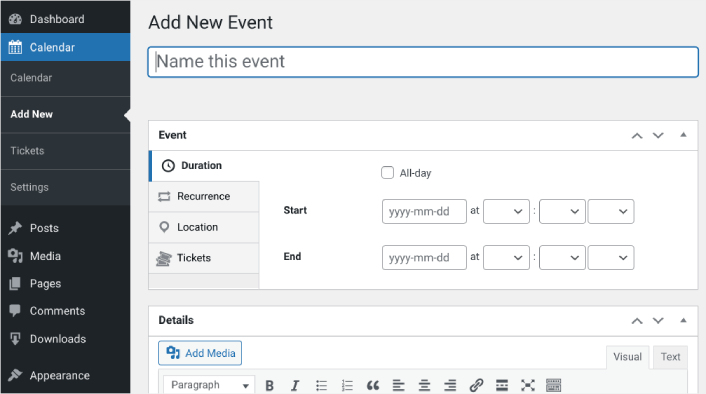
Let’s start by creating the event you want to sell tickets for inside your WordPress site. Go to Calendar » Add New. You can name the event, add a description, and configure the dates:
Next, navigate to the Tickets tab. Then click on Enable Ticket Sales:
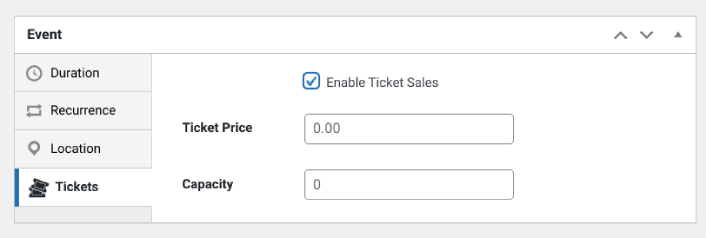
Then you can enter a ticket price and set the capacity, meaning the quantity of tickets available. If you want to sell unlimited tickets, you can leave this value at 0.
Step #3: Start to Sell Show Tickets Online with WordPress
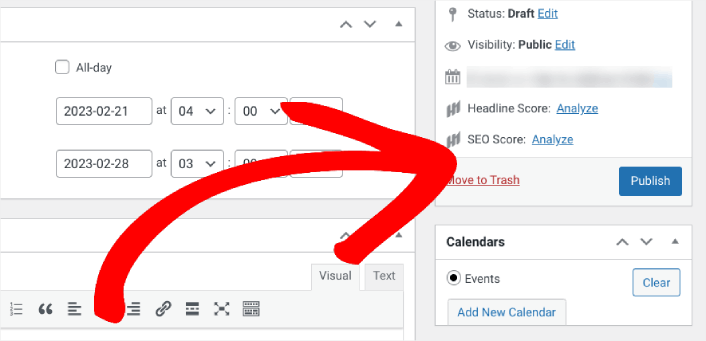
When you’re done configuring the event and enabling tickets, the only thing left to do is to start selling. In the right-hand settings panel under Calendar, select your calendar or click on Add New Calendar. Then click Publish:
Then you can preview the event to see how it looks on your WordPress site:
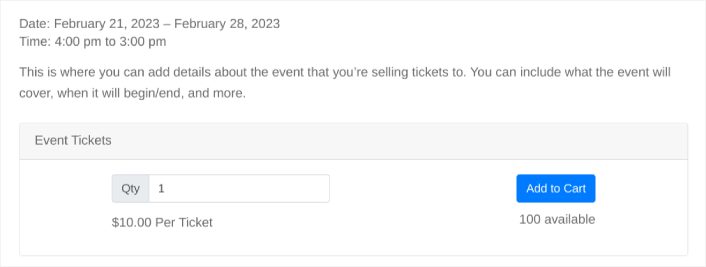
Congratulations! You can now sell show tickets on your WordPress site.
How to Sell Show Tickets Online Even Faster
Now that your event is up, it’s time to grow your sales fast.
売上を増やす素晴らしい方法は、自動プッシュ通知キャンペーンを作成することです。プッシュ通知は、サイトへのリピートトラフィック、エンゲージメント、および売上を増やすための非常に優れたツールになります。プッシュ通知キャンペーンに慣れていない場合は、より速く成長するのに役立つこれらの素晴らしいリソースを確認してください。
- コンバージョン率の高いプッシュ通知オプトインの7つの例
- ウェブサイトでWebプッシュ通知を設定する方法
- Webプッシュ通知を使用して購読者を購入者に転換する方法
- Web通知WordPressプラグインをサイトに追加する方法
プッシュ通知キャンペーンには PushEngage の使用をお勧めします。PushEngage は世界No.1のプッシュ通知ソフトウェアです。そのため、キャンペーンは安全な手に委ねられ、プッシュ通知で非常にクリエイティブになることができます。この例のように:

ビジネスの成長に真剣に取り組んでいるなら、PushEngageに投資すべきです。


