
Ikke alle besøgende er klar til at chatte i det øjeblik, de lander på din hjemmeside. Faktisk fører det at vise en chat-widget for tidligt ofte til lavere engagement og højere afvisningsprocent.
En smartere tilgang er at udløse chat kun når den besøgende har scrollet 50% af siden – et signal om, at de er engagerede, interesserede og mere tilbøjelige til at interagere.
PushEngage's chat-widget gør dette utroligt nemt.
Denne hurtige guide vil gennemgå, hvorfor scroll-baserede udløsere virker, og hvordan du opsætter dem med få klik.
Send multichannel-beskeder i dag!
Push- og WhatsApp-beskeder er super effektive, billige marketingværktøjer, der hjælper dig med at øge din gentagne trafik, engagement og salg automatisk.
Hvorfor en 50% scroll-udløser virker
En besøgende, der når 50% af en side, har vist klar intention. De har investeret tid, absorberet dit indhold og signaleret nysgerrighed.
En 50% udløser hjælper dig med at:
- Undgå at afbryde læsere for tidligt
- Fange besøgende, når de er fuldt opvarmede
- Øge chat-åbningsrater
- Forbedre lead-kvalitet
- Reducere agenternes arbejdsbyrde fra chats med lav intention
Dette er især effektivt for:
- Lange blogindlæg
- Produktsammenligningssider
- Ultimative guides
- FAQ-sider
- Vejledninger
Sådan håndterer PushEngage scroll-baserede chat-udløsere
PushEngage inkluderer indbyggede Adfærdsregler for chat-widgets. Disse regler bestemmer, hvornår en chat-widget vises baseret på den besøgendes handlinger.
En af de mest nyttige er: Vis, når besøgende scroller X%
Dette giver dig mulighed for at forsinke widgetten, indtil en hvilken som helst scroll-tærskel, du vælger - 50% er en af de bedst ydende indstillinger for informationsrige eller indholdstunge sider.
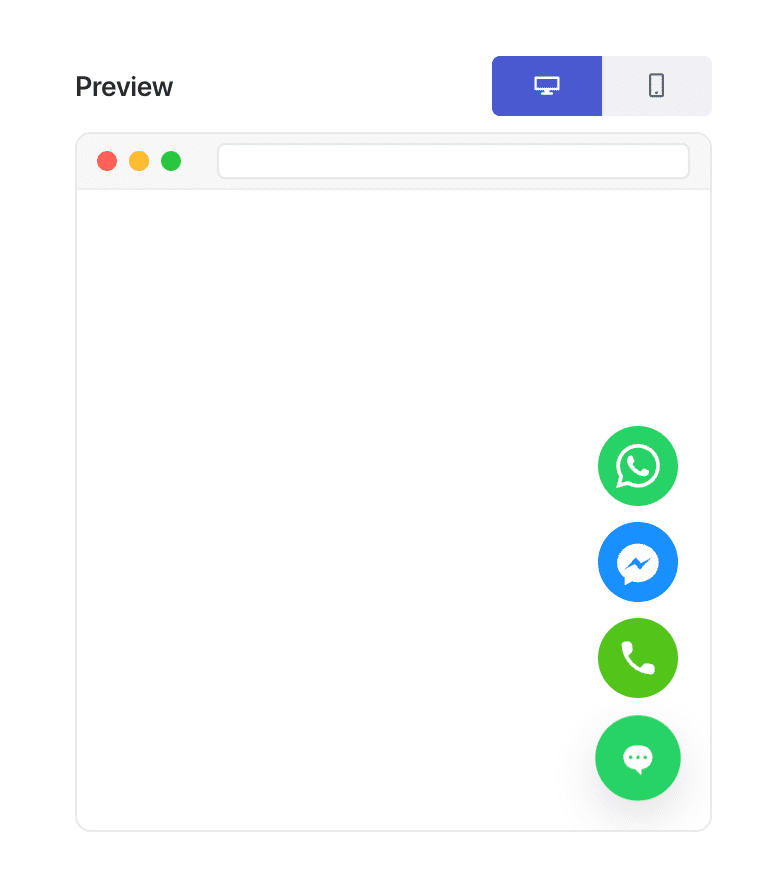
Denne fleksibilitet er præcis, hvad der gør "side-type-baseret personalisering" mulig.
Sådan udløser du din chat-widget ved 50% scroll (trin for trin)
Trin 1: Opret eller rediger en chat-widget
I dit WordPress-dashboard:
Gå til PushEngage » Chat Widgets og klik på Opret ny widget eller Rediger en eksisterende.
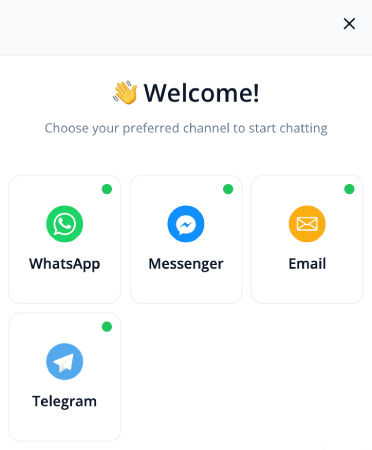
Opsæt din besked, kanaler og design som normalt.
Trin 2: Åbn fanen Adfærd
Inde i widget-editoren skal du gå til Udløsere. Dette styrer, hvornår widgetten vises.
Vælg Vis efter scroll % fra dropdown-menuen for udløsere:
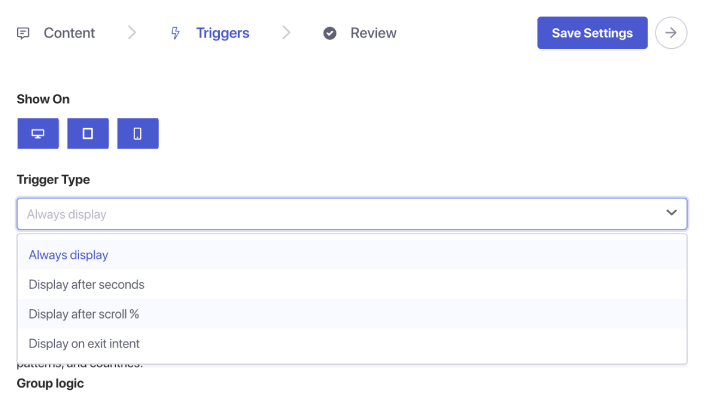
Du vil se et procentfelt dukke op. Indstil scroll-dybden til 50%. Dette fortæller PushEngage at vente, indtil en bruger har scrollet halvvejs ned på siden, før chat-widgetten vises.
Trin 3: Gem og publicer
Klik på Gem widget.
Sørg derefter for, at widgetten er aktiveret og målrettet mod de sider, du ønsker. Din chat-widget vil nu blive udløst præcis ved 50% scroll-punktet på hver tildelt side.
Pro Tip: Kombiner scroll-udløser + side-målretning
Scroll-baserede udløsere bliver endnu mere kraftfulde, når de parres med målretningsregler.
Du kan vise widgetten:
- Kun på blogindlæg
- Kun på WooCommerce produktkategorier
- Kun på langt indhold
- Kun for tilbagevendende besøgende
- Kun på prissider
Gå blot til fanen Udløsere og indstil sidebetingelser.
Bedste praksis for 50% scroll chat-udløsere
For at opnå de bedste resultater:
1. Kombiner ikke 50% scroll med øjeblikkelige udløsere
Det underminerer formålet med intentionsbaseret engagement.
2. Hold beskeden hjælpsom, ikke påtrængende
Eksempler:
- “Har du brug for hjælp til at forstå denne side?”
- “Ønsker du personlige anbefalinger?”
- “Har du et spørgsmål? Jeg er her for at hjælpe!”
3. Undgå at bruge flere scroll-udløste widgets på én gang
Én widget pr. side holder oplevelsen ren.
4. Test på både mobil og desktop
Scroll-dybde kan føles forskellig på tværs af enheder.
Hvad du skal gøre efter opsætning af chat-widgets
En 50% scroll-udløser er en af de enkleste måder at vise chat på det perfekte tidspunkt – *efter* den besøgende er engageret, men *før* de forlader siden.
Med PushEngages adfærdsregler tager det mindre end et minut at opsætte dette og forbedrer straks kvaliteten og intentionen af indgående chats.
Med PushEngage kan du opsætte dette på få minutter – og straks begynde at se bedre engagement, højere konverteringer og mere effektive agentarbejdsmængder.
- Kunder ser altid nogen online
- Responstiderne falder
- Før-køb konverteringer stiger
- Support føles hurtigere og mere pålidelig
- Din butik føles globalt klar
Når tidsplanerne er indstillet, kan dit team arbejde mere effektivt – og dine kunder får den oplevelse, de forventer.
Hvis du endnu ikke har opsat agentprofiler og -planer i PushEngage, er det nu, du skal gøre det.
Ikke overbevist? Se disse fantastiske ressourcer om multichannel marketingkampagner:
- Sådan øger du hotelsalg i lavsæsonen
- Sådan laver du multichannel-marketing for hoteller i 2026
- Sådan konverterer du abonnenter til købere ved hjælp af web push-notifikationer
- Sådan giver du abonnenter besked om nye WordPress-indlæg
- Sådan sender du lager-tilbage-notifikationer for at få mere salg
- Sådan renses push-notifikationsabonnentlister (nemt)
- Sådan sendes RSS push-notifikationer automatisk
- Sådan bruges push-notifikationer til at promovere en nyhedsside
- Sådan bruges cross-selling push-notifikationer til at fordoble dit salg
- Sådan bruges browse abandonment push-notifikationer (4 trin)


