Leder du efter en hurtig og nem måde at sortere push-notifikationer på og finde dine bedst ydende kampagner?
Sortering af dine push-kampagner efter performance-metrikker hjælper dig med at forstå, hvad der virker, og hvad der ikke gør. Endnu vigtigere er, at du kan bruge dine bedste kampagner som grundlag for nye kampagner.
Sorteringsfunktionen er ikke standard for alle push-notifikationstjenester. Selvom du får funktionen, kan du muligvis ikke bruge den uden at bruge deres API-tjeneste. Hvilket betyder, at du skal bruge en udvikler til at gøre det for dig.
Hvis du har en intern udvikler, er det fint. Men hvis du ikke har det, anbefaler vi kraftigt at skifte til PushEngage. PushEngage giver dig mulighed for at filtrere dine kampagner med et par enkle klik.
I denne artikel vil vi vise dig trin for trin, hvordan du sorterer push-notifikationer og finder dine bedste kampagner.
Hvorfor vil du filtrere og sortere push-notifikationer?
Du kan filtrere og sortere push-notifikationer for at finde de bedst ydende kampagner eller endda dine dårligst ydende kampagner.
Det episke ved disse filtre er, at du kan se:
- Typer af push-notifikationer, som du sender flest af
- Hvor godt specifikke typer notifikationer klarer sig
- Identificer sæsonbestemte tendenser i kampagnens performance
- Hvilke typer kampagner der skal optimeres med det samme
Og du kan gøre det med et par enkle klik!
Du kan også sortere push-notifikationerne efter Senest Oprettet eller Ældst Oprettet. På denne måde kan du gøre det super nemt at finde specifikke kampagner, selv efter du har filtreret efter et datointerval.
Tillader din push-notifikationstjeneste kampagnesortering?
Ikke alle push-notifikationstjenester giver dig mulighed for at filtrere og sortere push-notifikationer. I hvert fald ikke direkte. Nogle gange kan du gøre det ved hjælp af deres API-tjeneste. Men det er svært at gøre, hvis du ikke har en intern udvikler.
En god måde at verificere på er simpelthen at spørge din tjenesteudbyder, om de har en oprydningsmulighed. Men chancerne er, at de ikke har en med tilgængelige muligheder.
Vi anbefaler, at du skifter til PushEngage med det samme.

PushEngage er den bedste push-notifikationstjeneste i verden. Og vi taler ikke kun om gratisversionen. Den giver dig mulighed for at forbinde med besøgende, efter de har forladt dit websted, med målrettede push-beskeder.
PushEngage er vores førstevalg til push-notifikationstjenester og -værktøjer, fordi det er:
- Den er så nem at bruge
- Effektiv på HTTP- og HTTPS-websteder
- Leveres med en visuel builder, der kræver lidt eller ingen kodning at sætte op
- Opsæt nemt fuldt automatiserede push-meddelelseskampagner for enhver form for websted
- Har flere muligheder for at sende personlige push-notifikationer for højere klikrater
- Udstyret med brugerdefineret målsporing, UTM-parametre og avanceret analyse
Og dette er kun lige begyndelsen. Tjek PushEngages fulde liste over funktioner, før du går videre.
Den mest utrolige del ved PushEngage er, at den har en evigt gratis plan, som du kan prøve, før du træffer en købsbeslutning.
PushEngages gratis plan er god nok til at få din virksomhed til et punkt, hvor du nemt har råd til de betalte planer. De starter ved 9 USD/måned i det første år (1.000 abonnenter, faktureret årligt) og skalerer med dit abonnentantal; 100.000 abonnenter er Premium-planen, og de aktuelle tal findes på prissiden.
De samlede skifteomkostninger er ret lave. Så vi opfordrer dig kraftigt til at skifte til PushEngage med det samme. Oprydningsfunktionen er ikke den eneste grund til at købe en PushEngage-plan. Du får en masse avancerede funktioner, som andre push-notifikationsværktøjer simpelthen ikke tilbyder.
Sådan filtreres og sorteres notifikationer hurtigt
Nu hvor du har skiftet til PushEngage, er det tid til at rydde op i din push-notifikationsabonnentliste.
Hvis du er ny til sporing af push-notifikationer, har vi nogle rigtig gode nyheder til dig. Du kan nemt sortere og filtrere dine push-udsendelser.
Gå til dit PushEngage dashboard og gå til Push Udsendelser:

Her vil du bemærke, at der er en filtermulighed:
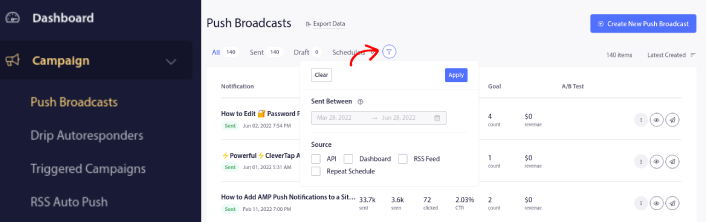
Du kan filtrere de push-udsendelser, du har sendt ud, efter dato og kilde:
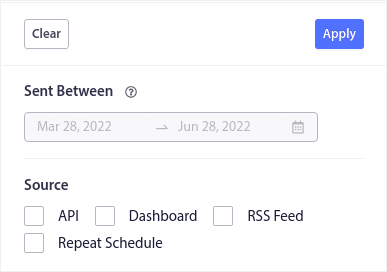
Lad os sige, at du har en Black Friday push-notifikationskampagne, der strækker sig over flere dage.
Nu kan du få et klart billede af, hvilke notifikationer der klarede sig bedst, og hvilke der ikke klarer sig så godt. Og denne information kan hjælpe dig med at optimere dine nuværende udsendelser og kampagner.
Hvis du er ny til at bruge push-notifikationer, skal du vide, at du kun kan A/B-teste push-udsendelser. Men du kan bruge sorterings- og filtreringsmulighederne til at anvende optimeringer på selv dine automatiserede kampagner. Det er en rigtig smart måde at opsætte best practices for push-notifikationer for din branche og dit brand.
Hvad skal du gøre, efter du har sorteret push-notifikationer
Efter du har sorteret dine push-notifikationer, kan du se på detaljerede analyser og derefter vende tilbage til at optimere dine push-notifikationskampagner og udvide din forretning.
Vi foreslår også, at du tager dig tid til at læse vores artikler og lære, hvordan du supercharger dine automatiserede push-notifikationer. Start med vores artikel om bedste praksis for push-notifikationer.
Hvis du er ny til push-notifikationer, bør du følge en fuld push-notifikationstestproces, før du går live. Det vil hjælpe dig med at fejlfinde almindelige problemer, før dine besøgende ser dem og begynder at klage over en ødelagt brugeroplevelse. Og helt sikkert bør du opsætte Google Analytics til at spore push-notifikationer.
Retargeting af push-notifikationer for at målrette abonnenter, der klikkede på dem eller ej. Lad os vide, hvordan det virker for dig. I mellemtiden kan du tjekke disse ressourcer:
- Sådan øger du klik på dine push-notifikationer med nysgerrighed
- Sådan personaliserer du hver push-notifikation
- Sådan skiller du dig ud med rich media i dine push-notifikationer
- Sådan genaktiverer du inaktive push-abonnenter
- Sådan bruger du push-notifikationer til at holde kunderne informeret
- Sådan bruger du emojis i dine push-notifikationer for højere klikrater
- Sådan øger du konverteringer ved at skabe en følelse af hastværk
Og hvis du ikke allerede har gjort det, kom i gang med PushEngage.


