Leder du efter en guide til at oprette dryp-kampagner for at øge dit salg?
Markedsføring er ufuldstændig i dag uden automatisering. Selvfølgelig kan du indsamle abonnenter og sende push-meddelelser og e-mails ud. Hvad så? Bliv ved med at sælge dem din virksomhed med hvert nyhedsbrev og håbe, at dine abonnenter konverterer?
Der er ingen måde at:
- Personalisere dine kampagner
- Få nye kunder på autopilot
- Beholde eksisterende kunder med dit indhold
- Upsælge eller krydssælge produkter
- Genvinde tabt salg
Medmindre... du bruger dryp-kampagner, der konverterer.
I denne artikel viser vi dig, hvordan du opsætter dryp-kampagner og får mest muligt ud af dem. Det bedste? Du behøver ingen tidligere erfaring.
Lyder godt? Lad os dykke ned.
Hvad er dryp-kampagner?
Tænk på dryp-kampagner som at opsætte en masse e-mails eller endda push-meddelelser, der sendes ud automatisk, lidt ligesom et sprinkleranlæg til din have. I stedet for at vande planter, sender du beskeder ud til folk, der er interesserede i det, du har at sige eller sælge.
Her er, hvordan det fungerer:
- Det er ikke magi, det er automatiseret: Når du har sat det op, fortsætter disse beskeder med at blive sendt ud af sig selv. Du behøver ikke at blive ved med at sende dem manuelt.
- Du kan tale med de rigtige mennesker: Du kan sende forskellige beskeder til forskellige grupper af mennesker. For eksempel kan en person, der lige har tilmeldt sig, få en venlig "hej"-besked, mens en anden person, der har været med i et stykke tid, kan få særlige tilbud eller opdateringer.
- Det er personligt: Disse beskeder kan bruge personens navn eller tale om ting, de har vist interesse for. Det får dem til at føle, at du virkelig taler til dem, ikke bare sender det samme til alle.
- Timing er alt: Beskederne sendes på tidspunkter, der giver mest mening – som lige efter nogen tilmelder sig eller kigger på noget på dit websted.
- Hver besked har en opgave: Hver e-mail eller meddelelse er beregnet til at gøre noget specifikt, som at hjælpe folk med at lære dit produkt bedre at kende eller minde dem om noget, de kiggede på, men ikke købte.
- Du kan se, hvordan det går: Du kan tjekke ting som, hvor mange der åbner beskederne eller klikker på links indeni. Dette hjælper dig med at vide, om dine beskeder fungerer godt.
Dryp-kampagner er ikke kun til e-mails – de virker også til app push-meddelelser og web push-meddelelser. De er gode til at holde kontakten med folk, der er interesserede i dine ting, uden at overvælde dem. Det er en smart måde at holde folk engagerede og interesserede i det, du laver.
Typer af dryp-kampagner
Lad os dykke ned i de forskellige typer af drypkampagner. Ligesom is kommer i alle mulige varianter, har drypkampagner også forskellige typer. Hver type er skræddersyet til et specifikt formål eller publikum. Her er nogle af de mest almindelige:
- Velkomstserie: Dette svarer til at sige “Hej!” til en ny person. Når nogen tilmelder sig dine e-mails eller notifikationer, sender du dem et par venlige beskeder for at introducere dem til dit brand eller din service. Det er som at rulle den røde løber ud for dine nye gæster.
- Onboarding Kampagner: Tænk på dette som en hjælpsom guide. Når nogen køber et produkt eller tilmelder sig en service, guider disse beskeder dem gennem, hvordan de bruger det, tilbyder nyttige tips eller viser dem ting, de måske ikke kender til. Det er som at give en rundvisning til en ny person i byen.
- Påmindelser om forladt indkøbskurv: Har du nogensinde lagt noget i din online indkøbskurv og derefter glemt det? Disse kampagner er små skub for at minde folk om ting, de var interesserede i, men ikke købte. Det er som et blidt puf på skulderen, der siger: “Hej, har du glemt dette?”
- Genaktiveringskampagner: Disse er til at række ud til folk, der plejede at interagere med dit brand, men ikke har gjort det i et stykke tid. Det er som at ringe til en gammel ven og sige: “Hej, lad os mødes!” Du kan tilbyde dem et særligt tilbud eller bare minde dem om dit brand.
- Uddannelsesindhold: Her er målet at lære dit publikum noget værdifuldt relateret til dit produkt eller din branche. Det er som et minikursus, leveret i små, fordøjelige beskeder. Tænk på det som en serie af sjove og informative lektioner.
- Produktopdateringer: Har du noget nyt eller forbedret? Denne type kampagne holder dit publikum opdateret om nye funktioner, produkter eller services. Det er som at vise dine venner din seneste gadget.
- Eventinvitationer: Afholder du et webinar, en workshop eller et andet event? Disse kampagner handler om at få folk begejstrede og tilmeldt dine events. Det er som at sende seje invitationer til en fest.
- Sæsonbestemte kampagner: Disse er knyttet til bestemte tidspunkter på året, som helligdage, sæsoner eller særlige begivenheder. Det er som at pynte din butik til jul eller have et sommersalg.
Hver type drip-kampagne har sin egen charme og formål. Ved at matche den rigtige type kampagne med dit publikum og dine mål kan du skabe meningsfulde forbindelser og holde dit publikum engageret på en måde, der føles naturlig og ikke for salgsagtig.
Sådan opretter du Push Notification Drip Kampagner
Det er ikke svært at installere push-notifikationer på et websted. Men det indebærer et par trin, og du vil gerne følge denne guide trin for trin.
Spring ikke frem i tiden på noget tidspunkt, og du vil være okay.
Før du opretter en velkomst push-notifikationskampagne, skal du vælge en push-notifikationstjeneste. En push-notifikationstjeneste er en software, der giver dig mulighed for at oprette push-kampagner uden kodning.
Vi anbefaler at bruge PushEngage.

PushEngage er verdens førende plugin til push-notifikationer.
Push-notifikationer hjælper dig med at øge din webtrafik og dit engagement automatisk. Og hvis du driver en onlinebutik, hjælper PushEngage dig også med at øge dit salg ved at hjælpe dig med at oprette automatiserede e-handels-push-notifikationer.
Du kan komme i gang gratis, men hvis du er seriøs omkring at vækste din forretning, bør du købe en betalt plan. Før du køber en push-notifikationstjeneste, bør du også se denne guide til priser på push-notifikationer.
Her er et hurtigt overblik over, hvad du får med PushEngage:
- Højt konverterende automatiserede kampagner
- Flere målretnings- og kampagneplanlægningsmuligheder
- Målsporing og avanceret analyse
- Smart A/B-test
- En dedikeret succesmanager
Du vil se, at PushEngage uden tvivl er det bedste valg, hvis du vil opbygge trafik, engagement og salg for din virksomhed. Og hvis du har et stramt budget, kan du altid være lidt kreativ med dine push-notifikationer.
BEMÆRK: Hvis du driver et WordPress-site, bør du installere og aktivere PushEngage WordPress-plugin.
Lad os komme i gang!
Trin #1: Opret en gratis PushEngage-konto
Gå til PushEngage og klik på Kom i gang gratis nu:
Du kan komme i gang med gratisplanen. Men hvis du ønsker at sende målrettede push-notifikationer, bør du vælge Growth Plan. Når du ved, hvilken plan du vil have, skal du klikke på Kom i gang for at oprette din PushEngage-konto.
Trin #2: Tilmeld dig PushEngage
Nu er det tid til at oprette din PushEngage-konto. Start med at tilmelde dig med en e-mailadresse eller et Gmail-id:

Udfyld derefter dine kontooplysninger:

Og tilføj dine kreditkortoplysninger for at købe din plan:

Hvis du valgte gratis kontoen, vil dit kreditkort aldrig blive opkrævet penge, før du vælger at opgradere din plan. Og nu er du klar til at få adgang til dit PushEngage-dashboard. Klik blot på Gennemfør registrering og få øjeblikkelig adgang.
Hvis du har brugt OneSignal eller PushAlert før, vil du se, at PushEngage giver dig en meget renere oplevelse fra dashboardet. OneSignal-dashboardet er ikke beregnet til avancerede kampagner. Til det skal du bruge API'en mere end OneSignal-pluginet.
Trin #3: Installer WordPress-pluginnet til webenotifikationer
NOTE: Hvis du ikke kører et WordPress-site, bør du tjekke vores installationsvejledninger for at komme i gang.
Du er færdig med at oprette din konto. Så gå til PushEngage-dashboardet og følg med:

Klik på Sideindstillinger » Sideoplysninger og klik på knappen Klik her for opsætningsinstruktioner:

Klik på fanen WordPress og klik på knappen Installer PushEngage WordPress Plugin for at installere pluginet på din hjemmeside.

Her er den fede del: Da du oprettede din PushEngage-konto, synkroniserede du allerede din hjemmeside med din PushEngage-konto. Så klik på installationslinket i PushEngage-dashboardet for automatisk at installere PushEngage WordPress-pluginet på din hjemmeside.
Trin #4: Forbind dit WordPress-websted med PushEngage
Når du er færdig med at installere og aktivere PushEngage WordPress-pluginet, vil du se PushEngage-guiden:

Guiden er ret ligetil. Hvis du er ny bruger, skal du klikke på Ny? Gør krav på din gratis konto. Og hvis du allerede har tilmeldt dig, skal du klikke på Forbind din eksisterende konto.
Dernæst kan du vælge din side fra rullemenuen Vælg en side under Forbind en registreret side, hvis du allerede har registreret en side under tilmelding:

Eller du kan klikke på Registrer en ny side for at tilføje en ny side, hvis du har en Premium prisplan eller højere. I næste trin vil guiden bede dig om at installere andre nødvendige WordPress-plugins.

Hvis du fulgte hvert trin korrekt, vil du se denne succesmeddelelse fra guiden:

Du er nu klar til at oprette kampagner og push-underretningspop op-modaler.
Trin #4: Send Personaliserede Drip Kampagner
Før du opretter en kampagne, bør du opsætte segmenter og målgruppegrupper for at sende personlige push-beskeder.
Intet slår niveauet af personalisering, du kan opnå ved at oprette segmenter og målgruppegrupper til dine push-notifikationsabonnenter. Gå til PushEngage » Audience og begynd at oprette segmenter og målgruppegrupper med det samme.
Under fanen Segments kan du oprette nye segmenter eller redigere eksisterende:
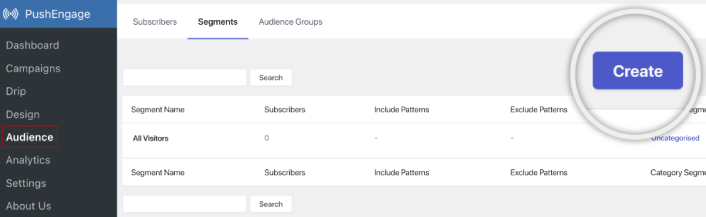
Og hvis du har brug for endnu dybere personalisering, skal du oprette en målgruppegruppe under fanen Audience Groups:
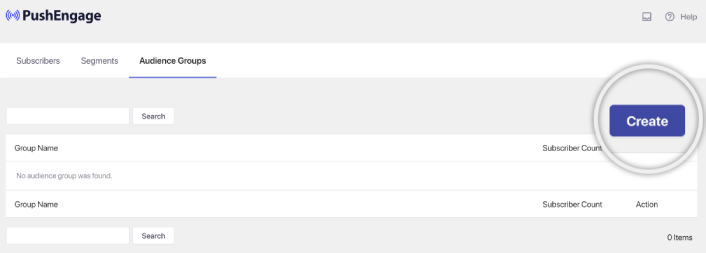
Hvis du er nybegynder inden for push-notifikationssegmenter og personaliserede push-notifikationer, bør du læse vores artikel om hvordan man opretter segmenter og vores meddelelse om avanceret målgruppegruppering.
Trin #5: Opret din Drip Push Notifications Kampagne
Gå til PushEngage dashboard og naviger til Kampagne » Drip Autoresponders og klik på Opret ny Drip Autoresponder:

Navngiv derefter din kampagne (vi foreslår noget som Velkomst Drip), og under Indhold, vælg muligheden, der siger: “Send notifikation umiddelbart efter brugeren abonnerer“):

På dette tidspunkt kan du klikke på pilen ved siden af notifikationen for at redigere indholdet af din notifikation.
Hvis du har en Premium- eller Enterprise-plan med PushEngage, vil du kunne tilføje mere end én notifikation for at oprette en sekvens af automatiserede velkomstbeskeder. Klik blot på Tilføj ny notifikation og rediger indholdet.
Når du er færdig, klik på Drip Indstillinger og vælg muligheden for at sende din velkomstkampagne til alle abonnenter:

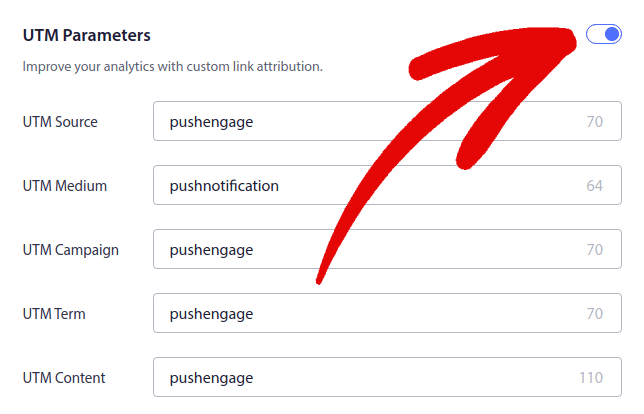
Rul derefter ned for at indstille dine egne UTM-parametre for at spore push-notifikationerne:
Og når du er færdig, rul tilbage op og klik på knappen Aktiver Autoresponder:

Og du er færdig!
Sådan opretter du E-mail Drip Kampagner
Opsætning af disse smarte automatiserede drip-kampagner i WordPress? Det kan du nemt gøre med et e-mail marketingværktøj. Følg resten af denne guide, og du er klar!
Trin #1: Vælg en E-mail Drip Service
Vi foreslår at give Constant Contact et forsøg. Det er som superstjernen inden for e-mail marketing-tjenester. Super brugervenligt og det kommer med en cool drag-and-drop-funktion til at udforme e-mails.

Constant Contact er den bedste e-mailmarkedsføringstjeneste til at opsætte autosvar til din virksomhed. Den er super nem at bruge og tilbyder masser af automatiseringsfunktioner til at forbedre dine e-mailkampagner.
Her er, hvad der gør Constant Contact til et så godt valg til opsætning af e-mailmarketingkampagner:
- Nem træk-og-slip-bygger til at oprette e-mails
- Hundredvis af foruddesignede e-mailskabeloner
- Velkomstbeskeder, fødselsdagstilbud og autoresponders for forladte indkøbskurve
- Værktøjer til at opbygge lister og tilmeldingsformularer til at udvide din målgruppe
- Split-test til målrettede e-mails
- Integrationer med CRM'er og tredjepartstjenester
- Fremragende support via live chat og telefon
For ikke at nævne, at Constant Contact har et formular-plugin til WordPress, som du kan bruge til leadgenerering. Du kan også pleje og lukke dine leads med autosvar.
Men hey, dette er ikke den eneste mulighed. De fleste af de store e-mail marketing-tjenester, som Brevo (du kender det måske som Sendinblue), HubSpot og andre, de har også denne drip e-mail magi.
Med et par klik kan du få disse automatiserede e-mails sendt ud til dine abonnenter. Desuden fungerer Constant Contact godt sammen med WordPress-plugins som WPForms og OptinMonster. Og hvis du er til e-handel, ved brug af WooCommerce eller Shopify, dækker det dig til at nå ud til nye kunder eller minde folk om de varer, de har efterladt i deres kurve.
Klar til at prøve det? Gå over til Constant Contact hjemmesiden, tilmeld dig, og gæt hvad? Du kan prøve det med en 60-dages gratis prøveperiode. Det er som at prøvekøre en bil, men for e-mail marketing. På denne måde kan du se, om det er det rigtige valg, før du beslutter dig for en betalt plan.
Trin #2: Opret en E-mail Liste
Efter at have oprettet en konto, kan du besøge Constant Contact-dashboardet for at oprette en kontaktliste.
Constant Contact har allerede oprettet en standardliste for dig. Du kan dog oprette din egen liste ved at gå til fanen Kontakter i topmenuen og derefter klikke på knappen Opret liste.

Du kan forbinde din WordPress-nyhedsbrevformular med Constant Contact og begynde at opbygge en e-mail liste. Du bør også tjekke vores blogindlæg om hvordan man tilføjer en WordPress blog abonnements-widget.
Trin #3: Opret Marketing Drip Kampagner
Nu hvor du har tilføjet abonnenter til din Constant Contact liste, er næste skridt at oprette en automatiseret drypkampagne. Gå til fanen Marketingkampagner og klik derefter på knappen Opret.


Constant Contact vil vise dig flere muligheder for at oprette en kampagne. Vælg Automatiseringer-kampagnen.
Herfra kan du vælge mellem flere forudbyggede kampagneskabeloner til at opsætte en drypkampagne. Du kan oprette en Brugerdefineret automatisering for at starte fra bunden, eller du kan hurtigt komme i gang ved at bruge en af kampagneskabelonerne.
Til denne vejledning vælger vi skabelonen Opret brugerdefineret sti for at komme i gang. Vælg indstillingen Abonnerer på e-mail og klik derefter på knappen Næste.

Giv din brugerdefinerede sti et navn, og du er færdig! Denne skabelon udløser en drypkampagne, hver gang nogen ny abonnerer på din e-mail-liste. Så den er perfekt til en velkomstkampagne. Hvis du ønsker at oprette en onboarding-kampagne, kan du bruge tags til at placere dem på en separat drypkampagne.
Trin #4: Opret et kampagnenflow
Du kan dog simpelthen trække handlinger og regler fra menuen til venstre ind på stien. For eksempel kan du tilføje forskellige handlinger som at sende en e-mail eller sende en SMS til din arbejdsgang.
Der er også forskellige regler, der hjælper dig med at tilpasse din automatisering. Du kan tilføje en tidsforsinkelse og angive, hvornår den næste e-mail skal sendes. Tilsvarende er der en betinget opdelingsmulighed, der lader dig opsætte Ja- og Nej-betingelser og opdele stien.

Det er også en leg at finjustere din automatiserede arbejdsgang. Find bare ikonet med de tre prikker, og klik på det. Vælg Rediger for at foretage ændringer. Lad os sige, at du vil ændre handlingen Send en e-mail.
Når du gør det, vises et pop op-vindue. Her kan du enten lave en helt ny e-mail eller bruge en, du allerede har lavet.
Da det er første gang, du opsætter denne arbejdsgang, skal du vælge Opret en ny e-mail. Indtast et fedt navn til din e-mail, og tryk derefter på Fortsæt. Og lige som så, er du på vej til at tilpasse din e-mail-arbejdsgang!
Trin #5: Opret din e-mailkampagne
Du kan søge efter en skabelon baseret på lejligheden eller bruge en tom skabelon til at oprette en e-mail fra bunden.

Når du har valgt en skabelon, startes e-mail-editoren.

Når du er færdig, skal du trykke på knappen Gem & Luk øverst. Dette vil tage dig tilbage til Sti-byggeren i Constant Contact. Fortsæt med at færdiggøre din automatiseringssti ved at tilføje så mange handlinger og regler til din sti og redigere hver af dem.

Efter at have oprettet en automatiseret arbejdsgang, kan du blot klikke på knappen Aktivér øverst. Og du er færdig!
Hvad du skal gøre, efter du har oprettet en drypkampagne
Det var alt for denne gang, folkens!
Hvis du fandt denne artikel nyttig, så sørg for at efterlade en kommentar nedenfor.
Det kan virke skræmmende at komme i gang med drypkampagner. Men hvis du holder øje med målsporing og analyse, skal det nok gå. Endnu vigtigere er, at du vil tjene meget mere profit med hjælp fra push-notifikationskampagner. Her er et par gode ressourcer til at komme i gang:
- Sådan bruges retargeting push-notifikationer til at fordoble din omsætning
- Sådan sorteres dine push-notifikationer og finder vindende kampagner
- Sådan renses push-notifikationsabonnentlister (nemt)
- Sådan sendes RSS push-notifikationer automatisk
- Sådan bruges push-notifikationer til at promovere en nyhedsside
- Sådan bruges cross-selling push-notifikationer til at fordoble dit salg
- Sådan bruges browse abandonment push-notifikationer (4 trin)
Hvis du er ny til push-notifikationer, bør du prøve PushEngage. PushEngage er den #1 push-notifikationssoftware på markedet. Og dine kampagner vil være i sikre hænder.
Så hvis du ikke allerede har gjort det, kom i gang med PushEngage i dag!


