Leder du efter en enkel måde at aktivere og deaktivere Firefox-notifikationer på?
Browser push-notifikationer hjælper dig med at holde kontakten med brands, som du elsker. Og du kan vælge push-notifikationer ret nemt. Men hvordan begynder du at modtage browser push-notifikationer?
I denne artikel vil vi trin for trin vise dig, hvordan du aktiverer eller deaktiverer Firefox-notifikationer.
Lyder godt? Lad os dykke ned.
Sådan får du Firefox-notifikationer fra ethvert websted
Lad os starte med at se på, hvordan du kan modtage Firefox-notifikationer fra ethvert websted.
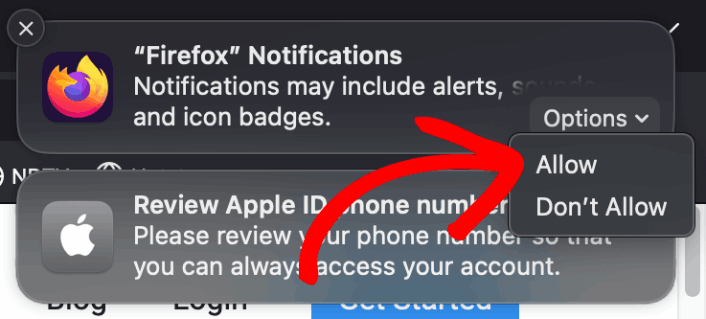
Første gang du installerer Firefox, får du en pop op-meddelelse, hvor du kan tillade eller afvise web push-notifikationer på Firefox. Klik blot på Indstillinger » Tillad for at modtage Firefox-notifikationer:
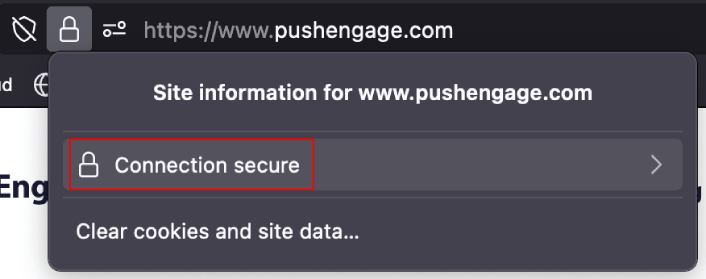
Som standard blokerer Firefox push-notifikationsmuligheder. Så hvis du vil have Firefox-notifikationer fra et websted, skal du gå til URL-linjen og klikke på hængelåsen. I rullemenuen skal du klikke på Forbindelse sikker:
Her kan du indstille tilladelser for webstedet. Gå til Tilladelser, rul ned til Send notifikationer, fjern markeringen i afkrydsningsfeltet Brug Standard, og klik på Tillad:
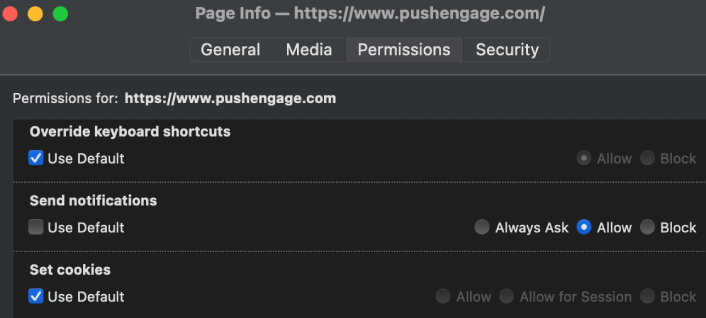
Nu kan du få Firefox-notifikationer fra det pågældende websted.
Sådan aktiveres eller deaktiveres Firefox-notifikationer
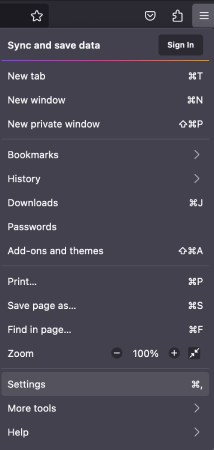
Firefox har indbyggede indstillinger og præferencer, der kan aktivere eller deaktivere push-notifikationer. Den enkleste måde at aktivere eller deaktivere Firefox-notifikationer på er at gå til menulinjen og vælge Indstillinger:
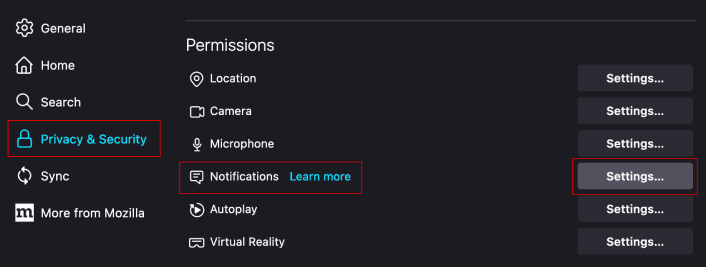
Gå derefter til Beskyttelse af personlige oplysninger og sikkerhed » Notifikationer » Indstillinger:
Her kan du tillade eller afvise push-notifikationer fra ethvert websted ved blot at ændre tilladelsen ud for webstedet.
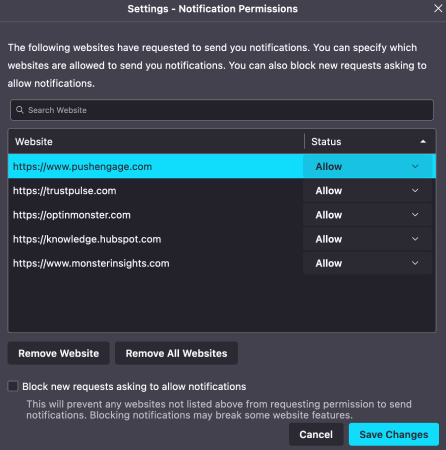
Hvis du vil aktivere Firefox push-notifikationer fra et websted, skal du indstille det til Tillad. Hvis du ikke ønsker notifikationer fra et websted, skal du indstille tilladelsen til Bloker.
Du kan fjerne alle tilladelser ved at klikke på Fjern alle websteder. Eller hvis du kun vil fjerne et enkelt websted fra listen over godkendte websteder, der kan sende dig notifikationer, kan du også klikke på Fjern websted.
Hvad du skal gøre, efter du har aktiveret Firefox push-notifikationer
Bare fordi du elsker indholdet i de push-notifikationer, du modtager, betyder det ikke, at du skal abonnere på dem. Før du abonnerer på flere push-notifikationer, bør du tjekke GDPR-overholdelsesreglerne og finde ud af, om dine push-notifikationer er sikre.
Og hvis du synes, Safari push-notifikationer er seje, bør du også se, hvordan du kommer i gang med push-notifikationer til din virksomhed.
Push-notifikationer er en fantastisk måde at organisk udvide din fanbase på. Og det er virkelig nemt at opsætte push-kampagner. Hvis du er ny til push-notifikationer, bør du også tjekke disse episke ressourcer ud:
- Sådan tilføjer du en blogabonnements-widget i WordPress
- Sådan får du mere trafik til din WordPress-blog (9 nemme måder)
- Push-meddelelsesomkostninger: Er det virkelig gratis? (Prisanalyse)
- Sådan øger du din opt-in-rate for web push-meddelelser (7 måder)
- Sådan bruger du push-notifikationshandlingsknapper til at fordoble klik
Vi anbefaler at bruge PushEngage til at oprette dine push-notifikationskampagner. PushEngage er den førende push-notifikationssoftware på markedet, og dine kampagner vil være i sikre hænder.
Så hvis du ikke allerede har gjort det, så kom i gang med PushEngage i dag.


