Forsøger du at bruge forskellige typer notifikationer for at maksimere din hjemmesides engagement?
Forestil dig at få gratis trafik på autopilot, hver gang du udgiver et nyt blogindlæg uden de tidskrævende SEO-kampagner. Hvis du driver et WordPress-websted, ved du allerede, hvor meget arbejde det er at promovere dit indhold og få læsere til at vende tilbage til dit indhold.
I denne artikel vil vi vise dig, hvordan du får gentagne besøgende, engagement og salg, hver gang du udgiver noget. Og vi vil gøre det ved at bruge forskellige typer notifikationer, så du ikke behøver at stole udelukkende på betalte annoncer og SEO.
Lyder godt? Lad os dykke ned.
Forståelse af forskellige typer notifikationer
Før vi går i de finere detaljer om, hvordan man bruger forskellige typer notifikationer succesfuldt, lad os tage et kig på det grundlæggende i push-notifikations marketingstrategi. Vi vil gøre det simpelt og nemt for dig. Så, bare rolig, hvis du ikke har nogen tidligere erfaring med push-notifikationer.
Hvad er Push-notifikationer?
En push-notifikation er en kort, klikbar pop-up-besked, der vises på en abonnents enhed og omdirigerer abonnenten til dit indhold med et enkelt klik:
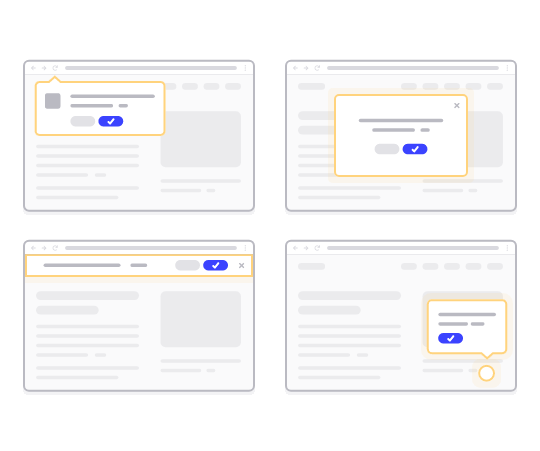
Det bedste er, at forskellige typer notifikationer leveres, selvom abonnenten ikke bruger en browser. Det er som en e-mail-udsendelse, men med en web push-notifikation behøver dine abonnenter ikke at bruge en app for at se din besked.
Kort sagt: WordPress push-notifikation er en enkel måde at sende et klikbart link til dit indhold til alle, der har tilmeldt sig dem fra din push-notifikations popup.
Med push-meddelelsessekvenser har din målgruppe nu ingen undskyldning for at ignorere dig. Og i modsætning til sociale medier-websteder er der ingen algoritme, der begrænser din rækkevidde for at få dig til at betale for annoncer.
Det fedeste ved web push-notifikationer er, at du kan bruge dem til at supplere dine lead magnets og e-mail opt-in-formularer. Du kan endda bruge popups til at indsamle abonnenter på push-notifikationer.
Fordele ved at bruge push-notifikationer
Lad os tale om, hvorfor push-meddelelser er vigtige for din virksomhed.
Hvor ofte opretter du indhold og venter på, at det skal tage fart? Hvis du venter på, at søgemaskiner og sociale medier skal få din webtrafik til at vokse eksplosivt, bør du vide:
- SEO giver dig ikke eksplosiv vækst. SEO giver en stabil vækst over tid.
- Søge- og annoncer på sociale medier er "betal for at spille". Du kan kun få spidsbelastninger af trafik. For at retargete den trafik skal du betale mere.
- Viralitet på sociale medier er svært. Og der er ingen måde at vide, om det overhovedet vil ske.
Så hvis trafik er så svær at få, hvordan øger du så dit salg? Glem salg, hvordan øger du overhovedet din webstedsengagement forudsigeligt?
Svaret er push-notifikationskampagner. Her er et par vigtige fordele ved push-notifikationskampagner:
- Forbedre brugerengagement
- Behold kunder og abonnenter
- Øg konverteringsrater
- Målret de rigtige brugere
- Spor handlingsrettede metrics
- Forbedre din kundeservice-strategi
- Forbedre brandkonsistens
I løbet af denne artikel vil vi detaljeret forklare, hvordan du kan bruge disse fordele til din fordel. Hvis du hellere vil se på rigtige eksempler, bør du tjekke denne artikel om fordelene ved push-notifikationer.
Forskellige typer notifikationer, du kan bruge til markedsføring
Notifikationer er et kraftfuldt værktøj i markedsføring til at engagere sig med dit publikum, drive konverteringer og holde kunder informeret. Der er forskellige typer notifikationer, du kan bruge til marketingformål. Lad os tjekke dem ud.
E-mail-notifikationer
E-mail vs. push-notifikationer: Hvilken er bedst? Afhængigt af din overordnede marketingstrategi anbefaler vi kraftigt at bruge både e-mail marketing og push-notifikations marketing på samme tid. Du kan bruge e-mail-notifikationer til at sende:
- Kampagne-e-mails: Send e-mails for at promovere produkter, rabatter og særlige tilbud.
- Transaktionelle e-mails: Bekræftelses-e-mails, ordreopdateringer og nulstilling af adgangskoder er eksempler på transaktionelle notifikationer.
Udover dette kan du også sende nyhedsbreve for at uddanne dit publikum. Et godt sted at starte er at vælge en e-mail marketingtjeneste og opsætte en blogabonnementswidget på dit websted. Du kan endda bruge notifikationer til at promovere dine podcasts.
Push-notifikationer
Den gennemsnitlige tilmeldingsrate for web push-notifikationer er over 6%. Dette er cirka 3 gange tilmeldingsraten for e-mail-kampagner. Bredt set er der to typer push-notifikationer, du kan sende:
- Mobil push-notifikationer: Disse vises på brugerens mobile enhed, selv når appen er lukket.
- Web push-notifikationer: Leveres via webbrowsere, disse kan nå brugere på desktop og mobil.
Notifikationer i appen er en fantastisk måde at øge engagementet og forbedre kundeloyaliteten på.
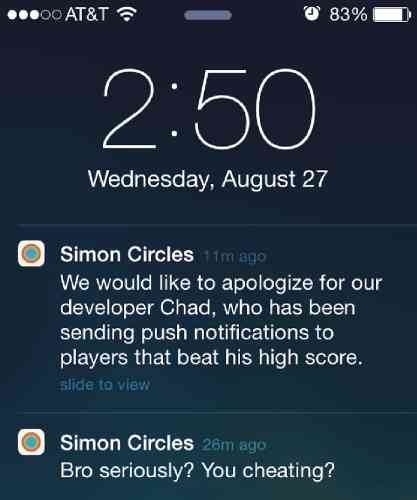
Det er også en fantastisk måde at øge salget i appen på. Du kan sende Android, iOS og iPadOS notifikationer. Selvfølgelig forudsætter alt dette, at du har en app til din virksomhed. Men hvis du blot driver et websted og ikke en app, kan du sende web push-notifikationer.
I modsætning til notifikationer i appen skal du eksplicit indhente samtykke for at sende mange forskellige typer notifikationer. Det er her, en push-notifikations popup kommer ind i billedet.
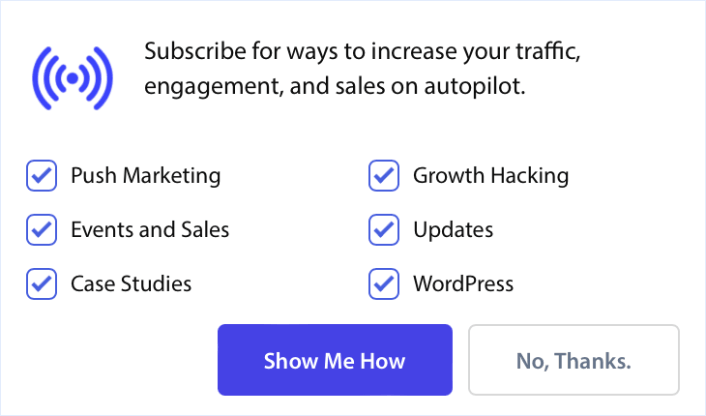
Og når du har indsamlet abonnenter på push-notifikationer, kan du endda sende automatiserede push-kampagner, der tjener dig penge, selv mens du sover!
SMS-notifikationer
Du kan sende tekstbeskeder til kunder med opdateringer, kampagnetilbud eller påmindelser. SMS-kampagner er ikke gode til multimediebeskeder. Alt, hvad du faktisk kan sende i en SMS, er et klikbart tekstlink.
Her er et eksempel på en velkomst-SMS:
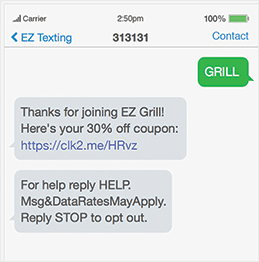
På den anden side er push-meddelelser virkelig fleksible med hensyn til at bruge forskellige mediatyper til at udtrykke forskellige typer beskeder. Se på dette eksempel på en velkomst-push-meddelelseskampagne:
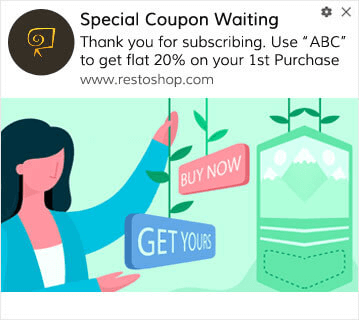
Kan du se forskellen mellem de to beskeder? Med en push-notifikationskampagne har du masser af plads til at udforske kreative idéer og kommunikere langt mere effektivt. Selvfølgelig, hvis du har en top-tier tekstforfatter til at skrive dine SMS-kampagner, kan du udrette en hel del med kun tekst.
Notifikationer på sociale medier
Notifikationer på sociale medier er beskeder eller alarmer sendt til brugere på sociale medieplatforme for at holde dem informeret, engageret og forbundet med platformens indhold og aktiviteter. Disse notifikationer spiller en væsentlig rolle i brugerengagement, da de giver brugerne besked om forskellige aktiviteter, opdateringer og interaktioner relateret til deres profiler på sociale medier og de konti, de følger.
Du kan sende:
- Opslag på sociale medier: Del opdateringer, kampagnetilbud og nyheder på dine profiler på sociale medier.
- Direkte beskeder: Send private beskeder for at engagere dig personligt med kunder.
Effektiv brug af notifikationer kan hjælpe enkeltpersoner og virksomheder med at opbygge og vedligeholde forbindelser, dele indhold og deltage i onlinefællesskaber.
Chat-notifikationer
At have en live chatboks på dit websted kan være et virkelig effektivt værktøj til engagement på hjemmesiden. Ved hjælp af live chat-software kan du nemt opsætte en chatboks med udløsere for:
- Kunder, der bruger meget tid på produkt- eller checkout-siden
- Kunder, der tilføjer produkter til deres kurv, men ikke kan betale for det
- Kunder med høj kurv værdi for at tilbyde en kupon eller rabat
Du kan oprette alle disse automatiserede udløsere til at sende chat-notifikationer og konvertere mange potentielle kunder meget hurtigt. Chatboksen vil bippe dine kunder, når en af de automatiserede udløsere aktiveres. Og derfra kan en kundeservicemedarbejder overtage og hjælpe kunderne med at træffe en købsbeslutning.
Se vores artikel om den bedste live chat-software for at komme i gang med chat-notifikationer.
Lokationsbaserede notifikationer
Geolokations-push-notifikationer er automatiserede push-notifikationer, der udløses baseret på dine abonnenters placering. Geolokations-notifikationer er gode til kampagnetilbud, informationsopdateringer og transaktionsnotifikationer.
Lokationsbaserede push-notifikationer er notifikationer, der sendes til abonnenter, som bor i den pågældende placering. Og det er virkelig nemt at målrette abonnenter ved at segmentere dem baseret på deres land, stat, by eller endda region ved hjælp af PushEngage.
I PushEngage-dashboardet kan du se de lande, hvor dine abonnenter befinder sig, under Demografisk oversigt.
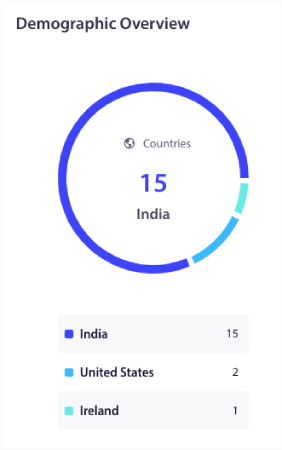
Du kan bruge denne liste over lande til at oprette geografiske segmenter. Geografisk segmentering giver dig mulighed for at:
- Sende push-kampagner i dine abonnenters tidszoner for bedre engagement
- Køre lokale tilbud, der kun er relevante for det pågældende kundesegment for højere konverteringsrater
- Oprette kampagner på lokale sprog for højere klikrater
Det bedste er, at du ikke engang behøver at oprette et segment i PushEngage. Når du opretter en ny kampagne, skal du gå til fanen Målgruppe og vælge de lande, du vil målrette mod, under Send til brugerdefineret målgruppe.
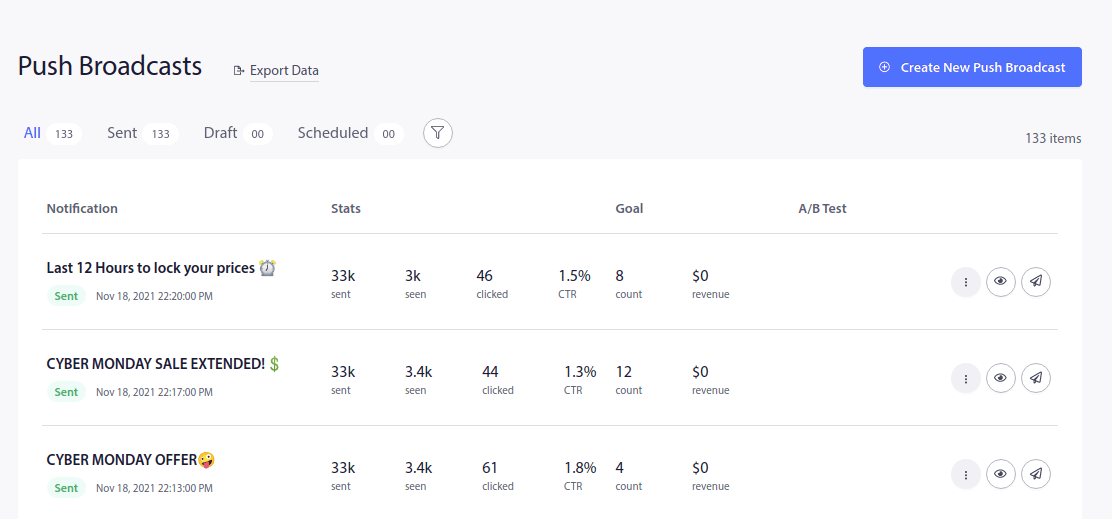
Lad os sige, at du vil sende en push-udsendelse. Gå til PushEngage-dashboardet og naviger til Kampagne » Push-udsendelser og klik på knappen Opret ny push-udsendelse:
Opret derefter din push-notifikation:
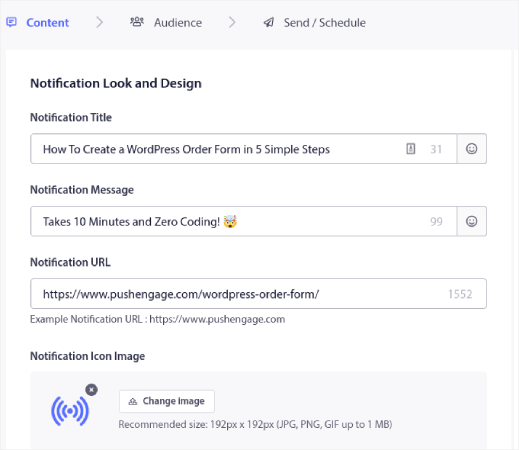
Gå til fanen Målgruppe og rul ned til Send til brugerdefineret målgruppe. Til sidst skal du indstille målretningsreglen til Land og vælge de lande, du vil målrette mod:
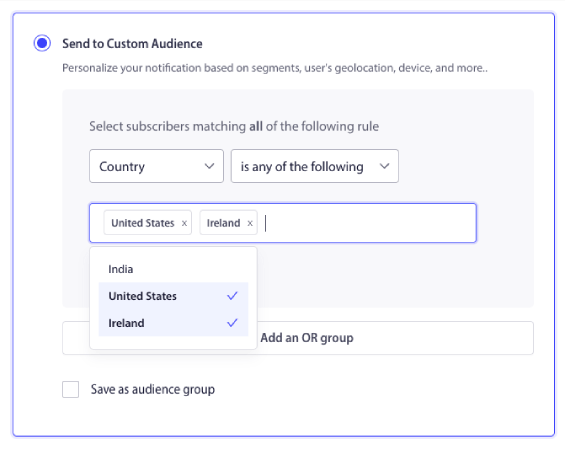
PushEngage viser kun lande, hvor du har abonnenter. Så det er super nemt at retargete dine abonnenter efter geolokation. Og nu kan du sende forskellige typer notifikationer baseret på placering alene!
Begivenhedsnotifikationer
Du kan sende notifikationer baseret på specifikke brugerhandlinger eller milepæle, såsom at nå et loyalitetsprogramniveau. Dette er mere avancerede kampagner, men du kan gøre det ved hjælp af brugerdefinerede løsninger og et notifications API. Nogle andre populære anvendelsestilfælde inkluderer:
- Begivenhedspåmindelser: Underret kunder om kommende begivenheder, webinarer eller udsalg.
- Begivenhedsopdateringer: Send opdateringer i realtid under begivenheder eller konferencer.
Begivenhedsnotifikationer bruges almindeligvis i forskellige sammenhænge, såsom personlige kalendere, forretningsplanlægningsværktøjer, sociale netværksplatforme og applikationer til begivenhedsstyring. Men de kan også bruges til at promovere en tilbagevendende begivenhed som et ugentligt udsalg.
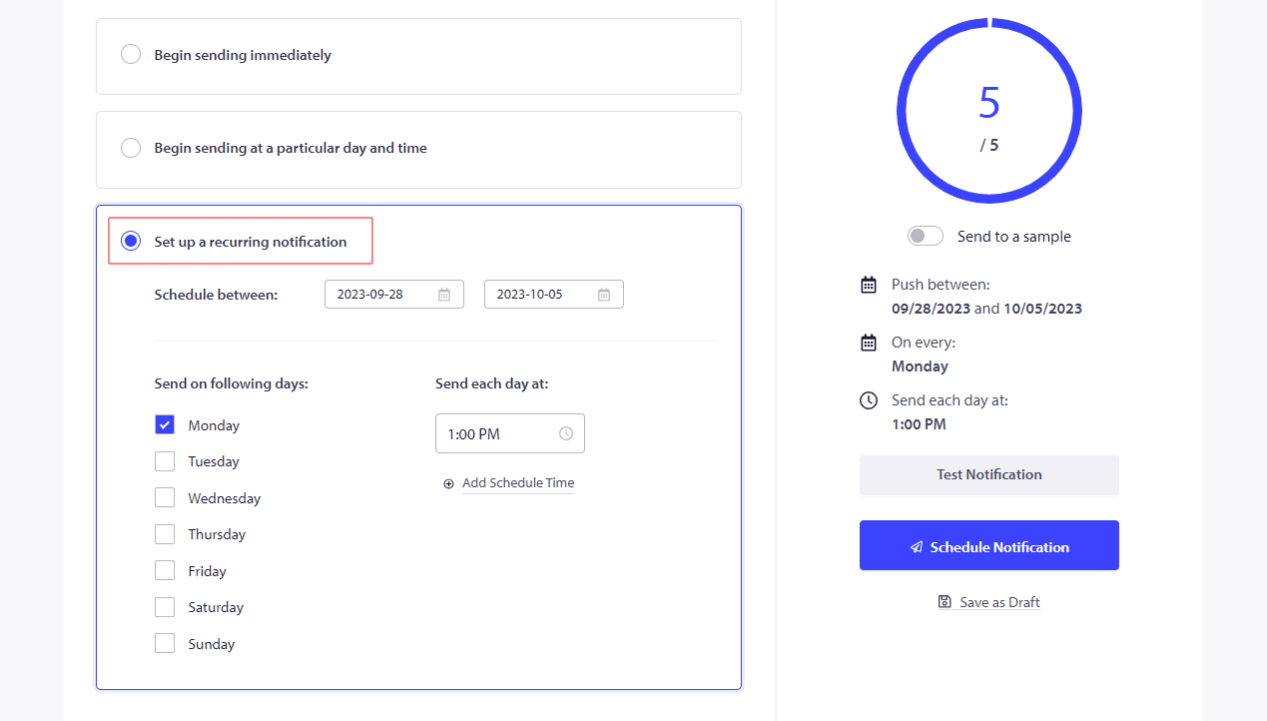
Du kan planlægge push-notifikationer til at blive sendt ud med faste intervaller helt automatisk.
Notifikationer om forladte indkøbskurve
WooCommerce-kurvforladelse sker, når dine potentielle kunder tilføjer dine produkter til indkøbskurven, men af en eller anden grund ikke køber. I e-handels-tragten startede de checkout-processen, men fuldførte den aldrig.
Du kan minde brugere om varer, der er efterladt i deres indkøbskurv, og opfordre dem til at gennemføre købet.
Selvfølgelig kan du oprette forskellige typer notifikationer for at genvinde forladte indkøbskurve. Men alle notifikationer om forladte indkøbskurve er udløste kampagner, der sendes ud automatisk. Så du skal bare sætte dem op én gang. Derefter fortsætter du med at genvinde tabte salg for evigt. Her er en hurtig vejledning om hvordan man opsætter notifikationer om forladte indkøbskurve.
Anmodninger om anmeldelser og feedback
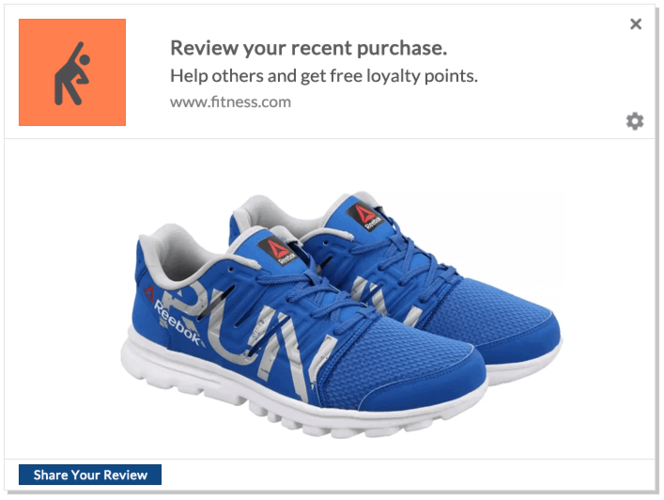
Du kan ikke vente rundt og håbe på, at dine kunder efterlader en anmeldelse. Det smarte er simpelthen at bede om en anmeldelse.
Men selvfølgelig kan det være en reel plage at gå rundt og spørge manuelt, hvis du har en masse nye kunder hver dag. Det er præcis derfor, en produktfeedback-push-notifikationskampagne er så nyttig. Den er fuldautomatisk, og hvis du gør det rigtigt, virker produktfeedback-kampagner virkelig:
Vi anbefaler at bruge PushEngage til at sende forskellige typer notifikationer. PushEngage er den førende software til push-notifikationer på markedet, og den er bygget til at hjælpe små virksomheder med at få succes.
Fra dit PushEngage-dashboard skal du gå til Kampagne » Udløste kampagner og klikke på Opret ny udløst kampagne:

Fra listen over kampagneskabeloner skal du klikke på Brugerdefineret udløst kampagne:

Giv din kampagne et navn, som du kan genkende. Opret derefter indholdet til din push-notifikationskampagne:
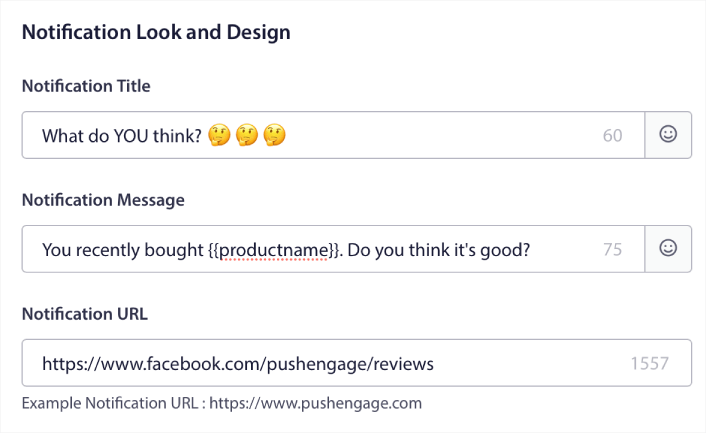
Da det er en udløst kampagne, kan du oprette så mange opfølgninger, som du ønsker, indtil du får en anmeldelse fra dine kunder.
Gå derefter til fanen Udløserindstillinger for at opsætte kampagneudløserne:
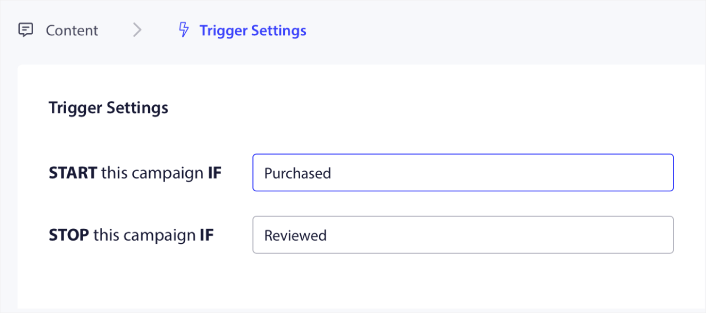
Indstil kampagnen til at starte, når kunden køber dit produkt, og stoppe, når de afgiver en anmeldelse. Du skal bruge PushEngage API til at definere Køb og Anmeldelse begivenhederne.
Og til sidst skal du integrere koden med dit website. Du kan få koden til Start kampagnebegivenhed, Stop kampagnebegivenhed og Målsporing ved at klikke på knappen Integrationskode.
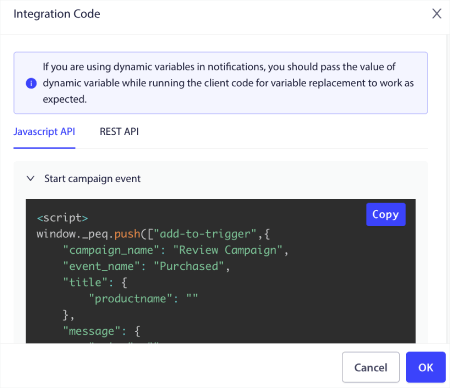
Det var alt! Hver gang nogen køber et produkt på din hjemmeside, udløses en automatiseret kampagne, der beder om anmeldelser. Du kan også bruge andre metoder til at få flere anmeldelser. Men at sende notifikationer er et godt sted at starte.
Henvisningsnotifikationer
Push-notifikationer spiller også en afgørende rolle i affiliate marketing. De handler ikke kun om at drive salg og promovere produkter; de hjælper også med at opbygge tillid og styrke brandets omdømme. Opfordr kunder til at henvise venner og beløn dem for succesfulde henvisninger.
Når du væver push-notifikationer ind i din affiliate marketing-strategi, låser du op for en dynamisk måde at forbinde med dit publikum og øge dine konverteringer.
Her er en oversigt over vigtige overvejelser:
- Øg kundefastholdelse med målrettede push-meddelelser: Push-meddelelser er en gylden billet til kundefastholdelse. Disse små beskeder giver dig mulighed for at tale direkte til dit publikum. Hold dem opdateret om nye produkter, kampagner og eksklusive tilbud. Ved at gøre dette vil du opmuntre til gentagne køb og pleje brandloyalitet.
- Informer og lok med rettidige beskeder: Push-meddelelser er dit hemmelige våben til hurtigt at informere kunder om nye produkter, opdateringer og tidsbegrænsede tilbud. Lav beskeder, der fanger deres opmærksomhed og føles personlige. Dette vil ikke kun fange deres interesse, men også drive dem til at handle, hvilket fører til øget affiliate-salg.
- Udnyt brugervenlige push-meddelelsesplatforme: Du er heldig med en række brugervenlige push-meddelelsesplatforme som PushEngage. Disse platforme er designet til at gøre dit liv lettere. De giver dig mulighed for at indsamle leads, segmentere dit publikum og sende push-meddelelser ubesværet. Resultatet? Dine affiliate marketing-kampagner bliver mere potente end nogensinde.
- Udnyt magien ved browser-meddelelser: Undervurder ikke kraften i browser-meddelelser – de små beskeder, der popper op i en brugers browser. De er en direkte, realtidsforbindelse til dit publikum. Brug dem til at guide dit publikum mod dine affiliate-tilbud og øge dine konverteringsrater.
Ved at væve push-meddelelser ind i din affiliate marketing-strategi vil du forstærke kundernes engagement, sende klikraterne i vejret og i sidste ende give dit affiliate-salg et betydeligt løft.
Vi har skrevet en hel guide til push-notifikationer til affiliate marketing. Tjek den ud næste gang!
Personaliserede Notifikationer
Personaliserede notifikationer bruger kundedata til at sende skræddersyede anbefalinger, personlige tilbud og fødselsdagshilsner.
Push-notifikationsattributter er variabler, der automatisk henter abonnentdetaljer og personliggør dine notifikationsbeskeder. Du kan tilpasse din drypkampagne ved at tilføje data som:
- Brugerens fornavn
- Deres hobbyer
- Deres placering
Og mere, afhængigt af typen af kampagne, du kører.
Selv uden at bruge push-notifikationsattributter giver PushEngage dig mulighed for at sende forskellige typer notifikationer ved hjælp af lande- og bynavnet på dine abonnenter. Hvis du vil, kan du sende en sekvens af dryp-push-notifikationer til alle dine abonnenter eller et brugerdefineret segment. Du kan endda køre dryp-kampagner med geo-segmentering i PushEngage.
Men hvis du vil tage det et skridt videre, kan du tilbyde et helt andet niveau af personalisering ved hjælp af PushEngage Attributes API.
Notifikationer om Hast og Knaphed
En af de mest effektive kampagner blandt alle vores kunder er prisfaldskampagner og lageropdateringskampagner.
Som denne:
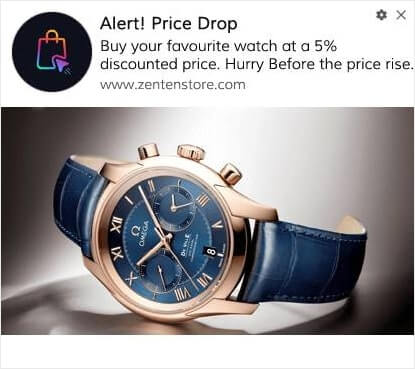
Hvis du er ny inden for e-handels push-notifikationskampagner, bør du helt sikkert tjekke denne artikel om hvordan man opretter prisfaldsalarmer.
Det er en rigtig livredder.
Mens du er i gang, bør du også tjekke hvordan man opretter en lageropdatering for at give dine kunder besked om, at deres yndlingsprodukt er ved at løbe tør.
Social Proof Notifikationer
Tilføjelse af social proof til dine beskeder kan resultere i mange flere salg.
En god anvendelse er at få folk til at købe produkter på deres ønskeliste.
Tag et kig på dette eksempel lige her:
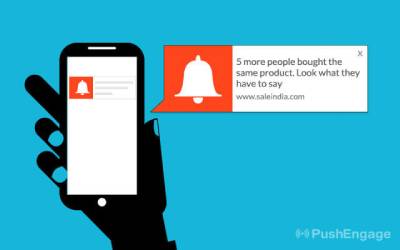
Denne simple notifikation kan igen udløse FOMO hos dine kunder og presse dem til at købe et produkt, de allerede ønsker. Vis notifikationer, der viser nylige køb eller positive anmeldelser for at opbygge tillid. Eller du kan komme i gang ved at tjekke de bedste social proof plugins.
Indholdsnotifikationer
Giv abonnenter besked om nye blogindlæg, videoer eller andet indhold. For mange nyhedssider og udgivere er annonceindtægter fra trafik den primære indtægtskilde. Hvis det er dig, kan genaktivering af dine inaktive abonnenter generere en masse ekstra indtægter på meget kort tid.
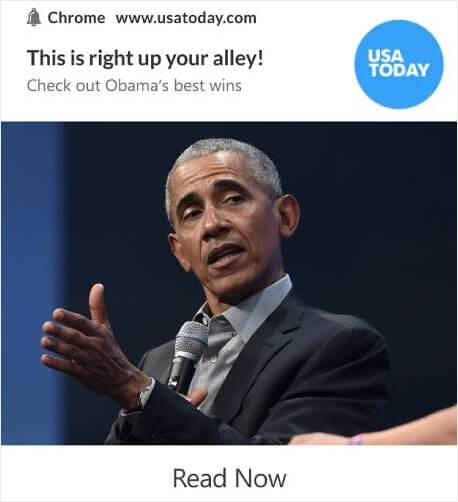
Og du kan gøre det ved hjælp af forskellige typer notifikationer.
Pro-tip: Det er aldrig en god idé at være afhængig af kun én indtægtskilde fra dit indhold. Hvis du er stærkt afhængig af annonceindtægter, så tjek denne artikel om Google AdSense-alternativer, der kan tjene dig flere penge.
Cross-Sell og Upsell Notifikationer
Krydsalg er en af de nemmeste måder at øge ordreværdien for enhver kunde. Krydsalg er, når du beder en kunde om at købe et relateret produkt til det, de allerede køber.
Typisk er det oprindelige produkt og det foreslåede produkt inden for samme prisklasse.
Selvfølgelig kan du udløse en krydsalgskampagne, som Gadgetsdeal gør:
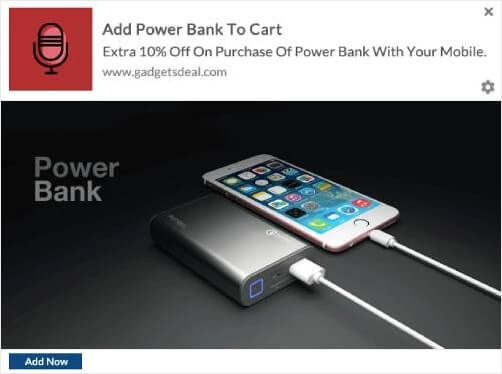
Hver gang nogen tilføjer en mobiltelefon til deres indkøbskurv, krydssælger Gadgetsdeal en powerbank med yderligere rabat. Det er et godt tilbud for kunden, og Gadgetsdeal tjener øjeblikkeligt flere penge med en enkelt notifikation!
Når du bruger notifikationer til markedsføring, er det afgørende at overveje brugerpræferencer, timing og relevans for at undgå at spamme eller irritere din målgruppe. En gennemtænkt notifikationsstrategi kan forbedre kundeengagementet og drive forretningsvækst.
Valg af en tjeneste til at sende notifikationer
Før du opretter en push-notifikationskampagne, skal du vælge en push-notifikationstjeneste. En push-notifikationstjeneste er en software, der giver dig mulighed for at oprette push-kampagner uden kodning.
Vi anbefaler at bruge PushEngage til at sende forskellige typer notifikationer.

PushEngage er verdens førende plugin til push-notifikationer.
Push-notifikationer hjælper dig med at øge din webtrafik og dit engagement automatisk. Og hvis du driver en onlinebutik, hjælper PushEngage dig også med at øge dit salg ved at hjælpe dig med at oprette automatiserede e-handels-push-notifikationer.
Du kan komme i gang gratis, men hvis du er seriøs omkring at vækste din forretning, bør du købe en betalt plan. Før du køber en push-notifikationstjeneste, bør du også se denne guide til priser på push-notifikationer.
Her er et hurtigt overblik over, hvad du får med PushEngage:
- Højt konverterende automatiserede kampagner
- Flere målretnings- og kampagneplanlægningsmuligheder
- Målsporing og avanceret analyse
- Smart A/B-test
- En dedikeret succesmanager
Du vil se, at PushEngage uden tvivl er det bedste valg, hvis du vil opbygge trafik, engagement og salg for din virksomhed. Og hvis du har et stramt budget, kan du altid være lidt kreativ med dine push-notifikationer.
BEMÆRK: Hvis du driver et WordPress-websted, bør du installere og aktivere PushEngage WordPress-pluginnet.
Lad os komme i gang!
Trin #1: Opret en gratis PushEngage-konto
Gå til PushEngage og klik på Kom i gang gratis nu:
Du kan komme i gang med gratisplanen. Men hvis du ønsker at sende målrettede push-notifikationer, bør du vælge Growth Plan. Når du ved, hvilken plan du vil have, skal du klikke på Kom i gang for at oprette din PushEngage-konto.
Trin #2: Tilmeld dig PushEngage
Nu er det tid til at oprette din PushEngage-konto. Start med at tilmelde dig med en e-mailadresse eller et Gmail-id:

Udfyld derefter dine kontooplysninger:

Og tilføj dine kreditkortoplysninger for at købe din plan:

Hvis du valgte gratis kontoen, vil dit kreditkort aldrig blive opkrævet penge, før du vælger at opgradere din plan. Og nu er du klar til at få adgang til dit PushEngage-dashboard. Klik blot på Gennemfør registrering og få øjeblikkelig adgang.
Hvis du har brugt OneSignal eller PushAlert før, vil du se, at PushEngage giver dig en meget renere oplevelse fra dashboardet. OneSignal-dashboardet er ikke beregnet til avancerede kampagner. Til det skal du bruge API'en mere end OneSignal-pluginet.
Trin #3: Installer WordPress Plugin til at sende forskellige typer notifikationer
BEMÆRK: Hvis du ikke kører en WordPress-side, bør du tjekke vores installationsvejledninger for at komme i gang.
Du er færdig med at oprette din konto. Så gå til PushEngage-dashboardet, hvor du kan spore engagementraten for push-notifikationer og følge med:

Klik på Sideindstillinger » Sideoplysninger og klik på knappen Klik her for opsætningsinstruktioner:

Klik på fanen WordPress og klik på knappen Installer PushEngage WordPress Plugin for at installere pluginet på din hjemmeside.

Her er den fede del: Da du oprettede din PushEngage-konto, synkroniserede du allerede din hjemmeside med din PushEngage-konto. Så klik på installationslinket i PushEngage-dashboardet for automatisk at installere PushEngage WordPress-pluginet på din hjemmeside.
Trin #4: Forbind dit WordPress-websted med PushEngage
Når du er færdig med at installere og aktivere PushEngage WordPress-pluginet, vil du se PushEngage-guiden:

Guiden er ret ligetil. Hvis du er ny bruger, skal du klikke på Ny? Gør krav på din gratis konto. Og hvis du allerede har tilmeldt dig, skal du klikke på Forbind din eksisterende konto.
Dernæst kan du vælge din side fra rullemenuen Vælg en side under Forbind en registreret side, hvis du allerede har registreret en side under tilmelding:

Eller du kan klikke på Registrer en ny side for at tilføje en ny side, hvis du har en Premium prisplan eller højere. I næste trin vil guiden bede dig om at installere andre nødvendige WordPress-plugins.

Hvis du fulgte hvert trin korrekt, vil du se denne succesmeddelelse fra guiden:

Du er nu klar til at oprette kampagner og push-underretningspop op-modaler.
Udarbejdelse af indhold til forskellige typer notifikationer
Her er en lille hemmelighed, som tekstforfattere ikke vil fortælle dig...
Tekstforfatning er for det meste drevet af standardmønstre. Hvad der ser kreativt ud på ydersiden, er virkelig bare et velkendt mønster. Og at have overbevisende indhold giver dig meget mere trafik, engagement og salg gentagne gange.
Lad os se på de forskellige dele af indholdet for de mest vindende kampagner.
Udarbejdelse af engagerende beskeder til forskellige typer notifikationer
Netflix er kongen af binge-værdigt indhold. Og deres push-meddelelser er simpelthen episke.
Men hvordan gør de det?
Netflix sender personaliserede push-meddelelser lige så meget, som de sender dig personlige indholdsanbefalinger:
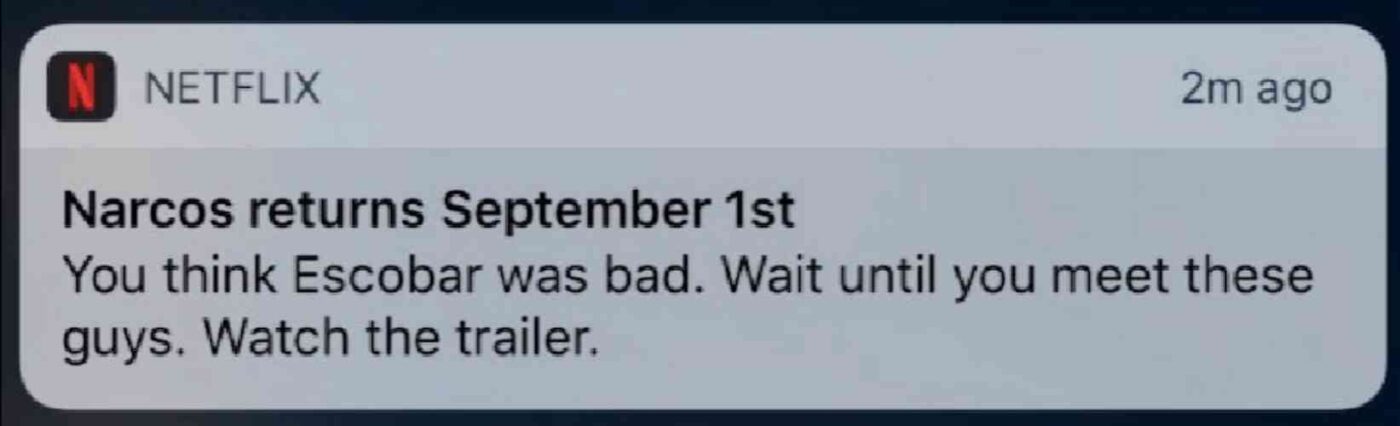
Enhver fan af Narcos ved, hvad den meddelelse betyder. Tekst som denne begejstrer dem øjeblikkeligt, fordi teksten trækker på en eksisterende fanbase, der allerede er bekendt med Narcos-historien.
Så hvad er den vigtigste lektie her?
Personlige anbefalinger + historie-drevet tekst = Høj engagement.
Og det betyder ikke noget, hvis du ikke har en eksisterende database af begejstrede fans. Denne metode virker også for en lille virksomhed med en lille liste af abonnenter. Se disse eksempler på push-meddelelses-tekster for at få mere inspiration.
Udnyt personalisering
Personaliserede push-meddelelser får dine abonnenter til at føle, at de var skræddersyet til dem. Det bedste? Vores kunder får omkring 8% konverteringsrater for personaliserede kampagner.
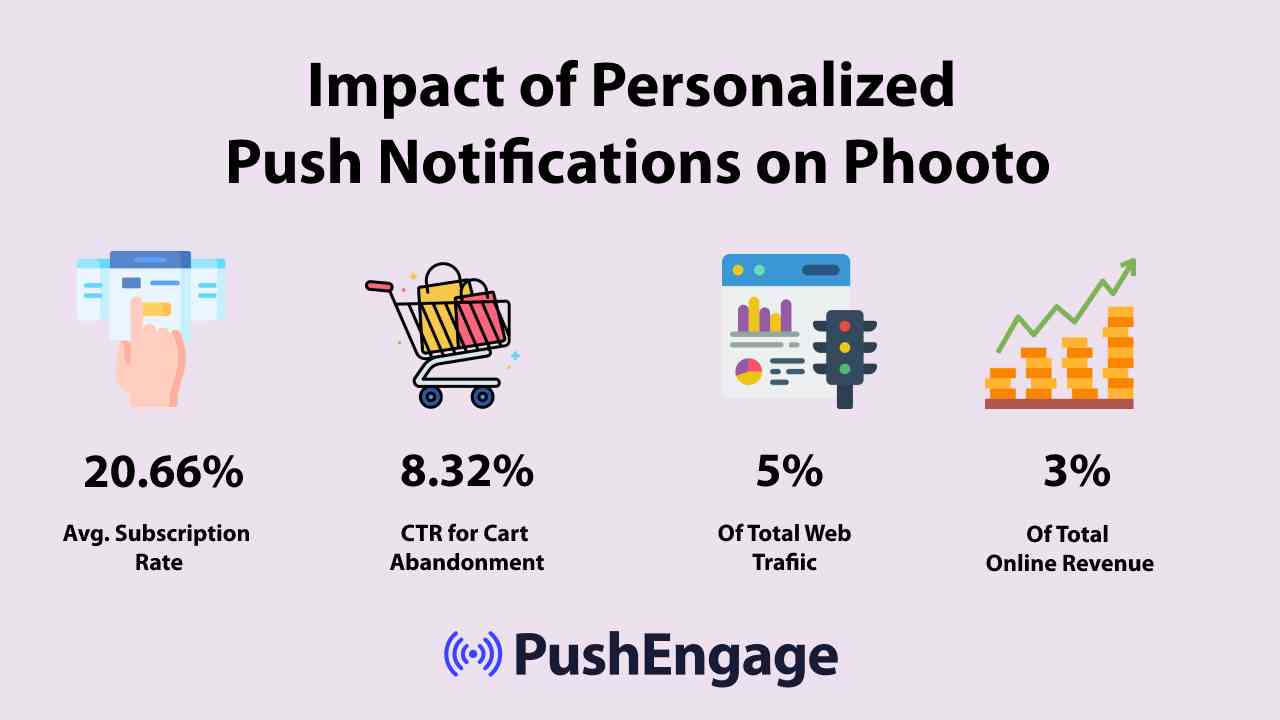
Tydeligvis kan personaliserede push-meddelelser ændre den måde, du driver forretning online på.
Men ifølge et studie, sker 70% af personaliseringsoplevelserne på en e-handelswebshop kun, når brugeren er logget ind på kontoen. Men ideelt set vil du gerne tilbyde en personlig oplevelse, selv når de ikke er logget ind.
- Kampagner for forladte indkøbskurve
- Lageropdateringer
- Prisfaldsalarmer
- Personalisering efter lokation
- Kampagner for forladte kurve
- Produktgennemgangskampagner
- Påmindelser og opdateringer om live-begivenheder
Push-meddelelser hjælper dig endda med at nå ud til dine kunder, når de er online, uanset om de er på dit websted eller ej.
Brug af forskellige indholdstemaer til forskellige typer notifikationer
Indholdstemaer er en fantastisk måde at få folk til at abonnere på dine push-meddelelser. Du kan bruge forskellige lejligheder som f.eks. Black Friday som indholdstemaer:
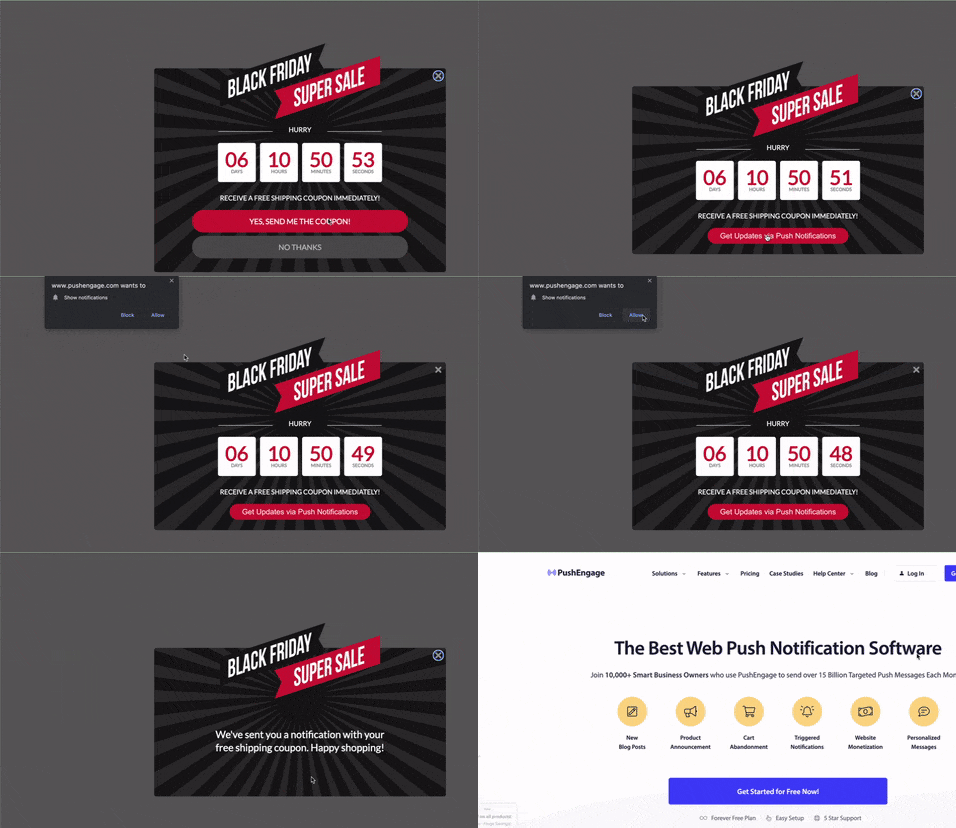
Du kan også bruge lejlighedsbaseret segmentering til at sende forskellige typer målrettede push-kampagner. Endnu bedre, du kan bruge disse segmenter til at oprette abonnementswidgets på dit websted:

En abonnementsstyrings-widget giver dine besøgende mulighed for at vælge, hvilken type push-meddelelser de vil modtage fra dig.

Og du kan endda oprette push-meddelelses-popups, der automatisk segmenterer dine abonnenter, når de abonnerer.
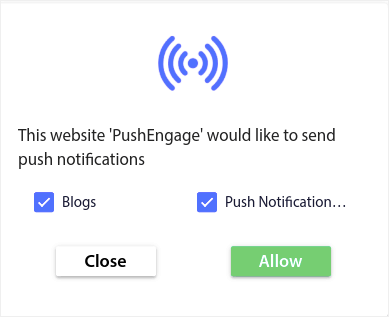
Indholdstemaer giver dig mulighed for kun at sende relevant indhold til dine abonnenter. Dette vil hjælpe dig med at øge dine abonnementsrater og endda dine engagementrater.
Pro Tip: Husk at diversificere dine indholdstemaer. Du kan oprette flere push-meddelelses-tilmeldinger for at målrette forskellige typer brugere. Oprettelse af flere brugerdefinerede tilmeldinger er en fantastisk måde at øge dine push-abonnenter fra dit eksisterende indhold.
Opbygning af en abonnent-opt-in-strategi
Brugerdefineret indhold er en af de nemmeste måder at få mest muligt ud af forskellige typer notifikationer. Men det er ikke alt. Du skal også have en klar strategi for at fortsætte med at udvide din abonnentliste. Lad os se nærmere på nogle af de mest kritiske dele af en opt-in strategi.
Implementering af en klar opfordring til handling
En call-to-action-knap er den nemmeste måde at få dine hjemmesidebesøgende til at abonnere. Som standard beder dine push-notifikations-popups dine besøgende om at abonnere. Men du kan ændre teksten til hvad som helst, du ønsker.
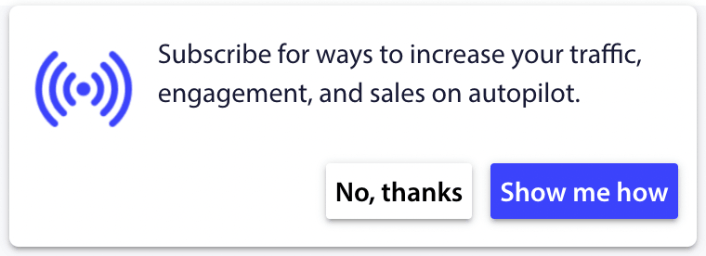
Og hvad mere er, at du kan tilpasse udseendet og følelsen af den, inklusive dine brandfarver.
Pro Tip: Du kan bruge handlingsknapper i dine push-notifikationer for at få mange flere klik.
Timing og frekvens af notifikationer
Der findes noget, der hedder for mange push-notifikationer.
Antallet af push-notifikationer, du bør sende, afhænger af din branche. Når det er sagt, er det bedste, du kan gøre, at sende dine kunder højst 2 notifikationer om dagen. Og ikke mere end 5 om ugen.
Et gennemsnit på 1 notifikation om dagen fungerer endnu bedre.
Medmindre du har noget virkelig vigtigt at fortælle dine abonnenter, selvfølgelig:
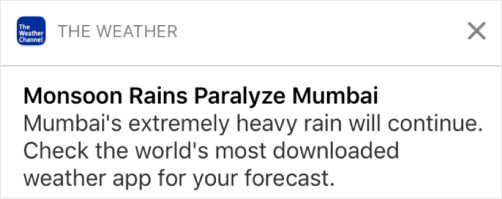
Du kan nemt virke for aggressiv og irritere dine abonnenter. Det er en fantastisk måde at miste abonnenter på push-notifikationer. Men du bliver nødt til at forbinde dig med dine kunder. Og du skal sende dem salgsfremmende og transaktionelle notifikationer.
Se denne artikel om hvor mange push-notifikationer du bør sende for endnu flere tips.
Du kan også planlægge dine push-notifikationer på forskellige måder.

Det er super nemt at planlægge push-notifikationer, der skal sendes:
- Straks
- På en bestemt dato og tid
- Som en tilbagevendende begivenhed
At vide, hvor mange notifikationer du skal sende, og hvornår du skal sende push-notifikationer vil dramatisk reducere dine afmeldingsrater.
Pro Tip: Hvis du når et punkt, hvor dine push-abonnenter ikke engagerer sig med dig, kan du starte en retargeting-kampagne for at genengagere dem. Hvis det ikke virker, kan du altid rense din abonnentliste.
A/B-test af forskellige typer notifikationer
Split-test er en god måde at vælge mellem forskellige typer notifikationer. Det er en god måde at forstå, hvad der virker for dig. Men hvad kan du split-teste i en push-notifikation?
De mest almindelige præstationsmålinger for push-notifikationer er:
- Klikrate: Klikraten på en push-meddelelse er, hvor ofte dine abonnenter så din push-meddelelse og derefter klikkede på den.
- Visningsrate: Visningsraten for en push-meddelelse er, hvor ofte en abonnent modtog din push-meddelelse og så den, før den udløb.
- Målkonverteringer: Du kan sætte mål for din kampagne og opsætte målesporing for dine kampagner. Målkonverteringer er et mål for, hvor mange gange du opnåede dit mål.
For at øge dine visningsrater vil du gerne bruge et stort billede i dine push-meddelelser. Brugen af billeder i dine meddelelser gør dem øjeblikkeligt mere tiltalende.
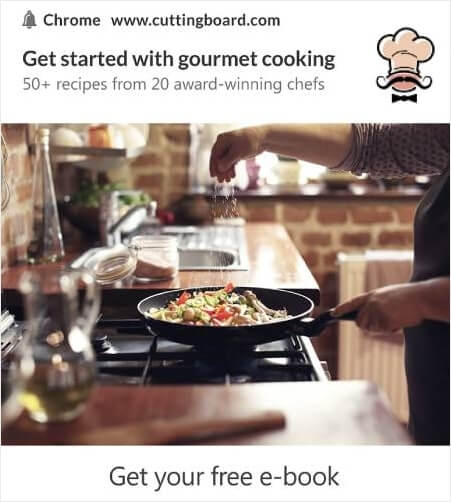
Du kan også eksperimentere med power words i din push-notifikationstitel.
Så du kan A/B-teste notifikationer med billeder og uden. Du kan også teste visningsrater ved at split-teste push-notifikationer med og uden power words i titlen.
Hvis du ønsker at forbedre din klikrate, skal du fokusere på kernemeddelelsen og arbejde på at gøre den yderst relevant. For det meste handler dette om en af to ting:
- Segmentering af dine abonnenter
- Ikke at sende for mange push-notifikationer
Og der er intet at A/B-teste på dette område. Men du kan A/B-teste dine klikrater med Call to Action (CTA) knapperne på dine push-notifikationer. Prøv at A/B-teste push-notifikationer med en eller ingen CTA mod en med to CTA'er.
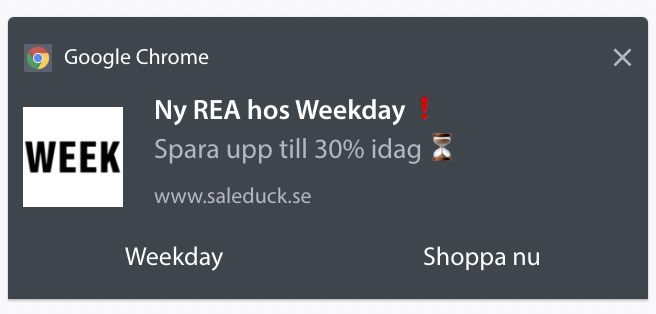
Hvis du ikke er sikker på, hvordan du opretter flere CTA'er, kan du læse denne artikel om hvordan du tilføjer knapper til dine push-notifikationer.
Med målkovertider er det mest et spørgsmål om at opsætte relevante eCommerce push-notifikationer. Så igen, der er ikke meget at split-teste her. Når det er sagt, hvis du kan optimere dine push-notifikationer for bedre klik til et rigtig godt tilbud, vil dine målkovertider stige.
Forbedring af resultater på forskellige typer notifikationer
Over tid kan du forbedre optin-raterne for dine push-notifikations-popups. Med enhver god push-notifikationstjeneste får du detaljerede optin-analyser.
Ethvert konverteringsværktøj under solen kommer med sine egne popup-analyser. Så hvorfor skulle push-notifikations-popups være anderledes?
Her er, hvad der er episk...
Du kan få analyser ikke kun for dine push-notifikationskampagner, men også for dine tilmeldinger!
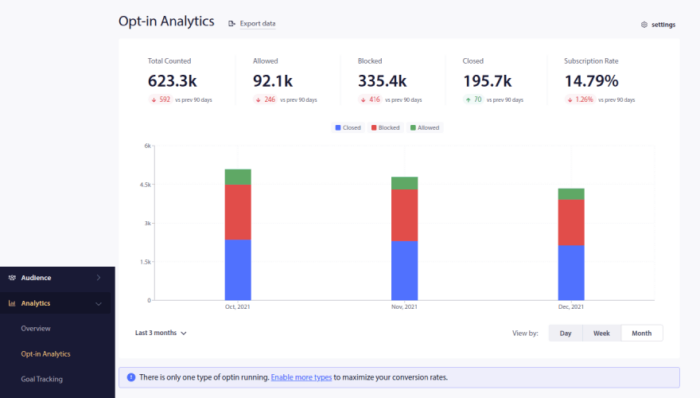
At være opmærksom på din optin-analyse er en god måde at få abonnenter på push-notifikationer. Samtidig anbefaler vi også at få feedback fra dine abonnenter om dine push-notifikationskampagner.
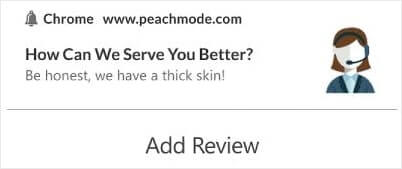
Du kan oprette en simpel landingsside med en formular til at indsamle anmeldelser og feedback om dine kampagner.
Privatlivsbekymringer med forskellige typer notifikationer
Ifølge GDPR skal du indhente eksplicit samtykke, før du indsamler eller behandler personlige oplysninger om en EU-borger eller -indbygger.
Push-notifikationer minder meget om e-mails, men er endnu mere begrænsede. Du kan KUN sende push-notifikationer til dine abonnenter. I modsætning til e-mails kan du ikke sende en enkelt push-notifikation tilfældigt til nogen, der ikke er abonnent.
Hvor GDPR møder push-notifikationssoftware er, at du vil sende forskellige typer notifikationer. Så du vil indsamle forbrugerdata.
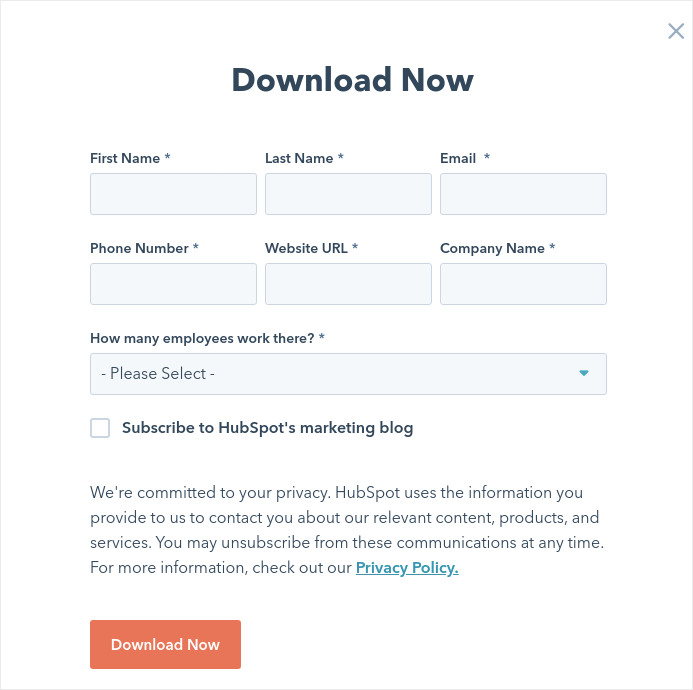
Det er selvfølgelig ikke det samme som en e-mail-opt-in. Med en e-mail-opt-in skal du indfange e-mailadressen, men du kan indfange MANGE yderligere data. Se på denne fra HubSpot:
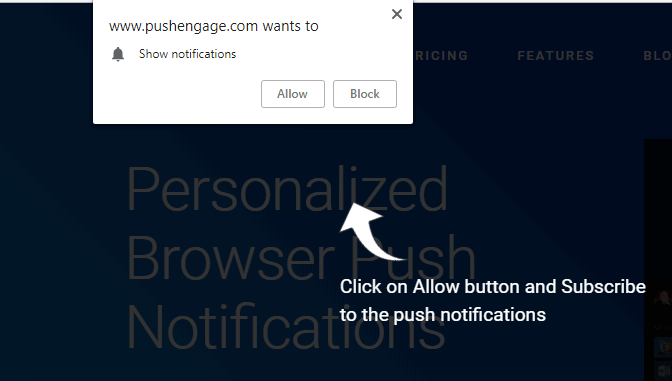
Men med push-notifikationer indfanger du kombinationen af enheden og IP-adressen for at generere en nøgle, der er unik for kundens enhed. Det er det, der sker, når folk vælger dine push-notifikationer ved at klikke på 'Tillad':
Derudover kan PushEngage gemme dine abonnenters geografiske placering, så du kan oprette personlige push-notifikationskampagner. Dette inkluderer land, stat og by på tidspunktet for abonnementet.
Men som du nok kan forstå, er dette helt baseret på samtykke. Når nogen vælger push-notifikationer, giver de dig samtykke til at sende dem marketingnotifikationer. Så push-notifikationer er allerede i overensstemmelse med GDPR pr. definition, fordi de opererer på et samtykkebaseret paradigme.
Hvad du skal gøre, efter du har opsat forskellige typer notifikationer
Nu hvor du ved, hvordan du sender forskellige typer notifikationer, er det tid til, at du begynder at opbygge dine kampagner. Start med at se på flere eksempler på, hvordan du kan bruge push-notifikationer effektivt:
- 21 bedste eksempler på velkomstbeskeder til hjemmesider, du kan bruge
- Sådan tilføjer du et WordPress-plugin til webenotifikationer til dit websted
- 75 episke push-meddelelseseksempler, du kan stjæle lige nu
- 15 eksempler på tekst til push-meddelelser, der kan inspirere dig
- 7 eksempler på push-meddelelser med høj konvertering (2022)
- 11 kreative push-notifikationseksempler, du kan stjæle lige nu!
Du bør også tjekke vores artikel om bedste praksis for push-notifikationer for at få mest muligt ud af dine push-notifikationskampagner.
Men intet af dette vil flytte nålen for dit brand, medmindre du begynder at sende push-meddelelser.
Så hvis du ikke allerede har gjort det, så kom i gang med PushEngage i dag!


