Leder du efter en hurtig guide til opsætning af push-notifikationer for forladte browserbesøg?
Push-notifikationskampagner for forladte browserbesøg er automatiserede kampagner, der kan opfordre dine hjemmesidebesøgende til at tilføje produkter til deres indkøbskurv. Men hvordan sætter man en op? Er det en kompliceret proces? Hvilken push-notifikationstjeneste bruger du? Virker kampagner for forladte browserbesøg så godt?
I denne artikel vil vi besvare alle disse spørgsmål. Vi vil også vise dig, hvordan du opsætter push-notifikationer for forladte browserbesøg på mindre end 10 minutter uden kodning.
Lad os dykke ned.
Hvad er push-notifikationer for forladte browserbesøg?
En notifikation om afbrudt browsing er en automatiseret push-notifikation, der sendes, når nogen, der browser på din hjemmeside, beslutter sig for at forlade uden at foretage sig noget. At sende den besøgende en påmindelse om, at de var interesserede i noget på din hjemmeside, kan øge dine konverteringsrater enormt.

Kampagner for forladte browserbesøg bruges oftest af e-handelswebsteder. Men det betyder ikke, at en rejseportal eller et nyhedswebsted (eller ethvert websted, virkelig) ikke kan bruge dem. Hvis du sælger noget overhovedet, skal du opsætte push-notifikationer for forladte browserbesøg for at genvinde tabt salg.
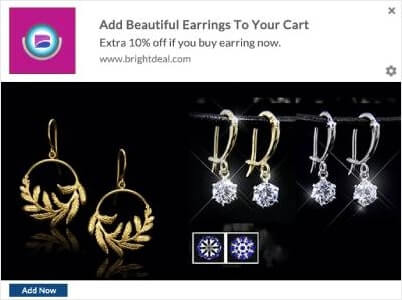
En notifikation om afbrudt browsing slutter, når din besøgende tilføjer noget til deres indkøbsvogn. Derefter overtager en notifikation om indkøbsvognsafbrydelse for at konvertere dem til betalende kunder.
Det er her, kampagner for forladte browserbesøg kommer ind i billedet. Du kan målrette, overtale og konvertere kunder, der:
- Tilføjede et produkt til en ønskeliste, men ikke deres indkøbskurv
- Så et produkt mere end én gang
- Gennemset mere end 3 produkter i samme kategori
- Søgt på siden efter et specifikt produkt
- Blev på en produktside i mindst 3 minutter og ikke købte
Det sejeste er, at du kan opsætte e-mails for forladte browserbesøg til at understøtte dine push-notifikationer for forladte browserbesøg. Så længe du har råd til en af de bedste e-mail marketingtjenester, kan du nemt opsætte automatiserede kampagner.
Og stol på os, når vi siger det, du vil få fantastiske afkast på dine marketingindsatser med kampagner for forladte browserbesøg.
Pro Tip: Tjek vores liste over de mest kraftfulde e-handels push-notifikationer, du kan bruge. Opsæt så mange af disse automatiserede kampagner, som du kan.
Sådan opsætter du push-notifikationer for forladte browserbesøg
Nu hvor vi forstår, hvad en kampagne for forladte browserbesøg er, og hvorfor du bør oprette en, lad os dykke ned i, hvordan du kan opsætte en. Vi vil bruge PushEngage til at opsætte din kampagne for forladte browserbesøg.

PushEngage er den bedste push-notifikation software i verden.
Push-notifikationer hjælper dig med at øge din webtrafik og dit engagement automatisk. Og hvis du driver en onlinebutik, hjælper PushEngage dig også med at øge dit salg ved at hjælpe dig med at oprette automatiserede e-handels-push-notifikationer.
Du kan komme i gang gratis, men hvis du er seriøs omkring at vækste din forretning, bør du købe en betalt plan. Før du køber en push-notifikationstjeneste, bør du også se denne guide til priser på push-notifikationer.
Her er et hurtigt overblik over, hvad du får med PushEngage:
- Højt konverterende automatiserede kampagner
- Flere målretnings- og kampagneplanlægningsmuligheder
- Målsporing og avanceret analyse
- Smart A/B-test
- En dedikeret succesmanager
Du vil se, at PushEngage er uden tvivl det bedste valg, hvis du vil opbygge trafik, engagement og salg for din virksomhed. Og hvis du har et budget, kan du altid være lidt kreativ med dine push-notifikationer. Lad os oprette vores push-notifikationer for forladte browserbesøg nu.
Trin #1: Opret en ny autoresponder for forladte browserbesøg
Gå til dit PushEngage-dashboard og gå til Kampagne » Udløste kampagner. Klik derefter på Opret ny autoresponder for afbrudt browsing:
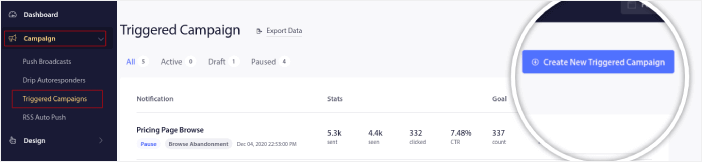
Og vælg derefter kampagnetypen Browse Abandonment Campaign fra listen over kampagnetyper, og klik på Create New:

Trin #2: Opret en serie af push-notifikationer
Nu burde du kunne se et kampagneopsætnings-dashboard. Opret din kampagne under Content:
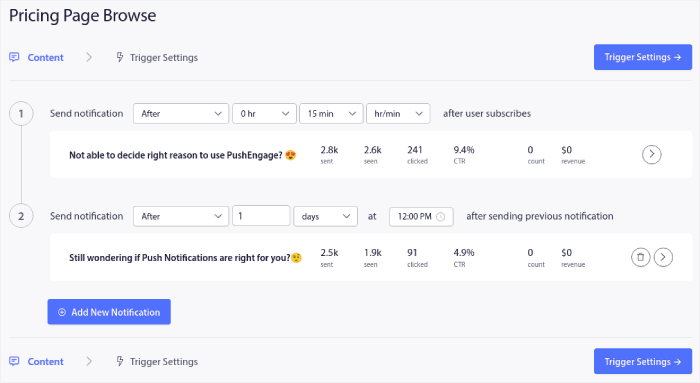
Det meste af dette er ligetil. Giv din kampagne et navn, og opret en sekvens af push-notifikationer for forladte browserbesøg.
Trin #3: Konfigurer udløseren for forladte browserbesøg
Når du er færdig, skal du klikke på Udløserindstillinger. Det er tid til at opsætte udløseren for forladte browserbesøg:
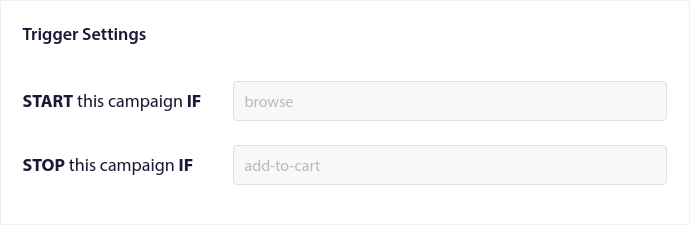
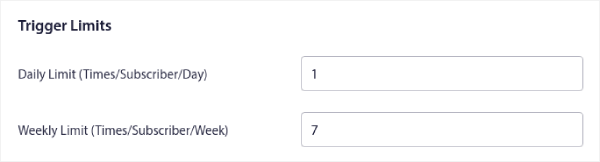
Dette er standardværdier for skabelonen til kampagnen for forladt browsing. Så du behøver ikke ændre noget her. Du kan indstille Udløsergrænser baseret på hvor ofte du vil sende push-meddelelser:
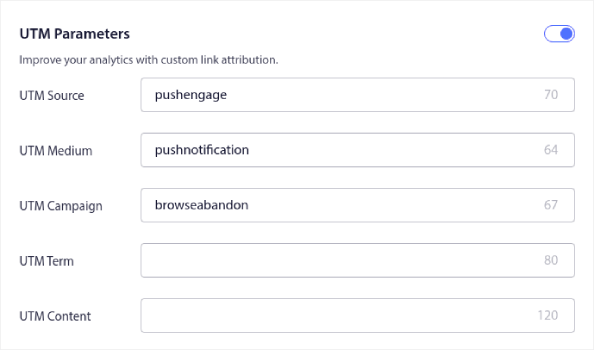
Og du kan også opsætte UTM-parametre her:
Og aktiver også Goal Tracking:
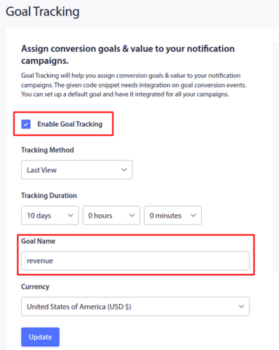
Hvis du er ny inden for push-notifikationsanalyse, så tjek vores guide til målsporing for push-notifikationer.
Trin #4: Konfigurer din popup-modal for push-notifikationer
Endelig, i dit PushEngage-dashboard, skal du gå til Design » Popup Modals:
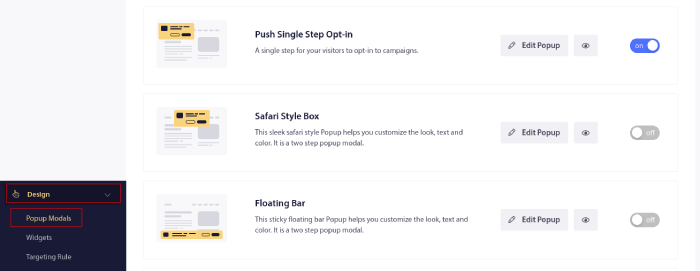
Herfra kan du tilpasse din push-notifikations-tilmelding. Hvis du har brug for hjælp til det, bør du tjekke denne artikel om hvordan man opretter en brugerdefineret push-notifikations-tilmelding.
Hvis du har brug for inspiration, kan du tjekke denne artikel om push-notifikationer, der konverterer højt.
Gennemse strategier for frafald, der øger konverteringer
Opsætningen ovenfor får kampagnen i gang. Hvad der adskiller en kampagne for frafaldne browsere, der genvinder omsætning, fra en, der brænder abonnenter af, er strategilaget: hvem du målretter mod, hvor ofte du sender, og hvad hver notifikation i sekvensen siger. Frafaldne browsere sidder højere i tragten end frafaldne indkøbskurve, så denne målgruppe er større, men koldere, og den straffer doven målretning med afmeldinger.
Segmenter efter browsedybde
Ikke enhver browser fortjener en notifikation. Vægt din målretning mod dybdesignaler: en shopper, der har set det samme produkt to gange, har gennemset tre eller flere produkter i én kategori, eller har foretaget en søgning på webstedet, har erklæret hensigt. En shopper, der har skimmet én side, har ikke. Kun at sende til høj-dybdesegmentet holder din klikrate oppe og din afmeldingsrate nede, og det giver dig mulighed for at henvise til den nøjagtige kategori i teksten, f.eks. en påmindelse om, at nye løbesko lige er landet i den kategori, de udforskede.
Match kadence med købscyklus
Hvor længe en shopper forbliver på markedet bestemmer, hvor mange notifikationer du får lov til at sende. For produkter med lav værdi og høj frekvens som tøj sker beslutningen inden for en dag eller to, så to notifikationer over 48 timer er den rigtige ramme. For køb med høj værdi og lav frekvens som møbler eller elektronik er vinduet for research længere, og målet skifter: brug sekvensen til at besvare indvendinger og flytte shopperen til en kundeemne, f.eks. en konsultation eller en live chat, snarere end at presse på for en øjeblikkelig checkout.
Giv hver notifikation i serien ét job
Find de tre vigtigste årsager til, at shoppere forlader dine produktsider, og mål derefter én notifikation mod hver. Den gennemprøvede rotation:
- Påmindelsen. Et simpelt puf med produktbilledet. Mange browsere blev afbrudt, ikke uinteresserede.
- Tilgængelighedsopdateringer. Hvis de gennemgik en størrelse eller farve, der var udsolgt, så giv dem besked i det øjeblik, den vender tilbage. Dette er den mest hensigtsmæssige udløser i sættet.
- En selektiv kupon. Tilbyd en kode kun til browsere med høj dybde. At sende rabatter til alle træner hele din liste til at opgive med vilje og vente.
- Krydssalget. Foreslå et tilbehør eller et relateret produkt fra den gennemgåede kategori. Det konverterer, selv når det oprindelige produkt blev købt andetsteds.
- Prisberoligelse. Hvis skjulte omkostninger er en kendt indvending, fjerner én notifikation, der angiver, at der ikke er ekstra gebyrer ud over den angivne pris, den.
- Et menneskeligt tilbud. For varer med høj værdi, rute trykket til live chat eller en gratis konsultation i stedet for en checkout-side.
Afslut sekvensen med en udløsergrænse, så ingen shopper får mere end én eller to notifikationer om dagen. I det øjeblik en shopper tilføjer til kurven, er denne kampagnes job færdigt, og din kampagne for frafaldne indkøbskurve overtager. Hvis du endnu ikke har bygget den, start med guiden om, hvordan du reducerer frafaldne indkøbskurve, og par push-sekvensen med e-mails om frafaldne browsere for de abonnenter, du har adresser til.
Hvad du skal gøre, efter du har oprettet push-notifikationer om forladte indkøbskurve
Nu hvor du kender kraften i e-handels push-notifikationer, er det tid til, at du begynder at oprette dine egne kampagner. Men før du går i gang med kampagnerne, bør du først studere nogle gode eksempler på push-notifikationer.
Og hvis du er ny til push-notifikationer, bør du tjekke vores artikel om bedste praksis for push-notifikationer, før du begynder at oprette kampagner. Nogle af de bedste praksisser, som vi aktivt anbefaler, inkluderer:
- Boost klik med nysgerrighed
- Personliggør hver push-notifikation
- Skil dig ud med rigt medieindhold
- Genaktiver inaktive push-abonnenter
- Hold kunderne informeret
- Brug emojis, hvor du kan
- Skab en følelse af hastværk
Pro Tip: Hvis du er ny inden for e-handels push-notifikationer, bør du også tjekke denne artikel om hvordan du får flere anmeldelser.
Vi anbefaler at bruge PushEngage til at oprette dine push-notifikationskampagner. PushEngage er den førende push-notifikationssoftware på markedet, og dine kampagner vil være i sikre hænder.
Så hvis du ikke allerede har gjort det, så kom i gang med PushEngage i dag.


