Hej, Engagelings.
Spændende nyheder: Vi har netop tilføjet Attributter og Abonnentfelter til PushEngage-dashboardet.
Attributter og Abonnentfelter har altid været en del af PushEngage API'et. Men med denne nye opdatering kan du oprette og administrere begge dele direkte fra dashboardet.
For at sige det enkelt, har vi gjort det muligt for din udvikler at opsætte Attributter og Abonnentfelter til at indsamle og tagge data som en engangsøvelse. Derefter kan dit marketingteam oprette overbevisende push-notifikationer fra dashboardet uden at have brug for hjælp fra udviklerne!
Lad os dykke ned.
Hvorfor skal du bekymre dig om Attributter og Abonnentfelter?
Før vi dykker ned i, hvorfor du har brug for at kende til Attributter og Abonnentfelter, lad os tage et hurtigt kig på, hvad de er, og hvorfor de overhovedet betyder noget.
PushEngage indsamler kun 3 datastykker fra dine abonnenter:
- Deres placering
- Browseren
- Enhedstypen
Og dette er, hvad der gør PushEngage GDPR-kompatibel. Softwaren indsamler ingen identificerbare data.
Men selvfølgelig er PushEngage API'et super fleksibelt, og du kan gemme identificerbare data for dine abonnenter ved hjælp af brugerdefineret kode. Du kan forbinde PushEngage API'et til dit CRM eller en kontaktformular og holde styr på, hvilke notifikationer du sender til præcis hvilken abonnent.
Det er præcis derfor, du skal bekymre dig om Attributter og Abonnentfelter.
Abonnentfelter er standardfelterne, der er tilgængelige for enhver abonnent. Abonnentfelter hjælper med at gemme yderligere oplysninger om abonnenter, såsom e-mail, fornavn og mere. Du kan designe personlige kampagner til dine abonnenter ved hjælp af de grundlæggende personlige oplysninger om den pågældende abonnent.
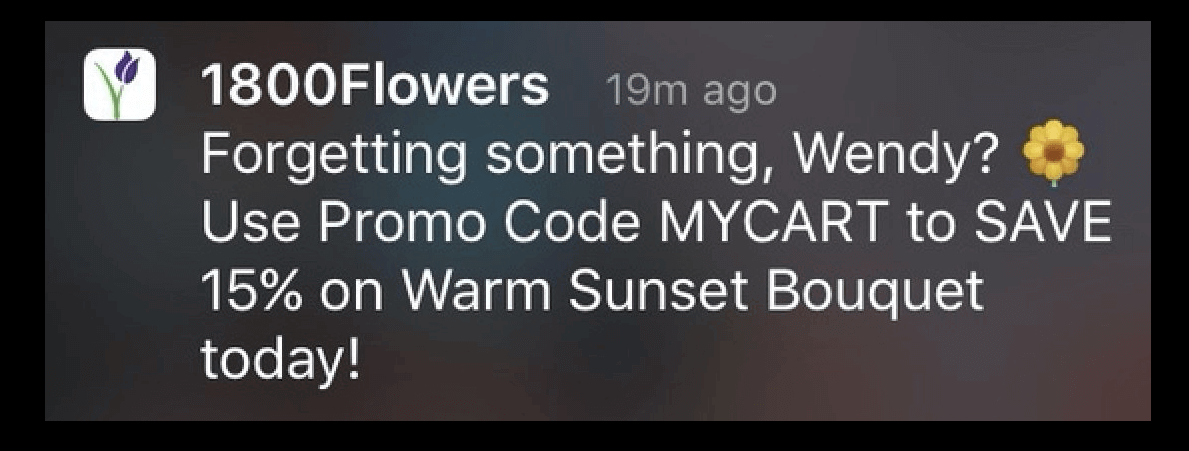
For eksempel bruger denne push-notifikation abonnentens navn (Wendy) til at sende en personlig notifikation:
Og du kan tilføje data til Abonnentfelter ved hjælp af PushEngage Identifying Subscribers API til brug i dine kampagner.
Attributter bruges til at gemme yderligere oplysninger om dine abonnenter. Alle data, du kan bruge til at oprette adfærdsbestemte, kulturelle, lejlighedsvise og psykografiske segmenter, kan gemmes som abonnentattributter.
For eksempel kan du oprette en attribut kaldet 'payment_expiry_date' for at gemme abonnenternes betalingsudløbsdato og sende en påmindelseskampagne før udløbsdatoen.
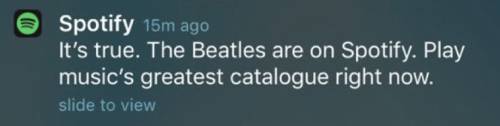
Eller, hvis du sporer indholdspræferencer hos dine abonnenter, kan du sende personlige indholdsanbefalinger, som Spotify gør:
Og igen, du kan sætte dette op ved hjælp af PushEngage Attributes API.
Brug af Attributter og Abonnentfelter vil give dig højere klikrater og flere konverteringer i en skala, som du simpelthen ikke kan opnå med en-til-en-beskeder eller endda en generel push-notifikationsudsendelse.
Men alle disse muligheder har eksisteret i lang tid. Så hvad har vi præcist ændret?
Hvad er ændringen præcist?
Tidligere skulle du gøre alt dette udelukkende via API'en, hvilket betød, at kun din udvikler eller udviklingsteam kunne administrere abonnentfelter og attributter. Nu, hvis du går til din PushEngage-konto og går til Publikum » Attributter, kan du administrere begge datatyper direkte fra PushEngage-dashboardet:
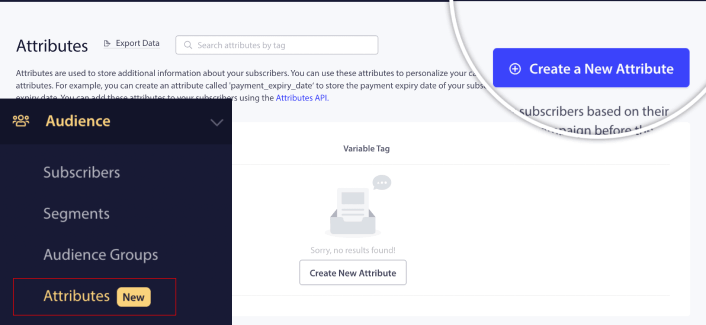
Her kan du tilføje en ny attribut ret hurtigt.
VIGTIGT: Du skal stadig bruge API'erne til at tilføje data til dine attributter og abonnentfelter. Dashboardet giver dig kun mulighed for at tilføje og administrere attributter visuelt.
Når du har oprettet en attribut, kan du bruge den i dine push-meddelelser til at sende dynamiske, personlige meddelelser. For eksempel oprettede jeg lige en attribut, der mapper vores foretrukne sociale mediekanaler for hver abonnent.

Nu kan jeg bruge denne attribut i enhver push-meddelelse, jeg sender. Lad os sige, at vi laver en live-streaming begivenhed på tværs af flere sociale mediekanaler. For at få mest mulig visning kan jeg bede vores abonnenter om at tilmelde sig begivenheden på deres foretrukne sociale mediekanal:
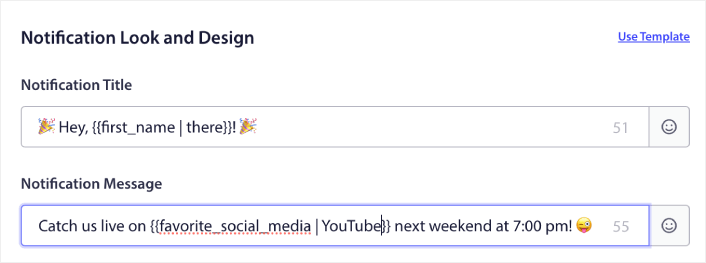
Denne meddelelse erstatter dynamisk variablen for fornavnet med det faktiske fornavn og det foretrukne sociale medie med det faktiske kanalnavn. Og hvis disse data ikke er tilgængelige for den pågældende abonnent, vil fallback-muligheden oprette en meddelelse, der siger "Hej, der!" i stedet for at bruge fornavnet og "YouTube" i stedet for at bruge den foretrukne sociale mediekanal.
Men det er ikke alt!
Du kan endda oprette et Brugerdefineret publikum ved hjælp af disse attributter. Så hvis jeg ville sende et andet tilmeldingslink eller begivenhed link til forskellige sociale mediekanaler, kunne jeg gøre det ved at oprette flere versioner af den samme meddelelse og ændre Meddelelses-URL.
Gå blot til fanen Publikum i meddelelsen, og vælg den rigtige attribut.
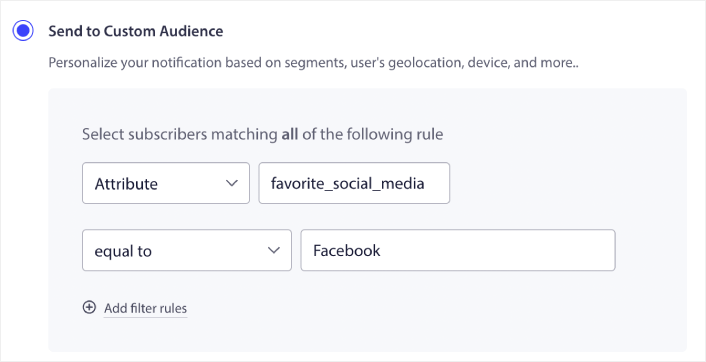
Og så kan du simpelthen duplikere meddelelsen og ændre URL'en og værdien for attributten for at målrette specifikke brugere.
Hvad ellers?
Vi ved, at det er hårdt arbejde at vækste en virksomhed. Hos PushEngage søger vi altid at forbedre vores produkt og din oplevelse. Vi har lanceret denne nye funktion for at hjælpe dig med at få endnu mere værdi ud af dit PushEngage-abonnement.
Nu kan du få dine udviklere til at opsætte attributter og abonnentfelter én gang for at indsamle og tagge dataene, og derefter lade dit marketingteam sende kraftfulde push-meddelelser uden at have brug for udviklerne, hver gang en ny kampagne skal sendes ud.
Mange tak for at læse denne meddelelse.
Hvis du har spørgsmål, er vores Customer Success-team her for at hjælpe. Start blot en samtale på Live Chat eller tjek vores kontaktside.
Og tak, fordi du bruger PushEngage. Uanset om du bruger gratisversionen eller Enterprise-versionen, er du lige så vigtig for os. De nye skabeloner er beregnet til at hjælpe dig med at få succes, og vi ønsker dig alt det bedste.
Giv os din mening i kommentarerne nedenfor, og hvis du endnu ikke har gjort det, kom i gang med PushEngage i dag!


