正在为您的电子商务商店寻找一种简单的方法来发送 Shopify 购后调查?
使用推送通知发送调查非常简单,您无需任何编码或复杂步骤。最棒的是什么?您可以创建一次活动,然后将其自动化,以便在有人在您的网站上购买产品时自动发送。
在本文中,我将向您展示如何使用自动推送通知发送 Shopify 购后调查。
听起来不错?
让我们开始吧。
发送 Shopify 购后推送通知!
推送通知是一种超级有效、低成本的营销工具,可帮助您自动增加重复流量、互动和销售。
如何创建 Shopify 购后调查活动
让我们开始介绍如何使用推送通知创建 Shopify 购后调查。我建议在您的推送通知活动中使用 PushEngage。

PushEngage是唯一一款让您能够跨Web推送、应用推送和WhatsApp与客户互动的Shopify应用——帮助您挽回更多销量、促进重复购买并增加收入,而无需仅依赖电子邮件或短信。
通过一次简单易用的集成,您可以设置自动化营销活动,在客户最有可能购买的时刻触达他们,无论他们是在台式机、移动设备上浏览,还是在WhatsApp上聊天。
使用Shopify上的PushEngage,您可以做到以下几点:
- 通过推送通知和WhatsApp提醒(支持WhatsApp Business API)自动挽回已放弃的购物车。
- 发送个性化的产品提醒,例如降价、补货通知和限时促销更新,在购物者最想购买的时候吸引他们回来。
- 运行系列营销活动和购买后跟进,以获取更多评论、交叉销售产品并促进重复订单。
- 通过原生的Android和iOS应用推送通知,即时吸引应用用户。
- 通过一键选择加入推送通知或免费的“点击聊天”WhatsApp小部件(无需Business API),将普通访客转化为订阅者。
- 通过客户细分、时区发送和个性化智能标签,智能地定位营销活动。
- 使用内置的目标跟踪、A/B测试和高级分析轻松跟踪投资回报率。
Shopify商家选择PushEngage的原因:
- 无缝的一键式Shopify集成,可自动同步您的产品、订单和客户活动。
- 适用于Web、应用和WhatsApp,因此您无需多种工具。
- 已被证明可以提高参与度并挽回损失的收入,而成本仅为电子邮件或短信的一小部分。
- 专门为Shopify Plus商家提供入职和成功支持。
👉 如果您正在寻找一种更智能的方法来吸引客户回购、提高客户生命周期价值 (LTV) 并轻松增加销售额,那么 PushEngage 是您的最佳选择。您可以免费开始使用,并在准备好扩展时升级以解锁高级自动化功能。
如果您经营在线商店,PushEngage 还可以通过帮助您创建 自动化的电子商务推送通知来帮助您增加销售额。您可以免费开始使用,但如果您想认真发展业务,则应购买付费套餐。最棒的是 推送通知的成本 非常低,可以轻松开始。
第 1 步:创建新的 Shopify 购后调查推送通知活动
在创建 Shopify 购后调查活动之前,让我们先了解一下它的基本工作原理。
您将创建一个简单的动态细分,以捕获刚刚购买了产品并进入了结账页面的任何订阅者。如果您的网站上有感谢页面,您也可以使用任何购后感谢页面来设置此活动。然后,您将创建一个简单的自动回复邮件序列,以征求评论或将您的客户重定向到NPS调查页面。
别担心。完成所有这些非常简单。
转到 PushEngage 仪表板,然后前往 受众 » 细分 并点击 创建新细分。在这里,您可以创建一个自定义细分,以捕获访问您感谢页面的任何订阅者:
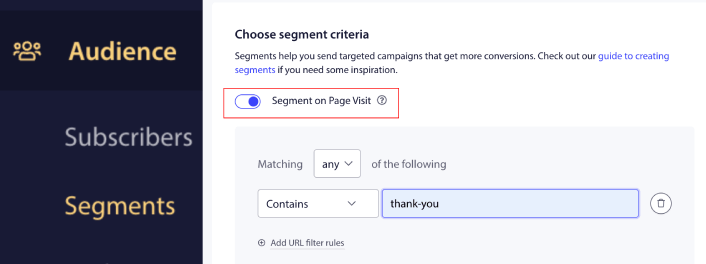
在 URL 匹配规则中,您可以添加 包含“thank-you”或您的感谢页面的任何 URL 别名。如果您有多个感谢页面,可以使用 精确匹配 而不是 包含 作为细分规则。
第 2 步:起草购后调查活动
接下来,您需要在 PushEngage 仪表板中起草活动。前往 活动 » 滴灌自动回复 并点击 创建新的滴灌自动回复:

然后,为您的营销活动命名(我们建议使用类似“欢迎自动回复”的名称),然后在 Content 下,选择“Send notification immediately after user subscribes”(立即向用户发送通知):

此时,您可以点击通知旁边的箭头来编辑通知内容。
在这里,您可以将链接添加到推送通知中的调查页面,或者如果您有允许您直接收集评论的 Shopify 应用,您也可以向他们发送评论链接。
如果您拥有 PushEngage 的 Premium 或 Enterprise 套餐,您将能够添加多个通知来创建一系列自动欢迎消息。只需点击 Add New Notification 并编辑内容即可。
完成后,点击 滴灌设置 并选择将您的 Shopify 购后调查活动发送到您的感谢页面细分的选项:
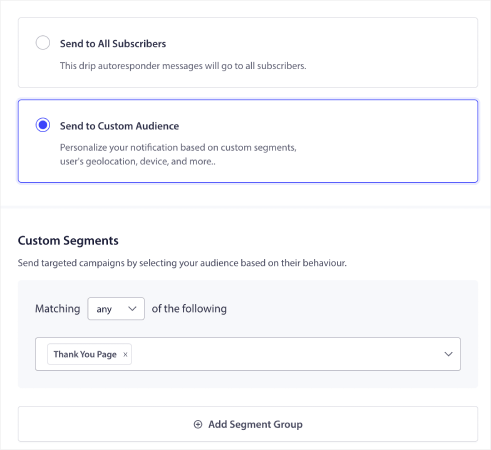
每当订阅者购买您的任何产品时,他们都会自动收到购后调查。
然后,向下滚动以设置您自己的 UTM 参数以 跟踪推送通知:
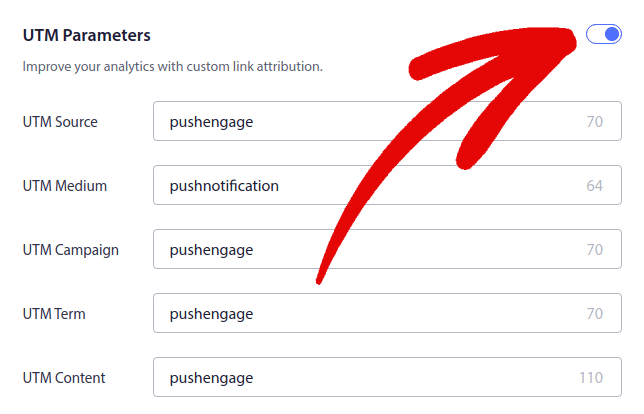
您已接近完成。
第 3 步:保存并启动营销活动
就是这样!
只需点击激活自动回复器按钮:

您就完成了。
在启动 Shopify 购后调查后该怎么做
好了,各位!如果您觉得这有帮助,您还应该查看我们关于如何减少购物车放弃率的文章。那里有一些非常有用的想法。
如果您刚开始使用推送通知,您应该试试 PushEngage。查看这些很棒的资源,帮助您入门:
PushEngage 是全球排名第一的推送通知软件,您可以使用 PushEngage 创建各种推送通知广告系列。
所以,如果您还没有,请立即开始使用 PushEngage。


