
正在寻找一种添加 PWA 推送通知的简单方法?
渐进式 Web 应用 (PWA) 是可在任何设备上运行的应用。但发送 Web 推送通知总会遇到一些冲突。通常,最大的问题是送达率。您可以通过多种方式为 PWA 添加 Web 推送。但是,如何发送真正能从 PWA 送达的 Web 推送通知呢?
别担心!在本文中,我们将一步步向您展示如何在 10 分钟内以可靠的送达率发送 PWA 推送通知。
让我们开始吧。
简而言之 — 什么是 PWA 推送? 渐进式 Web 应用 (PWA) 推送通知是标准 Web 推送消息,通过 PWA 注册的服务工作线程传递,允许从 Web 安装的应用即使在网页关闭时也能接收推送消息。
立即发送 PWA 推送通知!
推送通知是一种超级有效、低成本的营销工具,可帮助您自动增加重复流量、互动和销售。
如何安装 PWA 推送通知
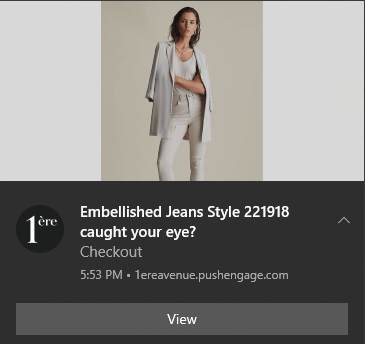
为渐进式 Web 应用添加推送通知非常简单。只需按照本文中的步骤操作即可。如果您遵循每一个步骤,在阅读完本文后,您应该能够发送如下所示的推送通知:
- 在网站根目录注册一个服务工作线程,该线程结合了 PWA 逻辑和推送处理。
- 安装 PushEngage 脚本并将安装代码复制到
<head>中。 - 配置选择加入模态框并在 PushEngage 仪表板中创建广告系列。
主要挑战在于,所有 Web 推送通知软件都使用一个名为 service_worker.js 的 Javascript 文件。服务工作线程可帮助您通过弹出模态框收集推送通知订阅者。但是,所有 PWA 都已有一个服务工作线程文件,用于实现不同的目的。而且,一次您的 PWA 只能使用一个服务工作线程。
简单来说,Web 推送服务会混淆您的 PWA。因此,有时它会收集推送通知订阅者,有时则不会。有时您可以发送通知,有时则不能。您甚至可能最终向整个订阅者列表发送 推送消息,但只有少数订阅者收到。
我们建议使用 PushEngage 发送 PWA 推送通知。PushEngage 是全球排名第一的推送通知软件。因此,您知道您的广告系列是安全的。
当然,像 Mendix 这样的 PWA 构建器自带推送通知系统。但是,如果您想迁移到其他 推送通知服务怎么办?如果您想在推送通知广告系列中获得更大的灵活性和控制权怎么办?更重要的是,这些服务通常会提供一个 API 来创建推送广告系列。但使用 PushEngage,您可以获得一个易于使用的仪表板,从中可以创建、安排、发送和管理推送广告系列。
而且,是的,您可以使用 Firebase Cloud Messaging (FCM) 来发送 Android 应用推送通知。但借助 PushEngage,您可以发送 Android 应用和网页推送通知、iOS 和 iPadOS 网页和应用推送通知以及浏览器推送通知。
最棒的是什么?您甚至只需点击几下即可发送强大的 电子商务推送通知。
| 事实 | 价值 |
|---|---|
| 主要交付机制 | Service worker (推送订阅) |
| 典型设置时间 | ~10 分钟(基础) |
| 通用要求 | 根作用域的 service_worker.js + manifest.json |
| 适用于 | 大多数桌面浏览器和 Android(因平台而异) |
让我们开始吧。
第 1 步:设置您的 PushEngage 帐户
前往 PushEngage 主页,然后点击“开始使用”按钮:

您可以免费试用 PushEngage。如果您经营一个需要重复流量和参与度的小型博客,这可能就足够了。但如果您对销售很认真,您应该购买企业套餐并解锁 自动活动。
注册 PushEngage 帐户后,请前往您的 PushEngage 仪表板 并转到 网站设置 » 网站详细信息:
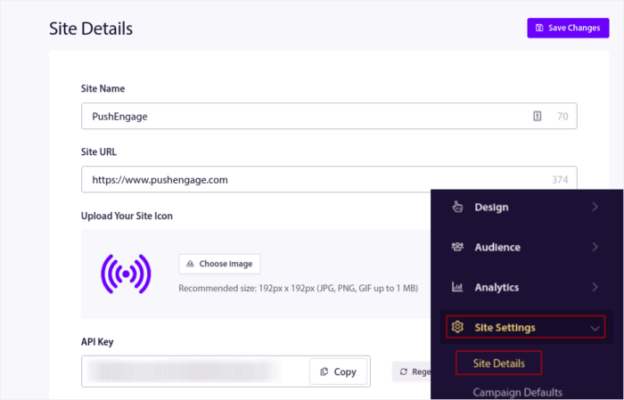
您可以在此处设置您的徽标、网站名称和网站 URL。现在就处理好这些事情非常重要,这样您以后才能测试整个设置。
第 2 步:从 PushEngage 获取安装代码
要安装推送通知,您需要获取安装代码。在您的网站设置屏幕中,向下滚动并单击单击此处获取设置说明按钮:

然后,单击任何网站选项卡:
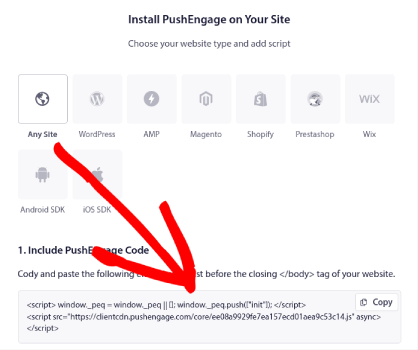
您可以使用 Javascript 代码开始发送推送通知。
第 3 步:为 PWA 推送通知添加服务工作线程代码
这个过程中最棘手的部分终于来了。在 PushEngage 仪表板的 设置说明下,您还会看到一个下载 service worker 文件的选项。
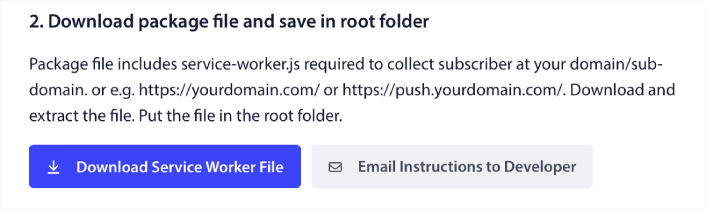
重要提示:一个 PWA 一次只能有一个活动的 Service Worker 范围 — 请将推送代码合并到您现有的 Service Worker 中。(在无法修改根目录的无代码平台上,请使用此 解决方法 在 Base44 PWA 上启用 Web 推送。) 默认情况下,PWA 不需要 Service Worker 文件。将任何网站变成渐进式 Web 应用所需的一切就是一个 manifest 文件。因此,如果您的 PWA 没有 Service Worker 文件,您可以直接将 PushEngage Service Worker 添加到您的网站或 Web 应用的根目录。
但是,如果您的 PWA 已经有一个 service worker,请不要直接上传 PushEngage 推送通知 service worker 文件。在记事本等文本编辑器中打开 PushEngage service worker,然后复制 PushEngage service worker 文件中的代码。接着,找到您 PWA 的 service worker 文件,然后将 PushEngage service worker 代码添加到该文件中。
如果您忽略此步骤,您将无法 收集推送通知订阅者。
第 4 步:配置 PushEngage 订阅选项
现在,返回您的 PushEngage 仪表板。转到 设计 » 弹出窗口并选择您喜欢的选择加入方式:
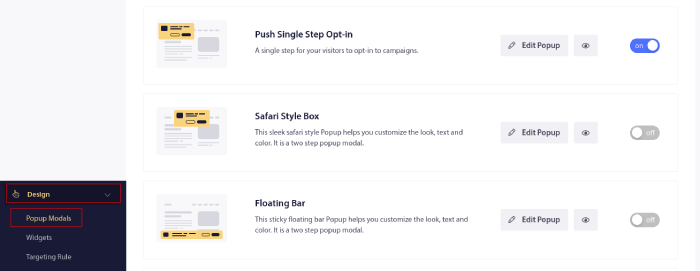
这里的想法是为您的访问者提供订阅的充分理由。如果您需要这方面的帮助,请查看我们关于 如何创建自定义推送通知选择加入的文章。
如果您想获取一些入门模板,您应该查看这篇关于 高转化率推送通知订阅选项的文章。
第 5 步:创建您的第一个营销活动
既然您的 PWA 可以发送推送通知,您应该创建一个实际的广告系列。
废弃购物车营销活动通过转化废弃的购物车来帮助产生额外收入。这是一个简单的提醒,可以自动销售大量产品。因此,它非常适合支持任何带来直接销售的着陆页。
只需前往您的 PushEngage 仪表板,然后转到 Campaigns » Triggered Campaigns » Create A New Triggered Campaign:
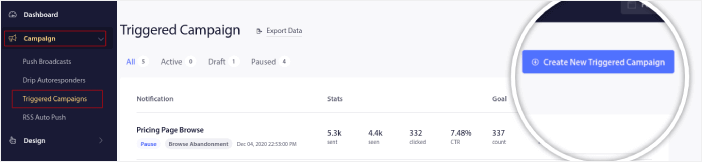
然后,选择 Cart Abandonment 广告系列模板:

如果您是创建自动化营销活动的新手,可以简单地参考我们关于如何设置废弃购物车推送通知营销活动的文章。请遵循每个步骤,您就可以设置像这样的推送通知:
以防您想知道,您的推送通知营销活动不必是家喻户晓的品牌才能有效。事实上,PushEngage 的创建就是为了帮助小型企业通过推送通知实现增长。
但在您开始营销您的网站之前,您应该修复推送通知订阅过程中遇到的任何问题。请查看这篇关于 测试您的推送通知 的文章。如果一切正常,您就完成了!
常见问题解答
问:PWA 推送需要 service worker 吗?
答:是的。PWA 推送消息由注册的 service worker 传递,其中必须包含推送事件处理。
问:我可以在 iOS 上发送 PWA 推送吗?
答:是的,您可以在 iOS 上发送 PWA 推送,您需要在安装设置中添加 service-worker 和 manifest 文件。
问:最常见的集成错误是什么?
答:将单独的推送 service worker 上传到根目录而不将其与 PWA 的现有 service worker 合并 — 这会导致冲突和订阅丢失。
添加 PWA 推送通知后该怎么做?
好了,各位,本次分享就到这里!
您现在可以发送 PWA 推送通知了。到目前为止,您还创建了一个强大的 Web 推送通知广告系列来促进您的增长。所有这些,在不到 10 分钟的时间内完成!
查看如何创建其他自动推送通知广告系列。大多数推送广告系列都简单有效。因此,我们建议为您的网站设置多个广告系列。以下是一些可以开始的优秀广告系列:
如果您还没有开始,请立即开始使用 PushEngage。PushEngage 是全球排名第一的推送通知软件。因此,您的营销活动是安全的。


