正在寻找一种自动发送个性化推送通知的方法?
最简单的方法是使用带有属性的自动滴灌广告系列。属性是自定义变量,可用于动态发送个性化推送通知。
如果这听起来有点复杂,请不要担心。
在本文中,我们将解释一切,以及如何使用属性轻松设置个性化推送通知滴灌广告系列。
听起来不错?让我们开始吧。
什么是推送通知属性?
推送通知属性是自动获取订户详细信息并个性化您的通知消息的变量。您可以通过添加以下数据来自定义滴灌广告系列:
- 用户的名字
- 他们的爱好
- 他们的位置
以及更多,具体取决于您运行的广告系列类型。
我们建议您使用 PushEngage 发送推送通知广告系列。PushEngage 是全球排名第一的推送通知软件。因此,您的广告系列将得到妥善处理。
即使不使用推送通知属性,PushEngage 也允许您使用订户的国家和城市名称发送个性化网络推送通知。如果您愿意,可以向所有订户或自定义细分市场发送滴灌推送通知序列。您甚至可以在 PushEngage 中运行带有地理围栏的滴灌广告系列。
但是,如果您想更进一步,可以使用PushEngage 属性 API 提供完全不同级别的个性化。
如何发送个性化滴灌推送通知
滴灌广告系列是一系列自动发送的推送通知。通常,滴灌序列在以下两种情况之一触发:
- 首次有人订阅时
- 当订户被添加到细分市场时
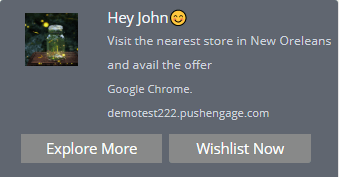
您可以根据订户的操作触发滴灌通知。现在您已经了解了什么是滴灌广告系列以及如何打开触发器,让我们来看看如何使用属性 API 发送个性化滴灌通知,例如此通知:
案例 #1:发送给所有订户
如果您将滴灌广告系列发送给所有订户,那么所有订阅您推送通知的人都将收到个性化滴灌通知。最棒的是,您可以创建整个序列以及交付计划。
在这种情况下,一旦用户订阅,您就可以传递值或设置订户哈希的属性。这可以通过哈希的响应来完成。
案例 #2:发送给自定义细分市场
您也可以将滴灌广告系列发送到自定义细分市场。如果您不确定那是什么,请查看我们关于如何创建自定义细分市场的文章。对于此触发条件,一旦订户进入细分市场,您就可以传递值或设置细分市场响应的属性。
案例 #3:属性和地理位置
使用 PushEngage,您可以通过在通知标题和消息中使用用户的国家和城市名称属性来向他们发送自定义的滴灌通知。这些是预定义的属性,您可以为所有订阅者使用,无需任何编码。同样,您可以在通知字段中添加用户的名字和其他详细信息。
对于地理定位属性,您需要在订阅者订阅后立即将这些属性设置为订阅者哈希值。
快速看一下您可以使用示例文本:
 var newAttributes = {
 'name': 'Jon smith',
 'isAdmin': true,
 'lastActive': "2019-09-19T05:41:53.150Z",
};
此代码段用于为用户创建三个新属性。简而言之,该代码试图分配姓名、管理权限标签及其上次活动时间戳。这些都可以用于创建个性化的推送通知。
window._peq.push(['init', false, function(res) {
   if(res.statuscode==1) {
     //Get your subscriber hash in response
     console.log(res.subscriber_hash);
     window._peq.push(['set-attributes', newAttributes, function(res) {
       if(res.statuscode == 1) {
         // handle response
         console.log(res);
       }
     }]);
   }
}]);
在这里,您只是尝试获取上一个代码块中为新订阅者定义的新属性,并将它们发送到 PushEngage 服务器。您也可以在订阅者作为用户登录网站时获取这些属性。一旦发送了这些属性,您就可以在 PushEngage 广告系列中使用它们。
如果您想更详细地了解属性,请查看 PushEngage 属性 API 文档。
如何设置带有属性的滴灌自动回复器
现在您对可以使用的滴灌广告系列属性类型有了更多的了解,让我们继续使用 PushEngage 进行设置。如果您还没有使用 PushEngage,请立即开始。
登录您的 PushEngage 仪表板,然后转到 Campaign » Drip Autoresponders 并点击 Create Drip Autoresponder:

通过为您的广告系列命名并向您的滴灌添加通知来开始创建您的广告系列:
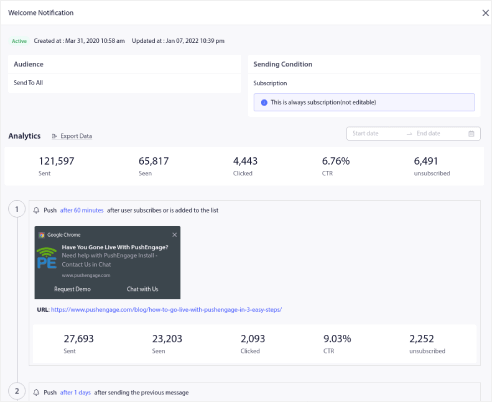
现在,是时候开始使用属性了。假设您想在通知中添加订阅者的名字。您可以使用标签 {{name||there}}。
这里的属性标签作用非常简单。对于每个订阅者,PushEngage 会检查其保存为 name 属性的名字。如果它找不到任何订阅者的有效 name 数据,PushEngage 将使用备用选项 there。
如您所见,该示例还在通知消息字段中使用 {{PE_CITY}} 属性,通过订阅者的位置个性化通知。无需创建地理定位属性,因为 PushEngage 会将每个订阅者的位置与其哈希值存储起来。因此,{{PE_COUNTRY}} 和 {{PE_CITY}} 是默认属性。
您也可以在滴灌广告系列的多操作按钮中使用属性:
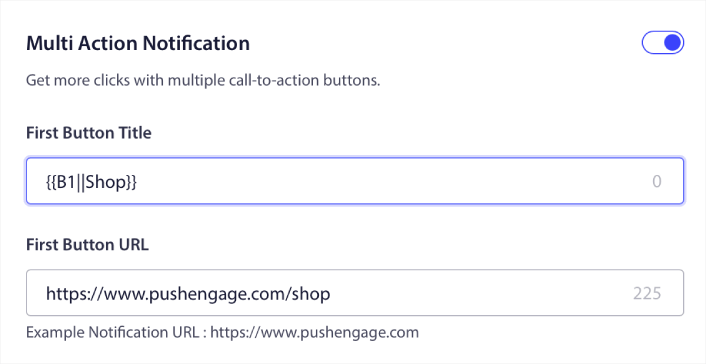
注意:请确保提供一个默认值,以防属性值丢失。
使用我们示例中的属性,个性化的推送通知将如下所示:
当您发送如此个性化和有针对性的通知时,与任何推送广播通知或滴灌活动相比,您会注意到更高的点击率。
下一步是什么?
好了,各位,本次分享就到这里!
您创建的属性也可以作为细分订阅者的一种方式。或者,您可以通过 GTM 动态创建 细分。也许接下来可以看看?
如果您是推送通知的新手,在上线之前,您应该遵循一个完整的 推送通知测试 流程。这将帮助您在访问者看到它们并开始抱怨糟糕的用户体验之前解决常见问题。
如果您还没有尝试过PushEngage,现在就去试试吧。PushEngage是全球排名第一的推送通知服务。所以,如果您想认真发展您的业务,就应该投资PushEngage。


