注意:此项目没有可用的旧版文档,因此您看到的是当前文档。
The Price Drop Alert campaign sends an automated push notification to subscribers who have opted in to price drop alerts for a specific product on your Shopify store. When you reduce a product’s price in Shopify, PushEngage detects the change and notifies everyone who subscribed to that product’s alert.
本指南将介绍提醒小部件的工作原理、如何启用和自定义它,以及如何配置通知营销活动。
开始之前
- PushEngage 已安装在您的 Shopify 商店上。
- Price Drop Alert campaigns require a PushEngage Growth plan or Automation Plan.
- 该营销活动由 PushEngage 在入驻过程中预先构建。本指南将介绍如何启用和自定义它。
How Price Drop Alerts Work
The Price Drop Alert runs in two parts: a widget on your product pages that customers use to subscribe, and a trigger campaign that fires when a price drops.
- A visitor lands on a product page and sees the Price Drop Alert widget.
- They click Notify me when the price drops and subscribe.
- When you lower the price of that product in your Shopify admin, PushEngage detects the change.
- Every subscriber who opted in for that product receives a push notification with the new price.
订阅者仅会收到他们订阅过的特定商品的通知。除非他们单独订阅其他商品,否则不会收到其他商品的提醒。
第一步:启用提醒小部件
The widget is what customers see on your product pages to opt in. It must be enabled before the campaign can collect subscribers.
- 登录您的PushEngage 仪表板。
- 转到 设计 » 小部件。
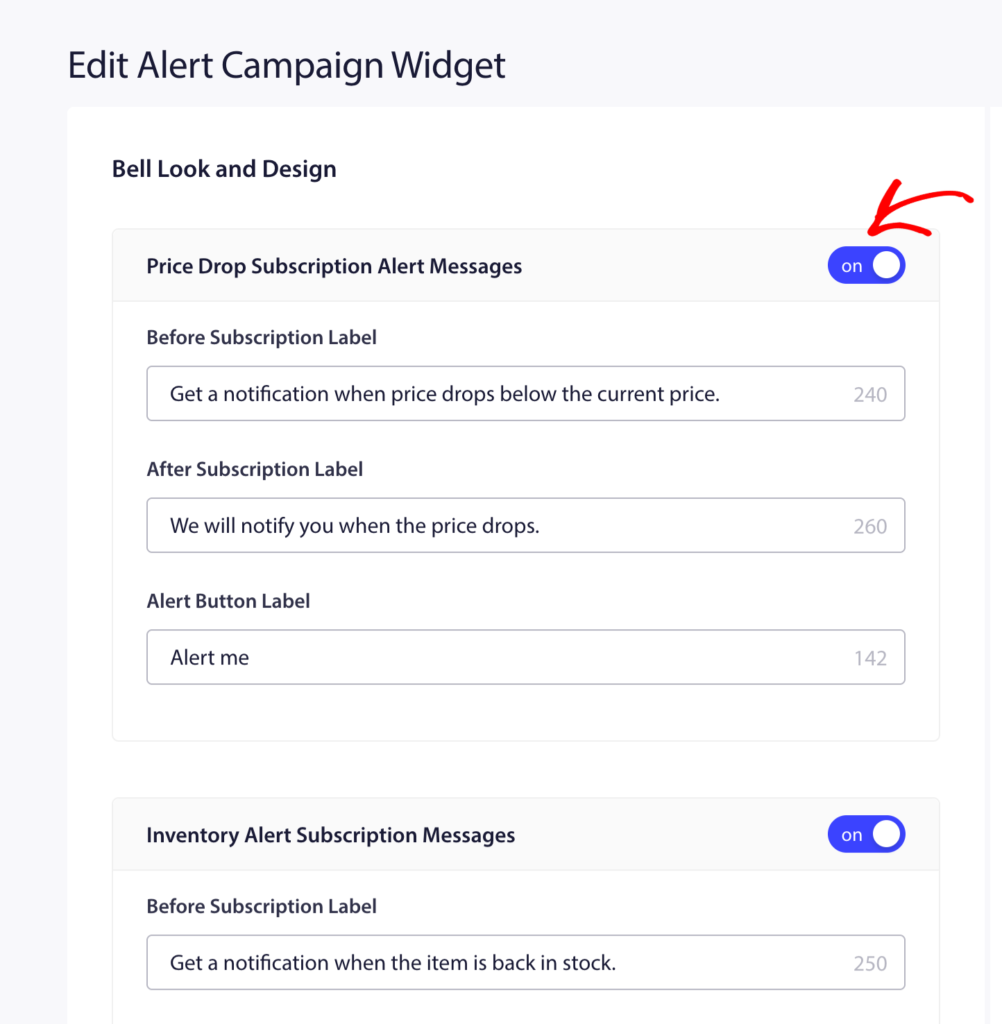
- 向下滚动到 提醒营销活动小部件。
- 将开关切换到 “开启”。
自定义小部件
Once enabled, you can customize the widget appearance to match your store’s branding.
| 设置 | 描述 |
|---|---|
| 小部件消息 | The text shown to visitors prompting them to subscribe. Example: “Get notified when this price drops” |
| 按钮文本 | The label on the subscribe button. Example: “Notify Me” |
| 颜色 | Match the widget background and button color to your store’s theme |

更改后,点击 “保存”。
Step 2: Open the Price Drop Alert Campaign
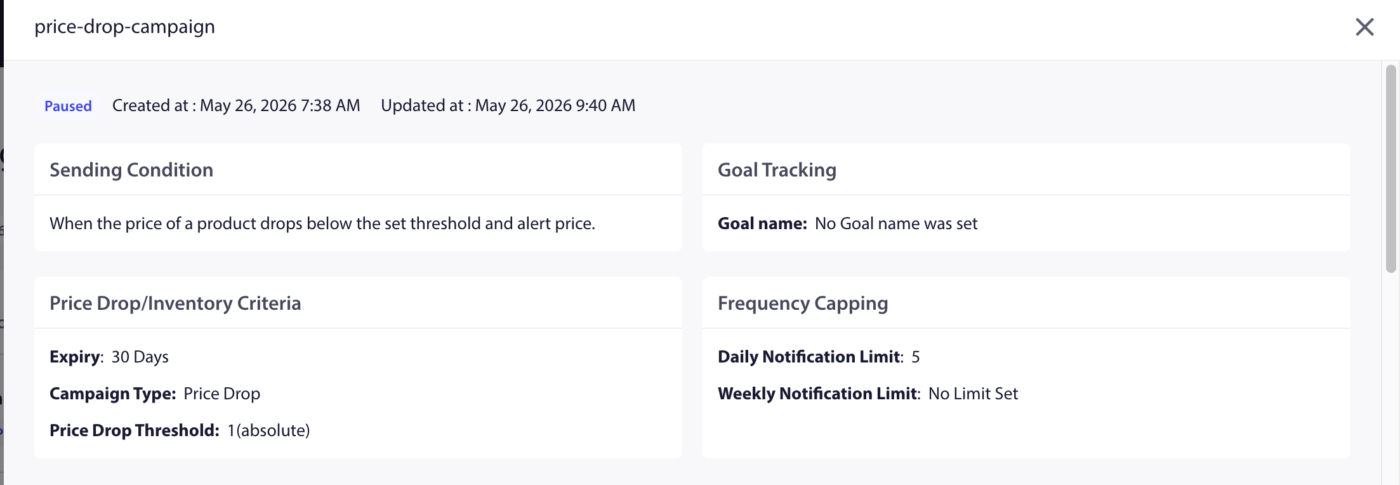
- 转到 营销活动 » 触发式营销活动。
- Find Price Drop Alert in the list and click Edit.

步骤 3:编辑通知
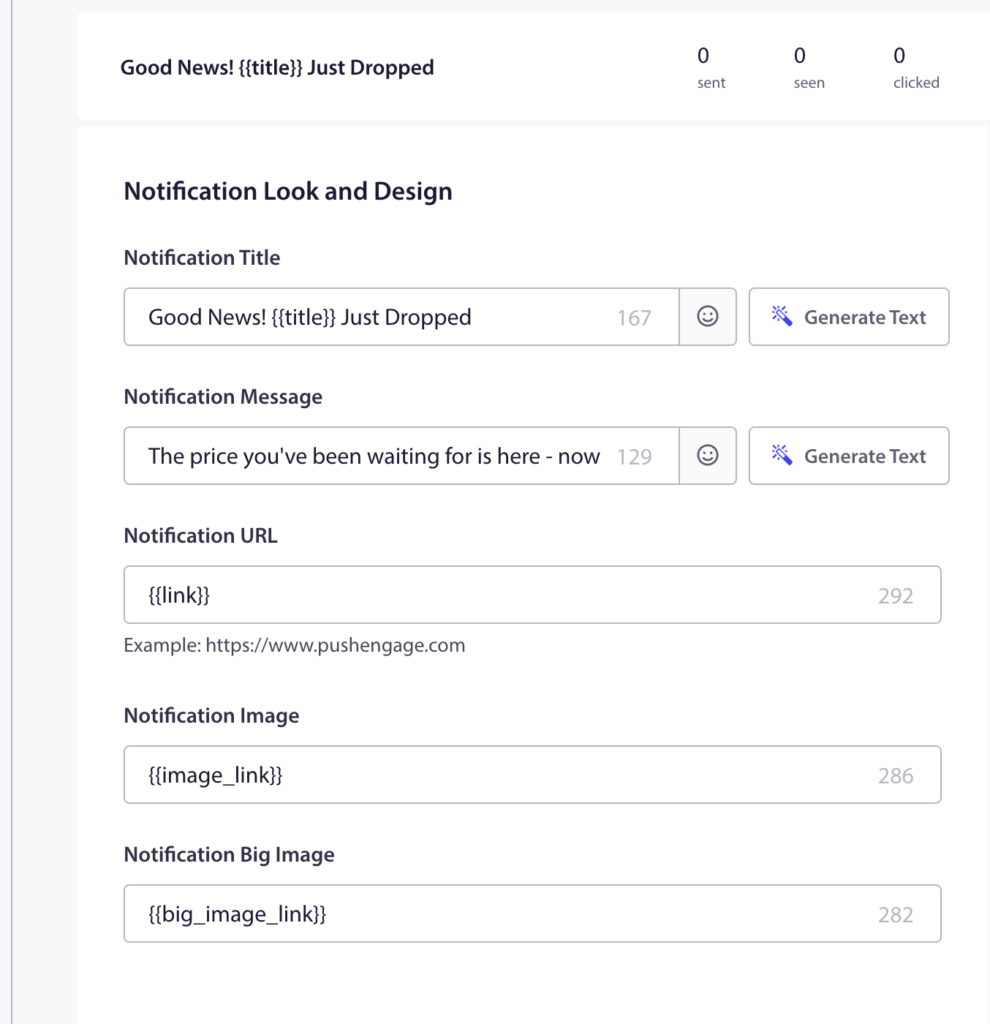
预建的广告系列包含一条通知。单击它进行编辑。
可用变量
| 变量 | 它插入的内容 |
|---|---|
{productname} | Name of the product whose price dropped |
{price} | The new (lower) price of the product |
{notificationurl} | 直接链接到产品页面 |
{imageurl} | 您的商店 Logo |
{bigimageurl} | 产品图片 |
注意:请勿删除这些变量。它们会在通知触发时从您的 Shopify 商店提取实时产品数据。
推荐字段设置
| 字段 | 推荐 |
|---|---|
| URL | 使用 {notificationurl} 直接链接到产品页面 |
| 图片 | 使用 {bigimageurl} 显示产品图片 |
复制选项
| 选项 | 标题 | 消息 |
|---|---|---|
| 1 | Price drop on {productname}! | Good news! {productname} is now only {price}. Grab it before it goes back up. |
| 2 | The price just dropped | {productname} is now {price}. You subscribed to this alert. Now is the time to buy. |
| 3 | Your price alert is here | {productname} dropped to {price}. Click to shop now before stock runs out. |

第 4 步:设置通知持续时间
Set the expiry so the notification does not sit in the subscriber’s notification center too long after it is no longer relevant.
推荐设置: 48 小时
Enable Keep notification open until user interaction so the push stays visible until the subscriber clicks or dismisses it.
第 5 步:激活广告系列
- 在活动编辑器中点击 保存。
- 返回 广告系列 » 触发广告系列。
- Click the Play / Resume button next to Price Drop Alert.
The campaign is now active. The next time you reduce a price on any product in your Shopify admin, subscribers who opted in to that product’s price alert will receive the notification automatically.
跟踪效果
要查看营销活动的效果:
- 转到 营销活动 » 触发式营销活动。
- Click on Price Drop Alert to expand the analytics view.
- 查看已发送、已送达、已点击和转化指标。
要进行收入归因,请启用目标跟踪。有关说明,请参阅如何设置目标跟踪。
常见问题解答
Does the alert fire for every price reduction, even small ones? Yes. Any price reduction on a product triggers the alert for subscribers of that product. If you want to avoid notifying subscribers of minor adjustments, consider how frequently you change prices.
Can a subscriber receive price drop alerts for multiple products? Yes. Subscribers can opt in to alerts on as many individual products as they want. Each product has its own subscriber list.
What if a product’s price goes back up after the alert fires? The alert only fires when a price drops. Price increases do not trigger any notification. Subscribers remain subscribed to future price drop alerts for the same product.
Can I customize the widget separately for Price Drop vs. Back-in-Stock? The Alert Campaign Widget toggle enables both types. The widget appearance settings apply to both. You cannot style them differently from the same widget panel.
Where do subscribers go when they click the notification? They are taken to the product page via the {notificationurl} variable. You can change this to a cart page or any other URL by editing the URL field in the campaign editor.
如果您遇到任何问题,请随时通过单击此处联系我们。我们的支持团队将能够帮助您。