
正在寻找一种快速为 Android 应用添加推送通知图标的方法?
其实非常简单。Android 通知图标会告知您的订阅者您是谁。它是您发送的每条推送通知上的品牌标识。这可能非常宝贵,因为它有助于您的受众记住您的品牌。
确保您发送的每条推送通知都能帮助您更具辨识度的成本是多少?不到 5 分钟。
在本文中,我们将向您展示如何为 Android 应用添加推送通知图标。有关频道的其他所有信息,请收藏我们的完整指南 Android 推送消息。正如我们所说,这非常简单。
让我们开始吧。
立即发送 Android 应用推送通知!
推送通知是一种超级有效、低成本的营销工具,可帮助您自动增加重复流量、互动和销售。
为什么为 Android 应用添加推送通知图标
您应用的推送通知图标就像一个小的徽章,代表您设备上的应用。这个微小但重要的图像会随着推送通知一起弹出,清晰地识别出发送消息或警报的应用。
拥有一个独特的应用推送通知图标有助于用户快速与尝试吸引他们的应用或网站建立联系,这样他们就不必阅读通知中的文字。
集成应用推送通知图标具有多项关键优势:
- 识别度:图标易于识别,就像在人群中认出一张熟悉的脸一样。当您的应用发送通知时,该图标会温和地提醒用户您的品牌,帮助用户快速辨别哪个应用正在吸引他们的注意力。
- 品牌推广:您应用的图标就像您应用的迷你广告。它是您整体品牌形象的一部分,每次互动都会巧妙地强化您的品牌形象,帮助您的应用保持在聚光灯下。
- 用户体验:用户设备上安装了太多应用,很容易感到不知所措。一个独特的图标可以帮助他们有效地管理通知,让他们可以决定首先查看哪些通知。
- 专业性:拥有一个特殊的通知图标可以提升您应用的外观和感觉。它显示了您对细节的关注,这可以提高整体用户满意度。
- 功能性:有时,图标可以提供额外的信息。例如,通信应用可能会为新消息与未接来电显示不同的图标。这增加了另一层功能,并使其对用户更加方便。
因此,即使应用推送通知图标看起来很小,它在塑造用户与您应用的互动以及影响用户对您应用的看法方面也起着重要作用!
如何为 Android 添加应用推送通知图标
与 AI 编码助手集成?开源的 PushEngage Agent Skills 可教会 Claude Code、Cursor 和任何兼容 SKILL.md 的助手集成和调试此 SDK。一旦您发布,PushEngage MCP 服务器即可让同一助手运行您的广告系列 — 分段、发送、A/B 测试和报告。在 Replit、Lovable 或 Bolt 中构建?开源的 vibe-coding kits 包括现成的演示商店、Flutter 入门程序以及预先连接了 PushEngage 的一键式演示。
现在我们了解了 Android 应用推送通知图标的含义以及为什么应该添加它,让我们来看看如何轻松添加它,而无需任何编码。
第 1 步:选择一个 Android 应用推送通知服务
推送通知是一种营销工具,可帮助您在访问者离开您的网站后仍能与他们保持联系。您可以向推送订阅者发送有针对性的通知,甚至可以为不同的客户群定制通知。但是,您应该选择哪个 Android 推送通知服务?
我们建议使用 PushEngage 来发送推送通知广告系列。

PushEngage 是世界上最好的推送通知服务。我们不仅仅是指免费版本。它允许您通过定向推送消息在访问者离开您的网站后与他们建立联系。
PushEngage 是我们推送通知服务和工具的首选,因为它:
- 超级易于使用
- 拥有可视化广告系列构建器和预制模板,只需很少或无需编码即可进行设置
- 易于为任何类型的网站设置完全 自动化的推送通知广告系列
- 配备 Android 和 iOS SDK,可快速开发、部署、分析和管理应用推送广告系列
- 内置多种选项,可发送 个性化推送通知以提高点击率
- 配备自定义 目标跟踪、UTM 参数和高级分析
- 提供强大的 推送通知 A/B 测试 选项
这仅仅是冰山一角。在继续之前,请查看PushEngage的完整功能列表。PushEngage最令人难以置信的部分是它有一个永久免费套餐,您可以在做出购买决定之前进行试用。
专业提示:在购买任何服务之前,请查看我们关于推送通知成本分析的文章。
第 2 步:设置 PushEngage Android 应用推送通知
到目前为止,您必须使用骨架 SDK 来发送应用推送通知。使用这些 SDK 的问题在于它们非常基础。
理论上,您可以使用它们发送任何类型的移动应用推送广告系列。但是,您还必须构建:
- 管理您广告活动的界面
- 用于跟踪广告活动效果的分析套件
- 更好地支持富媒体和应用内重定向链接(或深度链接)
- 协调市场营销和开发团队的流程
一切都是为了引入单一的增长渠道。使用旧工具发送移动应用推送通知既繁琐、昂贵、耗费资源,又耗时。当然,这需要您的团队具备深厚的编码技能来开发和管理您构建的一切。
借助新的 PushEngage Android SDK,您可以使用相同的可靠软件发送移动应用推送,以获得出色的送达率。但我们在此基础上构建了多层结构,可以轻松地与您的应用构建自定义集成。PushEngage 会管理整个 SDK。因此,您甚至不必花费大量时间和金钱来管理您的集成。
您要做的就是构建!
设置好应用以使用 PushEngage 的 SDK 发送移动应用推送通知后,您可以直接从您的 PushEngage 控制面板 发送广播通知。是的,您仍然需要为您的应用添加代码,并开发您的应用与 PushEngage API 之间的连接器。但一旦完成,您就可以轻松地从预构建的软件界面创建移动应用推送广告系列,该界面还附带:
- 高度吸引人的推送广告系列类型
- 经过验证的营销活动模板,转化率高
- 自动化营销活动,在您发布内容时推广您的内容
- 多种定位和营销活动调度选项
- 网络推送营销活动,作为补充增长渠道
- 通过基于数据的个性化提高受众留存率
- 目标跟踪和高级分析
- 智能 A/B 测试
- 专属客户成功经理
以及更多功能。我们只是消除了为您的应用开发 Android 移动推送广告活动的痛苦。
第 3 步:为 Android 添加或编辑您的应用推送通知图标
您可以轻松为 Android 移动应用推送通知设置图标。返回您的 PushEngage 控制面板,然后转到 Campaign » Broadcasts,点击 Create a New Push Broadcast。

在“Android 选项”下,选中“大图标图像”复选框:
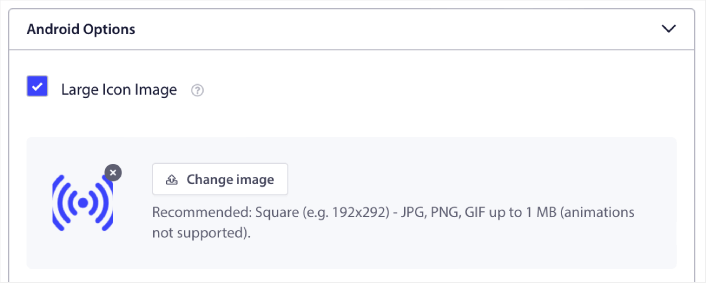
您上传的图片是您 Android 应用的推送通知图标。为获得最佳效果,请将图片尺寸保持在 192px x 192px,并确保图片大小小于 1MB。您可以使用 JPG、PNG 甚至 GIF 来制作动画品牌标识。只需确保图标与您在社交网站上使用的品牌标识一致即可。
如果您以后需要编辑图标,可以在这里进行。只需上传不同的图片即可!
换句话说,在发送移动推送通知时,您可以轻松地保留您的品牌设计指南。所有这些都来自一个易于使用的界面,您永远不必管理它!
第 4 步:发送测试通知以检查您的 Android 推送通知图标
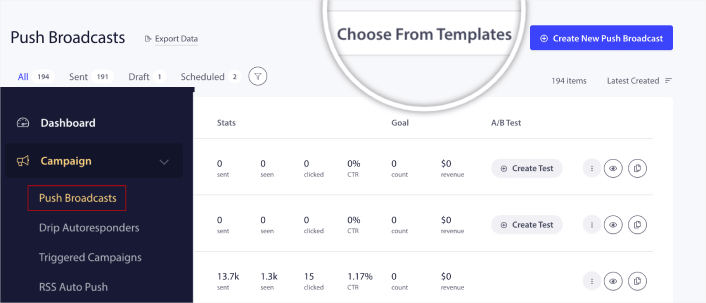
前往您的PushEngage仪表板,然后转到营销活动 » 推送广播,然后点击从模板中选择:
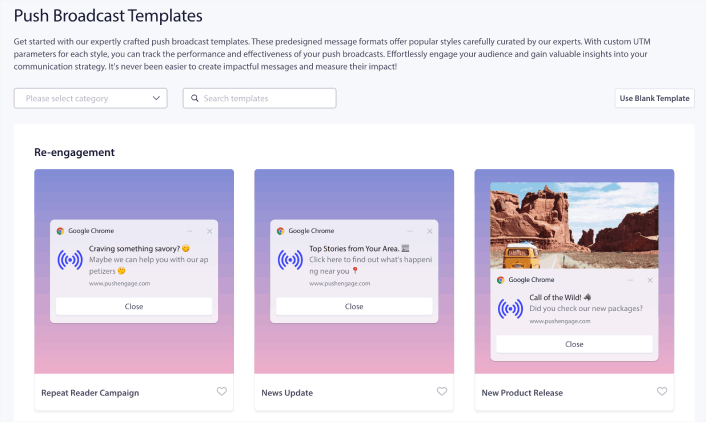
接下来,您可以从库中选择一个模板开始:
只需将鼠标悬停在任何模板上,然后点击使用模板按钮,即可使用该模板创建新的推送广播:
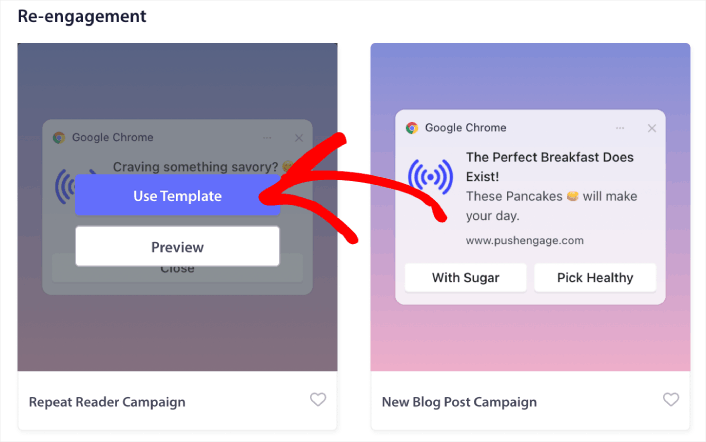
使用模板后,它将通过从模板中提取信息来自动填充创建新推送广播所需的所有字段。当然,您可以编辑所有字段以更符合您的品牌。但如果您愿意,也可以按原样发送广播。
目前,我们有以下推送通知模板:
最酷的部分是,即使是我们的免费用户也可以访问一些免费模板。当然,您随时可以升级您的PushEngage帐户以访问具有更强大功能的富媒体推送通知。
专业提示:创建一个 欢迎推送通知活动 来测试您的 Android 应用图标。
如果您是推送通知新手,在上线之前,您应该遵循一套完整的 推送通知测试流程。这将帮助您在访问者看到并开始抱怨糟糕的用户体验之前,排除常见的功能问题。
为 Android 添加推送通知图标后的操作
既然您知道如何添加应用推送通知图标,那么现在是时候开始创建您自己的广告系列了。但在开始制作广告系列之前,您应该先研究一些很棒的 推送通知示例。
如果您是推送通知的新手,在开始创建广告活动之前,应该先阅读我们关于 推送通知最佳实践 的文章。我们积极推荐的一些最佳实践包括:
我们建议使用 PushEngage 来创建您的推送通知广告系列。PushEngage 是市场上排名第一的推送通知软件,您的广告系列将得到妥善处理。
所以,如果您还没有,请立即开始使用 PushEngage。


