您每天都可以找到很棒的应用内通知示例。如果您正在决定使用哪个渠道,我们的推送通知与应用内通知比较将详细说明何时使用它们。
大多数人认为,必须要有创意天才才能创建出受众喜爱的推送通知。实际上,这其中是有方法的。
这主要关乎:
- 了解受众的兴趣所在
- 与受众保持持续联系
- 将一点幽默感与有用的内容相结合
这听起来像使用其他营销工具吗?
那是因为它就是。
但是,如果您才刚开始或者为推送通知活动缺乏灵感,请不用担心。我们是 PushEngage – 市场排名第一的推送通知软件,今天,我们为您准备了史诗级的应用内通知示例,您可以立即为您的品牌所用!
最好的部分是什么? 我们将为您详细解析,以便您确切地知道它为何如此出色。这样,您就可以有效地为您的品牌所用。
让我们直接开始吧。
- QuizUp
- SimonCircles
- Netflix
- Tinder
- Mashable
- Duolingo
- Peachmode
- 华尔街日报
- Clash of Clans
- Starbucks
- SoundHound
QuizUp
QuizUp 基本上是一个问答应用程序。是的,它非常喜欢双关语,而且本来就应该是这样的。QuizUp 的整体氛围就是一个有趣的、不那么严肃的游戏。
看看这个挽回用户的推送通知:
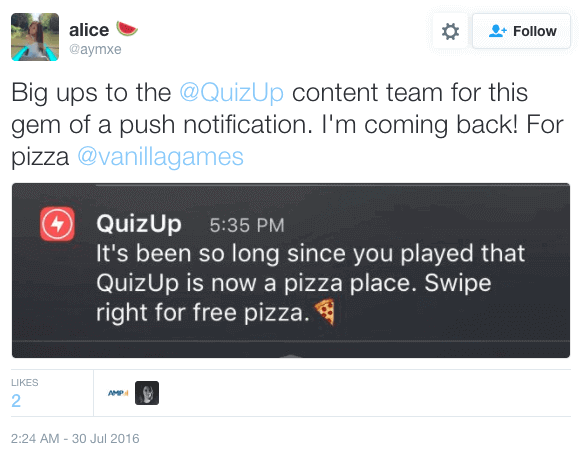
大多数客户都厌倦了通常的挽回策略,“我们想你”的消息被忽略了。所以,QuizUp 保持了其品牌特色,并发送了这条搞笑的推送通知。
很酷的是,这是一种您也可以在 PushEngage 上设置的再互动活动。您可以创建一个一段时间没有与您的推送通知互动的客户细分,并像这样向他们发送一个挽回活动。
SimonCircles
我们比严肃的活动更喜欢有趣的活动。尤其是当观众也觉得它有趣时。SimonCircles 的下一个就很有趣。
同样,这与 QuizUp 的思路相同。
SimonCircles 是一款 Android 游戏。所以,他们没有发送一个切中要点的严肃消息,而是创建了一个俏皮的序列推送,当有人打破高分时触发:
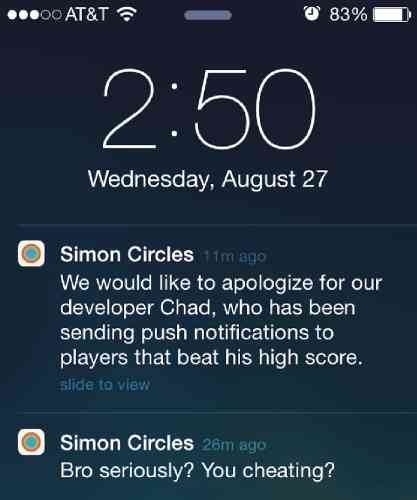
它可爱、俏皮、有趣,并能激发用户的竞争情绪,让他们在再次打破高分时看到更多有趣的推送通知。
这里的另一个优点是 SimonCircles 自嘲而不是嘲笑用户,这使得它非常讨人喜欢。
听起来很有趣,不是吗?
您也可以设置自己的序列推送通知。请查看这篇关于如何为您的品牌使用序列推送活动的文章。
Netflix
如果没有“追剧内容之王”,一份推送通知示例列表将是不完整的。没错,我们说的是 Netflix 的史诗级推送通知。
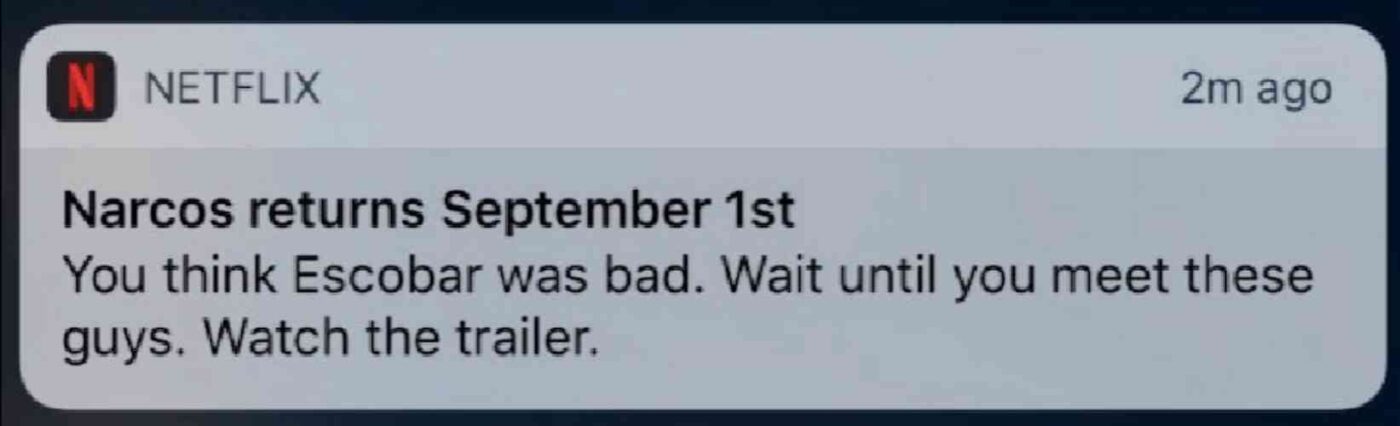
看过《毒枭》的人都会确切地知道为什么这个推送通知如此史诗级。而这正是重点。
Netflix 能够与迪士尼和亚马逊等巨头竞争是有原因的。
Netflix 非常了解其受众,因为它充当内容发现平台,而不是搜索引擎。
那里有一个史诗级的营销教训:了解您的受众意味着您可以根据他们的兴趣个性化您的推送通知。
在本文后面,我们将向您展示更多个性化推送通知的示例。
所以,请继续阅读!
但是,如果您想从 PushEngage 发送个性化推送通知,您也可以做到。只需查看我们关于有效的个性化推送通知活动的文章,了解更多史诗般的创意以及如何为您的品牌创建个性化活动的演练。
Tinder
Tinder 在其语气和声音方面一直有点前卫,有点大胆。他们的推送通知也不例外:
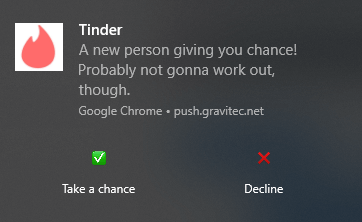
表面上看,这可能会冒犯很多人。这些人是那些从未在 Tinder 上被拒绝过的人。前卫对 Tinder 有效,因为他们的核心受众年轻、爱讽刺,而且也很前卫。
这是一个简单的推送提醒,旨在让人们再次对该应用感兴趣。它之所以如此有效,是因为它几乎是在大胆地邀请人们回来,在线证明这个推送通知是错误的。
这是对“害怕错过”(FOMO)原则的现代诠释。FOMO是将用户转化为买家的最强大方法之一。查看这篇文章了解更多巧妙的FOMO营销案例。
Mashable
你听说过“标题党”吗?
专家会告诉你,“标题党”已经过时了,反而会让读者反感。事实是……
如果你用“标题党”吸引用户,并且兑现了你的承诺,这是提高参与度的最令人印象深刻的方式之一。
看看Mashable这个有创意的推送通知吧:
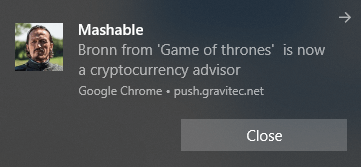
说真的,如果这都不算“标题党”,那我们也不知道什么算了!
“标题党”的一部分是纯粹的冲击力。另一部分是兑现你的承诺。Mashable两者都做到了。所以,不出所料,这是一篇非常值得一读的精彩文章。更重要的是,这个推送通知活动效果非常好。
如果你的网站转化率低,这篇文章可以帮到你。
Duolingo
我们已经看到,挑战用户常常能带来惊人的结果。这是Duolingo的另一个例子:
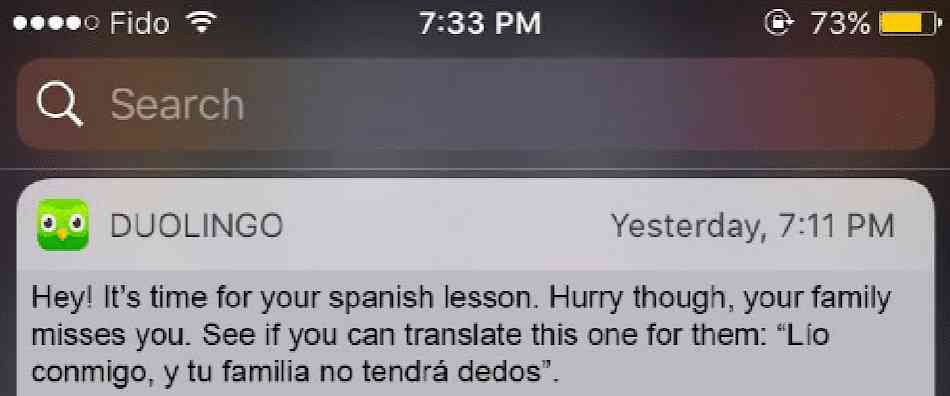
Duolingo是一款可以免费学习新语言的应用程序。他们面临的主要挑战之一是很难让用户保持参与和学习。因此,Duolingo使用推送通知来保持用户对课程的兴趣。
如果你翻译那个推送通知里的西班牙语,它的意思是:“惹我,你的家人将没有手指”。
听起来很吓人。
但是谁会手动输入到谷歌翻译里去弄明白它的意思呢?直接打开Duolingo应用找出答案要容易得多。
这实现了让用户保持学习兴趣的目标。同时,你还能获得一个高性能的推送通知活动。
很棒,对吧?
专业提示: 你不必非得是Duolingo才能在营销中使用不同的语言。Phooto在他们的推送通知中使用了本地语言以个性化他们的活动并销售个性化照片产品!
Peachmode
Peachmode是一家电子商务商店,使用一些非常有创意的推送通知。
这个竞赛是一个很好的例子,说明你可以使用PushEngage Javascript API的高级活动为你的品牌做什么。事实上,Peachmode的这个例子可能是我们很长一段时间以来见过的最具创意的推送通知之一:

乍一看,它只是一个普通的推送通知。但如果你像我们一样深入研究实际的活动,你会发现一些令人难以置信的东西。
他们为购物者举办了一个竞赛,并展示了一个排行榜。如果前10名购物者的购物总额超过47万美元,那么前10名中的每一位都将获得高达78美元的折扣。
接下来是普通购物者疯狂的抢购潮。
赞美Peachmode。继续加油!
顺便说一句,你应该看看这篇文章,了解更多电子商务商店有效利用推送通知的例子。
华尔街日报
我们又回到了带有点击诱饵的创意推送通知。当然,我们必须找一个新闻出版商的例子。新闻出版商几乎发明了点击诱饵的艺术。华尔街日报的这个例子也不例外:
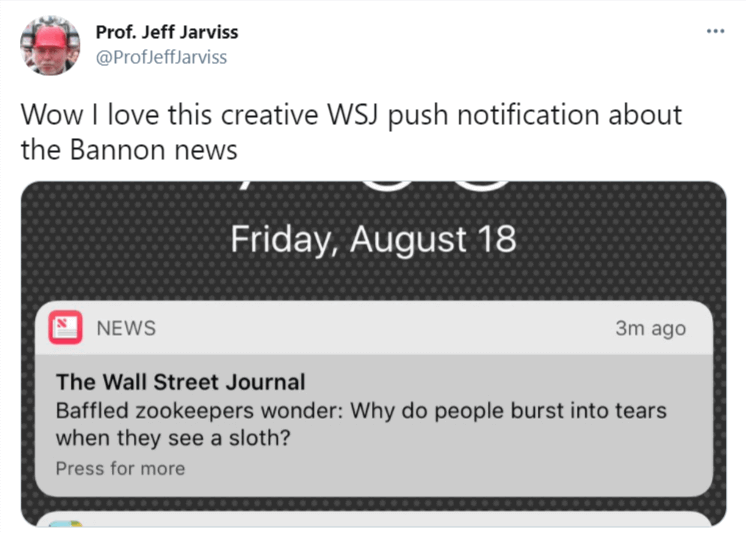
不,说真的。为什么人们看到树懒会流泪?如果您知道答案,请在本文底部留言。
如果您知道原因,那就更能证明这个推送通知奏效了!
那么,这个推送通知为什么会奏效?
简单来说:它利用了您的好奇心并吸引您。
如果您喜欢这个想法,请务必查看我们的 博客和内容网站的推送通知手册,以获取更多可用于发展您自己网站的创意。
Clash of Clans
Clash of Clans (CoC) 在几年前非常受欢迎。它仍然很受欢迎,但自 2018 年以来,热度有所下降。
或者,他们可能只是让每个人都安装了应用并玩了游戏。如果您不确定 CoC 是什么,它是一款手机游戏,您可以在其中创建一个定居点并突袭其他玩家以获取战利品。
这就是 CoC 如何使用推送通知让他们的每日活跃用户一天多次登录游戏:
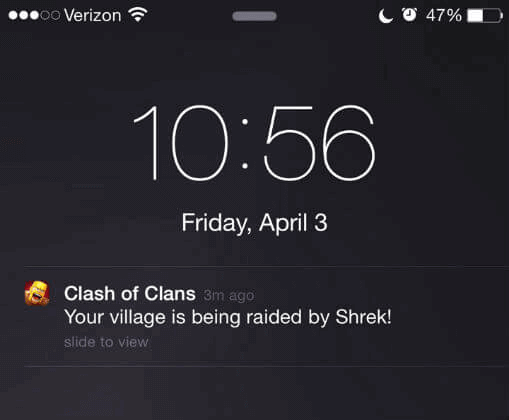
谁会忽略那个通知?
说明:并非所有袭击者都被标记为史莱克。这只是一个巧合。
这是一个简单的推送通知提醒,可以迎合用户的兴趣。
最棒的部分是:你不必经营一家游戏公司才能使用这个想法。你甚至可以将其用于电子商务商店。例如,你可以发送警报通知客户他们感兴趣的产品即将缺货。
这是相同的原理。
如果你想使用 PushEngage 设置降价或库存警报推送通知,请查看本文。
Starbucks
星巴克是世界各地一个熟悉的名字,我们不得不佩服他们的营销团队。他们有一些相当有创意的推送通知。
这是他们使用简单提醒让用户感觉像在与真人交谈的一个例子:
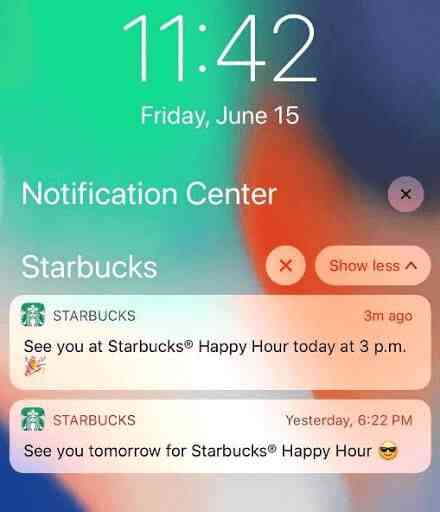
这个推送通知的优点在于其对话式的语气。感觉就像一个朋友在下班后给你发短信约见面。
但更美妙的是,它以如此有效的方式利用了一个非常普遍的想法。我们都发送或接收过提醒。老实说,我们不记得有哪一次跟进感觉如此甜蜜!
如果你喜欢这个想法,我们也非常喜欢,你应该使用 PushEngage 设置你自己的推送通知提醒。调度功能可以真正减轻你为使广告系列上线而必须保持在线的压力。
SoundHound
我们实话实说:我们不经常使用 SoundHound。但在看到这个推送通知后,我们愿意重新考虑。
这是一个用于查找新歌曲及其歌词的音乐应用程序。就像这个:
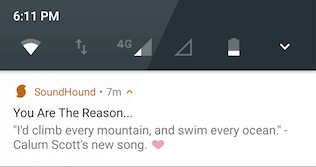
这是一个简单、甜蜜、聪明的想法。你用用户最初寻找的东西来吸引他们。
同样,就像一些最具创意的推送通知一样,这个利用了一个非常简单的想法。这个推送通知没什么花哨的。只是一个推广新产品的简单推送通知。
你可以使用 PushEngage Javascript API 自动化此过程。但如果你是一家产品数量有限的小型企业,你也可以在每次向库存中添加商品时发送一个简单的推送通知。
操作非常简单。您只需前往 PushEngage 控制面板,然后点击 Notifications » Create » New Notification 即可:

并创建一个新的推送通知。或者,您甚至可以使用我们的推送通知模板,然后点击 Choose from Templates 按钮。
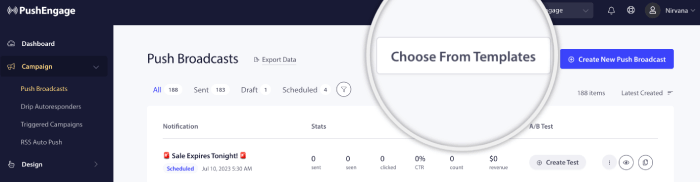
您会获得大量精美的模板,可用于即时启动成功的营销活动。
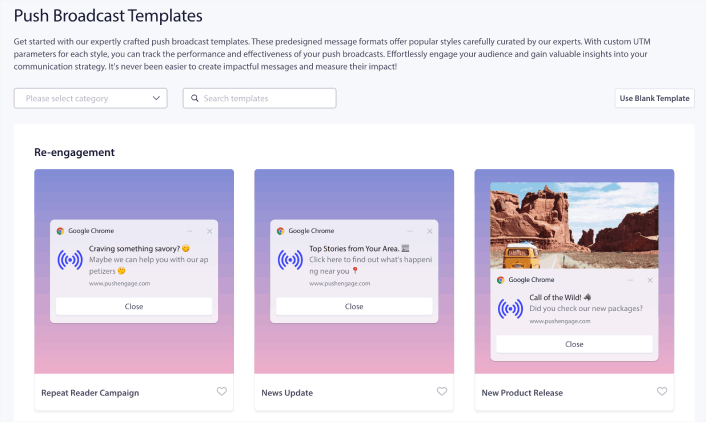
将鼠标悬停在您喜欢的模板上,您可以预览模板,或者点击 Use Template 来开始使用该模板。
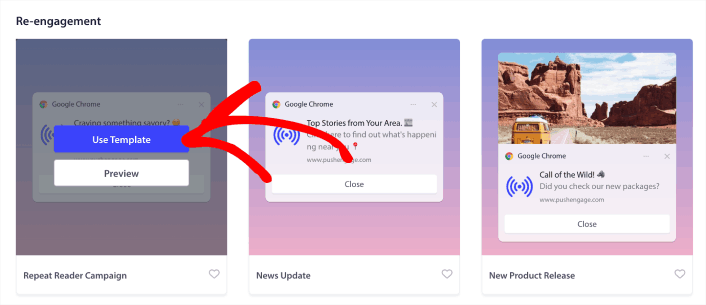
就是这么简单。
如何处理这些应用内推送通知示例
最好的方法是开始创建您自己的营销活动。
希望本文对您有所帮助,并激发了您的创作灵感。您还应该查看我们关于 推送通知费用 的文章。如果您需要更多灵感,请查看这些精彩资源:
从您的AI助手运行:此手册中的所有内容 — 构建细分、安排活动、提取结果 — 都通过 PushEngage MCP 服务器运行。将 Claude(或任何 MCP 兼容的助手)连接到您的 PushEngage 帐户一次,然后描述活动,让它完成点击。有关实际示例,请参阅从您的 AI 助手发送推送通知。
如果您还没有尝试过,应该试试 PushEngage。我们是市场上排名第一的推送通知软件。所以,立即开始使用 PushEngage。


