How to Send a WhatsApp Message Without Saving Contact

How to Send a WhatsApp Message Without Saving Contact

Ever needed to quickly message someone on WhatsApp but didn’t want to save their number first? You’re not alone.

Whether you’re responding to a customer inquiry, reaching out to a new business contact, or just trying to message someone without cluttering your address book, the traditional “save contact first” approach is frustratingly outdated.

Good news: there are several ways to bypass this limitation, and we’ve ranked them from basic to best. By the end of this guide, you’ll know exactly how to message anyone on WhatsApp without saving their contact — and discover why smart businesses are using PushEngage’s click-to-chat widget to make this process seamless for their customers.

让我们开始吧。

立即发送 WhatsApp 消息!

WhatsApp Business Automation is a super-effective, low-cost marketing tool to help you grow your repeat traffic, engagement, and sales on autopilot.

Why You Need This: The Problem with Traditional WhatsApp Messaging

Before we get to the solutions, let’s quickly address why this matters:

  • Cluttered Contacts: Nobody wants dozens of temporary contacts filling their address book
  • Wasted Time: The save-contact-first workflow adds unnecessary steps
  • Customer Friction: When customers need to save your business number, many simply won’t bother
  • Privacy Concerns: Some people prefer minimizing the personal data they store

For businesses, especially, making it easy for customers to reach you without friction is crucial. Studies show that reducing communication barriers can increase customer engagement by as much as 70%.

Method 1: PushEngage’s Click to Chat Widget (The Professional Solution)

Now we’re talking. If you’re serious about providing a professional WhatsApp experience (especially for business websites), PushEngage’s WhatsApp widget is the clear winner.

Why PushEngage’s Solution Stands Out:

  • One-Click Setup: Install the plugin, enter your number, and you’re done—no coding required
  • Professional Design: Clean, modern widget that builds trust with visitors
  • Mobile-Optimized: Works flawlessly across all devices and screen sizes
  • Fully Customizable: Match your brand colors, position, and messaging
  • Built-in Analytics: Track how many people are messaging you and from where
  • Part of a Complete System: Integrates with other customer communication channels
WhatsApp Click to Chat

Setting Up PushEngage’s WhatsApp Widget in 6 Simple Steps:

  1. Install the Plugin: From your WordPress dashboard, go to Plugins » Add New » Search “PushEngage”
  2. Activate and Create Account: Activate the plugin and create your free PushEngage account
  3. Navigate to WhatsApp Settings: In the PushEngage dashboard, find the WhatsApp section
  4. Enter Your Details: Add your WhatsApp number (with country code but without + sign)
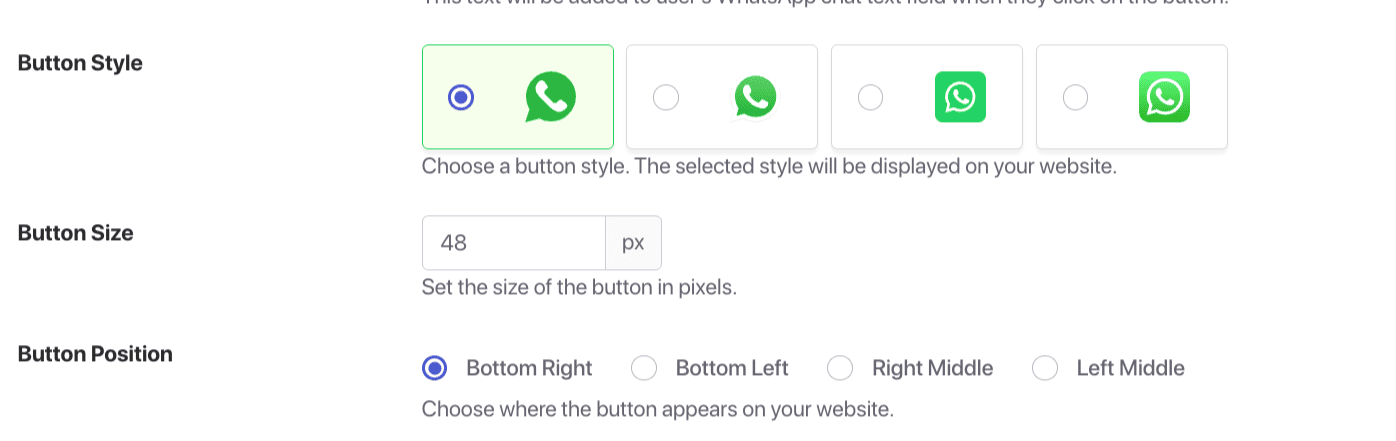
  5. Customize Appearance: Choose your widget style, size, and position
  6. Enable and Go Live: Click “Enable” and your widget is instantly active on your site

That’s it! Visitors can now message you on WhatsApp with a single click — no contact saving required.

The simplest way to message someone without saving their contact is by using WhatsApp’s built-in “click to chat” feature through a special link format.

The basic formula is:

https://wa.me/COUNTRYCODEPHONENUMBER

For example, to create a link for the US number +1 555-123-4567:

https://wa.me/15551234567

Important Formatting Rules:

  • Remove all spaces, brackets, and dashes
  • Include the country code without the + sign
  • Don’t use any special characters

Real Examples:

  • US: https://wa.me/15551234567 (for +1 555-123-4567)
  • UK: https://wa.me/442079460958 (for +44 20 7946 0958)
  • India: https://wa.me/919876543210 (for +91 98765 43210)

Adding Pre-filled Messages

Want to make things even easier? You can add a pre-written message that appears automatically:

https://wa.me/15551234567?text=Hello!%20I'm%20interested%20in%20your%20services.

When someone clicks this link, WhatsApp opens with the message already typed—they just need to hit send.

While this method works, it’s basic and lacks professional features that businesses need.

If you don’t want to deal with formatting links manually, several online tools can do it for you:

  • Walink (create.wa.link)
  • Respond.io WhatsApp Link Generator
  • AlvoChat WhatsApp Link Generator

These tools are straightforward: enter your phone number and optional message, and they generate the properly formatted link for you.

The downside? They’re still just creating basic links. You’ll need to manually place these links on your website, and you won’t get any analytics or customization options.

Best Practices for WhatsApp Business Communication

Whichever method you choose (though we strongly recommend PushEngage’s widget), follow these best practices:

Strategic Placement

Make your WhatsApp option highly visible:

  • In your website header or footer
  • On contact pages
  • On product pages
  • In checkout processes
  • In email signatures

Effective Messaging

Instead of generic “WhatsApp us” text, try:

  • “Get instant help via WhatsApp”
  • “Questions? Chat with us now”
  • “Message our team directly”
  • “Skip the wait—WhatsApp us”

Set Clear Expectations

Let customers know when they’ll hear back:

  • “We typically respond within 15 minutes during business hours”
  • “Available Monday-Friday, 9am-6pm”
  • “24/7 WhatsApp support available”

Track and Optimize

With PushEngage’s analytics, you can:

  • See which pages drive the most WhatsApp conversations
  • Identify peak messaging times
  • Measure response rates
  • Optimize widget placement for maximum engagement

要避免的常见错误

Don’t fall into these common traps:

Technical Errors

  • Incorrect phone number formatting (forgetting country code or including spaces)
  • Broken pre-filled messages (using special characters that break the URL)
  • Not testing links on multiple devices

Strategic Mistakes

  • Hiding your WhatsApp option where visitors can’t easily find it
  • Using generic messaging that doesn’t encourage action
  • Not setting clear response time expectations
  • Missing integration opportunities with your other marketing channels

Advanced Tips for Power Users

Ready to take your WhatsApp communication to the next level?

Campaign-Specific Tracking

Create different WhatsApp links for different marketing campaigns to track which channels drive the most conversations.

QR Code Integration

Convert your WhatsApp links to QR codes for:

  • Business cards
  • Product packaging
  • In-store displays
  • Print advertising

Multichannel Strategy

PushEngage’s real power comes from its unified approach to customer communication. Combine WhatsApp with:

  • Web push notifications
  • Email marketing
  • SMS messaging

This creates a seamless communication ecosystem where customers can reach you through their preferred channel.

Why PushEngage is the Smart Choice for Businesses

Let’s be honest — you could manually create WhatsApp links or use a basic generator. But here’s why thousands of businesses choose PushEngage instead:

Professionalism

The difference between a basic WhatsApp link and PushEngage’s widget is like the difference between a plain text email and a professionally designed newsletter. First impressions matter.

Time Savings

Setting up PushEngage takes literally one minute. Creating and implementing manual links across your site could take hours.

Complete Solution

PushEngage isn’t just about WhatsApp—it’s a complete customer engagement platform that helps you communicate with visitors even after they leave your site.

Analytics and Insights

Know exactly how your WhatsApp communication is performing and make data-driven improvements.

成本效益高

PushEngage’s WhatsApp widget is completely free to use. No hidden costs, no premium upgrades required for basic functionality.

常见问题解答

Can I use these methods on both personal and business WhatsApp accounts?

Yes, all three methods work with both personal WhatsApp and WhatsApp Business accounts.

Do recipients need to do anything special to receive messages this way?

No, recipients don’t need to change any settings. From their perspective, it’s just a normal WhatsApp message.

Does PushEngage’s widget work on all website platforms?

PushEngage works seamlessly with WordPress, Shopify, Wix, and most other major website platforms.

Can I customize the appearance of the WhatsApp widget?

Absolutely! With PushEngage, you can customize colors, size, position, and messaging to match your brand perfectly.

Will these methods work internationally?

Yes, as long as you use the correct country code format, these methods work for international numbers.

Is there a limit to how many people can message me through the widget?

No, there’s no limit to the number of conversations you can have through PushEngage’s WhatsApp widget.

您的下一步

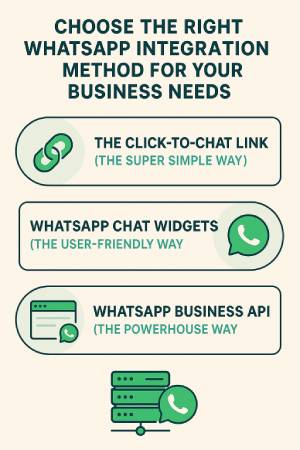
While all three methods we’ve covered will let you send WhatsApp messages without saving contacts, PushEngage’s solution is clearly superior for businesses and professionals who value their time and customer experience.

In just a few minutes, you can transform how customers connect with you — removing friction, increasing engagement, and ultimately driving more conversions.

PushEngage 是市场上的第一客户互动平台。如果您不确定从哪里开始,可以注册免费版本。但是,如果您希望通过强大的营销活动来扩展您的业务,那么您应该选择付费套餐之一。或者,您可以查看这些很棒的资源来开始:

无论哪种方式,都不要等待。 您的客户已经在使用的 WhatsApp。问题是:您会在那里与他们会面吗?

从最适合您业务的方法开始。您可以随时升级到更复杂的解决方案。重要的是开始着手,并开始建立 WhatsApp 所能实现的直接客户关系。

您的客户会感谢您让他们能够轻松联系到您。您的企业也会感谢您通过更好的客户沟通带来的互动和转化率的提高。

以上就是本篇的全部内容。

立即开始使用 PushEngage!

添加评论

我们很高兴您选择留下评论。请记住,所有评论都将根据我们的隐私政策进行审核,并且所有链接都将是 nofollow。请勿在姓名字段中使用关键字。让我们进行一次个人化且有意义的对话。

在访客离开您的网站后与他们互动并挽留他们

通过难以忽略的推送通知,增加每次网站访问的价值。

  • 永久免费套餐
  • 轻松设置
  • 五星支持