
Web siteniz için Shopify terk edilmiş sepet anlık bildirimleri ayarlamanın kolay bir yolunu mu arıyorsunuz?
Terk edilmiş sepet yazılımı kullanmak sizin için mükemmel bir çözümdür.
Ancak terk edilmiş sepet anlık bildirimleri ayarlamak gerçekten zor olabilir. Mevcut eğitimlerin çoğu terk edilmiş sepet e-postaları hakkındadır ve hatta onlar bile oldukça karmaşık olabilir.
Tam olarak bu yüzden bu makaleyi yayınladık.
Shopify terk edilmiş sepet bildirimlerini basit ve kolay adımlarla nasıl ayarlayacağınızı adım adım göstereceğiz.
Ve bu makaledeki adımları anlamak için çok fazla teknik uzmanlığa ihtiyacınız olmayacak.
Ayrıca, herhangi bir adımda takılırsanız, tek yapmanız gereken Müşteri Başarı ekibimizle iletişime geçmek ve sizin için bir terk edilmiş sepet kampanyası ayarlayacağız!
Kulağa hoş geliyor mu?
Hadi başlayalım.
Shopify Plus Satıcıları Sepet Terkini Ölçekte Nasıl Azaltır
Standart Shopify terk edilmiş sepet kurtarma, çoğu hacimde iyi çalışır. Shopify Plus'ta değişkenler değişir: ortalama sipariş değerleri daha yüksektir, sepet terkleri genellikle anonim oturumlar yerine oturum açmış hesapları içerir ve ödeme işlemi, Ödeme Uzantıları aracılığıyla tamamen özelleştirilebilir.
Ödeme Uzatılabilirliği, neleri ve ne zaman kurtarabileceğinizi değiştirir. Shopify Plus satıcıları, ödeme kullanıcı arayüzü uzantılarını kullanarak doğrudan ödeme içine güven sinyalleri, ek satış blokları ve ilerleme göstergeleri ekleyebilir. Bu, oturum bitmeden ilk bırakma terkini azaltır. PushEngage, sonrasında olanları halleder: sepete ekleyen, ödemeye ulaşan ancak hala satın almayan abone.
Daha yüksek AO V için kurtarma sıralaması. 200$+ sepetlerde, tek bir 30 dakikalık anlık bildirim masada para bırakır. Shopify Plus satıcıları genellikle üç aşamalı diziler çalıştırır:
- 30 dakika sonra anlık bildirim: düşük etkileşim, indirim yok — sadece ürün resmiyle sepet hatırlatıcısı.
- 4 saat sonra anlık bildirim: sosyal kanıt veya sınırlı süreli ücretsiz kargo teklifi ekleyin. Üç dokunuş boyunca tüm kopya fikirleri için e-ticaret için anlık bildirim örneklerini görün.
- 24 saat sonra WhatsApp mesajı: WhatsApp'a kaydolan aboneler için bu kanal, özellikle mobil öncelikli uluslararası alıcılarda, anlık bildirimin kaçırdığı sepetleri kurtarır.
Sepet değerine göre segmentasyon. PushEngage'ın davranışsal segmentasyonu, sepet değerine bağlı olarak farklı bir kurtarma dizisi tetiklemenize olanak tanır. 50$ sepet ve 500$ sepet aynı mesajlaşmayı almamalıdır. Yüksek değerli terk edenleri, vermeniz gerekmeyen bir indirim yerine aciliyetle (“sadece 2 kaldı”) başlayan bir diziye yönlendirin.
Çoklu mağaza ve uluslararası kurulumlar. Birden fazla mağaza veya uluslararası genişleme yürüten Shopify Plus satıcıları, PushEngage'ı tek bir kontrol panelinden her mağaza için çalıştırabilir. Abone listeleri mağazaya göre segmentlere ayrılır; kurtarma dizileri abonenin yerel saat diliminde tetiklenir.
Şimdi Shopify Terk Edilmiş Sepet Bildirimleri Gönderin!
Anlık bildirimler, düşük maliyetli bir kurtarma kanalıdır. İyi zamanlanmış bir terk edilmiş sepet dizisi, sepetleri kurtarır, tekrar ziyaretleri artırır ve devam eden harcama olmadan geliri artırır.
Bir Shopify Terk Edilmiş Sepet Kampanyası Nasıl Oluşturulur
Bu makalede, PushEngage kullanarak bir terk edilmiş sepet kampanyasının nasıl oluşturulacağını göstereceğiz.

PushEngage web anlık bildirimleri, uygulama anlık bildirimleri ve WhatsApp üzerinden müşterilerle etkileşim kurmanıza olanak tanıyan tek Shopify uygulamasıdır; bu da yalnızca e-postaya veya SMS'e güvenmeden daha fazla satış kurtarmanıza, tekrar satın alımları yönlendirmenize ve geliri artırmanıza yardımcı olur.
Tek, kurulumu kolay bir entegrasyonla, ister masaüstünde, ister mobilde geziniyor olsunlar, ister WhatsApp'ta sohbet ediyor olsunlar, müşterilere doğru anda ulaşan otomatik kampanyalar ayarlayabilirsiniz.
Shopify'da PushEngage ile şunları yapabilirsiniz:
- Hem anlık bildirimler hem de WhatsApp hatırlatıcıları ile terk edilmiş sepetleri otomatik olarak kurtarın (WhatsApp Business API ile çalışır).
- Alışveriş yapanları satın almaya en hazır olduklarında geri getirmek için kişiselleştirilmiş ürün uyarıları gönderin; örneğin fiyat düşüşleri, stoka geri dönen ürün bildirimleri ve flaş satış güncellemeleri.
- Daha fazla yorum almak, çapraz satış ürünleri yapmak ve tekrar siparişleri yönlendirmek için damla kampanyaları ve satın alma sonrası takip gönderileri çalıştırın.
- Yerel Android ve iOS uygulama anlık bildirimleriyle uygulama kullanıcılarıyla anında etkileşim kurun.
- Anlık bildirimler için tek tıklamayla kayıt veya ücretsiz bir “Sohbeti Tıkla” WhatsApp widget'ı (Business API gerekmez) ile sıradan ziyaretçileri abonelere dönüştürün.
- Müşteri segmentasyonu, saat dilimi gönderme ve kişiselleştirilmiş akıllı etiketler ile kampanyaları akıllıca hedefleyin.
- Dahili hedef izleme, A/B testi ve gelişmiş analizler kullanarak ROI'yi kolayca izleyin.
Shopify satıcıları neden PushEngage'i seçiyor:
- Ürünlerinizi, siparişlerinizi ve müşteri etkinliğinizi otomatik olarak senkronize eden sorunsuz tek tıklamayla Shopify entegrasyonu.
- Web, uygulama ve WhatsApp'ta çalışır; bu nedenle birden fazla araca ihtiyacınız olmaz.
- E-posta veya SMS maliyetinin çok altında bir maliyetle etkileşimi artırdığı ve kayıp geliri geri kazandırdığı kanıtlanmıştır.
- Özellikle Shopify Plus satıcıları için özel yerleştirme ve başarı desteği.
👉 Müşterileri geri getirmenin, LTV'yi artırmanın ve daha az çabayla satışları büyütmenin daha akıllı bir yolunu arıyorsanız, PushEngage en iyi seçeneğinizdir. Ücretsiz başlayabilir ve ölçeklendirmeye hazır olduğunuzda gelişmiş otomasyonu etkinleştirmek için yükseltebilirsiniz.
Ve çevrimiçi bir mağaza işletiyorsanız, PushEngage ayrıca size otomatik e-ticaret anlık bildirimleri oluşturarak satışlarınızı artırmanıza yardımcı olur. Ücretsiz başlayabilirsiniz, ancak işinizi büyütme konusunda ciddiyseniz, ücretli bir plan satın almalısınız. Harika olan şey, anlık bildirimlerin maliyetinin başlamak için çok az olmasıdır.
Adım #1: Yeni Bir Terk Edilmiş Sepet Anlık Bildirimleri Kampanyası Oluşturun
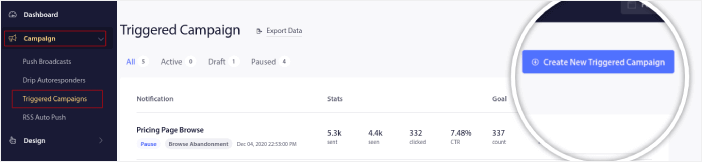
PushEngage kontrol paneline gidin ve Kampanya » Tetiklenen Kampanyalar bölümüne gidin ve Yeni Tetiklenen Kampanya Oluştur'a tıklayın:
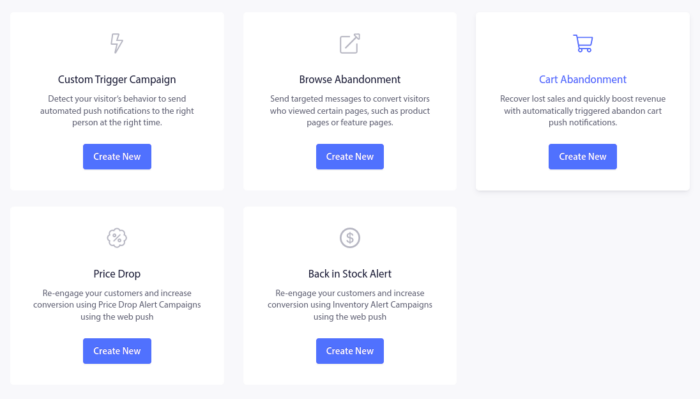
Ardından, Sepet Terk Etme şablonunu seçin ve Yeni Oluştur'a tıklayın:
Ve bir terk edilmiş sepet otomatik yanıtlayıcısı tasarlamaya başlayabilirsiniz.
Adım #2: Bir Shopify Terk Edilmiş Sepet Kampanyası Taslağı Oluşturun
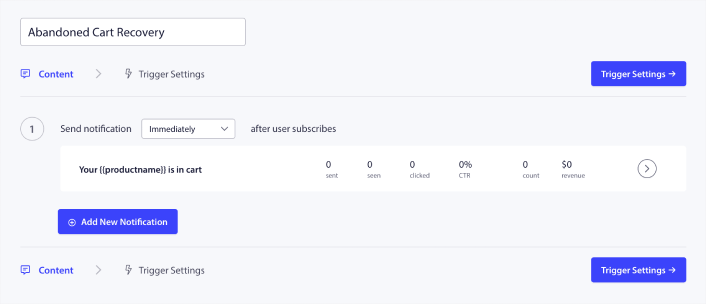
Ardından, PushEngage kontrol panelinde kampanyayı taslak haline getirmek isteyeceksiniz. İçerik altında bir dizi anlık bildirim oluşturabilirsiniz:
Bir bildirimi düzenlemek için, yanındaki ok işaretine tıklamanız yeterlidir ve anlık bildirimi özelleştirebilirsiniz:
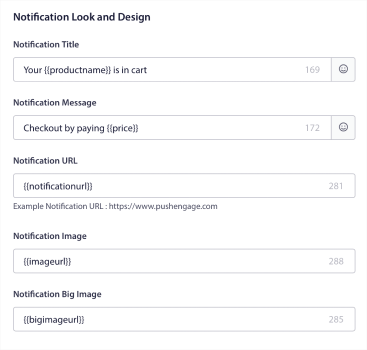
Bu alanların çoğunu değişkenleri kullanarak otomatik olarak alabilirsiniz.
Fark ederseniz, {{productname}} ve {{price}} gibi köşeli parantez içinde birden fazla değişken vardır. Bunları daha sonra kod parçacığınız için parametreleri tanımlamak üzere kullanabilirsiniz. Bu alanlar anlık bildirimlerinizi kişiselleştirmenize yardımcı olacaktır. Örneğin, {{bigimageurl}}, terk edilen ürüne göre ürün resmini otomatik olarak çeker.
Herhangi bir anlık bildirimde olduğu gibi, buradaki içerikle ilgili her şeyi özelleştirebilirsiniz.
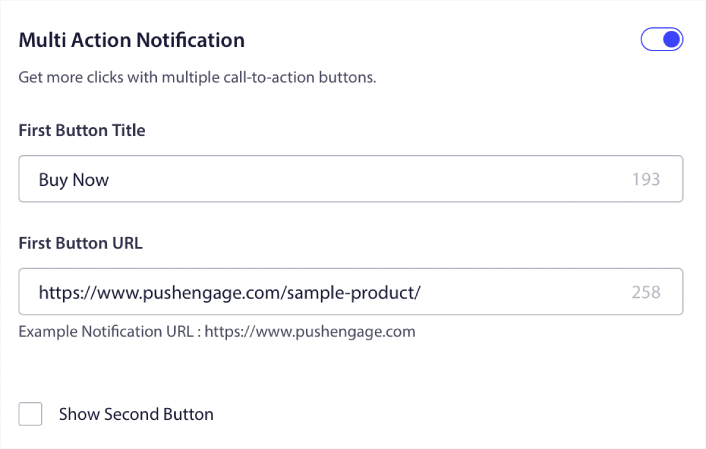
Ayrıca ödeme düğmeleri de ekleyebilirsiniz:
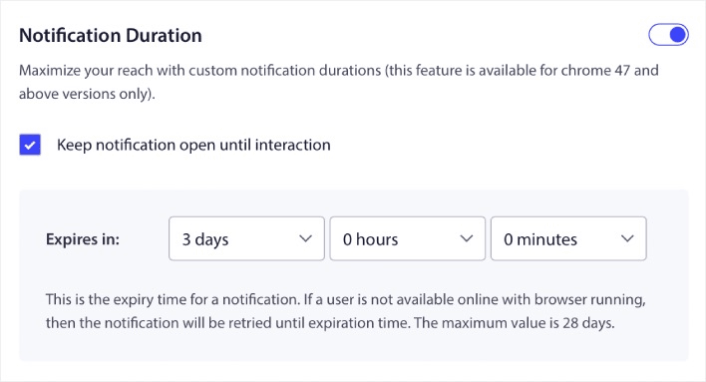
Veya özel bir bildirim süresi ekleyebilirsiniz:
İşiniz bittiğinde, kampanyayı etkinleştirmek için Tetikleyici Ayarları sekmesine gidin. Varsayılan olarak, Shopify uygulamamız Shopify terk edilmiş sepet kampanyanızın başlatılması için gereken tüm entegrasyon kodunu ekleyecektir.
Adım #3: Kampanyayı Kaydedin ve Başlatın
Hepsi bu kadar!
Sadece Otomatik Yanıtlayıcıyı Etkinleştir düğmesine basın:

Ve işiniz bitti.
Kişiselleştirilmiş Sepet Terk Kampanyaları Nasıl Oluşturulur
Özel öznitelikler kullanarak kişiselleştirilmiş sepet terk kampanyaları oluşturabilirsiniz.
Bu, PushEngage'ı Müşteri İlişkileri Yönetimi (CRM) yazılımınızla bağlayarak her müşteri için kişisel ayrıntıları alabileceğiniz anlamına gelir. Varsayılan olarak PushEngage, her müşteri için cihaz ve coğrafi konum bilgilerini yakalar. Ancak PushEngage Öznitelikler API'sini kullanarak kişiselleştirme aralığını genişletebilirsiniz.
Kullanıcının adını kullanarak özel terk edilmiş sepet anlık bildirimleri oluşturabilirsiniz, tıpkı şunun gibi:

Veya fiyat düşüşü veya kullanılmayan sadakat puanları gibi daha fazla öğe ekleyin:

Veya başka ürünleri çapraz satış yapın:
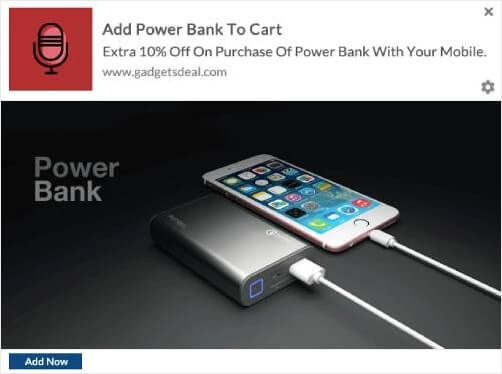
API'lerimizi kullanarak kurabileceğiniz kampanya türlerinin gerçekten sınırı yok. İstediğiniz gibi kullanın!
Bir Shopify Terk Edilmiş Sepet Kampanyası Başlattıktan Sonra Ne Yapmalı
Bu kadar, millet! Bunu faydalı bulduysanız, sepete terk etmeyi nasıl azaltacağınız hakkındaki makalemize de göz atmalısınız. Orada gerçekten faydalı fikirler var.
Ve eğer anında iletme bildirimlerine yeni başlıyorsanız, PushEngage'ı denemelisiniz. Başlamanıza yardımcı olacak bu harika kaynaklara göz atın:
- Shopify Anında İletme Bildirimlerini Sitenize Nasıl Eklersiniz
- Giyim Mağazası İçin En İyi Shopify Uygulamaları
- Dönüşüm Oranlarını Artırmak İçin En İyi Shopify Güven Rozetleri
- Shopify'da Otomatik E-postaları Nasıl Gönderirsiniz (Kolay Yol)
PushEngage, dünyanın 1 numaralı anında iletme bildirimi yazılımıdır ve PushEngage kullanarak çeşitli anında iletme bildirimi kampanyaları oluşturabilirsiniz.
Bu nedenle, henüz yapmadıysanız, bugün PushEngage'i kullanmaya başlayın.


