Det är måndag morgon i en WooCommerce-klädbutik med 25 miljoner dollar i GMV och retentionchefen lanserar den kvartalsvisa realisationen. Teamet har redan arbetat med butiksövergripande e-post: 25 % rabatt, gäller till fredag, en enda sändning kl. 10. Under de kommande sju dagarna återhämtar e-postmeddelandet 8 400 dollar i hänförbar intäkt. Den andra återhämtningsytan är tystare.
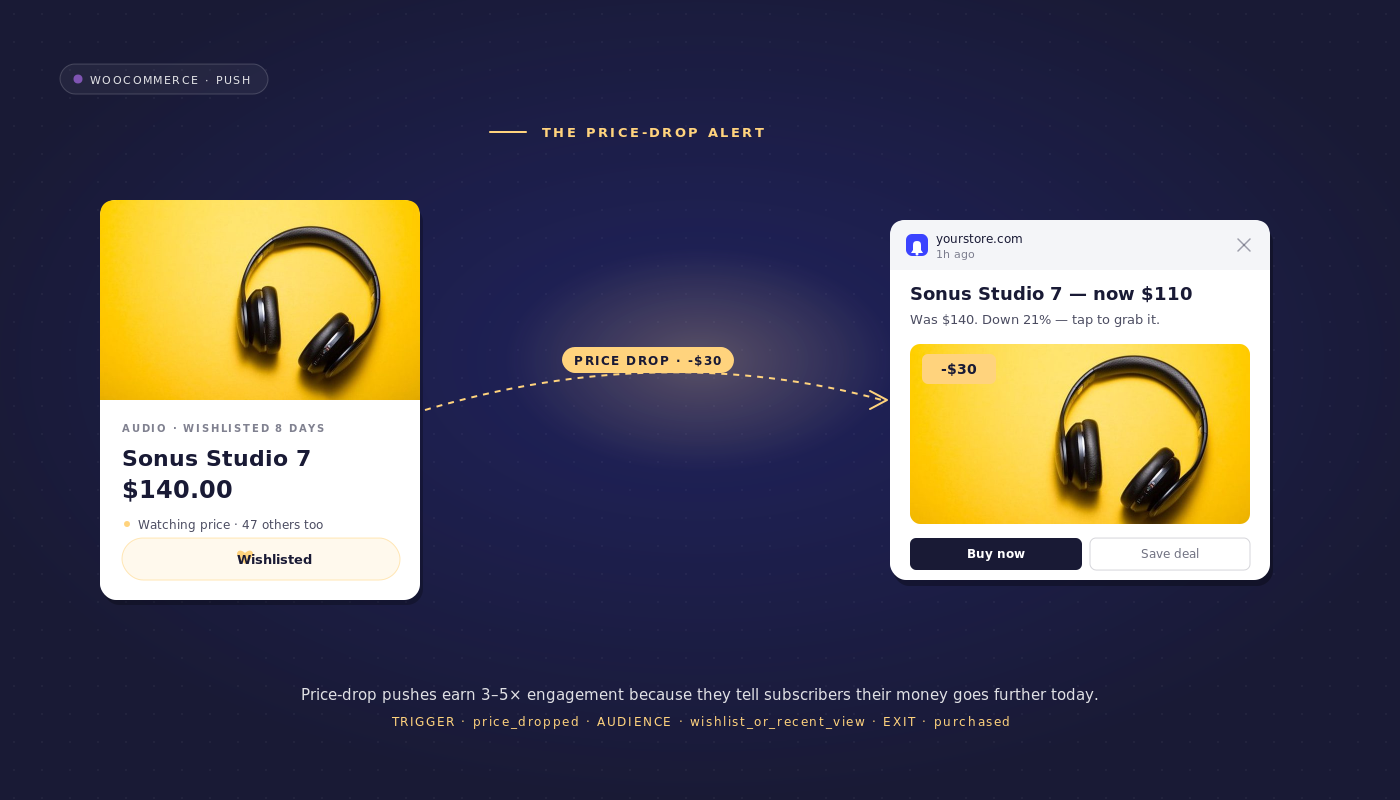
Varje gång en inköpare markerar ett reapris i WooCommerce-admin, utlöser en automatisk arbetsflöde WooCommerce-prisfallaviseringar till prenumeranter som specifikt bevakade den SKU:n. Under samma 72-timmarsperiod återhämtar prisfallsarbetsflödet 19 200 dollar. Samma butik, samma rea, två och en halv gånger återhämtningen från automatiseringen.
De två ytorna är inte utbytbara. Det butiksövergripande e-postmeddelandet är broadcasten. Prisfallsarbetsflödet är ytan per SKU. De staplas snarare än konkurrerar, och i de flesta medelstora WooCommerce-butiker är ytan per SKU den som är materiellt underinstrumenterad.
Den här artikeln går igenom hur prisfallsarbetsflödet ser ut från början till slut, varför en tre-målgruppskaskad är rätt arkitektur, hur man förhindrar frekvensbegränsning från att träna en rabattjägarbas, och hur man hänför återvunnen intäkt per SKU så att ekonomiavdelningen kan läsa radposten.
- Varför prisfall är den högsta konverterande återhämtningstriggern
- Ögonblicket för att anmäla sig till prisaviseringar
- Prisfallsarbetsflödet, från början till slut
- Varför målgruppskaskaden är rätt arkitektur
- Integration av prisstrategi: undvik att träna rabattjägaren
- Integration av WooCommerce-stacken
- Attribuering per arbetsflöde
- Bygg det i PushEngage Workflows
- Vad detta förändrar
Varför prisfall är den högsta konverterande återhämtningstriggern
De flesta retentionarbetsflöden utlöses mot en enda målgrupp. Arbetsflödet för övergivna kundvagnar riktar sig till de som övergav kundvagnar. Arbetsflödet för övergivna webbläsningar riktar sig till de som övergav webbläsningar. Välkomstserien riktar sig till nya prenumeranter. Prisfallsaviseringen är annorlunda. Två målgrupper konvergerar på samma trigger: de som övergav webbläsningar och tittade på produkten men inte lade den i kundvagnen, och de som övergav kundvagnar specifikt på grund av priset. Båda har visat specifikt produktintresse. Båda kan nås från ett arbetsflöde med en trigger och ett avslutningskriterium.
Det finns en tredje anledning till att prisfall konverterar till multiplar av någon enskild påminnelse. Triggersignalen är mer konkret än enbart målgruppssignalen. En påminnelse om övergiven webbläsning ber prenumeranten att lita på handlarens ord att produkten fortfarande är värd deras uppmärksamhet. Prisfallsmeddelanden bär beviset i själva meddelandet: priset har faktiskt ändrats, här är det nya numret. Prenumeranten ser aviseringen och priset samtidigt, vilket är anledningen till att även kalla målgrupper konverterar bättre på prisfallsutskick än på generella återengagemangsnudgar.
Ögonblicket för att anmäla sig till prisaviseringar
En knapp "meddela mig när priset sjunker" på produktdetaljsidan är en av de högkvalitativa anmälningarna i e-handeln för medelstora marknader. Prenumeranten anger den specifika produkten de vill spåra. Jämfört med en generell anmälan för hela webbplatsen, ger anmälan om prisavisering på PDP en prenumerantbas som konverterar på arbetsflödet för prissänkning i mångdubbla hastigheten jämfört med kalla prenumeranter. Argumentet om den sammansatta kvaliteten hos prenumeranter täcks mer i detalj i den relaterade artikeln om utlösta prenumerationsfrågor; den korta versionen är att anmälningskällan förutsäger intäkter per prenumerant nedströms lika rent som någon signal inom retention.
För WooCommerce-butiker implementeras PDP-anmälan genom PushEngage JS SDK:s metod subscribeToProduct(productId). Knappen skriver produkt-ID:t till en prenumerantattribut, som blir ett segment som arbetsflödet för prissänkning kan dirigera mot. Butiker som redan kör YITH eller TI WooCommerce Wishlist-plugin har en parallell rutt till önskelista-prissökning: varje önskad produkt är effektivt en explicit prisavisering från kunden.
Prisfallsarbetsflödet, från början till slut
Detta är den fullständiga specifikationen för arbetsflödet. Lyft den direkt in i PushEngage Workflows-byggaren.
- Utlösare (START): Anpassad händelse
price_dropped, utlöst från WooCommerce när fältetproduct_meta._sale_priceuppdateras och är lägre än_regular_price. Händelsens nyttolast inkluderarproduct_id,old_price,new_priceochpercent_off. - Körningstyp: Flera parallella. En arbetsflödesinstans per produkt per prenumerant. En prenumerant som spårar tre produkter får tre samtidiga instanser; var och en avslutas oberoende när dess produkt köps.
- Frekvensbegränsning (arbetsflödesnivå): Avsluta om prenumerantattributet
last_price_drop_alert_atär inom de senaste 14 dagarna. Begränsningen skyddar mot att träna en publik av rabattjägare och försvaras i nästa avsnitt. - BESLUT 1: Har prenumeranten uttryckligen anmält sig till aviseringar för denna produkt (segment
price_alert_subs_{product_id}eller önskelista-matchning)? JA-väg: skicka aviseringen om prissänkning till den uttryckliga prenumeranten. NEJ-väg: fortsätt till BESLUT 2. - BESLUT 2: Är prenumeranten i segmentet för bortglömd surfning för denna produkt inom de senaste 30 dagarna? JA-väg: skicka påminnelsen om prissänkning till den som glömde surfa. NEJ-väg: fortsätt till BESLUT 3.
- BESLUT 3: Är prenumeranten i segmentet för bortglömd kundvagn för denna produkt inom de senaste 14 dagarna? JA-väg: skicka påminnelsen om prissänkning till den som glömde kundvagnen. NEJ-väg: AVSLUTA tyst.
- VÄNTA: 24 timmar efter första sändningen.
- BESLUT 4: Köpte prenumeranten produkten? JA-väg: AVSLUTA (framgång, avslutningskriterier uppfyllda). NEJ-väg: skicka andra kontakten om lagret börjar ta slut.
- SLUT.
Kopiera för aviseringar för varje gren:
- Explicit subscriber: “Priset har sjunkit på produkten du bevakar. {{product_name}} kostar nu {{new_price}}, {{percent_off}}% rabatt. Handla till det nya priset.”
- Browse-abandoner: “Bra tajming. {{product_name}} som du tittade på förra veckan kostar nu {{new_price}}, {{percent_off}}% rabatt.”
- Cart-abandoner: “Du lämnade {{product_name}} i din varukorg. Priset har precis sjunkit till {{new_price}}. Din varukorg finns kvar.”
- Stock-running-low second touch: “Observera. {{product_name}} för {{new_price}} börjar ta slut. Lagret går snabbt för reavaror.”
Prisaviseringens arbetsflöde har en utlösare, tre sändningsgrenar och ett avslutningskriterium. Läsaren som också kör varukorgs- och webbläsararbetsflöden har redan målgruppssegmenten och prenumerantattributen på plats. Prisaviseringens arbetsflöde sätts ihop på under en timme ovanpå den befintliga infrastrukturen.
Varför målgruppskaskaden är rätt arkitektur
De flesta retentionsstackar bygger tre separata prissänkningskampanjer. En för explicita önskeliste-prenumeranter, som hanteras av lojalitetschefen. En för de som övergett webbläsning, som hanteras av livscykelmarknadsföraren. En för de som övergett varukorgen, som hanteras av CRM-ansvarige. Tre kampanjer innebär tre kampanjägare, tre uppsättningar texter som driver isär under tredje kvartalet, och tre platser där avslutningskriteriet glöms bort. Kaskaden kollapsar dessa till ett arbetsflöde med tre BESLUTs-noder, avslutas tyst för prenumeranten utan avsikt, och skickar aldrig dubbelt.
| Koncept | Tre separata kampanjer | Ett kaskadararbetsflöde |
|---|---|---|
| Ägare | Tre (lojalitet, livscykel, CRM) | En (retention manager) |
| Textvarianter | Tre, driver isär | En kanonisk variant per gren |
| Avslutningskriterier | Tre regler, satta separat | En arbetsflödesregel |
| Frekvensbegränsning | Ingen (kampanjer koordinerar inte) | En begränsning, på arbetsflödesnivå |
| Attribuering | Tre rader | En rad, tre gren-delbelopp |
| Risk för dubbelsändning | Hög (en önskeliste-prenumerant kan också vara en som övergett varukorgen) | Noll (kaskaden sorterar efter avsikt) |
Kaskadens ordning spelar roll. Explicita prenumeranter utvärderas först eftersom anmälan är den starkaste avsiktsindikatorn. De som övergett webbläsning utvärderas som andra eftersom produktvisningen är mer aktuell och specifik än övergiven varukorg för de flesta butiker. De som övergett varukorgen utvärderas som tredje eftersom arbetsflödet för övergiven varukorg redan har meddelat dem med en rabattstege på 0/10/20 %; prisaviseringen är en annan vinkel på samma prenumerant och bör landa sist i kaskaden för att undvika att staplas med varukorgsarbetsflödets egen eskalering.
Integration av prisstrategi: undvik att träna rabattjägaren
En prenumerant som får meddelanden om reapriser varannan vecka lär sig att vänta. Detta är den dolda kostnaden för ett obegränsat prissänkningsprogram: den kohort som konverterar på aviseringarna skjuter också upp efterföljande köp och väntar på nästa nedsättning. Över fyra kvartal kan det tränade beteendet att jaga rabatter helt urholka retentionsmatematiken. En 5 % marginalförlust i utbyte mot återhämtning är acceptabel. En 25 % tränad beteendeförlust över kohorten under tolv månader är det inte.
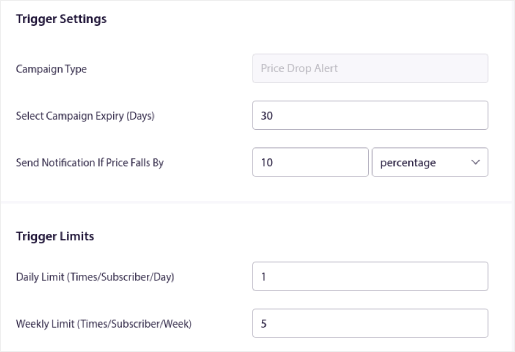
Försvaret är en frekvensbegränsning på arbetsflödesnivå. Max 1 prisnedgångsavisering per prenumerant per 14 dagar, verkställd inuti arbetsflödet som en kontroll av utgångskriterier på prenumerantattributet last_price_drop_alert_at. Varje lyckad sändning uppdaterar attributet via en UpdateAttribute-åtgärdsknut. Nästa prisnedgångshändelse som utlöses för samma prenumerant kontrollerar attributet; om det är inom 14 dagar, avslutas arbetsflödet innan någon av de tre DECISION-grenarna utvärderas.
Fönstret för begränsning kan justeras. Butiker med löpande veckoförsäljning kan behöva sänka till 7 dagar för att förbli relevanta. Butiker med kvartalsvisa reaförsäljningar kan hålla sig till 14 dagar eller utöka till 21. Poängen är att begränsningen är en regel för arbetsflödet, verkställd av motorn, inte en kalenderpåminnelse för kampanjägaren. Arbetsflödesregler glöms inte bort när kampanjägaren byter plats.
Det finns en följd. Frekvensbegränsningen skyddar också relationen med prenumeranter som inte är ute efter prisnedgångar. En kund som köpte produkten till fullpris förra veckan vill inte ha en prisnedgångsavisering för samma produkt den här veckan. Utgångskriteriefiltret för målgrupp (köp inom de senaste 30 dagarna för denna produkt) hanterar det fallet som en separat regel, men 14-dagarsbegränsningen är det universella golvet.
Integration av WooCommerce-stacken
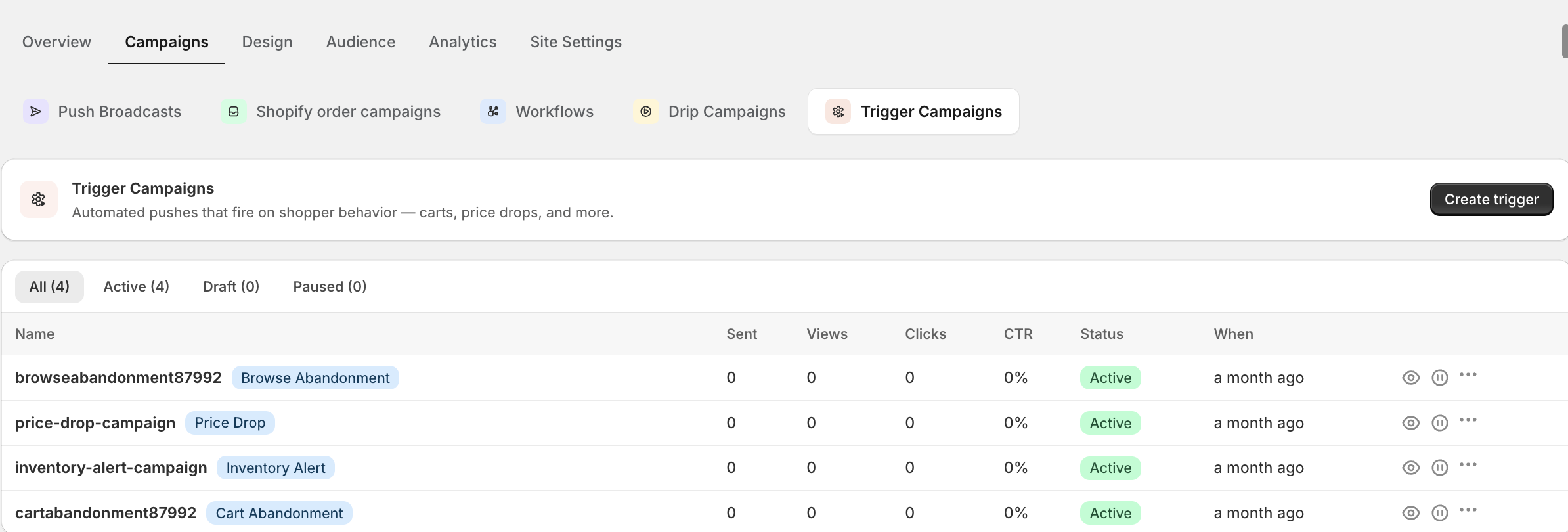
Dataingångarna är specifika. WooCommerce-butiker lagrar rekommenderat pris som _sale_price och ordinarie pris som _regular_price i produkternas metatabell. WooCommerce-PushEngage-integrationspluginet kopplar in sig i åtgärden save_post_product och läser av metan vid varje produktsparning; om _sale_price inte är tomt och är lägre än _regular_price, utlöser pluginet CustomEvent price_dropped med SKU, de gamla och nya priserna samt procentrabatten. Detta är händelsen som START-noden för prisnedgångsarbetsflödet lyssnar efter.
Dynamiska prissättningsplugins (Advanced Dynamic Pricing for WooCommerce, WooCommerce Dynamic Pricing & Discounts) skriver till samma metanivå när deras regler aktiveras och utlöser samma koppling. Arbetsflödet för prisnedgång behöver inte veta om prisändringen kom från en manuell redigering av reapriset eller från en automatiserad regel för dynamisk prissättning. Det lyssnar efter händelsen oavsett källa.
För uttryckliga godkännanden exponerar PushEngage JS SDK subscribeToProduct(productId). PDP-knappen för prisavisering anropar denna metod vid klick; prenumeranten läggs till i ett segment per produkt som heter price_alert_subs_{product_id}. Butiker som använder YITH- eller TI WooCommerce Wishlist-plugins kan skriva en parallell koppling som mappar varje önskad produkt till samma segment per produkt, så att spårning av önskelistans priser och det uttryckliga godkännandet för prisavisering matar samma målgrupp.
Vad som ska instrumenteras först. De 100 bästa SKU:erna efter försäljningsvolym täcker det mesta av intäkterna. Koppla save_post_product-kopplingen för att utlösa price_dropped för dessa SKU:er först. Lägg till PDP-knappen för prisavisering på samma uppsättning. Starta arbetsflödet mot denna avgränsade målgrupp, mät och expandera. Hela katalogen kan vänta.
Attribuering per arbetsflöde
Återvunnen intäkt per prissänkningshändelse, per SKU, per kanal. Detta är den renaste intäktsåterföringen inom retention eftersom triggern (prisändring) är tidsstämplad och konverteringshändelsen (köp av samma SKU) är tidsstämplad. Subtrahera de två; skillnaden är den återvunna intäkten per avisering.
PushEngage Workflows spårar köade, slutförda och avslutade användare vid varje nod. Här är hur analysen på nodnivå ser ut för ett realistiskt prissänkningsflöde på en lista med 200 000 prenumeranter under en kvartalsvis rensningsvecka:
| Nod | Köad | Slutförd | Avslutad | Anteckningar |
|---|---|---|---|---|
| START (pris_sänkt, 40 SKU:er) | 0 | 18,400 | 0 | 18 400 prenumerant-produktpar berättigade |
| Avslut baserat på frekvensbegränsning | 0 | 17,100 | 1,300 | 1 300 begränsade från en nyligen genomförd avisering |
| BESLUT 1: explicit prenumerant | 0 | 4 200 (JA) | 0 | Dirigerad till sändning för explicit prenumerant |
| BESLUT 2: övergiven-bläddring | 0 | 7 800 (JA) | 0 | Dirigerad till sändning för övergiven-bläddring |
| BESLUT 3: övergiven-kundvagn | 0 | 2 300 (JA) | 0 | Dirigerad till sändning för övergiven-kundvagn |
| BESLUT 3 NEJ-sökväg: AVSLUT | 0 | 0 | 2,800 | Prenumeranter utan avsikt avslutas tyst |
| ÅTGÄRD: första sändning | 0 | 14,300 | 0 | Skickad över tre grenar |
| VÄNTA 24 timmar | 1,800 | 9,400 | 3,100 | 3 100 köpte inom 24 timmar, avslutas |
| BESLUT 4: köpt? | 0 | 9,400 | 0 | Alla icke-köpare fortsätter |
| ÅTGÄRD: lagret sinar andra kontakt | 0 | 9,400 | 0 | Andra sändningen |
| SLUT | ej | 9,400 | ej | 1 200 av dessa konverterar inom de kommande 48 timmarna |
I denna tratt köpte 4 300 prenumeranter (3 100 plus 1 200) den aviserade SKU:n inom 72 timmar från prissänkningshändelsen. Med en genomsnittlig kundvagn på 58 USD är det cirka 249 400 USD i återvunnen intäkt under veckan, mot 14 300 sändningar och noll kostnad per sändning för push-kanalen. Aggregerat per SKU landar intäkten per SKU på säljarens instrumentpanel tillsammans med mått för rabattrealisering. Arbetsflödet slutar vara en kampanjkostnad och blir en intäktslinje för prissättning.
Den rätta inramningen för finansavdelningen är att prissänkningsflödet är återfunnen intäkt. Det här är prenumeranter som inte skulle ha köpt till ordinarie pris men som köpte till reapriset efter aviseringen. Butiken skulle ändå ha sänkt priset på dessa SKU:er. Arbetsflödet omvandlar den planerade nedsättningen till återvunnen efterfrågan.
Bygg det i PushEngage Workflows
Prissänkningsflödet mappar direkt till PushEngage Workflows-komponenter.
| Arbetsflödesdel | PushEngage-element |
|---|---|
| Utlösare | START med CustomEvent price_dropped, körningstyp för flera parallella körningar |
| Frekvensbegränsning | Avslutningskriterier med publikfilter på prenumerantattributet last_price_drop_alert_at |
| Publikkaskad | BESLUT x3 med publikfilter på segmentmedlemskap |
| Skickar | ÅTGÄRD SkickaPushNotis x4 (tre grenar plus andra kontakt) |
| Attributuppdatering | ÅTGÄRD UppdateraAttribut på last_price_drop_alert_at efter varje utskick |
| Vänta | VÄNTA 24 timmar |
| Avslut vid köp | BESLUT med Goal.Tracked-filter på händelsen purchase som matchar produkt-ID |
| Terminal | SLUT |
Workflows-motorn levereras med över 60 färdiga mallar som täcker prissänkningar och de stödjande flödena för kundvagn och surfning. Den retentionansvarige vars kundvagns- och surfhistorikflöden redan är aktiva kan driftsätta WooCommerce push-notiser för prissänkningar ovanpå befintliga publiksegment på under en timme.
Vad detta förändrar
För butiker som kör flerkanals-retentionsplaner, lagerför push- och e-postorkestreringsmetoden e-post som reserv för kunder som avregistrerat sig från push. Det bredare navet för e-handelspush-notiser täcker de omgivande arbetsflödena som prissänkningslagret förstärker, inklusive arbetsflödet för övergiven kundvagn i WooCommerce och återställningsarbetsflödet för övergiven surfning som delar publiksegment med detta.
Prissänkningsaviseringen är inte en kampanj. Det är ett arbetsflöde som förstärks över två befintliga publiker plus en explicit opt-in-kohort, från en enda utlösare, med ett enda avslutningskriterium. Säljaren fortsätter att markera rekommenderade priser i WooCommerce-admin. Arbetsflödet fortsätter att köras per SKU. Den retentionansvarige fortsätter att läsa intäktsraden per SKU. Tre kampanjer blir en. Risken för tränade rabattjägare hanteras vid arbetsflödets tak. De återvunna intäkterna landar som hittade dollar på nästa resultat- och förlusträkning. Matematiken förstärks över varje rea som butiken kör.
Gratisplanen ger dig 200 prenumeranter, alla fyra kanaler (webb-push, app-push, WhatsApp och livechatt) och hela Workflows-motorn från dag ett. Det räcker för att instrumentera prissänkningsarbetsflödet på dina topp 10 SKU:er och bevisa återvinningsmatematiken på riktiga prenumeranter innan du begär budget.
Börja med gratisplanen och driftsätt prissänkningslagret ovanpå dina befintliga arbetsflöden denna vecka.


