
Inte alla besökare är redo att chatta i samma ögonblick som de landar på din webbplats. Faktum är att om du visar en chattwidget för tidigt leder det ofta till lägre engagemang och högre avvisningsfrekvens.
Ett smartare tillvägagångssätt är att aktivera chatt endast när besökaren har scrollat 50 % av sidan – ett tecken på att de är engagerade, intresserade och mer benägna att interagera.
PushEngages chattwidget gör detta otroligt enkelt.
Den här snabbguiden går igenom varför scrollbaserade utlösare fungerar och hur du ställer in dem med bara några få klick.
Skicka meddelanden via flera kanaler idag!
Push- och WhatsApp-meddelanden är supereffektiva, billiga marknadsföringsverktyg som hjälper dig att öka din återkommande trafik, engagemang och försäljning automatiskt.
- Varför en 50 % scrollutlösare fungerar
- Hur PushEngage hanterar scrollbaserade chattutlösare
- Så här aktiverar du din chattwidget vid 50 % scrollning (steg-för-steg)
- Proffstips: Kombinera scrollutlösare + sidinriktning
- Bästa praxis för 50 % scrollchattutlösare
- Vad du ska göra efter att ha konfigurerat chatt-widgets
Varför en 50 % scrollutlösare fungerar
En besökare som når 50 % av en sida har visat tydlig avsikt. De har investerat tid, tagit till sig ditt innehåll och signalerat nyfikenhet.
En 50 % utlösare hjälper dig att:
- Undvika att avbryta läsare för tidigt
- Fånga besökare när de är helt uppvärmda
- Öka chattöppningsfrekvensen
- Förbättra kvaliteten på potentiella kunder
- Minska agentens arbetsbelastning från chattar med låg avsikt
Detta är särskilt effektivt för:
- Långa blogginlägg
- Produktsidjämförelser
- Ultimata guider
- FAQ-sidor
- Handledningar
Hur PushEngage hanterar scrollbaserade chattutlösare
PushEngage inkluderar inbyggda Beteenderegler för chattwidgets. Dessa regler bestämmer när en chattwidget visas baserat på besökaråtgärder.
En av de mest användbara är: Visa när besökaren scrollar X%
Detta gör att du kan fördröja widgeten tills en valfri scrolltröskel du väljer – 50 % är en av de bäst presterande inställningarna för informations- eller innehållstunga sidor.
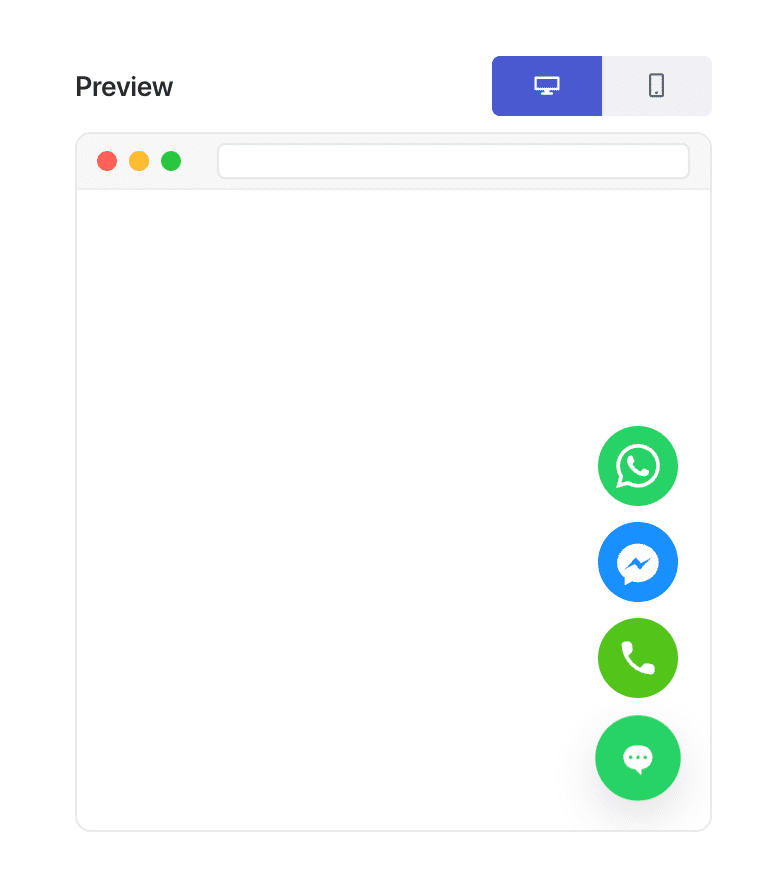
Denna flexibilitet är precis vad som möjliggör "sidtypsbaserad personalisering".
Så här aktiverar du din chattwidget vid 50 % scrollning (steg-för-steg)
Steg 1: Skapa eller redigera en chattwidget
I din WordPress-instrumentpanel:
Gå till PushEngage » Chat Widgets och klicka på Skapa ny widget eller Redigera en befintlig.
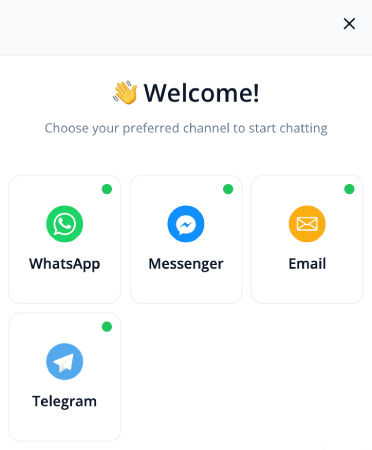
Ställ in ditt meddelande, dina kanaler och din design som vanligt.
Steg 2: Öppna fliken Beteende
Inne i widgetredigeraren, gå till Utlösare. Detta styr när widgeten visas.
Från rullgardinsmenyn för utlösare, välj Visa efter scroll %:
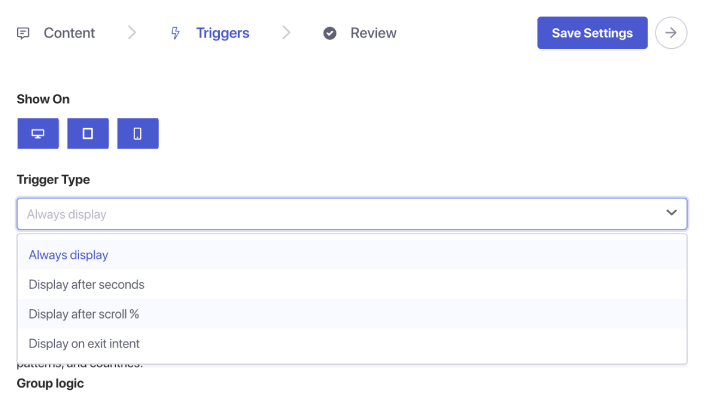
Du kommer att se ett procentfält visas. Ställ in scroll djupet till 50 %. Detta talar om för PushEngage att vänta tills en användare har scrollat halvvägs ner på sidan innan chattwidgeten visas.
Steg 3: Spara och publicera
Klicka på Spara widget.
Se sedan till att widgeten är aktiverad och riktad till de sidor du vill. Din chattwidget kommer nu att utlösas exakt vid 50 % scrollpunkten på varje tilldelad sida.
Proffstips: Kombinera scrollutlösare + sidinriktning
Scrollbaserade utlösare blir ännu kraftfullare när de paras ihop med målgruppsregler.
Du kan visa widgeten:
- Endast på blogginlägg
- Endast på WooCommerce produktkategorier
- Endast på långt innehåll
- Endast för återkommande besökare
- Endast på prissidor
Gå bara till fliken Utlösare och ställ in sidvillkor.
Bästa praxis för 50 % scrollchattutlösare
För att få bästa resultat:
1. Kombinera inte 50 % scrollning med omedelbara utlösare
Det motverkar syftet med avsiktsbaserad engagemang.
2. Håll meddelandet hjälpsamt, inte påträngande
Exempel:
- ”Behöver hjälp att förstå den här sidan?”
- ”Vill du ha personliga rekommendationer?”
- ”Har du en fråga? Jag finns här för att hjälpa till!”
3. Undvik att använda flera scrollutlösta widgets samtidigt
En widget per sida håller upplevelsen ren.
4. Testa på både mobil och dator
Scroll djup kan kännas annorlunda på olika enheter.
Vad du ska göra efter att ha konfigurerat chatt-widgets
En 50 % scrollutlösare är ett av de enklaste sätten att visa chatt vid det perfekta ögonblicket – *efter* att besökaren har engagerat sig men *innan* de lämnar.
Med PushEngages beteenderegler tar det mindre än en minut att ställa in detta och förbättrar omedelbart kvaliteten och avsikten med inkommande chattar.
Med PushEngage kan du ställa in detta på några minuter – och omedelbart börja se bättre engagemang, högre konverteringar och mer effektiv arbetsbelastning för agenter.
- Kunder ser alltid någon online
- Svarstiderna minskar
- Förköpskonverteringar ökar
- Supporten känns snabbare och mer pålitlig
- Din butik känns globalt redo
När schemana väl är inställda kan ditt team arbeta mer effektivt – och dina kunder får den upplevelse de förväntar sig.
Om du inte redan har ställt in agentprofiler och scheman i PushEngage, är det dags nu.
Inte övertygad? Ta en titt på dessa fantastiska resurser om marknadsföringskampanjer i flera kanaler:
- Hur man ökar hotellförsäljningen under lågsäsong
- Hur man gör omnikanalmarknadsföring för hotell 2026
- Hur man konverterar prenumeranter till köpare med hjälp av webb push-notiser
- Hur man meddelar prenumeranter om nya WordPress-inlägg
- Hur du skickar notiser om lageråtergång för att få fler försäljningar
- Hur man rensar listor över prenumeranter på push-meddelanden (enkelt)
- Hur man automatiskt skickar RSS push-meddelanden
- Hur man använder push-meddelanden för att marknadsföra en nyhetssida
- Hur man använder korsförsäljnings-push-meddelanden för att dubbla din försäljning
- Hur du använder push-notiser för övergivna webbläsare (4 steg)


