一斉送信は不快です。セグメントはコンバージョンします。
購入しようとしている
ターゲット層に狙いを定めましょう。
ダイナミックセグメンテーションは、行動、地域、デバイス、購入履歴に基づいて購読者を分類し、各セグメントを常に最新の状態に保ちます。VIPにはVIP待遇を、初めて閲覧した人には優しい後押しを提供します。

「ターゲットオーディエンスを調整できる能力は、ソフトウェアを使用するにつれてエンゲージメント率を高めることができるため、特に印象的です。」 Alex Avery · Database Marketing Executive
75,000社以上の企業 数分でセットアップ完了、エンジニアリングチケット不要 14日間の返金保証
150カ国以上、75,000社以上の企業に信頼されています








仕組み
適切なメッセージを、適切な1000人に。
一般的な一斉送信はオプトイン率を低下させます。セグメント化されたキャンペーンはクリック率を向上させ、構築に労力をかけたリストを保護します。
実際の行動に基づいてセグメント化
閲覧したページ、表示した商品、購入履歴、最終アクセス日:セグメントは、推測ではなく、購読者が実際に行っていることに基づいて自動的に構築されます。
地域、デバイス、言語
適切なオファーを、適切な地域に、適切な言語で、着信するデバイスに合わせてサイズ調整して送信します。TurboSendは購読者ごとのタイムゾーンで配信します。
精度のためのオーディエンスグループ
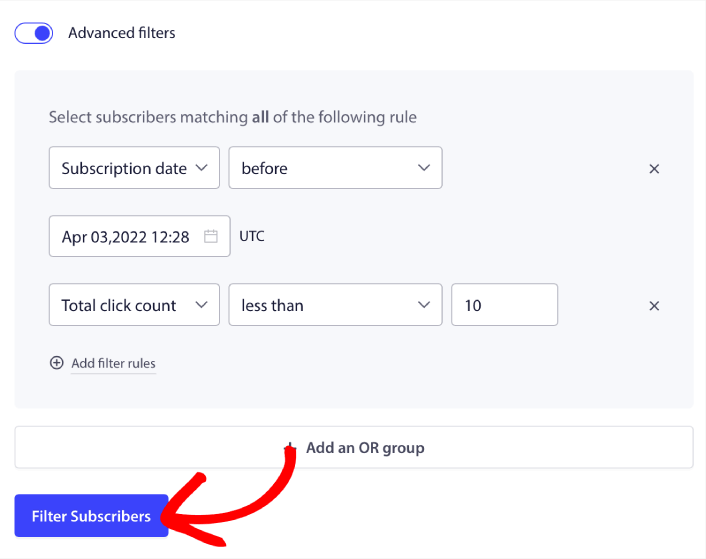
セグメントを組み合わせてフィルタリングし、詳細なリターゲティンググループを作成します。例:過去に購入したドイツのモバイルユーザーで、カート放棄したユーザー。まさにそれだけ具体的に。
仕組み
1つのリストから100のシャープなコホートへ。

セグメンテーションはオプトインから始まります
購読者が「許可」をクリックした瞬間にセグメントを割り当てます。購読元ページに基づきます。レシピページの購読者と価格ページの購読者は、同じリードではありませんでした。
- 購読ページと行動による自動セグメント化
- パーソナライゼーションAPIによるカスタム属性
- 行動の変化に合わせてセグメントは自動的に更新されます

セグメントがその価値を発揮したことを証明する
目標追跡はキャンペーンごと、セグメントごとに収益を報告するため、どのコホートがコンバージョンし、どのコホートが異なるメッセージを必要とするかがわかります。
- セグメントごとの収益とエンゲージメント
- コホートごとのコピーをA/Bテスト(プレミアム以上)
- オプトインコンバージョン指標でループを閉じる
含まれるもの
1つのダッシュボードで、購入内容を正確に把握。
このページ上のすべてのキャンペーンを支える6つの機能。毎月152億件の通知を配信するエンジンで稼働しています。
スマートオプトインプロンプト
ページ滞在時間、スクロール深度、クリックトリガーを完全なデザインコントロールで設定可能。これにより、オプトイン率が3%から12%に向上します。
オプトインスタイルをプレビュー一斉送信&ドリップキャンペーン
単発送信、スケジュールされたプッシュ通知、複数ステップのドリップキャンペーンをリッチ画像とアクションボタン付きで利用可能。AIコピーライターが、開始したい時に下書きを作成します。
AIコピーライターを見るビジュアルワークフロー
カート回収、ウェルカムメッセージ、再購入促進のためのドラッグ&ドロップジャーニー。ビルダーはFreeプランを含むすべてのプランで利用可能です。
ワークフローを探索動的セグメンテーション
行動、地域、デバイス、購入履歴でセグメント化。オーディエンスグループは自動的に最新の状態に保たれます。
セグメンテーションを確認A/Bテスト
ヘッドライン、画像、CTAをテスト。スマートモードは自動的にトラフィックを勝者に振り分けます。Premiumプラン以上で利用可能。
A/Bテストを確認目標達成設定と分析
キャンペーンごと、ワークフローごとの収益アトリビューション。CFOが実際に受け入れるオーナーチャネルの数値。
目標達成設定を確認インテグレーションと開発者
販売チャネルはプラグインレベルで深く連携。構築チャネルはAPIレベルで深く連携します。
ネイティブプラグインにより、エンジニアリングチケットなしでチャネルをローンチできます。開発者がアクセスを求めた場合、すべてのSDKとエンドポイントが文書化されています。

Shopify & Shopify Plus
高ボリュームストア向けのネイティブアプリ:カートおよび閲覧リカバリ、在庫切れおよび値下げアラート、収益アトリビューション。12週間の統合サイクルではなく、午後にインストールできます。
Shopify Plusアプリを探索
WooCommerce
WordPress管理画面から直接カートリカバリおよび注文キャンペーンを開始します。2回のクリックで、同日中に最初のキャンペーンを開始できます。
WooCommerceカートリカバリ
HubSpot
HubSpotリストおよびイベントからプッシュをトリガーします。
HubSpot連携REST API & Webhook
すべてのコンソール操作をドキュメント化されたエンドポイントとして利用できます。ダッシュボードロックインはありません。
APIドキュメントiOS SDK
ネイティブAppleアプリ向けの本番グレードのAPNs配信。
iOSプッシュAndroid SDK
Firebaseのアップグレード:より深いターゲティング、クリーンなアトリビューション。
AndroidプッシュReact Native SDK
1つのコードベースで、両方のプラットフォームでリアルタイムプッシュ。
React NativeプッシュFlutter SDK
午後の作業でFlutterアプリにプッシュを追加します。
Flutterプッシュ数字
精度は報われます。その背後にある規模をご覧ください。
「PushEngageは迅速かつ簡単に実装できます。ターゲットオーディエンスを調整できる機能は特に印象的で、ソフトウェアを使用するにつれてエンゲージメント率を高めることができます。」
アレックス・エイブリー
データベースマーケティングエグゼクティブ
よくある質問
質問に回答します。
これは基本的なプッシュセグメンテーションとどう違うのですか?
ほとんどのツールは手動リストで止まります。ダイナミックセグメンテーションは、行動からコホートを自動的に更新し、オーディエンスグループを使用すると、エクスポートやスプレッドシートなしでフィルタを組み合わせて正確なリターゲティングセットを作成できます。
セグメンテーションはいつ機能し始めますか?
オプトイン時です。購読者は購読元のページからセグメントが割り当てられ、その後のすべての行動がコホートを洗練させます。コールドスタート期間はありません。
どのプランに含まれていますか?
地域とURLのセグメンテーションはビジネスプランで25のオーディエンスグループから開始されます。上位プランでは高度な分析とセグメントごとのA/Bテストが追加されます。アクティブな購読者に対してのみお支払いいただきます。
エンジニアリングスプリントが必要ですか?
いいえ。行動セグメントはダッシュボードから設定できます。属性APIは、開発者がカスタムプロパティを必要とする場合に利用できますが、クリティカルパスではありません。