UTM-parameter gør det muligt for Google Analytics at fortælle dig, hvor klik kommer fra, og hvilken kampagne der dirigerede klik til din hjemmeside. Dette kan analysere almindelige notifikationer, A/B-test og Drip & Trigger-kampagner. Dette kan gøres på din hjemmeside ved at følge nedenstående trin :
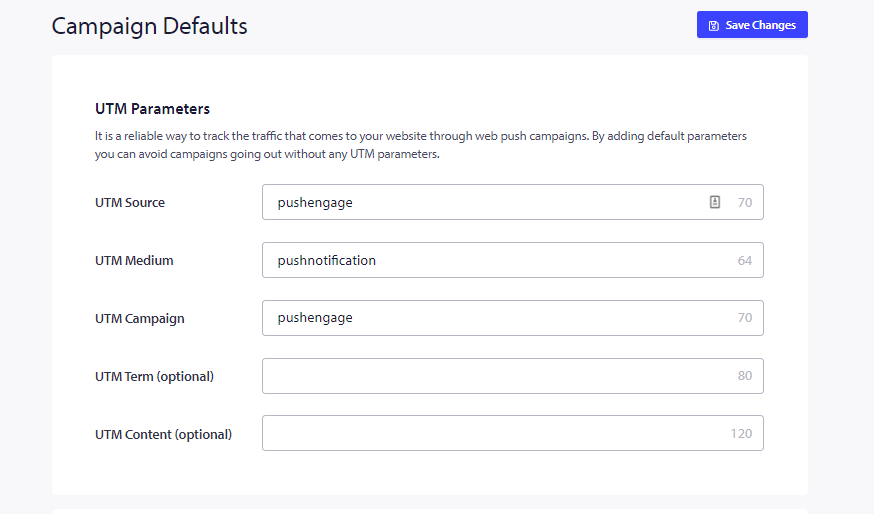
Naviger til Siteindstillinger » Kampagneindstillinger » UTM-parametre. Udfyld alle de påkrævede detaljer på denne side & klik på Gem ændringer.
Detaljerne, du kan tilføje, er angivet nedenfor:
1. UTM-kilde (obligatorisk)
2. UTM-medium (obligatorisk)
3. UTM-kampagne (obligatorisk)
4. UTM-term
5. UTM-indhold
Mere om UTM: Funktionen af UTM er at hjælpe med at holde styr på og analysere brugerne. Med UTM vil du være i stand til at vide alt om den trafik, der når din hjemmeside, fra ethvert link. Det betyder ikke noget, om disse links er fra Facebook, Twitter, en besked på sociale medier eller en e-mail; Google Analytics vil opsamle alle data og vise dem meget kortfattet.
Hvis du støder på problemer, er du velkommen til at kontakte os ved at klikke her. Vores supportteam vil kunne hjælpe dig