هل تتطلع إلى إبقاء عملائك على اطلاع بتحديثات طلباتهم الأخيرة، أو حثهم على إعادة محاولة طلبات الشراء، أو تعزيز تقييمات متجرك من خلال إشعارات الدفع عبر الويب في متجر WooCommerce الخاص بك؟
إذا كان الأمر كذلك، فقد وصلت إلى المكان الصحيح! في هذا الدليل، سنرشدك خلال خطوات إعداد وإدارة إشعارات الدفع عبر الويب لعملائك في متجر WooCommerce الخاص بك بفعالية.
قبل البدء
تأكد من تثبيت إضافة PushEngage على متجر WooCommerce الخاص بك. يفترض هذا الدليل أن لديك بالفعل إضافة WooCommerce و PushEngage
هناك حملات متعددة يمكنك إرسالها إلى العملاء للعديد من حالات الاستخدام –
- الحملات الافتراضية
- بث الإشعارات والقوالب
- ردود تلقائية متتابعة
- حملات التشغيل والأتمتة
إدارة إعدادات الإشعارات الافتراضية
يمكنك الانتقال إلى WooCommerce » الإعدادات
ثم انتقل إلى علامة التبويب إشعارات الدفع

ضمن هذه علامة التبويب، يمكنك المتابعة وتشغيل جميع أنواع الإشعارات التي تريد تمكينها حاليًا. يتيح لك هذا الحقل أيضًا تحديد ما إذا كنت تريد الإرسال إلى المسؤول فقط أو إلى العملاء.
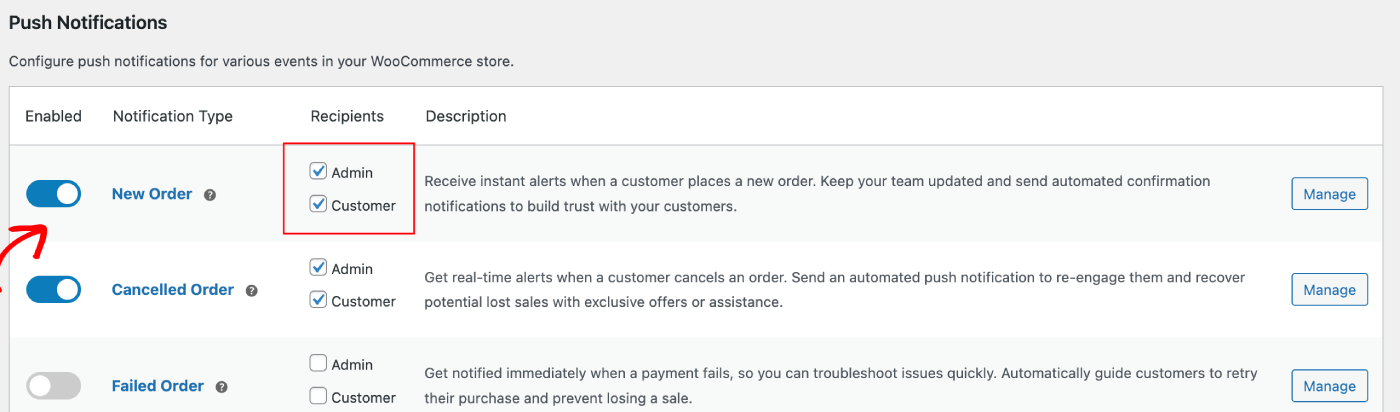
يمكنك اختيار الحملة التي ترغب في تعديلها والنقر فوق الزر إدارة. يمكنك تحديد المربع الذي يمكّن إرسال الحملات إلى العملاء. على سبيل المثال، نقوم هنا بإعداد إشعارات الدفع لطلب إعادة الشراء.
يمكنك إعداد عنوان الإشعار والرسالة مع عنوان URL لصفحة الدفع.
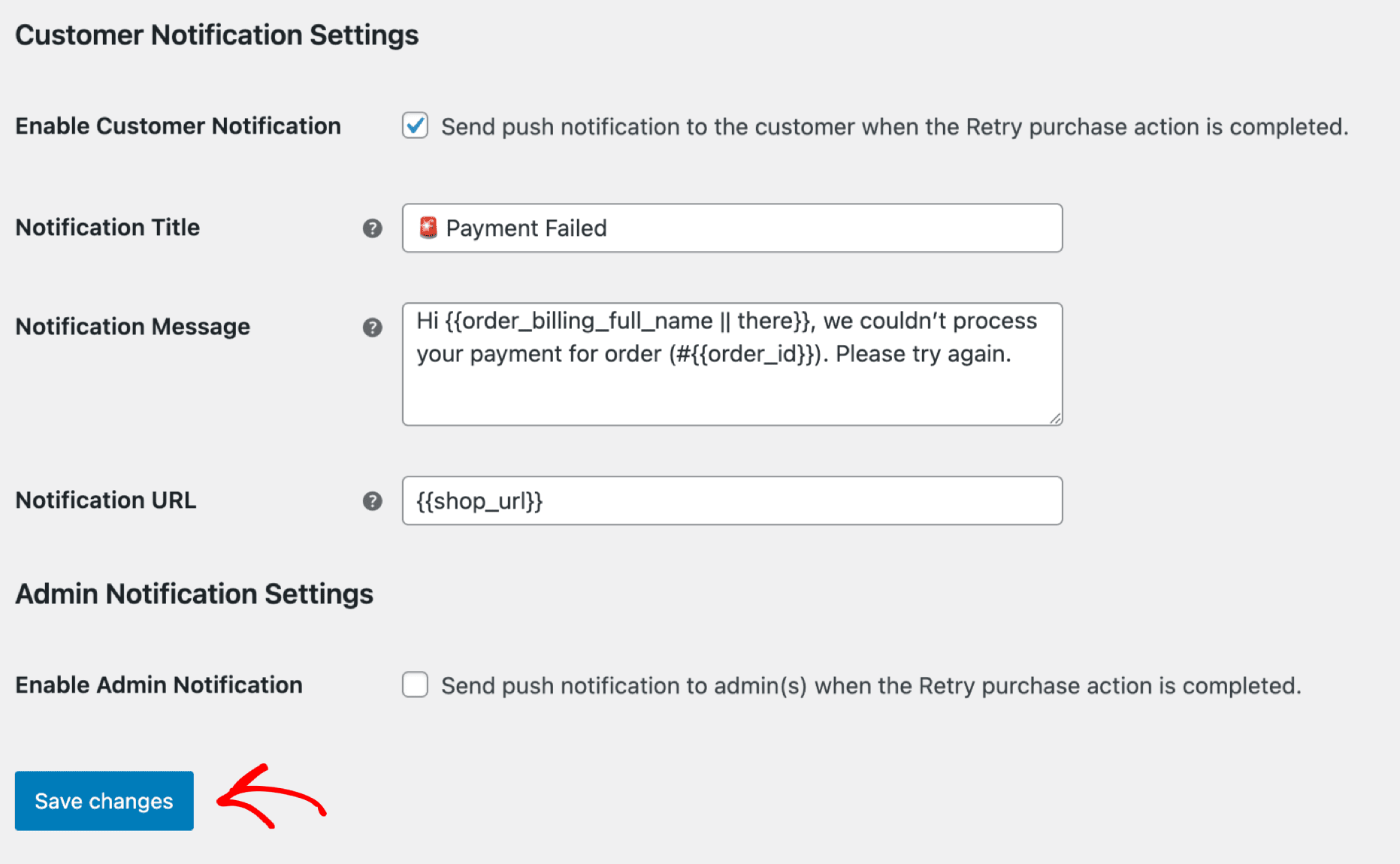
بمجرد تحديث التفاصيل، يمكنك النقر فوق الزر حفظ التغييرات .
بث الإشعارات والقوالب
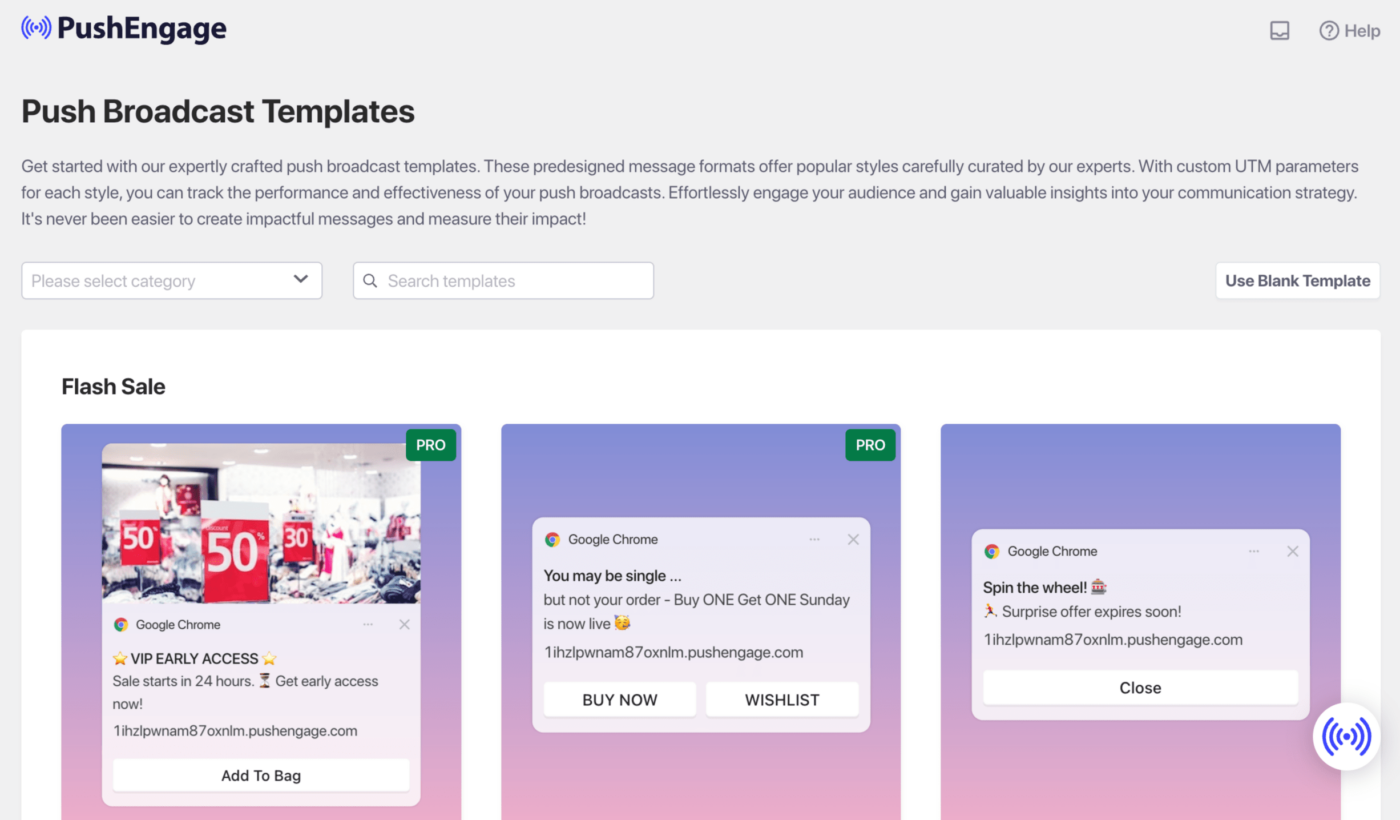
يمكنك إرسال بث إشعارات للمبيعات السريعة، أو العروض الموسمية، أو لبيع المنتجات بشكل إضافي.
يمكنك تسجيل الدخول إلى لوحة تحكم PushEngage ثم الانتقال إلى بث الإشعارات. سيساعدك هذا في الاختيار من بين مجموعة متنوعة من القوالب والفئات، ويمكنك تخصيص خيارات الجمهور والإرسال/الجدولة.
هنا هو الدليل الذي يمكنك الرجوع إليه لإنشاء حملات الدفع داخل لوحة تحكم WordPress.
ردود تلقائية متتابعة
يمكنك تمكين حملة رد تلقائي لإشعارات الويب وإرسالها إلى جميع المستخدمين المشتركين أو إلى قائمة/شريحة من المستخدمين في PushEngage. قم بتقسيم المستخدمين إلى قوائم محددة، والتي يمكن أن تحدث في صفحات معينة، أو عندما يشترك المستخدم في منهج للإشعارات.
هذا مثالي لإرسال سلسلة ترحيبية مع قسيمة خصم، أو إرسال حملات البيع المتقاطع، أو طلبات المراجعة، أو العروض الموسمية.
هنا هو الدليل الذي سيساعدك في بناء حملة تسلسلية.
حملات التشغيل الآلية
لدينا حملات مشغلة، وهي حملات خاصة بالأحداث. إنها خاصة بالأهداف، وبعض الأمثلة هي – حملات التخلي عن سلة التسوق والتصفح. تم إنشاء هذه الحملات مسبقًا لمتجرك. تحتاج فقط إلى التأكد من تمكين الحملات بمجرد توصيل متجرك.
تمكين إعدادات التخلي عن عربة التسوق والتصفح
لدينا حملة آلية للتخلي عن سلة التسوق والتصفح، وهي متكاملة مباشرة مع موجز منتجات متجرك. لدينا حدث بدء وحدث إيقاف لمنع إرسال المزيد من الإشعارات بعد اكتمال الهدف المنشود.
بمجرد اكتمال التكامل الخاص بك، يمكنك إدارة إعدادات التخلي عن عربة التسوق والتصفح لمتجر WooCommerce الخاص بك.
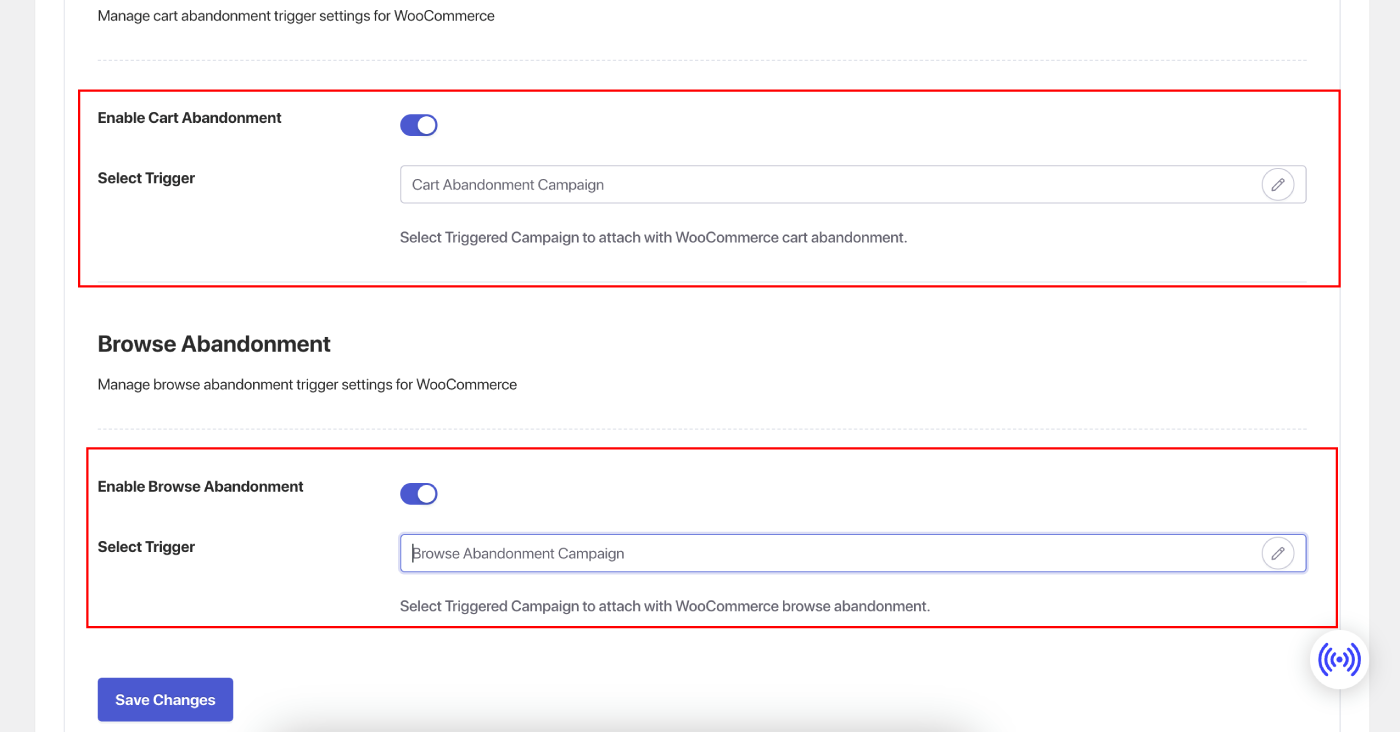
انتقل إلى علامة التبويب الإعدادات » التكاملات وتحت قسم WooCommerce.
قم بتمكين 'التخلي عن عربة التسوق' و 'التخلي عن التصفح' عن طريق تشغيل المفتاح.
تخصيص الحملات
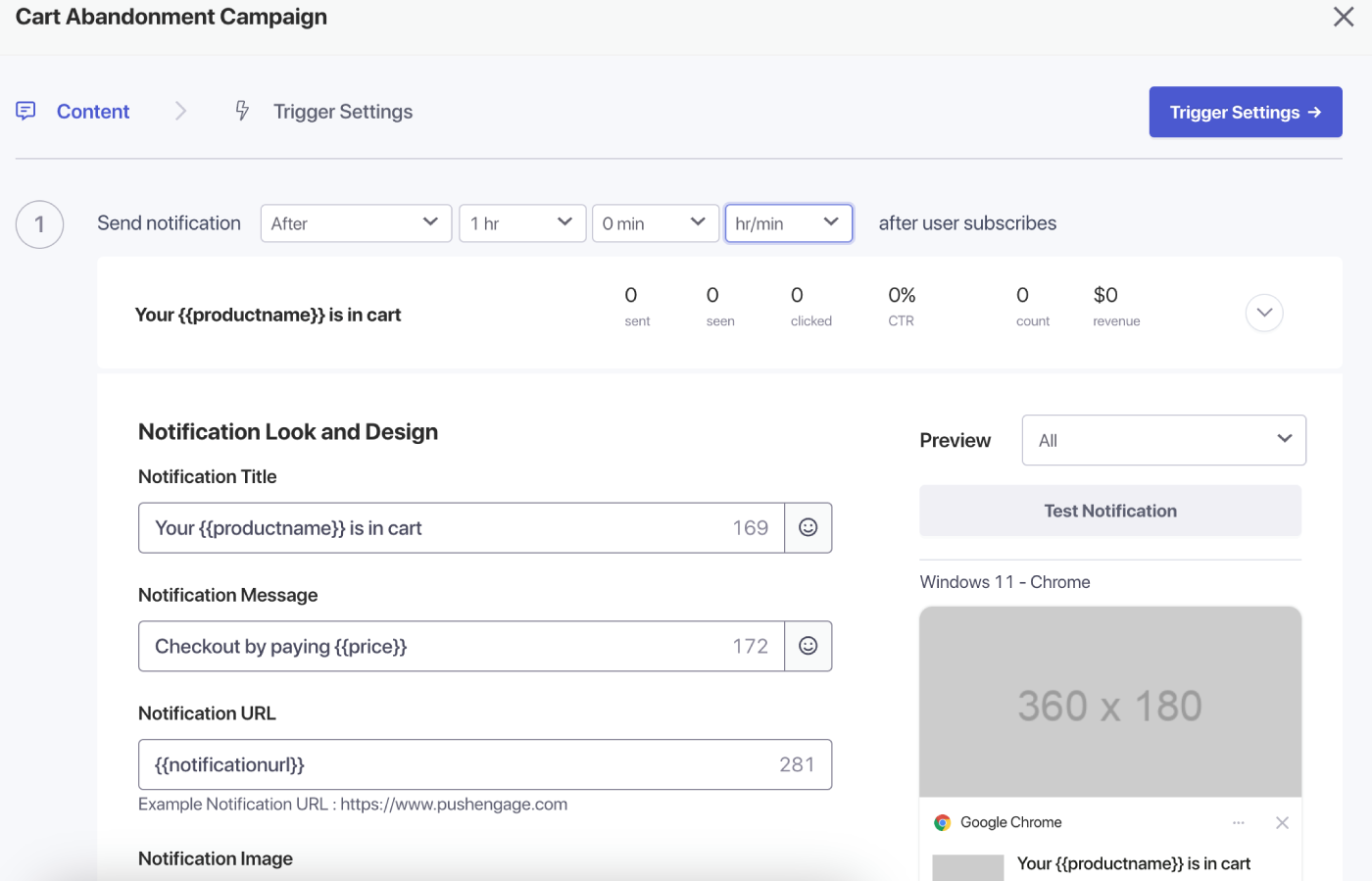
انتقل إلى 'الحملات المشغلة' وأضف إشعارات متعددة إلى حملتك.
حدد التأخير والشروط لكل إشعار وأضف متغيرات احتياطية.
إعدادات التشغيل
ضمن 'إعدادات المشغل'، قم بتحديد عدد مرات إرسال الإشعارات لمنع إرسال رسائل غير مرغوب فيها لعملائك. هنا، يمكنك اختيار حد يومي أو أسبوعي. على سبيل المثال، إذا كان لديك إشعاران للحد اليومي، فأضف 14 للحد الأسبوعي حتى لو تخلى الأشخاص عن أكثر من منتجين في اليوم، فلن يتم إرسال جميع الإشعارات إليهم.
يمكنك أيضًا إضافة معلمات UTM لهذه الحملات حتى يسهل عليك تتبعها في تحليلات Google.
بعد إعداد المشغلات، احفظ تغييراتك وقم بتنشيط الحملات. إذا تم تمكينها، يمكنك عرض تحليلات الحملة ورؤية عائد الإيرادات للهدف.
هذا كل شيء، لقد أنشأت بعض الحملات القوية لمتجر WooCommerce الخاص بك.
إذا واجهت أي مشاكل، فلا تتردد في الاتصال بنا عن طريق النقر هنا. يمكن لفريق الدعم لدينا مساعدتك.