Best WordPress Map Plugins

5 Best WordPress Map Plugins for 2026 [COMPARED]

Looking for the best WordPress map plugin for your site?

With a powerful Google map plugin, you can change map themes, add multiple locations, create custom markers, and much more. Of course, you can use HTML to embed a map on your site. But that comes with its own limitations.

So, the question really is, what is the right WordPress map plugin for your site? Do you need a paid plugin? Are free plugins good enough? And how do you choose one from a list of hundreds of WordPress plugins in the marketplace?

In this article, we’re going to give you the best plugins to embed maps on your WordPress site. We’ll even give you our top pick.

听起来不错?让我们开始吧。

Best WordPress Map Plugins

We’ve included free and paid map plugins here so that you can choose the best fit for your business. Let’s look at the best WordPress map plugins in the market. Some of these are super popular plugins and part of our list of best WordPress plugins.

#1. WPForms

WPForms是最佳的WordPress联系表单插件

WPForms 是最佳的 WordPress 表单构建器插件。我们已经测试了许多 WordPress 表单插件,但没有一个能与 WPForms 的功能或易用性相提并论。

您可以使用 WPForms 中的拖放式表单构建器来创建和发布:

  • 调查和投票
  • 多步骤表单
  • 条件逻辑表单
  • 表单放弃营销活动
  • 表单登陆页面
  • 表单模板
  • 离线表单
  • 对话式表单

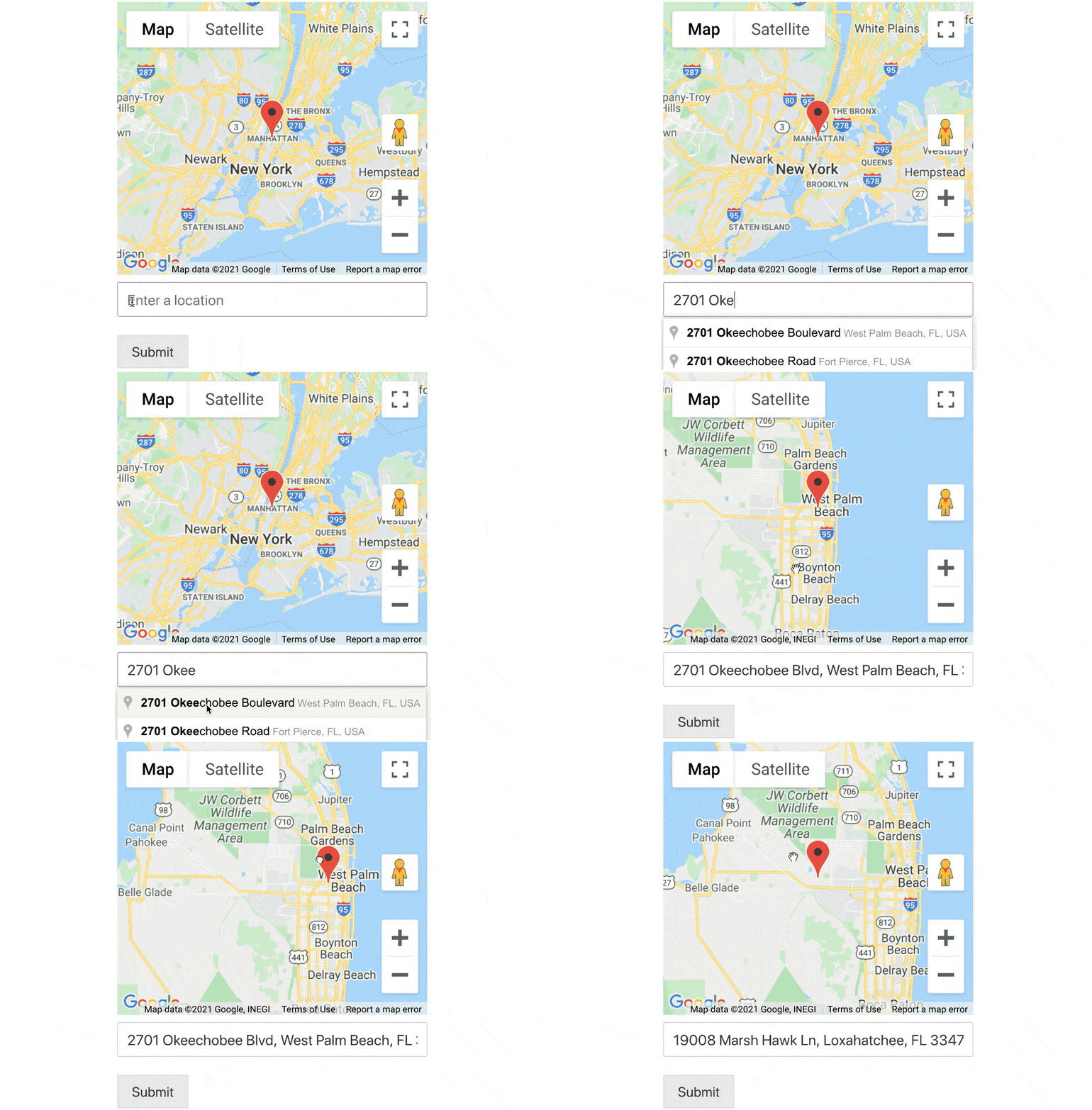
The Pro version of WPForms comes with a powerful Geolocation Addon that allows you to add a map to your website contact forms without any custom HTML code. All you have to do is connect it to either Google Places or Mapbox.

Embed WordPress map plugin

You can even  create autocomplete address forms in WordPress. Go ahead and create a WordPress form with WPForms and you’ll understand right away why we love the plugin so much.

#2. SeedProd

SeedProd 即将推出页面

SeedProd 是创建高转化率着陆页的最佳 WordPress 插件。

您将获得一个拖放式着陆页构建器,其中包含用于构建电子商务页面和着陆页的各种选项。与 WordPress 网站构建器不同,您可以自定义着陆页的每一个细节,包括导航菜单、页脚和样式。SeedProd 还可以与任何 WordPress 主题配合使用,并创建移动友好型着陆页。

使用 SeedPreed,您将获得预制的高转化率着陆页模板,可以立即发布。这包括以下模板:

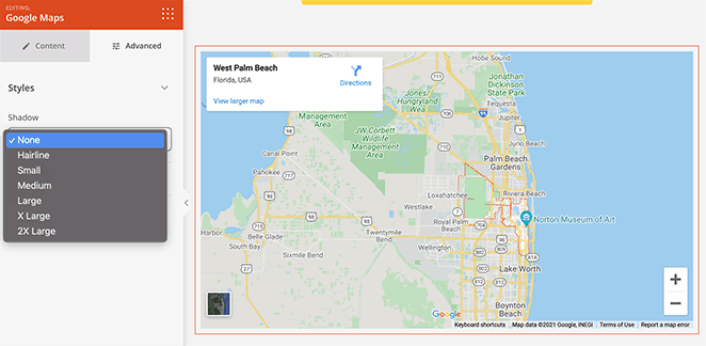
And lots more! The major benefit of using the SeedProd Google Maps Block is that you don’t need to copy-paste any shortcode in order to display maps on your web pages. You can simply drag and drop the Google map block, add your location, customize map settings, and you’re done!

SeedProd Google Map Features

We love using SeedProd and we even wrote an in-depth review of the SeedProd plugin. Go ahead and check that out!

#3. Maps Marker Pro

Maps Marker Pro

Maps Marker Pro is a premium Google maps plugin for WordPress. It allows you to create a map with multiple locations and custom markers. If Google Maps isn’t your thing, you can also use Bing Mapbox and OpenStreetMap.

The plugin comes with some super powerful features including:

  • Multiple types of maps
  • Different types of geocoding support
  • Filters for easy map navigation
  • Animated marker clusters for each map
  • GPX tracking
  • Marker sorting by date, name, and distance
  • Options to share maps offline via QR codes

It’s also compatible with WPML translation and other WordPress translation plugins. So, you can easily create maps in multiple languages.

#4. WP Go Maps

WP Google Maps WordPress plugin

WP Go Maps is a a popular plugin to add Google maps into WordPress. It’s a freemium plugin with plenty of powerful features to create customized Google maps on your websites.

You can create a Google map with multiple markers with its Free version. But we recommend using the Pro version that comes with more advanced features such as:

  • Terrain, roadmap, hybrid, and satellite maps
  • Settings to customize map color, height, width, alignment, and zoom level
  • Pre-built map templates for store locators and directional maps
  • Map block for Elementor page builder
  • Options to add your own map theme
  • Settings to add descriptions, links, and images to map markers
  • Category settings with advanced filtering to classify your maps
  • CSV import and export for all map markers

But even the free plugin is a great option for you if you’re just looking to embed a map on your site’s contact page.

#5. Mapify Pro

Mapify Pro

Mapify Pro is, according to one of their customers, the “sexiest” map software in the world. We don’t know about sexiness, but it sure is powerful. The plugin comes with both Lite and Pro versions.

With MapifyLite, you can create standard maps with images, videos, and custom map markers, and for more advanced map features, you can try using its Pro version. Here’s a quick look at what to expect from the paid version:

  • Add a video and photo gallery to any map
  • Cluster feature for multiple locations
  • Display customized map tooltips
  • Provides an option to share map locations on social media
  • Add a location directory under the map for better interaction
  • Styling option for tooltips and pop-ups
  • 100% responsive maps

MapifyPro uses its own unique mapping API. In other words, it doesn’t depend on the Google Maps API to display maps on WordPress. As a result, it’s not affected by Google’s frequent policy changes and the maps on your site keep working no matter what.

Which One’s the Best WordPress Map Plugin?

Hands down, SeedProd is the best WordPress Instagram plugin. If you consider the balance between price, performance, and features, there’s really no contest. We recommend that you go ahead and start embed maps on your site right away.

Once that’s done, all you’re left to do is generate traffic to your site.

一种简单的方法是开始使用推送通知。发送推送通知是为您的网站产生重复流量的好方法。如果您对此感兴趣,也应该查看这些文章:

我们建议使用PushEngage发送推送通知。PushEngage是全球排名第一的推送通知软件。因此,如果您还没有,请立即开始使用PushEngage

添加评论

我们很高兴您选择留下评论。请记住,所有评论都将根据我们的隐私政策进行审核,并且所有链接都将是 nofollow。请勿在姓名字段中使用关键字。让我们进行一次个人化且有意义的对话。

在访客离开您的网站后与他们互动并挽留他们

通过难以忽略的推送通知,增加每次网站访问的价值。

  • 永久免费套餐
  • 轻松设置
  • 五星支持