How to Add a WordPress Blog Subscription Plugin

如何添加 WordPress 博客订阅插件(2种方法)

Looking for an easy way to add a WordPress blog subscription plugin?

您希望让读者尽可能轻松地订阅您的博客。通过让人们订阅您的博客,您可以获得重复的流量、参与度和销量。最好的方法是使用小部件来获取更多订阅者。

But how do you add a WordPress blog subscription plugin?

In this article, we’ll show you some of the easiest ways to add a WordPress blog subscription plugin. And there’s no coding involved.

让我们开始吧。

How to Add a Web Push WordPress Blog Subscription Plugin

Push notifications are among the best ways to get repeat traffic, engagement, and sales on your site. But the traditional way to get push notification subscribers is to use a simple push notification optin.

We recommend using a push notification subscription widget. The only problem is that there’s only one push notification service that allows you to create a push notification subscription widget in WordPress.

第 1 步:选择一个推送通知服务

If you’re new to push notifications, you should get started with PushEngage.

PushEngage 推送通知服务

PushEngage is the #1 push notifications plugin in the world. 

推送通知可帮助您自动增加网站流量和参与度。如果您经营在线商店,PushEngage 还可以通过帮助您创建自动电子商务推送通知来帮助您增加销售额。

您可以免费开始使用,但如果您想认真发展业务,则应购买付费套餐。此外,在购买任何推送通知服务之前,您应该查看这篇关于 推送通知成本的指南。

PushEngage 提供以下功能,快速概览:

  • 高转化率的自动化营销活动
  • 多种定位和营销活动调度选项
  • 目标跟踪和高级分析
  • 智能 A/B 测试
  • 专属客户成功经理

您会发现,如果您想为您的业务带来流量、参与度和销售额,PushEngage 绝对是最佳选择。而且,如果您预算有限,您总是可以 在推送通知方面发挥创意

The best part is that you can use PushEngage to create subscription widget in WordPress.

Step #2: Create a WordPress Blog Subscription Widget

前往PushEngage仪表板,然后转到设计 » 小部件并启用订阅管理小部件

启用订阅管理小部件

点击“编辑小部件”按钮来自定义您的小部件。首先在“外观和设计”下自定义您小部件的外观,以匹配您品牌的语言风格:
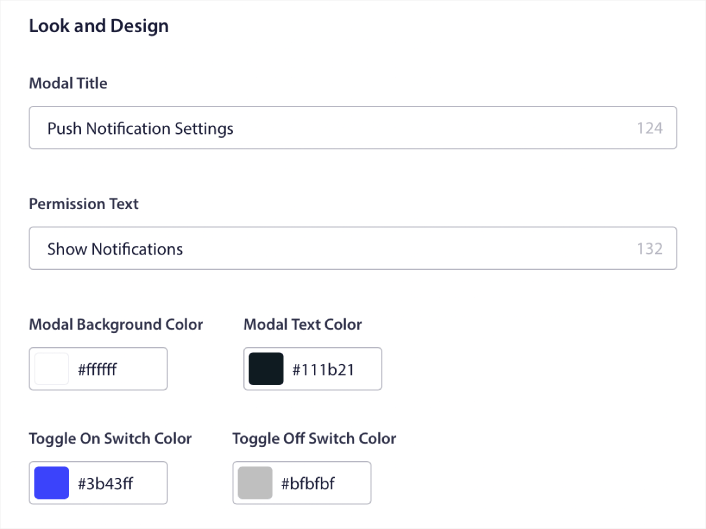
订阅小部件外观和设计

您可以创建一个完全自定义的弹出窗口,即使在访问者不订阅您的默认弹出窗口时,它也会保留。如果弹出触发按钮的大小让您觉得不合适,您也可以在触发按钮下进行自定义:
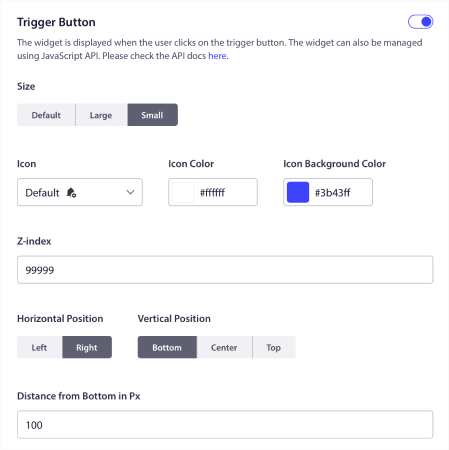
订阅小部件触发按钮

Step #3: Select Where to Show the WordPress Blog Subscription Plugin

最酷的是,您还可以选择在触发按钮显示规则下显示小部件的具体页面:

触发按钮显示规则

默认情况下,按钮将显示在所有页面上。 但是,您可以创建自定义定位规则,通过定位特定的内容来显示特定版本的小部件:

位置:
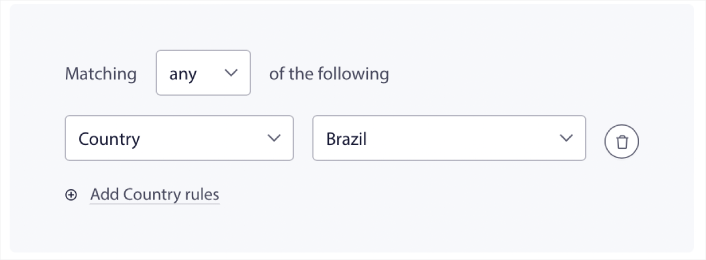
地理位置定位规则

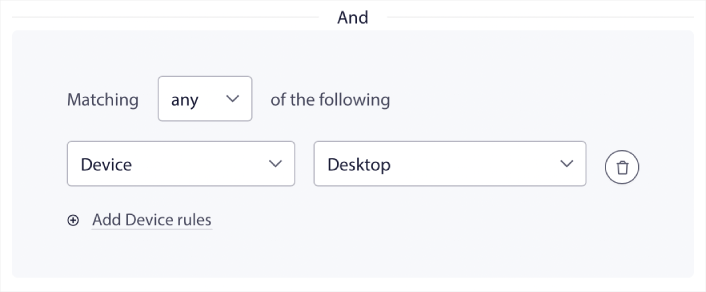
设备:

设备定位触发设置

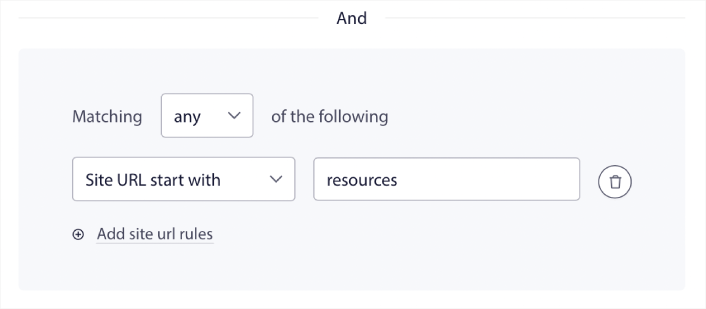
以及您网站上的网址:

URL 定位触发设置

Step #4: Allow Subscribers to Set Push Notification Preferences

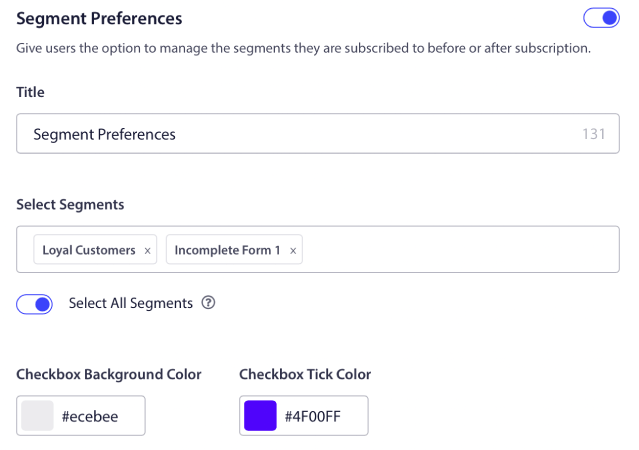
更进一步,您还可以允许订阅者在细分偏好设置下选择他们想要接收的通知类型:

细分受众设置

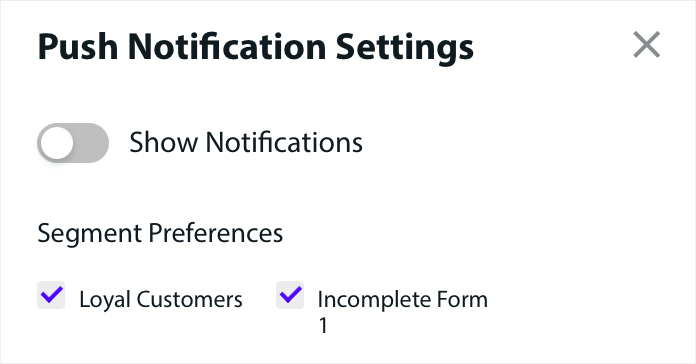
如果您启用了全选细分,那么您的订阅者将默认自动添加到所有选定的细分中:

WordPress blog subscription plugin

这对于新闻网站和博客网站来说是一项极其强大的功能。

Step #5: Ask for Permission to Send Personalized Push Notifications

如果您在网站上运行电子商务推送通知,其中很多将是触发式推送通知。这包括:

甚至自定义触发式推送通知广告系列。

With our new Subscription Management Widget, you can now allow your subscribers to choose if they want to see personalised notifications:

允许个性化通知的模态预览

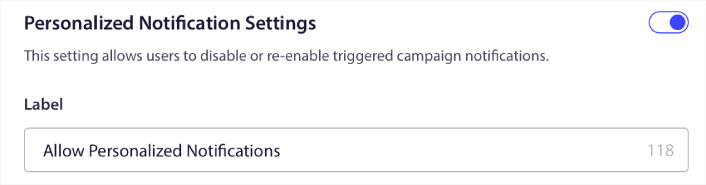
只需在个性化通知设置下启用该选项即可:

允许个性化通知

How to Add an Email WordPress Blog Subscription Plugin

Emails are a time-tested way to increase your traffic and sales. To date, email marketing remains one of the most affordable and effective methods of marketing. The cool part is that you can create an email subscription widget in WordPress using any of the best email services.

Let’s jump right into it.

Step #1: Selecting a Email Marketing Service

Hands down, the very best service for high-growth businesses is Constant Contact. It has all the features you need, comes with flexible pricing, and it’s super easy to use. You can also focus on the most important metrics. to grow your business right from the analytics dashboard.

Constant Contact 是最佳的电子邮件营销服务之一

Constant Contact 是设置业务自动回复器的最佳电子邮件营销服务。它非常易于使用,并提供大量自动化功能来改进您的电子邮件营销活动。

以下是 Constant Contact 成为设置电子邮件自动回复器的绝佳选择的原因:

  • 易于使用的拖放式构建器,用于创建电子邮件
  • 数百个预先设计的电子邮件模板
  • 欢迎消息、生日优惠和废弃购物车自动回复器
  • 列表构建工具和注册表单,用于增长您的受众
  • 拆分测试,用于定向电子邮件
  • 与 CRM 和第三方服务集成
  • 通过实时聊天和电话提供出色的支持

更不用说,Constant Contact 还有一个适用于 WordPress 的表单插件,您可以使用它来收集潜在客户并通过自动回复器进行培育。

Step #2: Creating Your Email Subscription List

Once you’ve created your account, it’s time to set up your email list. Head over to your Constant Contact account and click on the Contacts button and then click the Create List button.

Create List in Constant Contact

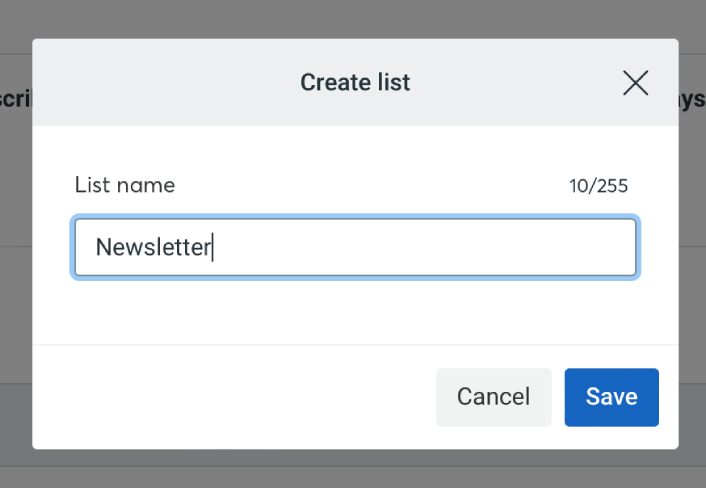
A popup window will now open. You’ll be asked to provide a name for your email list. It can be whatever you want, but let’s call it Newsletter for this example.

Add a List Name in Constant Contact

Don’t forget to click the ‘Save’ button when you’re done. Now you have a new list people can subscribe to.

Step #3: Creating a Contact Form in WordPress

We recommend using WPForms to create contact forms on your WordPress site.

WPForms

WPForms is the #1 WordPress form builder plugin with over 3 million users. You get a drag and drop form builder, which means that you can create WordPress forms with incredible features in a matter of minutes.

You can also use WPForms Lite, which is the free version of WPForms. So, if you’re looking for a free form builder to get started with, you can use the Lite version. Later, when you need more powerful features for your forms, you can upgrade to the paid plans.

If you’re not sure how to create a form, check out this article on how to create a WordPress form for detailed instructions.

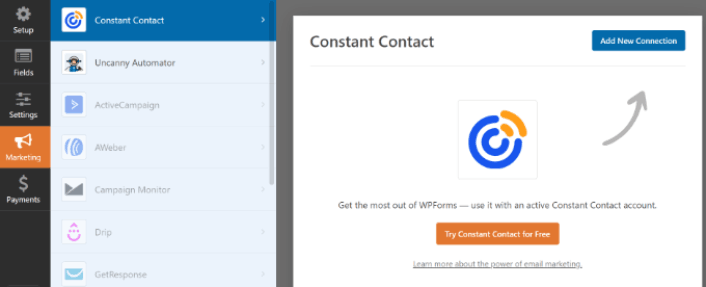
Once your signup form is ready, connect it Constant Contact. Simply click on the Marketing tab and select Constant Contact.

Connect Constant Contact with WPForms

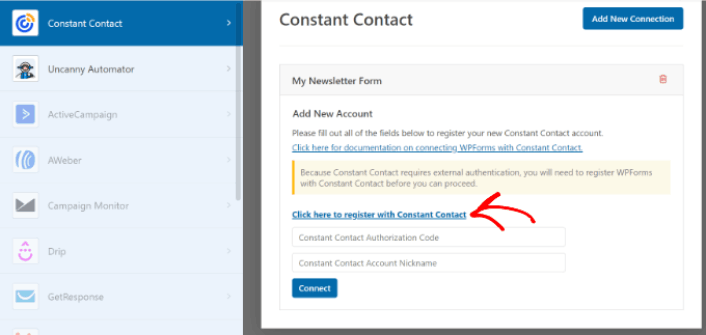
Click on the Add New Connection to create the connection. Then, click on the link that says Click here to register with Constant Contact.

Connect your Constant Contact Account

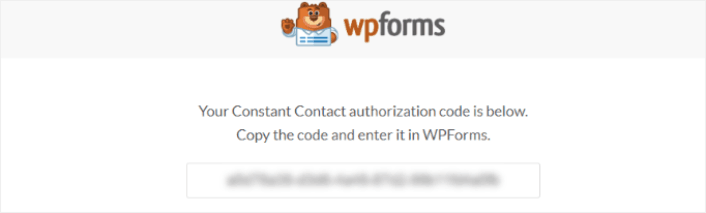
Once you click the link, a popup will prompt you to sign in to your Constant Contact account. Go ahead and sign in. You’ll be given a long authorization code to register your form. Make sure to copy the authorization code.

Copy the WPForms Auth Code

Paste the authorization code in WPForms settings and click on the Connect button to continue.

Step #4: Add Your Subscription Widget to Your WordPress Site

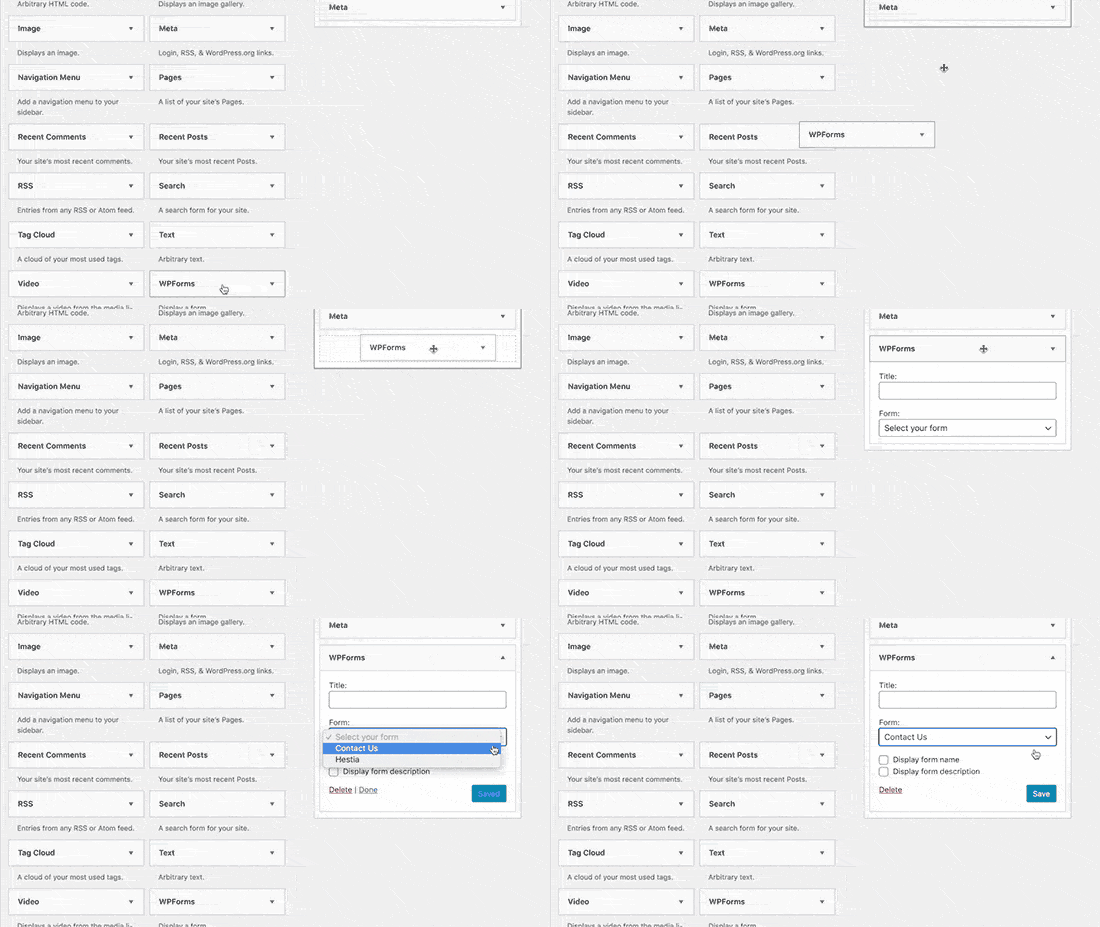
Go to the Appearance » Widgets page and drag and drop to add the WPForms widget block to your sidebar.

Add Contact Form to Sidebar

您就完成了!

What to do After You Add WordPress Blog Subscription Plugins

好了,各位,本次分享就到这里!

By now, you’ve created your first WordPress blog subscription plugin.

Now, all that’s left is generating traffic to your site so that your plugins can get to work. A simple way to do that is to start using push notifications.

Sending push notifications is a great way to generate repeat traffic for your site. If that’s something you’re interested in, you should check out these articles as well:

我们建议使用PushEngage发送推送通知。PushEngage是全球排名第一的推送通知软件。因此,如果您还没有,请立即开始使用PushEngage

添加评论

我们很高兴您选择留下评论。请记住,所有评论都将根据我们的隐私政策进行审核,并且所有链接都将是 nofollow。请勿在姓名字段中使用关键字。让我们进行一次个人化且有意义的对话。

在访客离开您的网站后与他们互动并挽留他们

通过难以忽略的推送通知,增加每次网站访问的价值。

  • 永久免费套餐
  • 轻松设置
  • 五星支持