Best WooCommerce Search Plugin

9 Best WooCommerce Search Plugins to Boost Your Sales

Looking for a WooCommerce search plugin to build your own site search engine?

Site search can make it super easy for your customers to find exactly what they’re looking for on your site. But the default WordPress search is extremely limited. It’s barely good enough for a blog site. But if you’re running an eCommerce site, you’re losing money every day.

But which search plugin are you supposed to use? There are a ton of free options. But are they any good? Do you need a paid plugin? What features should you be looking for?

In this article, we’re going to help you find the perfect WooCommerce search plugin for your site.

听起来不错?让我们开始吧。

Why Use a WooCommerce Search Plugin?

A WordPress search plugin can help users who are already on your website. Of course, you should focus on getting traffic to your site. And SEO plugins like All in One SEO and best practices can help you get traffic to your site. But what if your visitors are looking for an older post or a product on your WooCommerce site?

There’s a small problem, though. What kind of WooCommerce search plugin should you be using?

One alternative would be to use a AJAX product search plugin inside your product pages. An AJAX search plugin works like the Amazon autocomplete on your site. But why settle for that when you can create a custom search engine on your site?

当网站访问者在您的网站上搜索内容时,他们实际上是在告诉您他们想要什么。但大多数 WordPress 搜索栏都无法进行深度搜索。而且它们绝对无法帮助您了解访问者在搜索什么。

We recommend using a search plugin that can help you build a custom search engine that serves your website visitors with contextual search results.

Best WooCommerce Search Plugin

Now that we know why we should be using a WooCommerce search plugin, it’s time to find the best fit for you. We’re going to go over some of the best free and paid options in the market. Then, we’ll give you our favorite plugin. Let’s get started.

#1. SearchWP

SearchWP WooCommerce Search Plugin

SearchWP is one of the best WooCommerce search plugin we know of. WordPress comes with search capabilities by default, but the range of content that it can search through is extremely limited. Mostly, WordPress can’t search WooCommerce product pages for results. You can buy some premium WooCommerce themes that come with AJAX search. But even that’s pretty limited most of the time.

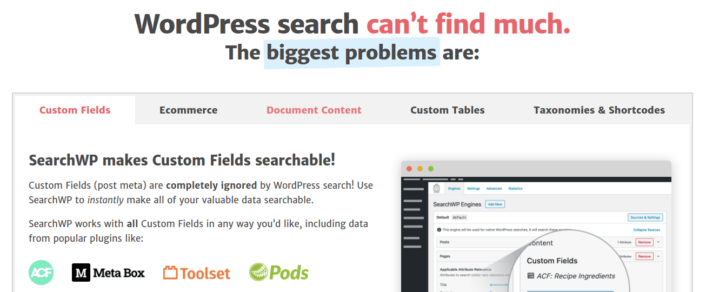
SearchWP 允许您在 WordPress 网站上创建自定义搜索引擎,让您的访问者可以搜索到以下内容:

  • 自定义字段(文章元数据),包括 ACF 字段
  • 电子商务产品详细信息、变体和属性
  • 分类、标签、自定义分类法
  • 短代码输出
  • 上传的文档(PDF、.docx、.txt 等)
  • 自定义数据库表内容

And of course, you can also search in the post titles and content as well. Check out our review of SearchWP and get started right away.

#2. ElasticPress

ElasticPress

ElasticPress is a WooCommerce search plugin service. ElasticPress is built on ElasticSearch and it runs queries on a cloud server at lightning fast speeds. It is extremely easy to use and integrate on any WordPress site and works with all of the best WordPress hosting services.

The plugin allows you to run a live Ajax search which shows instant results while you type in a search query. It also works with WooCommerce. So, you can use it on an eCommerce site to increase conversions.

You can also use their search consulting service where you can have custom search engines built for you by the ElasticPress team. All you have to do is install the plugin.

The plugin itself is fairly easy to use. ElasticPress also supports multi-site licenses. And there is no coding involved. However, ElasticPress is a hosted service and is a lot more expensive than any other search solutions on this list.

#3. Ivory Search

Ivory Search

Ivory Search is a free WooCommerce search plugin to replace the default WordPress search. You can easily create a custom WordPress search form. And you can even create different forms for different parts of your site.

The coolest bit is that Ivory Search looks into post types, images metadata, custom fields, and more. You can also use Ajax to show live search results without reloading a page.

The plugin comes with shortcodes and a search widget so you can easily display search forms anywhere on your WordPress website. And if you need even more powerful features, you can always upgrade to the paid version of the plugin.

#4. YITH WooCommerce Ajax Search

YITH WooCommerce Ajax Search

YITH WooCommerce Ajax Search is a great WooCommerce product search plugin that’s perfect for eCommerce sites. You can use it to allow customers to search products by SKU, search within specific product categories and filter the results without reloading a page.

The plugin’s from YITH, which is a very well-known WordPress plugin builder. So, of course, it’s super easy to customize. You can use thumbnails, badges, prices, and promotions in the live search results. You can also replace the default WordPress search bar with a custom search bar built for eCommerce.

And the coolest bit? You can use it for sites in any language. It’s also compatible with multilingual sites.

#5. FiboSearch

FiboSearch

FiboSearch is an Ajax search plugin for WooCommerce. It’s not a custom search engine but you can use the plugin to create an Ajax search bar. Since it’s built for WooCommerce, you can search by SKUs, categories, and tags.

You can add search bars to any category or product page. It’s also super easy to integrate FiboSearch into the navigation menu of your site. The plugin also works on multilingual stores out of the box.

The basic version of the plugin is free. But if you’re looking for a powerful solution, you should check out their paid plugin.

#6. WOOF Products Filter for WooCommerce

WOOF Products Filter for WooCommerce

WOOF Products Filter for WooCommerce is more a product filter plugin than a WooCommerce search plugin. But if you’re selling consumer goods where the product’s design matters a lot, WOOF Products Filter can act almost like a visual search tool.

 It allows your customers to filter products using a number of options including categories, colors, size, and more.

And if you like setting up product filters in your sidebars, you can use shortcodes. The plugin also uses Ajax to load results without having to refresh the page. So, it’s a great way to enhance the overall experience on your site.

The only drawback is that there’s no way to tell what your customers are searching for on your site.

#7. Relevanssi

Relevanssi

Relevanssi is another free WooCommerce search plugin. Relevanssi focuses on serving relevant search results.

A really cool thing about this plugin is that you can index and search PDF files on your site. It can also search shortcode outputs, custom fields, user profiles, categories and tags, WooCommerce products, and more.

But there are some known compatibility issues with the plugin especially with page builder plugins. So, while the plugin has great features, you should only get the paid version after checking for compatibility issues.

The basic version is completely free. But if you find it to be a good fit, you can upgrade to the paid plugin.

#8. WP Extended Search

WP Extended Search

WP Extended Search is a light weight and simple WooCommerce search plugin. It takes the default WordPress search bar and adds more search settings to it. You can add settings to search in author names, taxonomies, post types, meta data, and more.

The cool bit is that the plugin enhances the default WordPress search. So, you don’t need any shortcodes to implement it on your site. All you have to do is install and activate the plugin and you’re good to go. If you’re not sure how to install WordPress plugins, you should check out this article on how to install a WordPress plugin.

WP Extended Search is completely free and doesn’t have a paid version.

#9. Better Search

Better Search

Better Search is another great WooCommerce search plugin to replace the default WordPress search. As the name suggests, you get a better search engine that searches all post types to find relevant results.

The cool bit is that you can decide weights for search results to improve search relevance. This means that you can create a search bar that takes into account where it found the search term over the fact that it was found on your site at all.

Better Search automatically replaces the default WooCommerce search. If your theme doesn’t have a built-in search form, then you can add one by using widgets in WordPress.

Better Search is completely free and doesn’t have a paid version.

Which One is the Best WooCommerce Search Plugin?

Hands down, SearchWP is the best WooCommerce search plugin there is. You get a huge range of features at an affordable pricing. In fact, SearchWP does everything that all the other plugins in the list can do besides creating a product filter.

The coolest bit is that SearchWP tells you exactly what your website visitors are looking for by maintaining detailed analytics. So, it also helps you create content that your site is currently missing and getting more traffic, engagement, and sales on your site.

And if you’re looking for new ways to get traffic, engagement, and sales, push notifications can be super useful for your site.

If you’re not 100% convinced, you should check out these resources on how to effectively use push notifications:

我们建议使用PushEngage来创建您的推送通知广告系列。PushEngage是全球排名第一的推送通知软件。所以,如果您还没有,请立即开始使用PushEngage

添加评论

我们很高兴您选择留下评论。请记住,所有评论都将根据我们的隐私政策进行审核,并且所有链接都将是 nofollow。请勿在姓名字段中使用关键字。让我们进行一次个人化且有意义的对话。

在访客离开您的网站后与他们互动并挽留他们

通过难以忽略的推送通知,增加每次网站访问的价值。

  • 永久免费套餐
  • 轻松设置
  • 五星支持