How to Trigger Chat With Scroll Depth

How to Trigger Chat Only After a Visitor Scrolls 50%

Not every visitor is ready to chat the moment they land on your website. In fact, showing a chat widget too early often leads to lower engagement and higher bounce rates.

A smarter approach is to trigger chat only when the visitor has scrolled 50% of the page—a signal that they’re engaged, interested, and more likely to interact.

PushEngage’s chat widget makes this incredibly easy.

This quick guide will walk you through why scroll-based triggers work and how to set them up in just a few clicks.

立即发送多渠道消息!

推送和 WhatsApp 消息是非常有效且低成本的营销工具,可帮助您自动增加重复流量、参与度和销售额。

Why a 50% Scroll Trigger Works

A visitor who reaches 50% of a page has shown clear intent. They’ve invested time, absorbed your content, and signaled curiosity.

A 50% trigger helps you:

  • Avoid interrupting readers too early
  • Catch visitors when they’re fully warmed up
  • Increase chat open rates
  • Improve lead quality
  • Reduce agent workload from low-intent chats

This is especially effective for:

  • Long blog posts
  • Product comparison pages
  • Ultimate guides
  • 常见问题页面
  • Tutorials

How PushEngage Handles Scroll-Based Chat Triggers

PushEngage includes built-in Behavior Rules for chat widgets. These rules determine when a chat widget appears based on visitor actions.

One of the most useful is: Show When Visitor Scrolls X%

This allows you to delay the widget until any scroll threshold you choose—50% being one of the best-performing settings for informational or content-heavy pages.

正是这种灵活性使得“基于页面类型的个性化”成为可能。

How to Trigger Your Chat Widget at 50% Scroll (Step-by-Step)

Step 1: Create or Edit a Chat Widget

In your WordPress dashboard:

Go to PushEngage » Chat Widgets and click Create New Widget or Edit an existing one.

Set up your message, channels, and design as usual.

Step 2: Open the Behavior Tab

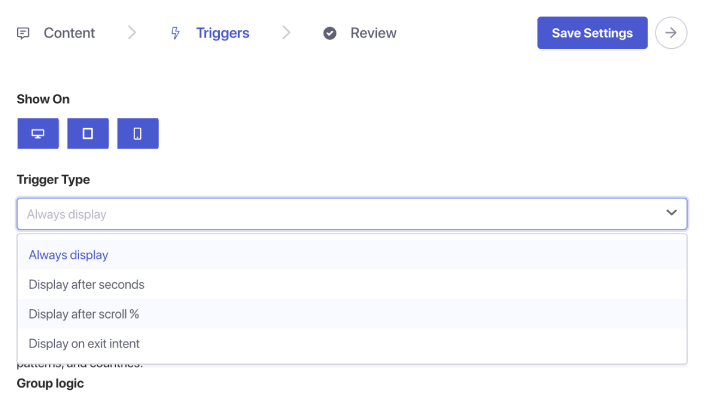
Inside the widget editor, go to Triggers. This controls when the widget appears.

From the trigger dropdown, choose Display after scroll %:

Scroll Triggers for Chat Widget

You’ll see a percentage input box appear. Set the scroll depth to 50%. This tells PushEngage to wait until a user has scrolled halfway down the page before displaying the chat widget.

Step 3: Save and Publish

Click Save Widget.

Then ensure the widget is enabled and targeted to the pages you want. Your chat widget will now trigger exactly at the 50% scroll point on every assigned page.

Pro Tip: Combine Scroll Trigger + Page Targeting

Scroll-based triggers become even more powerful when paired with targeting rules.

You can show the widget:

  • Only on blog posts
  • Only on WooCommerce product categories
  • Only on long-form content
  • Only for returning visitors
  • Only on pricing pages

Just go to the Triggers tab and set page conditions.

Best Practices for 50% Scroll Chat Triggers

To get the best results:

1. Don’t combine 50% scroll with instant triggers

It defeats the purpose of intent-based engagement.

2. Keep the message helpful, not pushy

示例:

  • “Need help understanding this page?”
  • “Want personalized recommendations?”
  • “Have a question? I’m here to help!”

3. Avoid using multiple scroll-triggered widgets at once

One widget per page keeps the experience clean.

4. Test on both mobile and desktop

Scroll depth can feel different across devices.

设置聊天小部件后该怎么做

A 50% scroll trigger is one of the simplest ways to show chat at the perfect moment—after the visitor is engaged but before they leave.

With PushEngage’s behavior rules, setting this up takes less than a minute and immediately improves the quality and intent of incoming chats.

With PushEngage, you can set this up in minutes — and immediately start seeing better engagement, higher conversions, and more efficient agent workloads.

  • 客户始终能看到有人在线
  • 响应时间缩短
  • 售前转化率上升
  • 支持感觉更快、更可靠
  • 您的商店感觉已准备好面向全球

一旦设置好时间表,您的团队就可以更高效地运作,您的客户也能获得他们期望的体验。

如果您还没有在 PushEngage 中设置客服资料和排班,现在就是时候了。

不信?请查看这些关于多渠道营销活动的精彩资源:

立即开始!

添加评论

我们很高兴您选择留下评论。请记住,所有评论都将根据我们的隐私政策进行审核,并且所有链接都将是 nofollow。请勿在姓名字段中使用关键字。让我们进行一次个人化且有意义的对话。

在访客离开您的网站后与他们互动并挽留他们

通过难以忽略的推送通知,增加每次网站访问的价值。

  • 永久免费套餐
  • 轻松设置
  • 五星支持