How to Sort Push Notifications

如何对推送通知进行排序并找到成功的营销活动

Looking for a quick and easy way to sort push notifications and find your best performing campaigns?

Sorting your push campaigns by performance metrics helps you understand what works and what doesn’t. More importantly, you can use your best campaigns as a base for new campaigns.

The sorting feature isn’t standard for all push notification services. Even if you get the feature, you might not be able to use it without using their API service. Which means that you’ll need a developer to do it for you.

If you have an in-house developer, that’s fine. But if you don’t, we highly recommend shifting to PushEngage. PushEngage allows you to filter your campaigns in a few simple clicks.

In this article, we’re going to show you step by step how to sort push notifications and find your best campaigns.

Why Would You Want to Filter and Sort Push Notifications?

You can filter and sort push notifications to find the best performing campaigns or even your worst performing campaigns.

The epic thing about these filters is that you can see:

  • Types of push notifications that you send the most
  • How well specific types of notifications perform
  • Identify seasonal trends in campaign performance
  • What kinds of campaigns need to be optimized immediately

And you can do it in a few simple clicks!

You can also sort the push notifications by Latest Created or Oldest Created. This way, you can make it super easy to find specific campaigns even after your filter by a date range.

Does Your Push Notification Service Allow Campaign Sorting?

Not every push notification service allows you to filter and sort push notifications. At least, not directly. Sometimes, you can do it using their API service. But that’s difficult to do if you don’t have an in-house developer.

验证的一个好方法是直接询问您的服务提供商是否提供清理选项。但他们很可能没有提供易于使用的选项。

我们建议您立即切换到 PushEngage

PushEngage 推送通知服务

PushEngage 是世界上最好的推送通知服务。我们不仅仅是指免费版本。它允许您通过定向推送消息在访问者离开您的网站后与他们建立联系。

PushEngage is our first choice for push notification services and tools because it’s:

  • 易于使用
  • 在 HTTP 和 HTTPS 网站上均有效
  • 附带可视化构建器,设置所需编码很少或无需编码
  • 轻松设置完全 自动化的推送通知广告系列 ,适用于任何类型的网站
  • 提供多种选项,可发送个性化推送通知以提高点击率
  • 配备自定义目标跟踪、UTM 参数和高级分析功能

这仅仅是冰山一角。在继续之前,请查看 PushEngage 的完整功能列表。

PushEngage 最令人称奇之处在于它有一个永久免费套餐,您可以在做出购买决定之前进行试用。

PushEngage 的免费套餐足以让您的业务发展到可以轻松负担付费套餐的程度,付费套餐起价为每月 9 美元,可容纳 100,000 名订阅者。

整体转换成本相当低。因此,我们强烈建议您立即切换到 PushEngage。清理功能并不是购买 PushEngage 套餐的唯一原因。您还可以获得许多其他推送通知工具根本不提供的先进功能。

How to Filter and Sort Notifications Quickly

既然您已经切换到 PushEngage,是时候清理您的推送通知订阅者列表了。

If you’re new to tracking push notification performance, we have some really great news for you. You can sort and filter your push broadcasts easily.

Head over to your PushEngage dashboard and go to Push Broadcasts:

创建新的推送广播

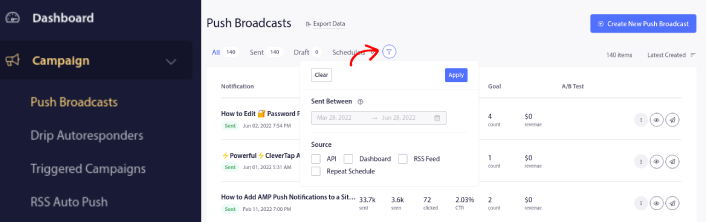
Here, you’ll notice that there’s a filter option:

Filter and Sort Push Notifications

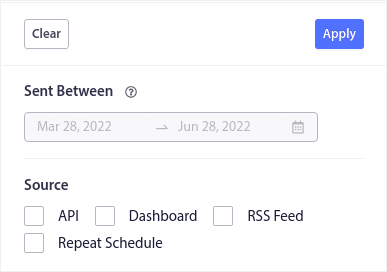
You can filter the push broadcasts you sent out by date and source:

Push Broadcast Filters

Let’s say that you have a Black Friday push notification campaign spanning multiple days.

Now, you can get a clear picture of which notifications performed the best and which ones aren’t performing too well. And this information can help you optimize your current broadcasts and campaigns.

If you’re new to using push notifications, you should know that you can only A/B test push broadcasts. But you can use the sorting and filtering options to apply optimizations to even your automated campaigns. It’s a really neat way to set up push notification best practices for your industry and brand.

What to do After You Sort Push Notifications

After you sort your push notifications, you can look into detailed analytics and then get back to optimizing your push notification campaigns and growing your business.

我们也建议您花些时间阅读我们的文章,了解如何为自动推送通知注入动力。从我们关于 推送通知最佳实践的文章开始。

If you’re new to push notifications, you should follow a full-blown push notification testing process before you go live. It’ll help you troubleshoot common issues before your visitors see them and start complaining about a broken user experience. And most definitely you should set up Google Analytics to track push notifications.

对点击了推送通知或未点击的订阅者进行再营销。让我们知道这对您有什么帮助。在此期间,请查看这些资源:

如果您还没有,请 开始使用 PushEngage

添加评论

我们很高兴您选择留下评论。请记住,所有评论都将根据我们的隐私政策进行审核,并且所有链接都将是 nofollow。请勿在姓名字段中使用关键字。让我们进行一次个人化且有意义的对话。

在访客离开您的网站后与他们互动并挽留他们

通过难以忽略的推送通知,增加每次网站访问的价值。

  • 永久免费套餐
  • 轻松设置
  • 五星支持