如何启用或禁用 Safari 推送通知

如何启用和禁用 Safari 推送通知

Looking for a simple way to enable Safari push notifications?

浏览器推送通知可帮助您与您喜爱的品牌保持联系。您可以轻松选择接收推送通知。但是,您如何开始接收浏览器推送通知?

In this article, we’re going to show you step-by-step how to enable or disable Safari push notifications.

听起来不错?让我们开始吧。

How to Get Safari Browser Notifications from Any Site

Let’s start by check out how you can receive Safari push notifications from any site.

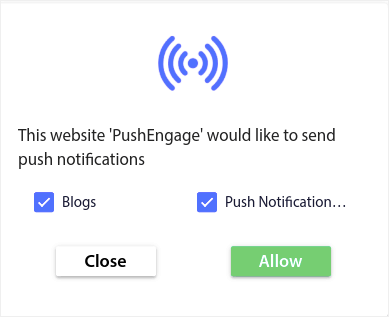
If you’re using the Safari web browser, then you can opt for browser push notifications from any site that allows it. Whenever you go to any site that uses web push notifications on a Safari browser, you’ll see a push notification optin like this one:

大型 Safari 风格选择加入(含分段)

All you have to do to receive Safari push notifications is click on Allow. It’s really that simple.

如何启用或禁用 Safari 推送通知

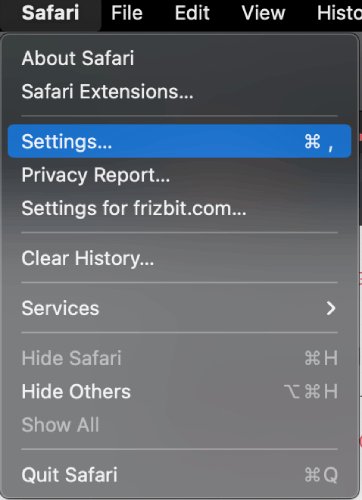
Safari has settings and preferences built in that can enable or disable push notifications. The simplest way to enable or disable Safari push notifications is to head over to the menu bar and go to Safari » Settings:

Safari Settings

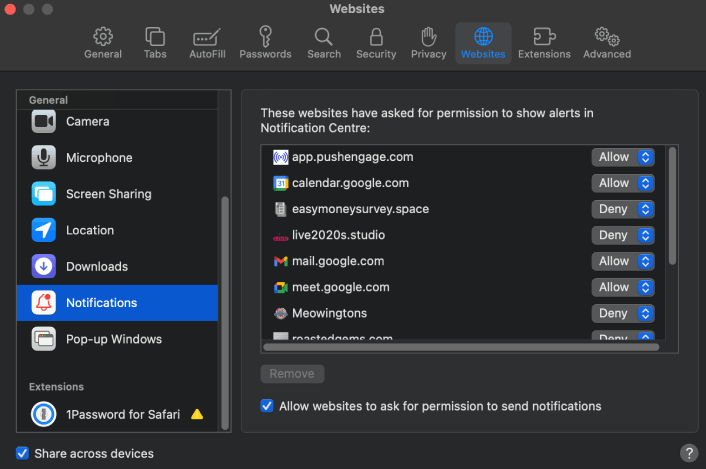
Then, go to Websites » Notifications:

Safari推送通知

Here, you can allow or deny push notifications from any site simply by changing the permission next to the website. If you want to enable Safari push notifications from a site, set it to Allow. If you don’t want notifications from a site, set the permission to Deny.

It’s really as simple as that!

What to do After You Enable Safari Push Notifications

仅仅因为您喜欢收到的推送通知中的内容,并不意味着您应该订阅它们。在订阅任何更多推送通知之前,您应该查看GDPR 合规性规则,并找出您的推送通知是否安全。

And if you think Safari push notifications are cool, you should also check out how to get started with push notifications for your business.

推送通知是自然增长粉丝群的绝佳方式。设置推送广告系列也非常简单。此外,如果您是推送通知新手,您应该查看这些精彩资源:

我们建议使用 PushEngage 来创建您的推送通知广告系列。PushEngage 是市场上排名第一的推送通知软件,您的广告系列将得到妥善处理。

所以,如果您还没有,请立即开始使用 PushEngage

添加评论

我们很高兴您选择留下评论。请记住,所有评论都将根据我们的隐私政策进行审核,并且所有链接都将是 nofollow。请勿在姓名字段中使用关键字。让我们进行一次个人化且有意义的对话。

在访客离开您的网站后与他们互动并挽留他们

通过难以忽略的推送通知,增加每次网站访问的价值。

  • 永久免费套餐
  • 轻松设置
  • 五星支持