PushEngage 中旧通知的频率上限 – 减少退订

One of the commonly heard issues from consumers around Push Notifications is that sometimes they get too many of them, irrelevant notifications, and at the wrong time.  We recommend our customers to use segments, to target your customers, use triggers/context of action on your website, to send at the proper time, and also to limit the number of notifications.

Even with that, when a user opens their browser after many days, he is flooded with a queue of older notifications from several sites.  This can be annoying to the consumer and can lead to users unsubscribing.  We listened to your feedback,  and have a feature that will help you limit the number of notifications at a given time a user will get from your site.

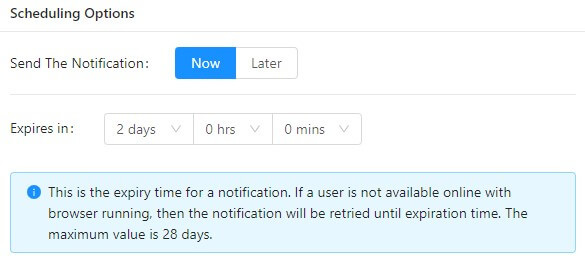
You can use the expiration time for notification to limit the number of notification sent to a user. By default, this is set to a month, but you can specify it to shorter durations for ensuring your subscribers do not get more than 2 or 3 notifications from you.

expiry in push notification

Here is how you can set this up

  1. Say you are sending a notification each day at 10 AM, and you want your subscriber to not get more than 2 notifications.  Remember in Web Push as soon as the customer comes online and opens a browser, all his pending notifications are displayed.
  2.  So when you send on Monday at 10 AM you can set your expiry date to Wednesday at 9:59 AM,  This way at any time not more than 2 of your notifications are shown to the user.
  3. On Tuesday at 10 AM when you send you can set the expiry to Thursday at 9:59 AM.

This is useful for cases where you may be sending several notifications a day and after some time old notifications are not relevant. Also, some sites want to reduce the number of notifications received by them to ensure the consumers don’t feel it is one too many.

添加评论

我们很高兴您选择留下评论。请记住,所有评论都将根据我们的隐私政策进行审核,并且所有链接都将是 nofollow。请勿在姓名字段中使用关键字。让我们进行一次个人化且有意义的对话。

在访客离开您的网站后与他们互动并挽留他们

通过难以忽略的推送通知,增加每次网站访问的价值。

  • 永久免费套餐
  • 轻松设置
  • 五星支持