
您是否在为获取电子商务客户评价而苦苦挣扎?如果您对如何获取电子商务评价感到困惑,那么本文非常适合您。
在我们开始之前,我们想让您知道,您不是一个人。
每个人在获取电子商务评价时都会遇到困难。十有八九,即使您的客户对您的产品非常满意,他们也不会回到您的网站留下评价。
最糟糕的是,获得更多在线商店评价是发展业务的绝佳方式。好的评价会鼓励更多人向您购买。
因此,即使您最畅销的产品收到的评价不多,也会让人感到非常沮丧。
需要明确的是:经营电子商务业务还有其他挑战,例如处理购物车放弃问题。但现在,让我们专注于如何通过简单、可操作的步骤来获取电子商务评价。
准备好了吗?让我们开始吧!
- 创建电子商务评价推送通知活动
- 利用评价发送产品推荐
- 在可下载文件中嵌入二维码
- 发送电子商务评价电子邮件活动
- 让留下评价变得快速而简单
- 展示您的电子商务评价
- 使用 Review Rabbit 系统获取更多评价
- 在社交媒体上分享您的评价
- 创建客户评价页面
#1. 创建电子商务评价推送通知活动
一个非常简单的策略,大多数人都忘记使用,那就是要求客户留下评价。
这非常简单,但效果惊人。当然,手动操作是一个非常糟糕的主意。这时,使用 PushEngage 进行产品反馈活动将非常强大:
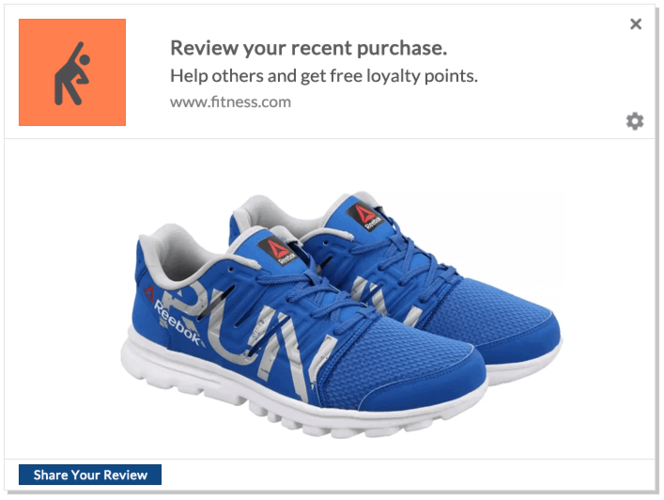
PushEngage 是市场上排名第一的网页推送通知软件。并且它非常容易在上面设置产品评价活动。
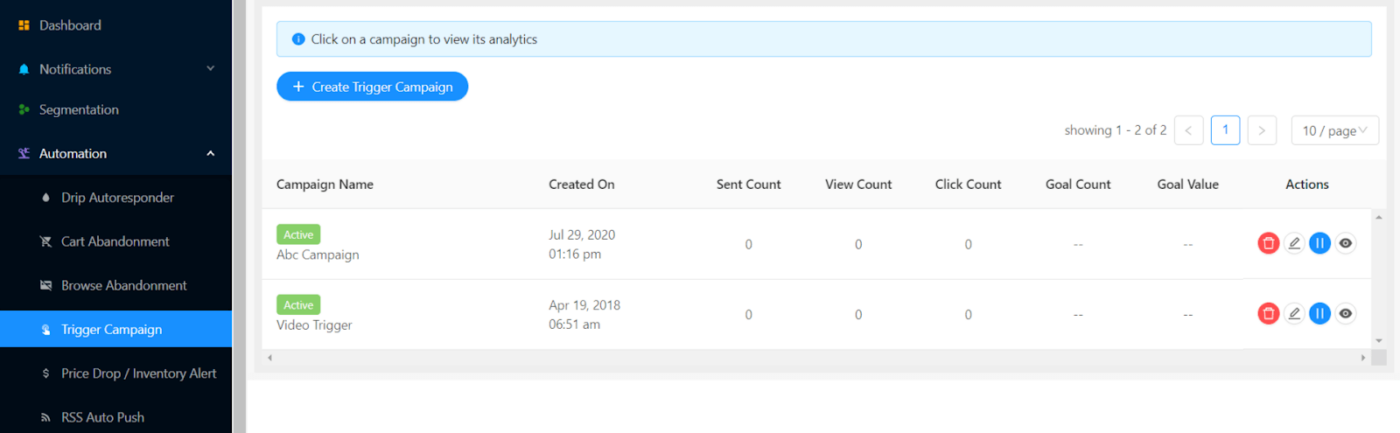
如果您已经是 PushEngage 的客户,请转到自动化 » 触发式活动 » 新建触发式活动:
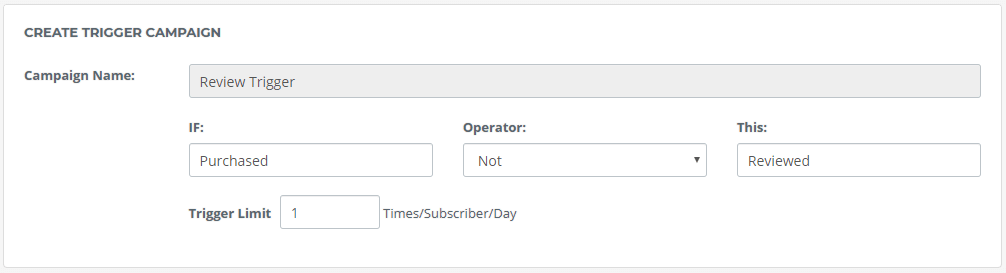
然后,将触发式活动设置为触发条件为“已购买”而不是“已评价”:
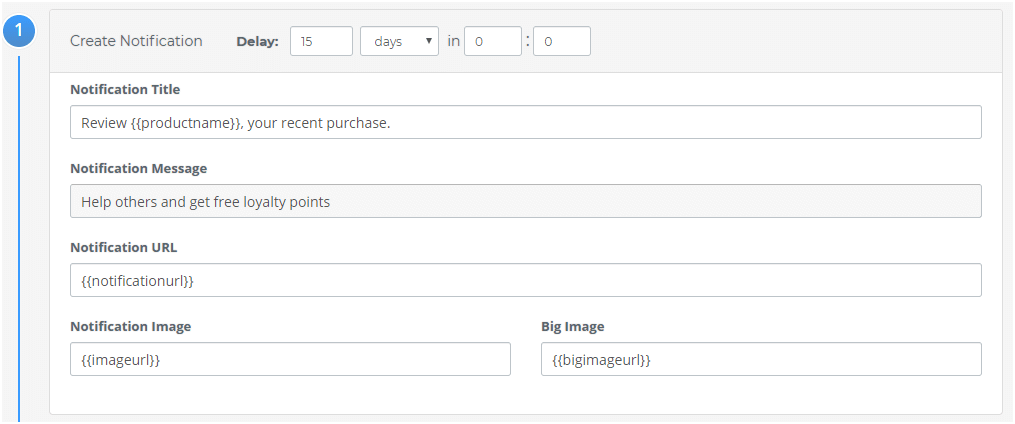
您可以个性化通知消息:
最后,将代码集成到您的网站:
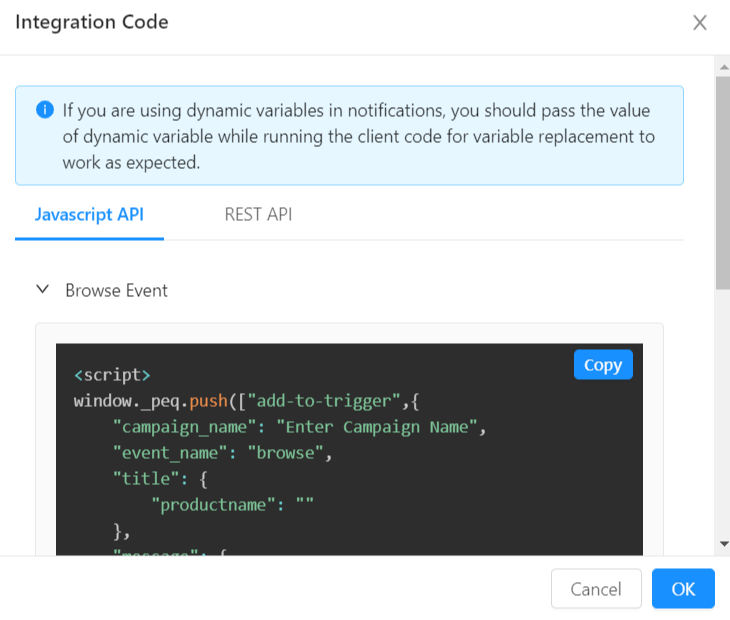
就这样,完成了。
如果您还不是 PushEngage 的客户,还在等什么?立即开始使用 PushEngage。
#2. 利用评价发送产品推荐
这一部分主要是关于利用您的评价并增强它们对销售的影响。假设您为模块化厨房橱柜留下了评价。很明显,您目前正在装修您的厨房。
所以,如果您收到这个推送通知:

这是一个非常棒的推荐,对吧?
重磅好消息:您可以使用 PushEngage 根据您的产品评论发送史诗级的产品推荐。
现在,这是一个非常高级的功能,您需要一位开发人员的协助才能实现这个想法。但如果您能负担得起一位开发人员来使用 PushEngage Javascript API,那么像这样的高级广告系列绝对是值得的。
专业提示:在实施任何高级广告系列之前,请务必与您的客户成功执行官沟通。我们的客户成功团队非常出色,我们将帮助您更快地完成整个广告系列的设置。
#3. 在可下载文件中嵌入评论表单的二维码
大多数电子商务商店会发送大量 PDF 文件。这包括账单、发票、收据和数字产品。
您很有可能还在使用 潜在客户磁铁 来建立电子邮件列表。
您的客户一定会打开这些文件。那么,为什么不利用这个宝贵的广告空间呢?
有趣的部分来了:您可以在这些可下载文件中嵌入一个二维码,方便客户留下对您产品的评论。
只需在 WPForms 上创建一个评论 表单来收集评论:
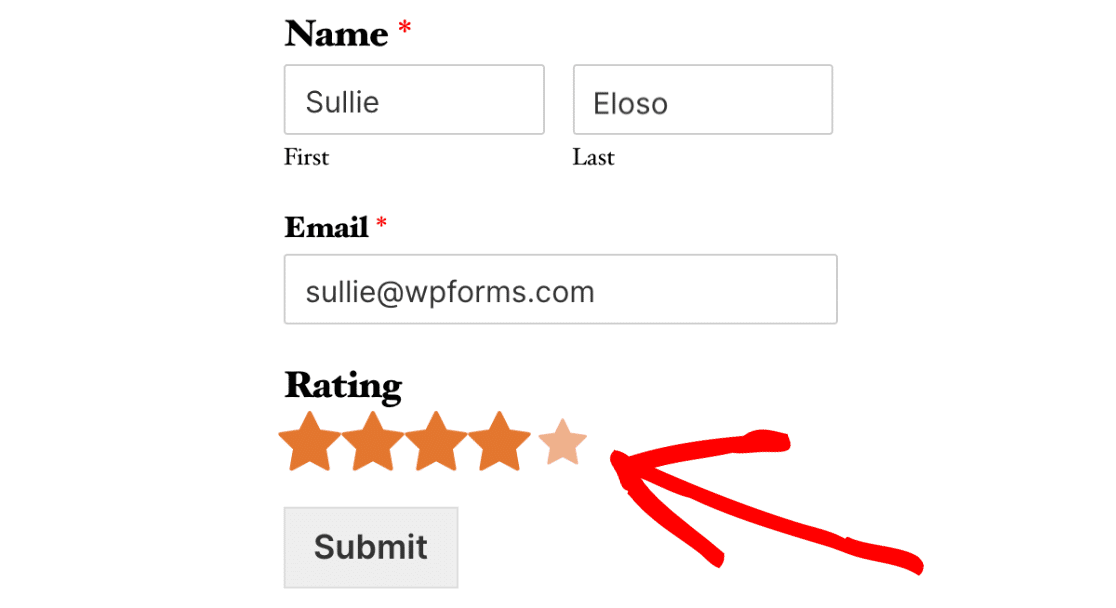
并将其添加到 收集评论和反馈的页面 中。
最后,使用 免费二维码生成器 为评论页面创建一个二维码:
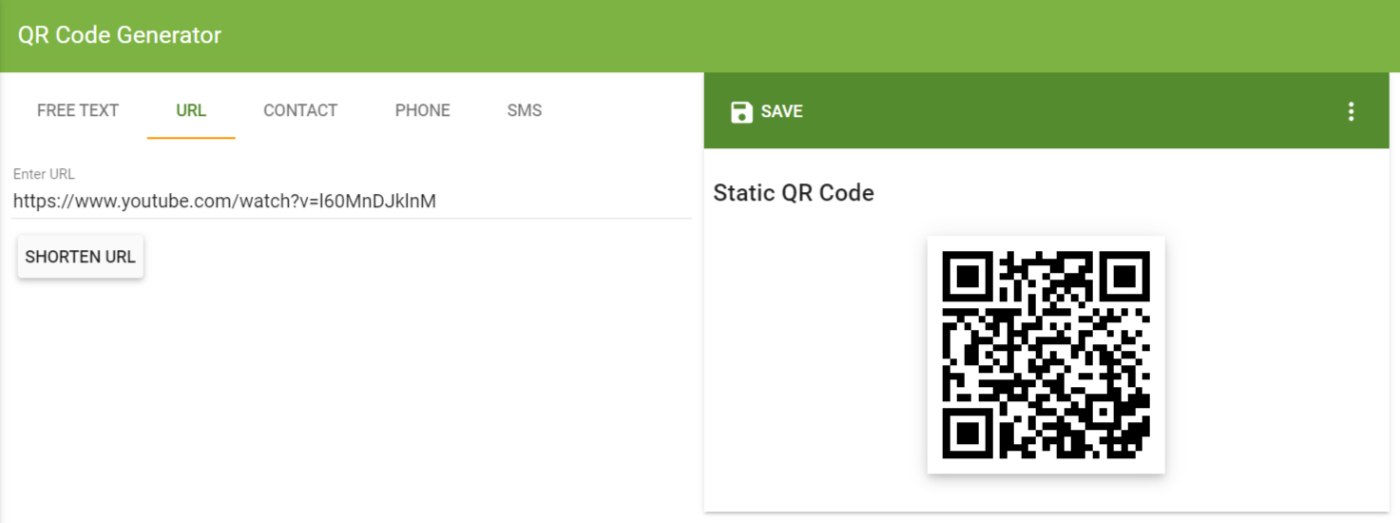
然后将此二维码添加到您的可下载文件中!
#4. 发送电子商务评论电子邮件广告系列
同样,您需要向客户索要评论。仅仅坐等并希望您的产品足够出色以至于客户会自动留下好评,这是一个糟糕的主意。
因此,您可以发送电子邮件广告系列,在推送通知广告系列的同时征求评论。看看 H&M 的这个例子:
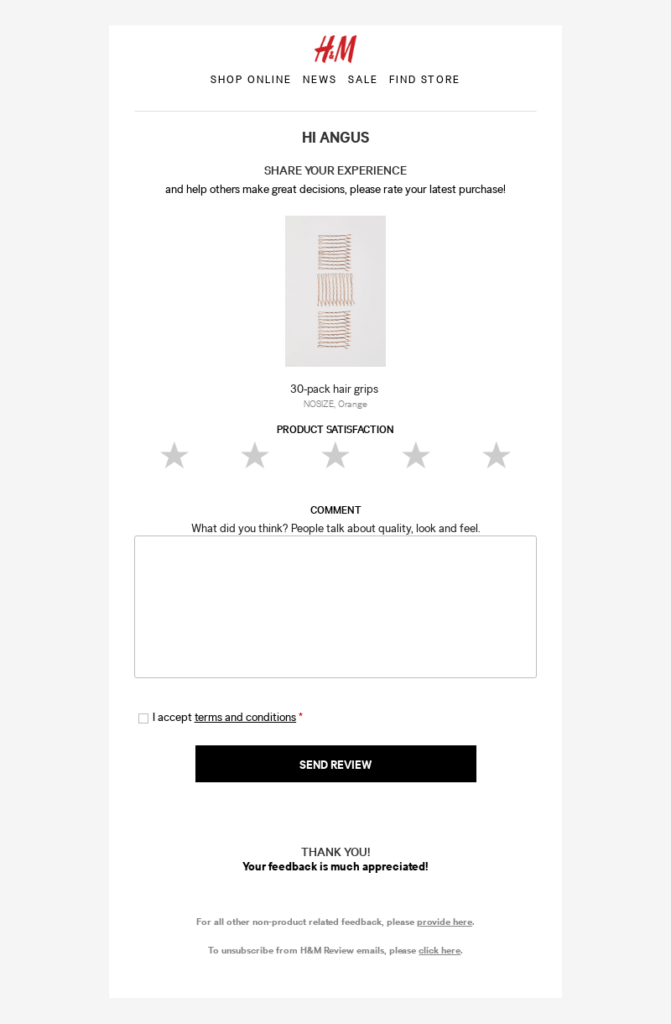
我们建议使用 Drip 发送产品反馈电子邮件。前往 Drip 创建您的产品反馈广告系列并设置自动化工作流程:
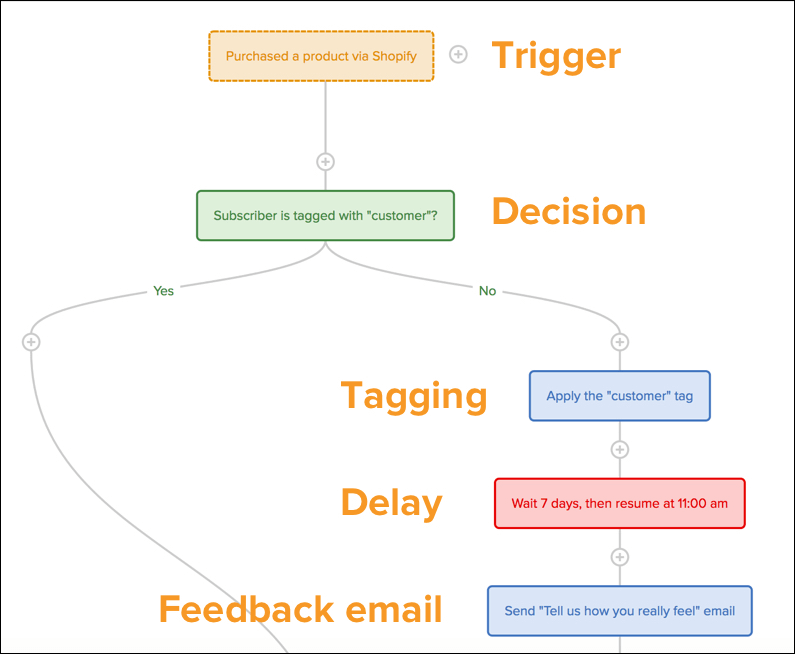
注意:本文可以帮助您 在 Drip 上设置您的产品评论广告系列。
#5. 让留下评论变得快速简便
在您开始征求评论之前,您需要确保任何人都可以轻松留下评论。如果留下评论太困难,那么您的客户很可能不会留下评论。
例如,如果您需要在 WordPress.org 上为 WordPress 插件留下评论,那将是一项艰巨的任务。要留下评论,您需要创建一个 WordPress 帐户,登录该帐户,然后留下评论。
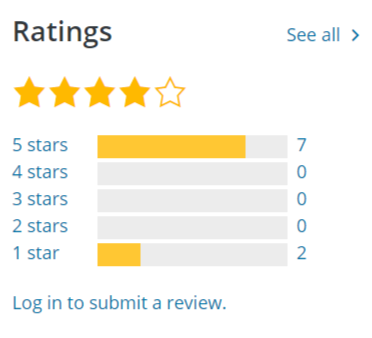
这是一个 3 步流程!
相反,我们建议使用 WooCommerce Product Reviews Pro 为产品评论创建自定义体验:
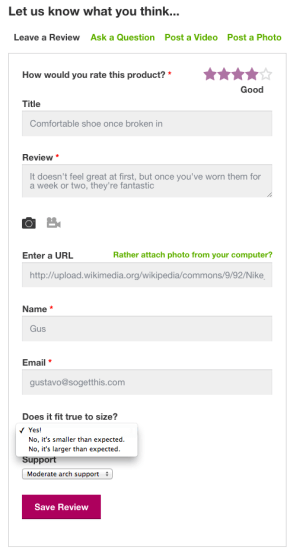
如果您仔细查看评论表单,您会发现它在评论字段后还有一些附加问题。这些额外的问题称为限定符。包含限定符是突出产品为何如此出色的绝佳方式。
最棒的是什么?您甚至可以使用此插件接受视频推荐作为评论。
#6. 展示您的电子商务评论
设置自定义的电子商务评论功能后,您还需要一种很好的方式来展示您的产品评论。展示您的评论将鼓励更多客户在您的网站上留下评论。
那么,展示电子商务评论的最佳方式是什么?
展示现有评论最简单的方法是将其包含在产品页面中。一些最大的电子商务网站使用这种确切的方法来展示他们的产品评论。您可以使用 SeedProd 的 WooCommerce 块轻松实现此目的。
SeedProd 是市场上最简单的拖放式 WordPress 登陆页面构建器。因此,即使您不懂任何编码,也可以使用它来展示您的评论。
专业提示: 您可以展示的不仅仅是您的电子商务评论。您可以嵌入您的 Google 评论到您的网站以提高转化率。或者,您可以展示其他奖项和评论以鼓励更多评论。
例如,PushEngage 经常在 G2Crowd 上获得评论:

我们特意在我们的定价页面.
简而言之:展示您的评论是获取更多评论的好方法,如果您还没有开始这样做,可以立即开始。
#7。使用 Review Rabbit 系统获取更多评论
Review Rabbit 系统是我们使用的一种有趣的方式,可以从客户那里获取更多评论。
这是一个非常简单的想法:奖励所有花时间留下评论的客户。
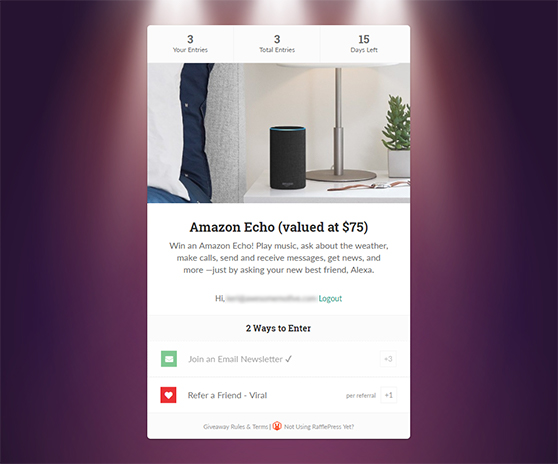
您可以在 RafflePress 上创建竞赛以获取更多评论。RafflePress 是用于赠品和竞赛的最佳 WordPress 插件。您所要做的就是创建一个新的竞赛,奖励经过验证的买家留下评论。
您可以使用 RafflePress 上的“Invent Your Own”赠品选项来创建此类自定义活动。
#8。在社交媒体上分享您的评论
社交媒体是分享您的好评以吸引眼球、为您的电子商务网站带来流量和建立品牌信任的理想场所。
看看 Fantasea Cruising 的这个例子:
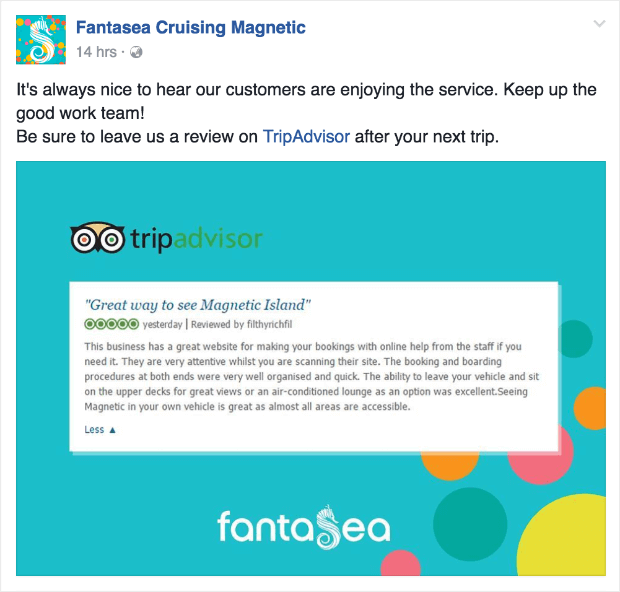
这是从好评中获得更多影响力的非常简单的方法。同时,如果您的客户看到您对他们的评论大加赞赏,他们会更愿意留下自己的评论。
#9。创建推荐页面
是否听说过任何体育项目的“名人堂”?
推荐页面是为您的客户创建名人堂的简便方法。这是我们之前提到的评论和反馈页面的完美补充。
看看 Toast 的这个推荐页面:
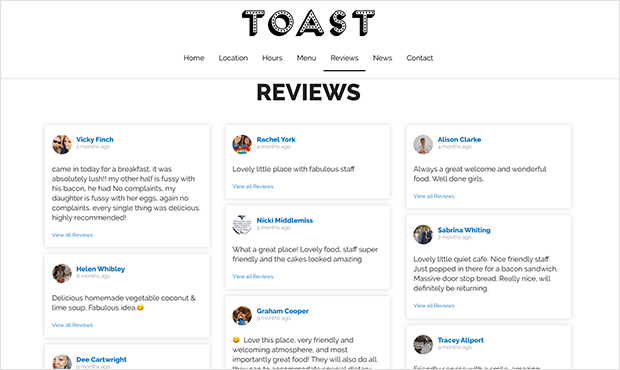
这是在一个地方展示您的评论的好方法。如果您需要一些灵感,请查看这篇关于精彩推荐页面示例的文章。
或者,您可以查看我们的推荐和案例研究。我们认为我们也很好地欣赏我们的客户!
总结
各位,本次分享就到这里。
对于大多数电子商务网站所有者来说,网站参与度可能是一个巨大的挑战。因此,请随时查看我们关于最佳网站参与度工具的文章,以获得更多日常活跃用户。
您会发现其中一个工具是推送通知,我们强烈建议您使用PushEngage来开展推送通知营销活动。PushEngage是全球排名第一的网页推送通知软件。
我们可以帮助您自动为网站带来免费的重复流量。然后,在此过程中赚取更多收入。
所以,如果您还没有开始,请立即开始使用PushEngage。


