正在为您的网站设置 GoHighLevel 废弃购物车推送通知,寻找简单的方法?
设置废弃购物车推送通知可能非常困难。网上大多数教程都关于废弃购物车电子邮件,即使是那些也可能相当复杂。这正是我们发布本文的原因。
我将向您展示如何通过简单易懂的步骤来设置 GoHighLevel 废弃购物车通知的分步说明。
您不需要很多技术知识来理解本文中的步骤。此外,如果您在任何步骤中遇到困难,只需联系我们的客户成功团队,我们将为您设置废弃购物车营销活动!
听起来不错?让我们开始吧。
立即发送 GoHighLevel 推送通知!
推送通知是一种超级有效、低成本的营销工具,可帮助您自动增加重复流量、互动和销售。
如何创建 GoHighLevel 废弃购物车推送营销活动
在本文中,我们将向您展示如何使用 PushEngage 创建 GoHighLevel 废弃购物车营销活动。PushEngage 是全球排名第一的推送通知软件,您可以直接从 PushEngage 仪表板设置购物车放弃营销活动。

因此,如果您还没有这样做,请继续创建 PushEngage 帐户。要设置废弃购物车营销活动,您需要获取 PushEngage 的 Growth Plan。因此,选择 Growth Plan 并完成 PushEngage 帐户的设置。
然后,前往仪表板以跟随本教程。
第 1 步:创建新的废弃购物车推送通知活动
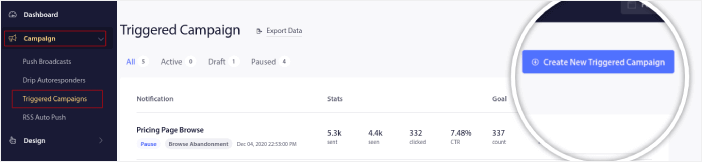
转到 PushEngage 仪表板,然后转到 Campaign » Triggered Campaigns 并单击 Create New Triggered Campaign:
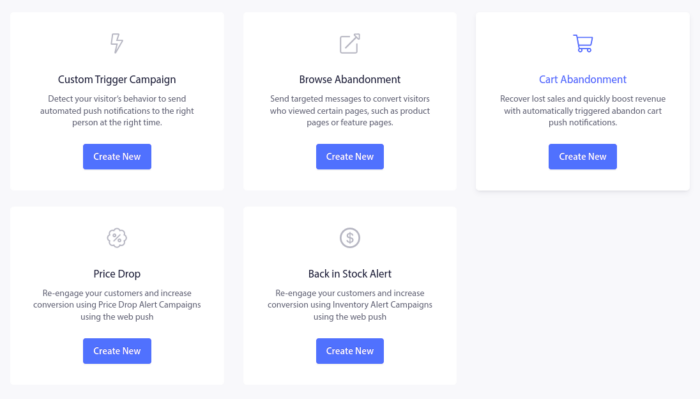
然后,选择 **Cart Abandonment** 模板,然后点击 **Create New**:
然后,您可以开始起草废弃购物车自动回复器。
第 2 步:起草活动详情
接下来,您需要在 PushEngage 仪表板中起草活动。在 **Content** 下,您可以创建一系列推送通知:
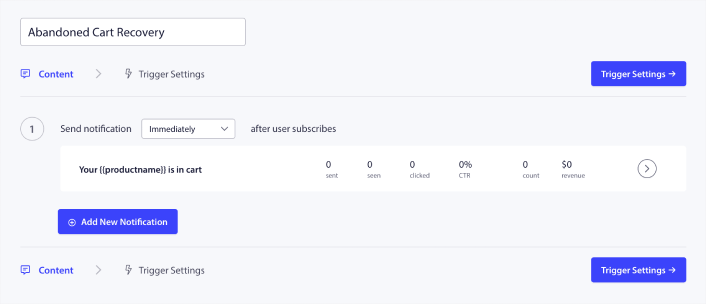
要编辑通知,只需点击旁边的箭头,即可自定义推送通知:
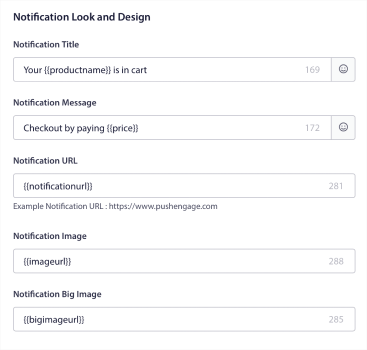
您可以使用变量自动获取大多数这些字段。
如果您注意到,有多个用括号括起来的变量,例如 {{productname}} 和 {{price}}。稍后,您可以使用这些变量来定义代码段的参数。这些字段将帮助您个性化您的推送通知。例如,{{bigimageurl}} 会根据放弃的商品自动获取商品图片。
与任何推送通知一样,您可以在此处自定义内容的所有内容。
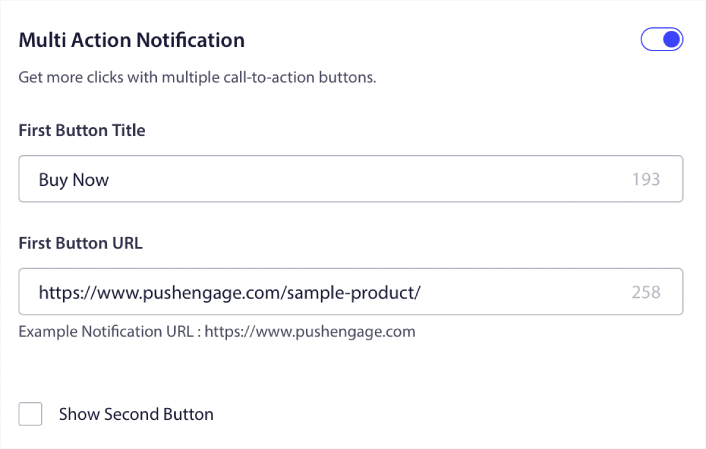
您还可以添加结账按钮:
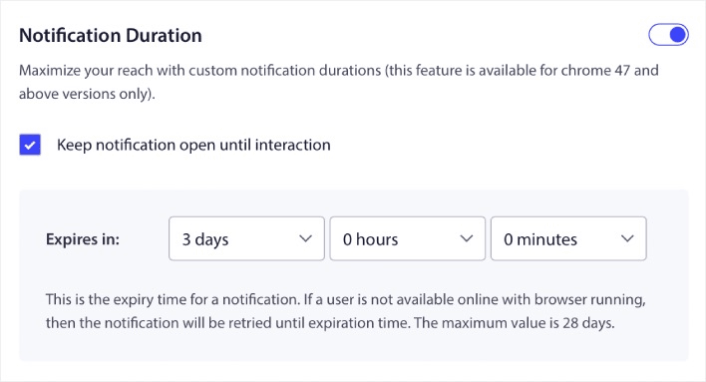
或者,您可以添加自定义通知时长:
完成后,转到 **Trigger Settings** 选项卡以激活您的活动。
第 3 步:复制活动代码段
我们不建议更改 **Trigger Settings** 中的任何内容,因为购物车放弃模板已为您处理好一切。
因此,只需点击 **Integration Code** 按钮并复制代码:
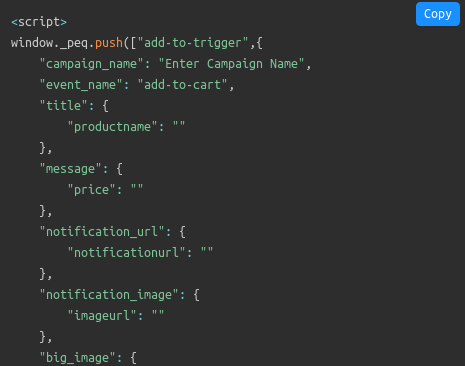
注意:您需要在此处复制多个代码片段。有用于加购事件、结账事件以及您需要添加的目标跟踪机制的代码片段。
您需要让您的开发人员在使用这些变量之前,用您网站上使用的变量填写此代码片段。 但如果您没有开发人员,请直接联系我们的客户成功团队。我们将为您设置广告系列。完全免费!
例如,产品名称和价格等变量是完全动态的。因此,您的开发人员必须将此代码片段中的字段与实际值配对。
您可以进一步自定义代码以发送个性化推送通知,但这相当高级(稍后会详细介绍)。
然后,将代码片段放置在您的网站上。
第 4 步:保存并启动广告系列
就是这样!
只需点击激活自动回复器按钮:

您就完成了。
如何创建个性化的 GoHighLevel 废弃购物车营销活动
您可以使用自定义属性创建个性化的 GoHighLevel 购物车放弃营销活动。
这意味着您可以将 PushEngage 与您的客户关系管理 (CRM) 软件连接起来,以获取每个客户的个人详细信息。默认情况下,PushEngage 会捕获每个客户的设备和地理位置信息。但您可以使用 PushEngage Attributes API 来扩展个性化范围。
您可以使用用户的姓名创建自定义的购物车放弃推送通知,例如这个:
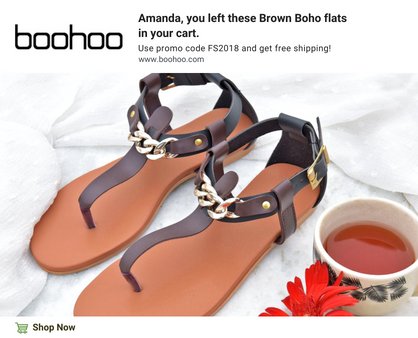
或添加更多元素,例如降价或未使用的忠诚度积分:
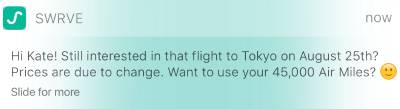
甚至交叉销售其他产品:
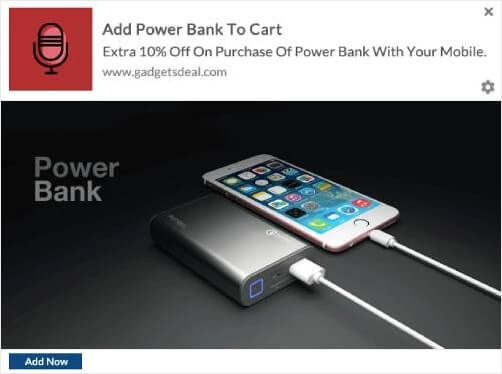
使用我们的 API,您可以设置的广告系列类型确实没有限制。尽情发挥吧!
设置 GoHighLevel 废弃购物车通知后该怎么做
好了,各位!如果您觉得这有帮助,您还应该查看我们关于如何减少购物车放弃率的文章。那里有一些非常有用的想法。
如果您才刚开始使用推送通知,您应该试试 PushEngage。PushEngage 是全球排名第一的推送通知软件,您可以使用 PushEngage 创建各种推送通知广告系列。
不信?查看这些关于推送通知活动的精彩资源:
- 如何通过 Web 推送通知将订阅者转化为买家
- 如何通知订阅者有关新的 WordPress 帖子
- 如何发送缺货通知以获得更多销售额
- 如何清理推送通知订阅者列表(简单方法)
- 如何自动发送 RSS 推送通知
- 如何使用推送通知推广新闻网站
- 如何使用交叉销售推送通知将您的销售额提高一倍
- 如何使用浏览放弃推送通知(4 个步骤)
所以,如果您还没有,请立即开始使用 PushEngage。


