How to Fully Automate Your Browser Push Notification Campaigns?

If you have a blog or content site on WordPress or have a site with RSS feed, you can manage your Browser Push Notifications in a completely automated manner using PushEngage.  You can read more details on How Browser Push Notifications can Help Bloggers to get up to 30% Extra traffic.

Here are the 4 ways to automate your Web Push Notifications with PushEngage

WordPress 插件

If you have a WordPress, then the easiest option for you is to use our WordPress Plugin available here.   For installation, search for PushEngage in New Plugin or download and upload from WordPress.

安装

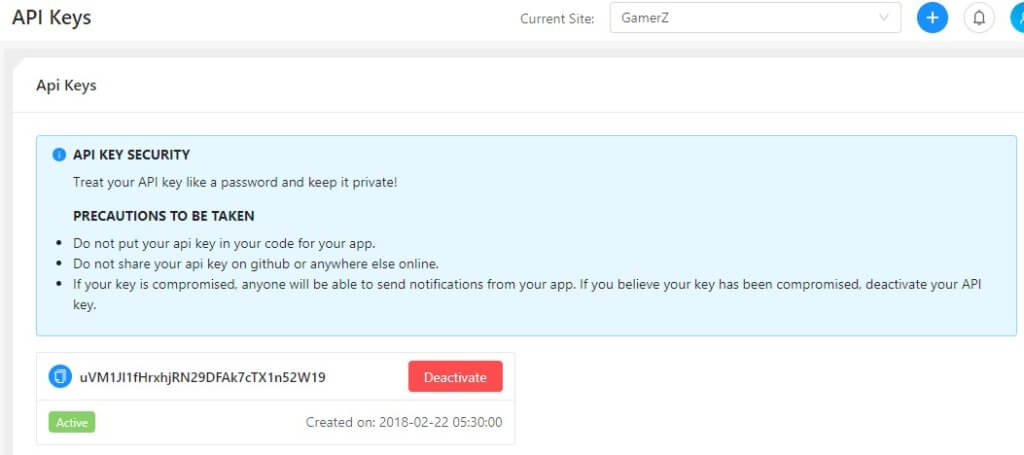
To go live with PushEngage, you need to only add your API key to the WordPress Plugin. PushEngage WordPress Plugin Installation is easy, and once you add the API key, which you can get from your PushEngage Dashboard,  the code for going live with PushEngage is automatically added to your website.

API Key for Push Notification activation

Going Live

Check this video on How To Install PushEngage on HTTP site based on WordPress.

HTTPS Site – If you are an HTTPS site hosted on WordPress, you need to add 2 more files to your root folder. Download these files from Settings -> Installation Settings to go live

You can also check this video on How To Install PushEngage In HTTPS WordPress Site.

You are now live with automated push notifications, and by default, each of your posts in WordPress has a checkbox for sending a Push Notification. If you uncheck this box then the notification would not be sent out

RSS Feed

To enable RSS Feed Automation, make sure you first select your time zone correctly in the Profile section in Settings.
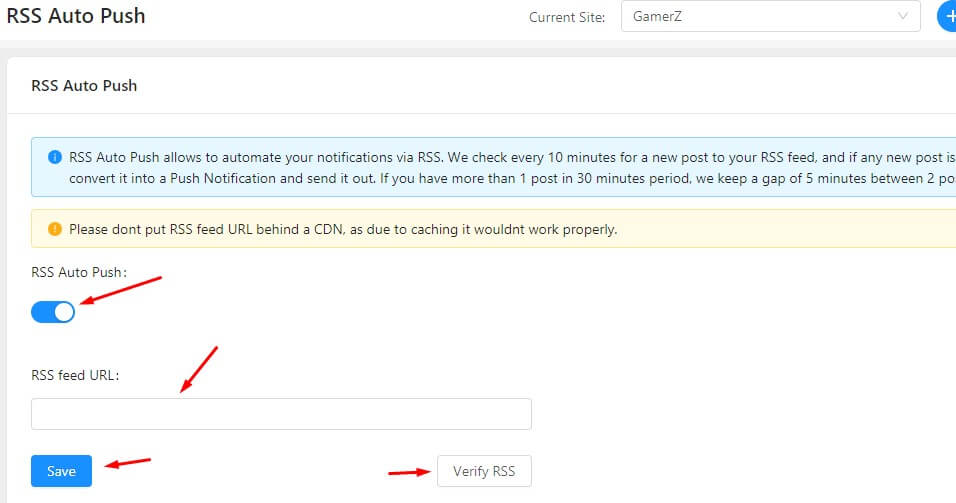
Then go to RSS Auto Push, and enable it, and configure the URL to RSS Feed. From Dashboard go to Automation > RSS Autopush Example Feed URL for PushEngage is https://www.pushengage.com/feed

RSS Auto Push Settings

That is it, now sit back and relax and see your traffic increase as more visitors come back to read your blog posts.

Using PushEngage

API We provide an extensive REST API for you to send notifications using that.  You can schedule notifications, send it to a single subscriber, send it to a single segment, etc.  The API allows you to make drip campaigns, and run any other automated campaigns using push subscribers.   Here is the link to the API docs for you to check them.

Use Autoresponders for Web Push Notifications

We also support automatically scheduled series of Push notifications sent to all customers or a segment. To enable that, read our detailed post on Drip Campaigns with Web Push here.

PushEngage is now fully compatible with AMP pages. If you have AMP pages, start using PushEngage for sending push notifications. You can also send free push notification service of PushEngage under free forever plan. Get started with Web Push Notification and re-engage with your visitors.

添加评论

我们很高兴您选择留下评论。请记住,所有评论都将根据我们的隐私政策进行审核,并且所有链接都将是 nofollow。请勿在姓名字段中使用关键字。让我们进行一次个人化且有意义的对话。

2 comments on “How to Fully Automate Your Browser Push Notification Campaigns?

  1. Pingback: Web Push Notifications for Content Sites, with PushEngage: What, Why & How – TheRodinhoods

在访客离开您的网站后与他们互动并挽留他们

通过难以忽略的推送通知,增加每次网站访问的价值。

  • 永久免费套餐
  • 轻松设置
  • 五星支持