How to Enable or Disable Firefox Notifications

How to Enable and Disable Firefox Notifications (Easy Way)

Looking for a simple way to enable and disable Firefox notifications?

Browser push notifications help you stay in touch with brands that you love. And you can opt for push notifications pretty easily. But how do you start receiving browser push notifications?

In this article, we’re going to show you step-by-step how to enable or disable Firefox notifications.

听起来不错?让我们开始吧。

How to Get Firefox Notifications from Any Site

Let’s start by check out how you can receive Firefox notifications from any site.

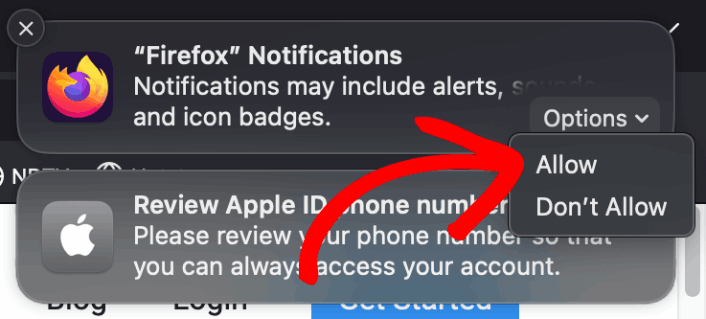
The first time you install Firefox, you’ll get a popup to allow or disallow web push notifications on Firefox. Just click on Options » Allow to receive Firefox notifications:

Firefox Notifications

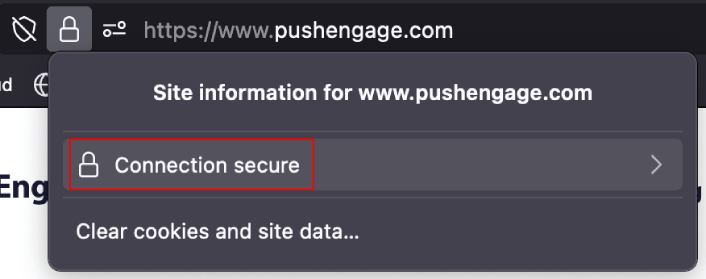
By default, Firefox blocks push notification optins. So, if you want to get Firefox notifications from a site, go to the URL bar and click on the padlock. In the dropdown, click on Connection Secure:

Firefox 连接设置

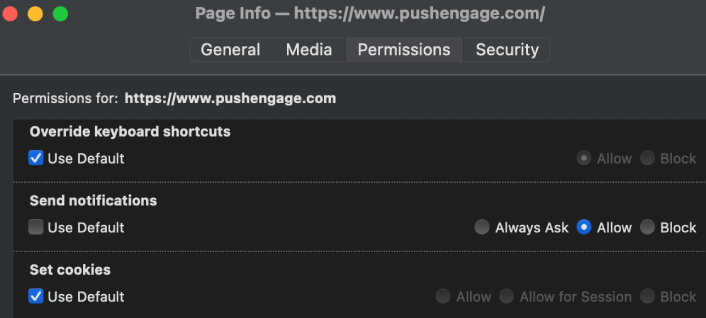
Here, you can set permissions for the site. Go to Permissions, scroll down to Send notifications, uncheck the Use Default checkbox, and click on Allow:

Firefox 页面信息权限

Now, you can get Firefox notifications from that site.

How to Enable or Disable Firefox Notifications

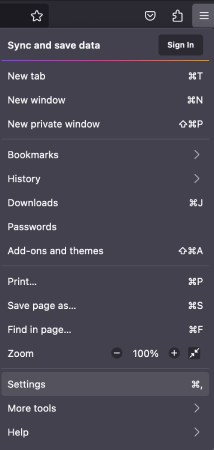
Firefox has settings and preferences built in that can enable or disable push notifications. The simplest way to enable or disable Firefox notifications is to head over to the menu bar and go to Settings:

Firefox 设置

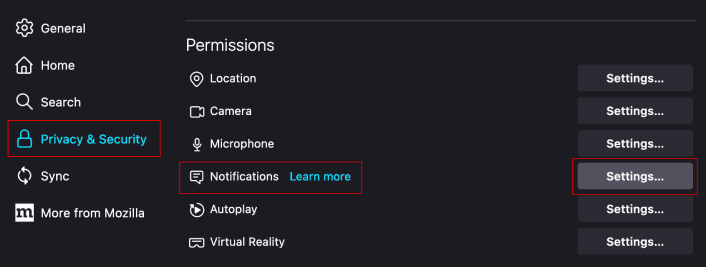
Then, go to Privacy & Security » Notifications » Settings:

Firefox 通知设置

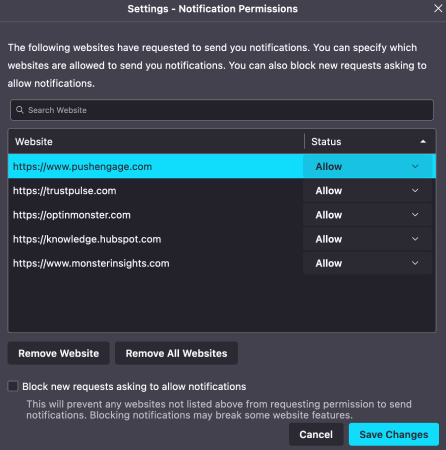
Here, you can allow or deny push notifications from any site simply by changing the permission next to the website.

启用和禁用 Firefox 推送通知

If you want to enable Firefox push notifications from a site, set it to Allow. If you don’t want notifications from a site, set the permission to Block.

You can remove all permissions by clicking on Remove All Websites. Or, if you want to remove just one website from the list of approved websites that can send you notifications, you can also click on Remove Website.

What to do After You Enable Firefox Push Notifications

Just because you love the content in the push notifications you receive doesn’t mean you should be subscribed to them. Before subscribing to any more push notifications, you should check out GDPR compliance rules and find out if your push notifications are safe.

And if you think Safari push notifications are cool, you should also check out how to get started with push notifications for your business.

Push notifications are a great way to organically grow your fan base. And it’s really easy to set up push campaigns. Also, if you’re new to push notifications, you should check out these epic resources:

我们建议使用 PushEngage 来创建您的推送通知广告系列。PushEngage 是市场上排名第一的推送通知软件,您的广告系列将得到妥善处理。

所以,如果您还没有,请立即开始使用 PushEngage

添加评论

我们很高兴您选择留下评论。请记住,所有评论都将根据我们的隐私政策进行审核,并且所有链接都将是 nofollow。请勿在姓名字段中使用关键字。让我们进行一次个人化且有意义的对话。

在访客离开您的网站后与他们互动并挽留他们

通过难以忽略的推送通知,增加每次网站访问的价值。

  • 永久免费套餐
  • 轻松设置
  • 五星支持