自动化邮件 Shopify

如何在 Shopify 中发送自动电子邮件(简单方法)

Looking for a simple, easy way to send automated emails in Shopify?

Email marketing is a great way to increase your revenue, customer engagement, and retention. But it’s a bad idea to only rely on email broadcasts. Automated emails will help you scale your marketing processes very easily. But how do you use automated emails in Shopify?

Do you need a developer? Which email marketing service should you use?

In this article, we’re going to answer all these questions and more. And we’ll also show you how to send automated emails in Shopify.

让我们开始吧。

PushEngage is the #1 Shopify push notifications app. Get it for free!

Which Automated Email Service Should You Use for Shopify?

There are so many email marketing tools and services out there. Before you make a choice, you need to consider:

  • 易用性: 该解决方案是否对初学者友好,还是需要一些先前的知识和专业知识?
  • 欢迎序列: 您是否可以使用该插件创建自动化的 欢迎消息 序列?
  • Web 触发器: 您是否可以从诸如 表单提交、 弹出窗口 点击或 废弃购物车 等事件触发自动回复器?
  • Audience Segmentation: Can you segment your customers into smaller lists for more targeted marketing?
  • 警报: 您可以安排消息通知订阅者有关新产品、 降价和 补货警报吗?
  • 个性化: 您可以使用高级设置和 属性来个性化消息吗?
  • 特别优惠: 您可以自动发送特别优惠,例如生日礼物和周年纪念礼物吗?
  • A/B 测试: 您可以 拆分测试不同版本的消息以提高转化率吗?
  • 跟进: 您可以根据他们与先前电子邮件的互动方式创建自定义工作流程吗?
  • 分析: 您是否有一个内置的 分析仪表板来跟踪您活动的表现?

We recommend using Constant Contact.

Constant Contact 是最佳的电子邮件营销服务之一

Constant Contact 是设置业务自动回复器的最佳电子邮件营销服务。它非常易于使用,并提供大量自动化功能来改进您的电子邮件营销活动。

以下是 Constant Contact 成为设置电子邮件营销活动的绝佳选择的原因:

  • 易于使用的拖放式构建器,用于创建电子邮件
  • 数百个预先设计的电子邮件模板
  • 欢迎消息、生日优惠和废弃购物车自动回复器
  • 列表构建工具和注册表单,用于增长您的受众
  • 拆分测试,用于定向电子邮件
  • 与 CRM 和第三方服务集成
  • 通过实时聊天和电话提供出色的支持

更不用说,Constant Contact 还有一个适用于 WordPress 的表单插件,可用于潜在客户开发。您还可以通过自动回复来培养和转化您的潜在客户。

立即开始使用 Constant Contact

How to Send Automated Emails in Shopify

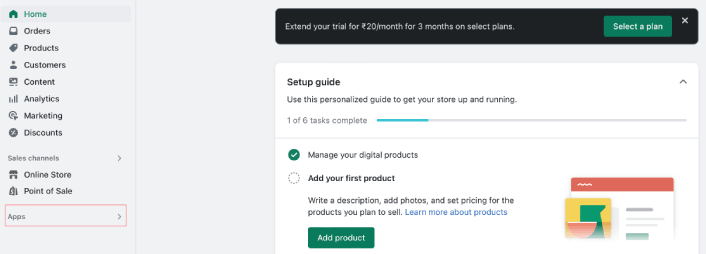
Let’s get started with sending automated emails in Shopify. Head over to your Shopify Dashboard and click on Apps to search for the Constant Contact Shopify app:

添加新的 Shopify 应用

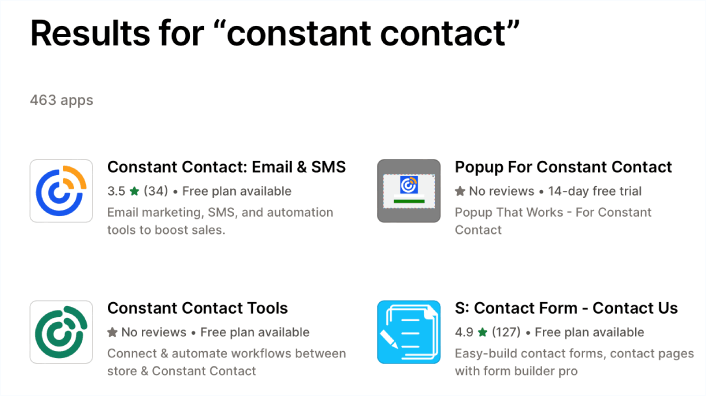
Go ahead and click on the Constant Contact app:

安装 Constant Contact 应用

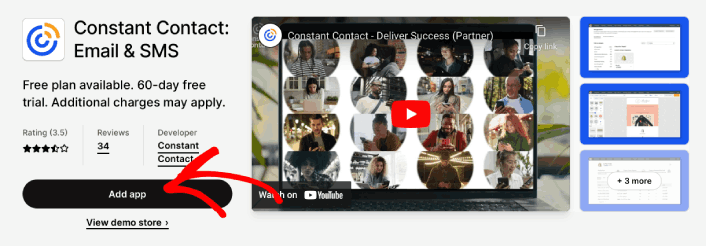
Then, click on Add App:

将应用添加到 Shopify 商店

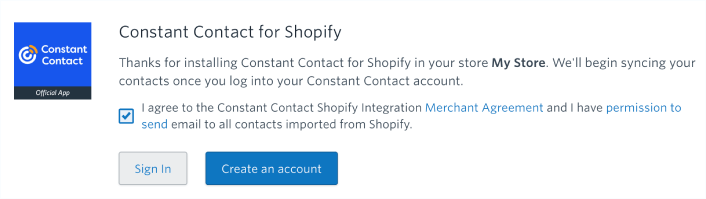
Give the app the necessary permissions to work and click on Create an account if you don’t already have a Constant Contact account:

Constant Contact 权限

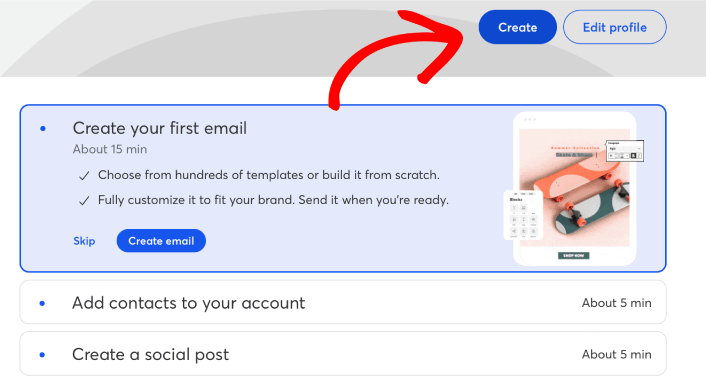
Once your account is set up, you’ll be able to send automated emails in Shopify. Follow the setup wizard you should be done soon enough. Then, click on Create to start creating an automated email for Shopify:

创建 Shopify 自动化邮件

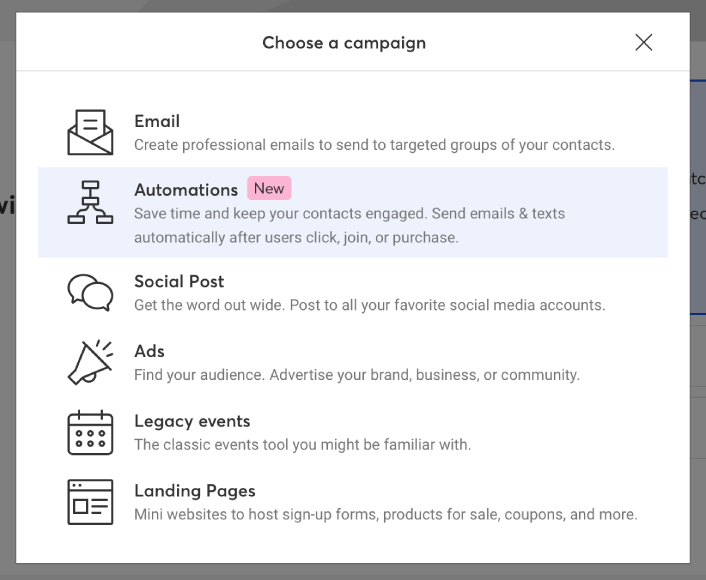
From the popup, select Automations to create automated emails.

创建自动化邮件 Shopify

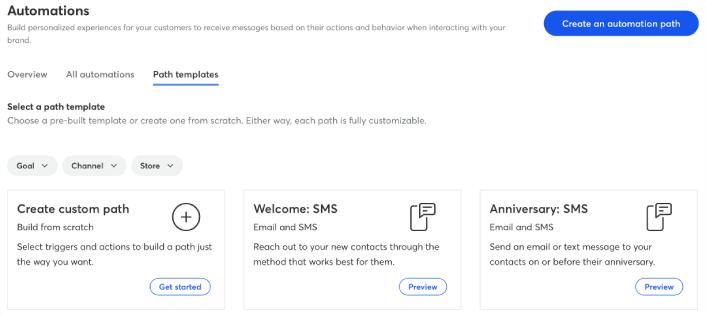
From the list of automations, pick one that suits your needs:

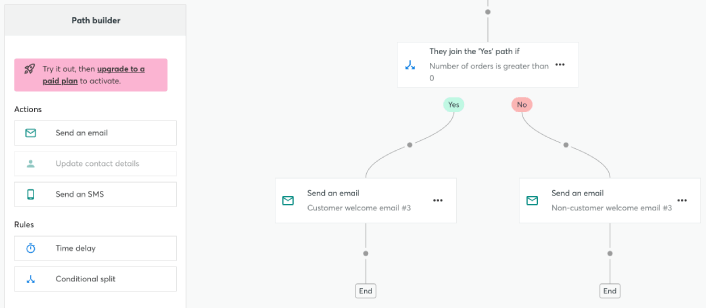
Shopify 的自动化路径

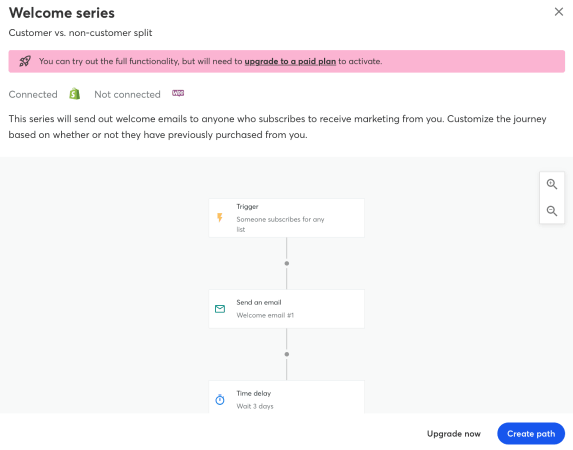
We recommend creating a website welcome campaign. All you need to do is click on the campaign and hit the Create button.

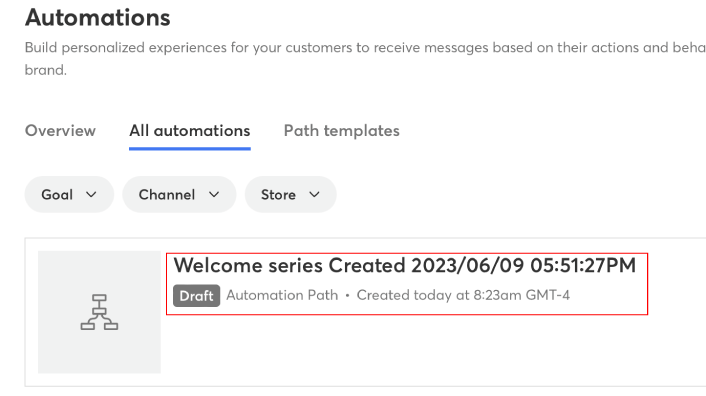
Shopify 的欢迎系列邮件

Edit the automation flow and when you’re happy, click on Save.

编辑自动化

And just like that, you have automated emails in Shopify.

Shopify 中的自动化邮件

If you like, you can create multiple such automated emails for different customer touch points.

What to do After You Create Automated Emails in Shopify

Once you’re done creating your first-ever automated email in Shopify, you should create more.

If you’re looking for a cost-effective way to increase your traffic, engagement, and sales, you should get started with push notification campaigns. Push notifications are powerful marketing tools that can help any eCommerce business grow quickly. Take a look at how you can send Shopify web push notifications with no coding and in less than 10 minutes!

不信?查看这些精彩资源:

PushEngage 是全球排名第一的推送通知软件。因此,我们建议使用 PushEngage 来创建您的推送通知并发展您的电子商务业务。

立即开始使用 PushEngage

添加评论

我们很高兴您选择留下评论。请记住,所有评论都将根据我们的隐私政策进行审核,并且所有链接都将是 nofollow。请勿在姓名字段中使用关键字。让我们进行一次个人化且有意义的对话。

在访客离开您的网站后与他们互动并挽留他们

通过难以忽略的推送通知,增加每次网站访问的价值。

  • 永久免费套餐
  • 轻松设置
  • 五星支持