你好,Engagelings。
激动人心的新闻:我们刚刚推出了一个新的WordPress插件!
为什么?因为你!
没错,我们正在让用户体验(也就是您的体验)变得更好。现在,您可以在WordPress仪表板中完成在PushEngage应用中可以完成的所有操作。
我们还使其超级易于使用。这款插件凝聚了大量心血,我们相信您会喜欢它。这也是一次重大更新,所以有很多内容需要深入了解。
让我们开始吧。
为什么使用PushEngage WordPress插件?
简而言之,PushEngage WordPress插件:
- 节省创建、编辑和管理推送通知广告系列的时间
- 允许您在Gutenberg编辑器中为博客文章创建推送通知
- 在WordPress仪表板中为您提供详细的推送通知分析
- 允许您在WordPress网站中管理推送通知受众
- 直接从您的WordPress网站创建推送通知弹出模态框
迄今为止,大多数推送通知服务要么允许您从其应用仪表板进行操作,要么提供API服务,您需要创建自定义代码来发送推送通知广告系列。
市场上的任何推送通知插件都只是充当其仪表板连接到您网站的一种方式。换句话说,您需要在您的内容和营销插件之间来回切换。
不再是这样了!
使用新的PushEngage WordPress插件,您可以在WordPress仪表板中获得所有功能。安装PushEngage后,您实际上不必考虑返回应用仪表板。该插件是为WordPress生态系统设计的。因此,它不仅易于使用,而且非常轻量级。
它不仅仅是一个替换仪表板的WordPress插件。在仪表板中创建的任何广告系列也会被带到您的插件中。这样,如果团队成员在PushEngage仪表板上创建了广告系列,您仍然可以在WordPress插件中进行管理。
我们之所以构建它,是因为我们测试过的每一个WordPress推送通知插件都在功能强大和简单易用之间进行了权衡——而这款插件拒绝这样做。
从WordPress插件仪表板访问所有内容
安装WordPress插件后,您可以从插件中访问您的PushEngage广告系列、策略、弹出模态框和分析。在您的WordPress仪表板中,转到PushEngage » Dashboard,快速查看您PushEngage帐户的所有关键元素:
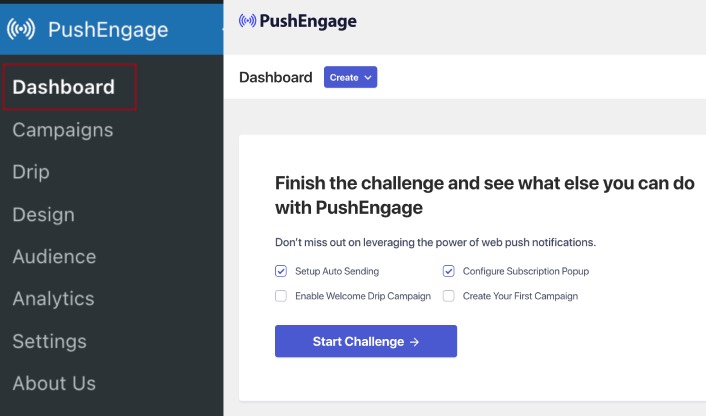
您首先看到的是 Create 按钮,可帮助您快速创建新广告系列。如果您的账户是新账户,您将获得“欢迎挑战”,以帮助您在遵循标准实践的同时快速设置 PushEngage。
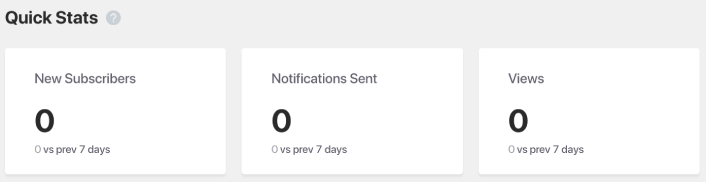
如果向下滚动,您将看到关于推送通知效果的 Quick Stats(快速统计):
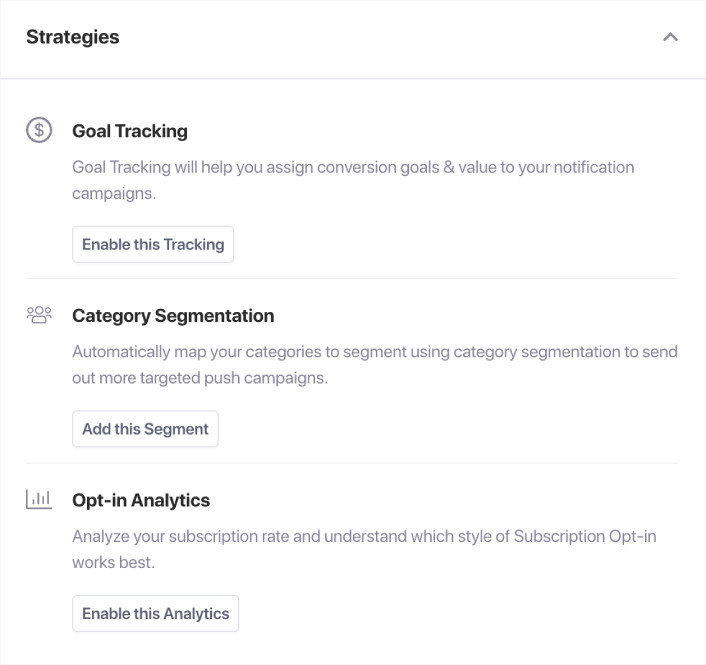
如果向下滚动,您将看到 推荐策略,可帮助您快速吸引更多推送通知订阅者:
这仅仅是冰山一角。
创建自动推送通知以推广您的帖子
您现在可以从 WordPress Gutenberg 编辑器内部创建自动推送通知来推广您的帖子。前往PushEngage » 设置 » 自动推送设置:
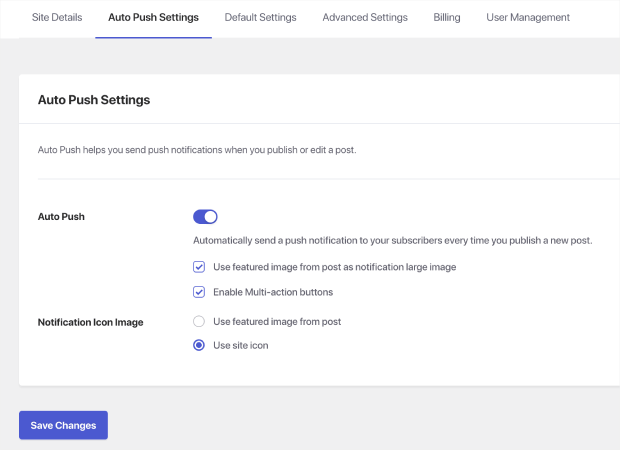
使用切换按钮启用 WordPress 自动推送功能。然后,勾选框以启用多操作按钮,并使用帖子的特色图片作为通知大图片。启用这些设置将帮助您发送富推送通知,例如此通知:
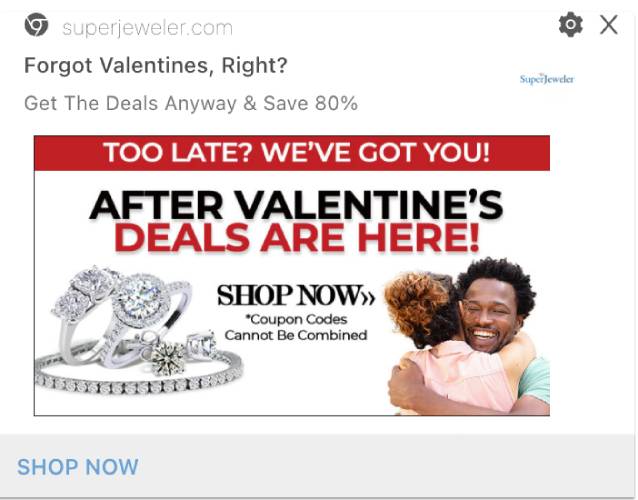
使用大图片和号召性用语按钮将提高您的查看率和点击率。
接下来,继续编辑您的任何 WordPress 帖子。在帖子底部,您现在应该会看到用于创建自动推送通知以推广该帖子的 Gutenberg 块:
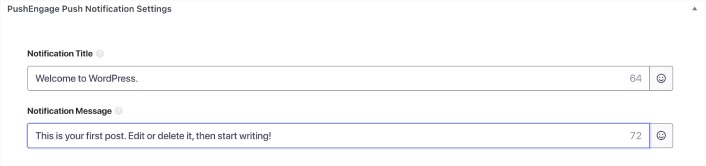
添加通知标题和通知消息以创建您的自动推送广告系列。然后,向下滚动以获取更多设置。
您可以添加推送通知大图片:
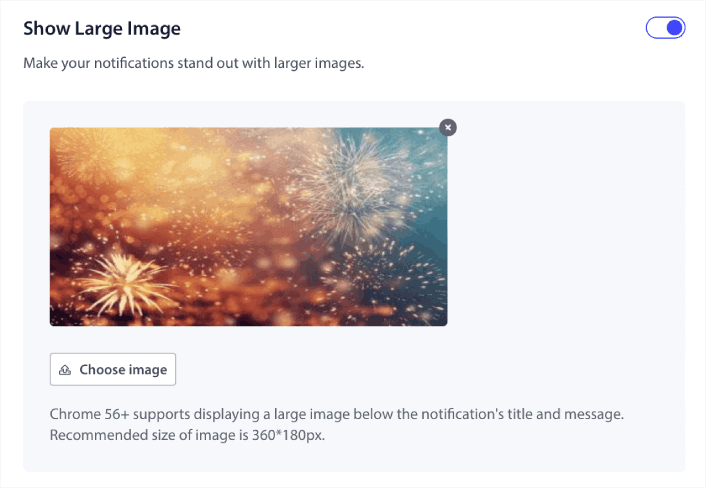
默认情况下,如果您为通知启用了大图片,PushEngage 会使用您帖子的特色图片作为大图片。但您也可以添加自己的图片。
您还可以为您的推送通知在多操作通知下创建按钮:
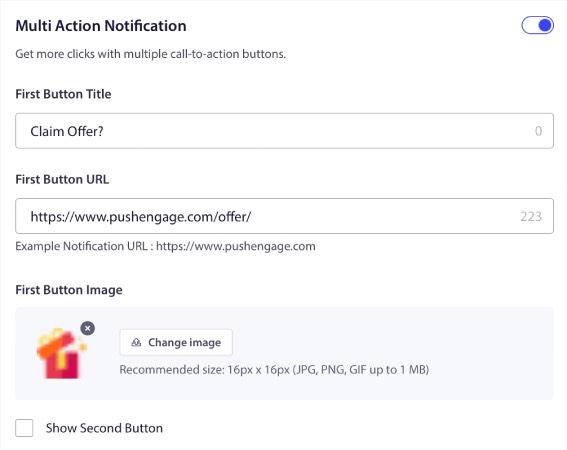
带按钮的推送通知通常比不带按钮的点击率更高。事实上,在我们的推送通知最佳实践指南中,我们建议始终为您的通知使用号召性用语按钮。
如果向下滚动更多,您可以看到受众设置,以选择谁应该收到您的自动推送通知。
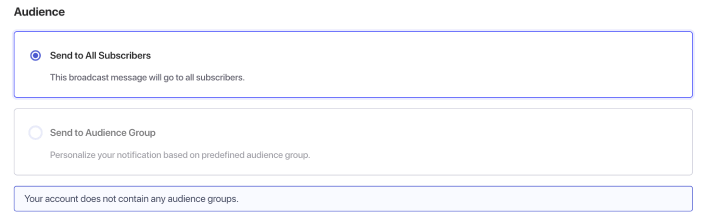
当然,您需要先创建受众群组才能定位他们(稍后会详细介绍)。设置完推送通知后,请查看 Gutenberg 右侧边栏中的PushEngage 推送通知设置:
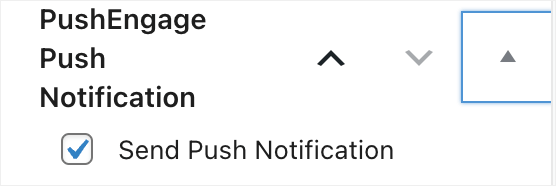
确保选中发送推送通知复选框。每当您的帖子发布时,即使您的帖子被安排在稍后发布,您的推送通知也会自动发送!
创建推送通知广播
前往 PushEngage » Campaigns(广告系列)以创建推送通知广播:
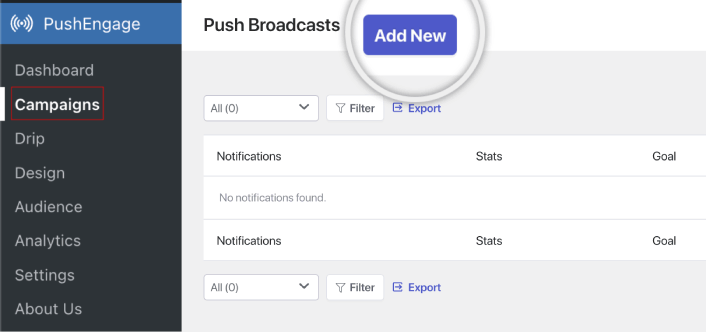
点击 Add New(添加新项)按钮以创建新的推送通知广播。如果您以前使用 PushEngage 发送过推送通知,您也会在此处看到您之前通知的列表。
设置邮件序列自动回复器
您还可以直接在插件中从头开始创建邮件序列广告系列。转到PushEngage » Drip:
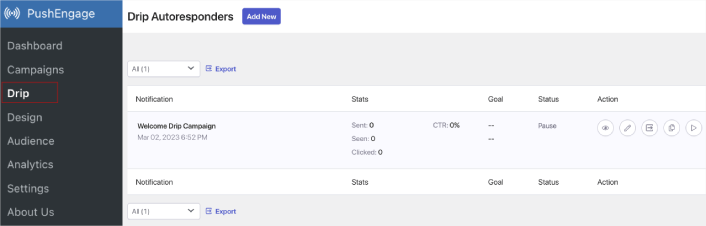
这包括一个网站欢迎广告系列。您还可以在此处查看、编辑、启用和禁用所有邮件序列自动回复器。
注意:目前,您无法在 WordPress 插件中创建电子商务推送通知。您仍然可以在仪表板中创建触发式通知,但它们不会显示在 WordPress 插件中。
设计推送通知弹出模态框
您的推送通知弹出模态框用作选择加入以收集订阅者。没有弹出模态框,您就无法收集订阅者或向任何人发送推送通知。很棒的一点是,您可以在 WordPress 插件中设计、自定义、启用和禁用您的推送通知弹出模态框。
转到 PushEngage » Design:
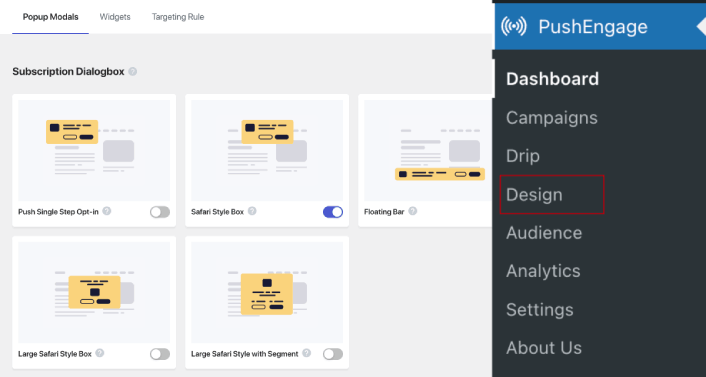
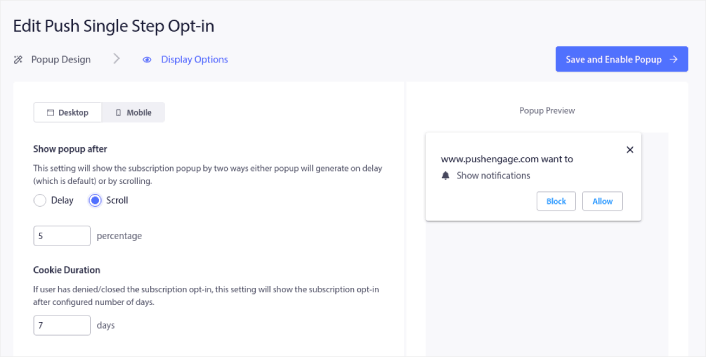
您可以根据需要设置任意数量的弹出窗口。当然,您可以确保它们在每个弹出窗口的 Display Options(显示选项)下于不同时间触发。
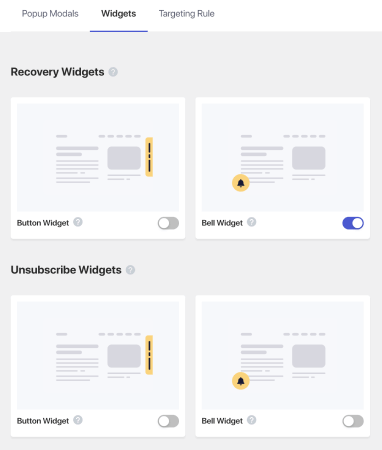
您还可以 创建订阅小部件或取消订阅小部件,以从 Widgets(小部件)选项卡 取消订阅 Chrome 通知:
如果您想创建更具针对性的弹出窗口,可以使用 Targeting Rule(定位规则)选项卡下的定位规则:
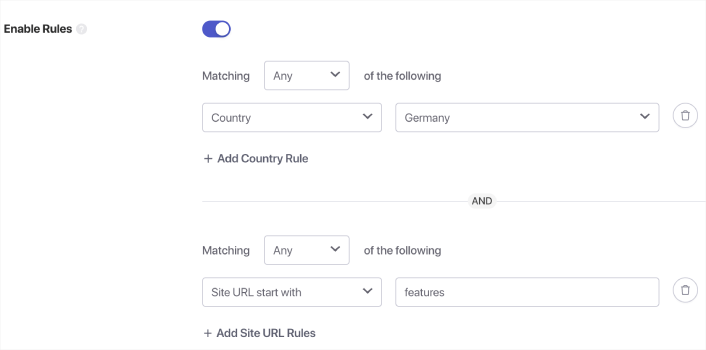
这些是全局定位规则,将优先于单个弹出窗口的定位规则。但如果您愿意,可以通过编辑它们来为每个模态创建强大的定位规则。
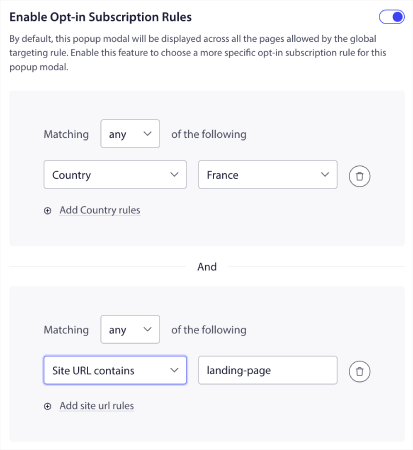
例如,您可以创建不同语言的弹出窗口,以定位来自不同国家的访问者。
创建细分和受众群以进行定向推送通知
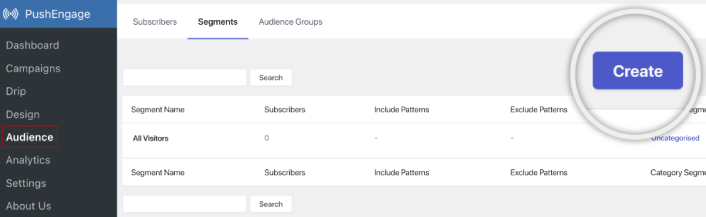
当然,没有什么比通过为您的推送通知订阅者创建细分和受众群组所能获得的个性化程度更高的了。前往PushEngage » 受众并立即开始创建细分和受众群组。
在细分选项卡下,您可以创建新的细分或编辑现有的细分:
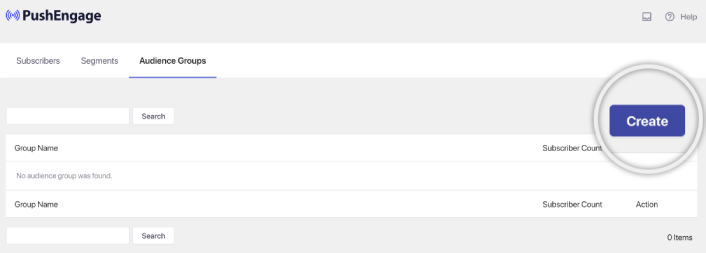
如果您需要更深入的个性化,请在受众群组选项卡中创建一个受众群组:
如果您是推送通知细分和个性化推送通知的新手,您应该查看我们关于如何创建细分的文章以及我们关于高级受众分组的公告。
获取详细的推送通知分析
分析和A/B 测试将帮助您保持在业务目标的轨道上。虽然您也可以在 Google Analytics 和您的 PushEngage 仪表板中跟踪推送通知,但从您的 WordPress 仪表板获取详细分析要方便得多。
前往PushEngage » 分析:
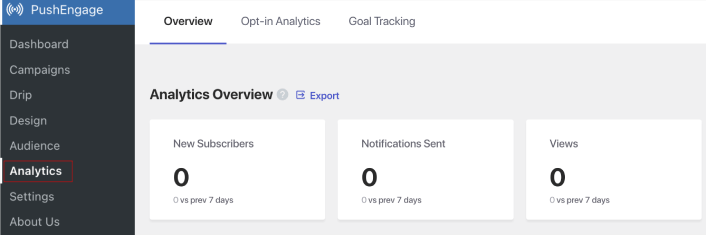
默认的分析仪表板仅提供您的 PushEngage 广告系列表现的概览。但如果您想更好地查看您的弹出窗口的注册分析,请转到注册分析选项卡。

您可以在 PushEngage 的目标跟踪选项卡下启用目标跟踪:
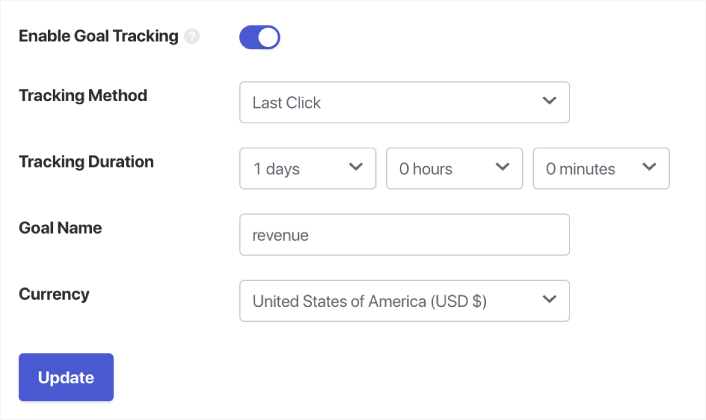
目标跟踪可帮助您精确衡量每个通知为您的收入带来的贡献。
还有什么?
我们知道发展业务是一项艰苦的工作。在 PushEngage,我们始终致力于改进我们的产品和您的体验。我们推出了这个新插件,以帮助您从 PushEngage 订阅中获得更多价值。
非常感谢您阅读此公告。
如果您有任何疑问,我们的客户成功团队随时为您提供帮助。只需在实时聊天中发起对话或查看 我们的联系页面。
感谢您使用 PushEngage。无论您使用的是免费版本还是企业版本,您对我们都同样重要。PushEngage WordPress 插件旨在帮助您取得成功,我们祝您一切顺利。
在下面的评论中告诉我们您的想法,如果您还没有开始,请立即开始使用 PushEngage!


