你好,Engagelings。
Exciting news: We just updated our Shopify app pricing and included some exciting new features. And it’s easier than ever to grow your eCommerce business at super affordable rates!
Sounds exciting? There’s a lot to unpack here. So, let’s dive in.
What’s The New Shopify Pricing for PushEngage?
We now have two pricing plans: A Free plan and a Growth plan.
The Free plan is perfect for new eCommerce businesses who are making less than $100/month in profits. It’s also fine for testing the PushEngage dashboard experience.
The Growth plan, on the other hand, starts at only $4/month for 5,000 subscribers and you can upgrade your account up to 100,000 subscribers. For anything beyond 100,000 subscribers, you can talk to us for an Enterprise account.
But there’s way more to unpack here. For one thing, we charge you based on your subscriber list and not on your clicks and push message sends. And that’s a big difference because with PushEngage, you get:
- Predictable Costs: With a subscriber-based pricing model, you know exactly how much you’ll be paying based on the size of your subscriber list. This makes budgeting and cost forecasting much easier compared to an impressions-based model where costs can fluctuate unpredictably.
- Focus on Quality Over Quantity: When you pay per impression, there’s an incentive to send as many notifications as possible, even to disengaged or inactive users, to get more value. With subscriber-based pricing, the focus shifts to building a high-quality, engaged subscriber base rather than saturating users with notifications.
- Better Alignment with Goals: The primary goal of push notifications is to reach and engage your subscriber base effectively. Paying per subscriber aligns the pricing model directly with this goal, rather than basing costs on the nebulous metric of impressions.
- Avoid Overcharging: With impression-based pricing, you may end up paying for notifications that are never actually seen or engaged with by users, leading to wasted spend. Subscriber-based pricing ensures you only pay for your active, consenting audience.
- Transparency and Control: Knowing your costs are based solely on your subscriber count gives you more transparency and control over your push notification spending, rather than having costs determined by a metric (impressions) that can be influenced by many external factors.
This besides, you can also clean up your subscriber list to remove inactive subscribers to pay less and maximize your sending volume (more on this later).
How to Create Shopify Push Campaigns
Once you’re done installing the PushEngage Shopify app, go ahead and search for it in the Shopify search bar:

Click on PushEngage Push Notifications to go to the PushEngage dashboard.

Here, you can create any eCommerce push notification campaign you like.
How to Send High-Converting Shopify Campaigns
eCommerce campaigns is where the Shopify integration really shines. It’s super simple and easy. Head over to your PushEngage dashboard and go to Campaigns » Triggered Campaigns:

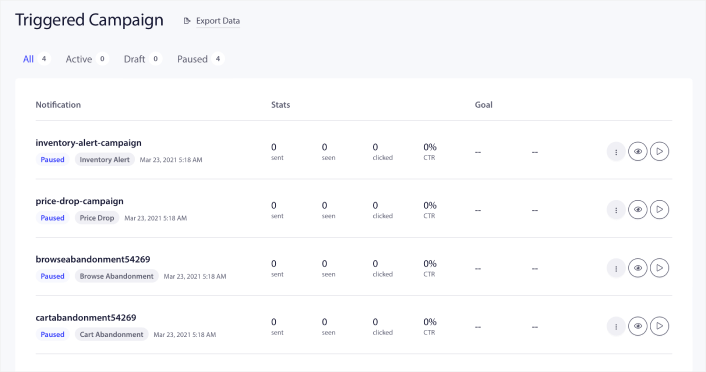
You’ll see that your account comes with 4 pre-built triggered campaigns by default:
- 降价提醒
- Inventory alert
- 浏览放弃广告系列
- Cart abandonment campaign
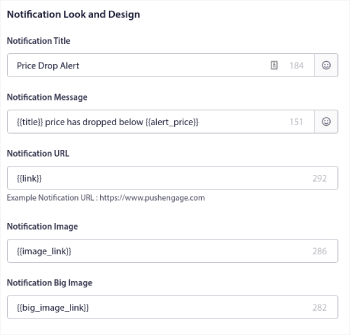
All you need to do is edit each campaign and fill out the Content section and activate them. Your pre-built campaign templates already come with fairly high-converting copy. But we ask all our customers to edit the content to suit their marketing strategy.
当您点击序列中的任何推送通知时,您可以根据需要自定义通知:

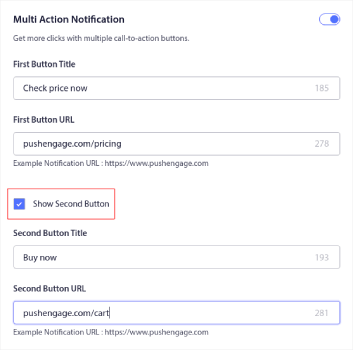
You can also add multiple buttons for a smoother conversion:

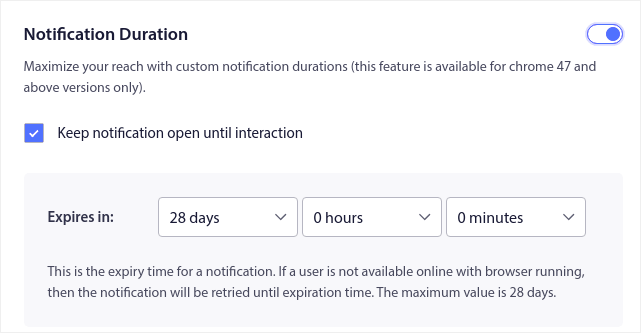
And you can set a custom notification duration under Notification Duration:

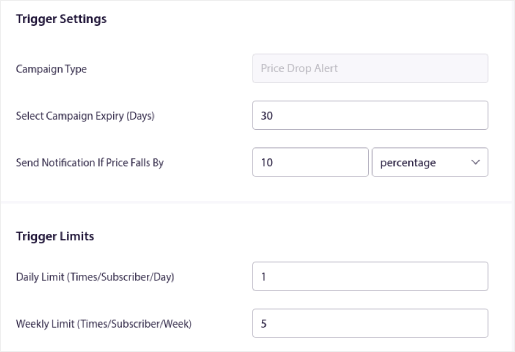
When you’re done with the Content tab, click on the Trigger Settings button and configure when your push notifications get sent.

This process is the same for all the eCommerce campaigns. All you need to do is customize your campaign and activate it. No API keys, no manual code integrations, and no barriers to getting started in 10 minutes or less!
NOTE: For your cart abandonment campaign, you also get a pre-built revenue tracker that will report conversions and revenue generated from your campaign. You don’t have to do anything to enable this feature. Just run your cart abandonment campaign.
How to Send Push Broadcasts
Sometimes, you’ll want to start is to send a push broadcast to announce specific time-limited offers and promos. Head over to Campaigns » Broadcast and click on Create New Push Broadcast:

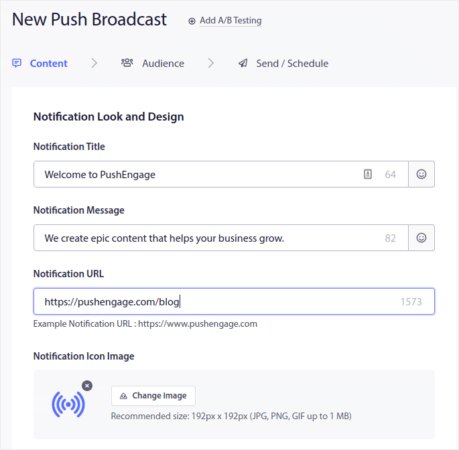
Then, create a new push notification to send. Customize the content under the Content tab:

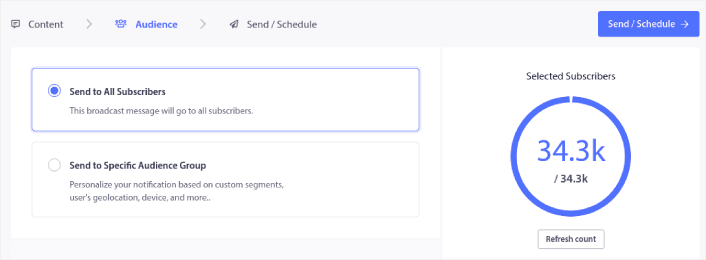
Next, select your audience under Audience:

And finally, under Send/Schedule, you can schedule the notification as a recurring push notification:

您可以轻松地为您的推送通知创建任何您想要的安排,包括自定义的星期、日期和时间。
How to Set Up RSS Auto Push Campaigns
Constantly creating content and managing a blog is hard work. But if you’re running a serious business, you know that just creating content isn’t good enough. You have to be able to promote your content as well. But how to scale eCommerce business revenue by promoting content automatically?
And push notifications are a great way to gain subscribers in a cost-effective way. What makes push notifications so good as a marketing tool is that they can be completely automated. That’s where RSS push notifications come into the picture.
前往您的 PushEngage 控制面板,然后转到 广告系列 » RSS 自动推送:
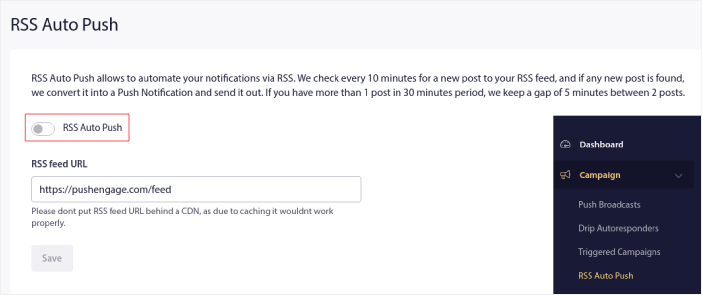
点击切换按钮以启用 RSS 自动推送,然后粘贴您的 RSS Feed URL。完成后,点击 验证 RSS 以确认您的 RSS Feed 已被接受。完成后,只需点击 保存。
现在,每当您发布新帖子时,您的推送通知订阅者都会自动收到有关您新内容的推送通知。
How to Reduce Your Subscriber Costs in Shopify
You can reduce your PushEngage plan costs in Shopify by deleting your inactive subscribers. Since you pay per subscriber, we wanted to also give you the option to remove unwanted subscribers so that you don’t end up inflating your costs without any reason.
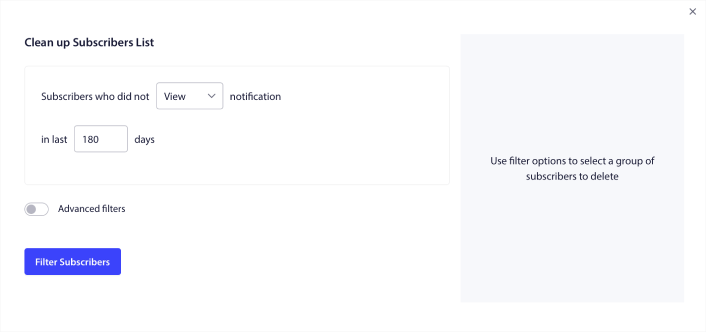
Simply go to the PushEngage dashboard and go to Audience » Subscribers to get the same options. You can remove subscribers who didn’t receive, view, or click on your notifications for any number of days.

我们建议删除在 240 天内未查看过您通知的订阅者。您还可以使用高级过滤器进行更精确的移除。
高级过滤器包括:
- 属性:删除具有特定属性(如平台或其他识别数据)的订阅者。
- 细分:删除整个细分或一组细分
- 浏览器:删除来自特定浏览器的订阅者。
- 设备:删除来自桌面或移动设备的用户。
- 国家:删除来自特定国家的订阅者。
- 州:删除来自特定州的订阅者。
- 城市:删除来自特定城市的订阅者。
- 订阅日期:定位在特定日期之前或之后订阅的用户。非常适合重新定位未参与互动的新订阅者。
- 上次发送:定位在特定时间限制之前最后收到通知的订阅者。
- 上次查看:定位在特定时间限制之前最后查看通知的订阅者。
- 上次点击:定位在特定时间限制之前最后点击通知的订阅者。
- 总发送次数:定位总计收到的通知次数少于或等于特定计数的订阅者。非常适合定位甚至不再接收您推送通知的订阅者。
- 总查看次数:定位总计查看的通知次数少于或等于特定计数的订阅者。用于定位接收您的通知但根本不查看它们的订阅者。
- 总点击次数:目标用户总计点击通知的次数小于或等于指定次数。筛选从未点击过您通知的用户。
- 用户哈希值:用于从列表中移除特定用户。这类似于从列表中删除电子邮件。
单独来看,这些筛选器可能意义不大。但是,您可以组合多个筛选器来选择特定的受众成员。例如,假设您想移除已订阅一年以上但从未点击过您通知的用户。您可以组合使用订阅日期筛选器和总点击次数筛选器。
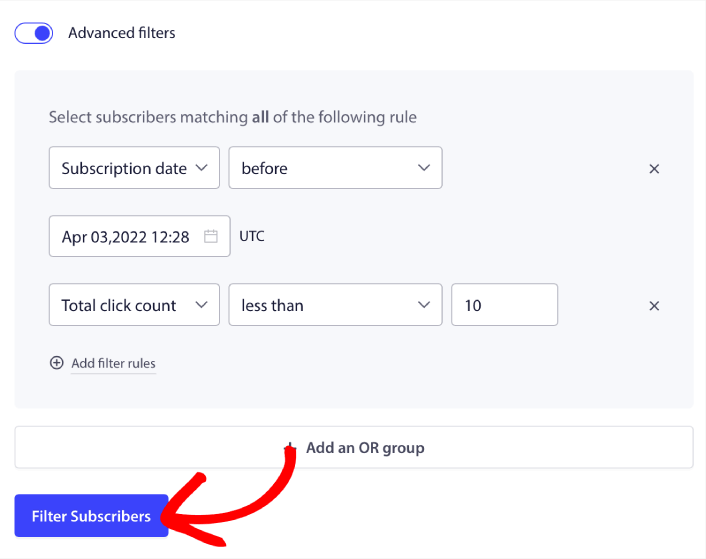
如果您想筛选多种类型的非活跃用户,可以点击+添加或分组按钮并定位多种类型的用户。
How to Create a Subscription Management Widget in Shopify
The subscription management widget is a unique feature in PushEngage that allows your subscribers and web traffic to select what kind of notifications they want to receive.
前往PushEngage仪表板,然后转到设计 » 小部件并启用订阅管理小部件:

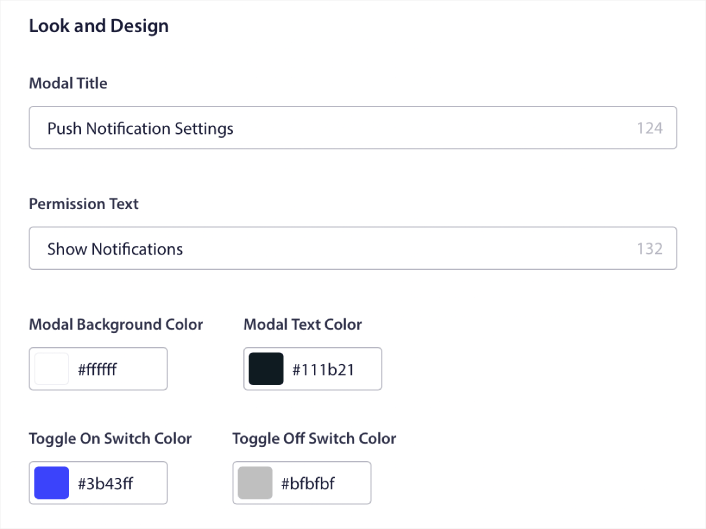
Click the Edit Widget button to customize your widget. Start by customising the look and feel of your widget to match your brand’s design language under Look and Design:

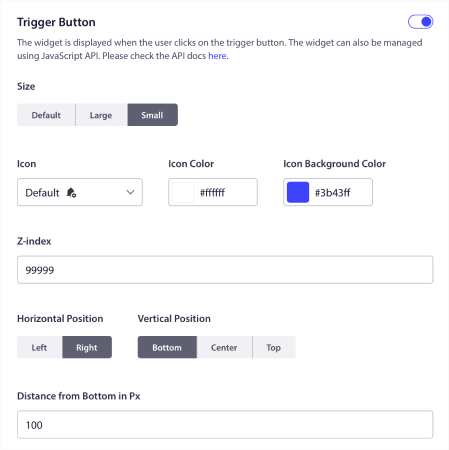
You can create a completely custom popup modal that sticks around even when your visitors don’t subscribe from your default popup modal. If the sizing of the popup trigger button feels off to you, you can customise that as well under Trigger Button:

And the coolest bit is that you can also select specific pages to display the widget under Trigger Button Display Rules:

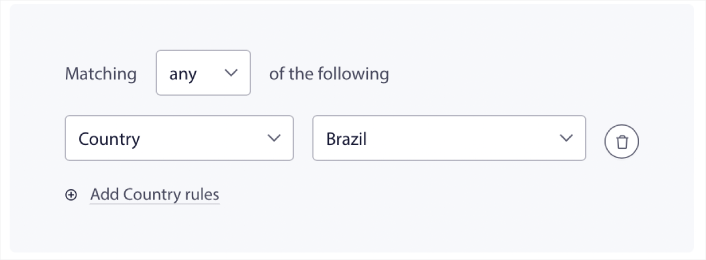
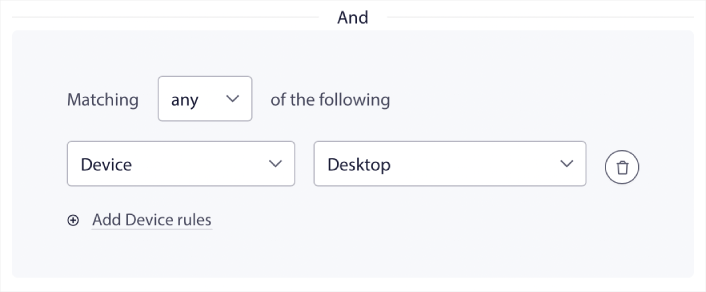
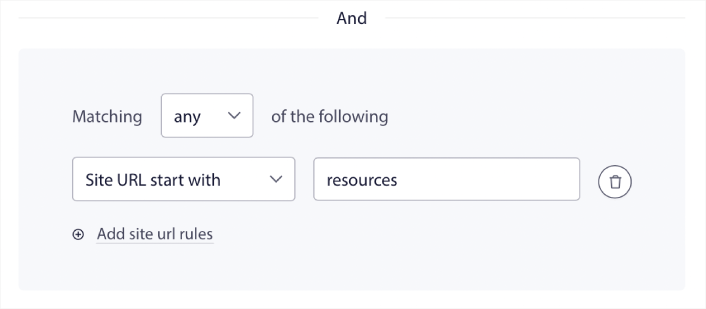
默认情况下,按钮将显示在所有页面上。 但是,您可以创建自定义定位规则,通过定位特定的内容来显示特定版本的小部件:
位置:
设备:
以及您网站上的网址:
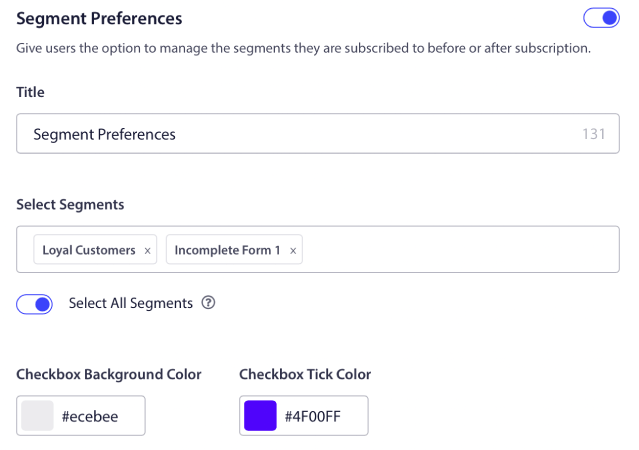
To take things to the next level, you can also allow your subscribers to select what types of notifications they want to receive under Segment Preferences:

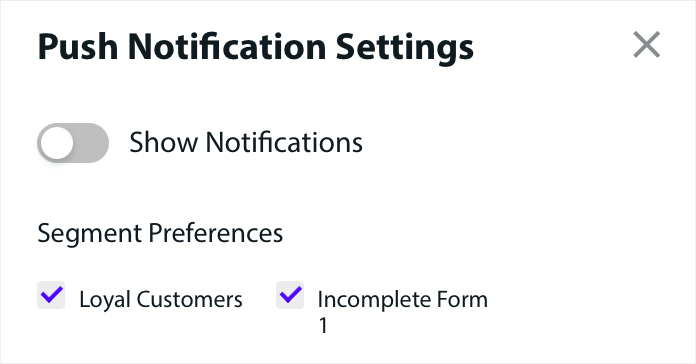
If you enable Select All Segments, then your subscribers will get automatically added to all the selected segments by default:

This is an amazing way to build a retargeting list.
If you’re running any eCommerce push notifications on your site, a lot of those are going to be triggered push notifications. This includes:
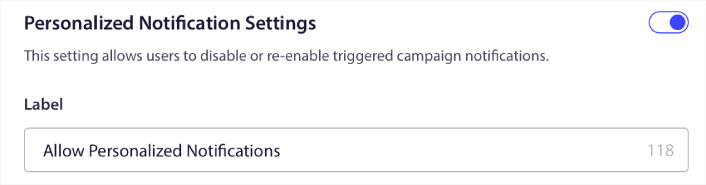
And even custom triggered push notification campaigns. With our Subscription Management Widget, you can now allow your subscribers to choose if they want to see personalised notifications:

Just enable the option under Personalized Notification Settings:

How to Grow Your Business With App Push Notifications
If you’re also running an Android or iOS app or even a web app for your store, then you can grow your sales even faster using mobile app push notifications and web app push notifications.
NOTE: You can add mobile push notifications to your Android and iOS apps using PushEngage’s powerful SDKs as well. There’s no need to build and manage an interface to send and manage your campaigns. And you can do it all from the same dashboard.
移动应用推送通知是从应用直接发送到用户移动设备的消息,即使在应用未主动使用时,也能提供更新、提醒或个性化内容。它们通过将及时相关的信息直接送到用户指尖来增强用户参与度。
当然,这只对您有帮助,前提是您有一个应用或正在为您的业务发布移动应用。如果您一直在犹豫是否要发布应用来发展您的业务,现在可能正是时候。应用面临的最大挑战之一是客户参与度。而 PushEngage 现在可以帮助您彻底消除这种痛苦。
为了更深入、更频繁的互动,应用推送更受欢迎。对于偶尔的更新或警报,网页推送很有效。为此,应用通知活动提供了更好的富媒体和互动内容。应用推送通知依赖于网页推送通知通常无法使用的数据。
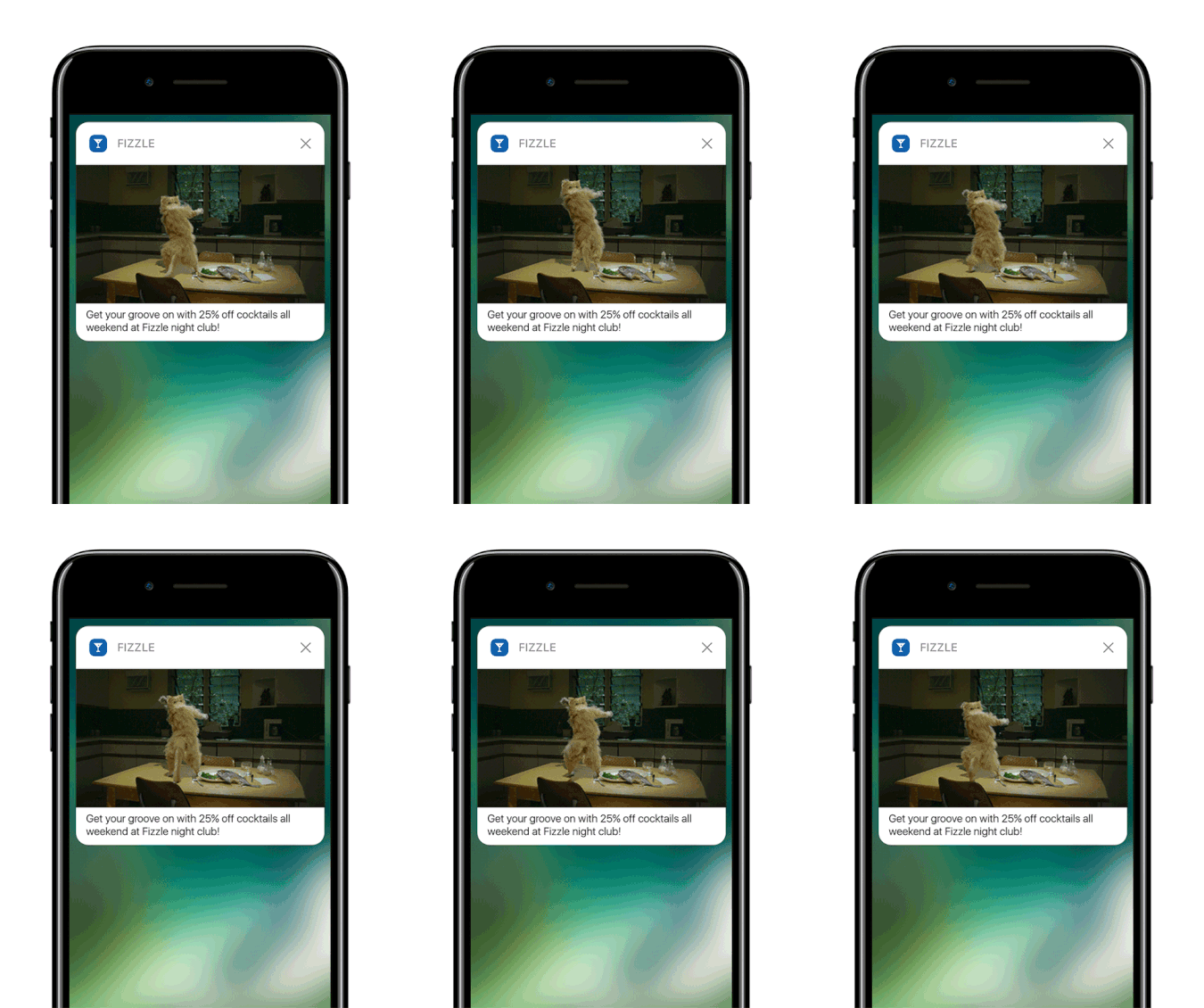
公平地说:您可以创建个性化的网页推送通知。但应用推送可以实现更深层次的个性化。
移动应用推送通知不仅仅是一种通信工具;它们是增强用户体验、提高参与度和与用户建立个性化联系的强大机制。
它们允许一定程度的互动和个性化,这可以显著提高应用在留住和吸引用户方面的有效性。
- 增强用户参与度:
- 情境相关性:应用推送通知可以非常情境化。它们利用用户数据(如位置、行为和偏好)来发送及时且相关通知。例如,健身应用可能会在您通常跑步的时间发送励志信息。
- 行为触发:通知可以由用户的特定操作或不操作触发。这使得它们在鼓励期望行为方面非常有效,例如提醒用户完成他们购物车中未结账的商品。
- 丰富的用户体验:
- 多媒体集成: 与纯文本消息不同,应用通知可以包含图像、音频甚至视频。这种丰富的媒体集成使它们更具吸引力和趣味性。
- 交互式元素: 某些通知允许用户直接从锁定屏幕或通知区域进行交互。这可能包括回复消息、点赞帖子甚至控制音乐播放等操作。
- 个性化沟通:
- 定制内容: 通过数据分析,应用可以发送高度个性化的通知。这可能很简单,比如使用你的名字;也可能很复杂,比如根据你的浏览历史推荐产品。
- 细分和定位: 应用可以根据各种标准对用户进行细分并发送定向通知。这确保用户收到与其兴趣和需求相关的通知。
- 客户留存和忠诚度:
- 定期互动: 通过让用户保持知情和参与,应用通知可以显著提高客户留存率。
- 忠诚度奖励: 通知是告知用户忠诚度计划、特别优惠和奖励的有效方式,从而提高客户忠诚度。
- 分析洞察:
- 用户响应数据: 应用可以跟踪用户如何与通知互动,从而提供有关用户偏好和行为的宝贵见解。
- A/B 测试: 这些数据可用于 A/B 测试不同的通知策略,以了解哪种效果最好,从而实现更有效的沟通。
- 运营效率:
- 自动化沟通: 可以根据特定标准自动发送通知,从而减少手动干预的需要并确保及时沟通。
通过利用用户数据和行为,应用推送通知可以改变企业与客户互动的方式,使沟通更相关、更及时、更有效。这种深度参与和个性化是应用推送通知的与众不同之处,也是它们成为任何移动应用程序数字通信策略宝贵资产的原因。
And if you need a more detailed guide, you should check out our documentation on how to set up iOS app push notifications and how to set up Android app push notifications.
还有什么?
我们知道发展业务是一项艰苦的工作。 在 PushEngage,我们始终致力于改进我们的产品和您的体验。我们推出了这项新功能,以帮助您从 PushEngage 订阅中获得更多价值。
非常感谢您阅读此公告。
如果您有任何疑问,我们的客户成功团队随时为您提供帮助。只需在实时聊天中发起对话或查看 我们的联系页面。
And thank you for using PushEngage. Whether you’re using the free version or the Enterprise version, you’re just as important to us. The new code snippets are meant to help you succeed and we wish you all the very best.
We’re coming up with even more epic integrations to make your life simpler. So, let us know your thoughts in the comments below. You can request specific integrations that you’d like to see in the future.
And if you haven’t already, get started with PushEngage today!