
E-posta açılma oranları düşüyorsa ve sosyal gönderileriniz kayboluyorsa, farklı bir şey denemenin zamanı gelmiş olabilir. Bir web push bildirim kampanyası tam da ihtiyacınız olan şey olabilir.
Web push hızlı, doğrudan ve aboneniz çevrimiçi olduğunda görünür. Gelen kutusu yok. Algoritma yok. Sadece sizi en çok ihtiyaç duyduğunuzda sitenize geri getiren hızlı bir mesaj.
Bu kılavuzda, PushEngage kullanarak ilk web push bildirim kampanyanızın nasıl kurulacağını göstereceğim. Düşündüğünüzden daha kolay ve basit bir kampanyanın bile gerçek sonuçlar getirdiğini göreceksiniz.
Kulağa hoş geliyor? Hemen başlayalım.
Bugün Web Push Bildirimleri Gönderin!
Anlık bildirimler, tekrar eden trafiğinizi, etkileşiminizi ve satışlarınızı otomatik olarak artırmanıza yardımcı olan süper etkili, düşük maliyetli bir pazarlama aracıdır.
Web Push Neden Çalışır (Diğer Kanallar Çalışmadığında Bile)
Web push bildirimleri, e-posta ve sosyal medyanın yapamadığı bir şekilde gürültüyü keser.
- Listenizi büyütmek için telefon numarasına veya e-posta adresine ihtiyacınız yok
- Aboneniz aktif olarak gezinirken mesajlar görünür
- Her şeyi otomatikleştirebilirsiniz - sepet kurtarmadan ürün indirimlerine kadar
- Cihazlar ve tarayıcılar arasında çalışır (uygulama gerekmez)
Kendi özel trafik kanalınıza sahip olmak gibidir... gerçekten fark edilen bir kanal. Düşünün... adınızın, ilgi çekici bir başlığın ve önemsediğiniz bir harekete geçirici mesajın olduğu bir tarayıcı bildirimini en son ne zaman görmezden geldiniz?
⚡ Anında Görünürlük: Günlerce okunmadan bekleyen e-postaların aksine, push bildirimleri anında ulaşır. Doğrudan kullanıcının ekranına. Masaüstü, mobil, fark etmez. Bir gelen kutusunu açmalarını beklemiyorsunuz. Tam olarak önemli olduğunda görünüyorsunuz.
🧠 Sıfır Hafıza Gerektirir: Kullanıcıların web sitenizi hatırlamasına gerek yok. Veya ürününüzü. Hatta giriş bilgilerini bile.
Abone olduktan sonra, onları istediğiniz zaman yeniden etkileşime geçirebilirsiniz - form yok, sürtünme yok, telaş yok. Dikkat sürelerine doğrudan hızlı bir şerit gibi.
📈 Aptalca Yüksek Etkileşim: Web push TBM'leri genellikle e-postanın 2-3 katıdır. Neden? Çünkü kısa. Beklenmedik. Ve insanların gezinme şekline özgü. Ayrıca, kimsenin gelen kutusu (henüz) push bildirimleriyle boğulmuyor. Bu yüzden öne çıkıyorsunuz.
💸 Kanalın Sahibi Sizsiniz: Algoritma yok. Teklif verme yok. Sosyal akış hileleri yok. Push aboneleri sizindir. Onlara ne ve ne zaman göreceklerine siz karar verirsiniz. Kiralanmış bir kitle değil, sizin kitleniz.
🧪 Test İçin Mükemmel: Bir başlığın işe yarayıp yaramadığını bilmeniz mi gerekiyor? İnsanlar yeni bir özellik mi önemsiyor? Push, sahip olduğunuzu bilmediğiniz en hızlı A/B test aracınızdır. Bir başlık varyasyonu gönderin. Hangisinin daha fazla tıklama aldığını görün. Hızlı öğrenin. Daha hızlı hareket edin.
Web push, ucuz, yüksek dönüşümlü ve doğru kullanıldığında acımasızca etkili olan nadir bir kanaldır.
Ve en iyi yanı... ilk kampanyanızın başlatılması 10 dakikadan az sürüyor.
Bir tane oluşturalım.
Kısa versiyonu: web anlık bildirimleri, gönderme düğmesine bastığınız anda abonelerinizin ekranına ulaşır, arada gelen kutusu, algoritma veya uygulama yüklemesi olmadan.
Web Push Bildirim Kampanyası Türlerinin Bir Dökümü
En geniş anlamda, 3 tür web push bildirim kampanyası vardır:
- Yayın bildirimleri
- Drip web push bildirim kampanyaları
- Tetiklenmiş web push bildirim kampanyaları
Yayınlar, tek bir bildirim olarak gönderdiğiniz anlık bildirimlerdir. Bunları zamanlayabilirsiniz, ancak yalnızca bir kez tetiklenirler. Tetiklenen kampanyalar, bir anlık bildirim ayarlamayı, onu tetikleyecek bir tetikleyici tanımlamayı ve zamanlamasını kontrol edecek bir iş akışı oluşturmayı içerir. Otomatik seri bildirimler, belirli zamanlarda veya belirli koşullar karşılandığında otomatik olarak tetiklenen bir dizi bildirimidir.
Her bakımdan, tetiklenen kampanyalar ve otomatik seri kampanyalar dışarıdan aynı görünür. Kritik fark, tetikleyici kampanyaların çok daha esnek ve özelleştirilebilir olmasıdır. Anlık bildirimlerin maliyetinin diğer kanalların çoğundan çok daha az olduğunu düşünürseniz, işletmenizi büyütmek için üçünün bir kombinasyonunu kullanmak mantıklıdır.
Anlık bildirimlere yeni başlıyorsanız, yolculuğunuza kanıtlanmış şablonları kullanarak başlamanızı şiddetle tavsiye ederiz.
NOT: Çoğu tetiklenen kampanya biraz geliştirme deneyimi gerektirir. Tetiklenen bildirimlerden en iyi şekilde yararlanmak için bir API kullanmanız gerekir. Ancak, doğrudan kullanabileceğiniz bazı tetiklenen bildirimler de vardır. Merak ediyorsanız, daha iyi bir fikir edinmek için e-ticaret anlık bildirimleri hakkındaki makalemize göz atın.
Bir Web Anlık Bildirim Kampanyası Göndermek İçin En İyi Hizmet
Piyasada bulunan "ücretsiz anlık bildirim hizmetlerinin" çoğunun aslında ücretsiz deneme sürümleri olduğunu söyleyerek başlayalım. Burada listelediğimiz sağlayıcılardan bazıları deneme yazılımlarıdır, diğerleri ise tercih edebileceğiniz süresiz ücretsiz bir plana sahiptir.
Firebase Cloud Messaging (FCM) gibi başka freemium seçenekleri de var, ancak bu pek iyi bir seçenek değil. Neden FCM'nin PushEngage gibi bir hizmet sağlayıcısıyla rekabet edemeyeceği hakkında daha fazla bilgi edinebilirsiniz. Ama şimdilik bize güvenin ve daha iyi seçeneklere geçin.
PushEngage kullanmanızı öneririz.

PushEngage, dünyadaki 1 numaralı anlık bildirim eklentisidir.
Anlık bildirimler, web sitesi trafiğinizi ve etkileşiminizi otomatik olarak artırmanıza yardımcı olur. Ve bir çevrimiçi mağaza işletiyorsanız, PushEngage ayrıca otomatik e-ticaret anlık bildirimleri oluşturmanıza yardımcı olarak satışlarınızı artırmanıza da yardımcı olur.
Ücretsiz başlayabilirsiniz, ancak işletmenizi büyütme konusunda ciddiyseniz, ücretli bir plan satın almalısınız. Ayrıca, herhangi bir anlık bildirim hizmeti satın almadan önce, anlık bildirim maliyetleri hakkındaki bu kılavuza göz atmalısınız.
PushEngage ile nelerin geldiğine hızlı bir bakış:
- Yüksek dönüşüm sağlayan otomatik kampanyalar
- Birden fazla hedefleme ve kampanya zamanlama seçeneği
- Hedef takibi ve gelişmiş analizler
- Akıllı A/B testi
- Anlık kampanya şablonları
- Güçlü segmentasyon seçenekleri
- Özel Bir Başarı Yöneticisi
Ve bu sadece yüzeyin bir kısmı. Devam etmeden önce PushEngage'ın tüm özellikler listesine göz atın.
Ancak PushEngage hakkındaki en çekici kısım, sonsuza dek ücretsiz bir planla başlayabilmenizdir. Ve bunu birden fazla özelleştirme seçeneği kullanarak işinizi büyütmek için kullanabilirsiniz.
İşletmeniz için trafik, etkileşim ve satış oluşturmak istiyorsanız, PushEngage'in tartışmasız en iyi seçenek olduğunu göreceksiniz. Ve bütçeniz kısıtlıysa, anlık bildirimlerinizle biraz yaratıcı olabilirsiniz.
NOT: WordPress siteniz varsa, PushEngage WordPress eklentisini kurmalı ve etkinleştirmelisiniz.
Ücretsiz sürüm, 200 aboneye ve ömür boyu 30 bildirime kadar izin verir. Bu, işletmenizi kolayca ücretli planları karşılayabileceğiniz bir noktaya getirmeniz için yeterlidir. Bunlar, ilk yıl için ayda 9 ABD dolarından başlar (1.000 abone, yıllık faturalandırılır) ve abone sayınıza göre ölçeklenir; 100.000 abone Premium plandır ve mevcut rakamlar fiyatlandırma sayfasındadır.

Ve kodlama hakkında hiçbir şey bilmeseniz de endişelenmeyin. Herhangi bir web sitesi ve CMS için birçok kurulum kılavuzumuzdan birini kullanarak PushEngage'ı yükleyebilirsiniz.
PushEngage'ın yapay zeka destekli optimizasyonu, daha iyi başlıklar ve mesajlar oluşturmanıza yardımcı olarak etkileşimi ve kampanya başarısını artırır. Anlık bildirimlerinizin kendi kendine yazılmasını dilediniz mi? Artık yapabilir!
Büyük olasılıkla, anlık yayınlar, seri kampanyalar ve otomatik tetikleyici kampanyalar için kampanya oluşturma süresini %50'ye kadar azaltabilir ve metin yazarlığınızın kalitesini artırabilirsiniz.
PushEngage Yapay Zekası, tüm metin yazarlığı için yüksek performanslı kampanyaları referans noktası olarak kullanır ve varsayılan olarak her zaman en iyi uygulamalara bağlı kalır.
Ve en iyi yanı, aynı kontrol panelinden web anlık bildirimleri, Android yerel bildirimleri, iOS yerel bildirimleri, Flutter bildirimleri ve React Native bildirimleri için çalışmasıdır!
Herhangi bir kampanya türü için yapay zeka metin üretimini kullanabilirsiniz. Bu örnek için, yetenekleri göstermek üzere bir anlık yayın kullanıyorum. Ancak tam potansiyelini uygulamada görmek istiyorsanız, bu videoyu izleyin!
Yeni bir kampanya oluşturun veya Şablonlardan herhangi birini seçin. Ardından Metin Oluştur Düğmesine tıklayabilirsiniz.
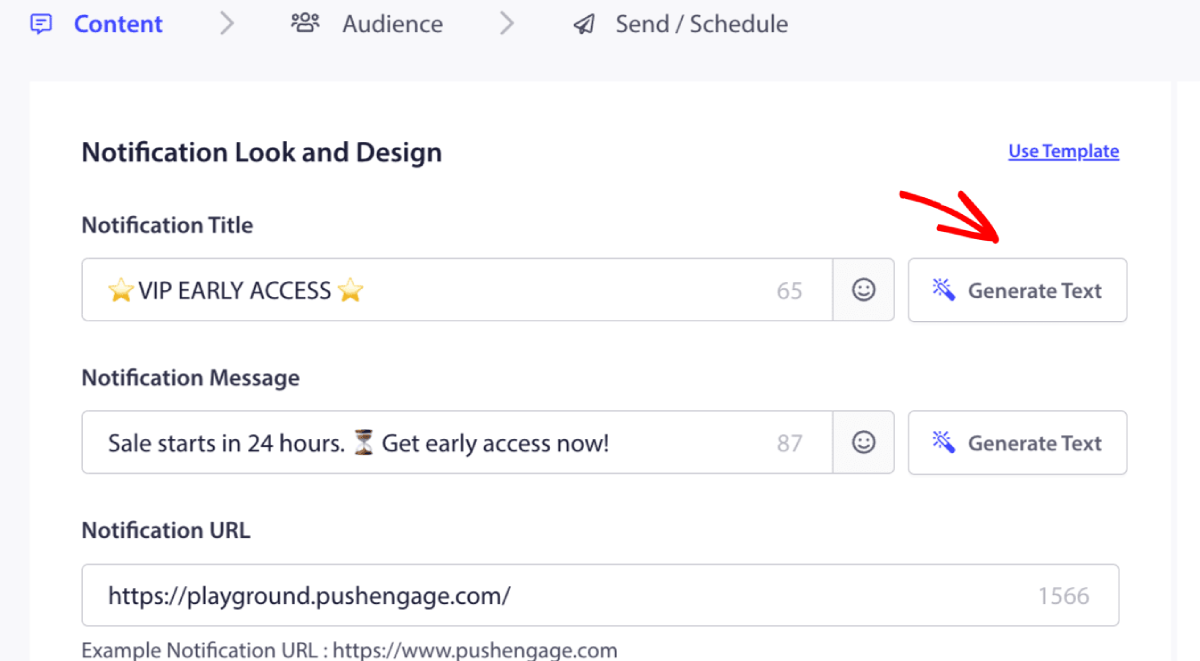
Web anlık bildirim kampanyası başlığı ve mesajı için küçük bir pencere açacaktır. Yapay zekanın istemi olarak görev yapacak herhangi bir anahtar kelime ekleyerek başlayabilirsiniz. İstem, istediğiniz kadar ayrıntılı olabilir.
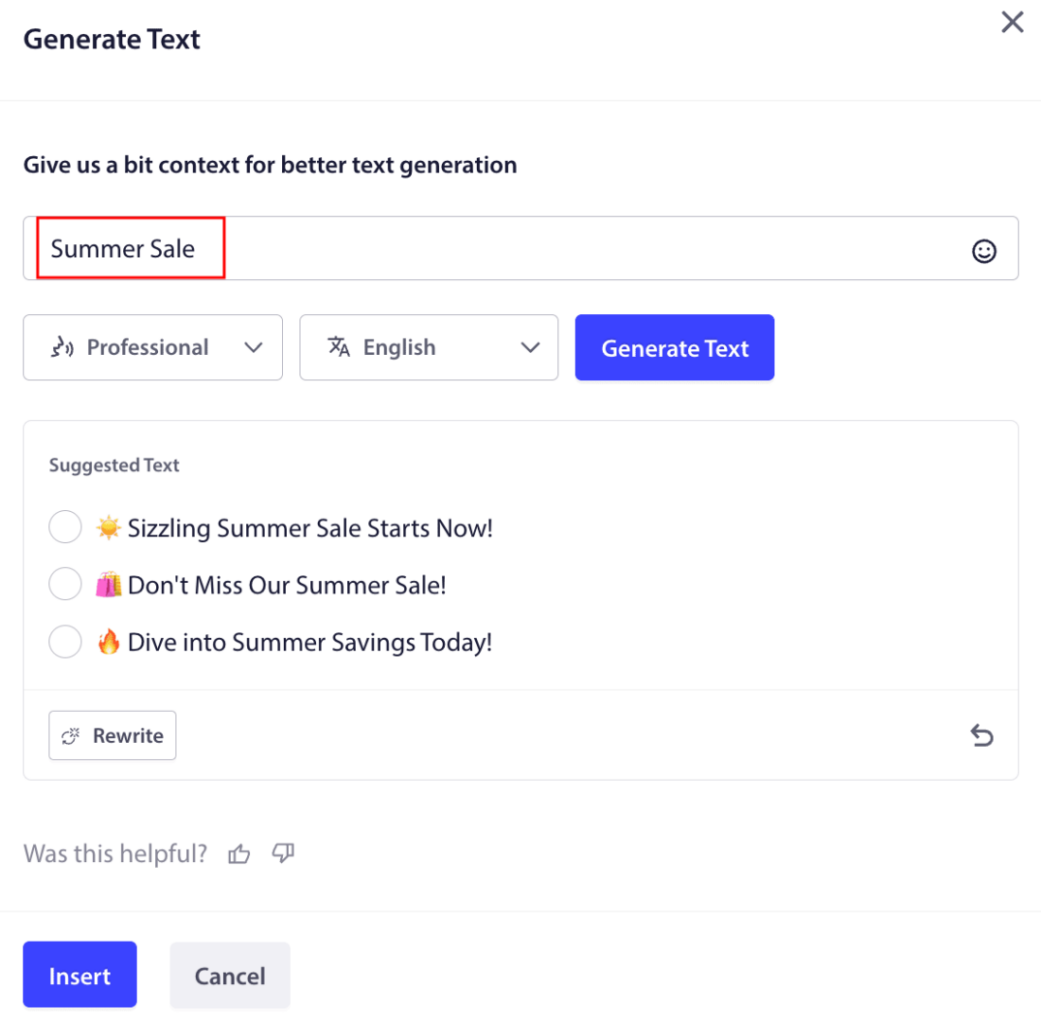
Web anlık bildirim kampanyası başlığı veya mesajı için tonu da ayarlayabilirsiniz. Sohbetin tonu, oluşturulacak kampanya türünü belirlemede çok önemlidir. Marka stilinizle rezonansa girdiğinden emin olun.
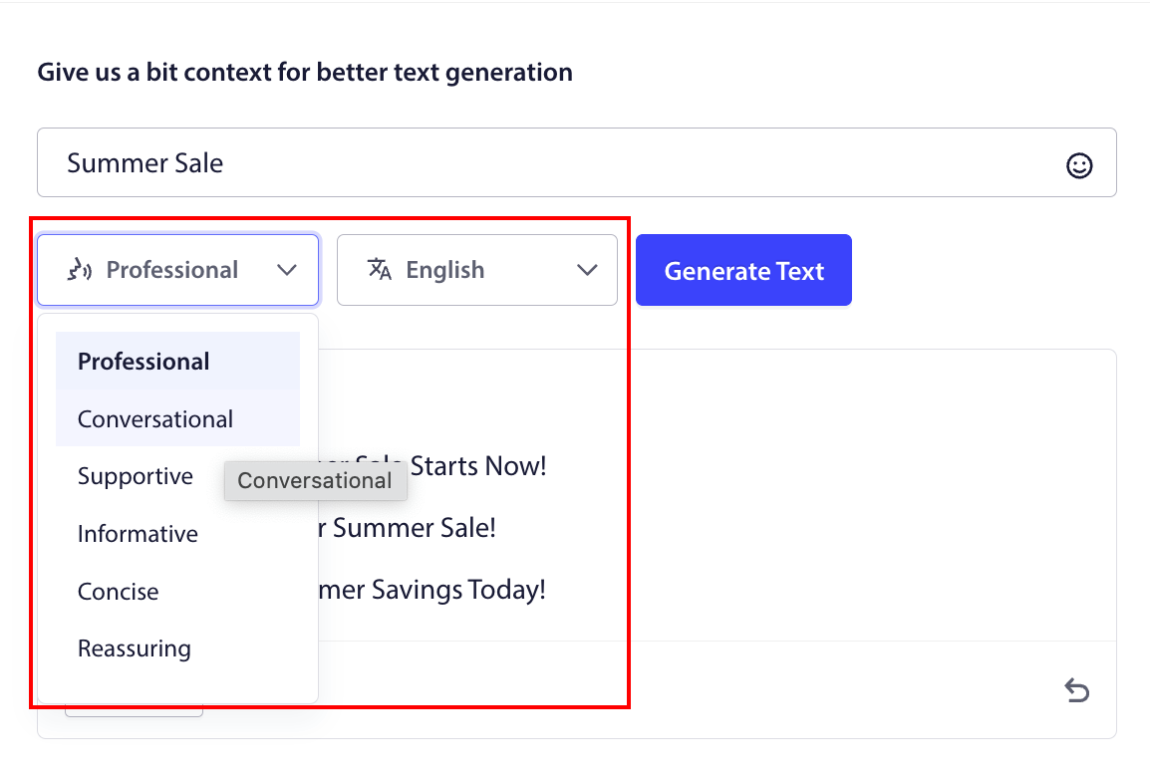
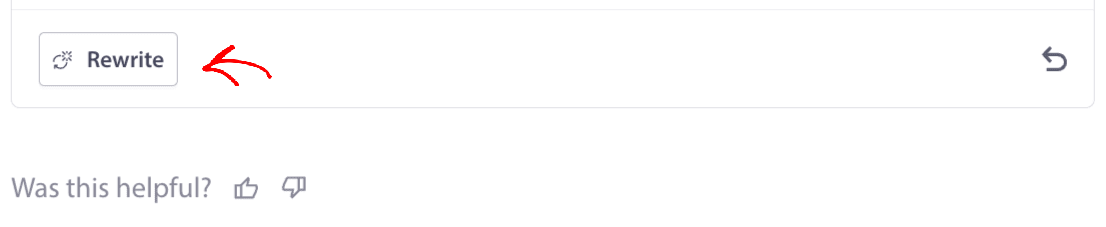
Ayarladıktan sonra, Metin Oluştur düğmesine tıklayabilirsiniz. Oluşturulan metinden memnun değil misiniz? Basitçe Yeniden Yaz düğmesine tıklayın!
Aslında HERHANGİ BİR DİLDE metin hazırlayabilirsiniz!
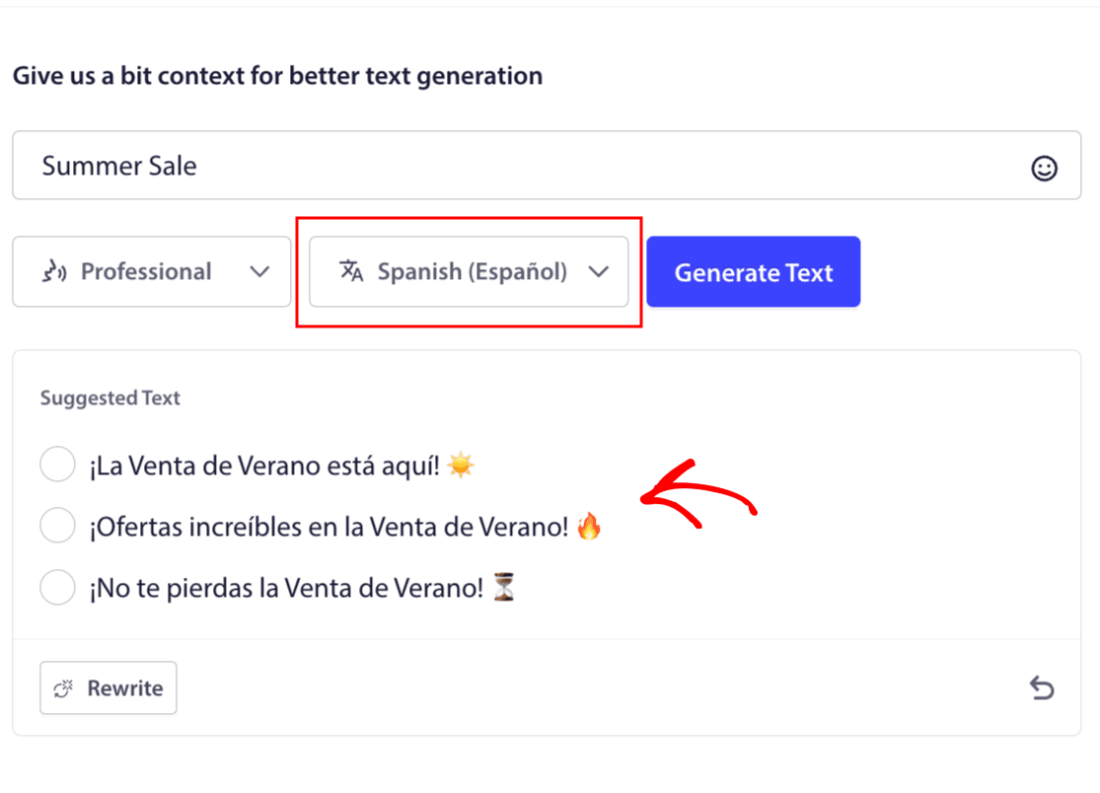
Bu düzeyde yerleşik çok dilli destek, başka hiçbir anlık bildirim yazılımında bulunmaz. Ve endişelenmeyin, çeviriler kusursuz! Bu nedenle, artık coğrafi olarak özel kampanyaları çok kolay bir şekilde gönderebilirsiniz. Doğru Kitle Grubu'nu seçin, dili seçin ve yapay zekamızın sihrini yapmasına izin verin.
Web Anlık Bildirim Kampanyası Nasıl Gönderilir
Artık web anlık bildirim kampanyasının ne olduğunu ve bunları göndermek için hangi hizmete ihtiyacınız olduğunu bildiğinize göre, farklı bildirimlerin nasıl gönderileceğini kontrol etme zamanı.
İşte web anlık bildirim kampanyaları gerçek hayatta şöyle görünür:
🛒 E-ticaret:
- Hoş geldin indirimi: “Abone olduğunuz için teşekkürler! İşte %10 indirim.”
- Fiyat düşüş uyarısı: “Beğendiğin ceket? Sonunda indirime girdi.”
- Ürün indirimleri: “Yeni ürünler geldi. İlk alan sen ol.”
📚 Yayıncılar ve Blog Yazarları:
- Yeni gönderi uyarısı: “Bu haftaki [Konu] özetini kaçırmayın.”
- Haftalık özet: “Cuma okuma listeniz burada.”
- Potansiyel müşteri mıknatısı teslimatı: “Ücretsiz rehberiniz burada. Ne düşündüğünüzü bize bildirin.”
💼 SaaS ve Araçlar:
- Özellik güncellemeleri: “Yeni bir şey başlattık. Ücretsiz deneyin.”
- Deneme hatırlatıcıları: “Ücretsiz deneme sürümünüz yarın sona eriyor.”
- Tercih edenler: “Hala düşünür müsünüz? Denemeniz için size %20 indirim sunuyoruz.”
Küçük başlayın. Bunları kopyalayın. Tonunuza uyacak şekilde düzenleyin. Tamamdır.
Pratik amaçlar için, burada bir API hizmeti kullanarak oluşturabileceğiniz özel tetiklenmiş kampanyalardan bahsetmiyoruz. Özel bildirimlerle daha çok ilgileniyorsanız, belgelerimize göz atmalısınız.
#1. Hoş Geldin Web Anlık Bildirim Kampanyası
Hoş geldin web anlık bildirim kampanyası, yeni bir aboneyi karşılamak için tasarlanmış basit bir anlık bildirimdir.
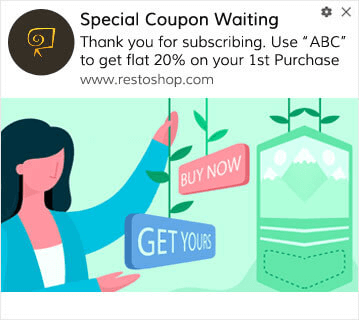
Ayrıca anlık bildirimlerinize abone olduğunuz için bir teklif veya hediye de gönderebilirsiniz. Bu, müşterilerimizin çoğuyla oldukça yaygındır. Hoş geldin anlık bildirimlerinizi şunlar için kullanabilirsiniz:
- Hoş Geldin Kuponu Paylaşın
- Premium Özellikler Sunun
- Ücretsiz Teslimat Gönder
- Ücretsiz Hediyeler Sun
- Abonenizi Bir Tanıtımla Dahil Edin
Şimdi, ilk hoş geldin anlık bildiriminizi PushEngage kullanarak kuralım.
PushEngage'de Hoş Geldin Bildirimlerini Nasıl Etkinleştireceğiniz aşağıdadır. PushEngage kontrol paneline gidin ve Kampanya » Otomatik Yanıtlayıcılar bölümüne gidin ve Yeni Otomatik Yanıtlayıcı Oluştur'a tıklayın:

Ardından, kampanyanıza bir ad verin (Hoş Geldin Drip gibi bir şey öneririz) ve Content altında, “Kullanıcı abone olduktan hemen sonra bildirim gönder“ seçeneğini seçin):

Bu noktada, bildiriminizin içeriğini düzenlemek için bildirim yanındaki oka tıklayabilirsiniz. PushEngage ile Premium veya Enterprise planınız varsa, bir dizi otomatik hoş geldin mesajı oluşturmak için birden fazla bildirim ekleyebileceksiniz. Sadece Add New Notification'a tıklayın ve içeriği düzenleyin.
İşiniz bittiğinde, Drip Ayarları'na tıklayın ve karşılama kampanyasını tüm abonelere gönderme seçeneğini belirleyin:

Ardından, anlık bildirimleri izlemek için kendi UTM parametrelerinizi ayarlamak üzere aşağı kaydırın:
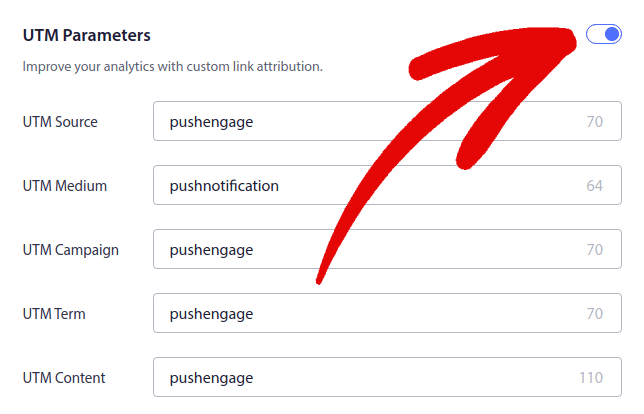
Ve işiniz bittiğinde, yukarı kaydırın ve Otomatik Yanıtlayıcıyı Etkinleştir düğmesine tıklayın:

Artık hoş geldin web anlık bildirim kampanyası kurmanın neden önemli olduğunu biliyorsunuz. Nasıl kuracağınızı da biliyorsunuz. Yeni aboneleri yeniden etkilemek için hoş geldin anlık bildirimlerini etkinleştirin veya ilham almak için web sitesi karşılama mesajları hakkındaki bu makaleye göz atın.
#2. Terk Edilmiş Sepet Web Anlık Bildirim Kampanyası
Alışveriş sepeti terk etme, potansiyel bir müşterinin alışveriş sepetine bir ürün ekleyip ödeme işlemini tamamlamadığı zaman meydana gelir.
İşiniz, sepet terk etmeyi mümkün olduğunca azaltmaktır.
Kaybettiğiniz satışları geri kazanmanın bir yolu, sepet terk etme web anlık bildirim kampanyası kullanmaktır. Sepet terk etme kurtarma kampanyaları, terk edilmiş sepete sahip aboneleri hedefler ve onlara takip, hatırlatma, teklif, kupon ve indirim gönderir.
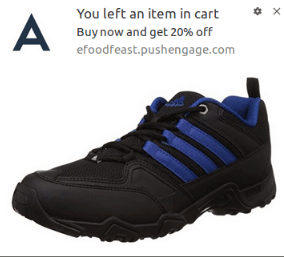
Basit bir fikir: Mümkün olduğunca çok insanı bir şeyler satın almaya ikna edin.
Sepet terk etme anlık bildirimleri, gelirleriniz üzerinde çok gerçek bir etkiye sahiptir. Örneğin, WickedWeasel, sepet terk etme anlık bildirim kampanyasından haftada 2.000 ila 4.000 $ ek satış elde ediyor.
Şimdi, ilk sepet terk etme kampanyamızı PushEngage ile kuralım.
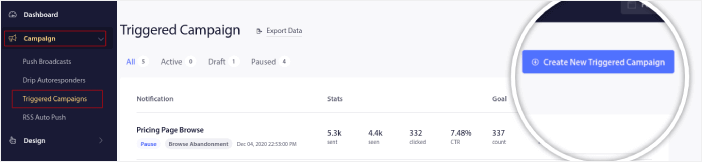
PushEngage kontrol paneline gidin ve Kampanya » Tetiklenen Kampanyalar bölümüne gidin ve Yeni Tetiklenen Kampanya Oluştur'a tıklayın:
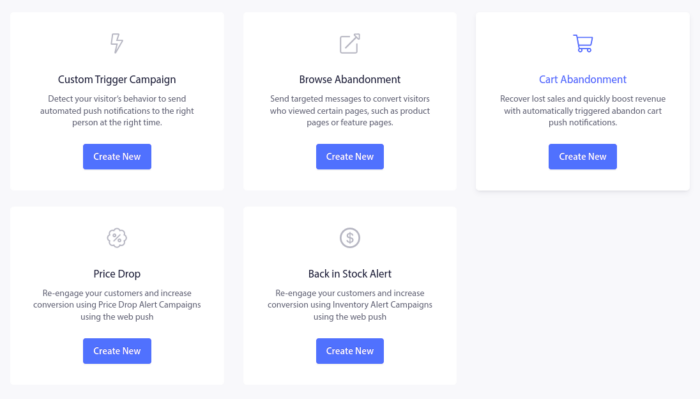
Ardından, Sepet Terk Etme şablonunu seçin ve Yeni Oluştur'a tıklayın:
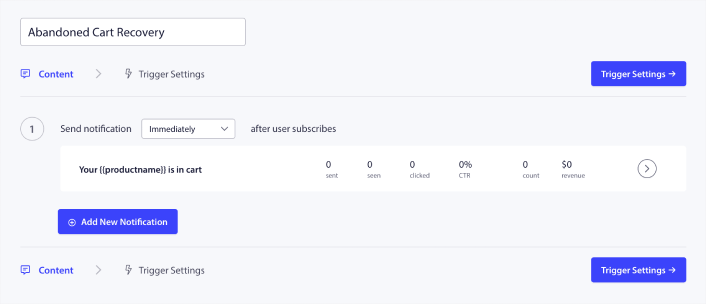
Ve terk edilmiş sepet otomatik yanıtlayıcısını tasarlamaya başlayabilirsiniz. İçerik sekmesi altında bir dizi push bildirimi oluşturabilirsiniz:
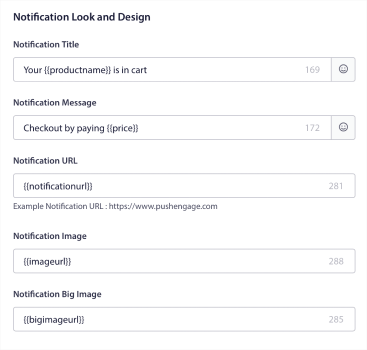
Bir bildirimi düzenlemek için yanındaki ok simgesine tıklamanız yeterlidir ve anlık bildirimi özelleştirebilirsiniz:
Daha fazla eğitim için terk edilmiş sepet push bildirimlerinin nasıl kurulacağına dair bu makaleye göz atın.
#3. Göz Atma Terk Etme Web Anlık Bildirim Kampanyaları
Göz atma terk etme tam olarak adından da anlaşılacağı gibi. Bir web sitesi ziyaretçisinin web sitenizde gezinirken aniden ayrılmaya karar vermesidir. Bu olaylar diğer satıcılar tarafından huni terk etme olarak da bilinir.
Göz atma terk etme, neredeyse her sektörde çok yaygın bir durumdur.
Ve azaltması veya kontrol etmesi gerçekten zordur çünkü rastgele bir kullanıcıyı web sitenizde kalmaya teşvik etmenin bir yolu yoktur. Göz atma terk etme kampanyalarının bu kadar güçlü olmasının nedeni budur.
İşte bir yayıncı için göz atma terk etme anlık bildirimlerine bir örnek:
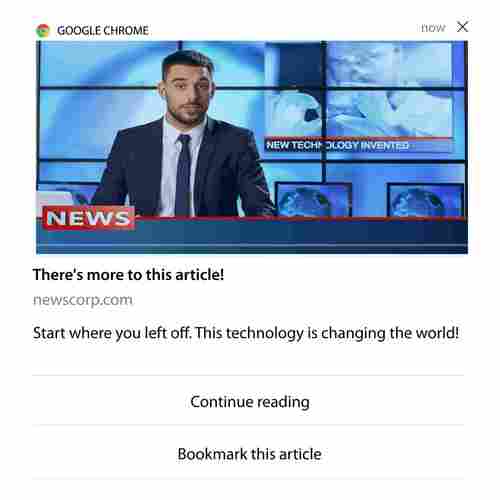
PushEngage'ın etkileyici yanı, hemen hemen her sektör için kampanyalar ayarlayabilmenizdir. Bu nedenle, SaaS ve seyahat web siteleri için de göz atma terk etme anlık bildirimleri gönderebilirsiniz.
Peki, göz atma terk etme kampanyalarını nasıl ayarlarsınız?
Sepet terk etme işleminde, anlık bildirimlerinizi tetiklemek için çok net bir parametre vardır. Göz atma terk etme için şu gibi parametreleri göz önünde bulundurabilirsiniz:
- Ürünü İstek Listesine ekledi
- Aynı ürüne X kereden fazla baktı
- Aynı kategoride X'ten fazla ürün inceledi
- Belirli bir ürün için siteyi arama
- Ayrılmadan önce sitede en az X dakika kaldı
Bir e-ticaret sitesi için bu kampanyanın arkasındaki fikir, aboneyi ürünü sepetine eklemeye ikna etmektir. Yayıncılar için, okudukları makaleye bir tıklama veya indirme olabilir.
PushEngage kontrol paneline tekrar gidin ve yeni bir tetiklenmiş kampanya oluşturmak için Kampanya » Tetiklenmiş Kampanyalar bölümüne gidin:

Ardından, Yeni Oluştur düğmesine tıklayarak yeni bir Göz Atma Terk Etme kampanyası oluşturun:

Ardından, her bildirim arasındaki gecikmeyle birlikte tüm push bildirim dizinizi ayarlayabileceksiniz:
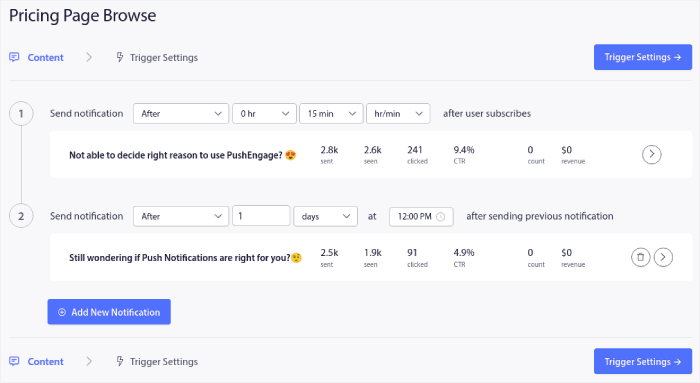
Push bildirimlerine yeni başlıyorsanız, push bildirim en iyi uygulamaları hakkındaki makalemize göz atmalısınız. Push bildirim içeriğinizden memnun kaldığınızda, Tetikleyici Ayarları'na tıklayın. Göz atma terk etme kampanyası için koşulların diziye önceden yapılandırıldığını göreceksiniz.
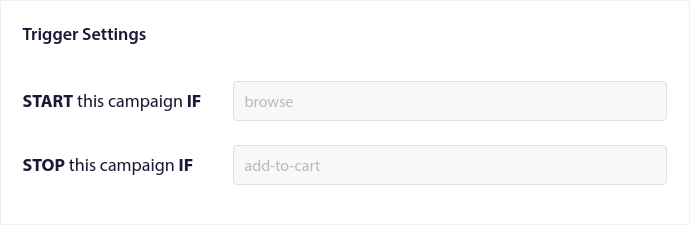
Göz atma terk etme kampanyasını sitenize yerleştirmek için gereken kod parçasını almak üzere Entegrasyon Kodu düğmesine tıklayın.
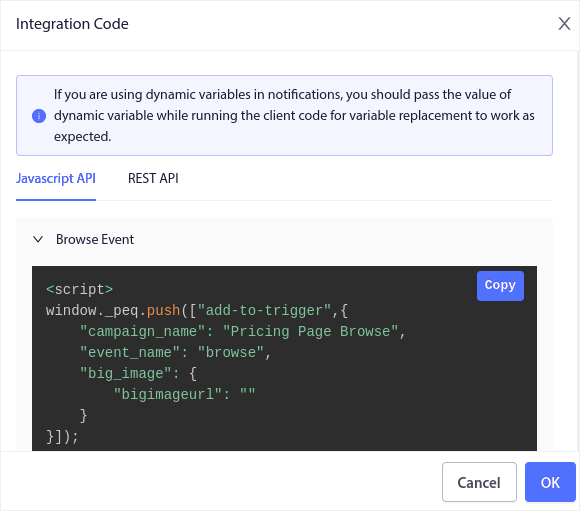
Ardından, kodu kopyalayın ve sitenize yapıştırın. Bu kodu izlemek istediğiniz sayfanın HTML <head> bölümüne yapıştırmak isteyeceksiniz. Son olarak, Tetiklenmiş Kampanyayı Etkinleştir düğmesine tıklayın:
Ve işte bu kadar!
#4. RSS Beslemesi Web Anlık Bildirim Kampanyası
RSS Otomatik Anlık Bildirim, bildirimlerinizi RSS aracılığıyla otomatikleştirmenizi sağlar.
PushEngage, RSS beslemenize eklenen yeni bir gönderi için her 10 dakikada bir kontrol eder. Yeni bir gönderi bulunursa, PushEngage bunu bir anlık bildirime dönüştürür ve tüm abonelerinize gönderir. En iyi yanı, tamamen otomatik olmasıdır.
RSS Besleme kampanyaları yayıncılar ve haber siteleri için mükemmeldir:
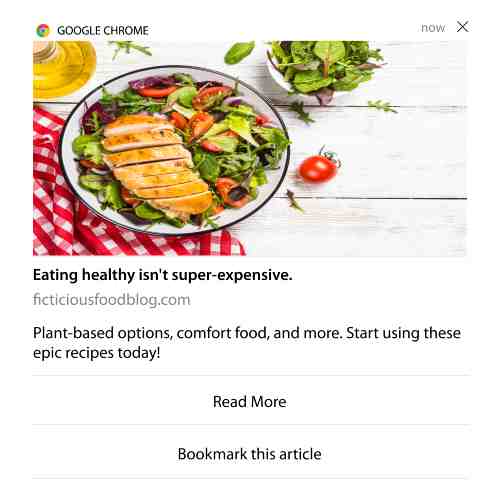
Büyük bir yayıncıysanız ve 30 dakikada birden fazla gönderi yayınlıyorsanız, PushEngage 2 gönderi bildirimi arasında 5 dakikalık bir gecikme tutar.
Daha fazla ilerlemeden önce, daha epik ipuçları ve püf noktaları için RSS akışlarının nasıl kullanılacağı hakkındaki bu makaleye göz atmalısınız.
Şimdi, PushEngage'de bir RSS beslemesi web anlık bildirim kampanyası kuralım.
Yeni Bir RSS Web Anlık Bildirim Kampanyası Oluşturun
PushEngage'i sitenize kurduktan sonra, PushEngage kontrol panelinize gidin ve Kampanya » RSS Otomatik İtme bölümüne gidin ve Yeni Kampanya Oluştur'a tıklayın:
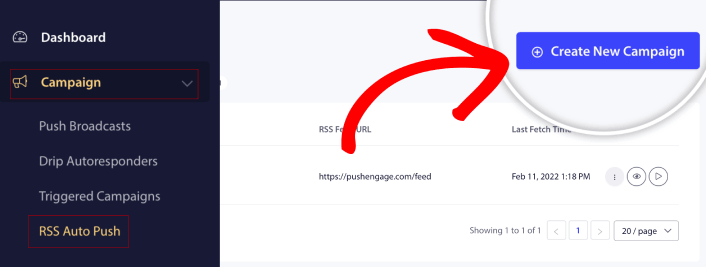
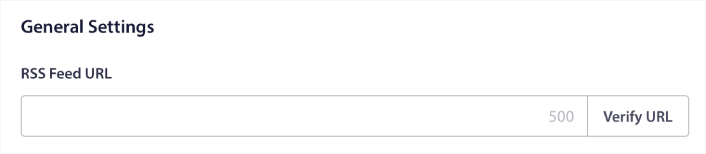
Bu, yepyeni bir RSS web anlık bildirim kampanyası oluşturacaktır. PushEngage'de birden fazla RSS beslemesi kampanyası kurabilirsiniz. Kampanyanıza açıklayıcı bir ad vererek başlayın. Ardından, RSS beslemenizin URL'sini yapıştırın:
RSS Bildirim Ayarlarını Yapılandırın
Ardından, Kampanya Sıklığı'nı ayarlamak isteyeceksiniz:
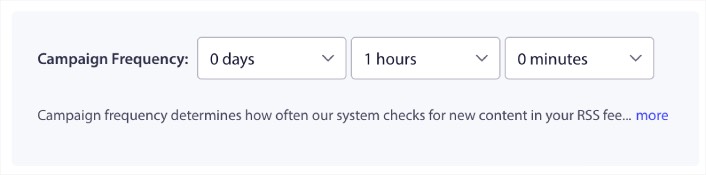
Kampanya Sıklığı, RSS beslemesi web anlık bildirim kampanyasının, otomatik bir anlık bildirim göndermek için blogunuzdaki yeni içeriği ne sıklıkla aradığıdır. Minimum değer 15 dakikadır ve maksimum değer 7 gündür.
Haber ajansı değilseniz, her 2 günde bir tanıtılacak içerik aramanızı öneririz. Haber ajansları için bunu 15 dakikada bir tutmalısınız. PushEngage'ın yalnızca RSS besleme kampanyasını kurup yayınladıktan sonra yeni içerik arayacağını unutmayın.
Tanıtılacak Gönderileri Seçin
Hangi gönderilerin tanıtılacağını seçebilirsiniz. Yalnızca en son öğe veya Tüm öğeler arasında seçim yapabilirsiniz. RSS anlık bildirimlerini yalnızca en son öğeyi seçecek şekilde ayarlarsanız, PushEngage yalnızca en son gönderiyi gönderir:
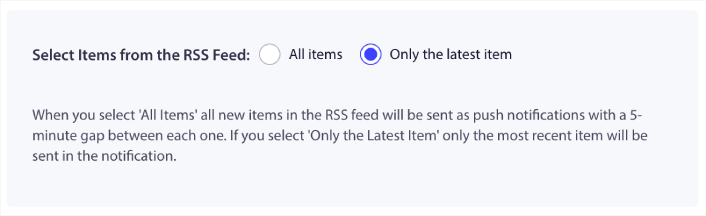
Veya, Tüm öğeler seçeneklerini seçebilirsiniz. Bu durumda, kampanya sitenizdeki tüm gönderileri seçecek ve aralarında 5 dakikalık bir boşlukla her biri için bir web anlık bildirim kampanyası gönderecektir.
Bir RSS Anlık Bildirim Simgesi Ayarlayın
Sizin anlık bildirim simgeniz, RSS anlık bildirimlerinizde marka kimliğinizi oluşturur. Abonelerinizin bildirimin markanızdan olduğunu anında bilmeleri için marka işaretinizi kullanmanızı öneririz.
Burada iki seçeneğiniz var. Bildirim simgesini manuel olarak yükleyebilirsiniz:
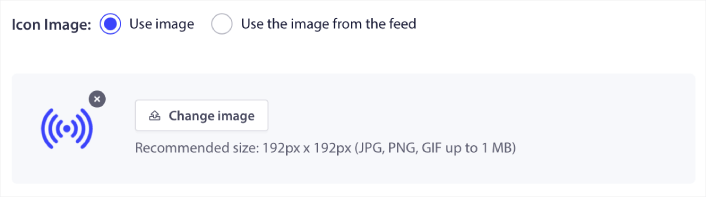
Ve bu gerçekten basittir. Sadece Görüntüyü Değiştir'e tıklayın ve bildirim simgenizi yükleyin. Veya, RSS beslemenizden alabilirsiniz:
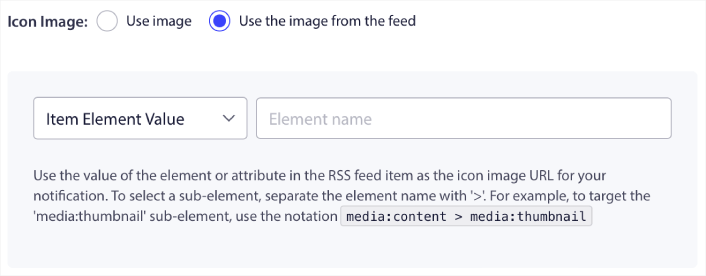
Bildirim simgenizi beslemeden dinamik olarak seçmek için öğe öğesini veya bir öğe içindeki özniteliği seçebilirsiniz. Tipik olarak, çoğu RSS beslemesi, media:content öğe öğesi içindeki site simgesini tutacaktır. Daha da spesifik olarak, genellikle media:content öğesinin media:thumbnail özniteliği içindedir.
Öğeyi hedeflemek için, Öğe Değeri seçeneğini seçip media:content olarak ayarlayabilirsiniz. Veya, Öğe Öznitelik Değeri seçeneğini seçip media:content > media:thumbnail olarak ayarlayabilirsiniz.
NOT: Bu seçeneği yalnızca XML'i nasıl okuyacağınızı biliyorsanız kullanmanızı öneririz. RSS akışları, örneklerimizdekiyle aynı XML etiketlerinde site simgesini içermeyebilir. Bu nedenle, RSS akışından bildirim simgesini nasıl alacağınızdan emin değilseniz, bunun yerine manuel olarak yüklemenizi öneririz.
RSS Beslemesi Bildirimleri İçin Büyük Resmi Seçin
Şimdi, RSS beslemesi web anlık bildirimleriniz için büyük resmi seçeceğiz. Yine, bunu yapmanın iki yolu var. PushEngage'in resmi otomatik olarak bulmasını sağlayabilirsiniz:

Veya, beslemeden hangi resmi istediğinizi manuel olarak seçebilirsiniz:
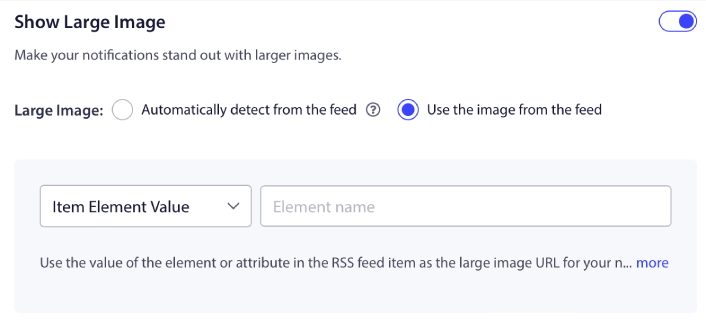
Bu, bildirim simgesini RSS beslemesinden seçmekle tamamen aynıdır. Resmi, onu içeren XML öğesinden seçebilir veya tercih ettiğiniz resmi içeren belirli özniteliği seçebilirsiniz.
NOT: Yalnızca XML'i nasıl okuyacağınızı biliyorsanız RSS beslemenizden bir URL seçmenizi öneririz. XML'i nasıl okuyacağınızdan emin değilseniz, PushEngage'in bildirimleriniz için en iyi resmi bulmasına izin vermek daha iyidir.
Web Anlık Bildirim Kampanyası Süresini Ayarlayın
Web anlık bildirim kampanyası süresi, bildirimin otomatik olarak silinmeden önce abonenizin bildirim çekmecesinde ne kadar süreyle kaldığıdır.
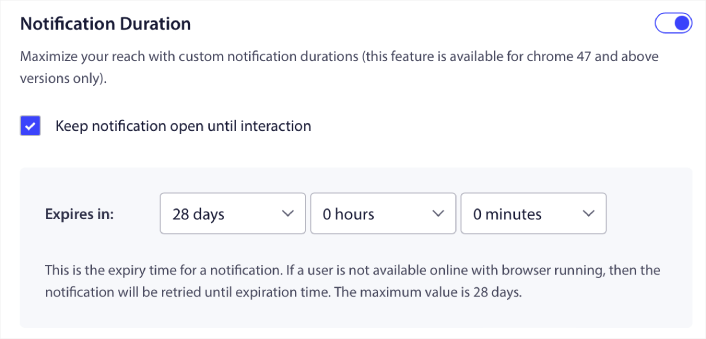
Abonelerinizi okunmamış bir sürü bildirimle bunaltmak istemiyorsanız, anlık bildirimlerin birkaç gün içinde sona ermesine izin vermek muhtemelen en iyisidir.
Yayın bildirimlerinin veya diğer otomatik web anlık bildirimlerinin aksine, RSS anlık bildirimlerini gerçekten zamanlayamazsınız. Bu nedenle, bildirim süresi dolmadan, aboneniz onunla etkileşime girene kadar bildirimi açık tutma seçeneğiniz her zaman vardır.
UTM Parametrelerini Ayarlayın
Neredeyse bitti. Anlık bildirimleri izlemek için kendi UTM parametrelerinizi ayarlamak üzere aşağı kaydırın:
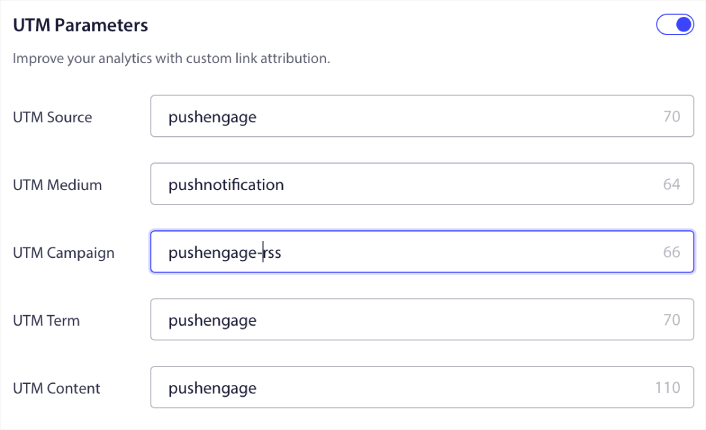
Bu şekilde, bu anlık bildirimlerden gelen trafiği Google Analytics'te kolayca atfedebilirsiniz.
Kitle Grubu Seç
Son olarak, RSS web anlık bildirim kampanyamızı göndermek için bir Kitle Grubu seçeceğiz. RSS beslemesi kampanyasını tüm abonelerinize gönderebilir veya Kitle Grupları oluşturarak RSS beslemenizden bile kişiselleştirilmiş anlık bildirimler gönderebilirsiniz.
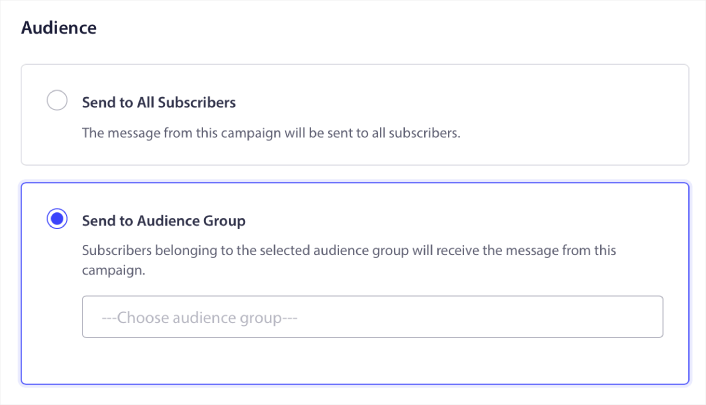
Ve hepsi bu kadar! Gerçekten hepsi bu kadar.
Artık yeni bir gönderi yayınladığınızda, seçilen Kitle Grubundaki tüm anlık bildirim aboneleri, yeni içeriğiniz hakkında otomatik olarak bir anlık bildirim alacaktır.
İşte bu kadar! Hazırsınız. Yeni bir gönderi yayınladığınızda, bu otomatik olarak tüm abonelerinize gönderilecektir.
#5. Otomatik Yeniden Etkileşim Bildirimleri
Bir süredir içeriğinizle etkileşim kurmamış aboneler için otomatik yeniden etkileşim kampanyaları ayarlayabilirsiniz.
Ama bunu neden ilk etapta yapasınız ki?
Nasıl ama:
- Yeni müşteri edinmenin maliyeti, mevcut müşterileri elde tutma maliyetinden 5 kat daha fazladır
- Kişisel tercihlerini zaten anladığımız bilinen bir kitleyi hedeflemek ve yeniden pazarlamak kolaydır.
- Uzun vadede, etkileşim kuran müşteriler, markanızla zar zor bağlantı kuran birinden daha fazla iş getirir.
Ofertia, kişiselleştirilmiş teklifler sunan anında iletme bildirimlerini kullanarak tekrar eden kullanıcılarını %39 artırmayı başardı. Onlar da yalnız değiller. Bunu bir e-ticaret web sitesi için büyük bir etkiyle kullanabilirsiniz:
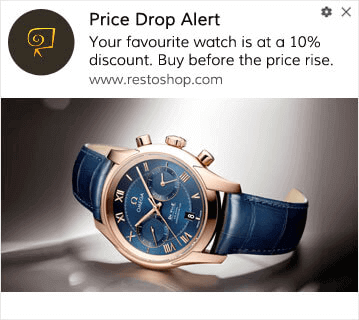
Abonelerinizi yeniden etkileşim kurmanın birçok yolu vardır.
Şöyle düşünün:
- Bir kullanıcı sitenizi ziyaret eder. Hafif bir izin isteği görür. "İzin Ver"e tıklar.
- Anında indirim veya bir sonraki adımı içeren bir hoş geldin bildirimi alır.
- Sitenizden ayrılır…
- Gün içinde, bir hatırlatma görür: "Hala düşünüyor musun?"
- Tıklar, geri gelir ve satın alır.
Bu, temel bir anlık bildirim hunisidir — ve canlıya alındıktan sonra siz hiçbir şey yapmadınız.
Şimdi, segmentasyonu ve otomatik kampanyaları katmanladığınızı hayal edin. İşte o zaman işler eğlenceli hale gelir. Dinamik segmentleri kullanarak aboneleriniz hakkında çok şey öğrenebilir ve onlara sevecekleri kişiselleştirilmiş içerikler gönderebilirsiniz.
PushEngage kontrol panelinizde, Segmentasyon'a gidin ve yeni bir Segment oluşturun:
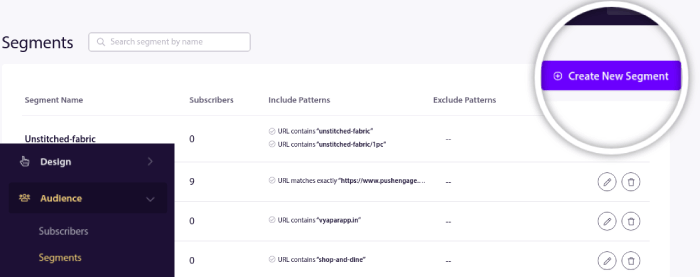
Bu, davranışı ve göz atma kalıplarını temel alan segmentler oluşturmanıza olanak tanır. Belirli segmentlerin ne zaman otomatik push bildirimleri alacağını belirleyen bir VE/VEYA işlemleri dizisi kurabilirsiniz.
Kullanıcılarınız push bildirimlerine abone olduğunda bile onları segmentlere ayırabilirsiniz. Tasarım » Açılır Modallar bölümüne gidin ve Segmentli Büyük Safari Stili'ni seçin.
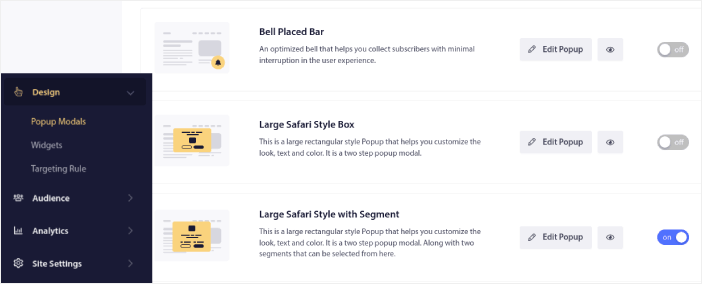
Kullanıcılarınızı segmentlere ayırmak için daha da fazla yol gerekirse, PushEngage Javascript API'yi kullanarak kullanıcı eylemlerine göre özel segmentler oluşturabilirsiniz.
6. Sayfa Ziyareti Web Anlık Bildirim Kampanyası
Sayfa ziyareti tetikleyicileri, anında iletme bildirimi segmentlerinin bir uzantısıdır. Tek yapmanız gereken, bir web ziyaretçisinin belirli bir ifade veya desene sahip bir URL'yi taraması üzerine bir segment oluşturmaktır.
Ardından, sadece Kitle » Segmentler bölümüne gidin ve kitlenizi belirli bir segmente ayarlayın:
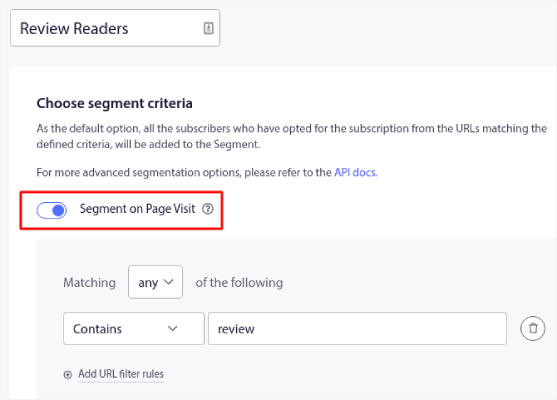
Bu, gerçekten kişiselleştirilmiş ve otomatik anında iletme bildirimleri oluşturmanıza olanak tanır.
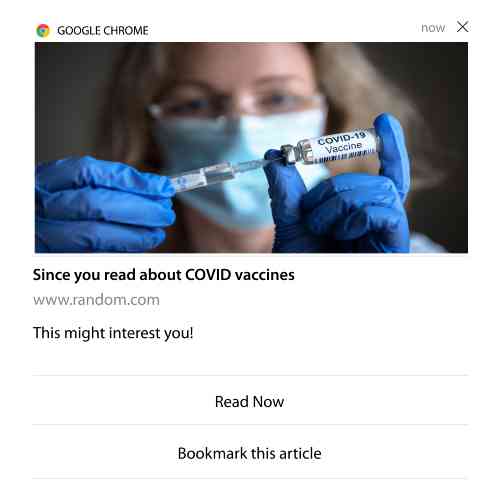
Ve en iyi yanı, PushEngage'de birkaç dakika içinde özel segmentler oluşturabilmenizdir.
#7. Otomatik Tıklanma Bildirimleri
PushEngage kullanarak, abonelerinizin gönderilen bir bildirime tıkladığında tetiklenen anında iletme bildirimleri oluşturamazsınız.
Ancak çok akıllı bir geçici çözüm var.
Belirli bir bildirimin yönlendirdiği URL'ye göre bir segment oluşturabilirsiniz. Birisi bu URL'ye her indiğinde, segmente eklenir ve hedeflenmiş bildirimler göndermek için bu segmenti kullanabilirsiniz.
Push bildirim tıklama kampanyaları, temel olarak damla kampanyaları için standart kitle segmentasyonunun bir uzantısıdır.
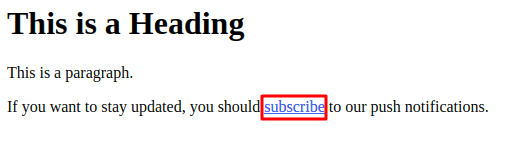
Tıklayarak abone olma düğmesi oluşturma hakkındaki bu eğitime göz atın.
#8. Tekrarlayan Otomatik Anlık Bildirimler
Şöyle bir şey hayal edin…
- Haftalık bir bit pazarı indirimi;
- Veya hafta sonu indirimi;
- Veya stok tasfiye indirimi;
- Veya aylık flaş indirim.
Her etkinlik için anlık bildirimleri manuel olarak oluşturmak ne kadar zahmetli olurdu?
Neyse ki, PushEngage ile tekrarlayan bildirimler ayarlayabilirsiniz.
Bildirimleri tekrarla, yinelenen bir etkinlik için zamanlanmış ve otomatikleştirilmiş anlık bildirimlerdir. Bunları bir kez ayarlayabilir, bir program belirleyebilir ve işiniz biter.
Bu, MyDeal'in anlık bildirimleri kullandığı yollardan sadece biri. Tam vaka çalışmasını okuduğunuzdan emin olun!
Kampanya bölümüne gidin ve PushEngage kontrol panelinizde otomatik bir bildirim ekleyin. Ardından, zamanlama bölümüne gidin ve Gönder/Zamanla sekmesine tıklayın:

Zamanlamayı ayarlayın ve işiniz bitti!
#9. Abone Saat Dilimi Bildirimleri
Abonenin saat dilimi bildirimleri tam olarak adlarından anlaşıldığı gibidir. Abonelerinize kendi saat dilimlerinde otomatik anlık bildirimler gönderirsiniz.
Bu neden bu kadar büyük bir anlaşma?
Abone saat dilimi bildirimleri daha yüksek açılma oranlarına sahiptir. Tipik olarak, aboneniz çevrimdışı olsa bile herhangi bir anlık bildirim teslim edilir. Bu bildirimler birikir ve aboneniz nihayet çevrimiçi olduğunda göz ardı edilir.
Diğer yandan, bir abone saat dilimi web anlık bildirim kampanyası, abonenizin çevrimiçi olma olasılığının en yüksek olduğu zaman gönderilecektir.
İpucu: Abonelerinize anlık bildirim göndermek için en uygun zamanı bulmak üzere A/B testi kullanın.
Abone saat dilimi bildirimleri çok daha kişisel hissettirir. Ve akıllıysanız, bildirimlerinizi daha da kişiselleştirmek için bunu coğrafi konum verileriyle birleştirebilirsiniz. Bu tam olarak Phooto'nun yerel dilleri kullanarak açılma oranlarını artırdığı şeydir.
Şimdi PushEngage'de abone saat dilimi bildirimlerini ayarlayalım.
Yeni bir bildirim oluşturduğunuzda, zamanlama seçeneklerine gidin ve Bildirimleri Abone Saat Diliminde Gönder etiketli onay kutusuna tıklayın:
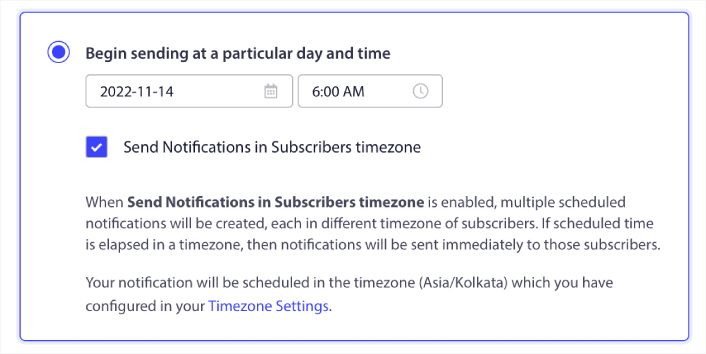
Hepsi bu kadar! Damla kampanyalarınız için de aynısını yapmanız gerekecek, ancak sonuçlar her kampanya için bir düğmeye tıklama zahmetine değecektir.
Haftada 1-2 mesajla başlayın. Ne işe yaradığını gördüğünüzde sayıyı artırın.
Başlamak için basit bir takvim:
- 1. Hafta: Hoş geldiniz mesajı + 1 ürün veya içerik gönderimi
- 2. Hafta: Hatırlatma veya indirim takibi
- 3. Hafta: Yeni ürün duyurusu, blog yazısı veya özellik vurgusu
Kullanıcılar tıklamayı bırakırsa, geri çekilin. Tıklamaya devam ederlerse? İkiye katlayın.
İpucu: Son iki taktik tamamen anlık bildirimleri zamanlamakla ilgiliydi. Ancak otomatik anlık bildirimleri zamanlamanın tek yolları bunlar değil. Daha epik püf noktaları için anlık bildirimler nasıl zamanlanır hakkındaki makalemize göz atın.
#10. E-posta Opt-in Bildirimleri
E-posta pazarlaması, potansiyel müşteriler oluşturmanın ve beslemenin uzun zamandır en iyi yolu olmuştur. Otomatik anlık bildirimlerin en iyi yanı, onlarla daha fazla e-posta abonesi oluşturabilmenizdir.
Kurulumu gerçekten basittir ve e-posta ile web anlık bildirim kampanyalarının bir kombinasyonunu kullanmak, yalnızca birini kullanmaktan çok daha etkilidir.
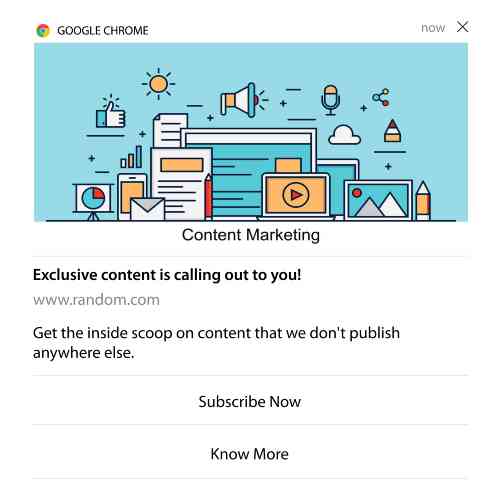
Tek yapmanız gereken, kullanıcıdan e-posta bildirimlerini kabul etmesini isteyen bir tetikleyici bildirim göndermektir.
Özel bir harekete geçirici mesaj (CTA) düğmesi oluşturun ve düğmenin URL'si olarak bir abonelik bağlantısı ekleyin. Gerçekten ihtiyacınız olan tek şey bu. Bir abonelik düğmesi oluşturmayı bilmiyorsanız, takip edin.
Herhangi bir bildirimde aşağı kaydırabilir ve Çoklu Eylem düğmelerini açabilirsiniz:
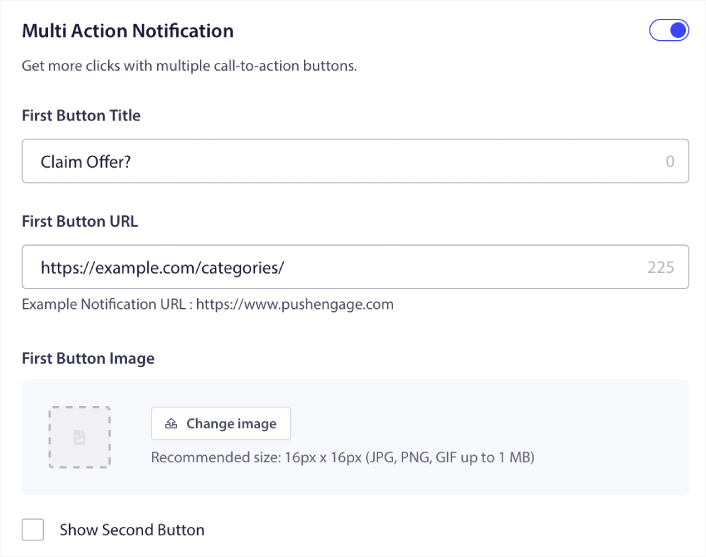
URL, bir e-posta kayıt formuna bağlantı olmalıdır. Bunu Drip gibi hemen hemen her e-posta hizmet sağlayıcısını kullanarak oluşturabilirsiniz. Tek yapmanız gereken, kayıt formunun paylaşım seçeneklerine tıklamak ve bu URL'yi kopyalamaktır. Ardından, anlık bildirim düğmenizin düğme URL'sine yapıştırın.
Daha fazla ayrıntı için çoklu eylem düğmeleri hakkındaki eğitimimize göz atın. Kullanıcılarınızdan e-posta bildirimlerinize abone olmanızı istediğinizi netleştirmek için düğmenize bir e-posta simgesi bile ekleyebilirsiniz:
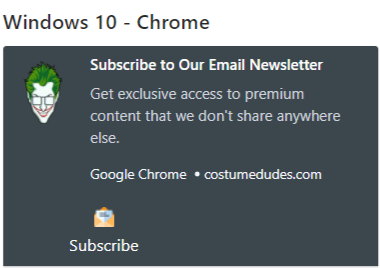
Profesyonel İpucu: Aynı fikri YouTube kanalınızı büyütmek için de kullanabilirsiniz. Kanal URL'nizin sonuna sadece ‘?sub_confirmation=1’ ekleyin ve anlık bildirim düğme URL'nize yapıştırın.
Her biri anlık bildiriminizdeki abone ol düğmesine tıkladığında, YouTube kanalınıza yönlendirilecek ve abone olmanız istenecektir.
Kullanabileceğiniz Segmentasyon Fikirleri
Segmentler, hedeflenmiş anlık bildirim kampanyaları göndermenin gerçekten harika bir yoludur. Ve bu, anlık bildirim pazarlama stratejinizin büyük bir parçası olmalıdır. Peki nasıl başlarsınız? Ne tür segmentler oluşturmalısınız?
Başlangıç olarak, yalnızca tek bir tür segment oluşturmaya odaklanmamalısınız. En etkili olduğunu düşündüğümüz farklı segmentasyon türlerini size adım adım anlatacağız.
İşte kurulumuna değecek birkaç yüksek etkili segment:
- Etkileşimli alışveriş yapanlar: Geçen hafta 2+ bildirime tıklayan kişiler
- Sepeti terk edenler: Bir ürünü ziyaret edip satın almayan kişiler
- Kategori meraklıları: Belirli bir ürün kategorisini sürekli kontrol eden kullanıcılar (örneğin, "Spor Ayakkabı Severler")
- Coğrafi hedefli: Ülkeye veya şehre göre mesajları uyarlayın
Ne kadar spesifik olursanız, o kadar çok tıklama kazanırsınız. Eğer ileri düzey bir pazarlamacıysanız, farklı segmentasyon modelleriyle bir e-posta kampanyası için yapacağınız gibi segmentler oluşturmalısınız:
- Coğrafi segmentler
- Davranışsal segmentler
- Duruma dayalı segmentler
- Kültürel segmentler
- Demografik segmentler
- Psikografik segmentler
Dinamik segmentler, abonelerle gerçek insanlar gibi konuşmanızı sağlar… sadece trafik istatistikleri gibi değil.
Ve mesajlaşmanızı daha da kişiselleştirmek isterseniz, kitle gruplarını kullanabilirsiniz.
Anlık Bildirim Hedef Kitle Grubu Nasıl Oluşturulur
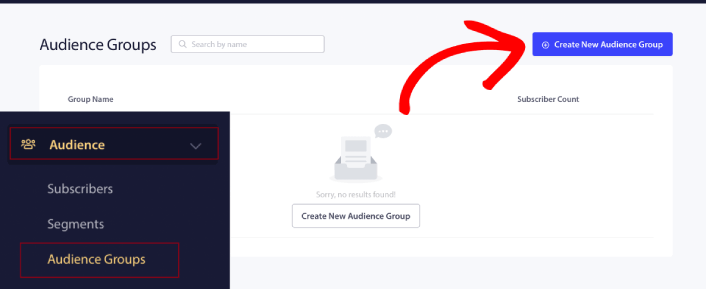
Başlamak için PushEngage kontrol panelinize gidin ve Kitleler » Kitle Grupları'na gidin ve Yeni Kitle Grubu Oluştur düğmesine tıklayın:
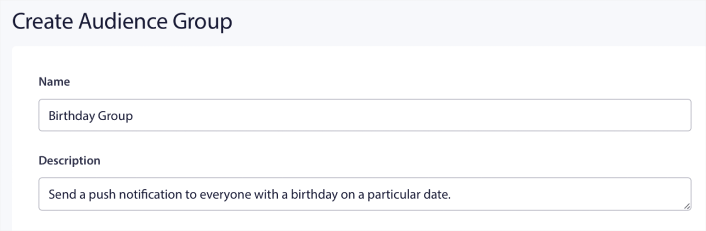
Hedefli anlık bildirim yayınları göndermek için Kitle Gruplarınızı kullanabilmeniz için, o grubu oluşturacak kurallarla bir Kitle Grubu oluşturmanız gerekecektir. Kitle Grubunuz için bir ad ve açıklama ile başlayabilirsiniz.
Bir Seçim Kriteri Oluşturun
Ardından, doğru kitleyi filtrelemek ve hedeflemek için bir seçim kriteri oluşturun:
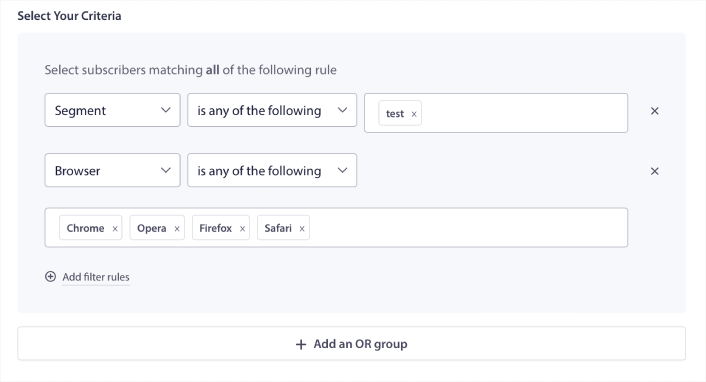
Tüm filtre kurallarına uyan aboneleri seçmek için Filtre kuralları ekle'ye tıklayabilir veya abonelerin seçim kriterlerinden en az birini karşıladığı bir filtre oluşturmak için VEYA grubu ekle'ye tıklayabilirsiniz.
Kullanıcı davranışı, anlık bildirim abonelerinizi hedeflemenin en temel yoludur. Daha önce de belirttiğimiz gibi, abone segmentleri genellikle benzer içerikleri gezinmeyi seven ziyaretçileri gruplandırır. Ancak aynı içeriği seven bu abone grubu içinde bile yapabileceğiniz küçük kişiselleştirmeler vardır.
Daha da önemlisi, onlara ortak, ilgili bir mesaj göndermek için birden fazla abone segmentini birleştirebilirsiniz.
Abone Segmentine Göre Filtrele
Henüz yapmadıysanız, anlık bildirim abonelerinizi segmentlere ayırmaya hemen başlamalısınız. Aksi takdirde, bu filtre çalışmaz. Ancak zaten segmentleriniz varsa, kitle grubunuzun temeli olarak birden fazla segment seçebilirsiniz.

Bundan sonra, hedeflemenizi iyileştirmek için diğer filtreleri ekleyebilirsiniz.
Abone Özelliğine Göre Filtrele
Öznitelikler çoğunlukla seri anlık bildirimler için kullanılırken, bunları anlık yayınlar için de kullanabilirsiniz. Şimdi, anlık bildirim öznitelikleri çoğunlukla e-ticaret siteleri için kullanışlıdır. Ancak bir Müşteri İlişkileri Yönetimi (CRM) aracınız varsa, kişiselleştirilmiş anlık bildirimler göndermek için de bunları kullanabilirsiniz.
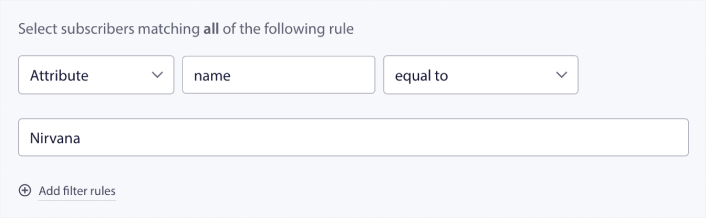
Özellikler, abone adları, doğum tarihleri, kişiselleştirilmiş pazarlama kampanyaları için CRM'inizde saklayacağınız diğer bilgiler gibi kişisel bilgileri içerebilir.
Abonenin Cihazına ve Tarayıcısına Göre Filtrele
Çoğu durumda, abonelerinizin mesajlarınızı nasıl aldığını bilmek çok önemlidir.
Michael Jackson hakkında gerçekten harika bir hikaye var. Bir şarkı kaydettiğinde, onu bir radyo üzerinden dinlerdi. Milyon dolarlık kayıt stüdyosunda üstün ses kalitesinde değil, çoğu dinleyicisinin daha sonra kullanacağı ucuz bir radyo üzerinden. Şarkı en ucuz cihazda bile kulağa hoş geliyorsa, şarkının yayınlanmasını onaylardı.
Hiç de şaşırtıcı değil ki Billie Jean 29 kez Platin oldu!
Anlık bildirimleriniz için durum farklı değil.
Abone Tarayıcısına Göre Filtrele
Farklı tarayıcıların farklı push bildirim karakter sınırları vardır. Bu nedenle, bir push yayını gönderirken bu sınırlara dikkat etmeniz gerekir. Harika olan şey, farklı tarayıcıları yeniden hedeflemek için farklı kitle grupları kaydedebilmenizdir. Her seferinde segment oluşturmanıza gerek yoktur.
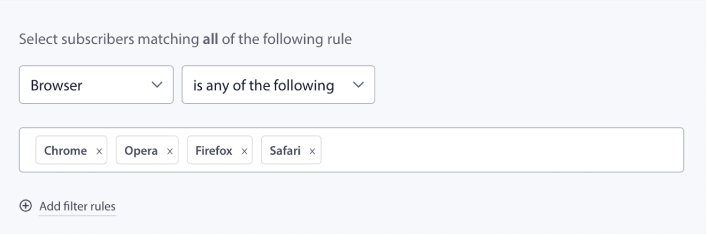
Abone Cihazına Göre Filtrele
iOS, Android ve Windows cihazlarına gönderebileceğiniz zengin push bildirimleri türlerinde bir fark vardır. Bu nedenle, gönderdiğiniz her kampanya tüm cihazlarda aynı görünmeyecektir. Aslında, birçok push bildirim türü tüm cihazlarda görünmeyecektir bile. Farklı cihazların farklı ekran boyutları da vardır. Bu nedenle, göndermeden önce push bildirimlerinizin nasıl görüneceğini optimize etmek isteyebilirsiniz.
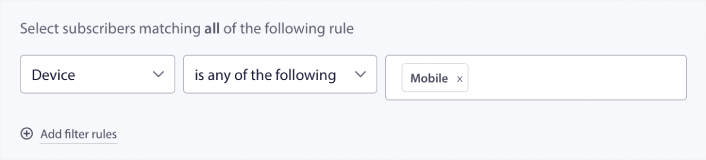
Ancak artık hedef kitlenizi cihazlarına göre filtreleyebildiğinize göre, bu artık bir sorun olmamalı.
Konuma Göre Nasıl Filtrelenir
Kampanyalarınızı daha fazla kişiselleştirmek için konuma göre de filtreleme yapabilirsiniz. Filtre, bir hedef kitle grubunu ülke, şehir ve eyalete göre seçmenize olanak tanır:
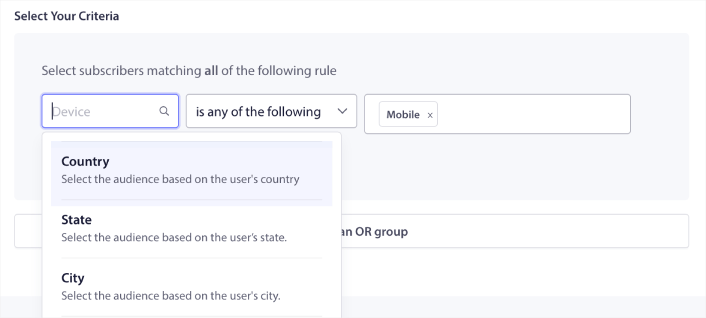
Phooto, yerel dillerde push bildirimleri göndermek için coğrafi konum kullanıyordu. Ve bu, etkileşim oranlarını hızla yükseltmelerine yardımcı oldu. Tam vaka çalışmasını okuyun.
Etkileşim Metriklerine Göre Filtreleme Nasıl Yapılır
Kitle Grupları'nın en iyi yanlarından biri, anlık bildirimler kullanarak yeniden hedefleme kampanyaları oluşturmanıza yardımcı olabilmesidir. Kitlenizi şunlara göre filtreleyebilirsiniz:
- Abonelik Tarihi
- Son Gönderim Tarihi
- Son Tıklama Tarihi
- Son Görüntülenme Tarihi
Bu metrikleri kullanmak, düşük etkileşim oranlarına sahip aboneleri yeniden hedeflemenize veya yüksek etkileşim oranlarına sahip abonelere satış yapmanıza yardımcı olabilir.
Veya, kitleyi şunlara göre filtreleyebilirsiniz:
- Toplam Gönderim Sayısı
- Toplam Görüntülenme Sayısı
- Toplam Tıklama Sayısı
Bu sayılar, sizden en az mesaj alan aboneleri bulmanıza yardımcı olabilir, böylece bildirimleri kişiselleştirmenin daha iyi yollarını bulabilirsiniz. Ayrıca anlık bildirimlerinizle en sık etkileşim kuran aboneleri de bulabilirsiniz.
Profesyonel İpucu: Abonelerinizle yeniden etkileşim kurmanın en iyi yollarını bulmak için iki veya daha fazla filtreyi birleştirin. Örneğin, yüksek Toplam Görüntülenme Sayısı ve yüksek Toplam Tıklama Sayısına sahip aboneler, bir süredir sizinle etkileşimde bulunan aboneler olacaktır. Bunlar, ödülü hak eden sadık abonelerdir.
Tanımlayıcılara Göre Filtreleme Nasıl Yapılır
Tanımlayıcılar, PushEngage'in abonelerinizi nasıl tanımladığıdır. PushEngage varsayılan olarak GDPR uyumlu olduğundan, yazılımımız aboneleriniz için hiçbir kişisel olarak tanımlanabilir veri saklamaz. Bunun yerine, her aboneye bir profil kimliği ve bir abone karması atarız.
Unutmayın, profil kimliklerini ve abone karmalarını çoğunlukla gelişmiş kampanyaların bir parçası olarak kullanacaksınız. Başka bir deyişle, bu tanımlayıcıları kullanan özel kampanyalar oluşturmak için PushEngage API'sini kullanmanız gerekecektir.
Tanımlayıcılar, bunun gibi işlemsel anlık bildirimler göndermek için harikadır:
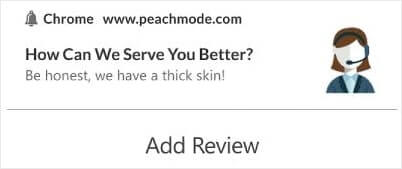
Özel e-ticaret push bildirimleri için harikadırlar. Bu nedenle, bunları gösterge tablosundan push yayınlarını test etmek dışında herhangi bir şey için kullanmanızı önermiyoruz.
Web Push Bildirim Kampanyaları Kurduktan Sonra Ne Yapmalı
Bir web push bildirim kampanyası başlatmak başarıyı garanti etmez. Herhangi bir pazarlama aracıyla olduğu gibi, mesajlarınızı ve segmentlerinizi test etmeniz ve iyileştirmeniz gerekir.
Detaylarda kaybolmayın. Üç sayıya odaklanın:
- Tıklama oranı (CTR): İnsanlar etkileşim kuruyor mu?
- Opt-in oranı: İsteminiz çalışıyor mu?
- Abonelikten çıkmalar: Çok mu fazla gönderiyorsunuz?
Gönderi başına gelir takibi yapıyorsanız bonus - ancak onsuz bile, CTR ve opt-in oranı size hızlı bir geri bildirim döngüsü sağlar. Ne yazık ki, otomatik bildirimleri doğrudan A/B testi yapamazsınız. Ancak bu kaynaklar sizi hızlandıracaktır:
- Sitenize Bir Web Bildirimleri WordPress Eklentisi Nasıl Kurulur
- Anlık Bildirim A/B Testi Nasıl Yapılır (En İyi Uygulamalar)
- Anında Trafik Almak İçin 7 Anında İletme Bildirimi En İyi Uygulaması
- 2022'de En İyi 21 E-ticaret WordPress Eklentisi (Ücretsiz ve Ücretli)
- 2022'de En İyi 7 WordPress Haber Eklentisi (Karşılaştırıldı)
Ayrıca, PushEngage'in oldukça fazla sayıda entegrasyonu vardır. Zapier kullanarak özel tetikleyiciler bile ayarlayabilirsiniz. Bunlar oldukça gelişmiş kampanyalardır ve bunları yalnızca yerleşik otomasyonlarımızla aşina olduktan sonra ayarlamanızı öneririz.
Ayrıca PushEngage Javascript API'nin çok esnek olduğunu ve web sitenizdeki hemen hemen her eylem için özel tetikleyiciler ayarlayabileceğinizi bilmelisiniz.
Tüm bu kaynakları inceledikten sonra, PushEngage'in piyasadaki 1 numaralı anlık bildirim yazılımı olduğunu anlayacaksınız.
Bu nedenle, henüz yapmadıysanız, bugün PushEngage ile başlayın!


