
Web anlık bildirimler nedir? Endişelenmeyin, size her şeyi anlatacağız. Ama önce şunu hayal edin…
Zaman alan SEO kampanyaları olmadan, her yeni blog gönderisi yayınladığınızda otomatik olarak ücretsiz trafik aldığınızı hayal edin. Bir WordPress sitesi çalıştırıyorsanız, içeriğinizi tanıtmanın ve okuyucuları içeriğinize geri döndürmenin ne kadar iş olduğunu zaten biliyorsunuz.
İyi haber şu ki, otomatik olarak tekrar eden ziyaretçiler oluşturmanın zahmetsiz bir yolu var:
- Hatta… yeni başlıyor olsanız ve hayran kitleniz hala küçük olsa bile;
- Hatta… her ay yüzlerce promosyonla bir e-ticaret mağazası işletiyor olsanız bile;
- Hatta… zaten çok fazla SEO trafiği üreten devasa bir blogunuz olsa bile;
Cevap şu:
WordPress web anlık bildirimleri!
Bu makalede, her yayına bastığınızda anında tekrar ziyaretçi çekmenin yollarını göstereceğiz:
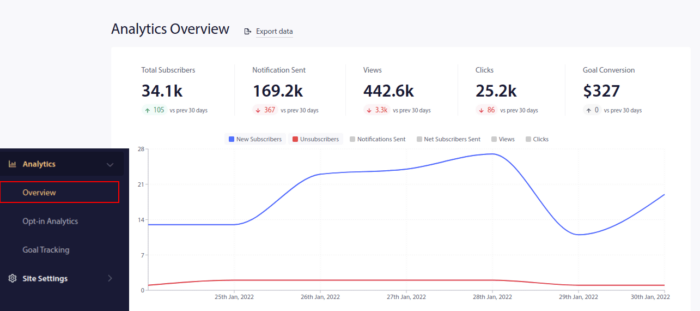
En iyi kısmı?
Tamamen ücretsizdir ve size trafik göndermeye başlamaları için arama motorlarını beklemek zorunda kalmazsınız.
Hemen başlayalım.
Web Anlık Bildirimler Nedir?
Bir anlık bildirim kampanyası, bir abonenin cihazında görünen ve aboneyi tek bir tıklamayla içeriğinize yönlendiren kısa, tıklanabilir bir açılır mesajdır:
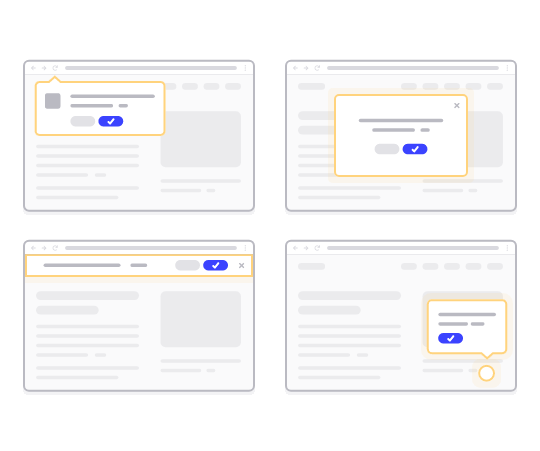
En iyi yanı, aboneniz tarayıcıyı kullanmasa bile bildirimlerin görünmesidir. E-posta bülteni gibidir, ancak tarayıcı anlık bildirim kampanyası ile abonelerinizin mesajınızı görmek için bir uygulama kullanmasına gerek yoktur.
Kısacası: WordPress web anlık bildirimleri, kaydolan herkese içeriğinizin tıklanabilir bir bağlantısını göndermenin basit bir yoludur.
Anlık bildirim kampanyası sıralı dizileri ile kitlenizin artık sizi görmezden gelmek için hiçbir mazereti kalmadı. Sosyal medya sitelerinin aksine, sizi reklam için ödeme yapmaya zorlayacak bir algoritma erişiminizi kısıtlamaz.
Tarayıcı anlık bildirim kampanyalarının en havalı yanı, bunları potansiyel müşteri mıknatıslarınızı ve e-posta kayıt formlarınızı tamamlamak için kullanabilmenizdir!
İpucu: Henüz potansiyel müşteri mıknatısları kullanmıyorsanız, dönüşümlerinizi artırmak için OptinMonster ile potansiyel müşteri mıknatısları oluşturmaya başlamalısınız.
Web anlık bildirim ve mobil anlık bildirimlere ücretsiz başlamak için PushEngage kullanmanızı öneririz. Her blog yazısı yayınladığınızda, PushEngage otomatik olarak tüm abonelerinize bir anlık bildirim yayını gönderir.
Bir sonraki bölümde, bunu 15 dakika veya daha kısa sürede nasıl kuracağınızı tam olarak göstereceğiz.
Web Sitenize Web Anlık Bildirimleri Nasıl Kurulur
PushEngage, WordPress için en iyi anlık bildirim eklentilerinden biridir. Ücretsiz katmanla bile anında 200 aboneye kadar ulaşabilirsiniz. Blogunuz 200 aboneyi aşarsa, planınızı yükselterek hızla ölçeklenebilirsiniz.
Şimdi, kitlenizi tarayıcı anlık bildirimleriyle ücretsiz olarak büyütmeye başlayalım.
Adım #1: Ücretsiz Bir PushEngage Hesabı Oluşturun
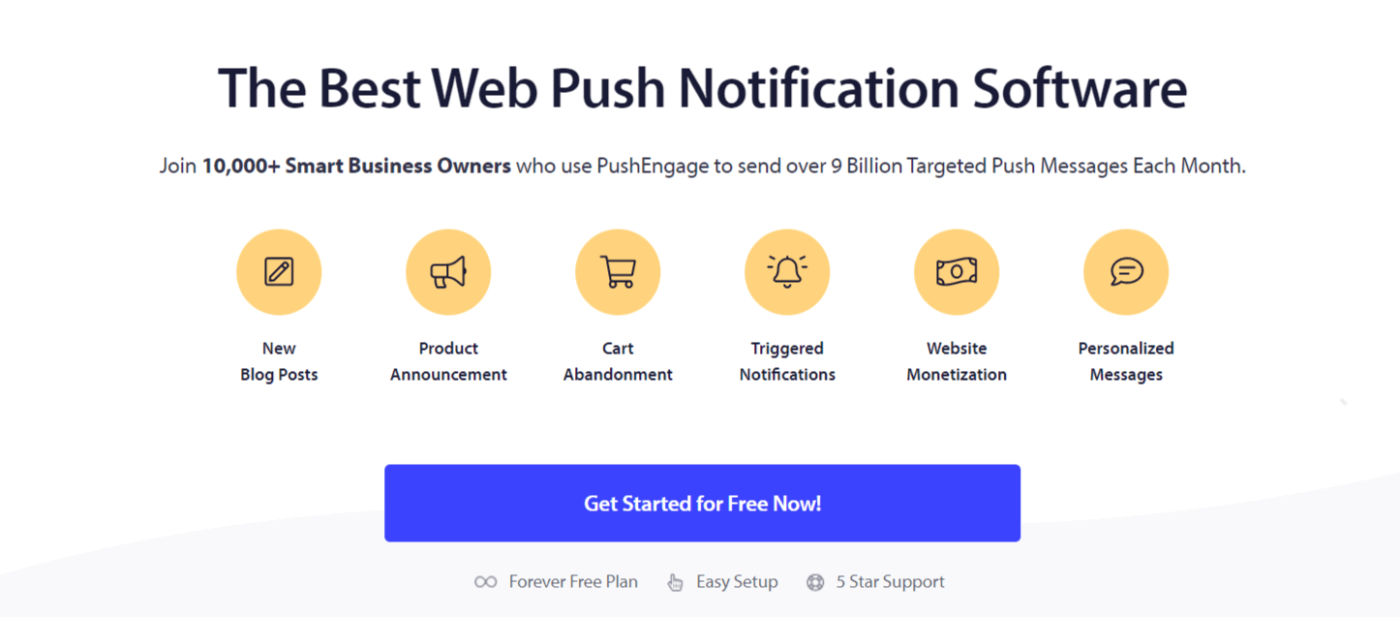
PushEngage adresine gidin ve Ücretsiz Başlayın:'a tıklayın
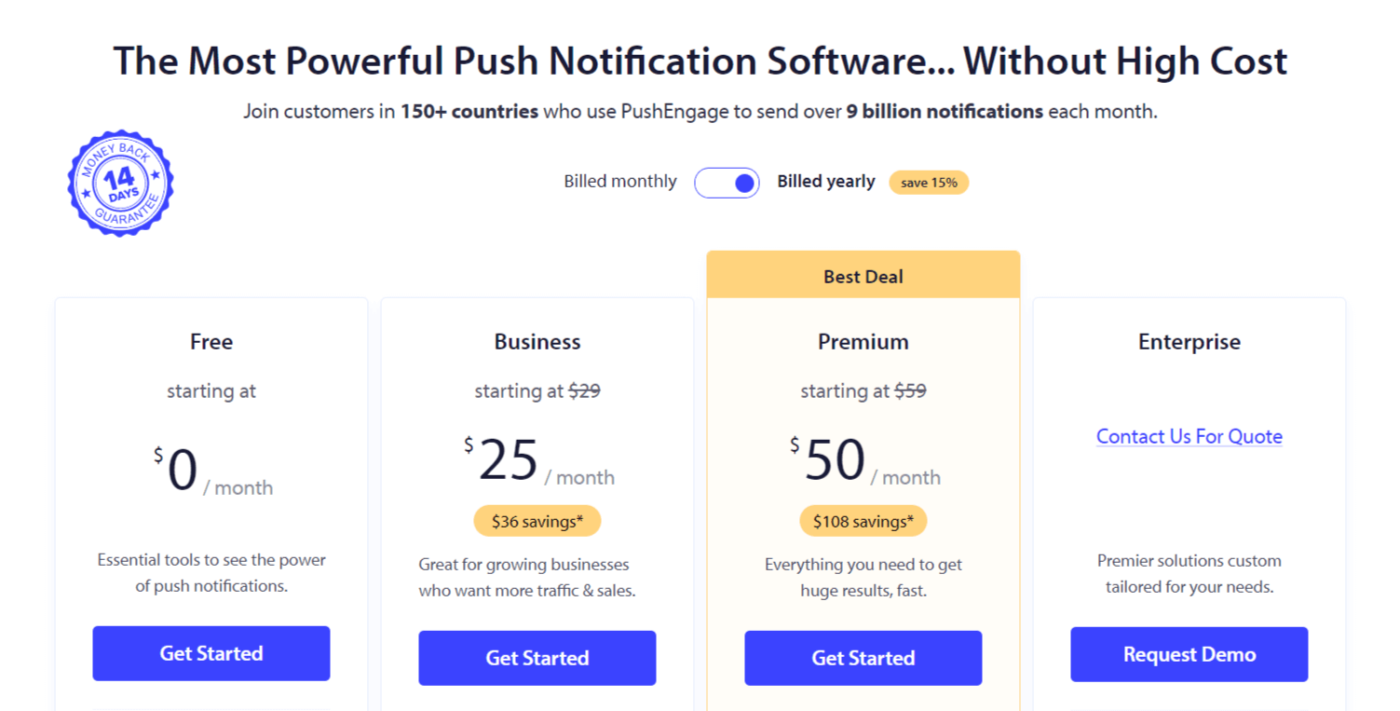
Ücretsiz planı veya ihtiyaçlarınıza en uygun olanı seçin:
Adım #2: PushEngage'a Kaydolun
Kullanıcı bilgilerinizle veya Gmail kimliğinizle eklenti için kaydolun:
Talimatları izleyin ve web sitenize bir web anlık bildirim uygulaması eklemek için hesabınızı kurmayı tamamlayın.
Adım #3: Web Anlık Bildirimleri WordPress Eklentisini Kurun
NOT: Web siteniz WordPress kullanılarak oluşturulmadıysa, web sitesi anlık bildirimlerini başka yöntemler kullanarak yükleyebilirsiniz. Bu yöntemleri bu makalede ele almıyoruz ancak ilgileniyorsanız kurulum kılavuzumuza göz atın.
Kaydolduktan sonra PushEngage kontrol paneline yönlendirileceksiniz:

Site Ayarları » Site Detayları bölümüne gidin:
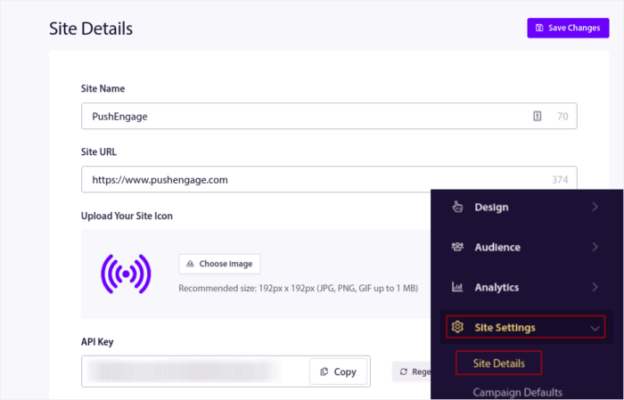
Kurulum Talimatları İçin Buraya Tıklayın düğmesine tıklayın:

Ardından, WordPress Eklentisini Yükle düğmesine tıklayın:

Sitenizin URL'sini zaten ayarladıysanız, PushEngage sitenize otomatik olarak yüklenecektir.
Adım #4: WordPress Sitenizi Web Anlık Bildirim Hizmetine Bağlayın
PushEngage WordPress eklentisini yükleyip etkinleştirmeyi bitirdiğinizde, PushEngage karşılama sihirbazını göreceksiniz:

Sihirbaz oldukça basittir. Yeni bir kullanıcıysanız, Yeni mi? Ücretsiz Hesabınızı Talep Edin'e tıklayın. Zaten kaydolduysanız, Mevcut Hesabınızı Bağlayın'a tıklayın.
Ardından, kayıt sırasında bir site kaydettiyseniz, Kayıtlı bir site bağla altında Bir Site Seçin açılır menüsünden sitenizi seçebilirsiniz:

Veya, Premium fiyatlandırma planınız veya daha üstü varsa yeni bir site eklemek için Yeni bir site kaydet'e tıklayabilirsiniz. Bir sonraki adımda, karşılama sihirbazı sizi diğer mutlaka sahip olunması gereken WordPress eklentilerini yüklemeniz için yönlendirecektir.

Her adımı doğru bir şekilde takip ettiyseniz, sihirbazdan bu başarı mesajını göreceksiniz:

Artık kampanyalar oluşturmaya ve anlık bildirim açılır pencereleri göndermeye hazırsınız.
Web Anlık Bildirimler Nasıl Çalışır?
Şimdi biraz teknikleşelim ve web anlık bildirimlerin nasıl çalıştığını inceleyelim.
Basitleştirilmiş hali, web sitenize yeni bir ziyaretçi her girdiğinde, web anlık bildirim abonesi olmaya teşvik edilmesidir.
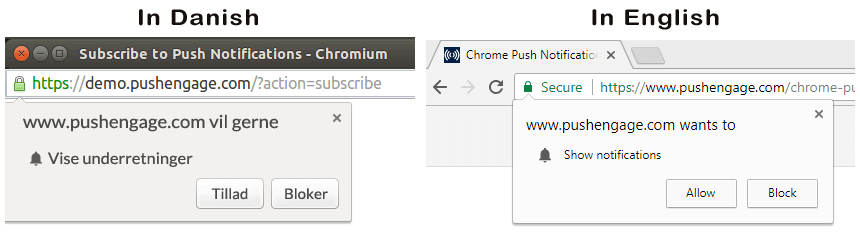
Tüm bunlar, hizmet çalışanı (service worker) adı verilen bir Javascript dosyası tarafından halledilir. Hizmet çalışanının görevi, anlık bildirim aboneleri toplamak için web anlık bildirim izinleri oluşturmaya yardımcı olmaktır. Bu sadece web siteleri için değil, aynı zamanda ilerici web uygulamaları (PWA'lar) için de geçerlidir. Ancak, Android uygulama anlık bildirimleri ve iOS uygulama anlık bildirimleri için farklıdır. Mobil anlık bildirimler genellikle PushEngage Mobil SDK'ları gibi bir anlık bildirim API'si gerektirir.
Ardından, göndermek istediğiniz bildirimleri oluşturmak ve zamanlamak için PushEngage gibi bir web anlık bildirim hizmeti kullanırsınız. Listenizdeki her aboneye veya abonelerinizin belirli segmentlerine göndermeyi seçebilirsiniz.
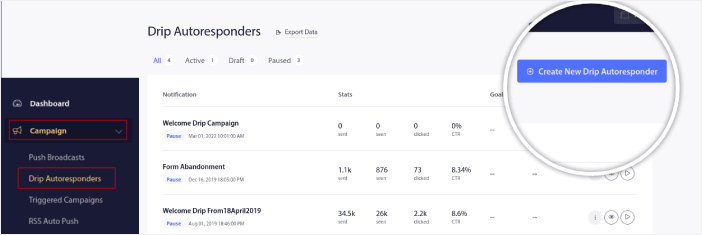
Önce bir Damla Otomatik Yanıtlayıcı (Drip Autoresponder) oluşturarak başlamak isteyeceksiniz:
Son olarak, abonelerinizin cihazları çevrimiçi olduğunda bildirimlerinizi alır ve önerilen eylemi gerçekleştirirler.
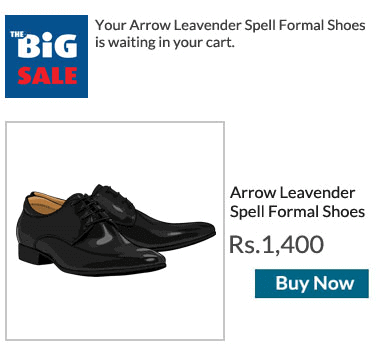
Bunların hepsi tamamen doğrudur, ancak arka planda olanların yalnızca küçük bir parçasıdır. Bu nedenle, teknik ayrıntılara bir göz atalım. Ama önce, henüz yapmadıysanız, bugün PushEngage ile başlayın.
Öncelikle, PushEngage'in abonenizin cihazlarına bağlanan ve onlara anlık bildirimlerinizi gönderen sunucuları vardır. Şimdi, bu sunucular herhangi bir abonenin adı veya e-posta adresi gibi kişisel bilgileri saklamaz.
Peki, bu sunucular ne saklar?
PushEngage ve sunucularımız için aboneleriniz, abonenizin cihazına ve tarayıcısına göre oluşturulmuş benzersiz bir karma numarasıdır. Ayrıca, sunucu abonelerinizin coğrafi konumunu da saklayabilir.
Artık bu sunuculara doğrudan erişiminiz olmayacak. Anlık bildirim kampanyaları oluşturmak, optimize etmek ve yönetmek için yalnızca PushEngage Kontrol Panelini kullanabilirsiniz.
Başka bir deyişle, PushEngage sizin hizmet sağlayıcınızdır. Bu, kodlama veya orijinal sunucuları nasıl koruyacağınız hakkında hiçbir şey bilmeniz gerekmediği anlamına gelir. Tüm bunları biz hallederiz. Tek endişelenmeniz gereken kampanyalarınızı kurmak ve kar etmektir!
Diğer popüler tarayıcı anlık bildirim hizmetlerinden bazıları şunlardır:
- Firebase Cloud Messaging
- Amazon Basit Bildirim Hizmeti
- Airship
- Leanplum A.Ş.
- Pushwoosh A.Ş.
Hangi hizmetin sizin için doğru olduğundan emin değilseniz, öncelikle anlık bildirimlerin maliyetine bakarak başlayın.
Şimdiye kadar, sunucular yalnızca bir karma numarası ve kişisel ayrıntı saklarken kişiselleştirilmiş anlık bildirim kampanyalarının nasıl çalıştığını muhtemelen merak ediyorsunuzdur. Gerçek şu ki, abonelerinizi tanımlamak zorunda kalmadan segmentleri kullanarak yeterli müşteri verisi saklayabilirsiniz. Ayrıca, tamamen özel kampanyalar oluşturabilir ve istediğiniz türde kullanıcı verisi saklayabilirsiniz. İşte burada web anlık bildirim API'si devreye giriyor. Sizin için bu, PushEngage Javascript API'si olacaktır.
Bu API'yi kullanabilir ve sahip olabileceğiniz diğer CRM veya veritabanlarına bağlayabilirsiniz. Bu, abonelerinizin kişisel ayrıntılarını kullanarak onlara kişiselleştirilmiş anında iletme bildirimleri göndermenize olanak tanır.
Ayrıca sepeti terk etme kampanyaları gibi gelişmiş kampanyalar göndermek için PushEngage API'sini kullanabilirsiniz.
Herhangi Bir Web Anında İletme Bildiriminin Farklı Bölümleri Nelerdir?
Anında iletme bildirimlerinin teknik olarak nasıl çalıştığını anladığımıza göre, özelleştirebileceğiniz (veya özelleştiremeyeceğiniz) bir anında iletme bildiriminin farklı bölümlerine bir göz atalım:
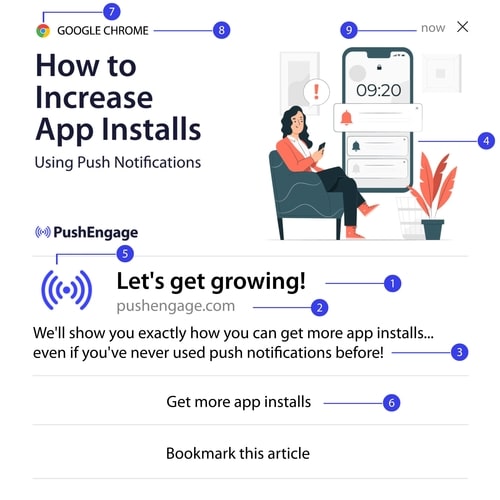
Ayrıca, daha net bir resim için bazı web anında iletme bildirimi örneklerine göz atmalısınız.
#1. Anlık Bildirim Başlığı
Başlık, anlık bildirimin en belirgin metnidir. Net görünürlük için 60-80 karakter ile sınırlıdır. Bu başlığın amacı abonenin dikkatini çekmektir. Bu nedenle, tüm başlığın net bir şekilde görünür olması önemlidir.
Abonelerinizin seveceği harika başlıklar oluşturmak için anlık bildirim metin yazarlığı kılavuzumuza göz atın.
#2. Alan Adı
Bir anında iletme bildirimindeki alan adı yalnızca web sitenizin URL'sidir. Bunu da değiştiremezsiniz. Ancak tarayıcı simgesinin aksine, alan adınız marka bilinirliğinize katkıda bulunduğu için açıkça görünür olmalıdır.
Artık anlık bildirim verilerini PushEngage'in bir alt alan adına depolama seçeneğiniz var. Alt alan adını kullanırsanız, anlık bildirimin bu bölümü markanız yerine bir PushEngage alt alan adının URL'sini görüntüler.
Bu seçeneği kullanmanızı önermiyoruz çünkü marka değerinizi düşürebilir.
#3. Anlık Bildirim İçeriği
Bildirim içeriği, tüm bildirimin en büyük metin bölümünü içerir. Başlık gibi görünürlük için 120-150 karakter ile sınırlıdır. Daha fazla karakter ekleyebilseniz de, kısa ve öz tutmanızı öneririz.
Genellikle bu bölüm, başlık hakkında daha fazla bağlam sunmak veya bir teklifi tamamlamak için bir yol olarak hizmet eder. Metnin kendisinde harekete geçirici mesaj kullanmakla uğraşmayın. Web anında iletme ile harekete geçirici mesaj düğmeleri ekleyebilirsiniz.
Profesyonel İpucu: Anlık bildirimlerinizi daha kişisel hissettirmek için bölgesel dilleri kullanabilirsiniz. Etkileşimlerini artırmak için Phooto'nun anlık bildirimlerde yerel dilleri nasıl kullandığına dair bu vaka çalışmasını okuyun.
#4. Bildirim Büyük Resmi
Büyük resim, topun güzeli ve herhangi bir bildirimin ilk fark ettiğiniz şeyidir. Genellikle bir anlık bildirimin en çekici kısmı olarak hizmet veren 360x180 bir resimdir.
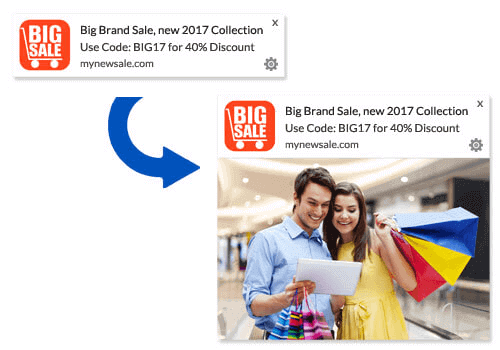
Bildirim resmi de tamamen isteğe bağlıdır. İsterseniz kullanmamayı seçebilirsiniz. Bir bildirim resmi kullanmak, anlık bildiriminizi bir reklama benzetebilir. Bu, bildirimin birçok abone tarafından göz ardı edilmesine neden olabilir.
Ancak doğru yaparsanız, resimler TBM'yi (tıklama oranlarını) %62'ye kadar artırabilir. Sektöre göre anlık bildirimlerde resimlerin etkisine ilişkin çalışmamıza göz atın.
Büyük bir resim kullanıp kullanmamanızdan emin değilseniz, resimli ve resimsiz bildirimi A/B testi yapmanızı öneririz.
#5. Anlık Bildirim Simgesi
Bir anında iletme bildirimi simgesi, web sitenizdeki site simgesi gibidir, ancak anında iletme kampanyalarınız için. İşletmenizi temsil etmek üzere 192×192 veya daha büyük bir resimdir. Genellikle bu sizin site simgeniz olacaktır ve bunu tüm anında iletme bildirimleriniz için yalnızca bir kez ayarlayabilirsiniz.
Profesyonel İpucu: Herhangi bir zamanda yeniden markalaşırsanız, PushEngage'deki anlık bildirim simgesini de değiştirmeyi unutmayın. Ayrıca, simgeniz için animasyonlu resimler kullanamayacağınızı unutmayın. Yani GIF'ler burada işe yaramaz.
#6. Harekete Geçirici Mesaj Düğmeleri
Her anında iletme bildirimi en fazla 2 düğmeyi destekler. Kampanyalarınız için özelleştirilmiş harekete geçirici mesaj düğmeleri kullanmanızı öneririz. Her CTA için ayrı URL'ler ve düğme simgeleri bile ekleyebilirsiniz.
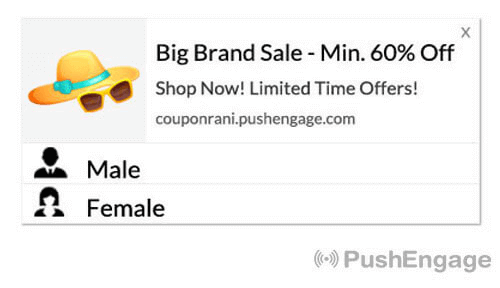
Bazı güzel CTA fikirleri için bu web anında iletme bildirimi hileleri listesine göz atın.
#7. Tarayıcı Simgesi
Anında iletme bildiriminin en küçük bölümü, abonenizin şu anda hangi tarayıcıyı kullandığını belirten tarayıcı simgesidir. En çok gözden kaçan bölümlerden biridir çünkü bunu hiçbir şekilde değiştiremezsiniz ve çoğu durumda bir abone tarayıcı simgesini fark etmez bile.
#8. Tarayıcı Etiketi
Tarayıcı etiketi, tarayıcı simgesinin metin sürümüdür. Simge gibi, tarayıcı adı etiketini de değiştiremezsiniz.
#9. Zaman Damgası
Zaman damgası, abonelerinizin mesajın ne zaman alındığını bilmeleri için basit bir yoldur. Sistem tarafından oluşturulur ve bunu da değiştiremezsiniz.
Farklı Anlık Bildirim İzin Türleri
Her anında iletme kampanyası rıza ile başlar. Seth Godin'in izin pazarlaması fikrinin bir uzantısıdır. Fikir çok basittir: web ziyaretçilerinize görmek isteyebilecekleri veya istemeyebilecekleri herhangi bir içerik göndermeden önce, izin isteyin.
Anında iletme kampanyaları göndermek için izin alma işlemine "kaydolma" denir. Bu nedenle, bir anında iletme bildirimi kampanyası göndermeden önce, öncelikle web sitenizin ziyaretçilerinin kaydolmasını ve bildirimlerinize abone olmasını sağlamanız gerekir.
YouTube'da bir içerik oluşturucuysanız, abonelerin nasıl çalıştığına zaten aşinasınızdır. Tek fark, YouTube abonelerinizin listesine sahip olmamanız ve onlara gönderdiğiniz bildirimleri kontrol edememenizdir.
PushEngage ile, bu bilgi alanınızda depolandığı için o listeye sahip olursunuz. Şimdi, kaydolma işlemine dayalı olarak web siteniz için kullanabileceğiniz iki tür kaydolma vardır:
- Tekli Onaylar
- Çiftli Onaylar
Aradaki temel fark çok açık. Tekli onaylar, bildirim göndermek için yalnızca bir kez izin ister. Çiftli onaylar, her abonenin kararını onaylamasını ister. Peki, hangisini seçmelisiniz?
Tekli onayların, çiftli onaylara göre %150'ye kadar daha fazla abone kazanabildiğini gözlemledik. Bu konuda zorlanıyorsanız, onay oranlarınızı nasıl artıracağınız hakkındaki makalemize göz atın.
Yasal açıdan bakıldığında, GDPR yalnızca tekli onay almanızı gerektirir. Ancak çiftli onaylarla çok daha iyi etkileşim elde edersiniz çünkü aboneleriniz aslında içeriğinizden daha fazlasını istemektedir. Saf onay sayıları açısından ise tek adımlı onaylar çok daha etkilidir.
Dikkate alınması gereken bir diğer nokta, tekli onayları kullanabilmek için web sitenize bir SSL sertifikası YÜKLEMENİZ GEREKTİĞİDİR. Ancak güvenli bir web siteniz olmasa bile iki adımlı onayları yükleyebilirsiniz.
Yani, bir SSL sertifikası yüklüyse, tekli onayları kullanın. Değilse, WordPress web sitelerine SSL sertifikası nasıl kurulur hakkındaki bu makaleye göz atın.
Anında Bildirim Etkileşim Oranlarını Kişiselleştirerek İyileştirin
Bir kampanya oluşturmadan önce, kişiselleştirilmiş anında iletiler göndermek için segmentler ve kitle grupları ayarlamalısınız.
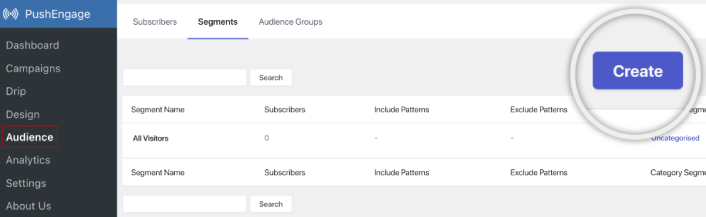
Anlık bildirim aboneleriniz için segmentler ve kitle grupları oluşturarak elde edebileceğiniz kişiselleştirme düzeyini hiçbir şey geçemez. PushEngage » Kitle'ye gidin ve hemen segmentler ve kitle grupları oluşturmaya başlayın.
Segmentler sekmesi altında yeni segmentler oluşturabilir veya mevcut olanları düzenleyebilirsiniz:
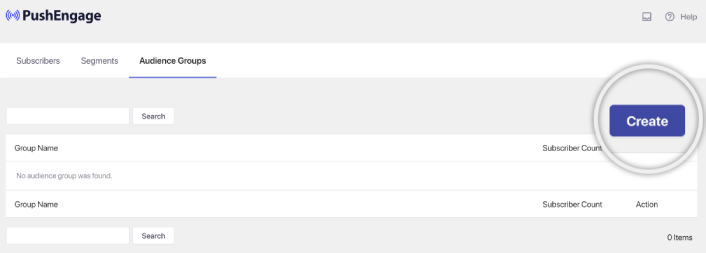
Ve daha derin kişiselleştirmeye ihtiyacınız varsa, Kitle Grupları sekmesinde bir kitle grubu oluşturun:
Anında bildirim segmentlerine ve kişiselleştirilmiş anında bildirimlere yeni başlıyorsanız, segment oluşturma ve kitle gruplamayı kullanıcı davranışını hedeflemek için nasıl kullanacağınız hakkındaki makalemize göz atmalısınız.
Daha İyi Etkileşim İçin Hedeflenmiş Web Anında Bildirimleri Oluşturun
PushEngage kontrol paneline gidin ve Kampanya » Otomatik Yanıtlayıcılar bölümüne gidin ve Yeni Otomatik Yanıtlayıcı Oluştur'a tıklayın:

Ardından, kampanyanıza bir ad verin (Hoş Geldin Drip gibi bir şey öneririz) ve Content altında, “Kullanıcı abone olduktan hemen sonra bildirim gönder“ seçeneğini seçin):

Bu noktada, bildirimin içeriğini düzenlemek için bildirimin yanındaki oka tıklayabilirsiniz.
PushEngage ile Premium veya Enterprise planınız varsa, otomatik karşılama mesajları dizisi oluşturmak için birden fazla bildirim ekleyebileceksiniz. Sadece Yeni Bildirim Ekle'ye tıklayın ve içeriği düzenleyin. İşiniz bittiğinde, Drip Ayarları'na tıklayın ve karşılama kampanyasını tüm abonelere gönderme seçeneğini belirleyin:

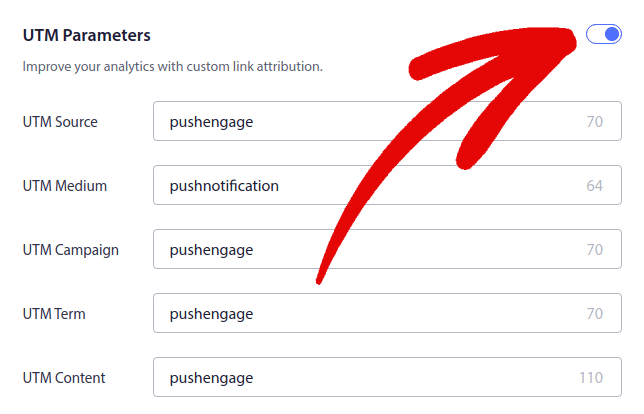
Ardından, anlık bildirimleri izlemek için kendi UTM parametrelerinizi ayarlamak üzere aşağı kaydırın:
Ve işiniz bittiğinde, yukarı kaydırın ve Otomatik Yanıtlayıcıyı Etkinleştir düğmesine tıklayın:

Ve işte bu kadar!
Web Anında Bildirim Yayınları Nasıl Gönderilir
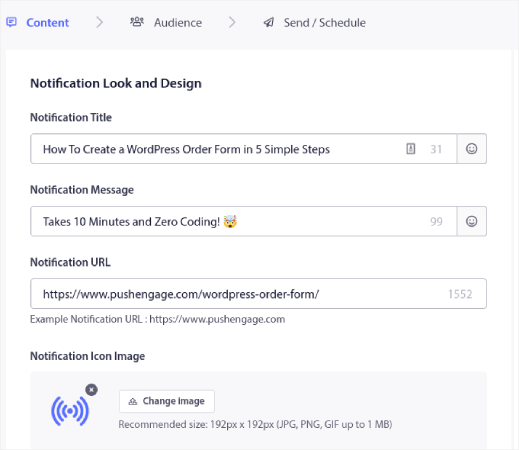
PushEngage kontrol panelinize gidin ve Campaign » Push Broadcasts bölümüne gidin ve Create a New Push Broadcast düğmesine tıklayın:

Content sekmesi altında, anlık bildirim içeriğinizi ekleyin:
Ve tıklama oranlarınızı artırmak için A/B testi kurabilir veya daha fazla görüntüleme elde etmek için anlık bildirim yayınlarınızı zamanlayabilirsiniz. Her iki durumda da, en iyi sonuçlar için anlık bildirim en iyi uygulamalarımızı incelemelisiniz.
Etkileyici Web Anında Bildirim Açılır Modalları Nasıl Oluşturulur
Bir anında bildirim açılır modali, web sitesi ziyaretçisine bir mesaj veya bildirim göstermek için bir web sitesinin veya mobil uygulama arayüzünün üzerine çıkan küçük bir penceredir. Açılır modal çeşitli olaylarla tetiklenebilir. Sayfa ziyareti, kaydırma derinliği ve hatta bir düğme tıklaması gibi özel eylemler üzerine tetiklenecek şekilde açılır pencereler ayarlayabilirsiniz.
Genellikle, ziyaretçilerden anında bildirim yayınları veya drip kampanyaları gönderme izni almak için açılır modalde "Abone Ol" veya "İzin Ver" gibi bir harekete geçirici mesaj görürsünüz. Bu öğreticiyi takip ederseniz, bunun gibi bir açılır pencere oluşturabilirsiniz:
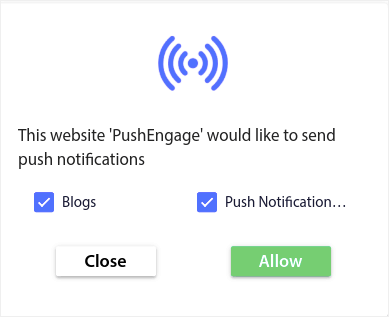
Aboneleri doğrudan segmentleyebilen açılır pencere modalleri oluşturabilir veya coğrafi konum ve tarayıcı gibi varsayılan özniteliklerle yalnızca aboneleri toplayan normal açılır pencereler oluşturabilirsiniz.
WordPress kontrol panelinize geri dönün. PushEngage » Tasarım'a gidin:
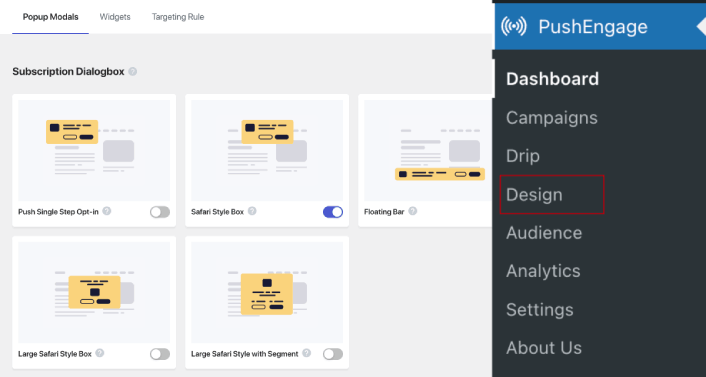
Ve istediğiniz kadar açılır pencere modülü ayarlayabilirsiniz. Elbette, her açılır pencere modülü için Görüntüleme Seçenekleri altında farklı zamanlarda tetikleneceklerinden emin olabilirsiniz.
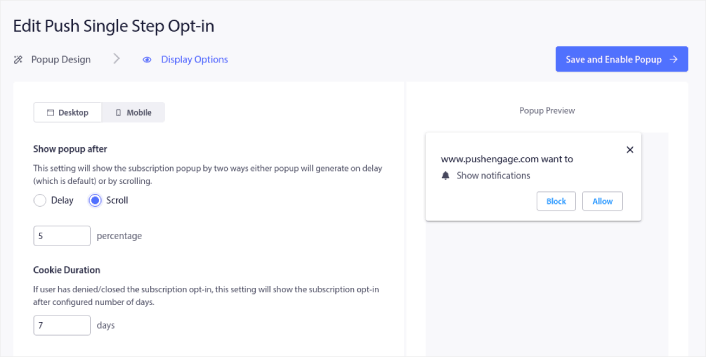
Buradaki fikir, ziyaretçilerinize abone olmaları için sağlam bir neden vermektir. Bu konuda yardıma ihtiyacınız varsa, özel bir anlık bildirim kayıt formu nasıl oluşturulur hakkındaki makalemize göz atın.
Ve daha hedeflenmiş açılır pencere modülleri oluşturmak istiyorsanız, Hedefleme Kuralı sekmesi altındaki hedefleme kurallarını kullanabilirsiniz:
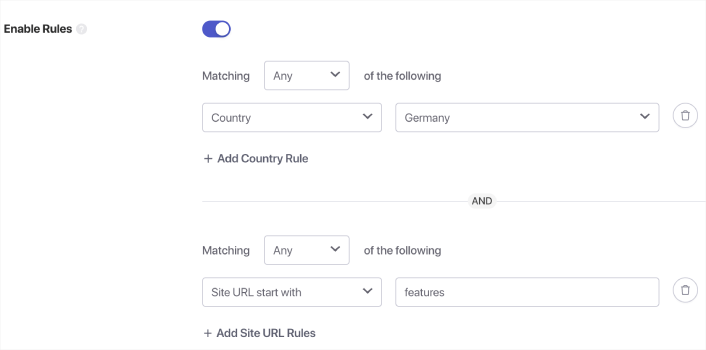
Bunlar genel hedefleme kurallarıdır ve bireysel açılır pencere modülleri için hedefleme kurallarına göre önceliklendirilir. Ancak isterseniz, bunları düzenleyerek her modül için sağlam hedefleme kuralları oluşturabilirsiniz.
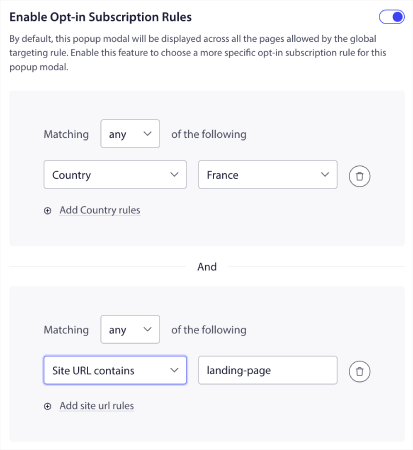
Örneğin, farklı ülkelerden ziyaretçileri hedeflemek için farklı dillerde açılır pencere modelleri oluşturabilirsiniz.
Ve başlamak için yüksek tıklama oranına sahip bazı şablonlar istiyorsanız, yüksek dönüşümlü anlık bildirim kayıt formları hakkındaki bu makaleye göz atmalısınız.
Hedeflenmiş Web Anında Bildirimleri Göndermeden Önce Ne Yapmalı
Neredeyse bitirdiniz. Anlık bildirim yayınları veya damla kampanyaları göndermeye başlamadan önce web siteniz için bir abonelik onay ayarı yapmanız gerekecek. Onay ayarınız, web ziyaretçilerini anlık bildirim abonelerine dönüştürecektir. Bu nedenle, bu kritik bir unsurdur. Biraz ilhama ihtiyacınız varsa, yüksek dönüşüm sağlayan anlık bildirim onayları hakkındaki bu makaleye göz atabilirsiniz. Onay ayarını kurduktan sonra siteniz aboneler toplayabilir. Peki, onay ayarınızın düzgün çalıştığını nasıl anlarsınız?
Bu nedenle, mantıklı olan bir hoş geldin anlık bildirimi ayarlamaktır.
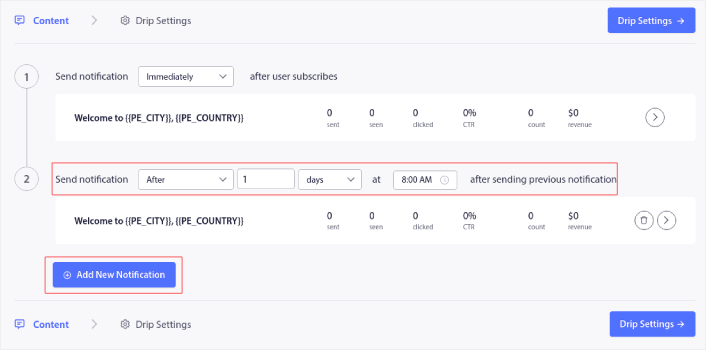
Uzman İpucu: Kapsamlı bir anlık bildirim testi için biraz zaman ayırmalısınız. Bu, en yaygın sorunları gidermenize yardımcı olacak ve daha sonra sorunları çözmeye çalışırken zaman kaybetmenizi önleyecektir. Ayrıca, bir dizi kampanya başlatmadan önce uygun bir kullanıcı etkileşim stratejisine veya bir anlık bildirim kampanyası stratejisine ihtiyacınız var.
Web Anlık Bildirimlerinin Ne Olduğunu Bildiğinize Göre Şimdi Ne Yapmalısınız
Web anlık bildirimlerinin ne olduğunu öğrendiğinize göre, kendi anlık bildirim kampanyalarınızı ayarlamanın zamanı geldi.
Web anlık bildirimlerine yeni başlıyorsanız, PushEngage kullanarak ilk hoş geldiniz mesajınızı nasıl oluşturacağınızı öğrenin. Hoş geldiniz mesajı, yeniden etkileşim ve web sitenizi tekrar ziyaret edenler için harikadır.
Ayrıca, web anlık bildirimlerini kullanmaya başladıysanız, kampanya fikirleri bulmanın zor olabileceğini anlıyoruz. Bir trafik kaynağını ne kadar uzun süre kullanırsanız, yeni fikirler bulmak o kadar zorlaşır. Müşterilerimizin zaten kullandığı anlık bildirim kampanyası fikirlerine göz atın. İhtiyacınız olan ilhamı bulabilirsiniz!
Segmentasyona başlamak göz korkutucu görünebilir. Ancak hedef takibi ve analitiklerine dikkat ederseniz, iyi olmalısınız. Daha da önemlisi, anlık bildirim kampanyalarının yardımıyla çok daha fazla kâr edeceksiniz. İşte başlamanıza yardımcı olacak birkaç harika kaynak:
- Gelirinizi 2 Katına Çıkarmak İçin Yeniden Hedefleme Anlık Bildirimleri Nasıl Kullanılır
- Anlık Bildirimlerinizi Nasıl Sıralarsınız ve Kazanan Kampanyaları Bulursunuz
- Anlık Bildirim Aboneli Listelerini Temizleme (Kolay)
- Otomatik Olarak RSS Anlık Bildirimleri Gönderme
- Bir Haber Sitesini Tanıtmak İçin Anlık Bildirimleri Kullanma
- Satışlarınızı 2 Katına Çıkarmak İçin Çapraz Satış Anlık Bildirimlerini Kullanma
- Göz Atma Terk Etme Anlık Bildirimlerini Kullanma (4 Adım)
Eğer bir e-ticaret siteniz varsa, bir sonraki adım olarak sepet terk kampanyalarına göz atın. Değilse, ilk damla anlık bildirim kampanyasını gönderin. Bunlar, müşterilerimizin çoğu için en yüksek dönüşüm sağlayan kampanyalardan bazılarıdır.
Ve henüz yapmadıysanız, bugün PushEngage ile başlayın!


İyi bilgiyi paylaştığınız için teşekkürler. Çok Güzel Makale, Anlık Bildirimi blogumda nasıl kullanacağım konusunda bana çok yardımcı oldu.
Paylaştığınız harika bir bilgi, Blog yazmaya yeni başlayan biri olarak kesinlikle fark yaratabilir. Çok teşekkür ederim
bir kullanıcı belirli bir siteye girdiğinde web anlık bildirimleri gönderebilir miyim? örn. web sitem çorap satıyor; web anlık bildirimine abone olmuş bir kullanıcı amazon'u ziyaret ettiğinde ona bir web anlık bildirimini tetiklerim. sanmıyorum ama yine de sormak istedim.
ayrıca web anlık bildirimlerini etkinleştirmek için bir sitenin https olması gerektiğini düşünmüştüm. https sayfası oluşturarak http sitesinde hala web anlık bildirimlerini etkinleştirebilir miyim?
iOS web anlık bildirimleri desteklemiyor. Yanlışsam lütfen beni düzeltin
Evet, haklısınız. iOS hala web anlık bildirimlerini desteklemiyor.
Güncelleme, Eylül 2026: yukarıdaki yanıt Nisan 2020'de doğruydu ve artık geçerli değil. iOS 16.4'ten (Mart 2023) bu yana, iPhone ve iPad'deki Safari, kullanıcının Ana Ekran'a web uygulaması olarak eklediği siteler için web anlık bildirimlerini desteklemektedir. Kurulum kılavuzu: iOS ve iPadOS için web anlık bildirimlerini ayarlama.
Her şeyi yaptım ama blogumun blogu için hala bunları alamıyorum.
[email protected] adresine e-posta gönderin veya canlı sohbetten bize ulaşın. Ekip sorunu çözmenize yardımcı olacaktır.
aslında doğru bir web yöneticisisiniz. Web sitesi yükleme hızı harika.
Sanki özel bir
hile yapıyormuşsunuz gibi hissediliyor. Ayrıca, içerikler ustaca hazırlanmış. Bu konuda harika bir iş çıkarmışsınız!