Mobil ve Masaüstü tarayıcı kullanıcılarınız için yeni etkileşim kanalı olan Web Sitesi Bildirimleri hakkında bilgi edindiniz mi? Web Anlık Bildirimleri nedir biliyor musunuz? Web Anlık Bildirimleri, kullanıcılarınızla yeniden etkileşim kurar ve onlar başka yerdeyken web sitenize geri getirir. Bunu web sitenize uygulamaya karar verirsiniz ve size sunulan çeşitli seçenekler karşısında kafanız karışır. Parse felaketinden sonra, web siteniz için Anlık Bildirimleri uygularken satıcı kilidi olmadığından nasıl emin olabileceğinizi merak ediyorsunuz.
Ya da bunu, ilk uyguladığınız satıcı yeterli önlemi almadığı ve kilitlendiği için, şimdi de fiyatlarının çok yüksek olması nedeniyle okuyorsunuz. Her zaman web anlık bildirim hizmet sağlayıcısı tarafından sunulan anlık bildirim özelliklerini kontrol edin. Mevcut anlık bildirim platformundan diğerlerine geçiş yapmak isterseniz, burada belirtilen adımları izlemelisiniz.
Biz PushEngage olarak bu konuda açıkça yazmak istiyoruz. Şeffaflık bizim temel değerlerimizden biridir. İkinci olarak, müşterilerimizin bizimle kalmasını istiyoruz, çünkü platformumuzdaki deneyimimizden dolayı, kilitlenmiş olduklarından değil.
Acele ediyorsanız, işte bir özet
HTTPS sitesi
- Safari Sertifikanızı kullandığınızdan emin olun. not: Ağustos 2018'den beri benzersiz bir VAPID anahtarı kullandığımız için FCM Anahtarı gerekli değildir.
- Aboneleri alan adınızda topladığınızdan emin olun (yani son izin alma işlemi alan adınızda gerçekleşir)
HTTP Sitesi
- Kendi Safari Sertifikanızı kullandığınızdan emin olun. not: Ağustos 2018'den beri benzersiz bir VAPID anahtarı kullandığımız için FCM Anahtarı gerekli değildir
- HTTPS Özel Alt Alan Adı kullanarak aboneleri alan adınızda topladığınızdan emin olun.
Ayrıntılı sürüm için okumaya devam edin.
Hadi başlayalım ve satıcı kilidi olmadan anlık bildirimleri nasıl entegre edeceğimizi görelim.
Yayına Geçmeden Önce Cevaplanması Gereken Temel Sorular
1) Web Siteniz HTTP mi HTTPS mi?
HTTPS web siteniz veya HTTPS olan bir alt alan adınız veya web sitesinin bir bölümü var mı?
HTTP veya HTTPS Nedir? Web sitenizin URL'sini kontrol ederseniz, PushEngage sitesinde gördüğünüz gibi Güvenli ve yeşil bir kilit görüyor musunuz.

Evet ise, HTTPS sitesindesiniz, değilse HTTP. HTTP veya HTTPS hakkında daha fazla bilgi edinmek için buradaki wiki bağlantısına bakın.
Bu neden önemli: Anlık Bildirim aboneliği ve gönderme, HTTPS alan adı gerektirir, bu nedenle kendi alan adınız varsa onu kullanabilirsiniz. Bunun diğer faydalarını daha sonra görün.
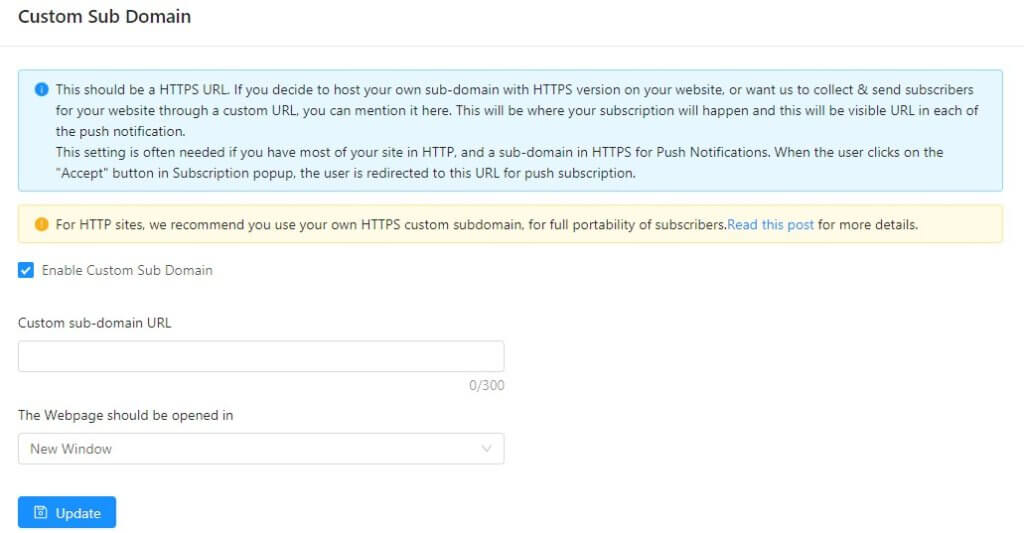
Eğer bir HTTPS alt alan adınız yoksa, size sitemizde barındırılan bir HTTPS alt alan adı sağlıyoruz, örneğin https://alanadiniz.pushengage.com/. Bu daha sonra kullanıcıları abone etmek ve anlık bildirim göndermek için kullanılır. Bu, bir HTTP sitesinde tam taşınabilirlik elde etmenin anahtarıdır. Platformumuzda özellik olarak özel alt alan adı ayarlarımız var.
Bu alt alan adı bildirimlerinizi nasıl etkiler?
a) Abonelik sırasında, web sitesi kullanıcılarınız bu alt alan adını görecektir,
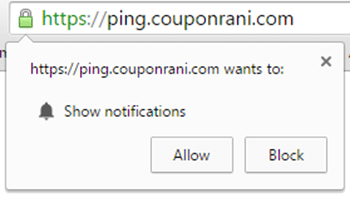
Yerel Abonelik Açılır Penceresi
b) Mesaj gönderildiğinde, Push'ta görüntülenen alt alan adının URL'sine sahip olacaktır - kullanıcının alan adınızdaki herhangi bir URL'ye yönlendirebilseniz bile.
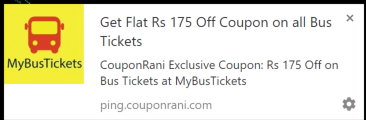
Örnek Bildirim
Yukarıdaki durumda, CouponRani.com kendi özel alt alan adını https://ping.couponrani.com kullandı, bu https'ye sahipti ve bu abonelik isteklerinde ve bildirimlerinde görünür.
2) Anlık Bildirim Entegrasyonunda Satıcı Kilidini Önlemek İçin İki Adım
Adım 1 PushEngage artık platformunda Vapid kullanıyor. Her hesap için benzersiz bir vapid anahtarı oluşturur. Tüm anlık bildirim aboneleriniz bu benzersiz anahtarla ilişkilendirilecektir. Bu nedenle, istediğiniz zaman başka bir platforma geçmek için vapid anahtarını kullanarak tüm abonelerinizi içe aktarabilirsiniz.
Bir satıcı olarak PushEngage, müşterileri asla kilitlemez. Bu nedenle, anlık bildirim abonelerinin kolay taşınabilirliği için vapid anahtarları sunuyoruz.
Anlık bildirimler için Chrome mimarisine bakarsanız, bir anlık bildirim abonesinin tarayıcısında çalışan hizmet çalışanı javascript koduna ihtiyaç duyar. Bu, tarayıcıya bir bildirim gönderildiğinde uyanır. Bu daha sonra, Anlık Bildirim ile yayına geçmek için kullandığınız platform tarafından barındırılan bir Anlık Sunucudan bildirimi alır. Bu, abonelik ve bildirim için kullanılan HTTPS alanından barındırılır.
Daha sonra geçiş yapabilmeniz için, hizmet çalışanı javascript kodunu yeni bir kodla değiştirme ve yeni Anlık Sunucuya işaret etme yeteneğine ihtiyacınız olacaktır. Bu, HTTPS alt alan adının tam kontrolüne sahip olmanız gerektiği anlamına gelir.
Adım 2: Bu nedenle, satıcı kilidini önlemek için gereken ikinci şey, bu anlık bildirimler için kendi HTTPS alt alan adınızı veya bir HTTPS alan adınızı kullanmaktır. Tam bir siteyi HTTPS'ye taşımak biraz çaba gerektirir ve SEO açısından tavsiye edilse de, yine de biraz çaba gerektirir. Bir çözüm, yalnızca HTTPS'de bir alt alan adına veya HTTPS'de sitenizde bir sayfaya sahip olmaktır. Bu, aboneliği kontrolünüz altındaki bir alanda toplamanızı gerektiren önemli bir adımdır.
Örnek: CouponRani örneğinde, yukarıdaki örnekte bu https://ping.couponrani.com idi.
Artık Aboneleri Nerede ve Nasıl Toplayacağınız Alan Adını/Alt Alan Adını Belirlediniz.
Bu nedenle, ürünün standart özelliklerinin bir parçası olarak özel alt alan adı oluşturduk
PushEngage'de özel alt alan adı kurulumunu etkinleştirmek için, eğer bir HTTP sitesiyseniz aşağıdaki adımları izlemeniz gerekir
a) Bir SSL sertifikası satın alın
b) https://notify.yourdomain.com adresinde bir alan adı kurun ve buna bir SSL sertifikası etkinleştirin. Bu alan adı için bir DNS eşlemesi kurmanız gerekecektir.
c) Ardından PushEngage kurulum dosyalarını alt alan adına yerleştirmeniz gerekir
d) Bunu PushEngage'deki Özel Alt Alan Adı ayarlarına girin. Ayarlar > Site Ayarları > Özel Alt Alan Adı'na gidin
Hepsi bu kadar ve satıcı kilidi olmadan Anlık Bildirimlerle yayında olacaksınız.
Yapılandırmanızın destek ekibimiz tarafından [email protected] adresine e-posta göndererek kontrol edilmesini sağlamak iyi olacaktır.
Abonelik Yönetimi ve Anında Bildirim İzin Alma Konusunda En İyi Uygulamalar
Web sitenizde Anında Bildirimleri başlatırken sıfır aboneyle başladığınızı unutmayın. Yavaş yavaş abone kazanmanız ve büyük bir yatırım getirisi potansiyeline sahip listenizi oluşturmanız gerekecektir. Artık satıcı tarafından kilitlenmeyeceğinizden emin olduğunuza göre, anında bildirim abonelik oranınızı artırmaya odaklanmaya başlayın.
Bu nedenle, sitenizde kullanıcı aboneliği elde etmenin en iyi yollarını ve izin alma oranınızı nasıl artıracağınızı belirlemeliyiz.
Genel olarak, sitenizin Anında Bildirim Aboneleri için en az E-posta aboneliği/izin alma oranı kadar bir oran elde etmesini bekliyoruz. Bunun iki nedeni olduğuna inanıyoruz:
- Anında Bildirimlere abone olurken herhangi bir şey yazmanıza gerek yoktur. Bir metin kutusuna yazmaktan daha kolay bir tıklamadır.
- Anında Bildirim aboneliğinizin tam kontrolü sizdedir, çünkü tarayıcı ayarlarınız aracılığıyla herhangi bir site için Anında Bildirimlerden çıkabilirsiniz.
Kullanılacak Abonelik İzin Alma Türü
Yukarıda belirtildiği gibi, satıcı kilidini önlemek için her zaman HTTPS web sitesini tercih edin. Anında bildirim izin almanın 7 farklı türü vardır. Dahası, HTTPS sitesi için en çok dönüşüm sağlayan anında bildirim izin almayı kullanabilirsiniz.
Bir aboneliği nasıl toplamalısınız? Tam bir HTTPS sitesiyseniz, aşağıda göründüğü gibi yalnızca 1 yerel açılır pencere görürsünüz.
Web sitesinin yalnızca bir kısmında HTTPS varsa, o zaman web sitesinin HTTPS sürümüne giden bir Açılır Pencere, Zil, Alt Çubuk veya başka bir öğe gibi diğer öğeleri kullanmanız gerekir.
Aboneleri tek bir küresel listede toplamanın yanı sıra, kullanıcıları segmentlere ayırmayı ve site eylemlerine, konumlarına veya başka herhangi bir özniteliklerine göre çeşitli listelere yerleştirmeyi düşünmelisiniz. Bunu PushEngage'deki otomatik segmentasyon ve özel segmentasyon özelliğini kullanarak yapabiliriz. Bunu nasıl kuracağınızla ilgili bu gönderiyi okuyun.
Karşılama Bildirimi
Kullanıcıların web siteniz için Anında Bildirime başarıyla abone olduklarını kabul ediyor musunuz? Bunun önemli bir kullanıcı deneyimi öğesi olabileceğine inanıyoruz, çünkü Anında Bildirim açılır pencereleri (bol miktarda) kafa karıştırıcı olabilir ve bir karşılama bildirimi aboneliği başarıyla tamamladıklarını yeniden doğrular. Bir anlamda, bu, karşılama e-postasına ve e-postadaki abonelik onayına benzer.
Drip Web Push Kampanyaları kullanarak, artık kullanıcı abone olduktan sonra, diyelim ki 30 dakika sonra bir Karşılama Bildirimi gönderebilirsiniz. Bu, müşteri siteyi terk ettiğinde ancak sitenizi net bir şekilde hatırladığında ve herhangi bir eylem için onları dürtmek için iyi bir zaman olduğunda ulaştığı için daha fazla etkiye sahip olabilir. İşte 30 dakika sonra gönderilen örnek bir Karşılama Drip'i.
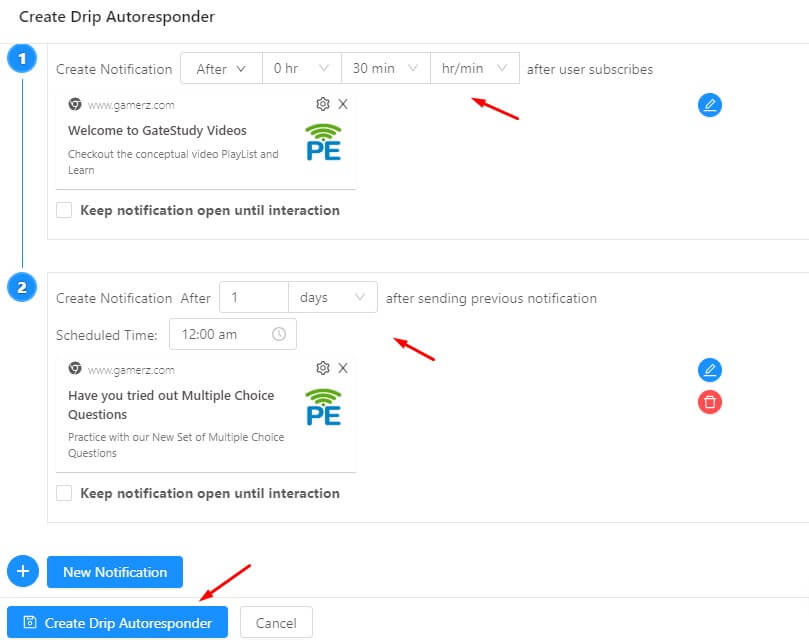
Anında Bildirimlerle Yayına Geçme Adımları
Entegrasyonun temel yönlerine karar verdikten sonra, artık Anında Bildirim ile yayına geçebilirsiniz. Belirli yayına geçme adımlarını burada belirtmedik, çünkü her sağlayıcı farklıdır. Sağlayıcıların çoğu, web sitenize Javascript kodu eklemenizi gerektirecektir. HTTPS siteleri için birkaç ek dosya yüklemeniz gerekebilir.
Anında Bildirim Kampanyalarına Örnekler
Aboneler topladığınıza ve onlarla yeniden etkileşim kurduğunuza göre, aboneleriniz için hangi kampanyaları yürütüyorsunuz? Bu geniş bir soru ve cevap, ne tür bir site işlettiğinize bağlıdır, ancak yaygın olarak kullanılan kampanya türlerini paylaşalım –
A. Yeni Makale Uyarı Kampanyası: Haber sitelerinin çoğu için bilgiyi zamanında kullanıcıya ulaştırmak başarının en önemli faktörlerinden biridir. Son dakika haberleri, seçim kampanyaları, spor veya mevcut pandemi olsun, aboneleri güncellemeleri gerekir.
C. Fiyat Düşüşü Uyarıları: Herkes en düşük fiyatı arar. Ancak bir müşteri fiyatın düştüğünü nasıl bilecek? Favori ürününde herhangi bir fiyat düşüşü hakkında kullanıcıları otomatik olarak güncellemek için fiyat düşüşü uyarı kampanyasını etkinleştirin.
D. Kupon/Teklif Uyarıları: Anında Bildirimler anında teslim edilir. Bu nedenle, gelirinizi artırmak için kolayca bir flaş satış veya süreli satış yapabilirsiniz.
E. Ürün Stokta Uyarıları: Ürün tekrar stoklara girdiğinde kullanıcıları da güncellemelisiniz. Anında Bildirimler, stoklar yenilendiğinde kullanıcıya otomatik anında bildirim göndermenize olanak tanır.
F. Alışveriş Sepeti Terk Kampanyası – Mobil veya Masaüstü sitede sepet terkine dayalı hedeflenmiş bildirim gönderin
Web siteniz için farklı kampanyalar oluşturmak üzere anında bildirim oyun kitabını da inceleyebilirsiniz.
Özet
İlk sonuçlar, Web Anında Bildirim'in yüksek yatırım getirisi sağlayan bir kanal olduğunu ve hızla büyüdüğünü gösteriyor, bu nedenle web siteniz için kesinlikle denemelisiniz. Web Anında Bildirimler yeni bir standart olduğu için, birçok yeni özellik ve değişiklik bekleyin. Web sitenizi Anında Bildirimlerle etkinleştirmeyi düşünürken, size daha fazla esneklik sağlayacak şekilde uygulayın.


Push Engage'i Magneto E-ticaretimizle nasıl yapılandırabiliriz? lütfen bana rehberlik edin.
Lütfen Magento ile Uygulama kılavuzumuza buradan göz atın
Başka bir anında bildirim satıcısından Push Engage'e geçtik. Başlangıçtan beri FCM Projesi ve FCM Anahtarı yöntemini kullanıyorduk. Şimdi aynı FCM Projesi ve FCM Anahtarını platformunuzda ayarladığımıza göre, önceki abonelerimiz hala abone mi yoksa manuel olarak yapmamız gereken bir şey var mı?
Abonelerin dışa aktarılmış halini bize göndermeniz gerekir, ardından bunu hesabınıza aktarabiliriz. Aboneler doğrudan aktarılmaz. Destek e-postamızdan takip edeceğiz.
Daha da iyisi, web siteniz HTTPS olduğu sürece, insanlar tek bir tıklamayla abone olabilir.
Yayınladığınız için teşekkürler, çalışmanızı gerçekten çok seviyorum, devam edin.
Gerçekten biri bilmediğinde, yardım edip etmeyecekleri diğer insanlara bağlıdır, bu yüzden burada oluyor.
İyi yazılmış ve tamamlanmış.
Son birkaç gündür bir blog yazmaya başladım ve birçok makalenin eski fikirleri tekrar ettiğini ancak çok az değer kattığını fark ettim.
Okuyucularınız için gerçek değeri olan bilgilendirici bir yazı okumak harika.
Yeni bir blog yazarı olarak kopyalamam gereken detaylar listeme ekleniyor.
Okuyucu etkileşimi ve içerik kalitesi
krallıktır.
Harika düşünceler; kesinlikle izlenecek siteler listeme aldınız!
İyi çalışmaya devam et!
Aferin,
Jock
Sık sık blog yazıyorum ve bilgileriniz için gerçekten teşekkür ederim. Bu makale gerçekten ilgimi çekti.
Blogunuzu yer imlerine ekleyeceğim ve haftada yaklaşık bir kez yeni bilgileri kontrol etmeye devam edeceğim.
RSS beslemenize de abone oldum.
Ah, bu inanılmaz derecede iyi bir yazıydı. Çok iyi bir makale oluşturmak için zaman ve gerçek çaba harcamak... ama ne diyebilirim ki...
Çok tereddüt ediyorum ve neredeyse hiçbir şey yapamıyorum.
Her şey çok açık ve sorunların net bir şekilde açıklanmasıyla ilgili.
Gerçekten bilgilendiriciydi. Siteniz kullanışlı.
Paylaştığınız için teşekkürler!