Etkileşimlerinizi ikiye katlayacak anlık bildirim hilelerini öğrenmek ister misiniz? Etkileşimlerinizi çok kısa sürede ikiye katlayabilecek kanıtlanmış anlık bildirim hilelerini size göstereceğiz. En iyi yanı, her sektörde işe yaramasıdır.

Maliyeti düşürmenin ve dönüşümleri artırmanın en iyi yollarından biri müşteri etkileşimdir. Anlık Bildirim, müşteri etkileşimi için en iyi araçtır. Daha yüksek dönüşüm ve etkileşim sağlayan en etkili şekilde müşterilerle yeniden etkileşim kurmanıza olanak tanır. Anlık bildirimler süper uygun maliyetlidir. Böylece etkileşim kampanyalarınızı kolayca ölçeklendirebilirsiniz.
Etkileşim için anlık bildirim kullanmanın en iyi yanı kullanım kolaylığıdır. Anlık bildirimleri 10 dakikadan kısa sürede kurabilirsiniz. Özelliklerin çoğu sadece 1 tıklamayla etkinleştirilebilir. Dahası, anlık bildirimleri farklı platformlarda kolayca entegre edebilirsiniz.
Ancak, anlık bildirimlerden en iyi şekilde yararlanmak için onları doğru şekilde kullanmanız gerekir. Bu makalede, gelirinizi ve etkileşiminizi artırabilecek en iyi hileleri paylaşacağız.
Etkileşiminizi ikiye katlayan 9 kanıtlanmış Anlık Bildirim hilesi
Abonenin Saat Diliminde Gönderme
Bunu anlamak için iki senaryo ele alalım:
Dünyanın farklı yerlerinden aboneleriniz var. Yılbaşı etkinliğinde bir indirim etkinliği düzenliyorsunuz.
Senaryo 1
Tüm abonelerinize bir anlık bildirim gönderdiniz. Bildirim anında teslim edilir. Ancak, abonelerinizin çoğu farklı saat dilimlerinde. Bildirim, sizin saat diliminize göre abonenize teslim edilecektir. Her abone bildirimi aktif olduklarında alacak mı?
Senaryo 2
Anlık bildirimin abonenin yerel saatine göre teslim edilmesini sağlamak için birden fazla anlık bildirim oluşturdunuz. Bunlar farklı zamanlarda coğrafi hedeflemeye göre teslim edilecek. Aynı bildirimin birden fazla kopyasını oluşturmak ideal bir çözüm mü?
Yukarıdaki senaryoların her ikisinde de etkileşim oranınız düşük olacaktır. Bunun nedeni, bildirimlerin abonenin aktif olduğu zamanda teslim edilmeyecek olmasıdır. Bunun çözümü Abone Saat Dilimidir.
Abone Saat Dilimi, aynı bildirimin aboneye kendi yerel saat dilimine göre teslim edilmesini sağlar. Birden fazla kopya oluşturmanıza gerek yoktur. Her coğrafyaya göre aynı bildirim teslim edilecektir. Bu küçük hile, anlık bildirim kampanyalarınızın etkileşim oranını kesinlikle artıracaktır.
Abone saat diliminde bildirimleri nasıl gönderebilirsiniz?
Çok basit bir işlemdir. Anlık bildirim gönderirken seçenek mevcuttur. Abone saat dilimi kutusunu işaretlemeniz yeterlidir. Bildirimler daha sonra abonenin saat dilimine göre teslim edilecektir.
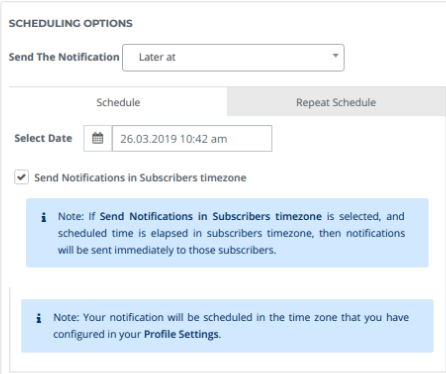
Abone saat diliminde bildirim göndermeden önce, saat dilimi ayarlarınızı doğru yaptığınızdan emin olun. Daha fazla ayrıntı için, abone saat diliminde anlık bildirim gönderme konusundaki ayrıntılı gönderiye göz atın.
Büyük Görüntü Kullanma
Hepimiz resimlerin kelimelerden daha güçlü olduğunu biliyoruz. PushEngage, bildirime büyük bir resim eklemenize olanak tanır. Bu, mesajı görsel olarak iletmenizi sağlar.
Büyük bir resim, diğer bildirimler arasında öne çıkmanızı sağlar. Bir e-ticaret sitesi olan Vegis, şunu paylaştı: Normal bildirimle karşılaştırıldığında, büyük resimli bildirim Vegis için tıklama oranında %37'lik bir artış sağladı.
Bu nedenle, etkileşimi artırmak için anlık bildirimlerde büyük resimler kullanmaya başlayın.
Anlık bildirimlerde büyük resimler nasıl kullanılır?
Anlık bildirimler oluştururken, büyük bir resim yükleme seçeneğiniz vardır. Varsayılan olarak kapalı moddadır. Düğmeyi açık konuma getirmeniz gerekir.
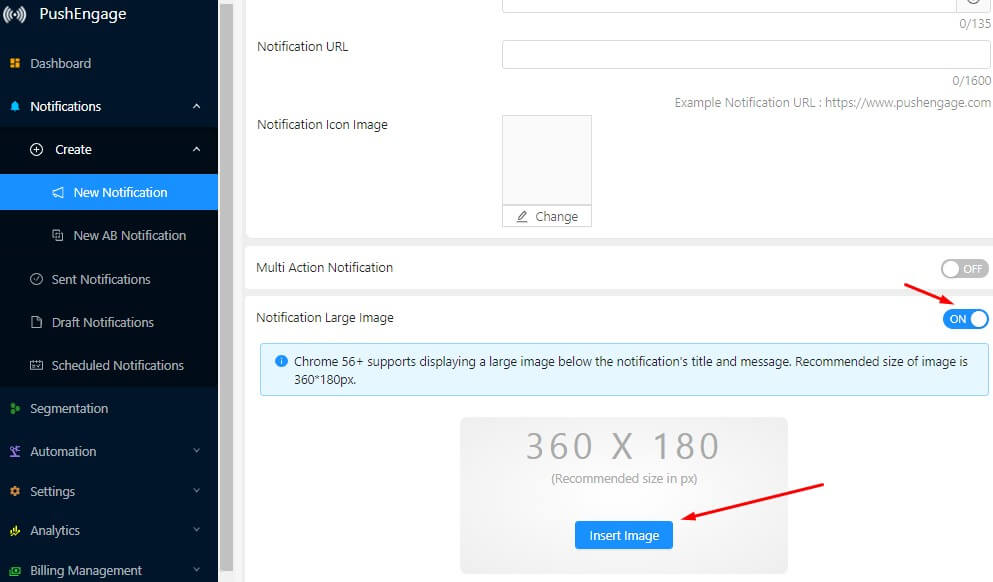
360×180 piksel boyutunda bir resim oluşturun. Resmi yüklemek için 'Resim Ekle'ye tıklayın.
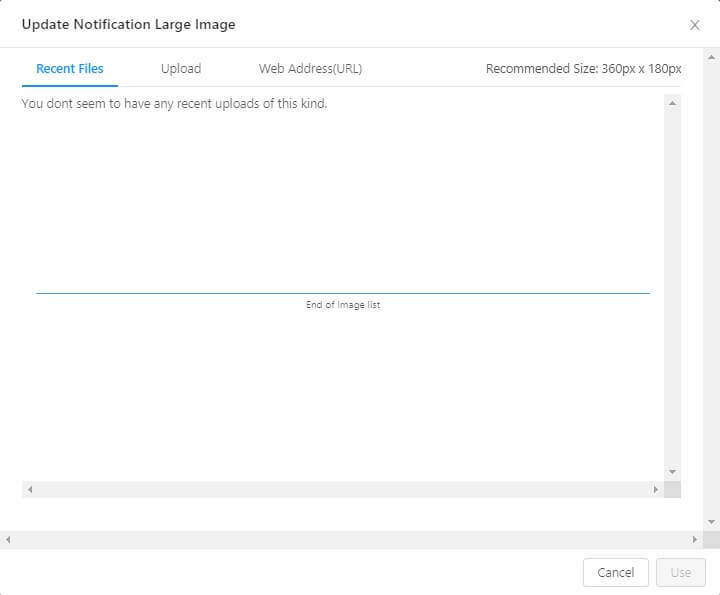
Bir resim yüklemek için birden fazla seçeneğiniz vardır. PushEngage ayrıca bir resim kütüphanesi özelliğine sahiptir. Bu, daha önce kullanılan resmi bildirime eklemenizi sağlar.
Resim seçildikten sonra, kullan'a tıklayın. Şimdi bildiriminize görünecektir. Anlık bildirimlerin performansına etkisini görmek için büyük bir resim kullanmaya başlayın.
A/B Testi
Gönderdiğiniz web anlık bildiriminin etkili olup olmayacağını bilemeyebilirsiniz. Anlık bildirimin işe yarayacağına dair bir sezgiyle hareket edebilirsiniz. Onaylamanın en iyi yolu, anlık bildirimlerde A/B testi yapmaktır.
Anlık bildirimlerin farklı parametrelerini test etmenize olanak tanır. Bildirimi test etmek için belirli bir kitle seçebilirsiniz. Hangi bildirimin iyi performans gösterdiğini bildiğinizde, o bildirimi kullanabilir ve herkese gönderebilirsiniz.
Anlık bildirimlerde A/B testi nasıl yapılır?
PushEngage'da anlık bildirimlerde kolayca A/B testi yapabilirsiniz. A/B testi yapmak için PushEngage kontrol paneline gidin->Bildirimler->Oluştur->A/B Testi.
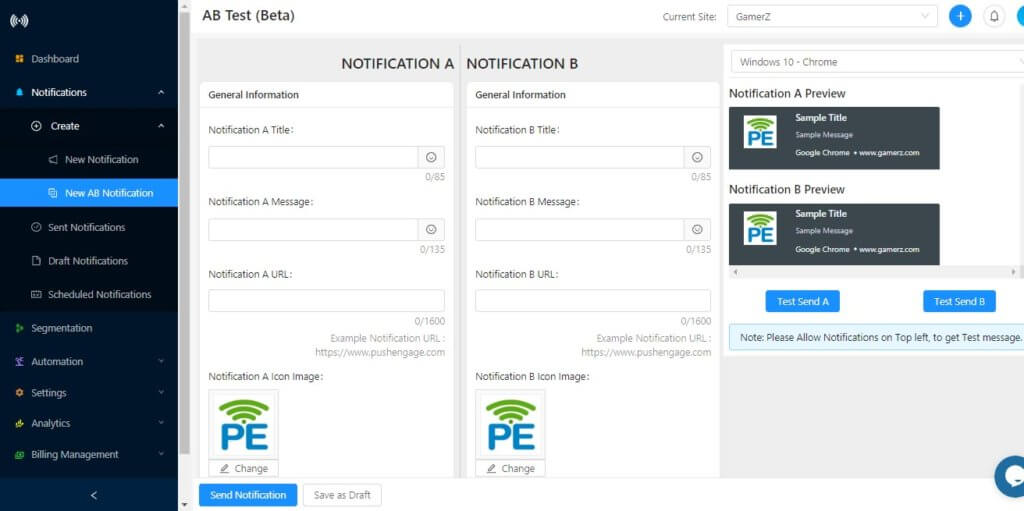
A/B testinde test edebileceğiniz 7 farklı parametre vardır. Daha fazla ayrıntı için, anlık bildirime A/B testi konusundaki makaleyi takip edebilirsiniz.
Hedeflenmiş Bildirimler Gönderin
Abonelere ilgisiz bildirimler gönderirseniz ne olur? Bu, abonelikten çıkma oranını artıracak ve etkileşim oranını düşürecektir.
PushEngage, farklı parametrelere göre anlık abone segmentleri oluşturmanıza olanak tanır. Coğrafi konum, cihaz, eylemler, satın alma ve diğer birçok parametreye göre aboneleri segmentlere ayırın. Daha iyi hedefleme için birden çok segmenti birleştirmeye olanak tanıyan gelişmiş segmentasyon seçeneğini de kullanabilirsiniz.
Hedeflenmiş bildirimlere nasıl bildirim gönderilir
Hedeflenmiş anlık bildirimler göndermek için tüm anlık bildirim kampanyalarında segmentleri kullanabilirsiniz.
1> Tek bildirim gönderme
Tek bir anlık bildirim gönderirken bir segment seçebilirsiniz. 'Yeni Bildirim' bölümünde aşağı kaydırın; 'Kitle Seç' seçeneğini göreceksiniz. Ona tıklayın ve segment seçeneğini göreceksiniz.
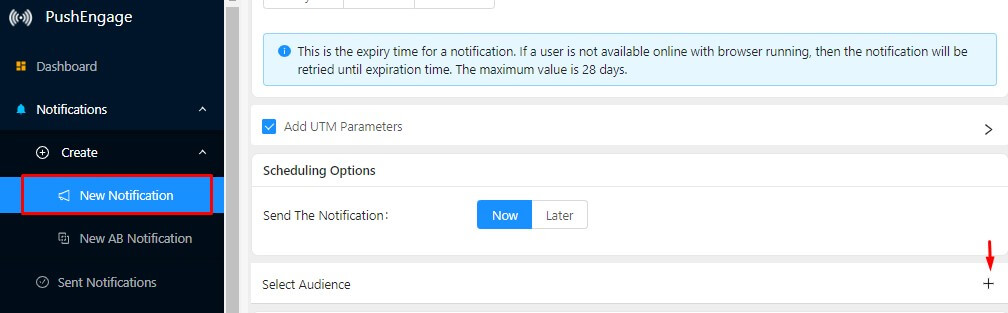
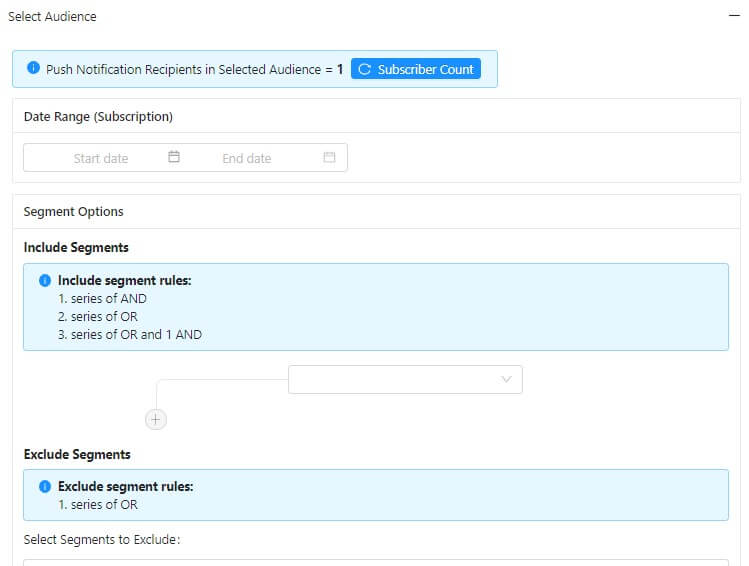
Ardından her segmente hedeflenmiş anlık bildirimler gönderebilirsiniz.
2> Anlık bildirim kampanyasında segment seçin
Kampanyalarda bir segmenti nasıl seçeceğinizi görmek için bir damla anlık bildirim örneği alın. Diğer kampanyalar (sepet ve göz atma hariç) için de aynı adımları izleyebilirsiniz.
Otomasyon->Damla Kampanyası'na gidin. 'Damla Otomatik Yanıtlayıcısı Oluştur'a tıklayın. Damla kampanyası ayarları açılacaktır. 'Kitle Seç' seçeneğini işaretleyin. Farklı hedefleme seçenekleri görüntülenecektir. Anlık bildirim göndermek istediğiniz segmenti seçin.
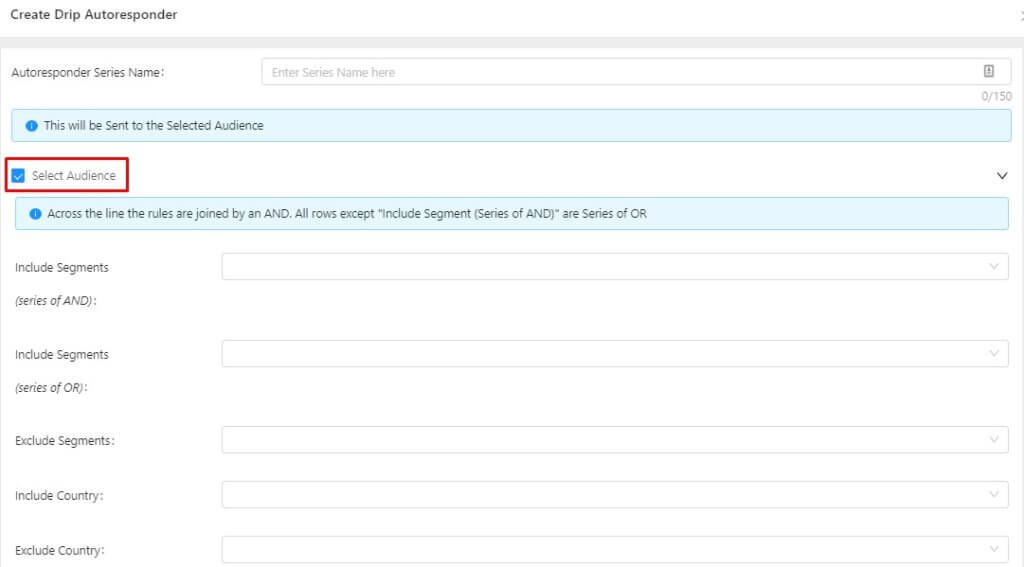
Anlık bildirim gönderirken segmentasyonu kullanmaya başlayın. Çalışmaya göre, segmentlere gönderilen bildirimler, herkese gönderilen bildirimlere kıyasla tıklama oranlarında 2 kat artış sağlıyor.
Sepet Terk Kampanyaları
Etkileşimi ve dönüşümü artırmak için kanıtlanmış anlık bildirim hilelerinden biri sepet terk kampanyasıdır. Kullanıcılar genellikle tek bir ziyarette satın almazlar. Onları müşteriye dönüştürmek için yeniden etkileşim kurmanız gerekir.
Sepet terk kampanyasını kullanarak tüm süreci otomatikleştirebilirsiniz. Sepet terk eden kullanıcılara otomatik olarak anlık bildirim gönderecektir.
Sepet terk kampanyaları nasıl kurulur?
Otomasyon->Sepet Terk'e gidin. 'Sepet Otomatik Yanıtlayıcısı Oluştur'a tıklayın. Sepet terk ayarları açılacaktır. Tüm değişiklikleri yapın ve sepet terk ile yayına geçin.
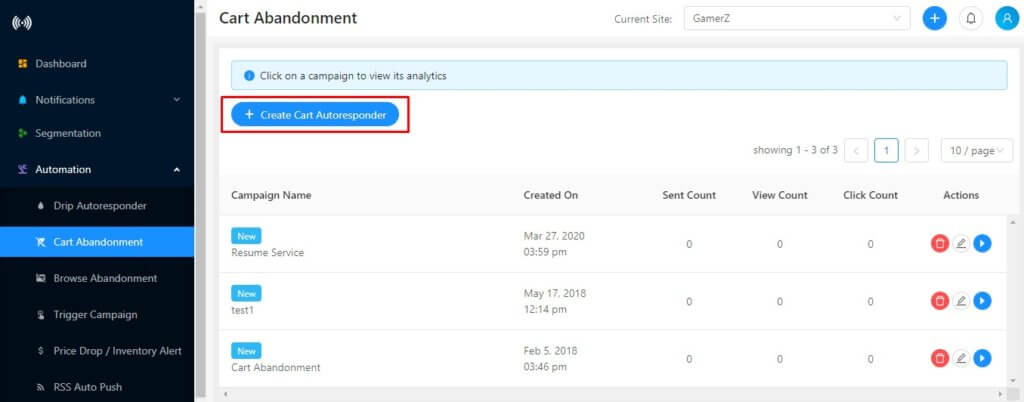
Bir sepet terk kampanyası kurma adımları hakkındaki makaleye göz atın. İşte kampanyanız için en çok dönüşüm sağlayan sepet terk şablonları.
Shopify'da sepet terk kurulumu farklıdır. Tek bir tıklamayla kampanyayı etkinleştirebilirsiniz. Shopify'da sepet terk kampanyası kurma hakkında bu makaleyi takip edin. Shopify'a PushEngage uygulamasını yükleyin ve sepet terk kampanyasına başlayın.
Damla Kampanyaları
Yeni bir kullanıcı anlık bildiriminize abone olduğunda, markanız ve ürününüz hakkında bilgi sahibi olmayabilir. Onları beslemeniz ve markanızla etkileşimde olmanın faydalarını göstermeniz gerekir.
Damla kampanyalarını kullanarak tüm süreci otomatikleştirebilirsiniz. Damla özelliğinin en yaygın kullanımı Onboarding kampanyalarında görülür. Damla'da bir Onboarding kampanyası oluşturun. Kullanıcıları markanız, ürününüz, incelemeleriniz, faydalarınız ve onları etkileşimde tutacak daha birçok şey hakkında beslemek ve eğitmek için bir dizi anlık bildirim ekleyin. Yeni bir kullanıcı abone olduğunda, otomatik olarak bir anlık bildirim gönderecektir.
Damla özelliğini kullanarak birden çok kampanya oluşturabilirsiniz:
- Onboarding kampanyası: Yeni kullanıcıları beslemek için.
- Kategori Kampanyası: Kullanıcının satın aldığı ürüne göre, aynı kategorideki diğer ürünleri sergilemek için bir dizi bildirim oluşturun.
- İlgi Alanı Tabanlı Kampanya: Aboneleri ilgi alanlarına göre segmentlere ayırın. Müşteri ilgisine göre farklı kampanyalar yürütün.
Damla, dönüşümleri de artırabilen çok güçlü bir özelliktir. Önde gelen bloglardan biri olan ShoutMeLoud, Damla kullanarak dönüşümü %10 artırdı.
Damla Kampanyası Nasıl Yürütülür?
Bir damla kampanyası yürütmek için öncelikle segmentler oluşturmanız gerekir. Bir segment oluşturulduktan sonra Otomasyon->Damla Otomatik Yanıtlayıcısı'na gidin. Damla Otomatik Yanıtlayıcısı'na tıklayın
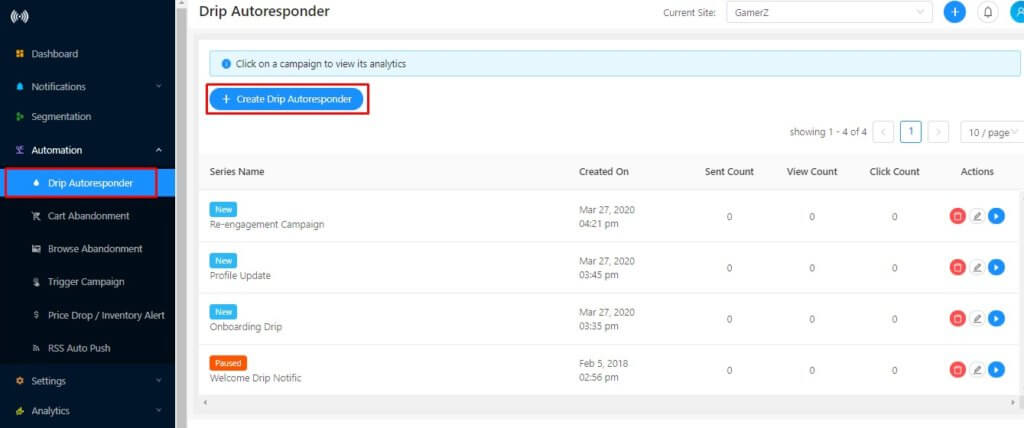
Şimdi damla kampanyası için segmenti seçin.
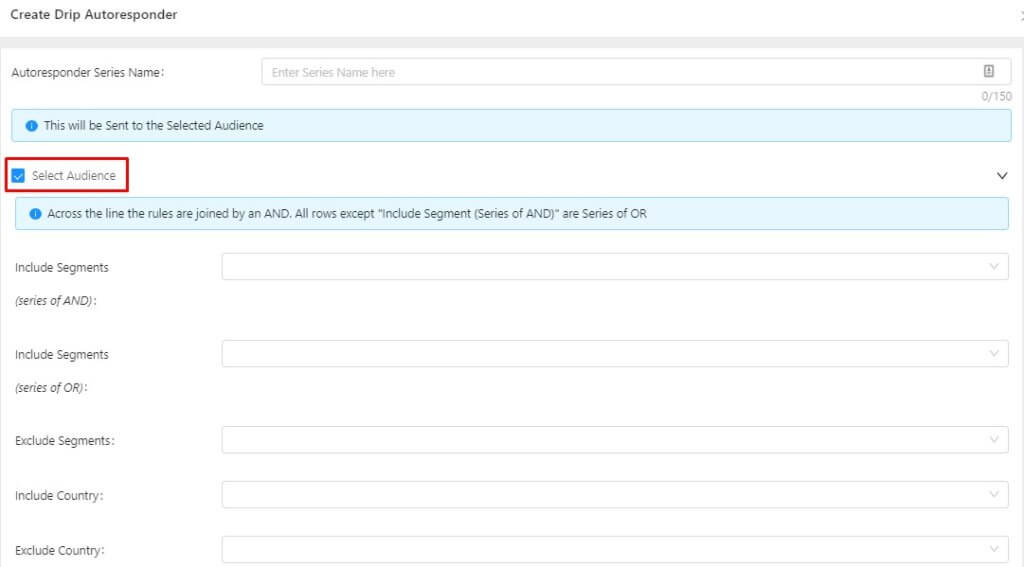
Kitleyi seçtikten sonra kampanyaya bir dizi bildirim ekleyebilirsiniz. Yeni aboneler o segmente her girdiğinde bildirim gönderilecektir.
Anlık bildirim damla kampanyası kurma hakkında ayrıntılı talimatlar için bu makaleye göz atın. Daha iyi sonuçlar için damla kampanyasındaki en iyi uygulamaları izleyin.
Coğrafi Tabanlı Kayıt
Bir web sitesi olarak, işletmeniz için hangi coğrafi bölgelerin iyi performans gösterdiğini ve hangilerinin göstermediğini bilirsiniz. Performansı düşük coğrafi bölgelerden aboneleriniz olduğunda ne olur? Sadece etkileşim kurmayacak aboneler için ödeme yapıyorsunuz demektir.
Ayrıca, genel etkileşiminiz de etkilenir. Kampanyaların iyi performans gösterip göstermediği konusunda size net bir resim vermez.
PushEngage kullanarak bu coğrafi bölgeleri kolayca hariç tutabilirsiniz. Anlık Bildirim kaydı bu coğrafi bölgelerde görünmeyecektir. Bu, yalnızca performans gösteren coğrafi bölgelerden abone almanıza yardımcı olacaktır.
Coğrafi tabanlı kayıt nasıl kurulur?
Coğrafi tabanlı kayıt kurmak çok basittir.
Adım 1> PushEngage paneline gidin->Ayarlar->Abonelik Ayarları->Kayıt Yönetimi.
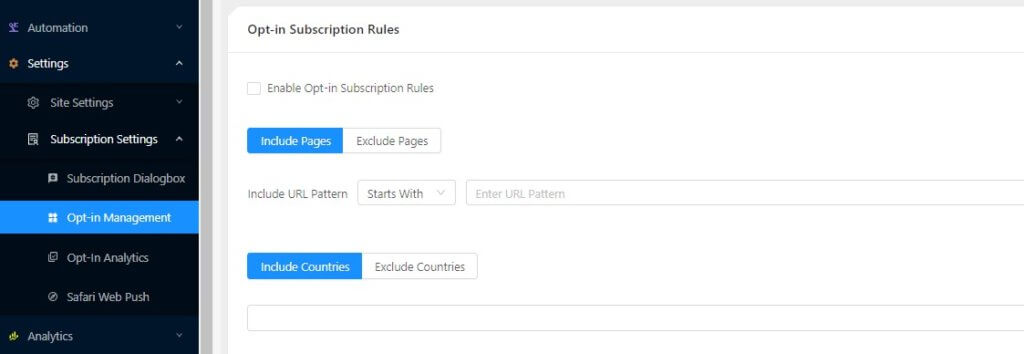
Adım 2> ‘Kayıt Abonelik Kurallarını Etkinleştir’ onay kutusunu seçin. Şimdi, hariç tutma seçeneğini seçin ve hariç tutmak istediğiniz coğrafi bölgeyi ekleyin.
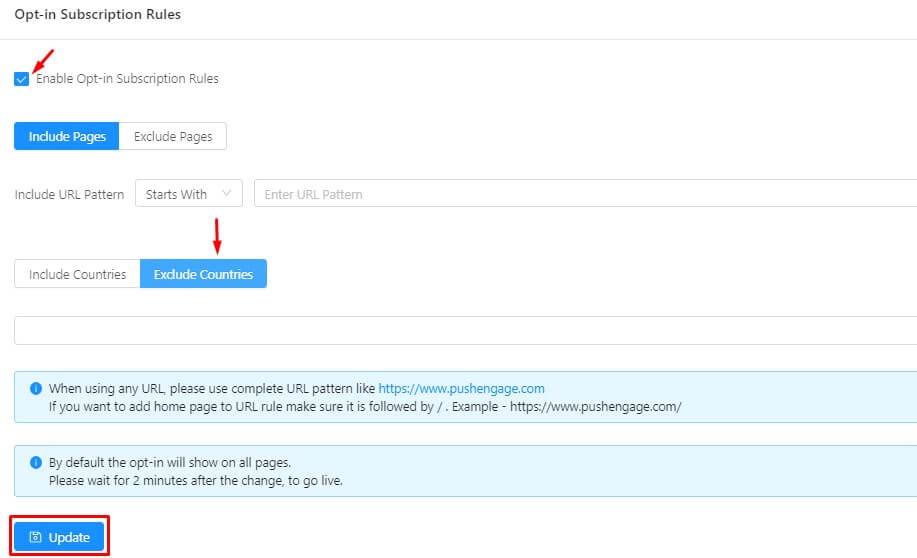
Değişikliklerin yansıması için güncelle düğmesine tıklayın.
Kayıt bu coğrafi bölgelerde görünmeyecektir.
Tarayıcı Terk Etme Kampanyaları
İnsanların herhangi bir işlem yapmadan sadece ürünlere göz attığı zamanlar olur. Çevrimiçi dünyada vitrin alışverişi gibidir. Kullanıcıların ürüne ilgi gösterdiğini gösterir.
PushEngage kullanarak, bu tür abonelerle kolayca etkileşim kurabilir ve onları müşteriye dönüştürebilirsiniz. Tarama Terk Etme Kampanyası, bu tür aboneleri hedeflemenize yardımcı olur.
Tarama terk etme kampanyası nasıl kurulur?
Otomasyon->Tarama Terk Etme'ye gidin. ‘Tarama Otomatik Yanıtlayıcısı Oluştur’ düğmesine tıklayın. Tarama terk etme ayarlarını açacaktır. Varsayılan ayarlar yerindedir. Bildirim şablonunda değişiklik yapabilir ve tarama terk etme kampanyasıyla yayına girebilirsiniz.
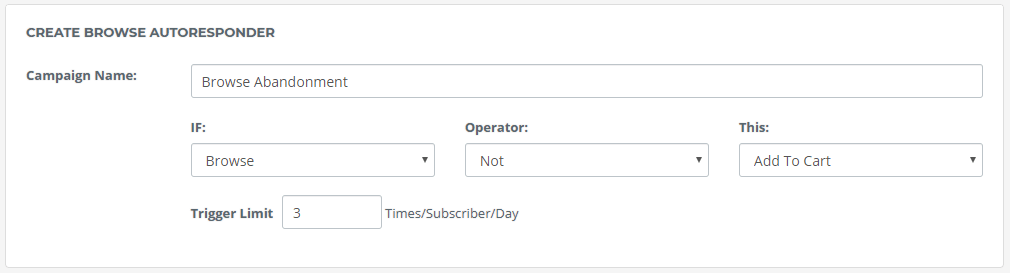
Ayrıntılı kurulum için tarayıcı terk etme kampanyası hakkındaki bu makaleyi izleyin.
Aboneler genellikle bir web sitesini ziyaret ettiklerinde birçok ürüne göz atarlar. Her seferinde tarama bildirimi göndermek, abone için çok fazla bildirimle sonuçlanacaktır. Bu nedenle, yayına girmeden önce tarama terk etme kampanyaları için doğru stratejileri kullanın.
Çoklu Dil ve Emoji Desteği
Etkileşimi artırmak için kişiselleştirme çok önemlidir. Kişiselleştirilmiş herhangi bir kampanya etkileşim oranınızı artırabilir. Kişiselleştirme, yukarıdaki tüm kampanyalar için de geçerlidir.
Bildirimi kişiselleştirmenin en iyi yollarından biri yerel dili kullanmaktır. İnsanlar kendi dillerinde konuştuğunuzda etkileşim kurarlar. Daha kişisel hissettirir. Aynı şey Anlık Bildirimler ile de yapılabilir. Anlık bildirimleri yerel dilde de gönderebilirsiniz.
PushEngage, UTF 8 karakterleri kullanılarak yakalanabilen tüm dilleri destekler. Çalıştığını görmek için yerel dilde yazmanız yeterlidir. Aşağıdaki yerel dilde gönderilen bildirimi görün.
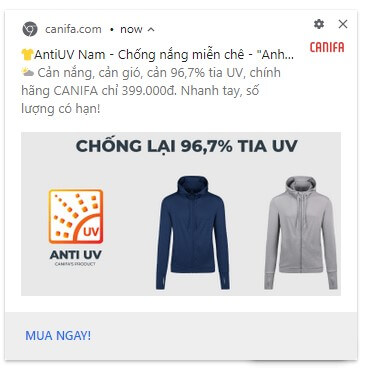
Bildirimleri kişiselleştirmenin bir başka yolu da emojiler kullanmaktır. PushEngage'ı kullanarak bildiriminize kolayca emoji ekleyebilirsiniz. Bir bildirim oluştururken emoji simgesini seçin.
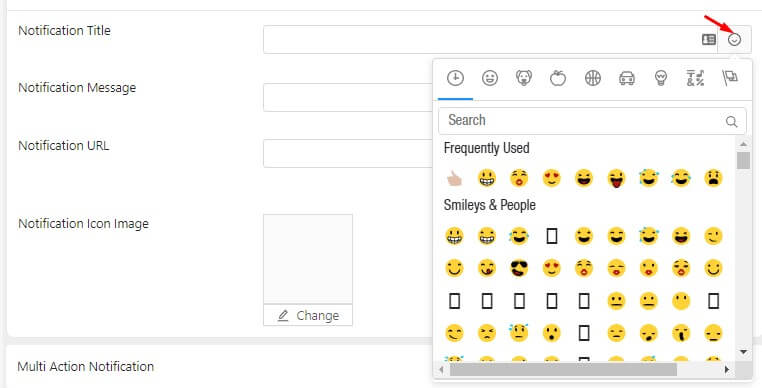
Tüm emoji seçeneklerini gösterecektir. Bildirim başlığına ve açıklamasına emoji ekleyebilirsiniz. Seçenek, sepet terk etme, göz atma terk etme, damla gibi tüm kampanyalarda mevcuttur. Şimdi etkileşiminizi ikiye katlamak için kanıtlanmış Anlık Bildirim hilelerini biliyorsunuz. Bu her sektörde işe yarar. Etkileşimdeki bir artış, dönüşümlerde de bir artışa yol açacaktır. Yukarıdakileri uygulamada yardıma ihtiyacınız olursa, [email protected] ile iletişime geçin.



