Så du har hört talas om den nya engagemangskanalen för dina mobil- och skrivbordsanvändare – Webbplatsnotiser? Vet du vad Web Push Notifications är? Webbplatsnotiser återengagerar dina användare och får dem tillbaka till din webbplats när de är någon annanstans. Du bestämmer dig för att implementera detta på din webbplats och är förvirrad över de olika alternativen som finns tillgängliga för dig. Efter Parse-debacle undrar du nu hur du kan säkerställa att det inte finns någon leverantörslåsning när du implementerar push-notiser för din webbplats.
Eller så läser du detta för att den första leverantören du implementerade med inte tog tillräckligt med försiktighetsåtgärder och blev inlåst, och nu är deras priser för höga. Kontrollera alltid push-notisfunktionerna som erbjuds av tjänsteleverantören för webbplatsnotiser. Om du vill migrera från den nuvarande push-notiseringsplattformen till andra, bör du följa stegen som nämns här.
Vi på PushEngage vill skriva om detta öppet. Transparens är en av våra kärnvärderingar. För det andra vill vi att våra kunder ska stanna hos oss, på grund av upplevelsen på vår plattform och inte för att de är inlåsta.
Om du har bråttom, här är en TL;DR-sammanfattning
HTTPS-webbplats
- Se till att du använder ditt Safari-certifikat. ps: FCM-nyckel behövs inte eftersom vi nu använder en unik VAPID-nyckel sedan augusti 2018.
- Se till att du samlar prenumeranter på din domän (dvs. slutlig tillåtelse är på din domän)
HTTP-webbplats
- Se till att du använder ditt eget Safari-certifikat. ps: FCM-nyckel behövs inte eftersom vi nu använder en unik VAPID-nyckel sedan augusti 2018
- Se till att du samlar prenumeranter på din domän, genom att använda en HTTPS-underdomän.
Läs vidare för den detaljerade versionen.
Låt oss börja och se hur man integrerar push-notiser utan leverantörslåsning.
Grundläggande frågor att besvara innan du går live
1) Är din webbplats HTTP eller HTTPS?
Har du en HTTPS-webbplats eller en underdomän eller en del av webbplatsen som är på HTTPS?
Vad är HTTP eller HTTPS? Om du kontrollerar URL:en till din webbplats, ser du det gröna låset med "Säker" som du ser på PushEngage-webbplatsen.

Om ja, då är du på en HTTPS-webbplats, annars HTTP. För att veta mer om HTTP eller HTTPS kolla wikilänken här.
Varför detta är viktigt: Prenumeration och sändning av push-notiser kräver en HTTPS-domän, så om du har en egen kan du använda den. Se senare vilka andra fördelar detta har.
Om du inte har en HTTPS-underdomän, tillhandahåller vi dig en HTTPS-underdomän som är värd på vår webbplats, t.ex. https://yourdomain.pushengage.com/. Detta används sedan för att prenumerera på användare och skicka push-notiser. Detta är nyckeln till att uppnå full portabilitet på en HTTP-webbplats. Vi har anpassade underdomäninställningar som en funktion på vår plattform.
Vilken inverkan har denna underdomän på dina notiser?
a) Under prenumerationen kommer dina webbplatsanvändare att se denna underdomän,
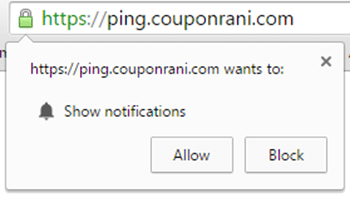
Inbyggt prenumerationsfönster
b) När meddelandet skickas kommer det att ha URL:en för underdomänen som visas i Push – även om du kan landa användaren på vilken URL som helst på din domän.
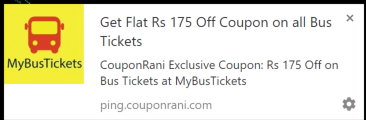
Exempelavisering
I ovanstående fall använde CouponRani.com sin egen anpassade underdomän https://ping.couponrani.com som hade https, och detta visas i prenumerationsförfrågningar och aviseringar.
2) Två steg för att undvika inlåsning hos leverantören vid integrering av push-aviseringar
Steg 1 PushEngage använder nu Vapid på sin plattform. Det skapar en unik vapid-nyckel för varje konto. Alla dina push-prenumeranter kommer att kopplas till denna unika nyckel. Så när som helst du vill flytta till en annan plattform, med hjälp av vapid-nyckeln kan du importera alla dina prenumeranter.
Som leverantör låser PushEngage aldrig in kunder. Därför erbjuder vi vapid-nycklar för enkel portabilitet av push-prenumeranter.
Om du tittar på Chromes arkitektur för push-aviseringar kräver den att service worker javascript-kod körs i en push-prenumerants webbläsare. Denna väcks när en avisering skickas till webbläsaren. Den hämtar sedan aviseringen från en Push Server, som ofta är värd för plattformen du använder för att gå live med Push Notification. Detta är värd från HTTPS-domänen, som används för prenumeration och avisering.
För att du ska kunna migrera senare behöver du kunna ersätta service worker javascript-kod med en ny och peka på den nya Push Servern. Detta innebär att du bör ha full kontroll över HTTPS-underdomänen.
Steg 2: Därför är det andra som behövs för att undvika inlåsning hos leverantören att använda din egen HTTPS-underdomän eller en HTTPS-domän för dessa push-aviseringar. Att flytta en hel webbplats till HTTPS är en del ansträngning, och även om det är rekommenderat ur SEO-perspektiv, är det fortfarande en del arbete. En lösning är att bara ha en underdomän på HTTPS eller en sida på din webbplats på HTTPS. Detta är ett viktigt steg som kräver att du samlar in prenumerationer på en domän som du kontrollerar.
Exempel: I fallet med CouponRani var detta på https://ping.couponrani.com i exemplet ovan.
Nu har du identifierat domänen/underdomänen Var & Hur du kommer att samla in prenumeranter.
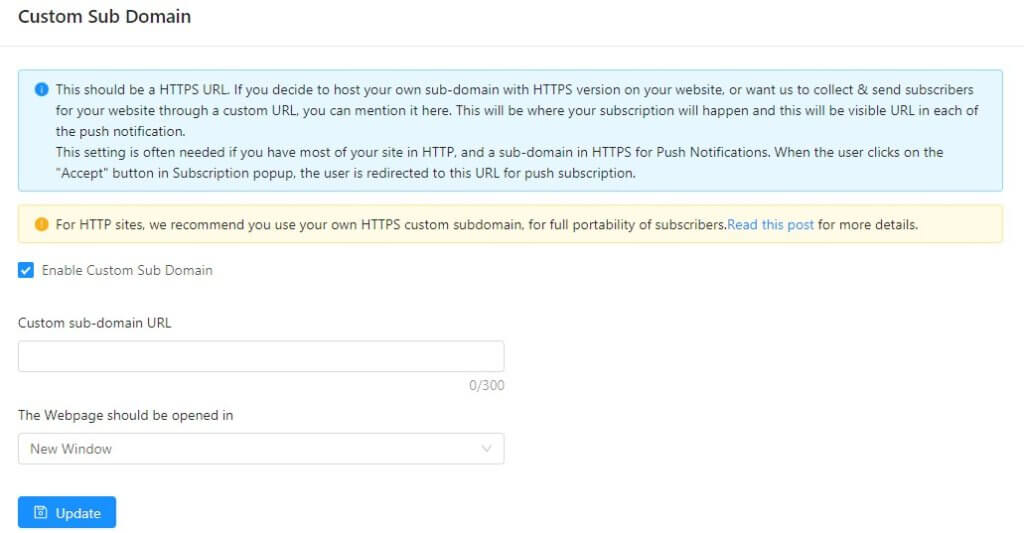
Därför har vi byggt en anpassad underdomän som en del av produktens standardfunktioner
För att aktivera anpassad underdomäninställning i PushEngage, behöver du göra följande om du är en HTTP-webbplats
a) Köp ett SSL-certifikat
b) Ställ in en domän https://notify.yourdomain.com och aktivera ett SSL-certifikat på den. Du behöver ställa in en DNS-mappning för denna domän.
c) Sedan behöver du placera PushEngage-installationsfilerna i underdomänen
d) Ange detta i inställningen för anpassad underdomän i PushEngage. Gå till Inställningar > Webbplatsinställningar > Anpassad underdomän
Det är allt och du skulle vara live med Push-aviseringar utan inlåsning hos leverantören.
Det vore bra att få din konfiguration kontrollerad med vårt supportteam genom att skicka ett e-postmeddelande till [email protected]
Bästa praxis för prenumerationshantering & insamling av push-medgivande
Tänk på att när du börjar med push-meddelanden på din webbplats, börjar du med noll prenumeranter. Du kommer långsamt att behöva skaffa prenumeranter och bygga din lista, vilket har en enorm ROI-potential. Nu när du är säker på att inte bli inlåst av leverantören, börja fokusera på att öka din push-prenumerationsgrad.
Därför bör vi identifiera vilka som är de bästa sätten att få användarregistrering på din och hur man ökar din medgivandegrad.
Generellt förväntar vi oss att din webbplats bör få minst lika hög registrerings-/medgivandegrad för push-prenumeranter som för e-post. Vi tror att detta beror på två skäl:
- Du behöver inte skriva något när du prenumererar på push-meddelanden. Ett klick är enklare än att skriva i ett textfält.
- Du har full kontroll över din prenumeration på push-meddelanden, eftersom du kan avregistrera dig från push-meddelanden för vilken webbplats som helst via dina webbläsarinställningar.
Typ av prenumerationsmedgivande att använda
Som nämnts ovan, för att undvika inlåsning av leverantörer, välj alltid HTTPS-webbplatsen. Det finns upp till 7 olika typer av push-meddelanden medgivande. Dessutom, för HTTPS-webbplats kan du använda den mest konverterande push-meddelanden medgivande.
Hur ska du samla in en prenumeration? Om du har en fullständig HTTPS-webbplats ser du bara 1 inbyggd popup som visas nedan.
Om du bara har en del av webbplatsen på HTTPS, måste du använda andra element som en popup, klocka eller bottenfält, eller något annat, som vid tillåtelse går till HTTPS-versionen av webbplatsen.
Förutom att samla in prenumeranter i en global lista bör du tänka på att segmentera användarna och placera dem i olika listor baserat på deras webbplatsåtgärd, plats eller någon annan attribut. Vi kan göra detta genom att använda automatisk segmentering och anpassad segmenteringsfunktion i PushEngage. Läs detta inlägg om hur du ställer in detta.
Välkomstnotis
Bekräftar du för användarna att de framgångsrikt har prenumererat på push-meddelanden för din webbplats? Vi tror att detta kan vara ett viktigt användarupplevelseelement, eftersom push-meddelandepopups (en överflöd av dem) kan vara förvirrande och ett välkomstmeddelande bekräftar att de har slutfört prenumerationen. På sätt och vis liknar detta välkomstmejl och prenumerationsbekräftelse via e-post.
Med hjälp av Drip Web Push Campaigns kan du nu skicka ut ett välkomstmeddelande, säg 30 minuter efter att användaren har prenumererat. Detta kan ha större inverkan eftersom det når dem när kunden har lämnat webbplatsen, men de kommer tydligt ihåg din webbplats och det är en bra tid att uppmana dem till någon åtgärd. Här är ett exempel på en välkomst-drip som skickas efter 30 minuter.
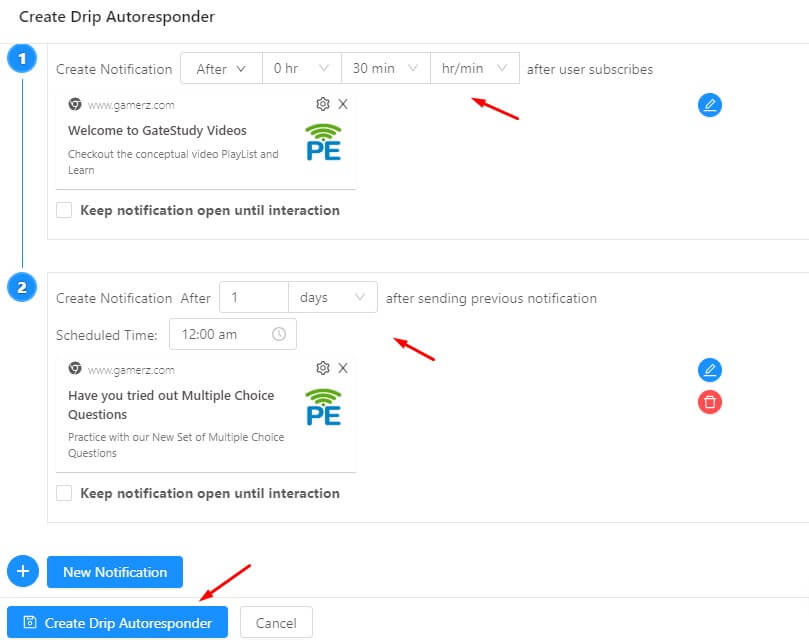
Steg för att gå live med push-meddelanden
Efter att ha beslutat om de viktigaste aspekterna av integrationen kan du nu gå live med push-meddelanden. Vi har inte nämnt specifika steg för att gå live här, eftersom varje leverantör är annorlunda. De flesta leverantörer kommer att kräva att du lägger till Javascript-kod på din webbplats. För HTTPS-webbplatser kan du behöva installera några extra filer.
Exempel på push-meddelandekampanjer
Nu när du samlar prenumeranter för att återengagera dem, vilka kampanjer kör du för dina prenumeranter? Detta är en bred fråga och svaret beror på vilken typ av webbplats du driver, men låt oss dela med oss av de vanligaste typerna av kampanjer som används –
A. Kampanj för nya artiklar: För de flesta nyhetswebbplatser är det en av de mest avgörande faktorerna för framgång att få ut informationen till användarna i tid. Oavsett om det handlar om nyheter, valkampanjer, sport eller den aktuella pandemin, måste de uppdatera prenumeranterna.
C. Prissänkning meddelanden: Alla letar efter det lägsta priset. Men hur skulle en kund veta att priset har sjunkit? Aktivera kampanjen för prissänkning meddelanden för att automatiskt uppdatera användare om prissänkningar på deras favoritprodukter.
D. Kupong-/erbjudandemeddelanden: Push-meddelanden levereras omedelbart. Så du kan enkelt köra en snabbförsäljning eller tidsbegränsad försäljning för att öka din intäkt.
E. Meddelanden om produkt tillgänglighet: Du bör också uppdatera användare när produkten är tillbaka i lager. Push-meddelanden tillåter dig att skicka automatiska push-meddelanden till användaren när lagret är uppe.
F. Kampanj för övergivna kundvagnar – Skicka riktade meddelanden baserat på övergivna kundvagnar på mobil- eller datorsidan
Du kan också kolla in handboken för push-meddelanden för att skapa olika kampanjer för din webbplats.
Sammanfattning
Tidiga resultat indikerar att Web Push Notification är en kanal med hög ROI, och snabbt växande, så du bör definitivt prova detta för din webbplats. Eftersom Web Push Notifications är en ny standard, förvänta dig många nya funktioner och ändringar. När du funderar på att aktivera din webbplats med push-meddelanden, implementera det på ett sätt som ger dig mer flexibilitet.


Hur konfigurerar jag Push Engage med vår Magneto e-handel? Vänligen guida mig.
Vänligen kontrollera vår guide om implementering med Magento här
Vi flyttade precis från en annan leverantör av push-meddelanden till Push Engage. Vi använde FCM Project och FCM Key-metoden från början. Nu när vi har ställt in samma FCM Project och FCM Key på din plattform, är våra tidigare prenumeranter fortfarande prenumeranter eller är det något vi behöver göra manuellt?
Du måste skicka oss exporten av prenumeranterna, och sedan kan vi importera den till ditt konto. Prenumeranterna importeras inte direkt. Vi följer upp från vår support-e-post.
Ännu bättre, så länge din webbplats är HTTPS, kan folk prenumerera med bara ett klick.
Tack för att du postade, jag älskar verkligen ditt arbete, fortsätt så.
Verkligen när någon inte vet, så är det upp till andra människor att de kommer att hjälpa till, så här händer det.
Välskrivet & klart.
Jag började skriva en blogg de senaste dagarna och märkte att många
artiklar bara upprepar gamla idéer men tillför väldigt lite värde.
Det är fantastiskt att läsa en informativ text av verkligt värde för dina läsare.
Det här hamnar på min lista över detaljer jag behöver replikera som ny bloggare.
Läsarengagemang och innehållskvalitet är
Kungligt.
Några underbara tankar; du har definitivt hamnat på min lista
över webbplatser att bevaka!
Fortsätt det goda arbetet!
Väl gjort,
Jock
Jag bloggar ofta och jag tackar verkligen för din information. Den här artikeln har verkligen väckt mitt intresse.
Jag kommer att bokmärka din blogg och fortsätta att leta efter ny information ungefär en gång i veckan.
Jag anmälde mig till ditt RSS-flöde också.
Åh, det här var ett otroligt bra inlägg. Att lägga ner tid och verklig ansträngning
för att skapa en mycket bra artikel... men vad kan jag säga...
Jag tvekar mycket och verkar inte få nästan något gjort.
Allt är mycket öppet med en riktigt tydlig förklaring av problemen.
Det var verkligen informativt. Din webbplats är användbar.
Tack för att du delar med dig!