Letar du efter ett snabbt och enkelt sätt att sortera push-notiser och hitta dina bäst presterande kampanjer?
Att sortera dina push-kampanjer efter prestandamått hjälper dig att förstå vad som fungerar och vad som inte gör det. Ännu viktigare är att du kan använda dina bästa kampanjer som en bas för nya kampanjer.
Sorteringsfunktionen är inte standard för alla push-notistjänster. Även om du får funktionen, kanske du inte kan använda den utan att använda deras API-tjänst. Vilket innebär att du behöver en utvecklare för att göra det åt dig.
Om du har en intern utvecklare, är det bra. Men om du inte har det, rekommenderar vi starkt att du byter till PushEngage. PushEngage låter dig filtrera dina kampanjer med några enkla klick.
I den här artikeln kommer vi att visa dig steg för steg hur du sorterar push-notiser och hittar dina bästa kampanjer.
Varför vill du filtrera och sortera push-notiser?
Du kan filtrera och sortera push-notiser för att hitta de bäst presterande kampanjerna eller till och med dina sämst presterande kampanjer.
Det fantastiska med dessa filter är att du kan se:
- Typer av push-aviseringar som du skickar mest
- Hur bra specifika typer av aviseringar presterar
- Identifiera säsongstrender i kampanjprestanda
- Vilka typer av kampanjer som behöver optimeras omedelbart
Och du kan göra det med några enkla klick!
Du kan också sortera push-notiserna efter Senast skapad eller Äldst skapad. På så sätt kan du göra det superenkelt att hitta specifika kampanjer även efter att du har filtrerat efter ett datumintervall.
Tillåter din push-notistjänst kampanjsortering?
Inte alla push-notistjänster låter dig filtrera och sortera push-notiser. Åtminstone inte direkt. Ibland kan du göra det med deras API-tjänst. Men det är svårt att göra om du inte har en intern utvecklare.
Ett bra s extit{ä}tt att verifiera extit{är} att helt enkelt fr extit{å}ga din tj extit{ä}nstleverant extit{ö}r om de har ett rensningsalternativ. Men chansen extit{är} stor att de inte har ett med tillg extit{ä}ngliga alternativ.
Vi rekommenderar att du byter till PushEngage omedelbart.

PushEngage är den bästa push-aviseringstjänsten i världen. Och vi pratar inte bara om gratisversionen. Den låter dig ansluta med besökare efter att de har lämnat din webbplats med riktade push-meddelanden.
PushEngage är vårt förstahandsval för push-notistjänster och verktyg eftersom det är:
- Den är så enkel att använda
- Effektivt på HTTP- och HTTPS-webbplatser
- Levereras med en visuell byggare som kräver lite eller ingen kodning för att ställa in
- Ställ enkelt in helt automatiserade pushnotiskampanjer för alla typer av webbplatser
- Har flera alternativ för att skicka personliga push-meddelanden för högre klickfrekvens
- Utrustad med anpassad målföljning, UTM-parametrar och avancerad analys
Och detta är knappt ytan. Kolla in PushEngages fullständiga lista över funktioner innan du går vidare.
Den mest otroliga delen med PushEngage extit{är} att den har en evigt gratis plan som du kan prova innan du fattar ett k extit{ö}pbeslut.
PushEngages gratis plan är tillräckligt bra för att få ditt företag till en punkt där du enkelt har råd med de betalda planerna. De börjar på 9 USD/månad under det första året (1 000 prenumeranter, faktureras årligen) och skalas med ditt prenumerantantal; 100 000 prenumeranter är Premium-planen, och de aktuella siffrorna finns på prissidan.
Den totala växlingskostnaden är ganska låg. Därför uppmuntrar vi dig starkt att byta till PushEngage omedelbart. Raderingsfunktionen är inte den enda anledningen att köpa en PushEngage-plan. Du får många avancerade funktioner som andra push-meddelandeverktyg helt enkelt inte erbjuder.
Hur man snabbt filtrerar och sorterar notiser
Nu när du har bytt till PushEngage är det dags att rensa din lista över prenumeranter på push-meddelanden.
Om du är ny på att spåra push-notisprestanda, har vi riktigt goda nyheter för dig. Du kan enkelt sortera och filtrera dina push-sändningar.
Gå till din PushEngage-instrumentpanel och gå till Push-sändningar:

Här kommer du att märka att det finns ett filteralternativ:
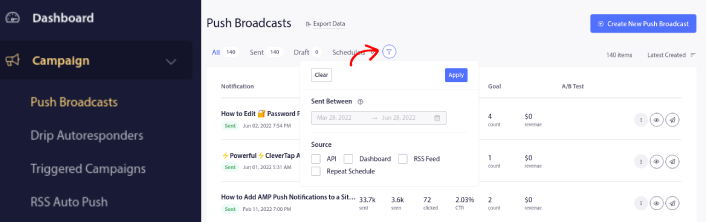
Du kan filtrera de push-sändningar du skickade ut efter datum och källa:
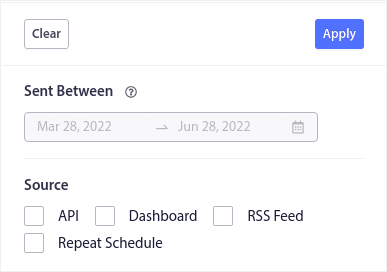
Låt oss säga att du har en Black Friday push-notiskampanj som sträcker sig över flera dagar.
Nu kan du få en tydlig bild av vilka notiser som presterade bäst och vilka som inte presterar så bra. Och denna information kan hjälpa dig att optimera dina nuvarande sändningar och kampanjer.
Om du är ny på att använda push-notiser bör du veta att du bara kan A/B-testa push-sändningar. Men du kan använda sorterings- och filtreringsalternativen för att tillämpa optimeringar även på dina automatiserade kampanjer. Det är ett riktigt bra sätt att ställa in bästa praxis för push-notiser för din bransch och ditt varumärke.
Vad du ska göra efter att du har sorterat push-notiser
När du har sorterat dina push-notiser kan du titta på detaljerad analys och sedan återgå till att optimera dina push-notiskampanjer och växa ditt företag.
Vi föreslår också att du tar dig tid att läsa våra artiklar och lär dig hur du kan förstärka dina automatiserade push-notiser. Börja med vår artikel om bästa praxis för push-notiser.
Om du är nybörjare på push-notiser bör du följa en fullständig testprocess för push-notiser innan du går live. Det hjälper dig att felsöka vanliga problem innan dina besökare ser dem och börjar klaga på en trasig användarupplevelse. Och du bör definitivt ställa in Google Analytics för att spåra push-notiser.
Skicka push-notiser för att rikta in dig på prenumeranter som klickade på dem eller inte gjorde det. Låt oss veta hur det fungerar för dig. Under tiden, kolla in dessa resurser:
- Hur du ökar klick på dina push-notiser med nyfikenhet
- Hur du anpassar varje push-notis
- Hur du sticker ut med rik media i dina push-notiser
- Hur du återaktiverar inaktiva push-prenumeranter
- Hur du använder push-notiser för att hålla kunderna informerade
- Hur du använder emojis i dina push-notiser för högre klickfrekvens
- Hur du ökar konverteringar genom att skapa en känsla av brådska
Och om du inte redan har gjort det, kom igång med PushEngage.


