Letar du efter en guide om hur du skickar Safari push-notiser som faktiskt kan växa din verksamhet?
Automatiserade notiser är enskilda push-notiser eller en serie push-notiser som fortsätter att fungera i bakgrunden. Till skillnad från sändningar av push-notiser fungerar de utan någon manuell åtgärd från din sida. Du kan helt enkelt ställa in dem en gång och de kommer att fortsätta att fungera för alltid.
Men vilka aviseringar bör du skicka? Hur vet du om de kommer att fungera för din verksamhet? Och hur kommer du igång?
I den här artikeln visar vi dig hur du använder enkla, handlingsbara knep för att generera trafik och försäljning automatiskt med hjälp av Safari push-notiser.
Låter bra? Låt oss bara dyka rakt in.
En genomgång av Safari push-notiser
I sin bredaste bemärkelse finns det 3 typer av Safari push-notiser:
- Sändningsmeddelanden
- Drip push-notis-kampanjer
- Utlösta push-notis-kampanjer
Sändningar är push-notiser som du skickar ut som en enskild notis. Du kan schemalägga dem, men de kommer bara att skickas en gång. Utlösta kampanjer innebär att du ställer in en push-notis, definierar en utlösare för att aktivera den och ett arbetsflöde för att styra dess schemaläggning. Automatiserade drip-notiser är en serie notiser som aktiveras automatiskt vid specifika tidpunkter eller när specifika villkor uppfylls.
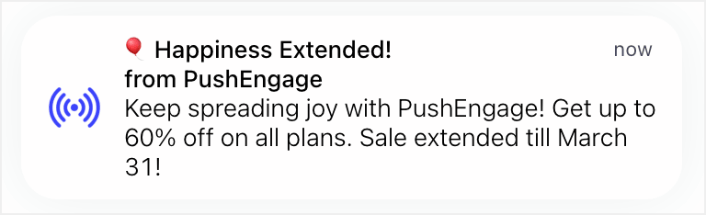
För alla praktiska ändamål ser utlösta kampanjer och automatiserade dropp-kampanjer likadana ut utifrån. Den avgörande skillnaden är att utlösta kampanjer är mycket mer flexibla och anpassningsbara. Om du tänker på att push-notiser kostar mycket mindre än de flesta andra kanaler, är det helt logiskt att använda en kombination av alla tre för att växa din verksamhet.
Om du är nybörjare på push-notiser rekommenderar vi starkt att du börjar din resa med hjälp av beprövade mallar.
OBS: De flesta utlösta kampanjer kräver viss erfarenhet av utveckling. Du skulle behöva använda ett API för att få ut det mesta av utlösta notiser. Det finns dock några utlösta notiser som du kan skicka direkt från hyllan. Om du är nyfiken, kolla in vår artikel om e-handels push-notiser för en bättre uppfattning.
Den bästa tjänsten för att skicka Safari push-notiser
Låt oss börja med att säga att de flesta av de "gratis push-aviseringstjänster" som finns där ute faktiskt är gratis testperioder. Vissa av leverantörerna vi har listat här är testprogramvara, medan andra har en evigt gratis plan som du kan välja.
Det finns några andra freemium-alternativ som Firebase Cloud Messaging (FCM), men det är egentligen inte ett bra alternativ alls. Du kan läsa mer om varför FCM inte kan konkurrera med en tjänsteleverantör som PushEngage. Men för nu, lita bara på vårt ord och hoppa över till de bättre alternativen.
Vi rekommenderar att använda PushEngage.

PushEngage är det främsta pluginet för push-notiser i världen.
Pushnotiser hjälper dig att öka din webbplatstrafik och engagemang automatiskt. Och om du driver en onlinebutik hjälper PushEngage dig också att öka din försäljning genom att hjälpa dig att skapa automatiserade e-handelspushnotiser.
Du kan komma igång gratis, men om du menar allvar med att växa ditt företag bör du köpa en betald plan. Innan du köper någon pushmeddelandetjänst bör du också kolla in den här guiden till kostnader för pushmeddelanden.
Här är en snabb överblick över vad du får med PushEngage:
- Högkonverterande automatiserade kampanjer
- Flera målriktnings- och kampanjplaneringsalternativ
- Målspårning och avancerad analys
- Smart A/B-testning
- Push-kampanjmallar
- Kraftfulla segmenteringsalternativ
- En dedikerad framgångschef
Och detta är knappt att skrapa på ytan. Kolla in PushEngages fullständiga lista över funktioner innan du går vidare.
Men den mest attraktiva delen av PushEngage är att du kan komma igång med en gratis plan för alltid. Och du kan använda den för att faktiskt växa din verksamhet med flera anpassningsalternativ.
Du kommer att se att PushEngage är utan tvekan det bästa valet om du vill bygga trafik, engagemang och försäljning för ditt företag. Och om du har en budget kan du alltid vara lite kreativ med dina pushmeddelanden.
OBS: Om du driver en WordPress-webbplats bör du installera och aktivera PushEngage WordPress-plugin.
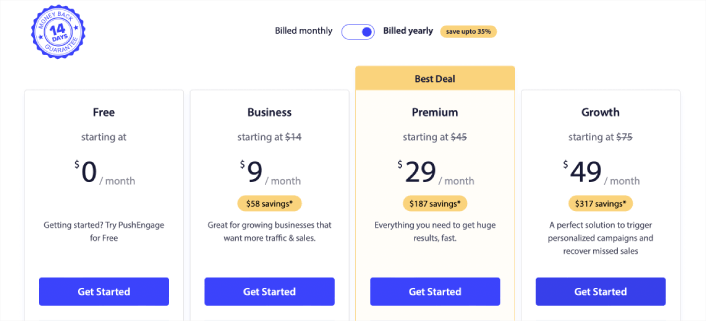
Den kostnadsfria versionen tillåter upp till 200 prenumeranter och 30 livstidsaviseringar. Det räcker bra för att få ditt företag till en punkt där du enkelt har råd med betalda planer. De börjar på 9 USD/månad under det första året (1 000 prenumeranter, faktureras årligen) och skalas med ditt prenumerantantal; 100 000 prenumeranter är Premium-planen, och de aktuella siffrorna finns på prissidan.
Och oroa dig inte om du inte kan någonting om kodning. Du kan installera PushEngage med hjälp av en av de många installationsguiderna för alla webbplatser och CMS.
Hur man skickar Safari push-notiser
Nu när du vet vad Safari push-notiser är och vilken tjänst du behöver för att skicka dem, är det dags att titta på hur du skickar olika notiser. För praktiska ändamål pratar vi inte om anpassade utlösta kampanjer som du kan skapa med en API-tjänst här. Om du är mer intresserad av anpassade notiser bör du kolla in vår dokumentation.
#1. Safari push-notiser för välkomstkampanjer
En välkomst push-notis-kampanj är en enkel push-notis avsedd att uppskatta alla nya prenumeranter.
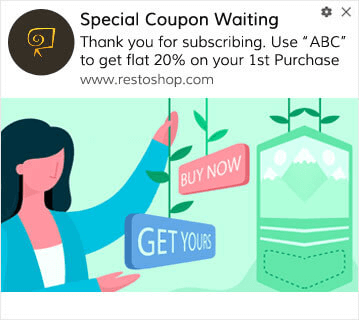
Du kan också erbjuda ett erbjudande eller en gåva för att prenumerera på dina pushaviseringar. Detta är ganska vanligt bland många av våra kunder. Du kan använda dina välkomstpushaviseringar för att:
- Dela en välkomstkupong
- Erbjud premiumfunktioner
- Skicka gratis leverans
- Erbjuda gratis gåvor
- Onboarda din prenumerant med en genomgång
Nu ska vi konfigurera din första välkomstpushavisering med PushEngage.
Här är hur du aktiverar välkomstnotiser i PushEngage. Gå till PushEngage-instrumentpanelen och gå till Kampanj » Drip Autoresponders och klicka på Skapa ny Drip Autoresponder:

Namnge sedan din kampanj (vi föreslår något som Välkomst-drip), och under Innehåll, välj alternativet som säger, “Skicka meddelande omedelbart efter att användaren prenumererar“):

Vid det här laget kan du klicka på pilen bredvid notisen för att redigera innehållet i din notis. Om du har en Premium- eller Enterprise-plan med PushEngage kan du lägga till mer än en notis för att skapa en sekvens av automatiserade välkomstmeddelanden. Klicka bara på Lägg till ny notis och redigera innehållet.
När du är klar, klicka på Drip-inställningar och välj alternativet att skicka din välkomstkampanj till alla prenumeranter:

Rulla sedan ner för att ställa in dina egna UTM-parametrar för att spåra push-notiserna:
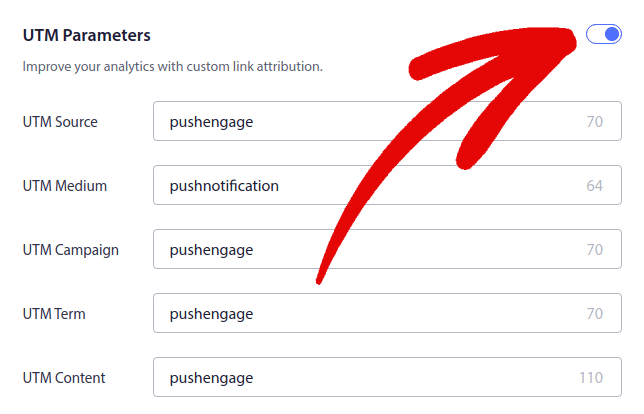
Och när du är klar, rulla upp igen och klicka på knappen Aktivera auto-svarare:

Nu vet du varför välkomstpushaviseringar är viktiga. Du vet också hur du konfigurerar dem. Fortsätt och aktivera välkomstpushaviseringar för att återengagera nya prenumeranter eller kolla in den här artikeln om välkomstmeddelanden för webbplatser för inspiration.
#2. Övergivna varukorgar Safari push-notiser
Övergivna kundvagnar uppstår när en potentiell kund lägger en produkt i kundvagnen och inte slutför köpprocessen.
Ditt jobb är att minska antalet övergivna kundvagnar så mycket som möjligt.
Ett sätt att återvinna dina förlorade försäljningar är att använda push-notiser för övergivna varukorgar i Safari. Kampanjer för återhämtning av övergivna varukorgar riktar sig till prenumeranter med en övergiven varukorg och skickar dem uppföljningar, påminnelser, erbjudanden, kuponger och rabatter.
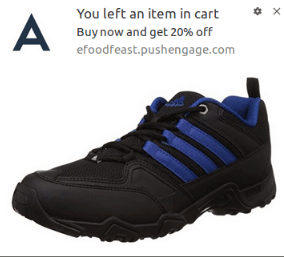
Det är en enkel idé: Få så många människor som möjligt att köpa något.
Pushaviseringar för övergivna kundvagnar har en mycket verklig inverkan på din resultatrad. Till exempel får WickedWeasel 2 000–4 000 USD per vecka i extra försäljning från sin kampanj med pushaviseringar för övergivna kundvagnar.
Nu ska vi konfigurera din allra första kampanj för övergivna kundvagnar med PushEngage.
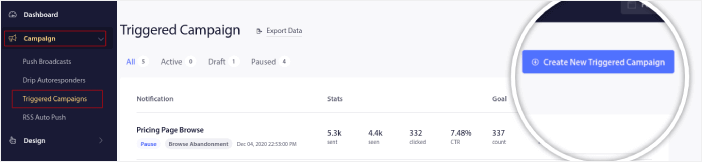
Gå till PushEngage-instrumentpanelen och gå till Kampanj » Utlösta kampanjer och klicka på Skapa ny utlöst kampanj:
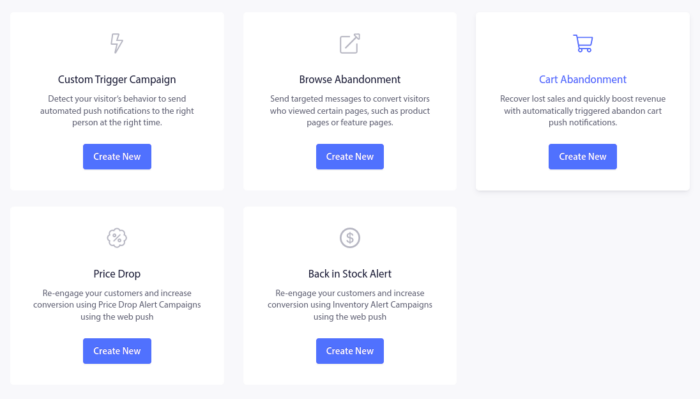
Välj sedan mallen Kundvagnsavbrott och klicka på Skapa ny:
Och du kan börja skapa en automatisk svarare för övergivna kundvagnar. Under fliken Innehåll kan du skapa en serie pushaviseringar:
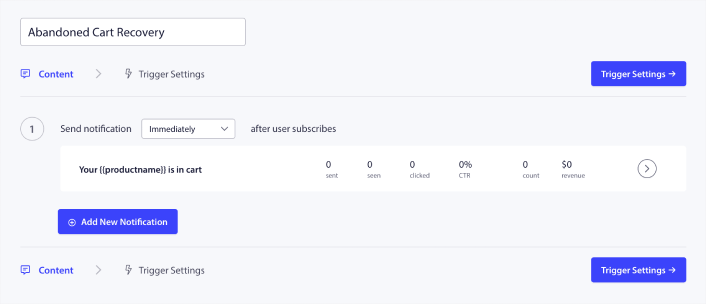
För att redigera en notis, klicka helt enkelt på pilen bredvid den och du kan anpassa push-notisen:
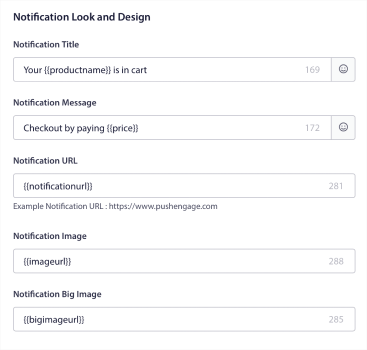
För en mer detaljerad handledning, kolla in den här artikeln om hur man konfigurerar pushaviseringar för övergivna kundvagnar.
#3. Safari push-notiser för övergiven webbläsning
Övergivna webbläsningar är precis vad det låter som. Det är när en webbplatsbesökare surfar på din webbplats och plötsligt bestämmer sig för att gå därifrån. Dessa incidenter är också kända som "funnel abandonment" av andra leverantörer.
Övergivna webbläsningar är en mycket vanlig företeelse inom nästan alla branscher.
Och det är verkligen svårt att minska eller kontrollera eftersom det inte finns något sätt att ge incitament till en slumpmässig användare att stanna kvar på din webbplats. Det är här kampanjer för övergivna webbläsningar är så kraftfulla.
Här är ett exempel på pushaviseringar för övergivna webbläsningar för en utgivare:
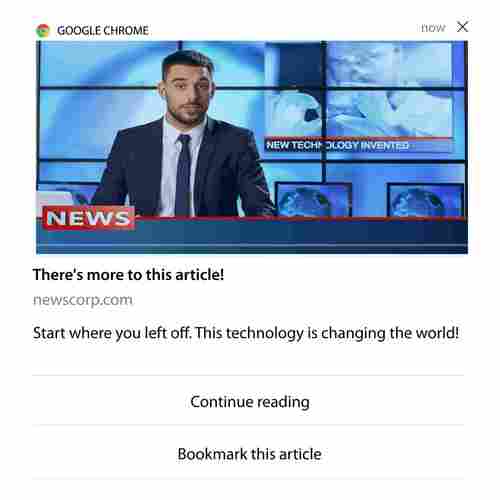
Det imponerande med PushEngage är att du kan ställa in kampanjer för i stort sett alla branscher. Så du kan skicka push-notiser vid övergiven surfning för SaaS- och resewebbplatser också.
Så, hur ställer du in kampanjer för övergiven surfning?
Med övergiven kundvagn finns det en tydlig parameter för att skicka dina push-notiser. För övergiven surfning kan du överväga parametrar som:
- Lade produkten till i Önskelistan
- Tittade på samma produkt mer än X gånger
- Surfning av mer än X produkter i samma kategori
- Sökte på webbplatsen efter en specifik produkt
- Stannade på webbplatsen i minst X minuter innan avvisning
Idén bakom denna kampanj för en e-handelswebbplats är att få prenumeranten att lägga produkten i sin kundvagn. För utgivare kan det vara ett klick eller en nedladdning på artikeln de läste.
Gå till PushEngage-instrumentpanelen igen och gå till Kampanj » Utlösta kampanjer för att skapa en ny utlöst kampanj:

Skapa sedan en ny kampanj för webbläsaravhopp genom att klicka på knappen Skapa ny:

Därefter kommer du att kunna ställa in hela din sekvens av push-meddelanden tillsammans med en fördröjning mellan varje meddelande:
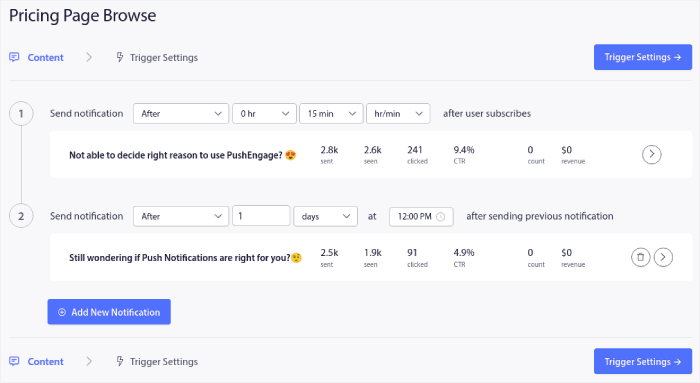
Om du är nybörjare på push-meddelanden bör du kolla in vår artikel om bästa praxis för push-meddelanden. När du är nöjd med ditt push-meddelandeinnehåll klickar du på Utlösningsinställningar. Du kommer att se att villkoren för en kampanj för webbläsaravhopp har förkonfigurerats i sekvensen.
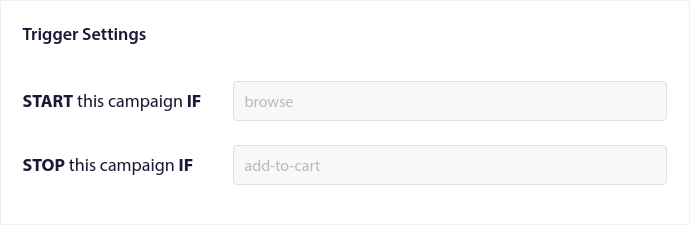
Klicka på knappen Integrationskod för att få kodavsnittet du behöver för att bädda in kampanjen för webbläsaravhopp på din webbplats.
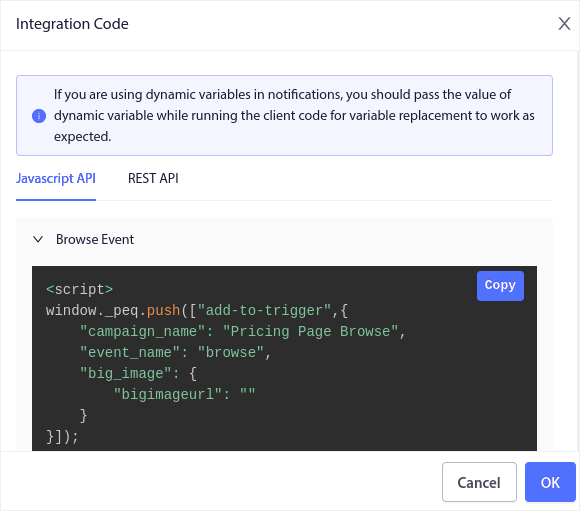
Kopiera sedan koden och klistra in den på din webbplats. Du vill klistra in den koden i HTML-<head>-sektionen på sidan som du vill spåra. Slutligen, klicka på knappen Aktivera utlöst kampanj:
Och du är klar!
#4. RSS-flöde push-kampanjer
RSS Auto Push låter dig automatisera dina notiser via RSS.
PushEngage kontrollerar var 10:e minut efter ett nytt inlägg som lagts till i ditt RSS-flöde. Om ett nytt inlägg hittas, konverterar PushEngage det till en push-notis och skickar ut den till alla dina prenumeranter. Det bästa är att det sker helt automatiskt.
RSS-flödeskampanjer är perfekta för utgivare och nyhetswebbplatser:
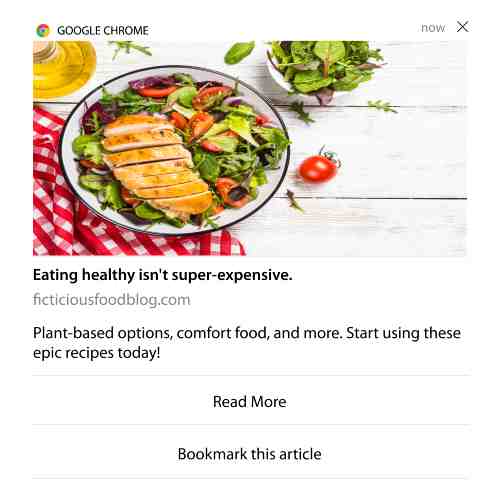
Om du är en stor utgivare och publicerar mer än 1 inlägg var 30:e minut, håller PushEngage en fördröjning på 5 minuter mellan 2 inläggsnotiser.
Innan vi går vidare bör du kolla in den här artikeln om hur man använder RSS-flöden för fler episka tips och tricks.
Nu, låt oss konfigurera RSS push-notiser på PushEngage.
Gå till Kampanj » RSS Auto Push och slå bara på den:
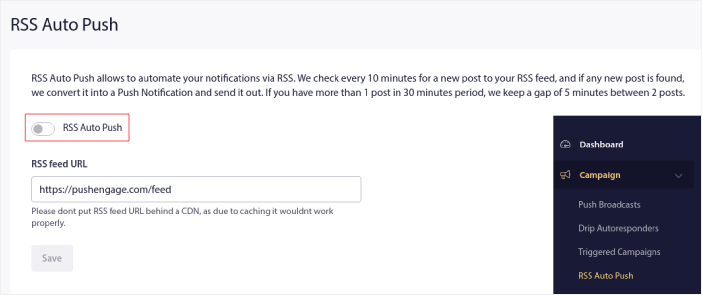
Du måste klistra in din RSS-flödes URL. För en WordPress-webbplats är den vanligtvis i formatet:
Klicka sedan på Verifiera RSS. Och klicka slutligen på Spara.
Det var allt! Du är redo. Varje gång du publicerar ett nytt inlägg skickas det automatiskt till alla dina prenumeranter.
#5. Automatiserade återengagemangsnätiseringar
Du kan ställa in automatiserade återengagemangskampanjer för prenumeranter som inte har engagerat sig i ditt innehåll på ett tag.
Men varför skulle du göra det från början?
Vad sägs om detta:
- Kostnaden för att skaffa nya kunder är 5 gånger högre än kostnaden för att behålla befintliga kunder
- Det är enkelt att rikta in sig på och remarknadsföra till en känd publik vars personliga preferenser vi redan förstår.
- Långsiktigt ger engagerade kunder mer affärer till företaget än någon som knappt kopplar sig till ditt varumärke.
Ofertia kunde öka sina återkommande användare med 39 % med hjälp av push-notiser som erbjuder personliga erbjudanden. De är inte ensamma heller. Du kan använda detta för en e-handelswebbplats med stor effekt:
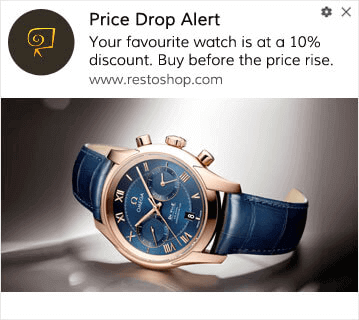
Det finns många sätt att återengagera dina prenumeranter.
Men ett av de mest effektiva sätten är att använda segmentering. Genom att använda dynamiska segment kan du förstå mycket om dina prenumeranter och skicka dem personligt anpassat innehåll som de kommer att älska.
I din PushEngage-instrumentpanel, gå till Segmentering och skapa ett nytt segment:
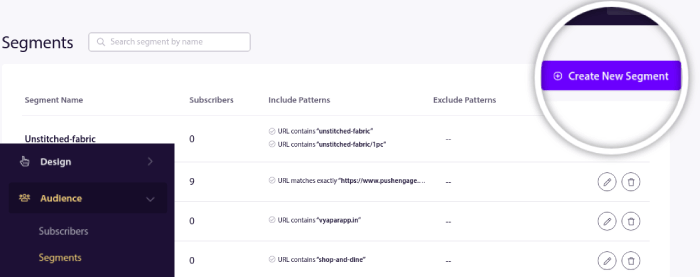
Detta gör att du kan skapa segment baserat på beteende och surfmönster. Du kan faktiskt ställa in en sekvens av OCH/ELLER-operationer som bestämmer när vissa segment får automatiserade push-notiser.
Du kan till och med segmentera dina användare när de prenumererar på push-notiser. Gå till Design » Popup Modals och välj Stor Safari-stil med segment.
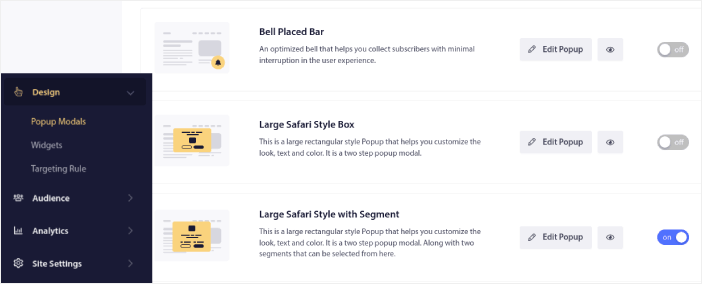
Om du behöver ännu fler sätt att segmentera dina användare kan du skapa anpassade segment baserat på användaråtgärder med hjälp av PushEngage Javascript API.
#6. Sidbesökstriggerkampanjer
Sidbesöksutlösare är en förlängning av push-notiseringssegment. Allt du behöver göra är att skapa ett segment när en webbesökare surfar på en URL med en viss fras eller ett visst mönster.
Gå sedan bara till Målgrupp » Segment och ställ in din målgrupp till ett specifikt segment:
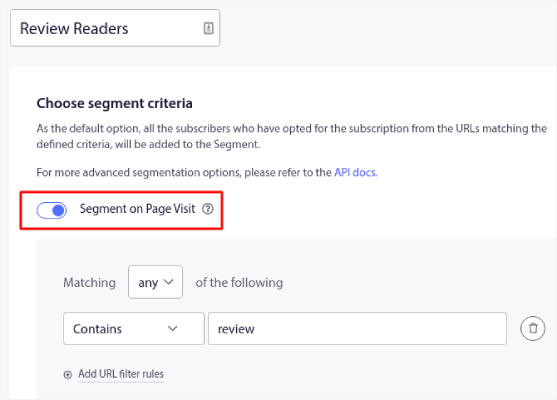
Detta gör att du kan skapa verkligt personliga och automatiserade push-notiser.
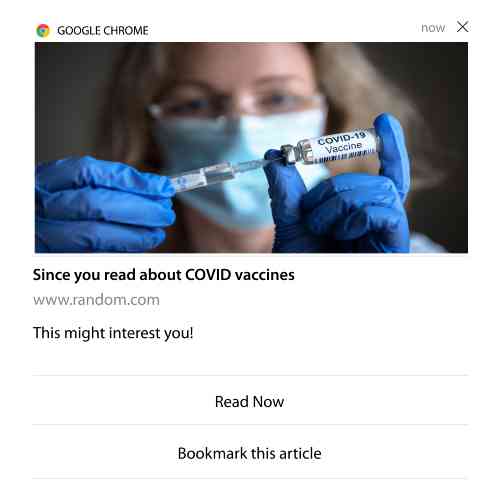
Och det bästa är att du kan skapa anpassade segment i PushEngage på ett par minuter.
#7. Automatiserade pushmeddelanden från klickgenomförande
Du kan inte skapa pushmeddelanden som utlöses när dina prenumeranter klickar på ett levererat meddelande med PushEngage.
Men det finns en mycket smart lösning.
Du kan skapa ett segment baserat på URL:en som en viss notifikation leder till. Varje gång någon landar på denna URL läggs de till i segmentet och du kan använda detta segment för att skicka riktade notifikationer.
Pushmeddelandekampanjer är i huvudsak en förlängning av standardsegmenteringen för droppkampanjer.
Kolla in den här handledningen om hur du skapar en klick-för-att-prenumerera-knapp.
#8. Upprepande automatiserade pushmeddelanden
Föreställ dig att du har…
- En veckovis rea på en loppmarknad;
- Eller en helgrea;
- Eller en lagerrensning;
- Eller en månatlig blixtrea.
Hur obekvämt skulle det inte vara att behöva skapa pushmeddelanden för varje händelse manuellt?
Lyckligtvis kan du ställa in upprepande meddelanden med PushEngage.
Upprepande meddelanden är schemalagda och automatiserade pushmeddelanden för en återkommande händelse. Du kan ställa in dem en gång, ange ett schema, och du är klar.
Det är bara ett av sätten som MyDeal använder pushmeddelanden. Var noga med att läsa hela fallstudien!
Gå till Kampanj och lägg till ett automatiserat meddelande i din PushEngage-instrumentpanel. Rulla sedan ner till schemaläggningssektionen och gå till fliken Skicka/Schemalägg:

Ställ bara in tidpunkten så är du klar!
#9. Prenumerantens tidszonsmeddelanden
Prenumerantens tidszonsnotifikationer är precis vad de låter som. Du skickar automatiserade push-notifikationer till dina prenumeranter i deras tidszon.
Varför är detta en så stor grej?
Aviseringar om prenumerantens tidszon har högre öppningsfrekvens. Vanligtvis levereras alla pushmeddelanden även om din prenumerant är offline. Dessa aviseringar samlas sedan på hög och ignoreras när din prenumerant äntligen går online.
Å andra sidan levereras pushmeddelanden via Safari för prenumerantens tidszon när du VET att din prenumerant med största sannolikhet är online.
Proffstips: Använd A/B-testning för att ta reda på den perfekta tiden att skicka dina prenumeranter ett pushmeddelande.
Prenumerantens tidszonsmeddelanden känns mycket mer personliga. Och om du är smart med det kan du kombinera det med geografisk data för att personifiera dina meddelanden ännu mer. Detta är precis vad Phooto gjorde när de använde lokala språk för att skjuta i höjden sina öppningsfrekvenser.
Låt oss ställa in prenumerantens tidszonsmeddelanden i PushEngage nu.
När du skapar ett nytt meddelande, gå till schemaläggningsalternativen och klicka på kryssrutan som säger Skicka meddelanden i prenumerantens tidszon:
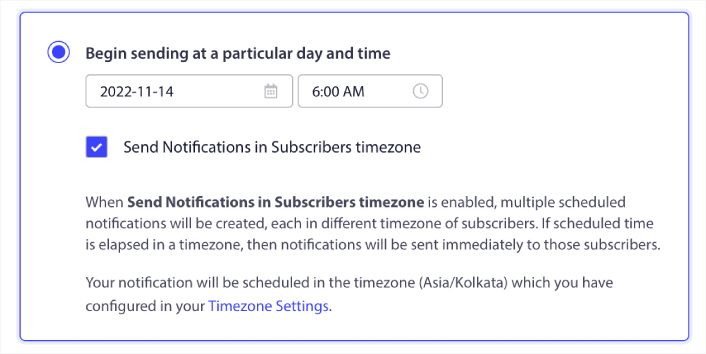
Det är allt! Du måste göra detsamma för dina droppkampanjer också, men resultaten är väl värda ansträngningen att klicka på en knapp för varje kampanj.
Proffstips: De två senaste taktikerna handlade om schemaläggning av pushmeddelanden. Men dessa är inte de enda sätten att schemalägga automatiserade pushmeddelanden. Läs vår artikel om hur man schemalägger pushmeddelanden för fler episka knep. Kolla även in bästa tiderna att skicka pushmeddelanden via Safari.
#10. E-postanmälningsnotiser
E-postmarknadsföring har länge varit det bästa sättet att generera och vårda leads. Det bästa med automatiserade push-notifikationer är att du kan generera fler e-postprenumeranter med dem.
Det är verkligen enkelt att ställa in och att använda en kombination av e-post och pushmeddelanden via Safari är mycket mer effektivt än att använda det ena eller det andra.
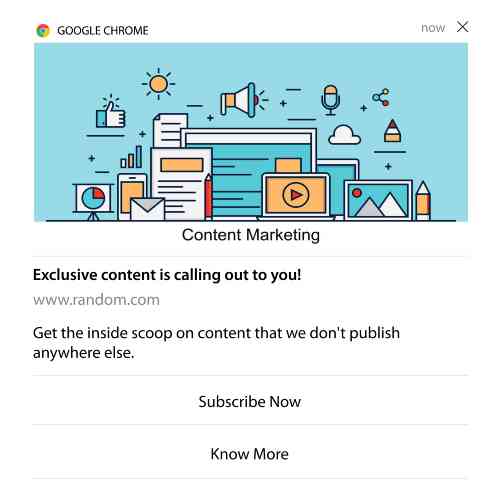
Allt du behöver göra är att skicka en utlösande notis som ber användaren att välja e-postnotiser.
Skapa bara en anpassad CTA-knapp (Call To Action) och infoga en prenumerationslänk som knappens URL. Det är verkligen allt du behöver. Om du är osäker på hur du får en prenumerationsknapp, följ bara med.
I vilken notis som helst kan du scrolla ner och slå på knappar med flera åtgärder:
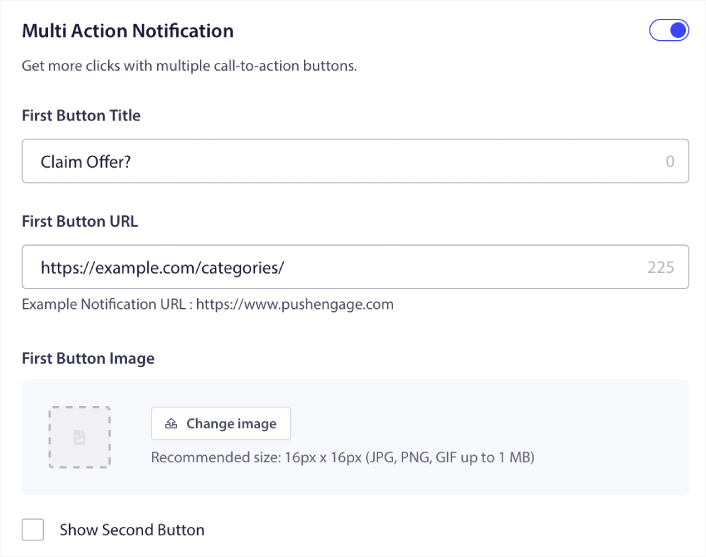
URL:en bör vara en länk till ett formulär för e-postregistrering. Du kan skapa ett med i stort sett vilken e-postleverantör som helst, som Drip. Allt du behöver göra är att klicka på delningsalternativen för registreringsformuläret och kopiera den URL:en. Klistra sedan in den i knappens URL för din push-notis.
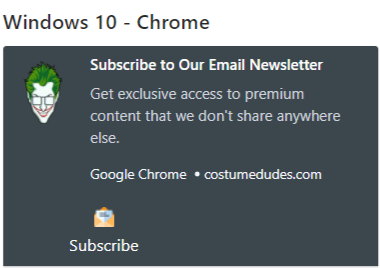
Kolla in vår handledning om knappar med flera åtgärder för mer information. Du kan till och med lägga till en e-postikon till din knapp för att göra det supertydligt att du ber dina användare att prenumerera på dina e-postnotiser:
Proffstips: Du kan använda samma idé för att växa din YouTube-kanal också. Lägg bara till ‘?sub_confirmation=1’ i slutet av din kanal-URL och klistra in den i din push-notisknapp-URL.
Varje gång någon klickar på prenumerationsknappen på din push-notis, kommer de att omdirigeras till din YouTube-kanal och uppmanas att prenumerera på den.
Vad du ska göra efter att du har ställt in pushmeddelanden via Safari
Pushmeddelanden via Safari garanterar inte framgång för ditt företag. Som med alla marknadsföringsverktyg måste du testa och förbättra ditt budskap och dina segment. Tyvärr kan du inte A/B-testa automatiserade aviseringar direkt. Men dessa resurser hjälper dig att komma igång snabbt:
- Hur man installerar ett WordPress-plugin för webbnotiser på din webbplats
- Hur du gör A/B-testning av pushmeddelanden (Bästa praxis)
- 7 bästa praxis för push-notiser för att få omedelbar trafik
- 21 bästa WordPress-plugins för e-handel 2022 (gratis och betalda)
- 7 bästa WordPress-nyhetsplugins 2022 (jämförda)
Dessutom har PushEngage en hel del integrationer. Du kan till och med ställa in anpassade utlösare med Zapier. Dessa är ganska avancerade kampanjer och vi rekommenderar att du bara ställer in dem när du är bekant med vår andra inbyggda automatisering.
Du bör också veta att PushEngage Javascript API är mycket flexibelt och du kan ställa in anpassade utlösare för i stort sett alla åtgärder på din webbplats.
När du har gått igenom alla dessa resurser kommer du att inse att PushEngage är den främsta programvaran för push-notiser på marknaden.
Så, om du inte redan har gjort det, kom igång med PushEngage idag!


